How to use Ollama with Claude Code: Complete local setup guide
How to use Ollama with Claude Code: Local setup guide
Connecting Ollama to Claude Code lets you power the Claude Code CLI with local open-weight models. You can launch it quickly via ollama launch claude or manually configure environment variables to manage your endpoints. This guide covers setup, model selection, validation testing, and troubleshooting to help you build a smooth local development workflow.
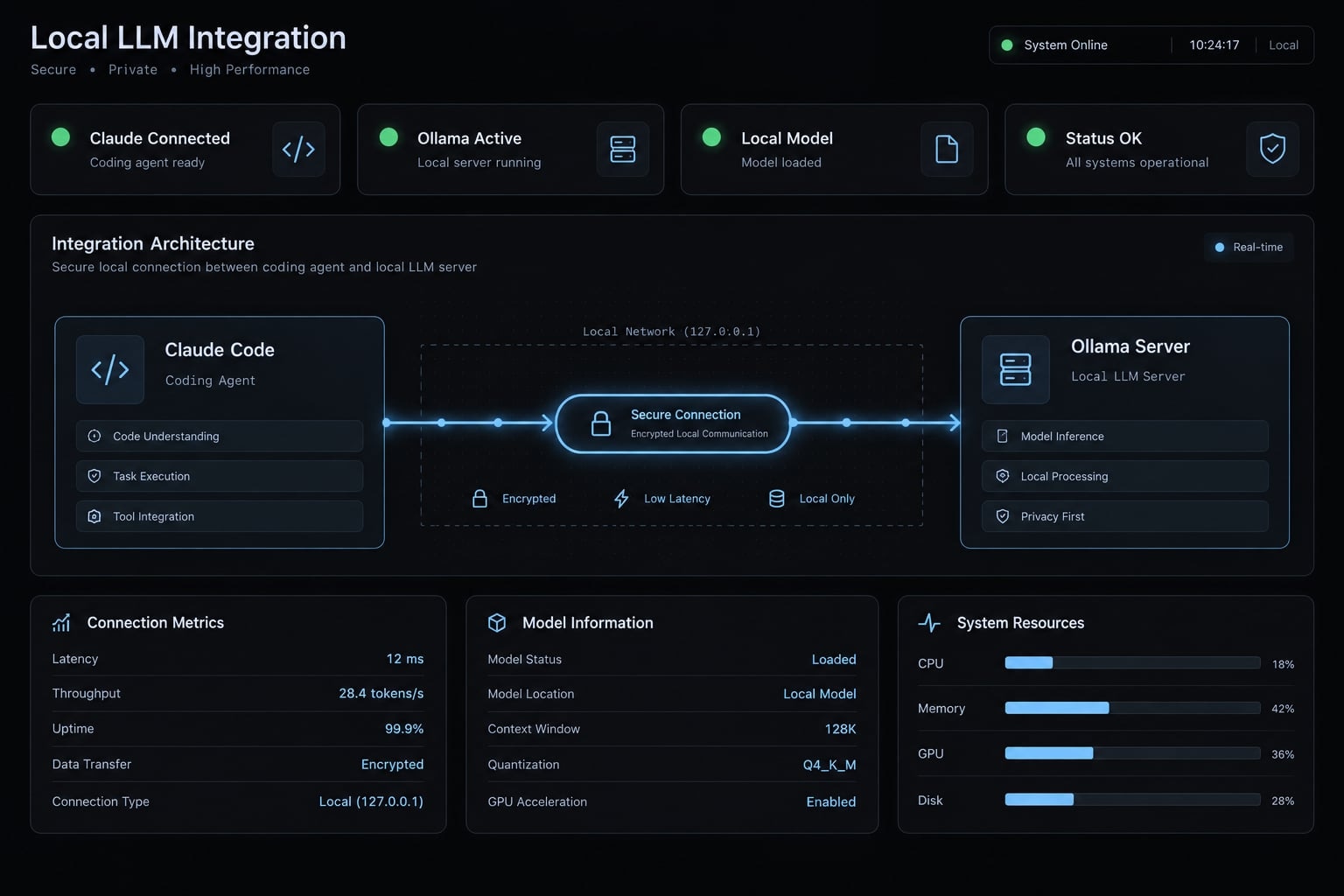
How Claude Code works with Ollama
Claude Code with Ollama separates the agent interface from its model backend. Claude Code manages the conversation and tools; Ollama exposes an Anthropic-compatible endpoint and serves or routes inference. In the documented native setup, no separate proxy is necessary. Compatibility still depends on the installed versions and selected model.
Conceptual architectureClaude Code → Ollama endpoint → Selected local or hosted model ↑ | └──── Responses / action requests ─┘ | └── Authorized tools → Repository files and shell
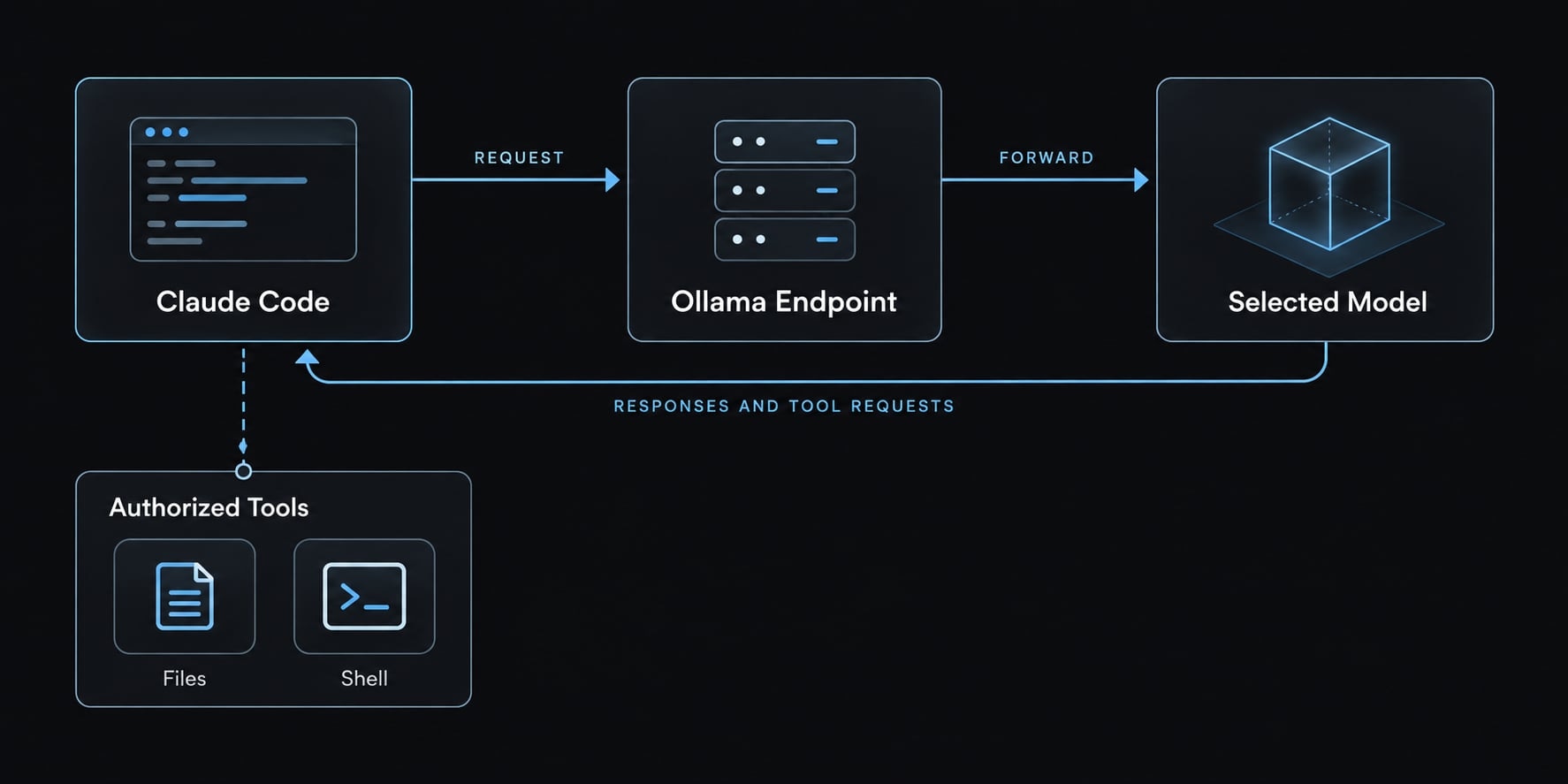
The usual local endpoint is http://localhost:11434. Official Ollama integration and Anthropic compatibility documentation describe the connection, not universal feature parity.
Layer | What must work |
|---|---|
API compatibility | Ollama accepts the client’s requests. |
Client/endpoint features | Both sides support the requested interaction. |
Model capability | The model produces useful responses and valid tool requests. |
Claude Code, Ollama and the model each have different roles:
- Claude Code: Executes file and shell operations allowed by its permission configuration.
- Ollama: Handles compatible requests and provides access to the selected backend.
- Model: Generates responses and requests actions through tool calling, meaning structured requests to use available tools.
The model does not independently modify files. Claude Code’s tool system performs those operations.
A connection failure needs endpoint diagnosis. A connected model making incorrect edits needs capability, context, or task-scope diagnosis.
Prerequisites before connecting Claude Code to Ollama
Prepare these components before changing configuration:
- An Ollama release supporting the documented integration.
- Claude Code installed and available in your terminal.
- A suitable downloaded Ollama model for local inference.
- Enough memory for model weights and active context.
- A small, trusted repository without sensitive credentials.
- Normal trust and permission controls enabled.
Use the official Ollama installation documentation to install Ollama, and Claude Code setup documentation to install Claude Code. Cloud access is optional, not a prerequisite for this local path.
Verify the installed tools
ollama --versionclaude --versionollama list
- The first command identifies the installed Ollama version.
- The second identifies the Claude Code version.
- The third lists downloaded models and their exact tags.
An unavailable command usually indicates an installation or PATH issue. A missing launcher requires checking release support. Manual configuration cannot repair a server that lacks the compatible API. If your chosen model is absent, download it using its exact library tag.
Confirm that the Ollama server is available
Keep the Ollama app or daemon running. Check its local model-list endpoint:
curl http://localhost:11434/api/tags
A JSON response indicates that the server is reachable; an empty model list still counts. Do not start another server if one already occupies port 11434.
Fastest method: Launch Claude Code directly through Ollama
The launcher provides the shortest interactive route in supported releases:
- Confirm Ollama is installed and running.
- Confirm Claude Code is installed.
- Open your trusted test repository.
- Run the Ollama launcher.
- Choose a model and validate the session.
Step 1: Start Ollama and open the repository
Replace the repository path below with your actual directory:
cd /path/to/test-repositoryollama launch claude
The official Ollama Claude Code integration documentation presents this command as the interactive entry point. Follow the model-selection and configuration prompts your installed version displays.
Review any proposed configuration changes. Do not assume launcher settings disappear when the session ends. Preserve Claude Code’s ordinary repository-trust and permission flow.
Step 2: Choose a suitable model
Choose a local model if on-device inference is your goal. Hosted choices, including models labeled :cloud, use remote infrastructure.
For example, qwen3.5:9b is an exact tag used in the supplied community walkthrough, not a tested recommendation here. Check its current model documentation, tool support, and hardware fit before downloading it.
First use may require downloading model weights and allocating substantial disk space. A small download alone does not establish coding-agent suitability.
Step 3: Check the active connection
Inside Claude Code, run:
/status
Inspect the session information available in your release. Do not assume this command displays every routing detail or proves inference location.
Corroborate it with Ollama server activity, logs, and the selected local model’s loading behavior. A model answering “I am Qwen” is not reliable identity evidence.
Quick setup decision table
Requirement | Launcher | Manual variables |
|---|---|---|
Interactive convenience | Guided starting point | More explicit steps |
Persistence | Inspect actual changes | Controlled by configuration scope |
Custom endpoints | Check release options | Explicit base URL |
Scripted environments | Documented automation options | Direct process configuration |
Configuration inspection | Review generated settings | Inspect selected variables |
First-time use | Shortest starting route | Useful for diagnosis |
Manual setup with environment variables
Environment variables redirect model requests to Ollama. They do not guarantee that plugins, shell commands, or other client activity remain local.
The following examples use qwen3.5:9b as an illustrative, untested model choice. Substitute an exact compatible tag from ollama list if needed.
Current Bash or Zsh session
The official Ollama integration documentation gives this variable combination:
export ANTHROPIC_BASE_URL="http://localhost:11434"export ANTHROPIC_AUTH_TOKEN="ollama"export ANTHROPIC_API_KEY=""claude --model qwen3.5:9b
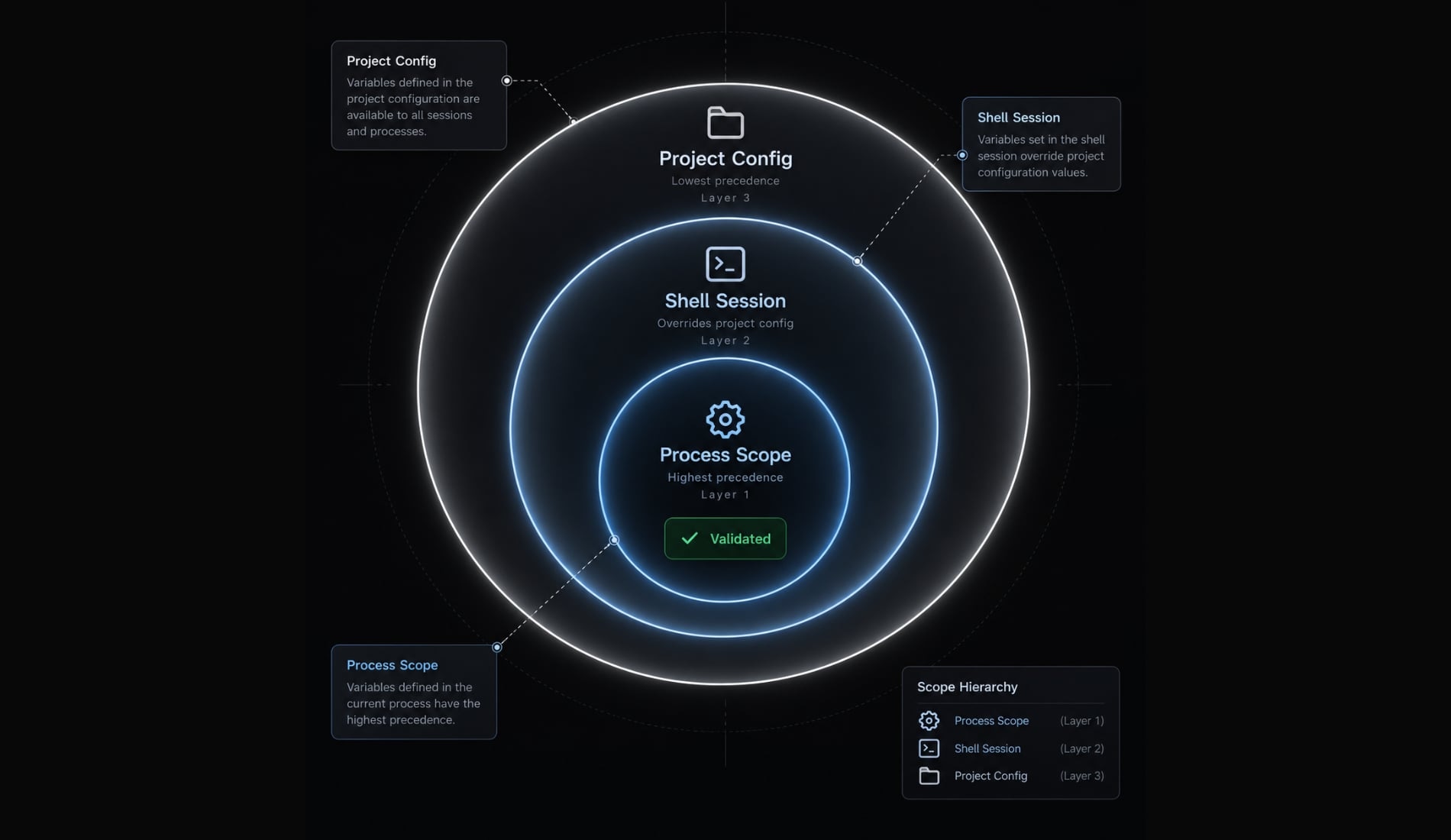
Exports affect the current shell and subsequently launched child processes. They do not reconfigure unrelated terminals or already-running Claude Code sessions.
Variable | Purpose | Status in this configuration |
|---|---|---|
| Routes model requests | Points to local Ollama |
| Supplies client authentication value | Documented local placeholder |
| Avoids conflicting API-key configuration | Empty in the documented pattern |
| Sets a default model where supported | Optional; examples use |
The value ollama is not a secure credential for a public server. Hosted or protected endpoints require their actual authentication configuration.
An empty API key is this integration’s documented conflict-avoidance pattern, not a universal API requirement.
One-off session
For a single launch without exporting variables into your shell:
ANTHROPIC_BASE_URL="http://localhost:11434" \ANTHROPIC_AUTH_TOKEN="ollama" \ANTHROPIC_API_KEY="" \claude --model qwen3.5:9b
These assignments apply to the launched process and its children. Application-level settings can still affect the resulting session.
PowerShell
Use native environment-variable syntax:
$env:ANTHROPIC_BASE_URL = "http://localhost:11434"$env:ANTHROPIC_AUTH_TOKEN = "ollama"$env:ANTHROPIC_API_KEY = ""claude --model qwen3.5:9b
These settings affect the current PowerShell process and its children.
Empty-value behavior is version-sensitive: PowerShell 7.5 supports empty-string environment values; earlier releases may remove the variable instead. This translation has not been execution-tested here. Check $PSVersionTable.PSVersion, and inspect stored Claude Code credentials if authentication behaves unexpectedly.
Persist the configuration
Persist settings only after validation. Depending on shell and session type, Bash or Zsh may read different startup files, such as .bashrc or .zshrc.
A project-specific launch script often makes backend switching clearer than global exports. Document its scope and keep hosted credentials out of version control.
Configuration scope:One launched process → Current shell → Persistent profile/project settings
Remove the override
For Bash or Zsh:
unset ANTHROPIC_BASE_URL ANTHROPIC_AUTH_TOKEN ANTHROPIC_API_KEY ANTHROPIC_MODEL
For PowerShell:
Remove-Item Env:ANTHROPIC_BASE_URL, Env:ANTHROPIC_AUTH_TOKEN, Env:ANTHROPIC_API_KEY, Env:ANTHROPIC_MODEL -ErrorAction SilentlyContinue
Also remove corresponding profile entries, project scripts, Claude Code settings, and launcher-created overrides. Check user-level and project-level configuration.
Unsetting a variable does not restore its previous credential value. Reestablish your intended authentication separately, then verify routing in a fresh session.
Never publish credential-bearing environment dumps when requesting help.
Choose an Ollama model and context window
The best Ollama model for Claude Code depends on your task, available memory, and required tool reliability. A successful chat response is only a connectivity check.
Model selection framework
Task or constraint | Selection criterion |
|---|---|
Connectivity | Compatible model that fits comfortably |
Targeted edits | Reliable file-tool requests and instruction following |
Larger repository inspection | Sufficient active context and memory |
Multi-step refactoring | Proven behavior on representative tasks |
Limited hardware | Smaller suitable model and narrower scope |
Hosted alternatives | Acceptable remote processing and provider terms |
Check the exact model card for tool support, license, and context limits. Do not generalize from a model-family name across every tag or variant.
Why context length matters
The context window is the amount of material available to the model for a request. It includes instructions, tool definitions, selected file contents, and conversation history. Claude Code does not necessarily load the entire repository at once. Official Ollama integration documentation recommends 64k or more context for local coding workflows, particularly larger repositories. Treat this as guidance, not a universal success threshold.
A model’s advertised maximum is not its active allocation. Inspect the runtime’s context configuration and loaded-model information. Configure context through the method documented for your Ollama release; do not assume the launcher has selected your desired value.
Larger context usually increases memory demand. System RAM and GPU VRAM are not interchangeable on every platform. More context also cannot compensate for unreliable reasoning.
Local model vs. Ollama Cloud model
Consideration | Local model | Ollama Cloud |
|---|---|---|
Inference location | Your device | Hosted infrastructure |
Offline operation | Conditional on full workflow | Requires connectivity |
Hardware dependence | Local weights and context | Most inference compute remote |
Costs | Hardware, electricity, maintenance | Provider terms and possible charges |
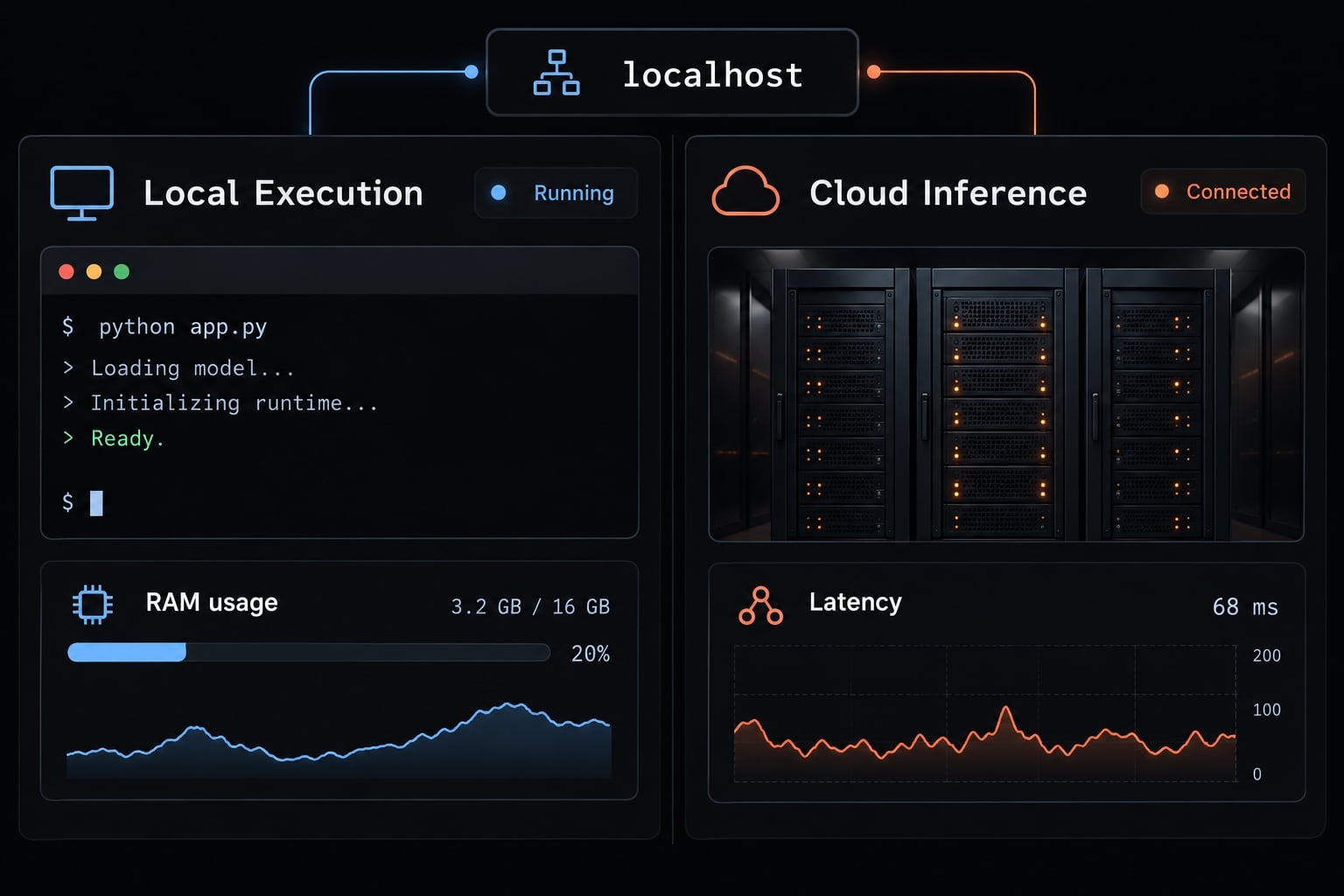
Source-code transmission | Inference can remain local | Submitted context leaves device |
Model capacity | Constrained by local resources | Depends on hosted availability |
A local endpoint can still route requests to a cloud model. Separately assess telemetry, plugins, and external tools before making privacy claims.
Validate the integration with a Coding-Agent smoke test
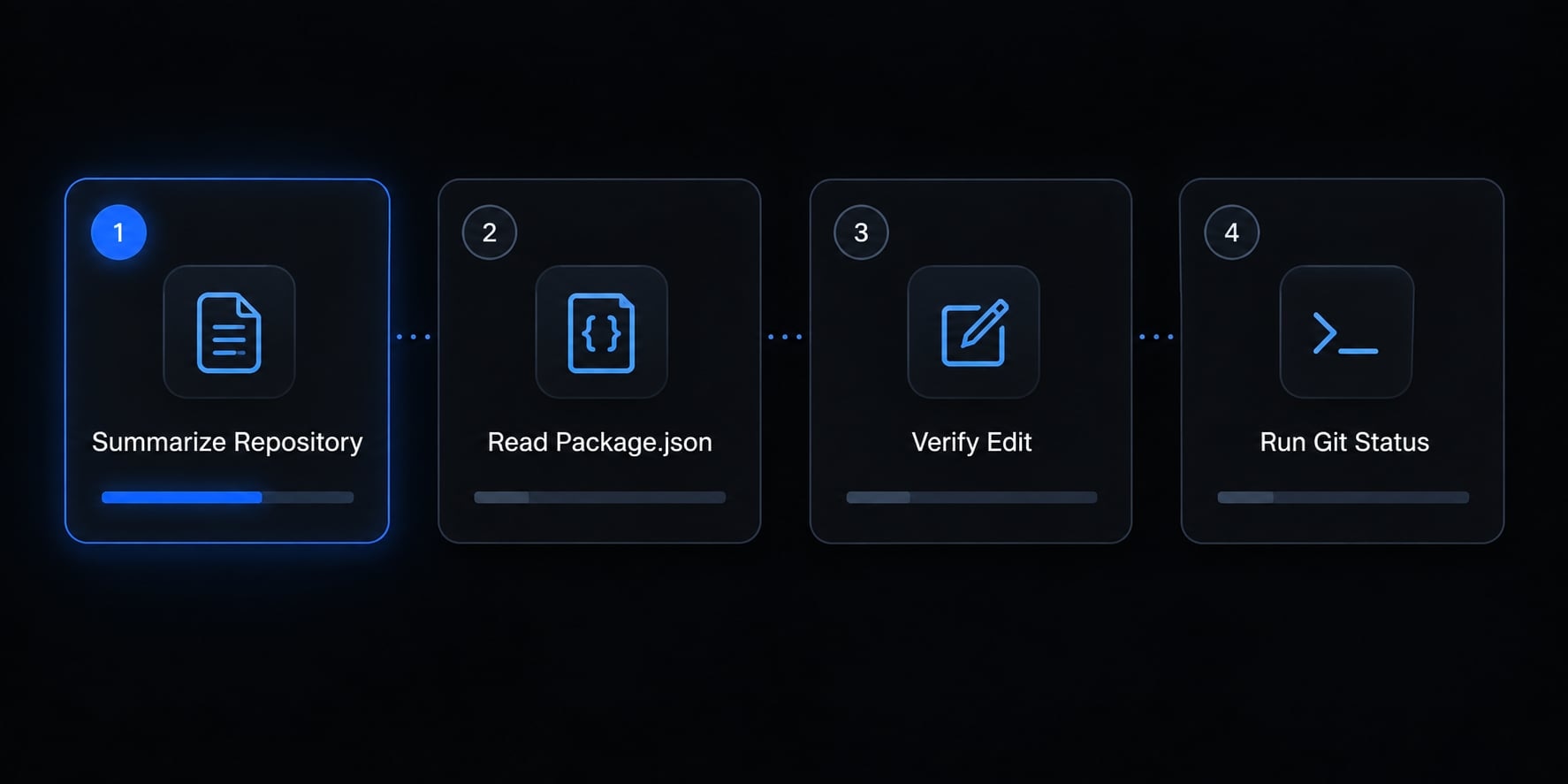
A smoke test checks whether the basic workflow operates before you trust it with larger tasks. Use one disposable, non-sensitive repository throughout. For example, prepare a small CLI project containing README.md, package.json, and src/index.js. Begin with a clean working tree. The following are test instructions and pass criteria-not reported results.
Repository understanding
- Instruction: “Inspect this repository. Summarize its purpose, runtime, and main directories. Cite the files you read.”
- Observable evidence: File-reading activity and references to real paths.
- Pass criterion: Claims match the repository’s actual contents. A polished summary without inspection is insufficient.
Read a specific file
- Instruction: “Read
package.jsonand report its name and scripts exactly. Do not edit anything.” - Observable evidence: A read of the manifest and reported field values.
- Pass criterion: Values match your direct inspection, including any absent fields.
Make a small reversible edit
- Instruction: “Append
Local backend smoke test.toREADME.md. Change nothing else.” - Observable evidence: Review the actual change:
git diff -- README.mdgit status --short
- Pass criterion: Only the requested documentation line changes.
Remove that line afterward. Use git restore -- README.md only if the file had no preexisting changes and discarding all its uncommitted edits is intentional.
Run a harmless command
- Instruction: “Run
git status --shortand explain the output. Do not run other commands.” - Observable evidence: Actual tool execution and matching output, including empty output for a clean tree.
- Pass criterion: Claude Code accurately interprets the result. Existing permission rules may authorize the command without another prompt.
Do not substitute an uninspected test script: tests can alter files or contact services. A branch helps review changes but does not isolate execution. Use a container or VM when the risk requires stronger separation.
Record versions, model tag, configuration, and captured results for repeatability.
Common Ollama and Claude Code errors and limitations
Diagnose the failing layer before changing models or credentials. The causes below are possibilities, not definitive explanations.
Troubleshooting matrix
Observed symptom | Likely cause | First corrective action |
|---|---|---|
Unknown launcher command | Installed release lacks launcher | Check release support; update if appropriate |
Connection refused | Server stopped or wrong address | Check daemon and endpoint |
Model not found | Tag missing or mismatched | Compare against |
Default provider still active | Wrong scope or persisted override | Inspect session, settings, and routing |
Authentication error | Endpoint and credentials mismatch | Identify local versus protected backend |
Chat succeeds, tools fail | Capability, compatibility, or permissions | Test one file read; inspect tool support |
Instructions get lost | Context pressure or task complexity | Narrow task and inspect active context |
Slow generation | Memory pressure or CPU processing | Inspect resource use and loaded model |
Out of memory | Weights/context exceed capacity | Reduce demand or choose a smaller model |
Malformed output | Model behavior or version mismatch | Check compatible versions; simplify reproduction |
Unexpected broad edits | Ambiguous scope or model failure | Stop, review, and revert narrowly |
Manual setup is a fallback for a missing launcher only when the server supports the compatible API. For connection errors, remember that localhost inside a container, VM, or separate runtime environment may not refer to your host’s Ollama server.
If tools fail while chat works, changing the base URL repeatedly is unlikely to help. Inspect the requested tool, permissions, and selected model first.
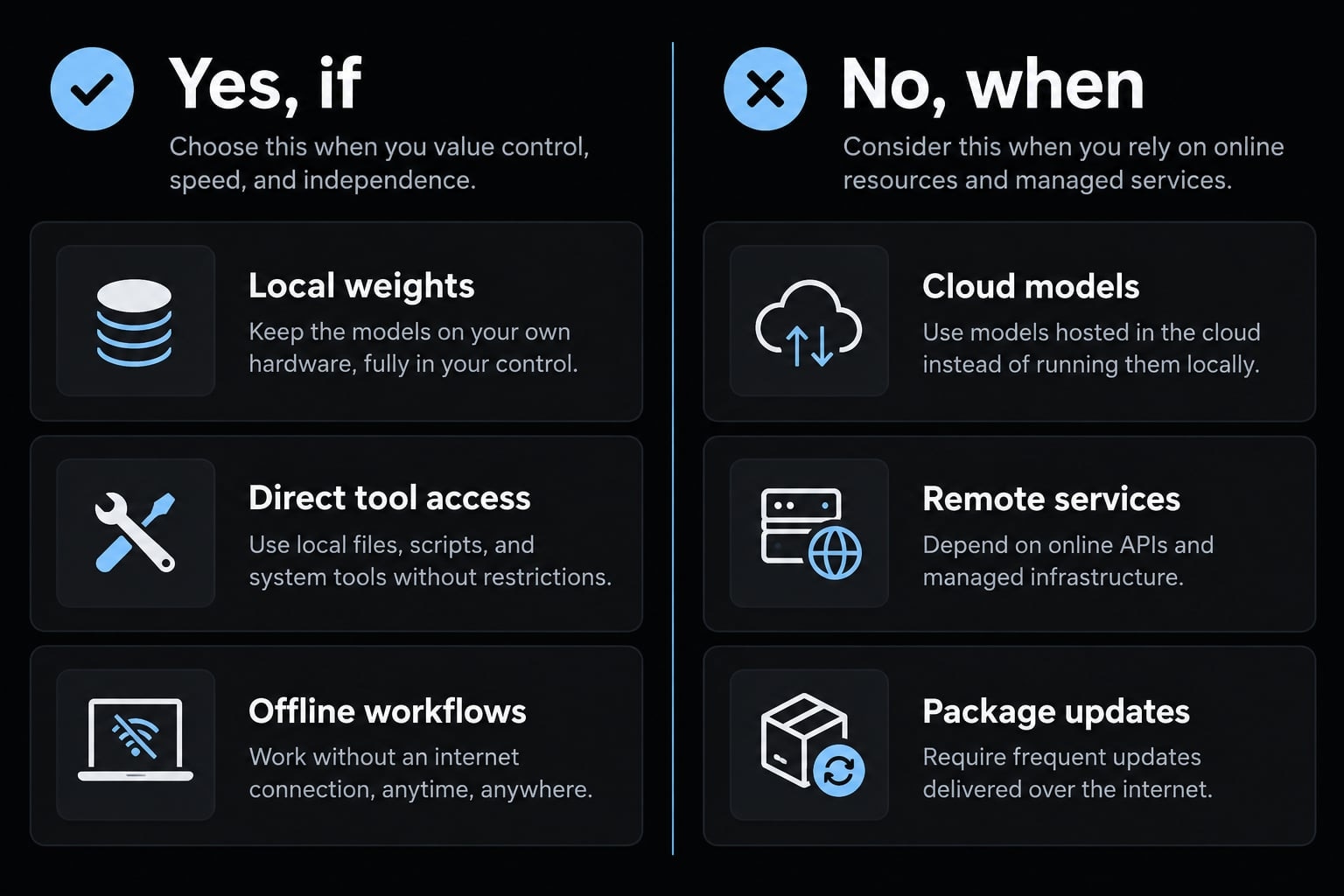
Is Claude Code with Ollama fully local or offline?
Local inference is possible; a fully offline workflow needs separate validation. Routing model requests locally proves neither that all tools stay local nor that a fresh session works without connectivity.
Yes, if…
- The selected model runs locally and its weights are already downloaded.
- Required files and dependencies are available on-device.
- Tools avoid remote services.
- The complete workflow succeeds in a fresh session with network access disabled.
No, when…
- Ollama routes inference to a hosted model.
- Web tools, plugins, or remote MCP servers require connectivity. MCP is Model Context Protocol, used to connect agents with external tools and data.
- Commands download packages or access remote services.
- Account-dependent behavior, update checks, or other client functions require a connection.
Telemetry and attempted network requests also deserve inspection. Observe the full workflow, not only model loading.
Local inference avoids a provider’s per-token inference charge for those requests. It does not eliminate hardware, electricity, maintenance, or separate service costs. Check current client-access and provider terms rather than assuming universal subscription requirements.
Feature and Model Limitations
Feature behavior depends on client version, endpoint implementation, model capability, and external dependencies.
Official Ollama documentation lists capabilities including file edits, subagents, vision, web access, and thinking controls, with compatibility qualifications. Do not infer that every model supports every listed feature through every endpoint.
This guide establishes no performance parity with Anthropic-hosted Claude models. Passing four small tests also does not establish production readiness for migrations, deployments, or repository-wide refactoring.
Security and Permission Boundaries
Keep the execution boundary explicit:
- Leave permission controls enabled.
- Review commands and diffs.
- Treat repository content and external instructions as untrusted.
- Isolate execution when working with untrusted code.
- Keep unauthenticated Ollama endpoints off untrusted networks.
The placeholder token ollama does not protect an exposed server. Review binding, firewall, and access-control settings before enabling remote access. Do not use --dangerously-skip-permissions as a troubleshooting shortcut. Removing approval boundaries does not fix model compatibility or reasoning errors.
Optional automation after validation
The official integration documentation describes launcher automation using --yes, an explicit --model, and -- to forward arguments to Claude Code. Verify those options against your installed release before scripting. Launcher --yes skips launcher interaction; it is not blanket permission for Claude Code tools. Keep automation limited to validated tasks, with retained logs and reviewable outputs.
Frequently asked questions
Can I run Claude Code entirely offline using Ollama?
Local inference is possible, but fully offline operation needs separate validation: run the complete workflow in a fresh session with networking disabled, and check plugins, MCP servers, and update checks.
How does Claude Code work with Ollama?
Claude Code uses the Anthropic-compatible API provided by Ollama. By redirecting the base URL to your local Ollama daemon, the Claude Code CLI treats your local model as an inference endpoint, allowing it to perform repository inspections, file edits, and command execution locally without sending code to Anthropic’s cloud.
Do I need to be a developer to set this up?
Yes, this setup requires familiarity with command-line interfaces and repository management. You should be comfortable navigating terminal directories, setting environment variables, and diagnosing connectivity issues. While the ollama launch command simplifies the process, troubleshooting may still require technical experience with local model runtimes.
Is Claude Code on Ollama as accurate as Anthropic’s hosted models?
Not necessarily. While local models like Qwen-coder are highly capable, they may experience higher failure rates with complex, multi-step tool calls or large-scale repository refactoring compared to Anthropic's flagship models. Performance often depends on the specific model parameters, context window configuration, and hardware capabilities.
How can I verify that Claude Code is using my local model?
You can check the active connection by running the /status command within your Claude Code session. Additionally, you can inspect your shell environment variables (specifically ANTHROPIC_BASE_URL) to confirm they point to your local Ollama instance (typically http://localhost:11434) rather than the default Anthropic API.
What should I do if my local model keeps crashing?
Crashes are often caused by memory exhaustion (OOM). Try reducing the num_ctx (context window) setting to lower VRAM usage, or switch to a smaller model version that better fits your device's memory limits. Ensure no other heavy applications are competing for GPU resources during your coding sessions.
Where is my source code sent during this integration?
When using a local model with Ollama, your code is processed by the Ollama daemon on your local machine. However, if your environment is misconfigured or you use "cloud" tags offered through Ollama, requests may still be routed externally. Always verify your endpoint settings to maintain local-only operations.
Read more:
- Claude Code tutorial: Set up and master your AI coding agent
- Claude Code Windows: How to install, set up, and fix issues
- How to setup Claude Code with OpenRouter: Practical guide
Conclusion
Connecting Ollama to Claude Code starts with either the interactive launcher or explicit environment variables. The launcher reduces setup steps; manual configuration makes routing and scope easier to inspect. Neither approach removes the need to select a capable model, allocate practical context, and stay within hardware limits. Complete all four smoke tests before expanding to larger repository work, and evaluate offline behavior separately from local inference.
Once the connection is reliable, AgentKit offers an optional next layer for reusable skills, specialized subagents, and workflow configuration. Treat reusable agent configuration as a way to standardize an already validated process-not a replacement for model compatibility checks or permission controls. Preserve your setup record, review changes, and repeat validation whenever the client, runtime, or model changes.