Claude Code skill auto trigger not working? How to fix it
Claude Code skill not auto-triggering? How to fix it
A custom skill can appear available in Claude Code without being selected or invoked by the model. If your custom skill won’t auto-trigger, you must first separate availability from activation: Claude must discover the skill, match it to your user request, and load its full instructions. A visible command name alone does not prove those internal diagnostic steps succeeded.
Start by checking discovery and testing direct invocation. Then improve the skill description, add project-level guidance if needed, and consider hooks as a last resort. This sequence prevents you from spending hours debugging routing issues around a fundamentally broken configuration. The examples below use a read-only pull-request review skill configured within a B2B SaaS repository.
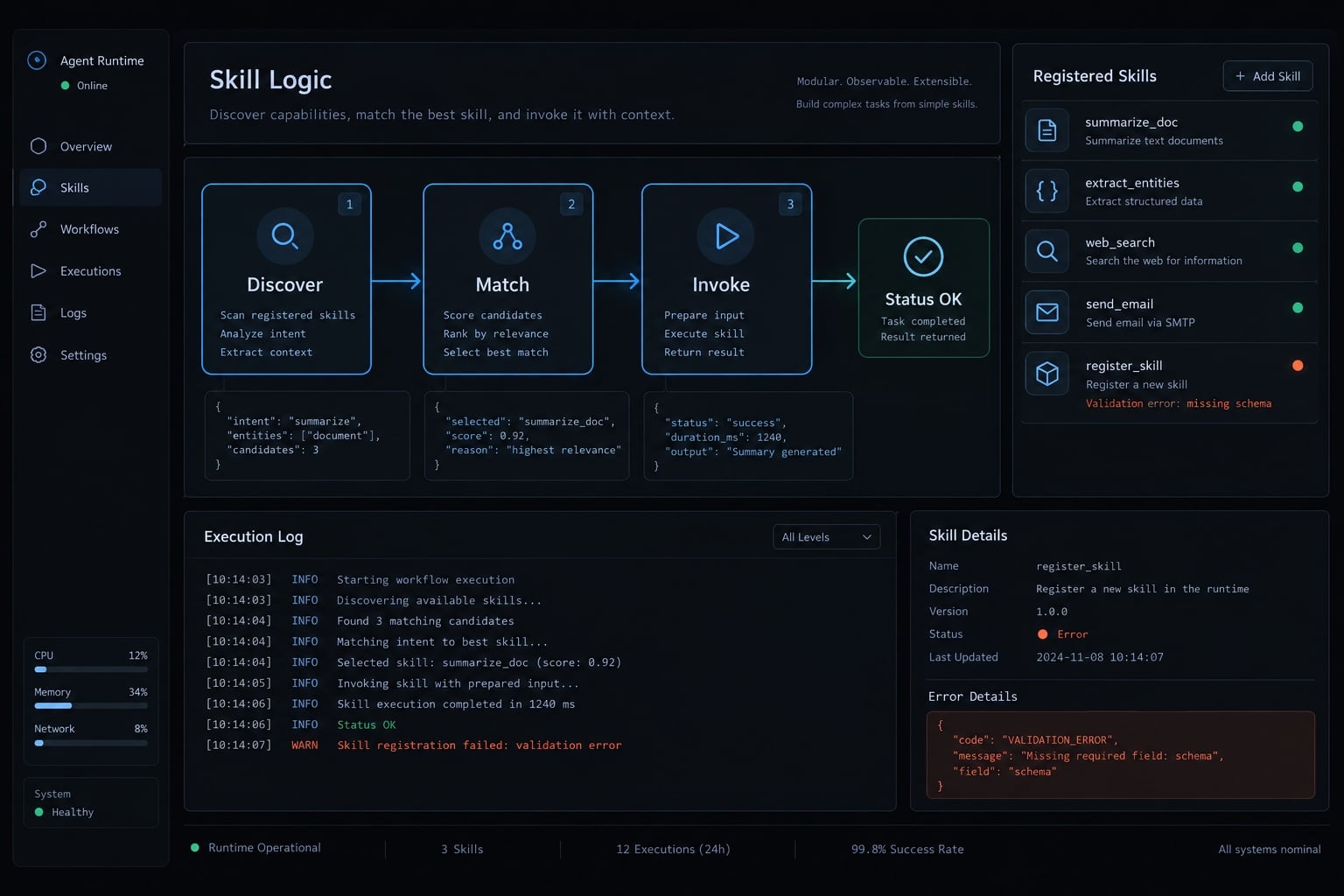
Why Claude Code skills do not always auto-trigger
Availability is not activation, and activation is not successful execution. Official Claude Code skills documentation distinguishes automatic selection from direct user invocation.
Skill registration vs. Skill activation
In this context, "registration" refers to discovery or availability rather than a separate CLI installation command.
State | Meaning |
|---|---|
Available | Relevant skill metadata is accessible in the current context, subject to invocation controls. |
Invoked | The skill’s instructions have been loaded through the supported invocation mechanism. |
The documentation describes progressive disclosure: Descriptions support selection, while full instructions and supporting resources become available as needed.
Discover → Match → Invoke → Execute workflow
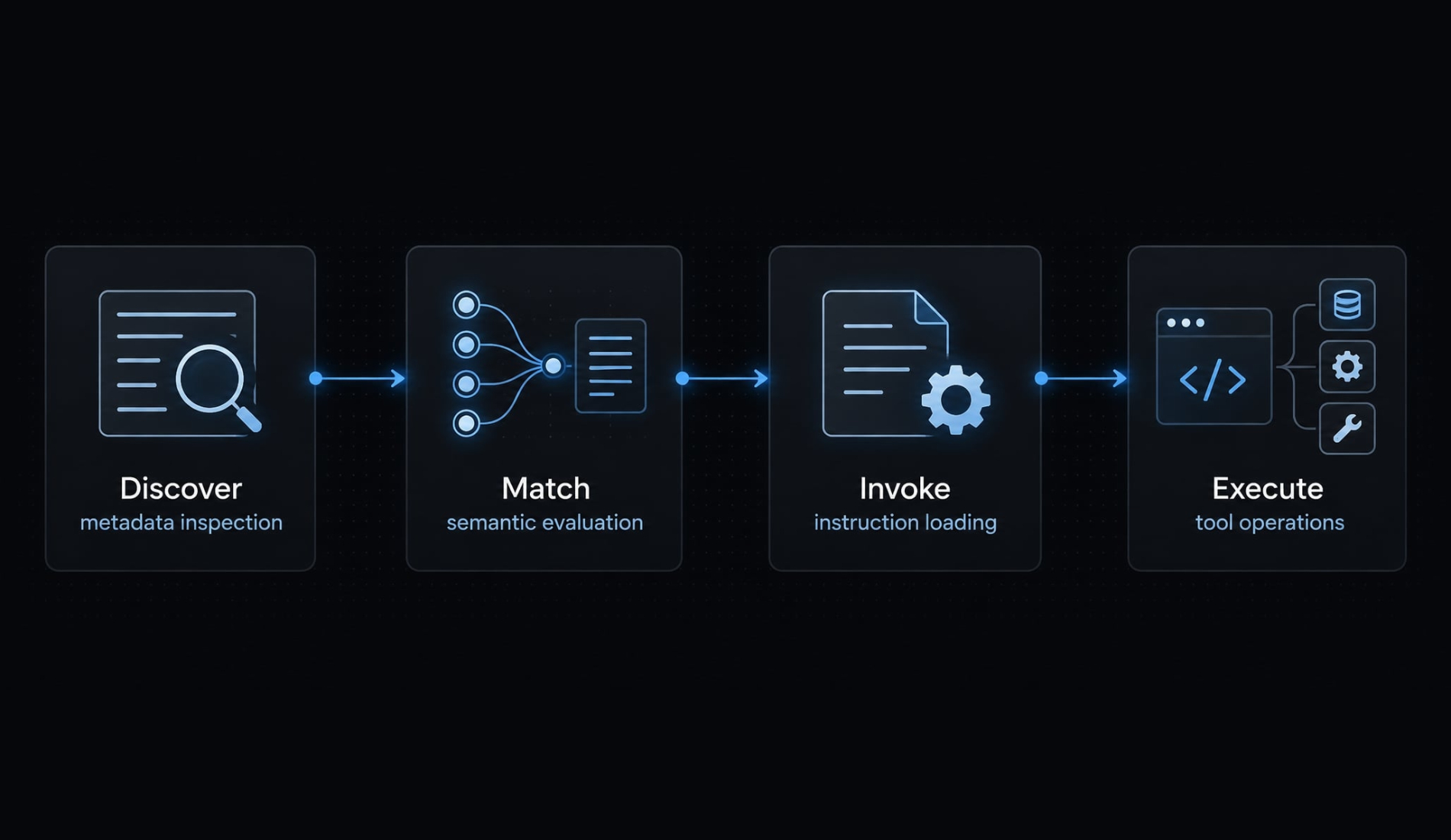
Where the activation decision can fail
- Missing Metadata: Suggests a Discovery issue (e.g., incorrect directory path or improper scope).
- Skipped Eligible Skill: Suggests a Matching issue (e.g., weak description or ambiguous triggers).
- Failed Loading Attempt: Suggests an Invocation issue (e.g., permissions or syntax errors).
Semantic matching means selecting tools by task intent rather than simply detecting rigid keywords. After successfully loading instructions, any missing repository access or failing CLI commands are execution problems rather than routing bugs.
Diagnose the problem with the Discover → Match → Invoke framework
Use observable tests before changing instructions. Discover → Match → Invoke is a troubleshooting framework, not an official description of Claude’s internal architecture.
Stage | Test | Observable evidence | Next action |
|---|---|---|---|
Discover | Check the supported skill menu and scope. | The expected user-invocable entry appears. | If absent, inspect paths and controls. |
Match | Submit a relevant request without naming the skill. | The session records actual skill invocation or none. | Inspect description and overlapping scopes. |
Invoke | Call the skill directly. | Instructions load, or an error appears. | Resolve the error before tuning routing. |
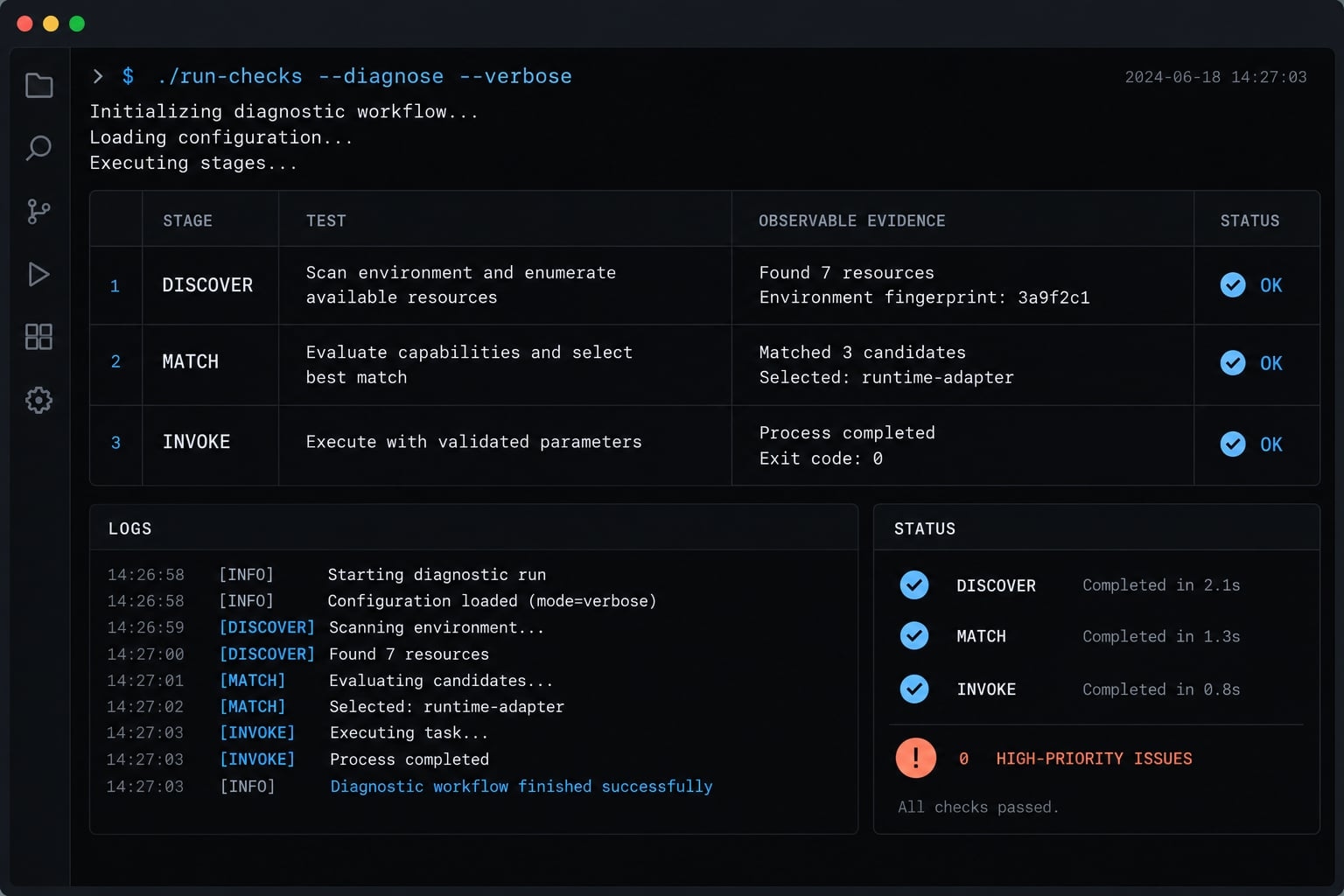
Step 1 - Discover
Check the intended project or user scope in the Claude Code CLI. Asking Claude to list skills is supporting evidence only; its answer can be incomplete.
The slash-command menu helps check user-invocable skills. Hidden menu entries require checking their configuration rather than assuming discovery failed.
Step 2 - Match
Submit test prompts such as:
- "Review this pull request for regressions."
- "Audit these changes for defects and missing tests."
Compare invocation events in your session logs rather than evaluating answer quality alone. Check automatic-invocation controls and competing skill descriptions if either request bypasses the skill.
Step 3 - Invoke
For a local skill named pr-review, official skills documentation specifies slash-command invocation:
/pr-review Review the current branch against main.
This represents explicit invocation. Prompts like "Please use pr-review" represent natural-language requests, which are not syntactically equivalent.
Successful explicit invocation narrows your investigation toward semantic selection or eligibility. If explicit invocation fails, inspect naming, file paths, YAML metadata, and system permissions.
Run these quick checks before adding a hook
Validate your environment configuration first. A hook should never be used to conceal a skill that fails to load directly.
Validate location, scope and naming
Official Claude Code skills documentation identifies these locations:
- Project skill:
.claude/skills/pr-review/SKILL.md - User skill:
~/.claude/skills/pr-review/SKILL.md
Check effective skill names, duplicate definitions, and plugin namespaces. Apply documented scope precedence rather than assuming the most recently edited file takes priority. After making changes, restart your session for a controlled retest.
Validate the YAML frontmatter
YAML frontmatter is the metadata between --- delimiters. This illustrative SKILL.md includes a minimal workflow:
---name: pr-reviewdescription: Review pull requests for defects, regressions, security concerns, and missing tests.---Review the requested diff without modifying files.If the comparison target is unclear, ask for it.Report actionable findings with file references.Do not commit, push, or post review comments.
Follow standard naming conventions: lowercase letters, numbers, and hyphens, with a maximum length of 64 characters.
Check the distinct controls:
disable-model-invocation: trueprevents automatic model invocation; its default isfalse.user-invocable: falsehides the user-facing command; it does not prevent automatic invocation. Its default istrue.
Check for conflicting instructions
Note that "read-only" instructions in markdown do not constitute a hard security boundary. The allowed-tools field does not restrict tools either — it pre-approves listed tools so they run without a permission prompt. To actually block edits or pushes, use deny rules in your permission settings or a PreToolUse hook.
Fix 1 - Rewrite the skill description for better semantic matching
The skill description must explain when to select the workflow rather than merely summarizing what it does. Instructions buried inside the markdown body arrive too late to guide initial model routing.
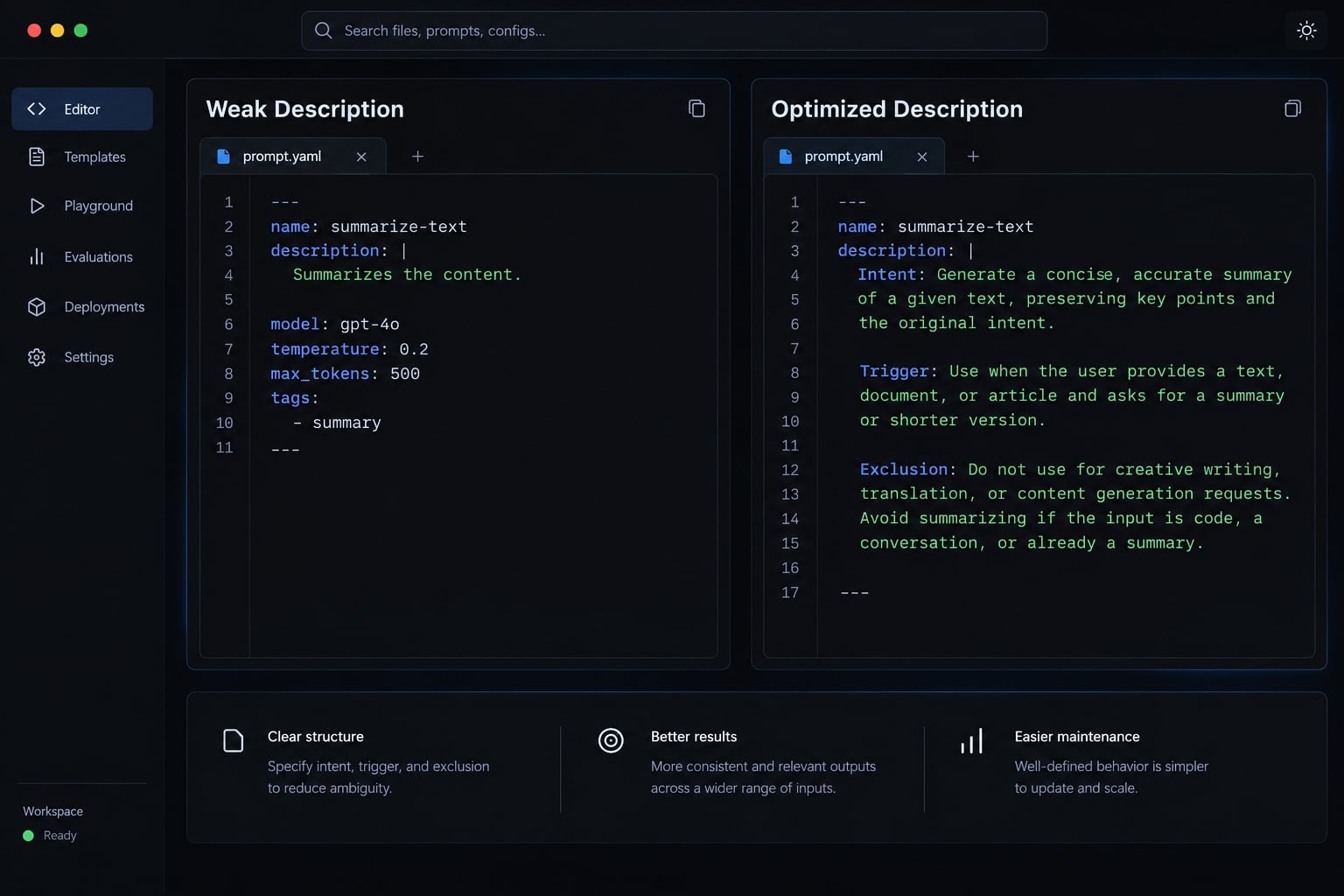
Use an Intent–Trigger–Exclusion formula
Structure your description with three distinct elements:
- Intent: The outcome the workflow provides.
- Trigger: Relevant tasks and realistic request wording.
- Exclusion: Nearby tasks belonging elsewhere.
Template: “Use for [outcome] when asked to [task or paraphrase]. Do not use for [adjacent excluded tasks].”
Weak vs. improved skill description
Weak description:
description: Helps with code quality.
Problem: Ambiguous. Matches code reviews, refactoring, writing unit tests, or general Q&A.
Improved description:
description: >- Review or audit pull requests and code diffs for defects, regressions, security concerns, and missing tests. Use for read-only assessment of proposed changes. Do not use for general code explanations or feature implementation.
Benefit: Clear work product, covers natural paraphrases, and explicitly separates assessment from code modification.
Prevent false positives and skill collisions
False positives are selections on requests outside scope. Skill collisions occur when multiple descriptions plausibly cover the same request.
Separate review, implementation, and explanation responsibilities. Avoid “use for every coding task,” which removes useful boundaries.
Specificity supports semantic matching; it does not establish enforced priority. “Always invoke” remains an instruction, not a control mechanism. Evaluate description changes against both relevant and excluded requests.
Fix 2 - Add explicit skill-selection instructions
Project instructions can establish a repeatable selection process without scripts. Keep the process short enough to remain useful alongside repository guidance.
Use a process instruction, not a reminder
Add a structured block to your CLAUDE.md file:
Before starting a specialized workflow:1. Check available skill descriptions for a direct task match.2. Invoke the matching skill before performing that workflow.3. If no skill applies, continue normally.For mixed review-and-implementation requests, review first.Do not modify files unless the user has requested implementation.
Unlike passive reminders like "remember to use skills", this instruction defines an explicit decision sequence.
Understand the limitation
Official Claude Code project-instruction documentation describes how instruction files supply context. They do not create deterministic routing.
This guidance is model-mediated: Claude must interpret and follow it. Competing instructions and session context can affect behavior.
An acknowledgment such as “I’ll use the review skill” does not demonstrate invocation. Check the session evidence before concluding that selection worked.
Fix 3 - Use a UserPromptSubmit hook for predictable routing
A UserPromptSubmi hook consistently injects contextual guidance when specific triggers are detected in user prompts.
Option A - Detection hook
This illustrative configuration targets macOS or Linux with a POSIX shell and Python 3. It has not been integration-tested here. Official Claude Code hooks documentation describes JSON input on standard input and contextual stdout for successful UserPromptSubmit commands.
- Create
.claude/hooks/review_hint.py. - Add the script below.
- Merge the settings fragment into
.claude/settings.json. - Confirm hook registration through the supported hooks interface.
- Test matching and nonmatching JSON locally.
- Submit both prompts in Claude Code and inspect invocation evidence.
import jsonimport reimport syspayload = json.load(sys.stdin)prompt = payload.get("prompt", "")if not isinstance(prompt, str): sys.exit(0)action = re.search(r"\b(review|audit)\b", prompt, re.I)target = re.search(r"\b(pull request|pr|diff)\b", prompt, re.I)if action and target: print( "If this is a read-only pull-request or diff review, " "invoke the pr-review skill before reviewing. " "Do not invoke it for explanation or implementation alone." )sys.exit(0)
Merge this JSON configuration; do not overwrite existing settings:
{ "hooks": { "UserPromptSubmit": [ { "hooks": [ { "type": "command", "command": "python3 \"$CLAUDE_PROJECT_DIR\"/.claude/hooks/review_hint.py" } ] } ] }}
CLAUDE_PROJECT_DIR supplies the project directory. Python runs the script directly, so executable permission is unnecessary; read permission is required.
Local check:
printf '%s\n' '{"prompt":"Review this PR"}' | python3 ".claude/hooks/review_hint.py"
Repeat with “Explain dependency injection”; expect no guidance. This verifies script behavior - not integration or skill activation. Keyword matching can also catch negated requests.
Option B - Forced skill evaluation
“Forced Eval Hook” is a descriptive prompting pattern, not an official feature name:
- Evaluate: Identify a direct skill match.
- Activate: Invoke the matching skill.
- Implement: Perform the requested workflow.
It does not require private reasoning or exhaustive analysis. Added context can increase tokens, latency, and irrelevant selection.
Hook safety and portability
Review scripts and dependencies. This example neither executes prompt text nor forwards it externally. Validate shell behavior separately on Windows.
Prompt → Script → Guidance → Claude selects/invokes ↑ model-mediated boundary
Version-control reviewed configuration. Keep deployment, billing, migrations, and external messages behind explicit user action and appropriate approvals.
Choose the right activation method
Select the simplest activation approach that solves your reliability requirements. Unnecessary routing machinery increases long-term maintenance overhead.
Method | Setup | Controls | Limitation | Best fit |
|---|---|---|---|---|
Description | Edit metadata | Selection cues | Model-selected | Default starting point |
Project instructions | Edit instruction file | Workflow guidance | Not enforcement | Shared conventions |
Detection hook | Script and settings | When guidance appears | Rules miss nuance | Narrow conditions |
Evaluate–activate–implement hook | Prompt injection hook | Evaluation reminder | Overhead; model compliance | Justified selection checks |
Explicit invocation | Slash command | User-selected workflow | Execution can fail | Deliberate selection |
Recommended decision rules:
- Start with valid configuration and clear descriptions. Add project instructions for shared workflow expectations.
- Use detection hooks when trigger rules are narrow and stable. Consider broader evaluation only if measured benefits justify its overhead.
- For consequential workflows, use explicit invocation plus approvals. Direct selection is neither guaranteed completion nor sufficient authorization.
Test whether auto-triggering actually works
Define expected behavior before testing. For mixed requests below, the expectation is review first, then requested implementation.
Category | Prompt | Expected outcome |
|---|---|---|
Exact | Review this PR for defects. | Invoke review skill. |
Paraphrase | Audit this diff for regressions and missing tests. | Invoke review skill. |
Implicit | Check these proposed changes for risks before merging. | Invoke when a reviewable diff exists. |
Excluded | Explain what a pull request is. | Do not invoke. |
Overlap | Review this PR, then implement fixes. | Review first; separate implementation. |
Track the right signals
Record correct, missed, irrelevant, wrong-skill, and unnecessary multiple-skill invocations. Misses are false negatives; irrelevant selections are false positives.
- Positive-case activation rate: Correct target invocations / cases requiring it.
- False-positive rate: Irrelevant target invocations / cases excluding it.
Report counts alongside percentages. Track execution success separately, plus token and latency overhead.
Use evidence-aware reliability claims
Repeat the matrix under comparable conditions, changing one major variable at a time.
Record version, model, OS, shell, scope, available skill count, controls, hook dependencies, test date, and trial count.
Capture a sanitized skill-loading event - not merely Claude’s acknowledgment - with that environment record. No real invocation capture or measured activation results are claimed here.
Common failure modes and their fixes
These symptoms suggest checks, not proven causes. For Claude Code skills that still aren’t triggering, return to the earliest failing stage.
Symptom | Possible cause | Next check |
|---|---|---|
Skill absent | Wrong scope or hidden command | Inspect directories, metadata, and user visibility. |
Visible, never automatic | Disabled model invocation or weak description | Check controls and relevant prompts. |
Direct invocation fails | Wrong name, namespace, or invalid configuration | Confirm effective command and error details. |
Hook runs; skill skipped | Output delivery or selection failure | Verify context delivery, then invocation evidence. |
Wrong skill invoked | Routing conflicts | Compare descriptions and boundaries. |
Hook works in one repository | Missing configuration or hardcoded path | Check project-relative setup. |
Hook command fails | JSON, dependency, path, or permission issue | Inspect input, command output, and exit status. |
Skill selected too broadly | Overinclusive conditions | Add exclusions and negative tests. |
If invocation succeeds but review fails, inspect diff access, comparison targets, and permissions. That is workflow debugging, not necessarily hook debugging.
Frequently asked questions
Why does Claude Code see my skill but fail to trigger it automatically?
Claude Code distinguishes between discovery (loading metadata into context) and invocation (selecting the skill for execution). Even when a skill is discoverable, automatic triggering relies on semantic matching between the user request and the skill description.
What is the most reliable way to fix auto-triggering issues?
Start by refining your SKILL.md description using an imperative "Intent–Trigger–Exclusion" formula. If that fails, ensure your skill is not flagged with disable-model-invocation: true. For mission-critical workflows, use project-level instructions or explicit invocation commands rather than relying on autonomous routing.
Should I use a "Forced Eval Hook" for all my skills?
No. A forced-evaluation hook adds context to every prompt, which increases tokens and latency and can cause irrelevant skill selection. Start with a clear description; use a narrow detection hook only for specific, stable triggers, and a broad evaluation hook only if measured results justify the overhead.
Does setting disable-model-invocation: true prevent me from using a skill?
It prevents Claude Code from choosing to trigger the skill autonomously, but you can still invoke it manually. Use this flag for skills that perform high-risk actions-such as infrastructure deployments or live database migrations-to ensure a human-in-the-loop requirement for every execution.
How do I verify if my auto-trigger fix is working?
Create a test matrix using five prompt types: an exact request, a natural paraphrase, an implicitly relevant prompt, a related but excluded prompt, and an overlapping scope prompt. Track the "positive-case activation rate" by recording the number of successful versus failed invocations across repeated trials.
Can I use hooks to guarantee skill invocation?
Hooks allow you to inject contextual guidance into a prompt, but they do not guarantee execution. Claude still evaluates the injected instruction against the model's current reasoning and constraints. If the instructions are ambiguous or conflict with other project settings, the model may still choose not to invoke the skill.
Read more:
- Claude Code notifications hook: Easy macOS desktop alerts guide
- Claude Code environment variables: Setup and best practices
- Claude Code managed-settings.json: Admin guide & security
Conclusion
When a custom skill won't auto-trigger, work through the stages in order: confirm discovery, test direct invocation, then improve the description before adding instructions or hooks. Measure activation with a small prompt matrix and record actual Skill tool calls, not Claude's acknowledgment. Automatic selection stays model-mediated; for consequential workflows, rely on explicit invocation and permission controls.
If your team maintains many skills and hooks across projects, AgentKit offers an editable starting set — 100+ skills, subagents, and pre-tool safety hooks — with production support for Claude Code and Codex and beta support for Cursor. The same rules apply: clear descriptions, a reasonable skill count, and tested activation.