Claude Code react: Best practices for faster frontend dev
Claude Code react: What it’s good for, how to use it, and where it breaks
React work is full of repetitive implementation tasks, but speed alone is not the win. Many teams using Claude Code for React quickly encounter the same issue: rapid output can still lead to cleanup work, additional review effort, and inconsistent code. Claude Code can be genuinely useful for frontend work, especially when tasks are narrow and requirements are clear. This guide explains where it helps most, how to use it in a controlled React workflow, which prompts produce better results, and where human review still matters. The goal is not to automate judgment away. The goal is to get faster at shipping solid React work without increasing maintenance risk.
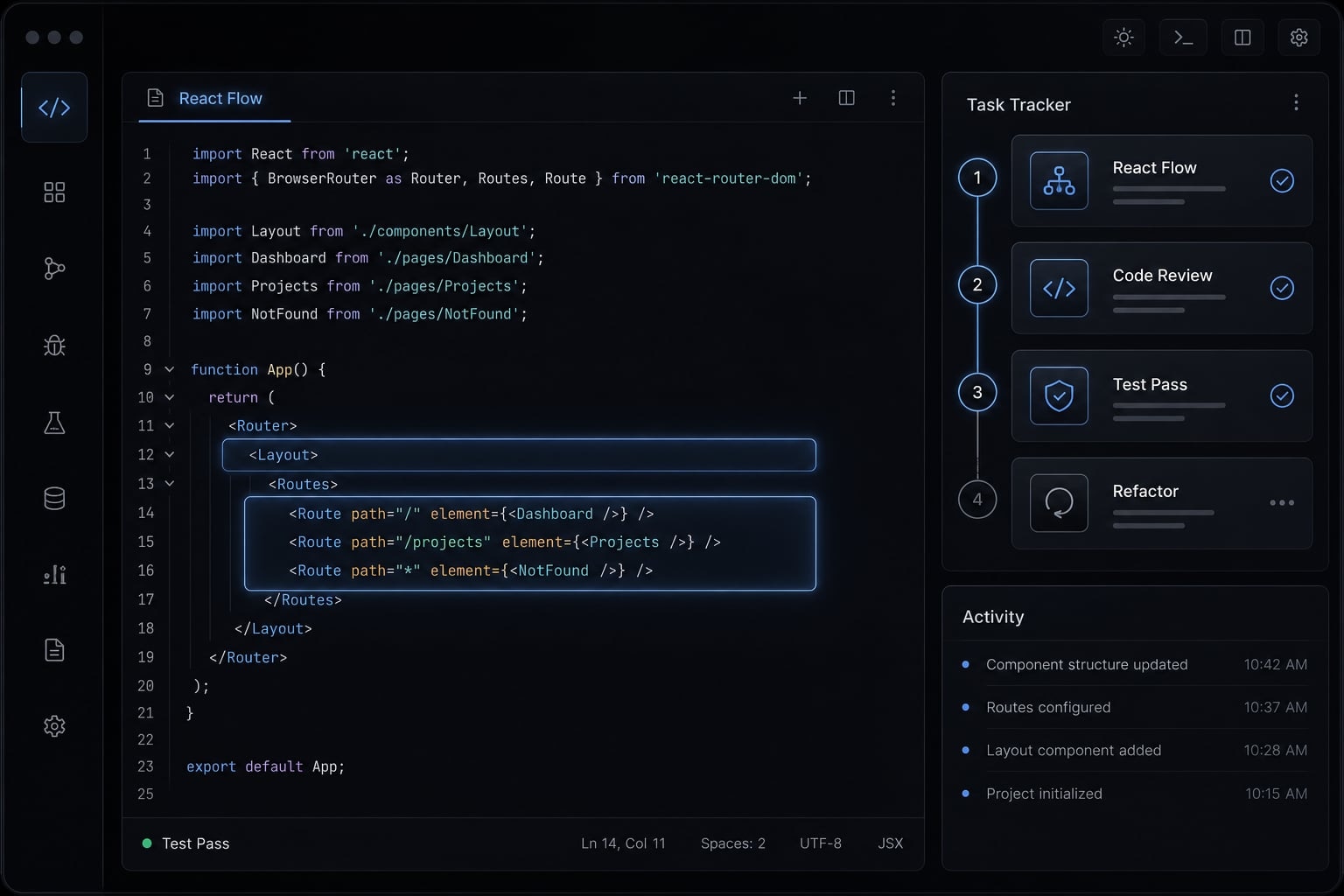
What Claude Code can actually help with in react
Claude Code for React is an AI-assisted implementation tool that works best on scoped frontend tasks such as scaffolding, component generation, refactoring, baseline tests, and focused bug fixes. It is most useful when the desired behavior, stack, file structure, and constraints are clearly defined before code generation begins.
In practice, Claude Code delivers the best results for React development when you use it as a guided implementation assistant rather than a fully autonomous engineer, not as a fully autonomous engineer. It can accelerate familiar development patterns in a typical React workflow, but it becomes less reliable when the task involves unclear UX, conflicting product assumptions, or architectural trade-offs.
Where it fits best
- App scaffolding - useful for bootstrapping a React feature area with Vite, TypeScript, routing, and baseline structure.
- Component generation - effective for forms, cards, modals, tables, and repeated UI patterns with defined props.
- Refactoring - helpful for splitting large components, extracting hooks, and reducing duplication.
- Test writing - good for generating baseline unit testing coverage with Vitest or Jest.
- Focused bug fixing - useful when you provide reproduction steps, expected behavior, and relevant files.
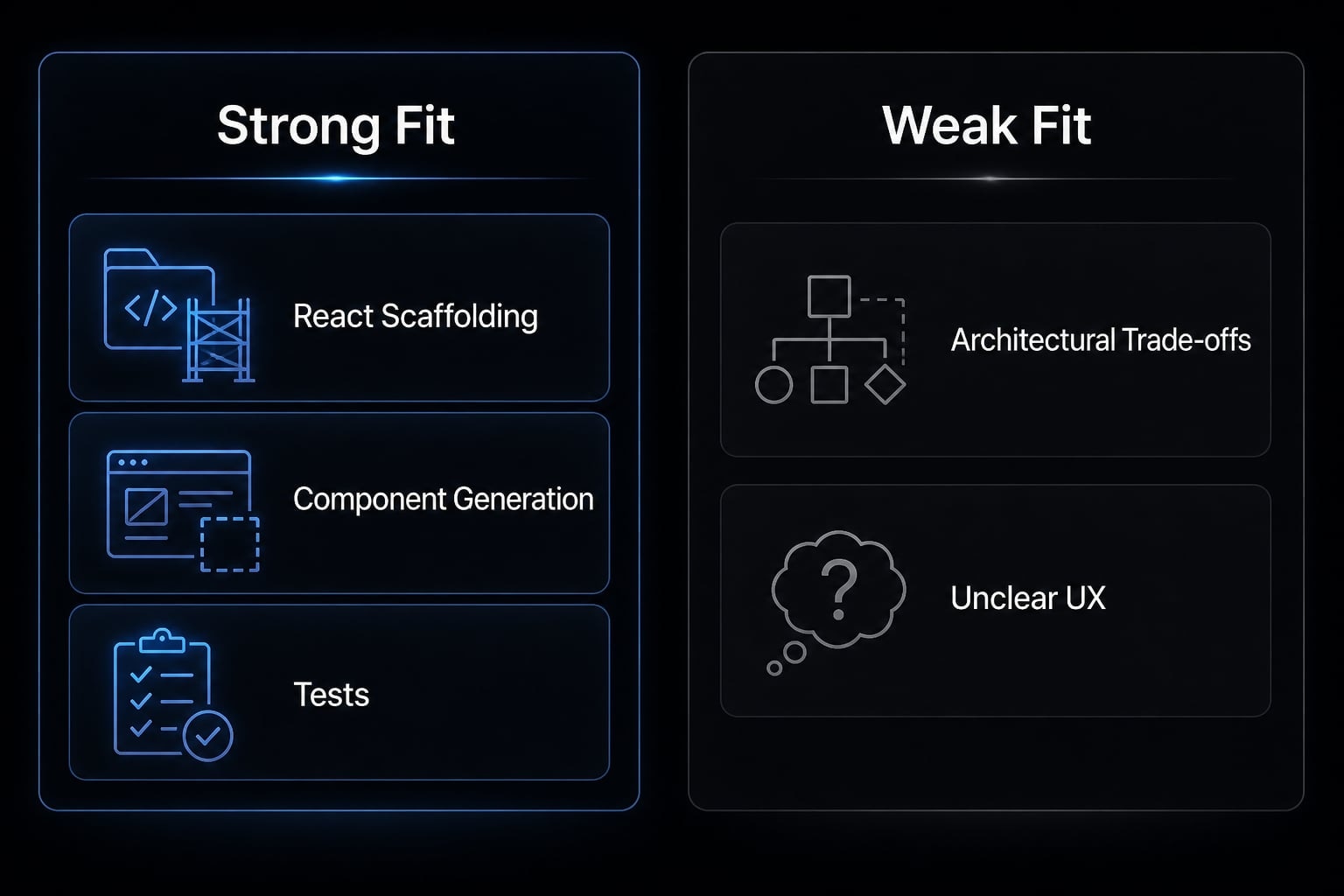
Best fit | Weak fit |
|---|---|
Clear component tasks | Ambiguous UX decisions |
Small refactors | Broad architecture redesign |
Test generation | Undefined product logic |
Scoped bug fixes | Cross-app strategy decisions |
Where it still needs human judgment
Claude Code can produce convincing output that still misses frontend code quality, consistency, or correctness in application context. Product intent, accessibility decisions, naming standards, and maintainability still need a developer review. A good first draft is not the same thing as a production-ready implementation.
Best react use cases for Claude Code
Claude Code works best when the work is repetitive, well-scoped, and technically explicit. That is why it tends to add value fastest in familiar AI-assisted React development tasks rather than open-ended product design.
- Scaffold a new React app or feature area.
- Generate components consistently.
- Refactor older React code.
- Write tests and improve coverage.
- Debug scoped UI bugs.
Use case | Why Claude Code helps | What still needs review |
|---|---|---|
Scaffolding | Speeds up baseline setup | Architecture fit |
Components | Repeats known patterns fast | Accessibility and style consistency |
Refactoring | Suggests cleaner structure | Behavioral regressions |
Tests | Creates baseline coverage | Missing edge cases |
Debugging | Speeds up root-cause exploration | Integration context |
Scaffolding a new react app or feature area
Claude Code is a good fit for creating a baseline app or feature slice using Vite, TypeScript, routing, and a default test setup. It can save time on repetitive setup and file creation. The limitation is that the first scaffold may be functional but still misaligned with your long-term architecture, naming conventions, or deployment expectations.
Generating components consistently
For React component generation, Claude Code is useful for forms, modals, cards, and list views when you specify props, state expectations, styling approach, and accessibility requirements. This is especially helpful when teams want repeatable patterns. The limitation is that visual consistency and accessibility details often still need manual review before merging.
Refactoring older React code
Claude Code can help split large components, reduce duplicated logic, convert legacy patterns, and support refactoring hooks into cleaner reusable units. This is often where teams save meaningful time. The limitation is structural judgment: you should still review whether the proposed split improves readability or simply moves complexity around.
Writing tests and improving coverage
For unit testing, Claude Code is useful for generating a baseline test suite in Vitest or Jest, including happy paths and some edge cases. It can also suggest missing assertions. The limitation is that generated tests often need cleanup, stronger fixtures, or more realistic edge-case coverage.
Debugging scoped UI bugs
Claude Code can be effective when debugging a specific UI issue if you provide reproduction steps, expected behavior, and the relevant files. It often helps narrow likely causes quickly. The limitation is that integration bugs may depend on broader state flow, routing, or app context that is not obvious from one file alone.
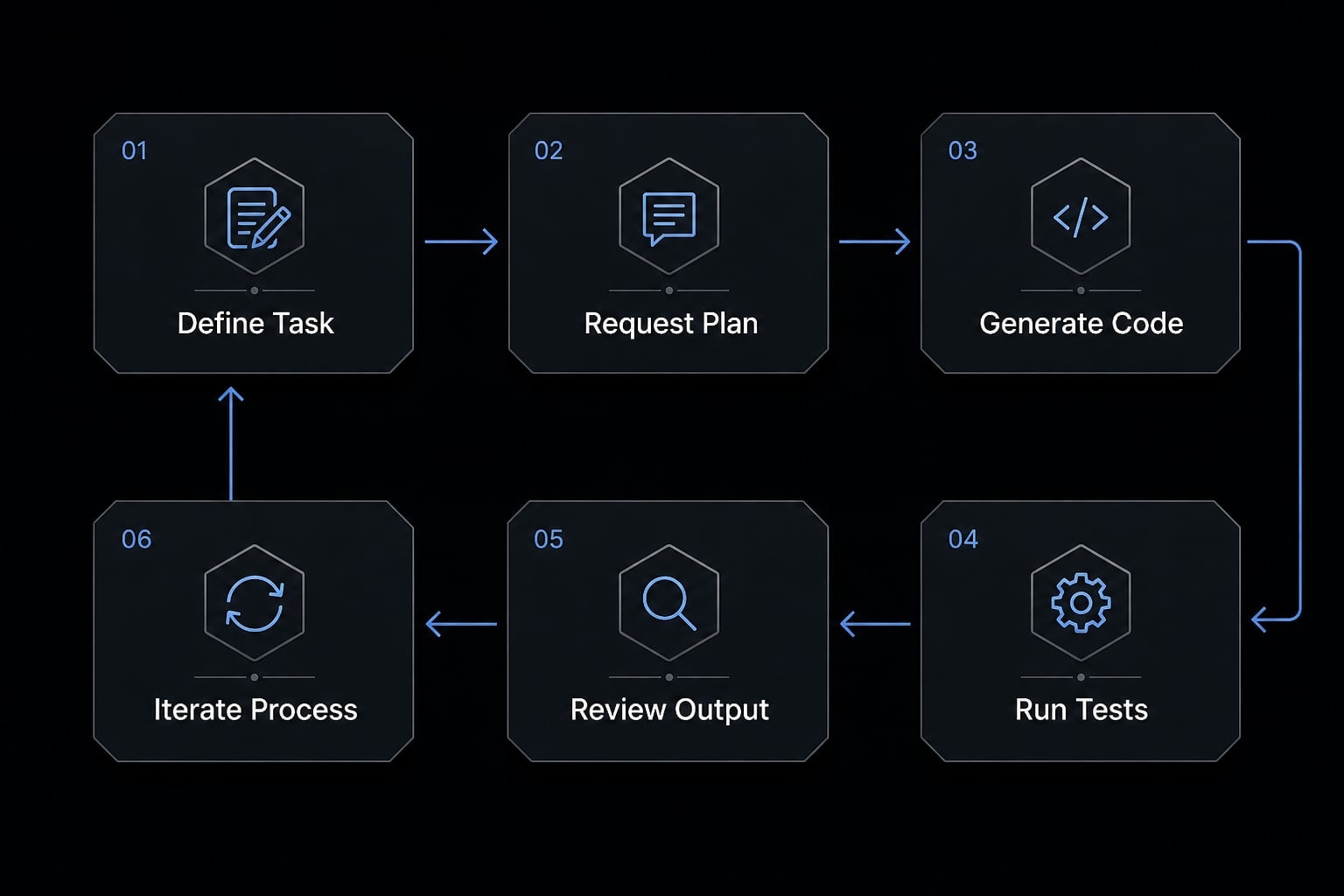
A simple step-by-step workflow for using Claude Code with react
The safest and most effective way to use Claude Code with React is to follow a clear, structured workflow. Teams usually lose time when they ask for too much at once, skip validation, or treat generated output as final. A disciplined process reduces rework and improves reliability.
- Define the task clearly.
- Ask for a plan before code.
- Generate in small units.
- Request tests and validation.
- Review the output carefully.
- Iterate with tighter feedback.
Step 1: Define the task clearly
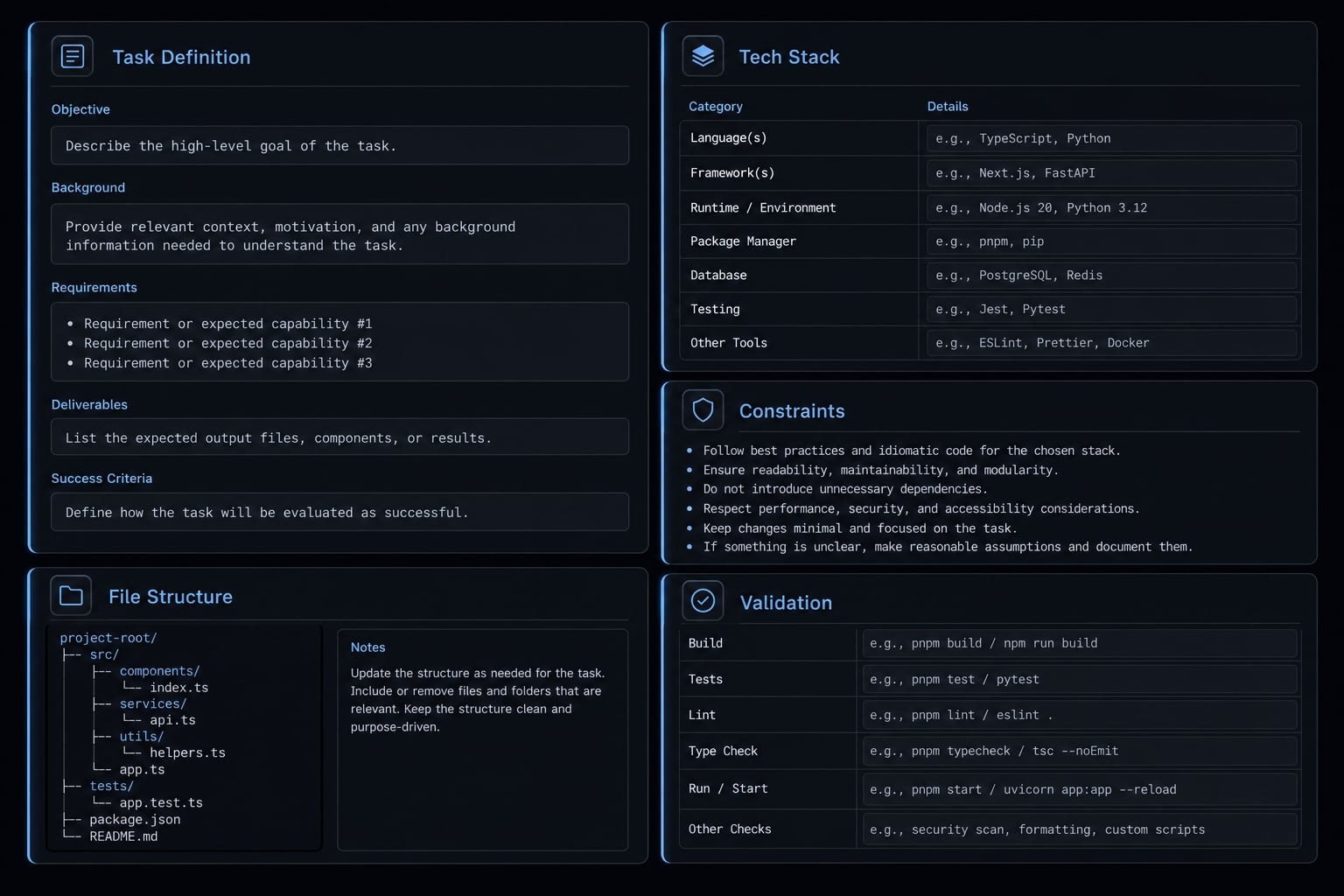
A clear React prompt usually includes:
- Feature goal.
- Stack.
- Libraries.
- Folder conventions.
- Expected output.
- Constraints.
Vague prompts create vague React output. That is the central rule of prompt engineering for code generation. If you ask for “a dashboard component,” you will likely get something generic. If you specify the layout, props, loading states, styling approach, and test expectations, the output is usually far more usable.
Step 2: Ask for a plan before code
Before code generation, ask for an implementation plan. This forces the model to outline components, data flow, dependencies, file changes, and trade-offs.
Mini prompt example:
Before writing code, propose a plan for implementing this React feature. List the components, state flow, files to create or edit, dependencies, and any assumptions. Do not generate code yet.
This “ask for a plan before code” step catches misunderstandings early and reduces throwaway implementation work.
Step 3: Generate in small units
Use iterative code generation instead of large all-at-once requests.
- Generate one component at a time.
- Build one feature slice at a time.
- Refactor one area at a time.
- Avoid prompts like “build the whole app”.
Small-batch generation is easier to review, easier to test, and easier to correct when output drifts.
Step 4: Request tests and validation explicitly
Ask for tests, linting, and build verification in the same prompt or immediately after code generation. Mention Vitest or Jest by name if your stack depends on one of them.
Working code is not the same as verified code.
Generated output may look correct but still fail type checks, lint rules, or build steps. If you want verified code, request:
- Unit tests.
- Run instructions.
- Lint checks.
- Build verification.
- Any required mocks or setup notes.
Step 5: Review the output carefully
Use a practical React code review checklist:
- Component boundaries.
- Naming clarity.
- Props design.
- State usage.
- Accessibility.
- Styling consistency.
- Side effects.
- Maintainability.
Claude Code can generate something plausible very quickly. But review should still look like a real pull request review, not a casual skim.
Step 6: Iterate with tighter feedback
When output misses the mark, tell Claude exactly what is wrong. This is where feedback-driven iteration matters most.
Good follow-up feedback usually includes:
- What behavior is wrong.
- What should remain unchanged.
- What constraint was violated.
- What file or pattern should be followed.
Avoid rewriting the entire request too early. Better second-pass prompts often improve output more than starting over.
Prompt examples that work better for react tasks
Prompt quality has a direct impact on output quality in AI-assisted React development. Stronger prompts reduce ambiguity, improve structure, and make it easier to validate the result. They do not guarantee correctness, but they usually improve usefulness.
Prompt for creating a React component
Create a React component in TypeScript called UserProfileCard.Requirements:- Use functional components- Accept props for name, role, avatarUrl, and status- Use CSS modules for styling- Create files for UserProfileCard.tsx, UserProfileCard.module.css, and UserProfileCard.test.tsx- Include accessible markup for images and status labels- Write Vitest tests for the happy path and one missing-avatar edge case- Keep the component presentational only
This React component prompt works because it specifies TypeScript, props, styling, file structure, accessibility, and tests.
Prompt for refactoring a large component
Refactor the existing CheckoutPanel component.Current problem:- The file is too large- UI logic and data formatting are mixed together- Repeated state handling appears in multiple sectionsRequirements:- Split the component into smaller subcomponents- Extract reusable logic into custom hooks where appropriate- Keep behavior unchanged- Preserve existing prop names unless there is a strong reason to change them- Before writing code, explain the proposed split strategy and trade-offs
A strong refactor prompt explains the current problem and protects behavior from accidental drift.
Prompt for writing tests for an existing component
Write unit tests for the existing ProductFilter component using Vitest.Requirements:- Cover the happy path- Cover edge cases for empty data and invalid filter values- Mock only what is necessary- Include run instructions- If current code is hard to test, briefly explain why before generating the tests
This test generation prompt improves baseline coverage while still surfacing testability issues.
Prompt for debugging a React issue
Help debug a React issue in the CartSummary component.Current behavior:- The total price does not update after quantity changesExpected behavior:- Total price should update immediately when quantity changesReproduction steps:1. Add an item to cart2. Increase quantity3. Observe stale totalRelevant files:- CartSummary.tsx- useCart.ts- cartUtils.tsPlease identify the likely root cause, explain it briefly, and propose a fix.
A good debug prompt reduces guesswork by including current behavior, expected behavior, reproduction steps, and file context.
What makes prompts stronger
- Specify the stack.
- Specify constraints.
- Ask for tests.
- Ask for verification.
- Keep scope narrow.
These are the basics of stronger prompts for React. They improve output quality, but they still do not replace review, build checks, or engineering judgment.
Where Claude Code struggles in react projects
Claude Code is useful, but deterministic output is limited without structure. Most failures are not dramatic. They are subtle: code looks reasonable, passes a quick glance, and still creates maintainability or integration problems later.
Limitation | What commonly happens | What to do |
|---|---|---|
Unclear prompts | Code matches wording but misses intent | Define UI behavior, stack, and constraints |
Inconsistent styling | Output differs from project patterns | Specify styling rules and component conventions |
Missing tests | Code appears done but is not verified | Ask explicitly for tests and run steps |
Partial bug fixes | Symptom changes but root cause remains | Provide repro steps and expected behavior |
Weak integration fit | Code passes locally but breaks in app context | Run build checks and review file dependencies |
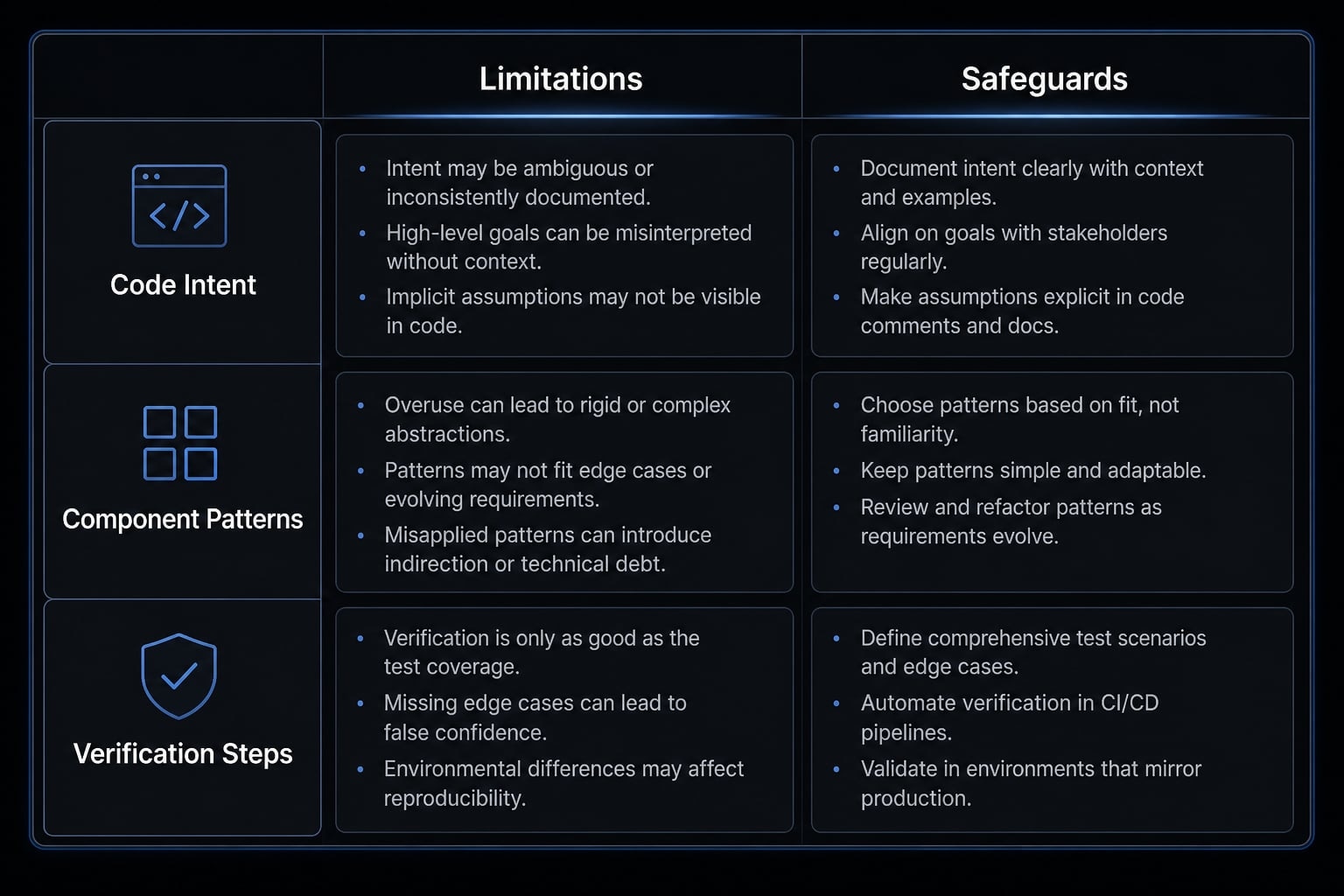
What goes wrong when prompts are underspecified
With underspecified prompts, AI often follows the wording literally while missing the real product intent. That is a common failure mode in frontend work. The output may look right in isolation but fail once it meets real state flow, edge cases, or design conventions. Fast drafts are helpful, but they are not inherently trustworthy.
Why testing, build checks, and code review still matter
Testing and code review remain part of the workflow, not optional extras.
- Tests are often absent unless explicitly requested.
- Build checks catch integration issues.
- Code review is still necessary.
- Long-term maintainability matters more than fast first drafts.
This is also where agentic coding standards become important. Without shared expectations, review overhead grows quickly.
Practical lessons from real Claude Code react experiments
Repeated usage patterns are fairly consistent across small React experiments and practical frontend workflows. A balanced Claude Code React review usually lands somewhere in the middle: helpful enough to keep using, not reliable enough to run unchecked.
- It can create a functional React baseline quickly.
- It performs better when requirements are specific.
- It may not write tests unless asked.
- Debugging often needs multiple iterations.
- Low generation cost does not remove review cost.
These are not formal benchmarks. They are common practitioner patterns. Teams building React apps with Claude AI often find that the tool is strongest in implementation acceleration, not product reasoning. That distinction matters. If your task is repetitive and bounded, the productivity upside can be real. If your task is vague or highly contextual, review and correction effort can erase much of the time saved.Claude Code react
If you want more consistency, move from one-off prompts to reusable workflows
One-off prompting works for experimentation. It is less effective when teams need consistent outputs over time. Repeatability improves when you standardize the rules around scaffolding templates, validation, and naming. That is how teams move closer to more deterministic AI output.
What repeatability looks like in practice:
- Predefined component templates.
- Shared test instructions.
- Lint and build verification steps.
- Team-wide naming conventions.
- Folder structure guidance.
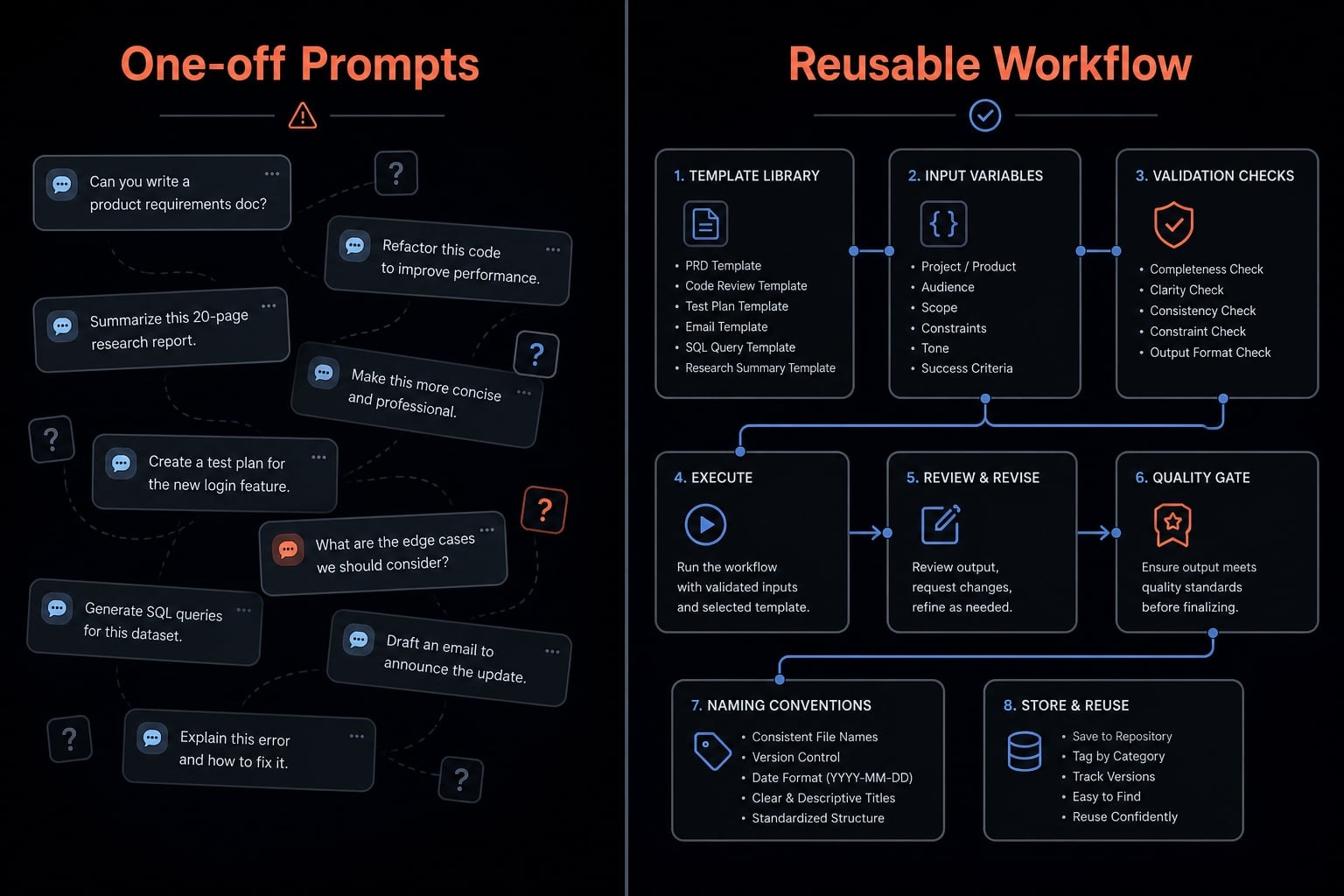
This is where Claude Code skills for React component generation and other reusable skills become valuable. Instead of rewriting the same instructions every time, teams can package a repeatable agentic coding workflow around component patterns, test requirements, and review rules. AgentKit is one example of this workflow maturity model: Not as a replacement for developer judgment, but as a way to make recurring AI-assisted tasks more consistent across projects.
Frequently asked questions
What is Claude Code useful for in React development?
Claude Code acts as an AI-powered implementation accelerator for React, primarily effective for scoped, repetitive development tasks. It excels at scaffolding projects, generating individual components, refactoring legacy code, writing unit tests, and debugging specific UI issues, though it requires human oversight to ensure code quality and architectural consistency.
What React tasks does Claude Code handle well?
Claude Code provides the most value when tasks are well-defined and follow standard frontend patterns:
- Scaffolding new React applications or features
- Generating consistent UI components
- Refactoring large or complex components
- Writing unit tests for specific logic
- Debugging isolated front-end bugs
How do you use Claude Code with React in practice?
To achieve reliable results while minimizing cleanup, follow this structured workflow:
- Define the task clearly
- Ask for a plan before code generation
- Generate in small, manageable units
- Request tests and build validation
- Review the output like a real code review
- Iterate with tighter feedback
What should I ask Claude Code to do in a React project?
Use specific, constraint-based prompts to ensure high-quality output. Always specify your stack (e.g., Vite, TypeScript), preferred styling approach (e.g., CSS Modules), component props, and testing requirements. For example, when creating a component, explicitly ask for accessibility attributes, test file generation, and storybook integration to match your project standards.
What are the limitations of Claude Code for React?
While powerful, Claude Code faces specific challenges that require developer intervention:
Limitation | Common Behavior | Safeguard |
|---|---|---|
Unclear intent | Code follows phrasing but misses logic | Use precise, constraint-based prompts |
Style drifts | Output varies from existing patterns | Provide style guides and base components |
Unverified code | Code runs but contains edge-case bugs | Explicitly request Vitest/Jest unit tests |
Integration errors | Logic passes but breaks app context | Run linting and build checks manually |
Does Claude Code replace the need for code reviews in React?
No. Claude Code is an implementation tool, not an engineering lead. Generated code often requires human review to verify component boundaries, accessibility standards, state management, and integration consistency. Treating the AI output as a "fast draft" rather than "verified code" is essential for maintaining long-term project health.
Read more:
- Claude Code toolkit: Scale your AI development workflow easily
- Claude Code tutorial: Set up and master your AI coding agent
- Claude Code hooks guide: Automate and control AI workflows
Conclusion
The best Claude Code React workflow is not “let AI build everything.” It is guided implementation with clear prompts, narrow scope, explicit testing, and real review. Claude Code is most useful for scaffolding, component generation, refactoring, baseline tests, and focused debugging. It is less reliable for vague product intent, styling consistency, and larger architectural decisions.
If you want better output, the pattern is straightforward: Define the task clearly, ask for a plan, generate in small units, and validate everything. For teams that want more repeatability, move beyond one-off prompts and adopt a reusable workflow template with shared conventions, test instructions, and review safeguards. Explore the workflow resources and reusable templates available at agentkit.best to standardize React AI assistance without adding unnecessary cleanup work.