
Claude Code PreToolUse hook: How to block unsafe tool calls
A Claude Code PreToolUse hook acts as a filter, blocking tool calls immediately after Claude chooses an action and before the tool runs. It lets you apply local validation rules to risks such as .env access, destructive Bash commands, or a direct git push. The handler receives JSON describing the proposed call, evaluates it against the repository policy, and returns a documented decision. This guide covers lifecycle placement, configuration, a Node.js policy handler, testing, and limitations. The hook is a useful guardrail, but it is not an operating-system sandbox.
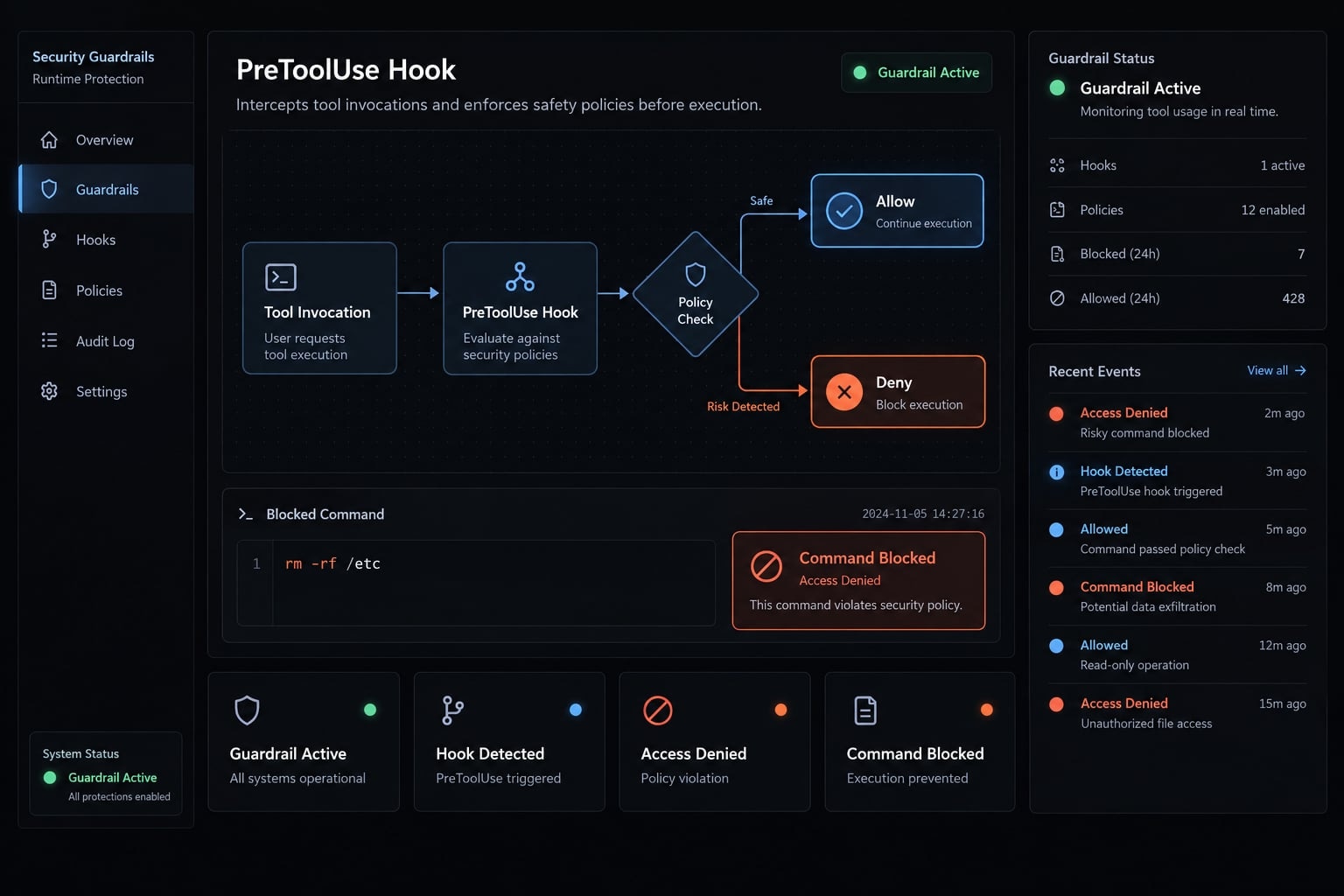
Quick answer: A Claude Code PreToolUse hook is a programmable checkpoint for tool-call interception. It examines a matched tool’s name and inputs before execution, then allows, denies, or routes the action through a supported permission path. Its protection remains limited by matcher coverage, handler quality, credentials, and process privileges.What is a Claude Code PreToolUse hook?
PreToolUse is a Claude Code hook event that runs when Claude proposes a call to a matched tool. The hook can inspect tool-specific arguments before Claude Code applies the documented decision and proceeds with execution.
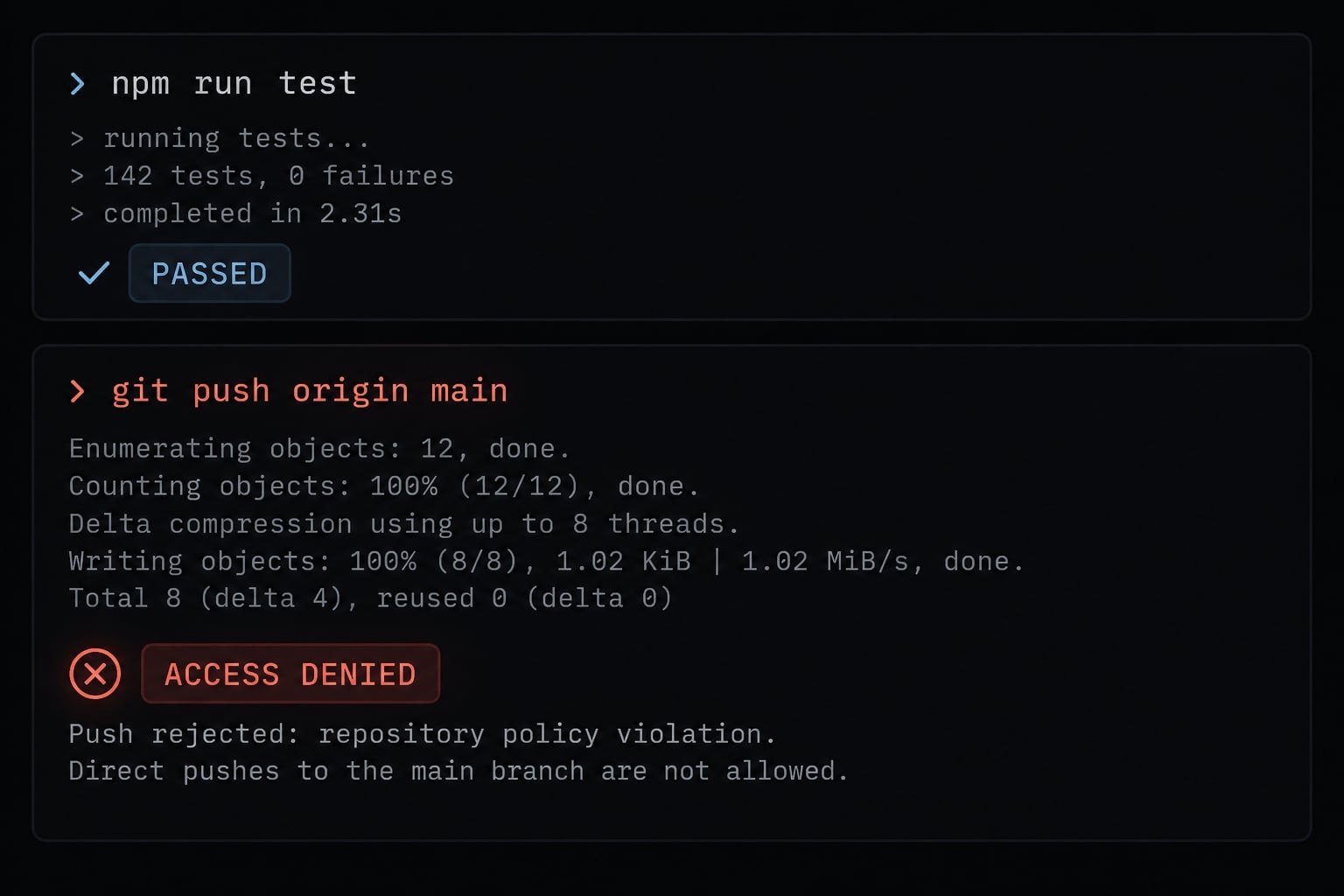
For example, Claude may propose git push origin main through the Bash tool. A Bash matcher invokes your handler, which reads the command and rejects it with an explicit reason. The underlying Git command does not execute through that permitted path.
Using a Claude Code PreToolUse hook provides stronger security than relying only on instructions in CLAUDE.md. While prompt guidance is merely suggestive, the hook enforces policy through code at a defined lifecycle boundary.
However, deterministic enforcement only applies to the configured hook boundary. An incomplete matcher, vulnerable validation logic, alternate tool, or privileged execution environment can still expose the repository.
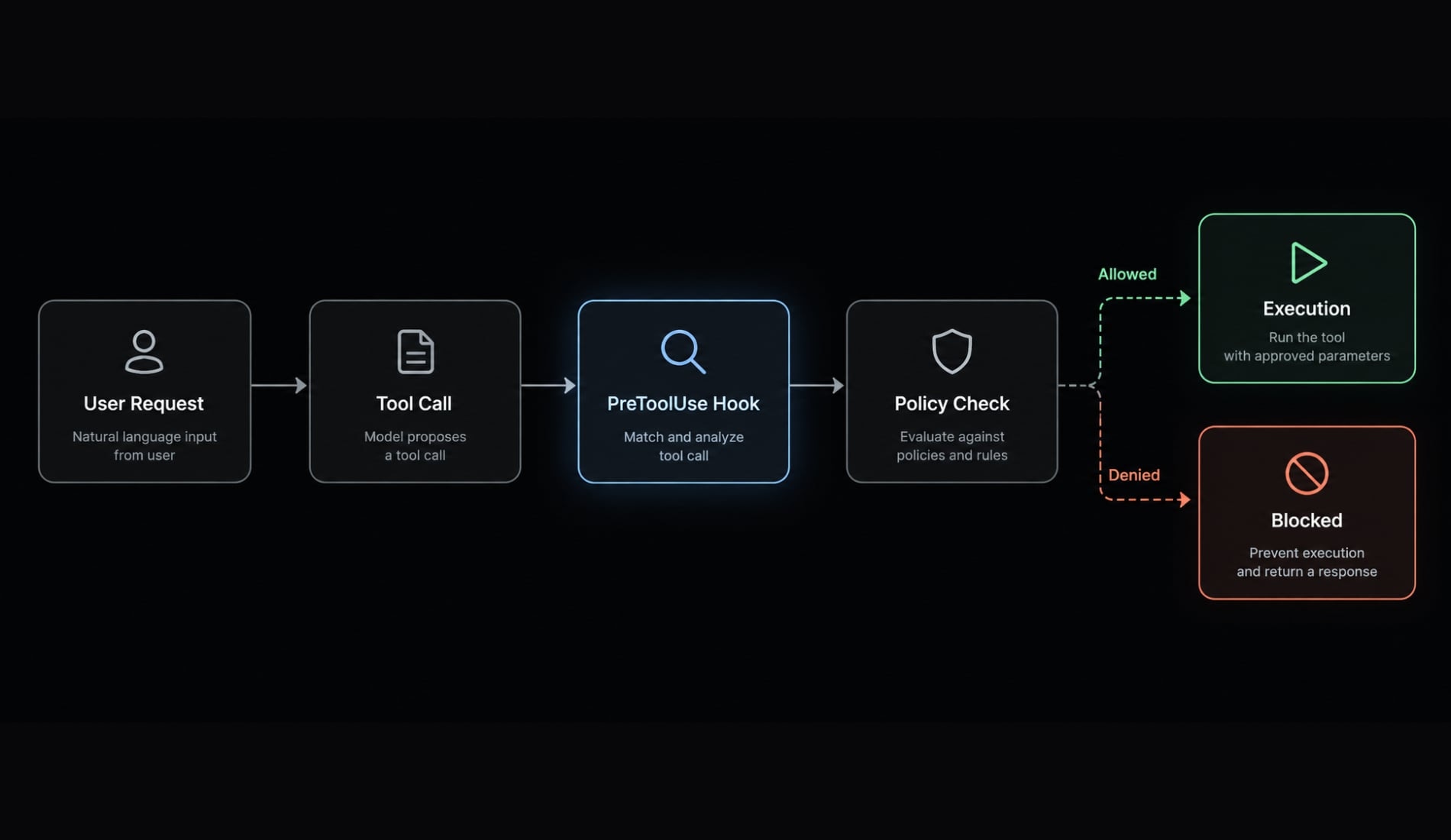
Where PreToolUse runs in the tool lifecycle
- The user submits a request.
- Claude evaluates the task.
- Claude proposes a tool call.
- Claude Code invokes matching
PreToolUsehandlers. - The documented decision path is applied.
- The tool executes only when permitted.
- A post-execution event may run afterward where applicable.
Why PreToolUse is more reliable than prompt-only rules
Prompt or |
|
|---|---|
Influences model behavior | Executes local validation code |
Advisory or probabilistic | Deterministic at the configured hook boundary |
Best for conventions and preferred workflows | Better for input-dependent restrictions |
May be interpreted differently by the model | Can reject a specific matched tool call |
CLAUDE.md remains valuable for conventions, such as preferred test commands or architectural rules. The hook is more appropriate when a specific command, path, branch, or environment requires programmatic tool execution control.
Its effectiveness still depends on narrow matchers, correct handler logic, protected configuration, process privileges, and complete execution-path coverage. Treat Claude Code hooks as one layer in a defense-in-depth security model.
How PreToolUse receives and controls tool calls
Claude Code sends hook data to a command handler as JSON through standard input. The handler parses that data, validates the relevant fields, and communicates its result through the documented structured output or process exit behavior.
The input fields that matter
Field | Meaning | Practical use |
|---|---|---|
| Identifies the lifecycle event invoking the handler | Reject or safely ignore unexpected events |
| Identifies the proposed tool | Apply Bash-specific rules only to |
| Contains arguments defined by the selected tool | Inspect a command, file path, or content field |
Session or project context | Version-dependent execution context | Apply repository-specific rules where documented |
tool_input does not have one universal schema. A Bash call may expose a command string, while file or editing tools use different fields.
A defensive handler should:
- Catch malformed JSON.
- Confirm
hook_event_nameandtool_name. - Check that
tool_inputis an object. - Validate each required field’s data type.
- Handle missing command values explicitly.
- Avoid assuming every tool has
tool_input.command. - Choose a deliberate failure policy instead of accidentally allowing execution.
Allow, deny, and error behavior
Outcome | Meaning | Implementation requirement |
|---|---|---|
Allow | Continue with the proposed action | Return the currently documented success response |
Deny | Prevent the proposed action | Return an explicit, actionable denial reason |
Ask | Route through user permission when supported by the current event schema | Verify support before implementation |
Handler error | The validator did not complete normally | Apply and document a fail-open or fail-closed policy |
For a structured response, machine-readable JSON belongs on stdout. Diagnostic messages should go to stderr so they do not corrupt the response payload.
Process status and structured decisions are separate mechanisms. Anthropic documentation has historically assigned special behavior to a blocking exit status, but other nonzero statuses may indicate handler failure rather than intentional policy denial.
A fail-closed policy blocks an action when validation fails. It reduces risk but can interrupt legitimate work. A fail-open policy preserves availability but may permit an unvalidated call. Critical, narrowly matched operations usually justify fail-closed behavior when recovery procedures are documented.
Version-sensitive behavior: Verify the current event-specific output schema, supported decision values, hookSpecificOutput nesting, timeout behavior, and blocking exit-code semantics against the official Claude Code hooks documentation before deployment.How to configure a PreToolUse hook in settings.json
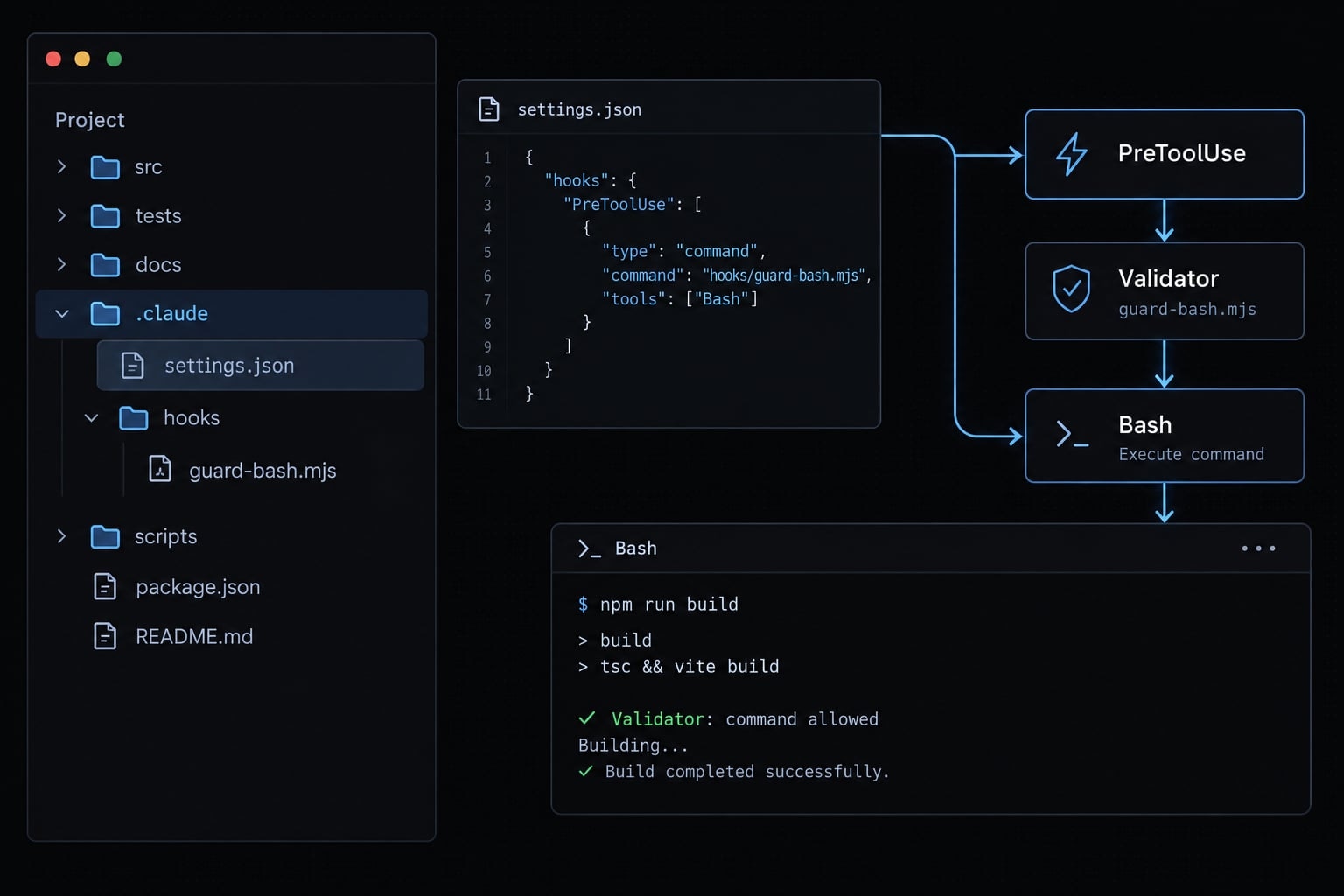
Use the narrowest practical matcher and keep the handler inside a clearly controlled repository path.
- Identify the relevant user, project, or local settings scope.
- Open the applicable
settings.json. - Add the verified
hooks.PreToolUsestructure. - Match only the documented Bash tool identifier.
- Configure the Node.js command handler.
- Set a short timeout using the documented unit.
- Run positive, negative, malformed-input, and timeout tests.
Verification record: Before publication or rollout, record the documentation verification date,claude --version,node --version, operating system, settings scope, and tested working directory. Do not assume schema stability across Claude Code versions.
Minimal settings.json Example
{
  "hooks": {
    "PreToolUse": [
      {
        "matcher": "Bash",
        "hooks": [
          {
            "type": "command",
            "command": "node \"$CLAUDE_PROJECT_DIR/.claude/hooks/guard-bash.mjs\"",
            "timeout": 10
          }
        ]
      }
    ]
  }
}
The configuration contains:
hooks: The lifecycle-hook configuration container.PreToolUse: The event invoked before matched tool execution.matcher: Limits invocation to theBashtool.- Nested
hooks: The handlers associated with that matcher. type: Selects a command-based handler.command: Starts the local Node.js validator.timeout: Limits how long validation can delay the tool call.
The example uses CLAUDE_PROJECT_DIR to locate a repository-local script. Confirm the variable and timeout unit in the documentation for your installed version.
The quoted variable syntax assumes a compatible shell. If your team uses Windows without a POSIX-compatible shell, test path expansion and command quoting separately. The Node.js script itself is portable, but the launcher command may require adjustment.
Hook scripts run with the privileges available to the Claude Code process. They should therefore be reviewed, access-controlled, and treated as privileged local code.
Create the hook handler
- Create
.claude/hooks/guard-bash.mjs. - Read JSON from stdin.
- Parse and validate the input.
- Confirm the expected event and tool.
- Extract the verified Bash command field.
- Return a documented result while keeping diagnostics on stderr.
Working example: Block dangerous Bash and Git Commands
Define the policy before writing regular expressions. This keeps implementation decisions tied to operational risk rather than an arbitrary list of command strings.
Define the policy before writing the code
Policy group | Examples | Intended result |
|---|---|---|
Allowed | Tests, linting, approved builds, read-only Git checks | Allow |
Denied |
| Deny |
Human-controlled | Production deployment, migration, push to protected branches | Deny with instructions for manual execution or an external approval flow |
“Human-controlled” should not be mapped to an unsupported decision value. When native manual routing is unavailable or unverified, deny the command and explain the approved manual workflow.
Inspect and reject unsafe commands
// .claude/hooks/guard-bash.mjsconst deny = (reason) => { process.stdout.write( JSON.stringify({ hookSpecificOutput: { hookEventName: "PreToolUse", permissionDecision: "deny", permissionDecisionReason: reason } }) );};let raw = "";try { for await (const chunk of process.stdin) { raw += chunk; } const input = JSON.parse(raw); if ( input?.hook_event_name !== "PreToolUse" || input?.tool_name !== "Bash" ) { process.stdout.write("{}"); process.exit(0); } if ( !input.tool_input || typeof input.tool_input !== "object" || typeof input.tool_input.command !== "string" ) { deny("Blocked: Bash command input is missing or invalid."); process.exit(0); } const command = input.tool_input.command.trim(); const policies = [ { pattern: /(^|[\s/"'=])\.env(?:[\w.-]*)?(?=$|[\s/"';&|])/i, reason: "Blocked: access to environment files is not permitted." }, { pattern: /\bgit\s+push\b/i, reason: "Blocked: review and run git push manually." }, { pattern: /\bgit\s+reset\b[^;&|]*--hard\b/i, reason: "Blocked: git reset --hard can discard local work." }, { pattern: /\brm\s+-[a-z]*r[a-z]*f[a-z]*\b/i, reason: "Blocked: recursive forced deletion is not permitted." } ]; const violation = policies.find(({ pattern }) => pattern.test(command)); if (violation) { deny(violation.reason); } else { process.stdout.write("{}"); }} catch { console.error("PreToolUse validation failed; command blocked."); deny("Blocked: the security hook could not validate the command.");}
The handler performs five tasks:
- Input validation: It catches malformed JSON and checks required fields.
- Tool filtering: It applies Bash rules only to the expected hook event.
- Command extraction: It verifies that the command is a string.
- Policy evaluation: It checks a small, readable denylist.
- Decision output: It returns an explicit reason without logging the full input.
This is a starter guardrail for shell command validation-not a complete command parser or sandbox.
Important limits of regex and substring checks
Warning: A denylist can catch obvious commands, but it cannot reliably model every way a shell operation may be expressed.
Potential bypasses include:
- Command chaining with
;,&&, or pipes. - Quoting and escaping.
- Environment-variable expansion.
- Aliases and wrapper scripts.
- Subshells and indirect execution.
- Encoded or dynamically generated commands.
- Path traversal and symbolic links.
- Alternate tools that create the same side effect.
For higher-risk repositories:
- Prefer an approved-script allowlist.
- Canonicalize paths before applying file rules.
- Remove production credentials from the process.
- Use Claude Code permissions where applicable.
- Run risky tasks in an isolated environment.
- Protect hook files and
settings.jsonfrom unauthorized changes.
Practical PreToolUse use cases
The strongest use cases involve a narrow, observable input and a clear policy decision.
Protect secrets and sensitive paths
A handler can reject references to:
.envfiles.- Cloud credential directories.
- SSH private keys.
- Production configuration.
- Files outside the repository.
- Paths that resolve through traversal segments or symbolic links.
Path validation only works when the relevant tool is matched and the required path is visible in its input. A Bash-only matcher does not automatically control file access through other tools.
Control Git, deployment, and database actions
Risk | Example action | Appropriate control |
|---|---|---|
Secret exposure | Read | Deny |
Unreviewed push | Push to a protected branch | Deny or use an external review flow |
Destructive reset | Run | Deny |
Production deployment | Execute a production deploy command | Keep human-controlled |
Database migration | Migrate a production database | Keep human-controlled |
Validate tool inputs before execution
Pre-execution validation can confirm that required files exist, restrict Bash to approved scripts, or validate branch, environment, path, and command arguments.
Record only the minimum information needed for the policy decision. Use an appropriate post-execution event for result logging because a pre-execution record proves only that a call was evaluated—not that it succeeded.
PreToolUse hooks vs. permissions vs. CLAUDE.md
These controls solve different problems and should not be treated as interchangeable.
Control | Best for | Enforcement model | Example |
|---|---|---|---|
| Conventions and workflow guidance | Advisory | Run project tests before finishing |
Claude Code permissions | Supported static access restrictions | Declarative | Restrict selected tools or actions |
| Context-aware validation | Programmable | Reject a push based on command or branch |
Environment isolation | Limiting real system capability | Infrastructure boundary | Run without production credentials |
Which control should you use?
- If breaking the rule is inconvenient, document it in
CLAUDE.md. - If access can be restricted declaratively, use Claude Code permissions.
- If the decision depends on tool input or runtime context, use
PreToolUse. - If the consequence can affect production, add least privilege, credential isolation, and an isolated environment.
A practical defense-in-depth setup combines project guidance, permissions, programmable validation, and infrastructure controls. Hooks provide contextual enforcement, while isolation limits the actual damage a process can cause.
Testing, troubleshooting, and security best practices
Test the handler directly with JSON fixtures before relying on an interactive Claude Code session.
Minimal test matrix
Test | Expected result |
|---|---|
Approved test or lint command | Allowed |
Normal source-file operation | Allowed when covered by policy |
Bash command referencing | Denied |
Direct | Denied |
| Denied |
Destructive recursive deletion | Denied |
Malformed JSON | Follows the explicit safe-error policy |
Missing command field | Follows the explicit safe-error policy |
Near-timeout execution | Completes or fails according to documented timeout behavior |
A minimal direct fixture can pipe JSON into the handler:
printf '%s' \
'{"hook_event_name":"PreToolUse","tool_name":"Bash","tool_input":{"command":"git push origin main"}}' \
| node .claude/hooks/guard-bash.mjs
Add fixtures for approved commands, missing fields, incorrect data types, malformed JSON, and delayed execution. Do not include credentials or real secret paths in test data.
Common implementation mistakes
- Matching several tools while assuming a Bash schema.
- Returning an outdated event-specific JSON structure.
- Writing diagnostics to structured stdout.
- Treating every nonzero exit status as a policy denial.
- Using broad patterns that create false positives.
- Failing to document Node.js or shell requirements.
- Assuming POSIX behavior on Windows.
- Logging commands that may contain credentials.
- Leaving hook files writable by untrusted processes.
- Running Claude Code with production credentials.
Production hardening checklist
- Use narrow matchers.
- Validate all field types.
- Document an explicit error policy.
- Prefer allowlists for critical operations.
- Canonicalize file paths.
- Keep hook latency low.
- Redact sensitive diagnostic data.
- Use least-privilege credentials.
- Protect hook configuration.
- Record versions and verification dates.
- Run fixture tests in CI where practical.
- Isolate production-impacting workflows.
Build a guardrail, not a false security boundary
A Claude Code PreToolUse hook creates a programmable checkpoint between a proposed tool call and tool execution. The implementation sequence is direct: Match the relevant tool, validate the JSON input, apply an explicit policy, return the documented decision, and test both permitted and prohibited scenarios.
For high-risk work, combine the hook with Claude Code permissions, least privilege, credential isolation, protected configuration, and an isolated environment. Regex rules alone should never carry the full security burden.
AgentKit’s PreToolUse security starter template packages a versioned settings.json example, portable Node.js handler, policy matrix, JSON fixtures, test matrix, and verification notes for reuse in non-production repositories.
Frequently asked questions
What is a Claude Code PreToolUse hook?
A PreToolUse hook is a programmable guardrail that intercepts a proposed tool call before it executes. It allows you to run a custom script to inspect the tool’s input, validate the action against your project policies, and either permit or block the execution deterministically.
Where does the PreToolUse hook fit into the tool lifecycle?
The hook runs after Claude Code proposes a tool call but before that tool actually executes. The sequence is: Claude identifies a task, proposes a specific tool call, the PreToolUse matcher triggers your handler, your script evaluates the action, and then the tool runs only if permitted.
Why use a PreToolUse hook instead of just prompting the AI?
Prompt-based guidance is advisory and can be overlooked by the model. A PreToolUse hook provides deterministic, code-based enforcement. It allows you to run logic that checks inputs against hard constraints—such as preventing access to .env files or blocking specific Git commands—regardless of how the agent is prompted.
How do I configure a PreToolUse hook?
You define the hook in your settings.json file under the hooks.PreToolUse key. You must specify a "matcher" (such as Bash) to target specific tools, the path to your executable handler script, and a timeout. Ensure your matcher is narrow to avoid unnecessary performance overhead.
What happens if my PreToolUse handler returns an error?
If your handler fails to execute or returns an invalid response, Claude Code’s behavior depends on your project’s configured fail-safe policy. It is recommended to design your handler to be robust, perform defensive JSON parsing, and write diagnostics to stderr while keeping structured output clean for the agent.
Is a PreToolUse hook a complete security sandbox?
No. A PreToolUse hook is a local validation layer, not a security sandbox. It runs with the same system privileges as the Claude Code process. For high-risk workflows, you should combine hooks with Claude Code permissions, least-privilege credentials, and an isolated execution environment to ensure defense-in-depth.
Can I block all dangerous Git commands using these hooks?
You can block specific dangerous Git patterns (like git reset --hard or git push) by inspecting the tool_input field in your handler. However, because commands can be obfuscated or executed through different tools, rely on a combination of blocklists, project-local allowlists, and human-in-the-loop approvals for sensitive operations.
Read more:
- Claude Code prompt injection: Risks and security best practices
- Claude Code plugins: A guide to workflows, setup and safety
- Claude Code automation: Build repeatable and low-risk workflows
Conclusion
Ultimately, the Claude Code PreToolUse hook serves as a critical, programmable guardrail that intercepts and evaluates tool calls before they execute. By moving beyond advisory prompt instructions to deterministic, code-based validation, it effectively blocks high-risk operations like destructive Bash commands or unauthorized credential access.
However, since it is not a comprehensive security sandbox and runs with the privileges of the Claude Code process, it should not bear the entire security burden. For true defense-in-depth, teams must combine these programmable hooks with narrow tool matchers, least-privilege credentials, and isolated execution environments.