Vibe coding for email: What it is, use cases, tools and risks
While teams often know which email tasks to automate, implementation time remains a bottleneck. Vibe coding email uses AI coding assistants to build working tools and workflows rather than just drafting messages. This makes automation far more accessible for marketing managers, founders, and product teams. However, faster implementation does not eliminate the need for testing, privacy, and delivery safeguards. This guide details what to build first, how components integrate, and where human review belongs, starting with a narrow assistant that prepares work before authorization.
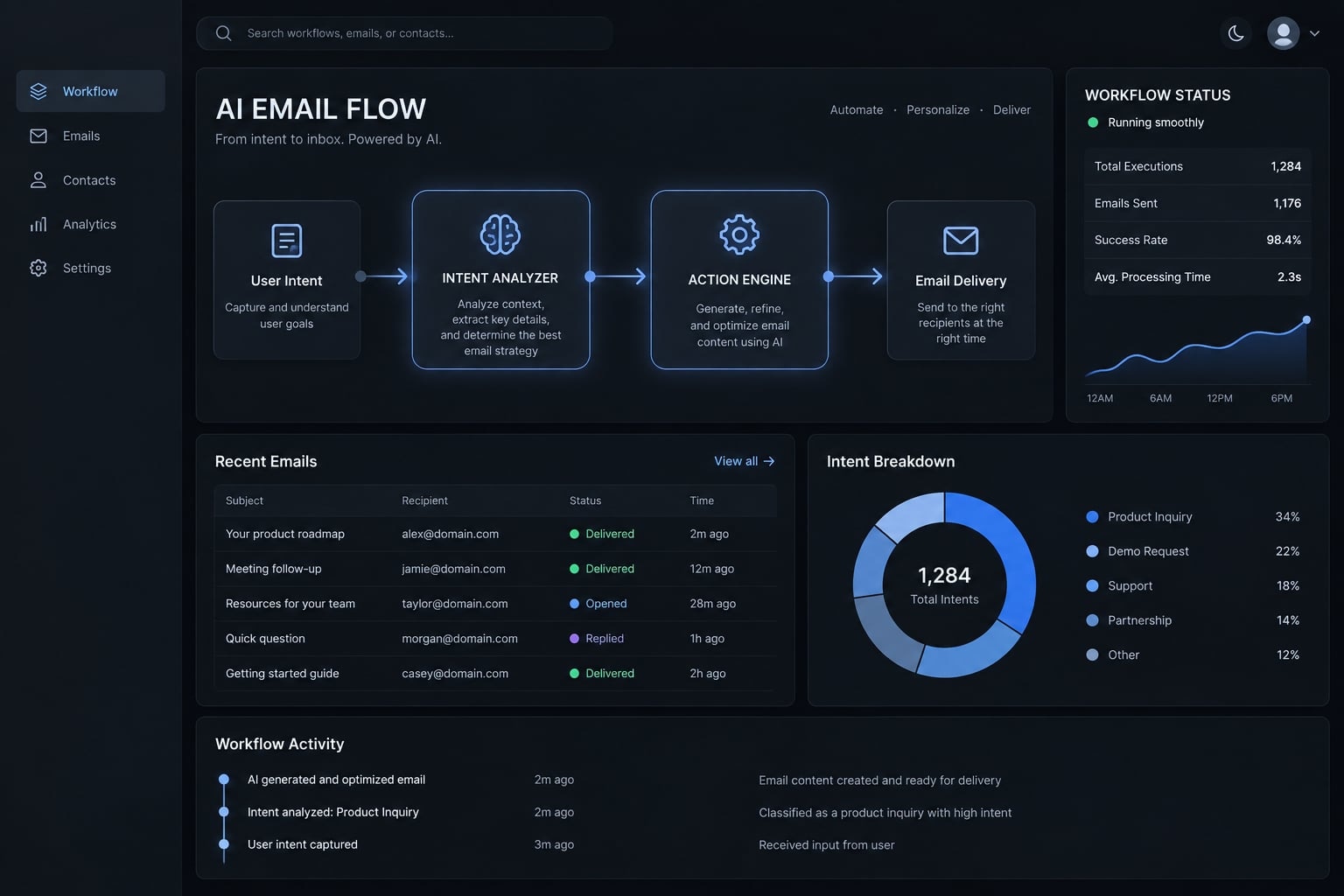
What does “vibe coding email” mean?
Vibe coding email is the practice of using natural-language instructions and AI coding assistants to create or modify email-related software. Outputs can include scripts, integrations, workflow configurations, and interfaces. It is a descriptive phrase, not a standardized product category, and generated implementation still requires testing, review, and maintenance.
The term “vibe coding email” is often used flexibly. However, its narrower original usage implies relying heavily on generated code without fully inspecting it. That approach is unsuitable for consequential email operations; the production guidance here requires review.
Generating email copy alone is different. Also, AI used during building does not necessarily remain in the finished workflow: Generated code can execute entirely fixed rules.
Vibe coding vs. no-code email automation
Approach | How it works | Main strength | Main limitation |
|---|---|---|---|
No-code | Configure visual steps and connectors | Accessible coordination | Platform constraints |
Describe requirements; AI generates implementation | Flexible prototyping | Generated logic needs inspection | |
Traditional development | Engineers design and implement software | Explicit architectural control | Requires engineering capacity |
These boundaries overlap. No-code platforms can support custom code and complex logic. Traditional engineering can use AI coding assistants. Reliability depends on controls, not the approach’s label.
Vibe coding vs traditional software development
Architecture, testing, deployment, and maintenance remain necessary regardless of who produces the first implementation. For example, “label incoming messages by customer account” can become a reviewed workflow that matches approved domains and routes uncertain matches for inspection. A plausible label alone does not establish correct account ownership.
What can you build with vibe coding for email?
Start with operational assistance, not delivery authority. An AI email assistant can organize information or prepare drafts while keeping consequential decisions with an accountable owner.
Inbox and productivity workflows
- Classification and summaries: Route demo-related threads to the right owner and summarize outstanding questions.
- Task extraction and suggested replies: Surface promised actions and prepare responses for review.
These workflows can reduce manual triage, but summaries must preserve exceptions, deadlines, and uncertainty.
Marketing and sales workflows
- Requested-demo follow-ups: Prepare contextual drafts and route activity into a CRM (customer relationship management system).
- Campaign quality checks and lifecycle messages: Flag broken personalization or prepare approved onboarding content.
Personalized email outreach still requires lawful contact practices, suppression checks, and appropriate review. Personalization does not establish permission.
Product, support and internal operations
- Support classification and drafts: Identify requests and suggest responses without inventing product commitments.
- Internal reports and product notifications: Summarize activity or trigger predefined messages.
Password resets and security alerts should use deterministic templates and established application logic—not free-form AI decisions.
Email use-case decision matrix
The following ratings are editorial assessments assuming limited scope and appropriate data handling. Human oversight should increase with impact.
Use case | Complexity | Relative risk | Required control |
|---|---|---|---|
Internal reporting | Low–medium | Lower | Recipient and data restrictions |
Inbox classification | Low–medium | Lower | Review uncertain routing |
Follow-up drafting | Medium | Moderate | Current-thread checks; approval |
Support responses | Medium–high | Higher | Approved knowledge; escalation |
Transactional notifications | Medium–high | Higher | Validated events; fixed templates |
Prospecting workflows | High | Higher | Lawful contact; suppression; limits |
Internal distribution does not automatically mean low risk. A summary containing confidential contract terms can expose sensitive information even when sent to colleagues.
How a vibe-coded email workflow works
Workflow orchestration means coordinating the steps and tools in a process. A language model is optional; LLM-based automation uses a large language model for interpretation or generation, not necessarily authorization.
The seven-stage workflow model
- Trigger: A schedule, mailbox event, or CRM event starts the workflow.
- Context retrieval: Collect relevant thread and account information.
- Deterministic validation: Apply explicit, repeatable checks for eligibility, permissions, required fields, and status.
- Decision logic: Select the permitted workflow path.
- AI processing: Classify, summarize, or draft when needed.
- Approval and execution: Validate output, obtain approval, and perform the allowed action.
- Logging and monitoring: Record outcomes and flag failures.
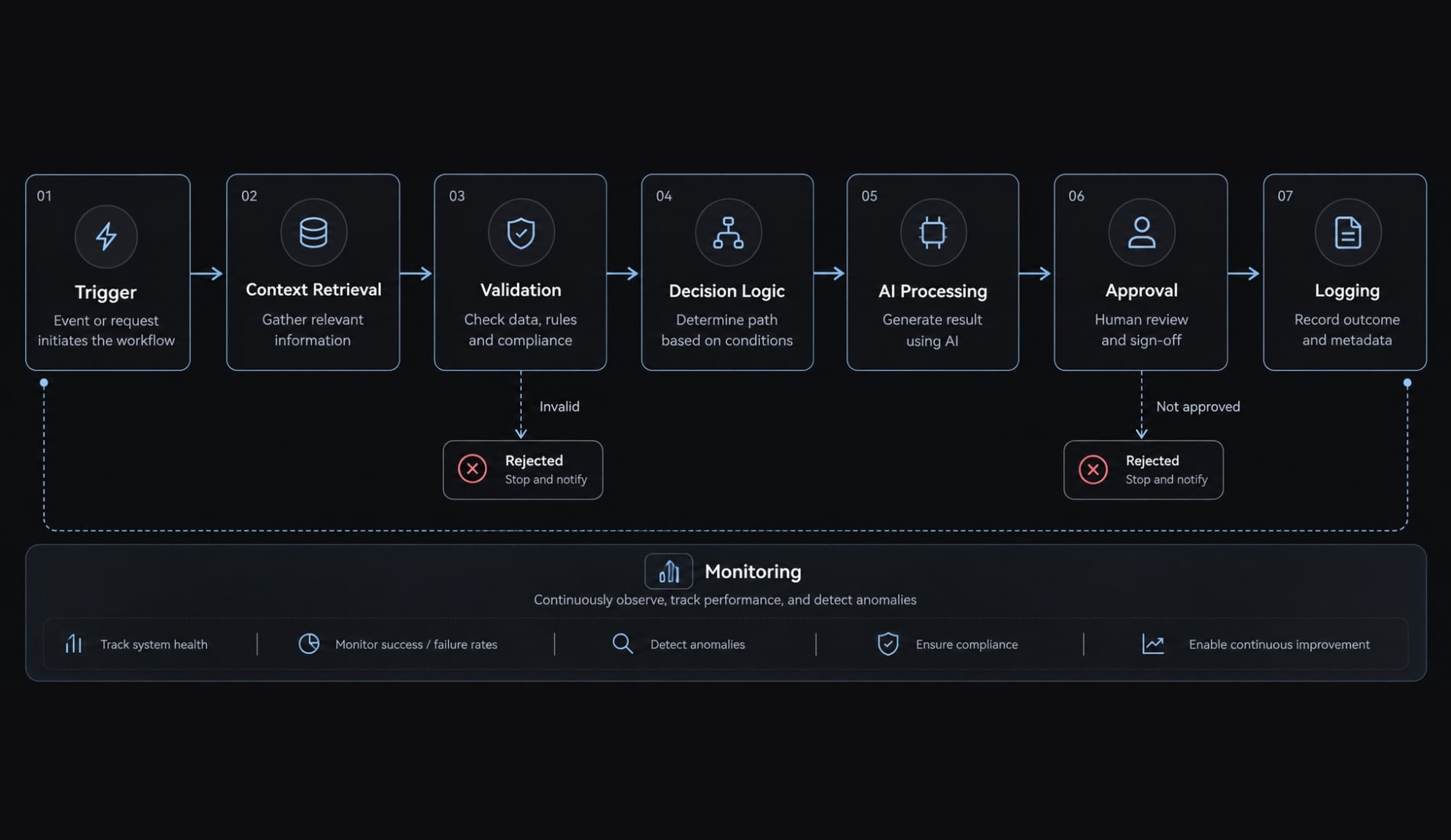
Logging and duplicate prevention operate throughout, before consequential actions. The Gmail API provides mailbox access; an appropriate scheduler or event mechanism initiates follow-ups.
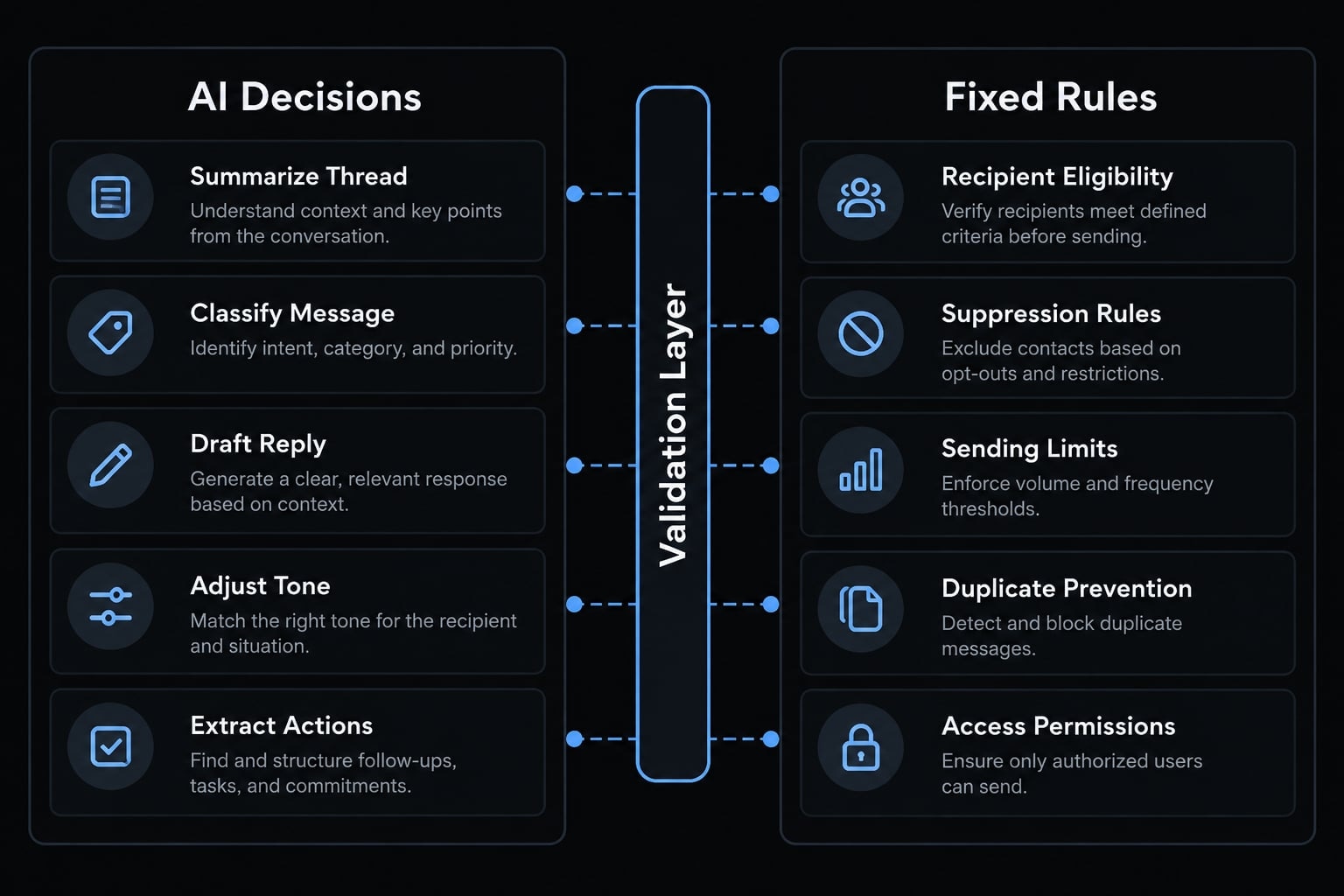
Where AI should-and should not-make decisions
Suitable AI tasks | Controls enforced by fixed rules |
|---|---|
Thread summaries | Recipient eligibility |
Message classification | Suppression and opt-outs |
Draft generation | Sending limits |
Tone adjustment | Duplicate prevention |
Action extraction | Access permissions |
AI-extracted values require validation. Deterministic rules must not depend on a model deciding whether restrictions apply.
Human-in-the-loop approval
Human-in-the-loop means a person reviews or authorizes a consequential step. Require review for new external recipients, complaints, sensitive legal or financial content, and prospecting.
Record the approver, approved content version, and time. Material changes require re-review. Creating a draft is not permission to send it, and model-reported confidence is not a calibrated safety score.
Common tools for building AI-powered email workflows
Choose tools for permissions, maintainability, observability, and ownership-not generation speed alone. Several categories may already exist within your current stack.
The core tool Categories
Category | Role | Examples | Main selection factor |
|---|---|---|---|
Coding assistants | Generate and revise implementation | Claude Code, Cursor, Codex, GitHub Copilot | Reviewable changes |
Orchestration | Coordinate steps | n8n, Make, Zapier | Retries and execution visibility |
Mailbox access / sending | Read mailbox data / submit messages | Gmail API, Microsoft Graph / Resend, Postmark | Permissions and purpose |
Models | Interpret and draft | OpenAI, Anthropic, Google | Quality and data policies |
State storage | Track workflow status | Database; prototype store | Concurrent-action protection |
Templates | Structure email layouts | React Email, MJML | Client testing |
Monitoring | Expose failures | Execution logs and alerts | Actionable notifications |
Google’s Gmail API documentation and Microsoft Graph documentation describe mailbox integration capabilities. Mailbox-access interfaces and sending services are not interchangeable. A spreadsheet should not be assumed to prevent simultaneous duplicate actions reliably.
Choosing between visual automation and code-first tools
Visual tools suit accessible coordination; code-first tools suit custom product logic and reviewable implementation. Both can support testing and versioning, depending on tooling. Hybrid approaches are common.
A note on email template generation
AI-generated HTML needs cross-client testing. Some desktop Outlook versions have rendering limitations. React Email and MJML help structure templates, but neither guarantees compatibility or delivery.
Simple example-Building an AI email follow-up assistant
This illustrative workflow serves a small B2B SaaS team following up after requested product demonstrations. It demonstrates business logic, not a documented deployment.
Define the intended outcome
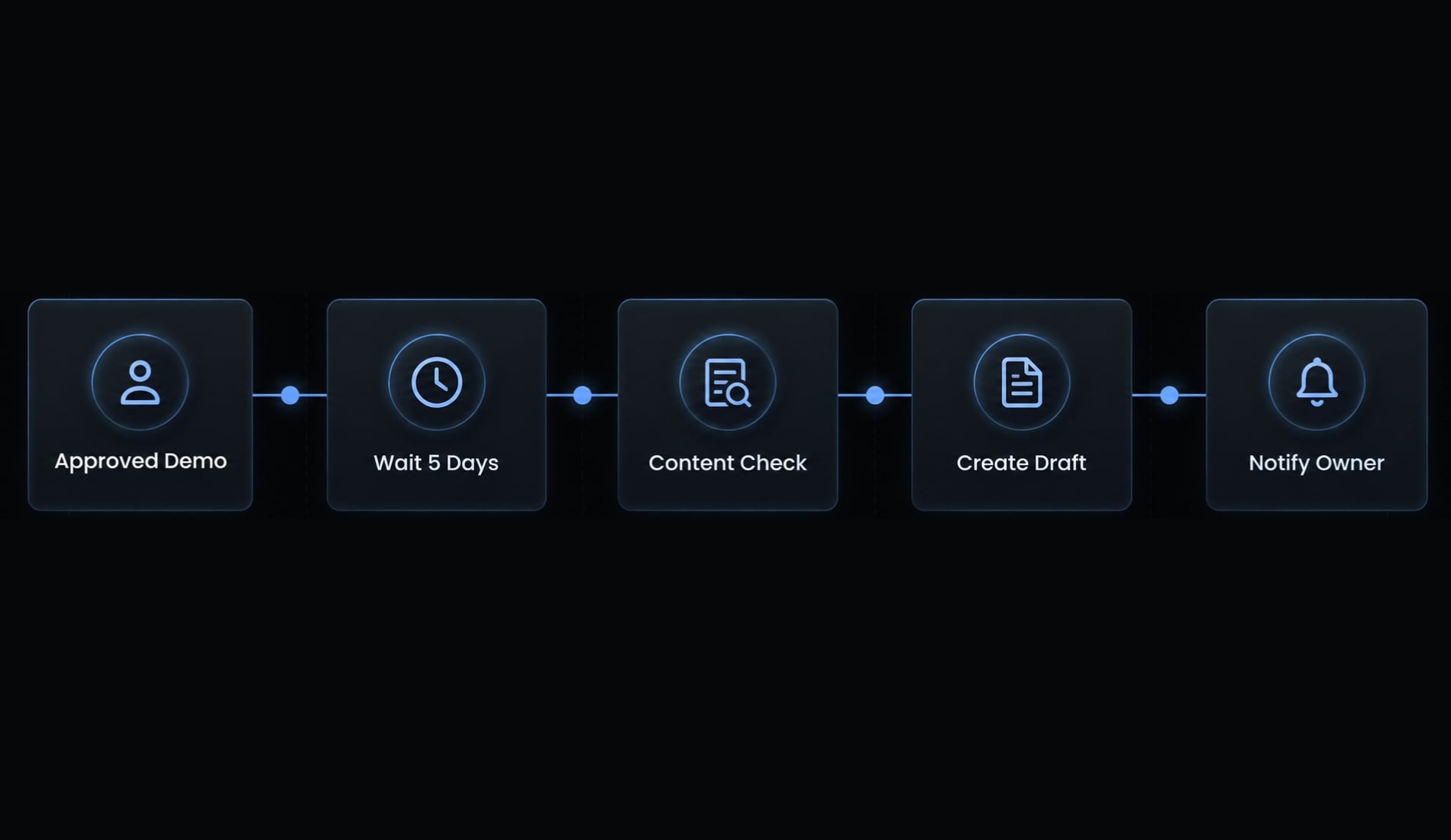
Find eligible sent messages, wait five business days, check current status, prepare one contextual draft, and notify the owner. Five days is an illustrative interval, not an evidence-based optimum. The assistant never sends autonomously.
Build the workflow step by step
- Select an approved sent-message or CRM trigger.
- Confirm the eligible contact and message category.
- Store thread, recipient, timestamp, and workflow status.
- Schedule the agreed waiting interval.
- Retrieve current conversation and contact status.
- Stop for replies, bounces, opt-outs, or manual follow-ups.
- Supply minimal context and approved tone guidance.
- Request structured output: predefined subject, body, and review-flag fields.
- Validate facts and duplicate status; create one draft.
- Notify the reviewer; require fresh checks before manual sending.
- Log the draft and review outcomes the integration can observe.
Required failure checks
Stop and surface an actionable error for:
- Missing or malformed recipient.
- A reply arriving during review.
- Suppression or opt-out status.
- An existing draft or follow-up.
- Unsupported claims or incorrect account context.
- Expired authorization.
- Duplicate events or retries.
Deduplication detects repeated items or actions. Idempotency prevents a repeated event or retry from creating an additional action. Both matter when draft creation succeeds but confirmation fails.
What success should look like
Measure draft acceptance as approved drafts divided by reviewed drafts, alongside review time, duplicate-draft failures, and logged recovery outcomes. Reject polished drafts containing unsupported promises. Do not judge this draft-only pilot by sends or reply-rate uplift.
Risks, limitations and the pre-launch safety checklist
A functioning prototype is no guarantee that a system is ready for production. Human approval helps, but cannot replace validation, restricted permissions, or operational monitoring.
The main risks of vibe-coded email systems
Risk | Consequence | Minimum safeguard |
|---|---|---|
Incorrect content | False commitments | Fact validation and review |
Duplicate execution | Repeated actions | Persistent idempotency controls |
Excessive permissions | Unauthorized mailbox actions | Least-privilege access: only necessary permissions |
Sensitive-data exposure | Confidentiality loss | Minimize context; assess provider policies |
Weak sender authentication | Identity and delivery problems | Validate domain authentication |
Uncontrolled volume | Complaints or suspension | Enforced limits and alerts |
Fragile code or malicious email instructions | Incorrect or unauthorized actions | Engineering review; isolate untrusted input |
Vendor or API dependency | Interrupted workflows | Failure alerts and recovery procedures |
Incoming email is untrusted data, not permission to override rules or retrieve unrelated information. This boundary helps counter prompt injection: malicious instructions embedded in content. Check the actual model product tier’s retention and training policies before supplying customer information.
Ten checks before sending real emails
- Start in draft-only or sandbox mode.
- Test controlled accounts and representative failure cases.
- Restrict API permissions and protect credentials.
- Recheck recipients and conversation state immediately before sending.
- Enforce duplicate prevention and idempotent action handling.
- Apply suppression, opt-out, and applicable consent rules.
- Set provider-aware daily and workflow-level limits.
- Record decisions and approvals with minimal sensitive data.
- Provide an emergency stop and documented recovery path.
- Verify applicable SPF, DKIM, and DMARC configuration; monitor delivery errors and complaints.
Logs need access controls and retention limits-not indefinite storage of message bodies.
SPF identifies authorized sending infrastructure; DKIM provides domain-associated signatures; DMARC checks alignment and specifies handling policies. Google’s Email Sender Guidelines explain relevant sender requirements. Authentication supports identity assurance, not guaranteed email deliverability. Provider acceptance does not guarantee inbox placement.
Preventing AI-generated spam
Lower generation costs do not justify contacting more people. Personalization proves neither relevance nor permission. Require accurate sender identity, lawful contact practices, suppression, and provider-policy compliance.
The FTC’s CAN-SPAM compliance guidance covers US commercial-email obligations; it does not universally require prior opt-in. European requirements also involve national ePrivacy rules alongside GDPR. Obligations vary by jurisdiction and message type.
Prototype vs. production decision table
These review levels are this guide’s governance recommendations, not universal legal requirements.
Environment | Suitable use | Controls | Recommended review level |
|---|---|---|---|
Personal prototype | Controlled experimentation | Test data; no external sends | Builder review |
Internal team | Bounded assistance | Restricted data; monitoring | Technical owner |
Customer-facing production | Validated workflows | Full action and recovery controls | Formal engineering review |
Regulated or mission-critical | Approved sensitive processes | Specialist controls; auditability | Engineering, security, compliance |
When is vibe coding the right approach for email?
Suitability depends on scope, impact, sensitivity, and autonomy-not the builder’s job title. Non-developers can prototype useful workflows, while production responsibilities still require qualified ownership.
Good candidates for vibe coding
- Draft-only assistants and controlled internal summaries with restricted data.
- Processes with clear inputs, outputs, and explicit stop conditions.
- Prototypes that can be disabled without disrupting customers.
A requested-demo follow-up assistant fits when eligibility is documented and manual review remains practical.
Cases that need formal engineering review
- High-volume or autonomous external sending.
- Transactional, security-sensitive, or regulated communication.
- Complex permissions, multiple data sources, or revenue-critical dependencies.
AI-assisted development can continue into production. Engineering review adds discipline across the software development lifecycle; it does not require abandoning AI assistance.
A simple suitability rule
Choose work that is narrow, testable, reversible, and observable. You should be able to describe permitted actions, reproduce failures, stop execution, and inspect outcomes. “Reversible” means restoring workflow state where possible-not undoing delivery. An email already delivered generally cannot be recalled reliably, so sending authority deserves stricter controls than drafting.
If these conditions are missing, reduce the email workflow prototype’s scope before adding features.
From a one-off prompt to a reusable email workflow
Prompt history is not operating documentation. A reusable agent workflow needs stable inputs, enforceable controls, tests, and an owner who understands failure handling.
Standardization checklist
- Version approved prompts, rules, and configuration.
- Separate retrieval, classification, drafting, validation, and delivery.
- Define expected input and output fields.
- Test normal, duplicate, missing-data, and failure scenarios.
- Document permissions, secrets handling, and integrations.
- Separate test and production configuration.
- Maintain change history, rollback, and emergency-stop procedures.
- Assign an owner for monitoring and updates.
A schema is simply an agreed structure for information, including required fields and permitted values. It helps detect malformed output; it does not establish factual accuracy.
Versioned configuration should travel with relevant tests. Recheck behavior after model, connector, permission, or business-rule changes. Rollback restores software or workflow state where possible; it cannot undo delivered messages.
Optional AgentKit implementation path
AgentKit supports reusable agent skills, workflows, and configurations for teams already using coding agents. It offers a way to organize repeatable development and marketing work rather than rebuilding instructions each time. Reusable tooling and security checks do not independently establish deployment safety or compliance; validation remains the team’s responsibility.
Frequently asked questions
What is "vibe coding" for email?
Vibe coding email refers to using natural-language instructions and AI coding assistants to build, orchestrate, and manage email workflows. Rather than manual coding or drag-and-drop design, builders describe their operational intent to agents, which then generate structured integrations, template components, and logical workflow configurations.
Is "vibe coding" email automation just asking AI to write emails?
No. While AI can draft content, vibe coding focuses on building the entire underlying workflow, including triggers, data retrieval, logical routing, and draft management. It is a development approach for creating automated systems, not just a tool for generating individual email messages.
Can vibe coding automatically handle all my email marketing?
No. Vibe coding helps build the infrastructure, but production email requires strict governance. You must implement fixed rules for suppression, duplicate prevention, and human-in-the-loop approvals. AI-generated workflows should never send sensitive or outbound marketing emails autonomously without rigorous validation and testing.
What risks should I consider before using vibe-coded email workflows?
Key risks include incorrect content generation, accidental duplicate execution, exposure of sensitive data, and potential spam violations. You must implement deterministic safeguards, such as strict permission checks, suppression lists, and manual review steps, to ensure the system operates safely within your specific business context.
How does "vibe coding" differ from traditional email development?
Traditional development requires manual coding and infrastructure management, whereas vibe coding uses AI to assist in creating components and orchestration. Regardless of the building method, both require engineering discipline, rigorous testing, secure authentication (SPF/DKIM/DMARC), and ongoing maintenance to ensure operational stability and reliable delivery.
What is the safest way to start a vibe-coded email project?
Begin with a draft-only workflow. Focus on internal tasks, such as inbox classification or generating follow-up drafts for human review. This approach allows you to validate the workflow's logic, test failure handling, and confirm that the automation behaves as intended before authorizing any external or automated sending actions.
Do I need to be a developer to use these email workflows?
While vibe coding makes building more accessible, it does not remove the need for operational responsibility. If you are not a developer, you must ensure that a technical owner audits the generated code, handles security configurations, manages access permissions, and monitors the system for failures to ensure it remains production-safe.
Read more:
- Vibe coding jobs: How to land AI-assisted developer roles
- Vibe coding vs. no-code: Which approach is right for you?
- Vibe coding product spec: Build faster with AI clarity
Conclusion
Vibe coding email makes it possible to translate plain-language requirements into email tools and integrations. Its most useful starting points are narrow: Inbox classification, controlled summaries, or a requested-demo follow-up assistant that creates drafts without sending them.
The essential distinction is between generating implementation and proving that implementation behaves correctly. Fixed safeguards, current-state checks, human approval, and accountable ownership remain necessary. Production systems also require continuing monitoring as tools, permissions, and business conditions change.
Start with the follow-up example and apply the ten-check safety list above. Define eligible recipients, permitted data, approval ownership, and stop conditions before connecting the workflow to real customer conversations.