Vibe coding admin dashboard: A practical build guide
Building an effective vibe coding admin dashboard leverages iterative prompts and AI-generated code to turn operational requirements into functional internal tools. Because administrative interfaces rely on highly repeatable patterns—like tables, filters, and forms—they are ideal for AI-assisted development. However, building a polished interface does not equal production readiness. In this controlled workflow, AI agents handle implementation while human engineers rigorously review data handling, security permissions, and error scenarios before release.
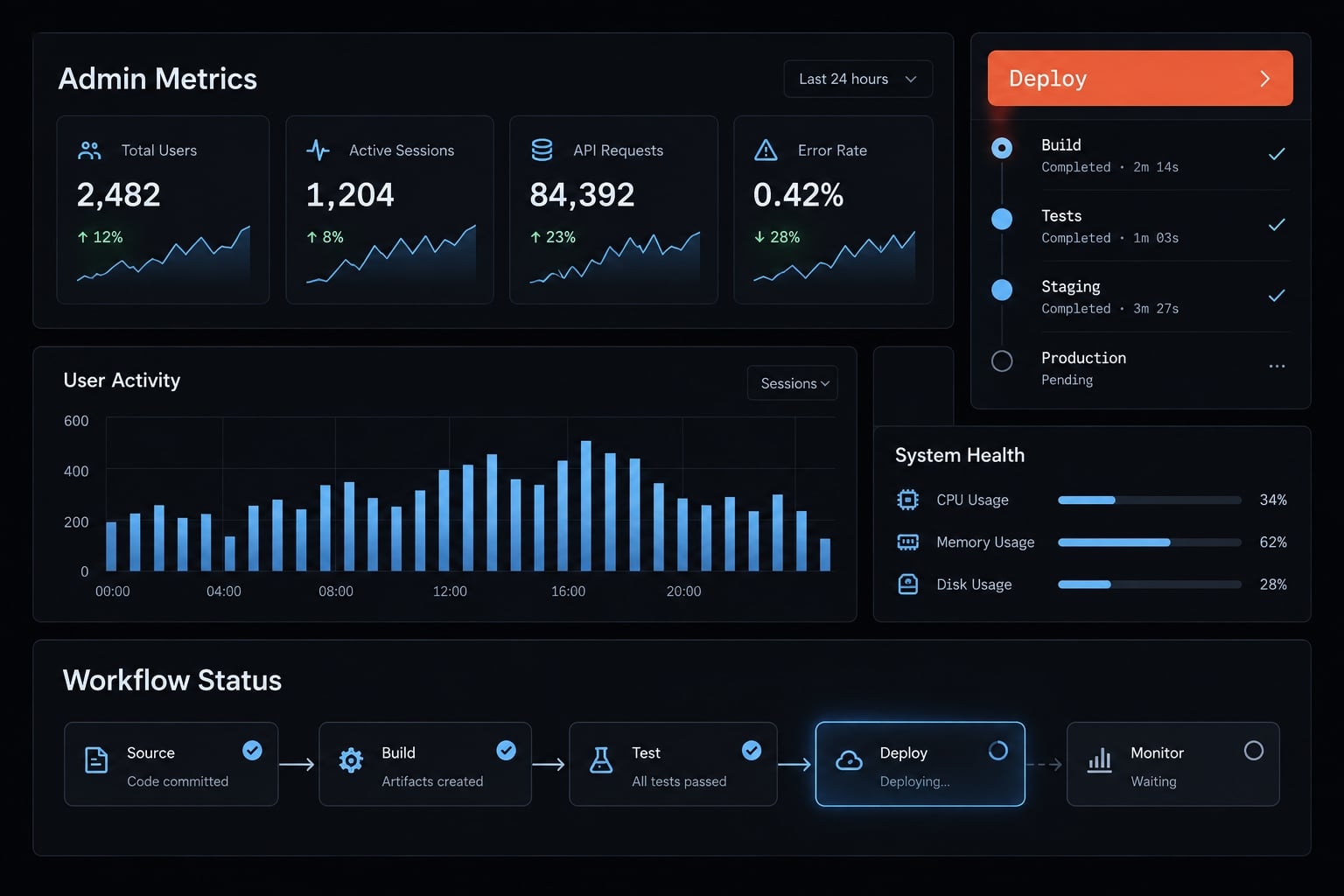
What is a vibe-coded admin dashboard?
A vibe-coded admin dashboard uses prompt-driven development to turn operational requirements into reviewable application changes. The builder describes behavior; an AI coding agent proposes or generates the implementation.
Here, “vibe coding” means controlled, prompt-led work. Broader usage sometimes means accepting generated code without close inspection. That is not the method recommended here.
Our example supports three capabilities:
- A support administrator can search for SaaS user accounts within an authorized organization.
- A viewer inspects permitted records without changing them.
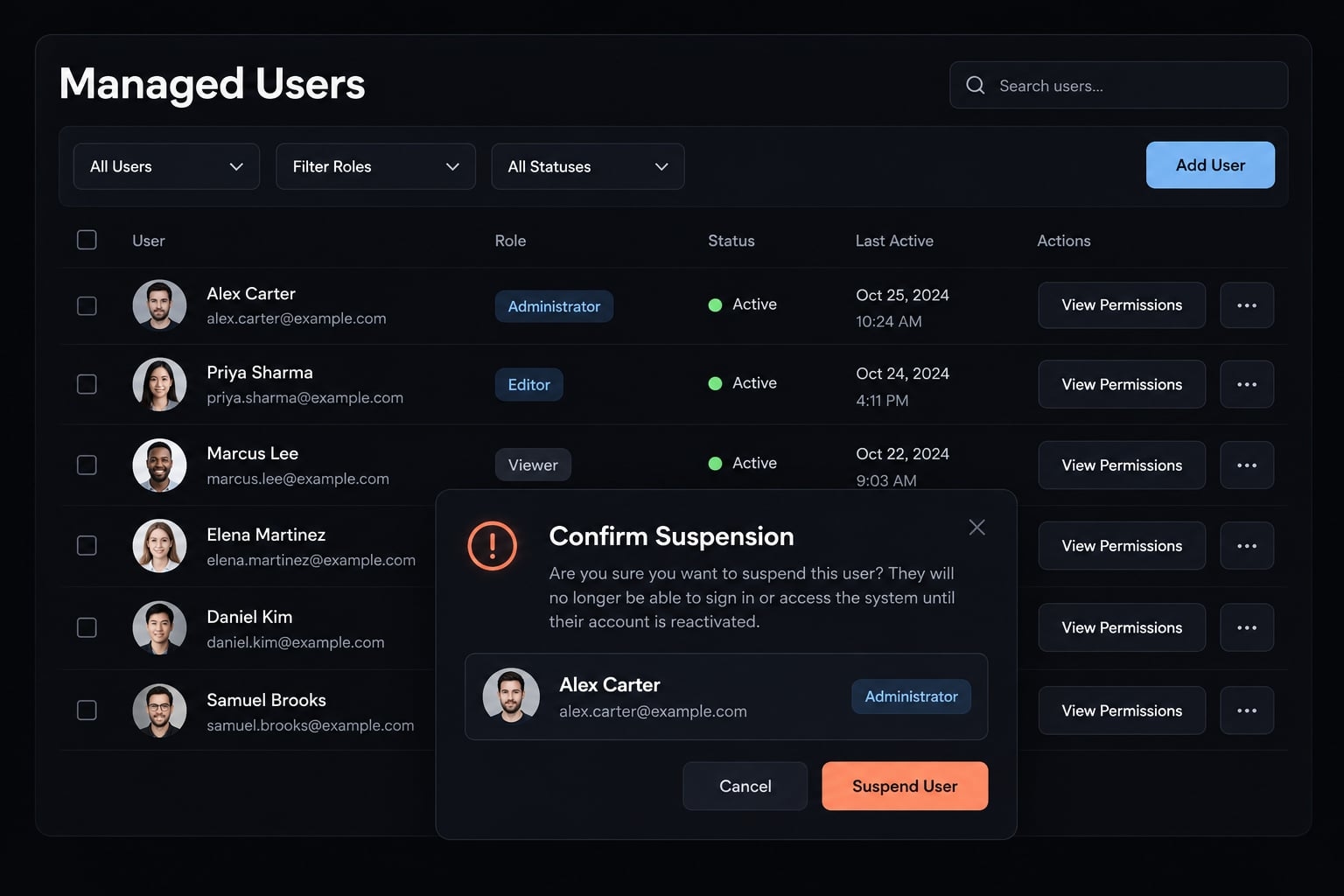
- A support administrator suspends or reactivates eligible accounts, with server authorization and an audit event.
The operator’s role determines dashboard permissions. The managed user’s role describes the account being inspected. Filtering accounts by role must never change the operator’s authority.
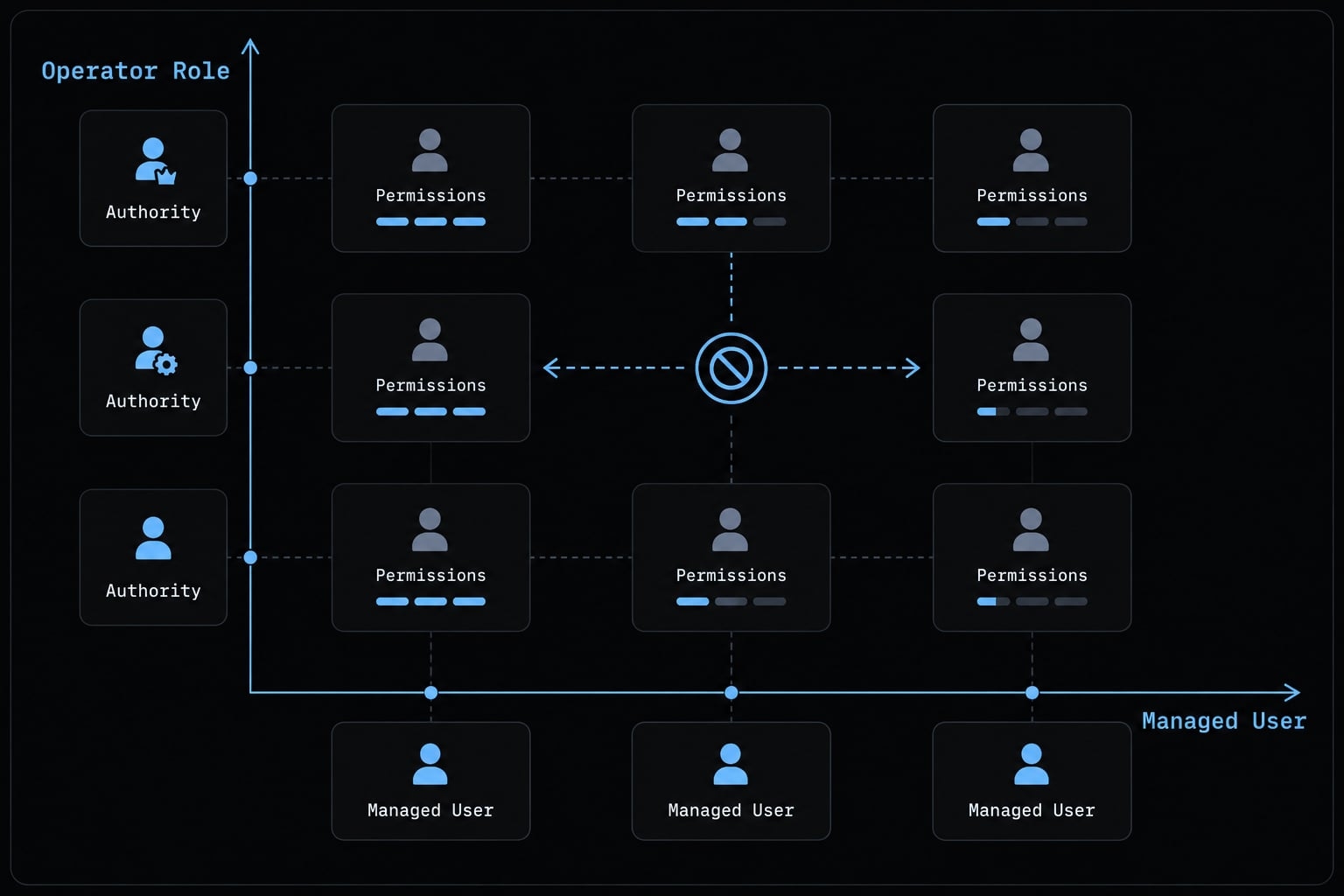
Eligibility also needs an explicit rule. For this walkthrough, only ordinary, non-protected accounts can change status; administrator accounts remain excluded.
AI-assisted dashboard generation changes implementation mechanics, not operating requirements. Data access, failure handling, and accountable actions still need deliberate design. Role changes, permanent deletion, and bulk actions remain outside this walkthrough.
Vibe coding vs. Traditional dashboard development: Both approaches can be iterative and support complex applications. The difference is how implementation work is produced and reviewed. Dashboard development methods compared
Dimension | AI-assisted development | Traditional development |
|---|---|---|
Starting point | Requirements plus repository-aware prompts | Requirements plus implementation design |
Initial code | Agent generates proposed changes | Developer writes or adapts code |
Iteration | Prompts, execution, inspection, tests | Edits, execution, inspection, tests |
Suitable conditions | Clear scope and capable review ownership | Engineering capacity and maintainable patterns |
Main quality risk | Accepting plausible but incorrect output | Implementation mistakes and review gaps |
Combine AI-generated scaffolding with conventional engineering controls—no implementation method relieves you of responsibility for the resulting software.
Plan the dashboard before writing the first prompt
Define five inputs first: Users, entities, permitted actions, data sources, and risks. These establish who can do what, against which records, and under which conditions.
A generic “build an admin dashboard” request leaves those decisions unspecified. The agent might generate unrestricted edit buttons or invent schema fields. Visual completeness can conceal missing operational rules.
Create a one-page requirements matrix
Use this requirements matrix as the starting scope. CRUD means create, read, update, and delete operations; this dashboard intentionally implements only selected reads and updates.
Admin dashboard requirements for account support
Requirement | Initial scope |
|---|---|
Primary operator | Support administrator; viewer has read-only access |
Business objective | Resolve account-status requests without manual database edits |
Data entity | SaaS user account within authorized tenant scope |
Required fields | Existing account identifier, approved display fields, managed-user role, status, organization |
Read actions | Search, filter, paginate, inspect account details |
Write actions | Suspend or reactivate eligible accounts with a reason |
Restricted actions | No role changes, permanent deletion, bulk actions, or protected-account mutations |
Data source | Existing authenticated service; seeded staging records initially |
Interface states | Loading, empty, denied, validation error, server error, success |
Audit requirement | Record privileged attempts and outcomes using necessary information only |
Map these conceptual fields to the actual schema before implementation. Do not ask the agent to manufacture missing columns.
Audit logging records who attempted or performed an important action, against which record, and with what result. It differs from debugging logs.
Start with one operational workflow
Choose an operational workflow using frequency, business value, and risk. User-account support is our example; alternatives include subscription support, feature-flag management, and failed integration monitoring.
Start with frequent, bounded work rather than the most powerful administrative action. Measure manual database interventions per support ticket or support-resolution time before and after rollout.
Mark exports, charts, and bulk operations as future work. Copy the matrix, assign an owner to unresolved rules, and approve it before generating code.
Choose the right stack and starting point
Reuse the existing product stack by default. Established authentication, API conventions, and deployment practices usually reduce integration uncertainty more than adopting a fashionable framework.
React or Next.js can support the interface, and Tailwind CSS can support styling. PostgreSQL or Supabase may fit the data layer. These are examples, not a mandatory combined stack.
Choose based on workflow complexity, available engineering capacity, and who will maintain the tool. A dashboard that only one contractor understands creates a support dependency.
Custom code, admin framework, or internal-tool platform?
Starting-point trade-offs for an account-support dashboard
Approach | Best fit | Main advantage | Main trade-off |
|---|---|---|---|
Custom code | Unusual workflows and product integration | Direct control over behavior | More implementation ownership |
Admin framework | Conventional CRUD operations | Reusable resource and form patterns | Complex exceptions may resist conventions |
Internal-tool platform | Connector-heavy operational tools | Integrated building and deployment options | Verify permissions, portability, and pricing |
Broader low-code solution | Simpler operations-owned processes | Less custom implementation | Advanced behavior may require extensions |
Internal-tool platforms and low-code solutions overlap. Compare actual capabilities rather than category labels. Verify record-level permissions, audit access, environment separation, and deployment controls individually.
Minimum starter criteria
Treat every admin dashboard template as third-party application code. Check:
- Compatibility with existing authentication.
- Accessible components and responsive layouts.
- Clear interface, server, and data boundaries.
- Server-only secrets handling.
- Working tests, linting, and applicable type checks.
- Maintained dependencies and suitable licensing.
- No committed credentials or unsafe demo defaults.
Login support does not establish authorization. Likewise, a maintained template can still require substantial adaptation for tenant isolation.
For Next.js, consult its official authentication guidance when locating server checks. For Supabase, review its Row Level Security and API-key documentation. Database-enforced policies can support client access, but privileged keys must never enter browser code.
Build the admin dashboard with a controlled vibe-coding workflow
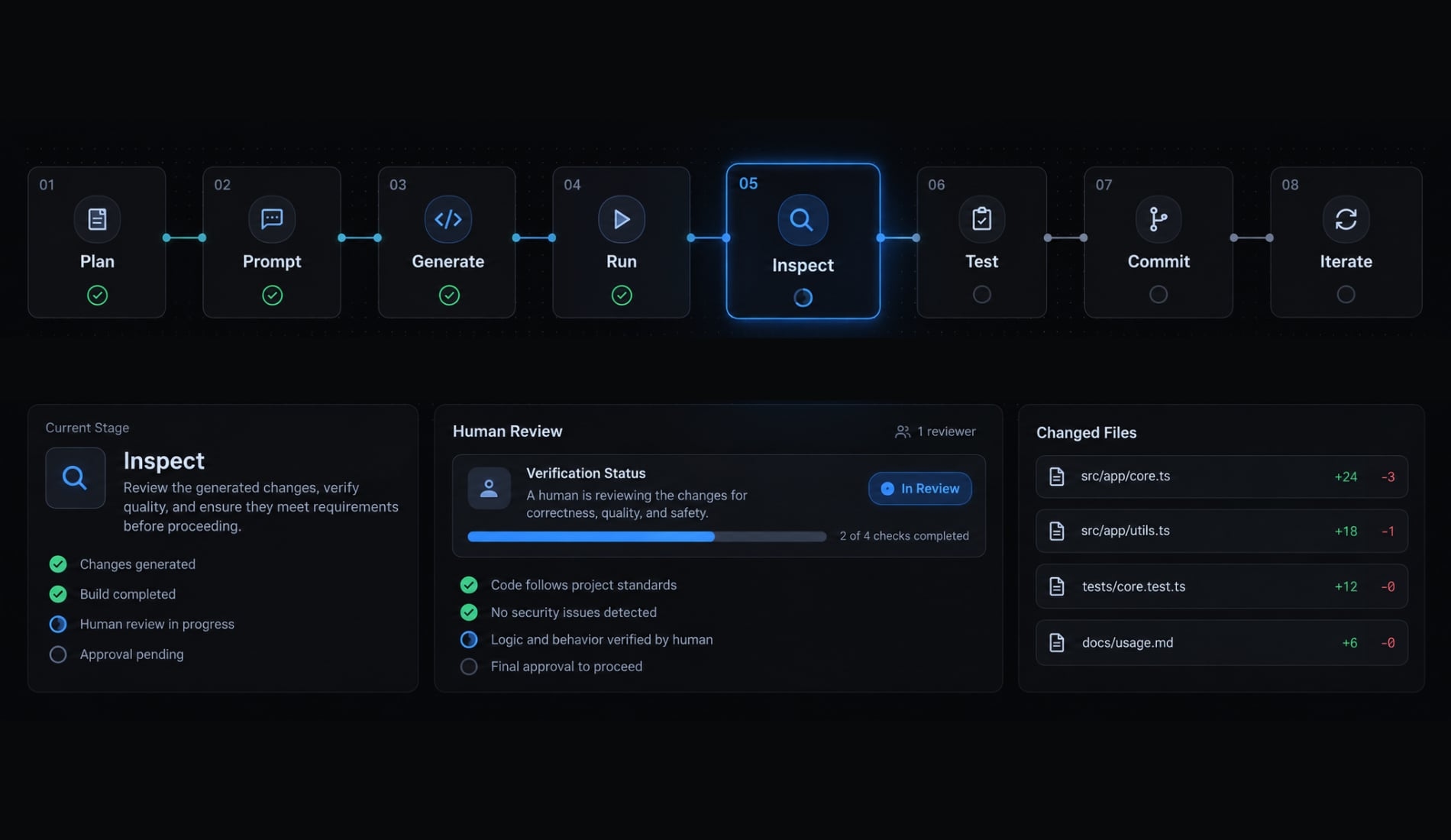
Plan → Prompt → Generate → Run → Inspect → Test → Commit → Iterate
- Plan one workflow and its permission boundaries.
- Prompt with repository context and constraints.
- Generate a small change.
- Run it against approved test data.
- Inspect behavior and affected files.
- Test permitted, denied, and failed requests.
- Commit only after human review.
- Iterate on the next acceptance criterion.
Step 1 - Give the agent repository and business context
A repository-aware tool such as Claude Code can start by inspecting the application. Adapt this dashboard prompt to your project:
Inspect the framework, authentication, APIs, data-access layer, and test conventions. Plan an account-support dashboard using existing patterns. Identify affected files, assumptions, permission risks, and unresolved questions. Do not invent schema or API behavior. Request approval before dependencies or structural changes. Return a plan before editing; do not modify files until approved.
Compare the proposed plan with the repository, not just the agent’s explanation. It should name actual authentication helpers, route conventions, and relevant tests.
Completion checks: The plan references existing patterns; no files changed before approval.
Do not provide production credentials or unnecessary customer records as repository context.
Step 2 - Scaffold the dashboard Shell
Build navigation and layout before adding account mutations.
Create the approved dashboard shell using existing components: navigation, responsive layout, Users route, loading and error boundaries, semantic landmarks, and visible keyboard focus. Reuse authentication. Show operator identity and logout only through working integrations. Use synthetic placeholders; do not connect production data or add decorative charts.
Inspect focus order, narrow-screen behavior, and whether placeholder routes clearly communicate unfinished functionality. Reuse shared components rather than duplicating forms or navigation logic.
Completion checks: Keyboard navigation works; the shell exposes no production data.
Step 3 - Build one end-to-end workflow
Use seeded records behind a staging or mock service boundary. Introduce authorization before any functional write endpoint exists. Server-side authorization means checking permissions where requests are processed, rather than only in the interface.
Implement account search, managed-user role/status filters, existing-API pagination, details, and eligible suspension/reactivation against seeded data. Viewers remain read-only. Enforce operator permissions and tenant scope server-side, and audit privileged actions. Add confirmation plus loading, empty, denied, validation-error, and server-error states. Test unauthorized mutations directly, outside the interface.
Existing page-based pagination may be sufficient. Cursor-based pagination can suit large or changing datasets; it is not a required rewrite.
Completion checks: Search, filters, and details work; direct viewer mutation requests fail.
Step 4 - Connect real data through a controlled server layer
“Real data” first means the real integration path, not immediate access to live customer records.
- Supply actual schema definitions or interfaces.
- Reuse the authenticated server API or data-access layer.
- Start with restricted staging reads.
- Validate input types and values; parameterize queries.
- Enforce operator role and record scope.
- Keep privileged secrets server-only.
- Enable integrated writes after relevant tests pass.
For this tutorial, privileged actions pass through the existing trusted server layer. API integration must preserve its permission rules.
Completion checks: Allowed records load; unauthorized and cross-tenant requests fail; browser bundles contain no privileged credentials.
Step 5 - Iterate with narrow, testable prompts
Improve one behavior without regenerating the application.
Refine account suspension only. Require a reason, server-side permission and eligibility checks, explicit confirmation, and an audit event. Keep displayed status consistent with the server result. Define safe behavior for mutation or audit-recording failure. Test permitted, denied, successful, and failed requests. Report changed files, tests run, and anything not tested.
Inspect failure handling carefully. A timed-out request may have succeeded server-side; reconcile account state before retrying. Avoid duplicate status changes or misleading success messages.
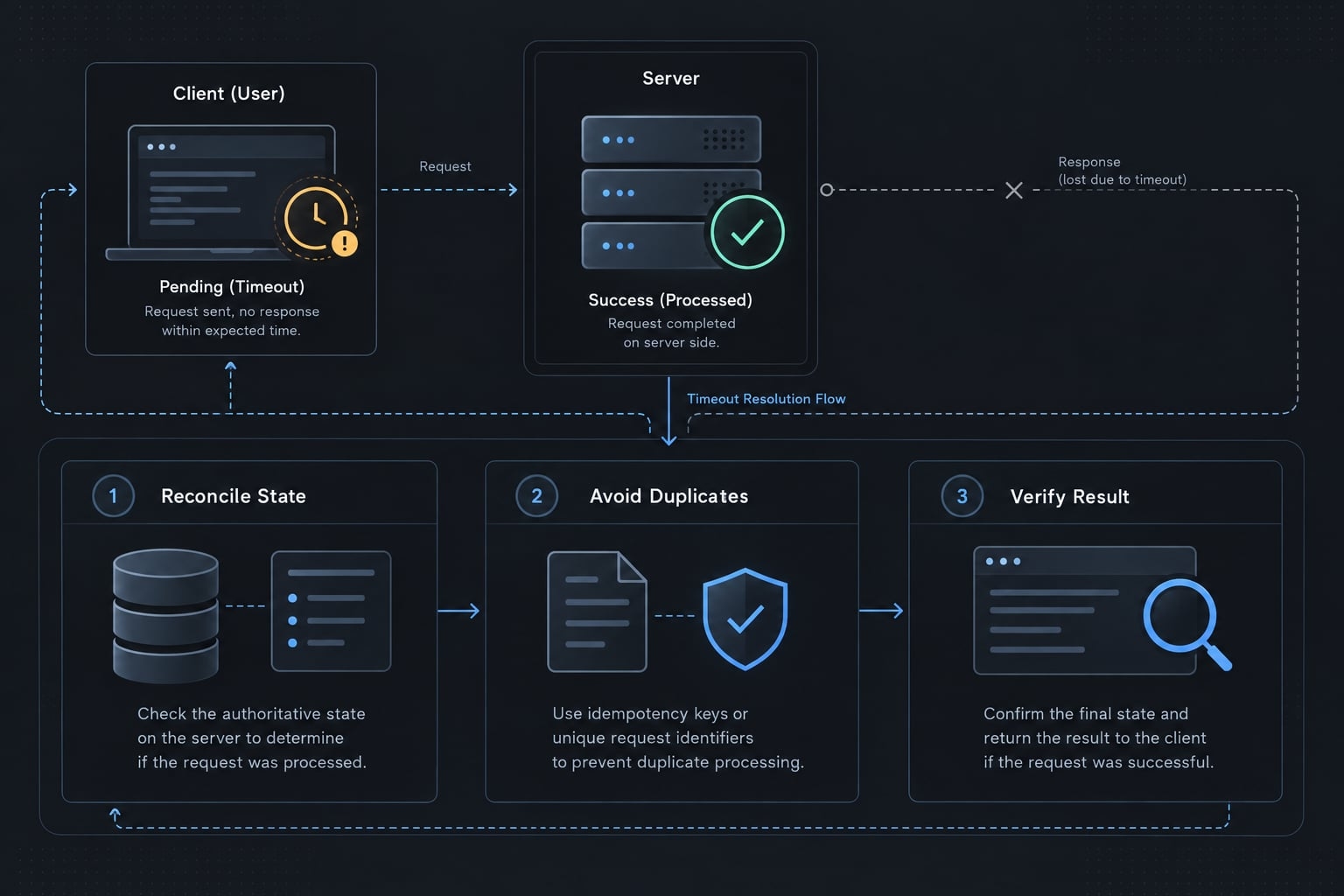
Completion checks: Only intended behavior changed; relevant tests pass before human diff review and commit.
Narrow, testable prompts make regressions easier to locate. Repeat the same loop for reactivation rather than assuming suspension tests cover both actions.
Secure and test the dashboard before production
“Hiding a button in the UI is not authorization.”
Authentication establishes identity. Authorization determines permitted actions. Record scope restricts which accounts an operator can access. Role-Based Access Control (RBAC) assigns permissions according to the operator’s role; it does not automatically grant access across tenants.
Illustrative failure mode: A viewer cannot see Suspend but can call its endpoint. The mistake is interface-only enforcement. Correct it with server-side role and scope checks, plus a direct denied-request regression test.
Minimum security checklist
- Require authentication, appropriate sessions, and consider multifactor authentication for privileged operators.
- Enforce server-side authorization on sensitive requests.
- Apply least-privilege roles and tenant/record restrictions.
- Test database policies, including Row-Level Security where applicable.
- Validate inputs; escape output for its rendering context.
- Parameterize database queries.
- Apply risk-based rate limits.
- Confirm consequential actions; keep deletion and bulk operations disabled.
- Protect audit records: Actor, target, action, timestamp, reason, outcome.
- Keep secrets server-only and outside source control.
- Separate development, staging, and production environments.
- Test denied API requests; protect cookie-authenticated mutations against cross-site request forgery.
- Review private-route indexing hygiene; indexing directives are not access controls.
Production-readiness ladder
Controls are cumulative. Beta means limited rollout, not weaker safeguards.
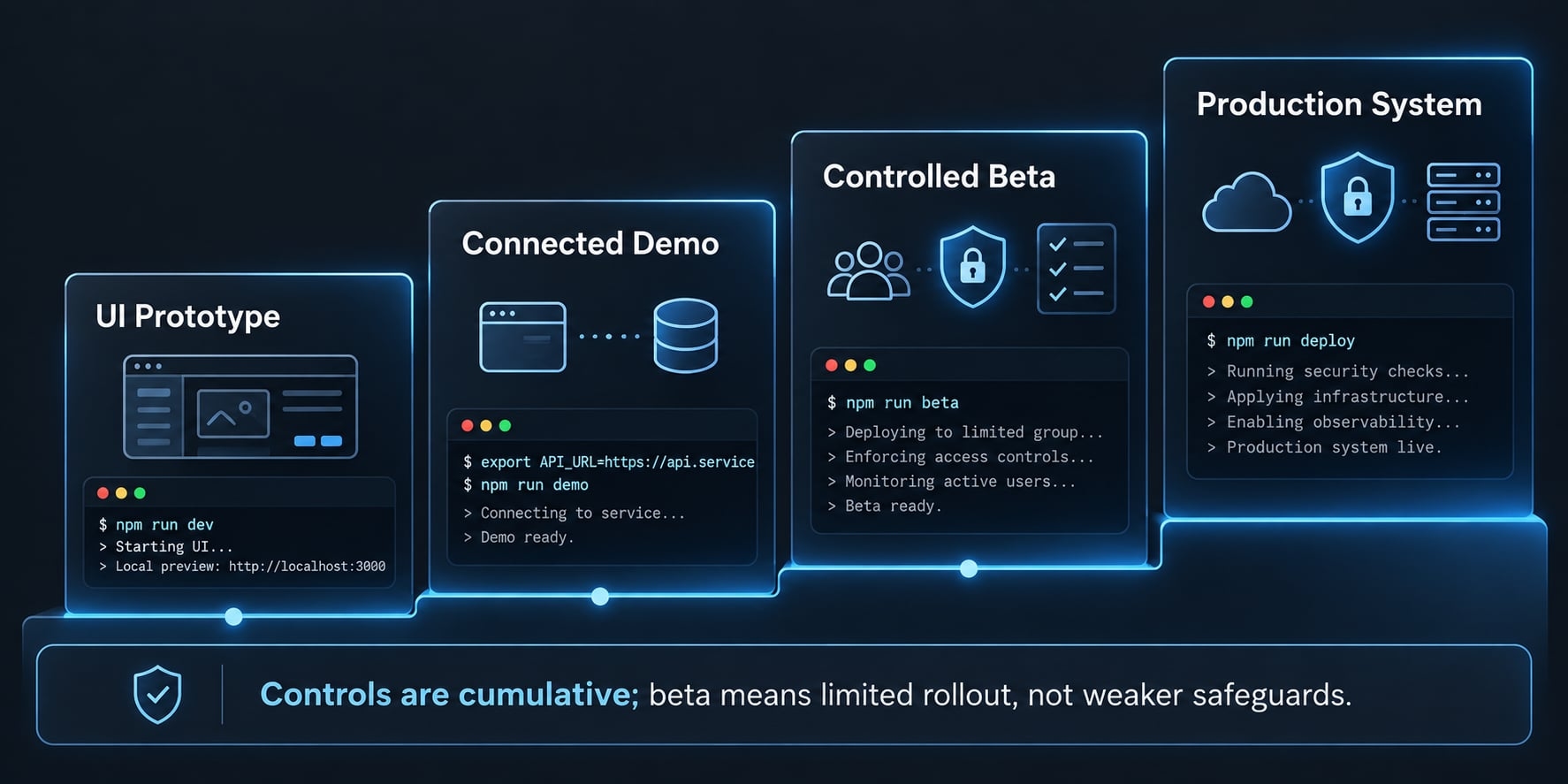
Cumulative dashboard release controls
Stage | Data | Required controls | Release boundary |
|---|---|---|---|
UI prototype | Mock records | No sensitive access | Interaction review only |
Connected demo | Seeded or sanitized | Authentication and authorization when exposed | Restricted integration testing |
Controlled beta | Approved live data, if needed | Production-grade access controls; restricted operators and actions | Named rollout owner |
Production system | Approved operational data | Reviewed controls, regression tests, monitoring, backups | Recovery owner and rollback plan |
Rollback planning must cover data changes and migrations, not just application code. A code rollback does not reverse an account suspension.
Definition of done for every generated feature
- Acceptance criteria met.
- Relevant interface states verified.
- Authorized and unauthorized requests tested.
- Inputs validated server-side.
- Privileged actions audited.
- Keyboard access and labels checked.
- Linting, type checks, and relevant tests pass.
- Human reviews the diff.
- Deployment and recovery behavior understood.
Turn one-off prompts into a reusable dashboard workflow
Version the decisions, not just the generated code. Isolated chats can lose tenant restrictions, eligibility rules, and earlier architectural choices. Keep these reusable assets alongside the project:
- Requirements worksheet defining the operational outcome.
- Repository instructions identifying approved patterns.
- Component conventions for consistent interfaces.
- Permission matrix separating operators from managed users.
- Prompt templates with scope and approval boundaries.
- Test plan covering allowed, denied, and failed requests.
- Security checklist matched to the deployment.
- Definition of done applied to every feature.
For account support, the permission matrix should explicitly prohibit viewer mutations and cross-tenant access. Future prompts should reference those rules rather than depend on conversation memory.
A repeatable agent-assisted delivery loop:Requirements → Implementation Plan → Feature Generation → Automated Tests → Security Review → Human Approval → Commit → Deployment
Planning establishes scope. Implementation produces bounded changes. Testing checks observable behavior. Review evaluates whether the changes preserve the intended controls.
A small team can run this reusable agent workflow with one agent and explicit review gates. Specialized subagents are optional. Multiple agents reviewing each other do not provide independent security assurance.
Require approval before adding dependencies, running migrations, granting production access, or deploying. Preserve sanitized prompts, plans, and test summaries without retaining secrets or customer data.
Each handoff should state what changed, what evidence supports it, what was not tested, and who owns remaining risks. Reopen approval when scope changes.
AgentKit is an optional way to organize reusable skills, specialized subagents, workflows, and review steps. These coordination tools support the process; they do not replace engineering ownership.
Frequently asked questions
What is a "vibe-coded" admin dashboard?
A vibe-coded admin dashboard is an internal tool built using conversational AI agents to generate code based on natural language prompts. It emphasizes rapid iteration—prompting, inspecting, testing, and refining—while requiring human developers to define the scope, enforce security controls, and review the final output.
What should I define before prompting an AI to build a dashboard?
Before writing prompts, you should create a requirements matrix that outlines your operators' roles, the specific data entities being managed, permitted versus prohibited actions, the data source schema, and necessary audit logging. Defining these boundaries prevents the AI from generating vague, unsecure, or bloated interfaces.
Is an AI-generated admin dashboard safe for production?
Not automatically. AI-generated code is scaffolding, not a security certification. To make it production-ready, you must manually implement server-side authorization (RBAC), Row-Level Security, input validation, and audit trails. Never rely on the AI to handle sensitive credentials or define your organizational permission structure without your explicit, reviewed configuration.
What tech stack works best for AI-assisted dashboard generation?
The stack your team already runs and maintains. Existing authentication, API conventions, and deployment practices reduce integration uncertainty more than adopting an unfamiliar framework — and maintainability depends on who will support the tool afterwards.
How do I prevent the AI from creating security vulnerabilities?
Instructions help, but verification is what prevents them. Test denied requests directly against the API, outside the interface: a viewer must be rejected server-side even when the button is hidden. Keep privileged secrets server-only, parameterize queries, and add a regression test for each denied path.
Can I reuse my dashboard prompts for future projects?
Yes, but you should treat prompts as versioned assets rather than one-off chat messages. Organize your successful prompt templates, permission matrixes, security checklists, and "definition of done" criteria into a reusable workflow. This ensures that every dashboard you build maintains the same high standard of security, accessibility, and functional quality.
Read more:
- How to vibe code a CRUD app without losing control
- How to vibe code an AI agent: Build prototypes to production
- Vibe coding product spec: Build faster with AI clarity
Conclusion
To build an admin dashboard with AI, start with one account-support workflow, reuse your existing stack, and make permission boundaries explicit. Give the agent narrow prompts, inspect each change, and test requests directly—not just visible buttons. Keep staging data separate from production, and require server authorization and audit records for privileged actions.
AI can handle repetitive implementation work, but requirements, access decisions, review, and release remain human responsibilities. A useful dashboard is one your team can operate, troubleshoot, and maintain—not merely demonstrate. Copy the included requirements worksheet, security checklist, and definition-of-done template. Combine the repository-context prompt with your approved requirements to create a project-specific master prompt.