How to build a vibe code portfolio: A practical seven-step guide
AI tools can quickly generate polished portfolio shells, but real professional credibility requires verifiable work—not just complex visuals or exaggerated claims. This guide helps creators and career switchers build evidence-backed portfolio websites through a structured process: preparing a brief, choosing a manageable workflow, generating the site in stages, and verifying the published result. Ultimately, the goal is to deliver a clear, usable site that highlights your true contributions and guides visitors toward a seamless next step.
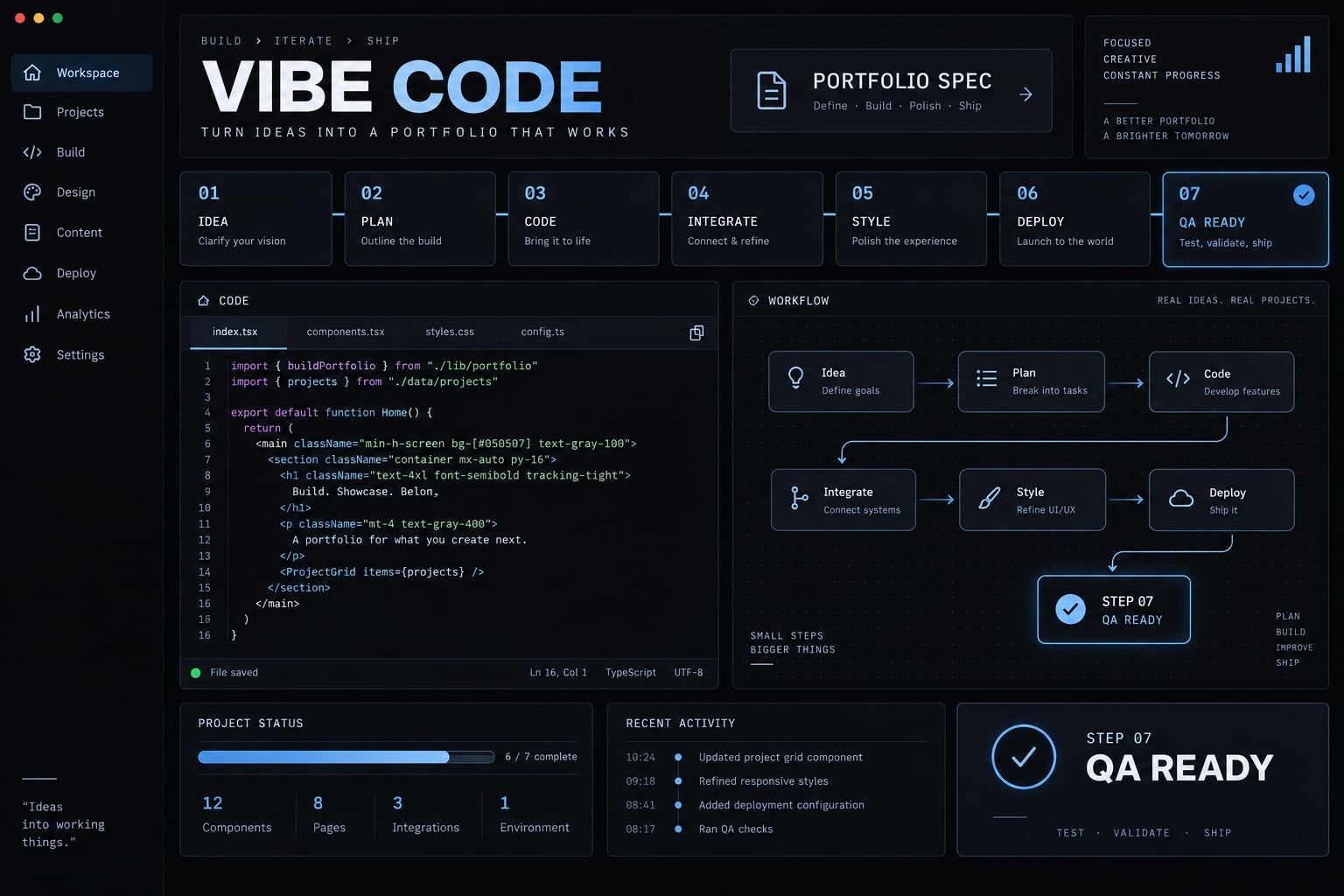
What is a vibe code portfolio and what makes one credible?
A vibe code portfolio is a portfolio website created through natural-language instructions to AI coding tools, which generate and revise its structure, styling, and functionality. In this guide, that process includes human review: You select the evidence, approve changes, test usability, and remain responsible for the published result.
Credibility checklist:
- Clear positioning: Visitors understand your specialty.
- Selected work relevant to your intended audience.
- Accurate descriptions of your personal contribution.
- Evidence supporting project claims.
- Readable presentation across screen sizes.
- Accessible navigation and interaction.
- Working contact options.
- Tested links and published pages.
Where AI helps and where human judgment still matters
AI assistance | Human responsibility |
|---|---|
Structure and component drafts | Audience and project selection |
Layout and styling alternatives | Visual direction and readability |
Copy and metadata drafts | Accuracy and claims |
Test suggestions and implementation fixes | Validation and launch approval |
A generated test plan is not a completed test. Request actual observations, identify anything untested, and inspect important behavior yourself.
When vibe coding is—and is not—the right approach
Suitable:
- You need a customized portfolio with a manageable scope.
- You can review changes and maintain the published website.
Reconsider:
- A résumé page or established template already meets your needs.
- Nobody can maintain the generated project.
- Sensitive data, payments, or account features would require expertise you lack.
You do not need to understand every line before starting. You do need to recognize your review limits and obtain qualified help where necessary.
Prepare your portfolio brief before opening an AI coding tool
Make the portfolio specification your approved reference document. It connects the visitor’s needs to your evidence, design constraints, and definition of a finished website. Before opening an AI coding tool for your vibe code portfolio, gather these nine inputs:
- Primary audience.
- Main visitor action.
- Positioning statement.
- Name, role, biography, and contact details.
- Selected projects and personal responsibilities.
- Screenshots, demonstrations, repositories and permissions.
- Page structure and visual references.
- Required features and technical constraints.
- Acceptance criteria and exclusions.
Audience → Evidence → Brief → AI instructions
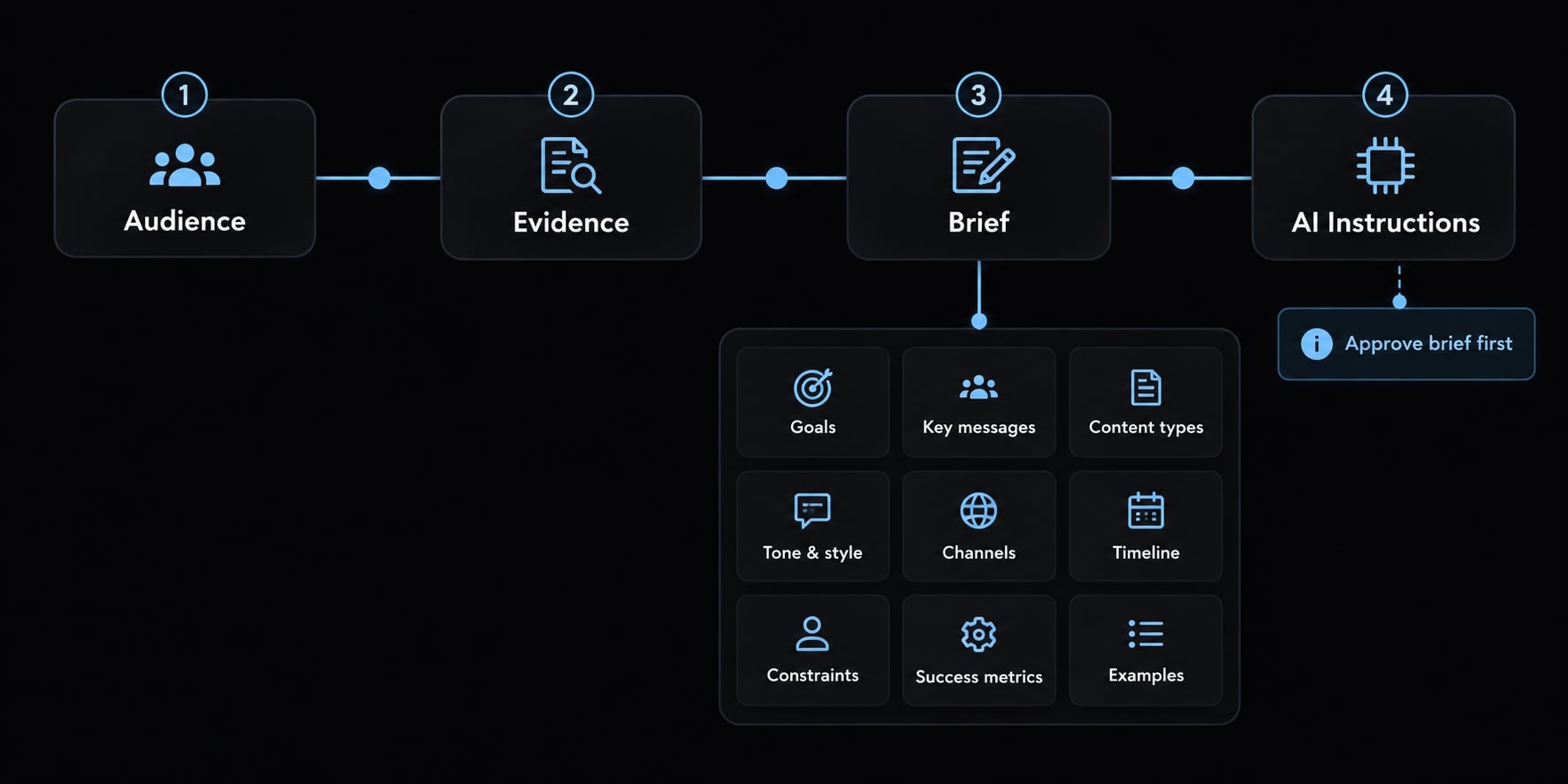
Define the portfolio’s audience and objective
Choose one primary audience and action before designing navigation.
Use this positioning formula:
I help [audience] achieve [outcome] through [specialty or approach].
Throughout this tutorial, the illustrative portfolio belongs to a SaaS designer presenting a self-initiated onboarding redesign.
Their positioning: “I help SaaS product teams make complex workflows easier to understand through interface and interaction design.”
The primary action is contacting the designer. Their most relevant workflow project therefore appears first, with contact access available throughout.
Build a content inventory before designing the interface
Aim for three to five relevant projects if you have them. Two well-documented examples are stronger than five thin descriptions. For each, collect the problem, your role, decisions, result, and supporting evidence. Screenshots, demos, repositories, and approved testimonials can substantiate different claims.
Without client work, use clearly labeled self-initiated projects, open-source contributions, coursework, or demonstration builds. Never present a concept redesign as commissioned work. Obtain permission for client assets and remove confidential details.
Create a copyable PORTFOLIO_SPEC.md
Copy this specification and replace the brackets before generating pages:
1. Objective: [What this portfolio should accomplish]2. Audience: [One primary visitor group]3. Positioning: [Audience + outcome + specialty]4. Primary CTA: [Visitor action and destination]5. Projects: [Approved stories, evidence, permissions]6. Pages: [Necessary pages or sections]7. References: [Examples; qualities to learn from]8. Design constraints: [Typography, color, spacing rules]9. Features: [Required interactions and contact method]10. Accessibility: [Keyboard, focus, contrast, labels]11. Responsiveness: [Phone through wide-desktop behavior]12. SEO: [Page titles, descriptions, indexing intent]13. Technical constraints: [Hosting, editing, dependencies]14. Exclusions: [Features and claims not permitted]15. Definition of done: [Tests and approval required]Decision status: Approved requirements above.Optional ideas: [Not authorized for implementation]
Context persistence means keeping your approved instructions active and available across different AI sessions. A filename alone does not provide it: Attach, paste, reference, or explicitly load the file according to your tool.
Ask the tool to summarize the constraints before work begins. An optional Roadmap.md can track progress and quality assurance without duplicating the specification.
Choose the right AI tool for your skill level and workflow
Choose by how you will edit, debug, publish, and maintain the site—not by the most impressive first preview.
Practical tool selection matrix
User profile | Tool category | Examples | Main advantage | Main limitation |
|---|---|---|---|---|
Beginner seeking a visual start | Browser-based builders | Lovable, Bolt | Integrated generation and previews | Export and hosting arrangements vary |
Designer or marketer refining layouts | Interface-generation tools | v0, Lovable | Visual exploration and revision | Precise behavior still needs testing |
Developer with an existing repository | Repository-aware coding tools | Claude Code, Cursor | Direct work within project files | Requires change and execution review |
Reader needing planning and copy support | Conversational or prototyping workspaces | ChatGPT, Google AI Studio | Brief development and content iteration | Execution capabilities depend on mode |
Advanced user coordinating stages | Configured agent workflows | Claude Code, Cursor | Separate planning, implementation, and review tasks | More permissions and context management |
These are workflow examples, not equivalent product bundles. Capabilities depend on the selected mode, configuration, and plan.
Before committing, consult the official documentation for Lovable, Bolt, v0, Google AI Studio, ChatGPT, Claude Code, or Cursor. Confirm:
- Code export and applicable ownership terms.
- Repository integration and backup options.
- Supported deployment destinations.
- Usage limits and ongoing costs.
- How project instructions reach the tool.
Do not assume a conversational interface can only draft text, or that a browser builder handles every production requirement.
Use one tool or a two-tool workflow?
One tool minimizes setup and context transfer. It is usually the simplest starting point.
Two tools can separate planning and copy from implementation. Transfer approved decisions explicitly; otherwise, conflicting instructions create rework.
A local agent workflow gives more direct repository control but increases responsibility for permissions, commands, and code changes.
A second tool is optional. Add one only when it solves a specific limitation.
How to vibe code a portfolio in seven steps
- Convert the brief into a sitemap.
- Approve visual rules.
- Generate the structural shell.
- Add verified content.
- Correct one problem at a time.
- Add useful interaction.
- Freeze the direction before testing.
Staged prompting means requesting one bounded deliverable, reviewing it, and approving it before starting the next.
Brief → Structure approval → Design approval → Build → Review → Test → Deploy
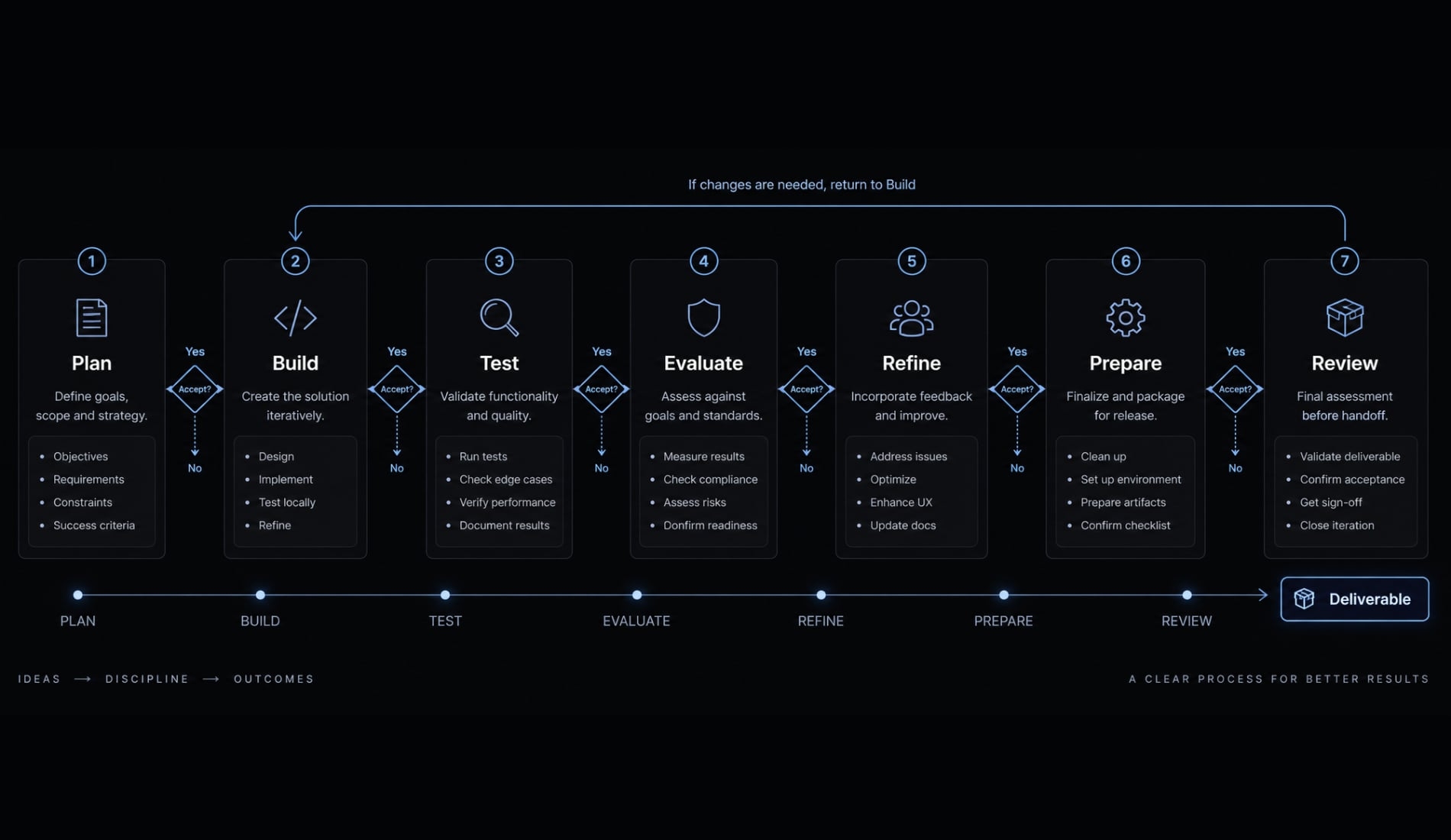
Step 1 - Convert the brief into a sitemap
Ask for two structures before generating code. A sitemap is simply the planned arrangement of pages or sections.
For the SaaS designer, a single page may suffice until project evidence warrants separate case-study pages.
Read the approved PORTFOLIO_SPEC.md. Propose two structures:a single-page version and a minimal multi-page version.Prioritize selected work and the primary visitor action.Explain each section's purpose and flag missing content.Do not generate code yet.
Acceptance gate: Familiar navigation, no empty pages, a clear role, and selected work reachable within one or two actions.
This prevents the AI from constructing unnecessary pages just because a template includes them. Save the approved structure.
Step 2 - Define the visual direction and design constraints
Choose two or three references. Identify specific qualities, such as generous spacing, readable project narratives, or consistent screenshot framing.
Design tokens are reusable rules for color, typography, spacing, and interface states.
Using the approved brief and reference notes, propose reusablerules for typography, colors, spacing, and interaction states.Preserve readable text and sufficient contrast.Do not copy another designer's work.Show a small component preview; wait for approval beforeconstructing full pages.
Acceptance gate: The preview demonstrates coherent headings, body text, buttons, focus states, and project cards.
Gradients, motion, Bento grids, and dark-neon styling are not inherently wrong. They become problems when accepted as defaults unrelated to the work.
Step 3 - Generate the structural Shell
Build navigation, footer, sections or page routes, and reusable project cards. This is frontend scaffolding: The initial structure of pages and components.
Instruct the tool to follow the approved structure, keep decoration minimal, and use explicitly labeled placeholders. It must not invent projects or professional history.
Acceptance gate: The project runs, navigation works, required sections exist, and no blocking errors prevent use.
Inspect the shell before investing in polish. A missing project section is easier to correct now than after detailed styling and animation. Save the approved version.
Step 4 - Add real content and project evidence
Replace placeholders using: Problem → Role → Decision → Result → Evidence
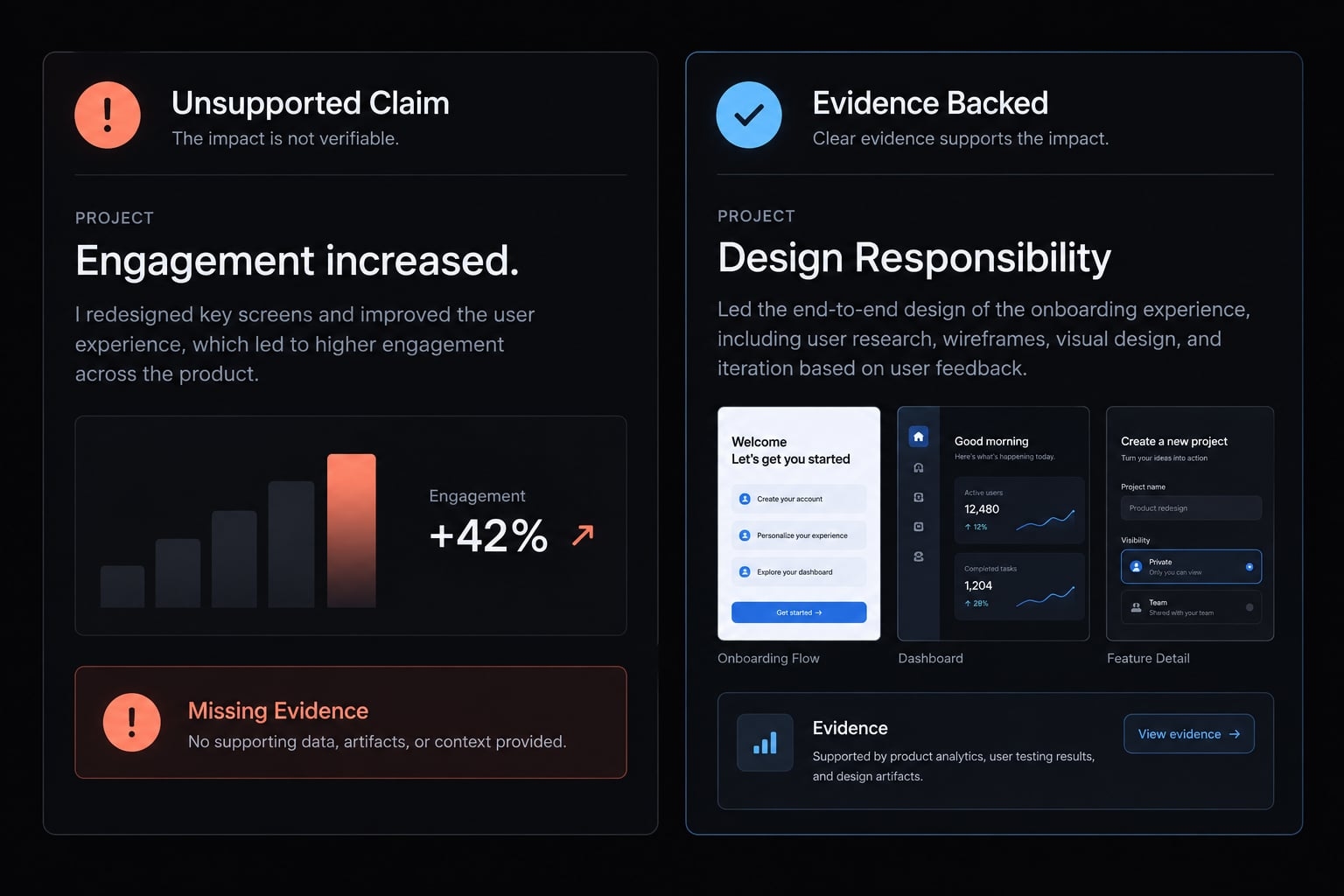
Replace placeholders with the approved content inventory.Preserve factual meaning. Do not invent metrics, clients,responsibilities, or tools. Flag missing proof instead offilling gaps. Keep demonstration projects clearly labeled.List unresolved content questions before finalizing.
- Before: “Created an intuitive experience that increased engagement.”
- After, only if supported: “Designed an onboarding prototype with revised task labels; annotated screens explain the proposed changes.”
The second version names a contribution without claiming an unmeasured business outcome.
- Acceptance gate: No placeholders or unsupported claims remain. Verify project destinations, image permissions, and the distinction between shipped work and concepts.
Step 5 - Refine one component or problem at a time
Use this iterative prompting loop:Identify → Describe expected behavior → Set constraints → Change → Review → Save
Suppose the project grid overflows on a phone. Report the specific behavior instead of asking the tool to “make everything responsive.”
The ProjectGrid overflows horizontally at a 390px viewport.Below 640px, use one column and let cards fit the container.Keep desktop columns, typography, content, and colors unchanged.Modify only the grid and directly responsible child styles.Explain the cause and changes; avoid unrelated refactoring.
The breakpoint is an example, not a universal rule. Choose it based on where the content stops fitting.
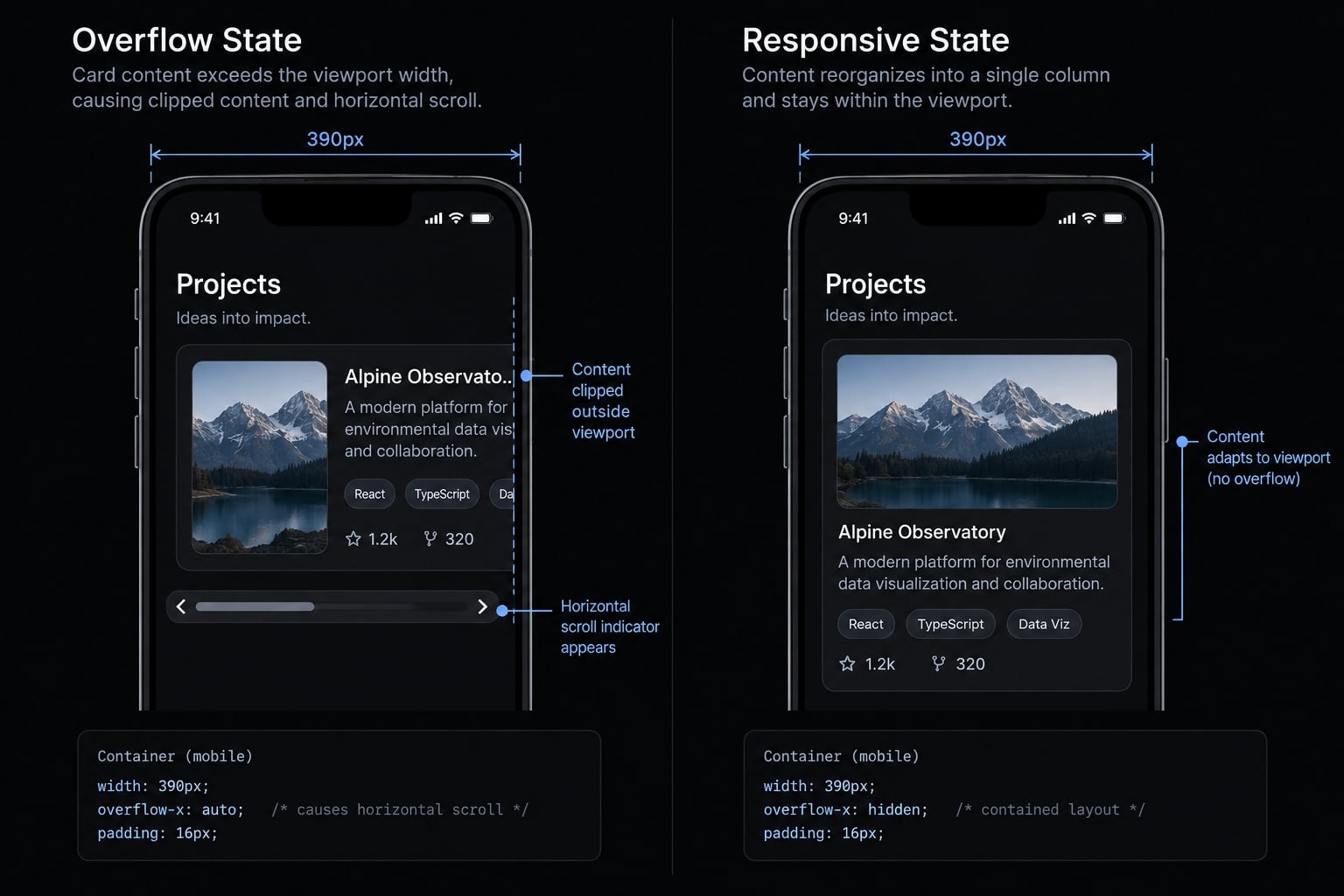
Acceptance gate: Retest the affected width, neighboring widths, and desktop. Confirm the issue is fixed without cropping content or changing unrelated layouts.
The narrower instruction reduces the chance of a local fix becoming an unwanted global redesign.
Step 6 - Add interaction and personality with restraint
Add useful hover states, visible keyboard focus, short transitions, and support for reduced-motion preferences.
For the designer’s portfolio, a clear project-card interaction is more useful than an elaborate entrance sequence.
Instruct the tool to keep essential information visible without hover and avoid motion that blocks reading.
Acceptance gate: Keyboard and touch users can reach every action. Content remains understandable without animation, and movement neither delays access nor obscures project evidence.
Step 7 - Freeze the approved direction before final QA
Record approved rules, completed areas, deferred ideas, known limitations, and the definition of done. Create a stable save point for rollback, meaning restoration of a previously working version.
Restrict quality assurance (QA) changes to identified defects. Require approval for global redesigns, new dependencies, or additional features.
Acceptance gate: The approved version is recoverable and the test scope is documented.
Freezing direction separates “necessary to launch” from “interesting to explore later.” It also makes regressions easier to identify.
Test and deploy the portfolio as a production website
A working preview is not proof of production readiness. Complete this checklist against the website visitors will actually use.
Launch checklist:
- Layout works from small phones to wide desktops.
- Navigation, links, and contact actions work.
- Keyboard access and visible focus are checked.
- Headings, image descriptions, and forms are reviewed.
- Claims, permissions, and project labels are accurate.
- Titles, descriptions, and indexing settings are checked.
- Images and loading behavior are assessed.
- Credentials and unnecessary data collection are absent.
- Domain, HTTPS, and production behavior are verified.
- Recovery steps and maintenance responsibilities are recorded.
Responsive and interaction checks
Try small and large phone widths, a tablet or narrow laptop, standard desktop, and wide desktop. Include a real mobile device when available.
Check menus, touch targets, project cards, images, text wrapping, and horizontal overflow. Visitors should not need sideways scrolling to read a project or hover to discover essential information. Open every contact destination rather than judging it by appearance.
Accessibility and content checks
Navigate by keyboard and confirm visible focus. Review logical headings, descriptive links, and appropriate alternative text; decorative images should not receive redundant descriptions.
Forms need labels, understandable errors, and success messages. Check contrast and reduced-motion behavior.
Use W3C’s WCAG 2.2 as the accessibility reference. Basic checks and automated scanners do not establish full conformance. Verify dates, roles, tools, and claims separately from interface testing.
SEO, performance and analytics checks
Write useful page titles and meta descriptions. Check canonical URLs—the preferred addresses for indexing—alongside indexing settings and social-preview metadata.
Optimize images, reserve their display space, and examine loading behavior. Search verification can help confirm discovery. Analytics is optional; minimize collection and address applicable privacy requirements. Structured data should describe only accurate, applicable information.
Google’s Core Web Vitals documentation distinguishes real-user experience from laboratory testing. A Lighthouse score does not guarantee a Core Web Vitals pass. New or low-traffic portfolios may lack sufficient field data.
Deployment and rollback
- Preserve a recoverable project version.
- Choose compatible hosting.
- Configure the domain and HTTPS where applicable.
- Test the actual production URL.
- Verify forms, links, metadata, and analytics.
- Record and verify the recovery method.
- Schedule checks after changes.
Consult the hosting platform’s official deployment documentation. Restoring source code and restoring the live deployment are related but different actions.
Never expose credentials in browser code or public repositories. Send a real test submission: a working form interface does not prove message delivery. Collect only necessary contact information.
Worked scenario—From a generic AI draft to an intentional portfolio
Status and scope: This is an unexecuted illustrative scenario, not a client case study or measured demonstration. It applies the workflow to the SaaS designer’s self-initiated onboarding project.
The starting instruction—“Build a modern SaaS designer portfolio”—leaves evidence, hierarchy, and mobile behavior unspecified. Suppose the resulting draft contains an unsupported engagement claim, inconsistent project cards, and phone-width overflow.
The corrective process first replaces the broad instruction with the approved specification. It then separates content correction from layout correction rather than requesting another complete website.
Initial issue in the scenario | Intervention | Verification required |
|---|---|---|
Unsupported engagement claim | Replace with documented design responsibility | Compare wording with project evidence |
Project card exceeds phone width | Apply the focused grid instruction | Inspect 390px, nearby widths, and desktop |
Inconsistent project presentation | Apply approved component rules | Compare cards and keyboard states |
The correction process follows this chain: Broad instruction, followed by an identified issue, a narrower instruction, and finally, verification. No final change is verified here because the build has not been executed.
In a real build, record screenshots at matching viewports, changes approved, tests performed, unresolved issues, and implementation versus QA time separately. The reproducible lesson is constraint control—not a claim about faster hiring or higher conversion.
Frequently asked questions
What is a vibe code portfolio?
A vibe code portfolio is a professional website built by leveraging AI-assisted coding tools through natural language interactions. Instead of manual line-by-line programming, creators define design systems, content architecture, and functionality requirements to AI agents, focusing on iterative refinement under human review. Production readiness comes from testing and approval, not from the generation method.
How does vibe coding differ from traditional web development?
Vibe coding prioritizes natural language instructions and agentic workflows to accelerate frontend scaffolding and component creation. Unlike traditional development, which involves manual boilerplate and framework setup, vibe coding relies on AI to handle repetitive implementation, allowing you to focus on audience, evidence selection, and the accuracy of what the site claims.
Do I need to be a developer to build one?
No, but you must possess technical intent and review capabilities. While AI tools lower the barrier to entry for generating interfaces, you are responsible for testing, troubleshooting responsive edge cases, and verifying that the code meets accessibility and performance standards. Human oversight is mandatory for professional results.
Which AI tools are best for building a portfolio?
The best tool depends on your workflow. For visual-first iteration, platforms like Lovable or Bolt are effective for scaffolding. For deep code-base control and repository integration, local agent environments like Claude Code or Cursor are preferred. Choose the simplest stack that meets your specific project’s technical requirements.
How do I ensure my portfolio is "production-ready"?
Production readiness requires thorough manual testing beyond automated scans. You must verify mobile responsiveness across multiple viewports, test keyboard navigation, validate that all forms and links function, and separately verify that project claims, labels, and asset permissions are accurate, that titles and indexing settings are correct, that no credentials are exposed, and that recovery steps and maintenance ownership are recorded. Always maintain a documented rollback strategy to restore the site if a deployment fails.
Is vibe coding suitable for all types of portfolios?
Vibe coding is ideal for portfolios with a manageable, well-defined scope. However, if your project requires complex backend infrastructure, custom data security protocols, or long-term maintenance by a team of engineers, traditional development practices or hybrid workflows may be more appropriate and maintainable than an agent-only approach.
Read more:
- Vibe coded websites: Build fast with AI prompt development
- Vibe coding SEO: Build AI-powered assets without developers
- 7 practical vibe coding examples: Build apps faster with AI
Conclusion
To build a credible portfolio, start with a clear brief, verifiable evidence, and a structure approved before full generation. Maintain control by establishing reusable design rules, making bounded updates, and separating verification from implementation.
Choose a simple, manageable workflow—focusing on a few strong projects and restrained interactions—and never deploy generated features you cannot assess or support. Ultimately, publication is complete only when the production site is fully functional, reliable, and easy to maintain.