Project-aware AI coding: A complete guide and evaluation
Project-aware AI coding: How it works and how to evaluate it
Project-aware AI coding leverages repository context, dependencies, and conventions to guide development rather than solving programming tasks in isolation. This approach prevents common pitfalls, such as generating plausible code like a form field that fails to save data. This guide covers how codebase context is retrieved, demonstrates a multi-file change, and provides a framework for tool evaluation.
What is project-aware AI coding?
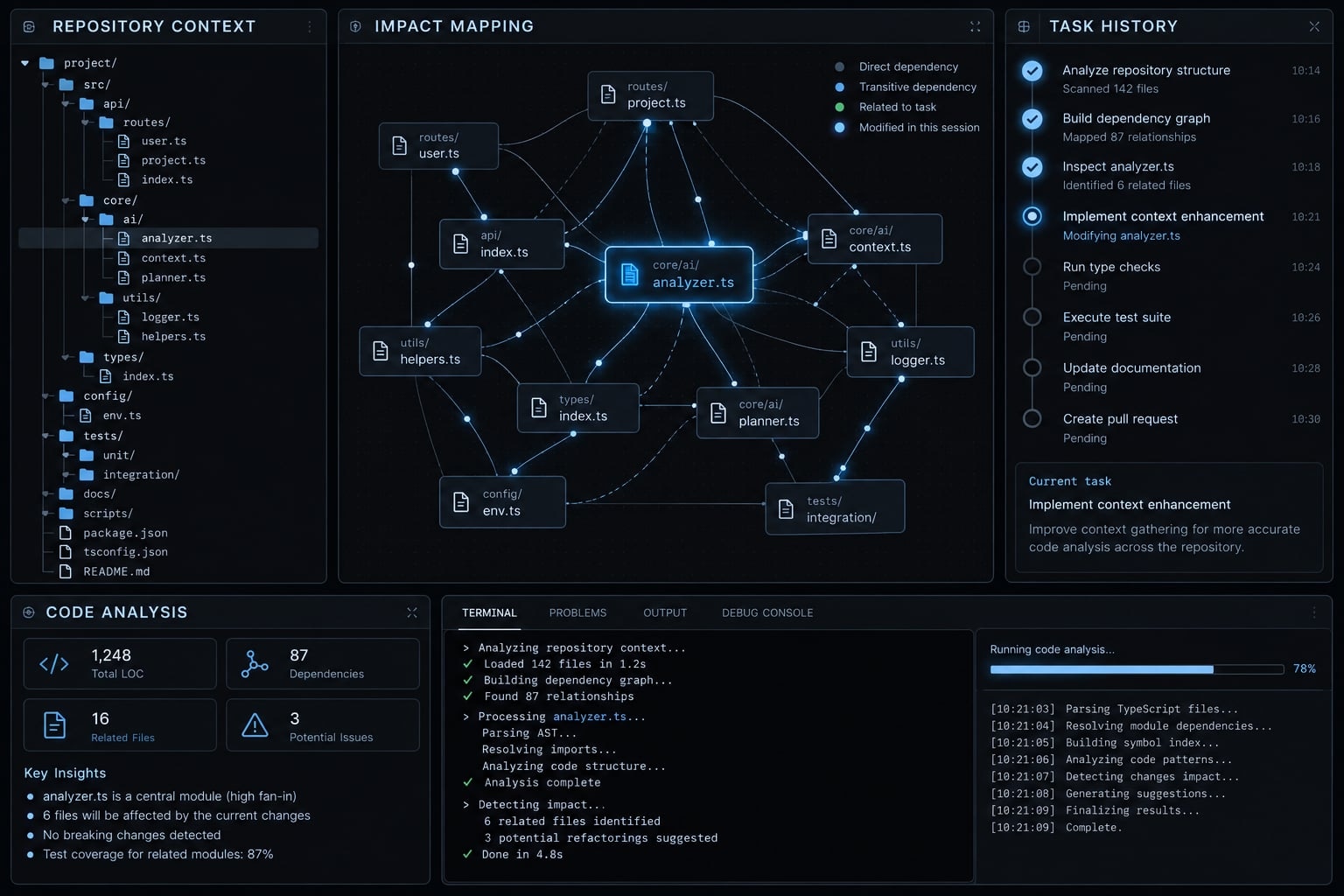
Project-aware AI coding combines general programming knowledge with current project evidence. Knowing how to write an API endpoint differs from knowing which validation rules, shared types, and persistence patterns this repository requires.
Effective codebase awareness goes beyond the active file—it enables the AI assistant to identify existing implementations, locate dependencies, and clarify potential side effects before suggesting changes.
Awareness and autonomy are separate dimensions. A read-only assistant can investigate dependencies and recommend a sound plan. An agent with terminal access can execute commands while still misunderstanding the project.
Project-aware AI coding vs. Conventional AI coding tools
These modes overlap within modern products. The table compares typical workflows, not vendors or fixed capability boundaries. Capabilities vary by tool, mode, configuration, and permissions.
Capability | Autocomplete mode | Chatbot mode | Project-aware agent workflow |
|---|---|---|---|
Local context | Typically nearby code | Attached or retrieved context | Inspected task context |
Wider search | Tool-dependent | Tool-dependent | Commonly supported |
Instructions | Tool-dependent | Prompt or repository rules | Repository rules when supported |
Dependencies | Often implicit | Can investigate references | Can trace cross-file impact |
Planning | Usually implicit | Can propose plans | Can plan ordered work |
Checks | Usually developer-run | Recommends or invokes checks | Runs permitted checks |
Diffs | Inline suggestions | Suggested or applied patches | Reviewable multi-file changes |
Permissions | Host-dependent | Integration-dependent | Needs explicit execution boundaries |
Project-aware is more than project memory
Agent memory (stored instructions, decisions, or prior task information) can preserve naming conventions, accepted designs, and task history. Maintained memory reduces repeated explanation; stale memory can repeat outdated assumptions.
Current awareness additionally requires file inspection, reference tracing, and verification. Remembering a CRM application’s naming convention does not establish which API consumer currently depends on its Customer type.
The six layers of project awareness
This practical six-layer framework is an editorial synthesis, not an industry standard:
- Repository structure.
- Code relationships and dependencies.
- Project rules and conventions.
- Task and decision history.
- Development tools and workflows.
- Permissions and validation controls.
Repository structure
Locate modules, services, configuration, tests, documentation, and generated files. In a customer relationship management application, or CRM, Customer might appear in database schemas, API definitions, and frontend types. A file tree identifies locations—not behavior.
Code relationships and dependencies
Inspect imports, callers, shared types, API contracts, and schema relationships. Blast radius means the files, interfaces, or behaviors a change may affect. Dependency mapping helps estimate it, but external consumers and implicit relationships may remain undiscovered.
Project rules and conventions
Project instructions describe naming, architecture boundaries, approved libraries, test commands, and security expectations. Tool-dependent examples include AGENTS.md and CLAUDE.md.
OpenAI’s Codex documentation, “Custom instructions with AGENTS.md,” and Claude Code’s memory documentation explain their respective mechanisms. These files provide instructions; they are neither model fine-tuning nor guaranteed enforcement.
Task and decision history
Preserve accepted plans, constraints, unresolved questions, and durable decisions. For the CRM feature, record an approved compatibility requirement rather than retaining every speculative chat message. Recheck memory against current code.
Development tools and workflows
Identify Git conventions, package managers, documentation, and checks. MCP (Model Context Protocol, a way to connect AI applications with tools and data sources) can provide additional access. Connectivity does not establish trust or safe execution.
Permissions and validation controls
Apply scoped permissions (limits on what an agent can read, modify, connect to, or execute). Combine sensitive-file restrictions and command approvals with checks and human review. These safeguards govern action; they do not replace contextual understanding.
How project-aware AI coding works
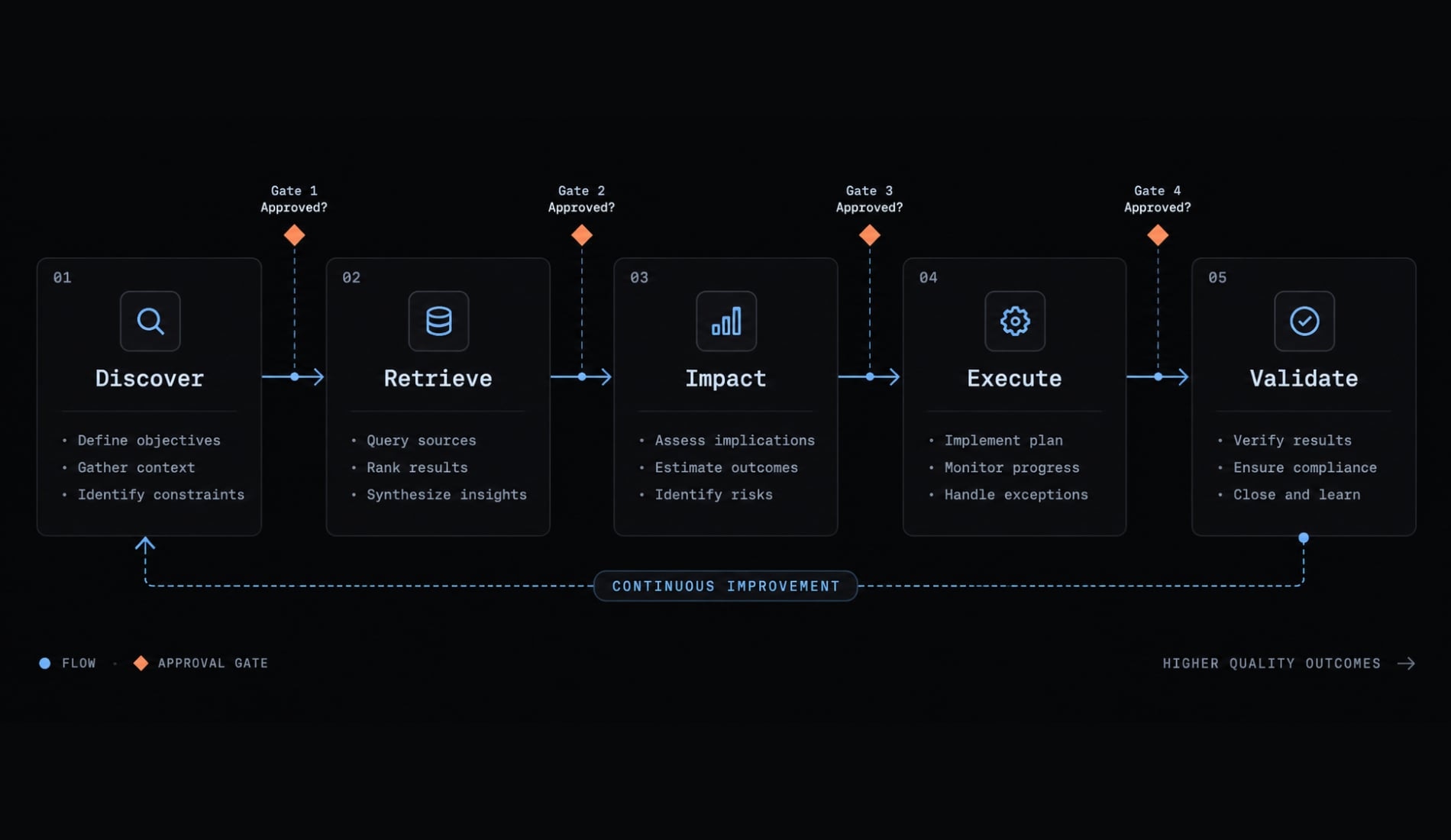
A typical workflow selects and verifies context through five steps:
- Discover the repository.
- Retrieve task-relevant context.
- Map the likely impact.
- Plan and execute reviewable changes.
- Validate and report.
Discover the repository
Inspect directory structure, dependency manifests, project instructions, and current Git state. Identify existing user changes before editing. The initial artifact should summarize the task, relevant project conventions, and boundaries—not assume a clean working directory.
Retrieve task-relevant context
Context retrieval means finding and selecting information relevant to the current task. An assistant might use keyword search, semantic search, or language-server references.
Codebase indexing is one option, not a requirement. Repository search can work without a persistent index. Selective context loading matters more than accumulating files; larger context windows do not guarantee better selection.
Map the likely impact
Trace callers, consumers, tests, schemas, and configuration. Produce an affected-file list that distinguishes confirmed dependencies from uncertain ones. For the CRM change, include both where the preference enters the system and where it is stored.
Plan and execute reviewable changes
Task planning should establish implementation order and approval needs. Preserve existing work, minimize unrelated edits, and expose the resulting diff. When new dependencies emerge, revise the plan rather than quietly expanding scope.
Validate and report
Run permitted checks and distinguish passed, failed, blocked, and unrun results. Identify what each check covers and what remains uncertain.
Test execution may reveal type incompatibilities without validating every business rule. A useful report connects changes to evidence and explicitly preserves human approval.
Practical example: A repository-wide feature Change
Illustrative example—not an executed test: A B2B CRM team requests, “Add a preferred contact method to customer profiles.”
The visible form change is only part of the requirement. Repository context determines whether persistence, API contracts, and other consumers also need updates.
How a context-blind assistant may respond
- Adds a dropdown to the open profile component.
- Updates local state but misses the save endpoint.
- Produces plausible code whose value disappears after reload.
This is an incomplete implementation caused by missing context, not necessarily fabricated code.
How a project-aware agent should approach the task
Before editing, the agent should:
- Inspect schema and migration conventions.
- Identify domain and validation rules.
- Trace API request and response contracts.
- Locate frontend types and form components.
- Follow existing design-system patterns.
- Inspect affected fixtures and tests.
- Review documentation and rollout requirements.
- Present the implementation plan and affected files.
One product decision requires clarification: What should happen when an existing customer has no stored preference? The agent should not silently select email or invent a migration default.
If messaging behavior is included, contact preference does not automatically establish communication consent.
An illustrative affected-file list could look like this:
db/customer-schema — persistence, if neededdb/migrations/... — conditional schema migrationapi/customer-validation — accepted values and null handlingapi/customer-handler — save and return the preferenceshared/customer-types — request/response compatibilityui/customer-profile — display and edit controlstests/customer-profile — persistence and existing-record behavior
These are conceptual paths, not inspected repository files. Actual changes depend on the project.
Expected output
- Implementation plan and affected-file list.
- Reviewable multi-file diff.
- Checks performed and their results.
- Remaining uncertainty or approval needs.
- No unrelated refactoring.
Validation status for this illustration: no checks executed. A real implementation should verify the save-and-reload behavior, not merely that the new dropdown renders.
Benefits, limitations and security risks
Relevant context can improve compatibility, but broader access also increases the consequences of mistakes. Potential benefits depend on context quality and execution controls.
Area | Upside | Risk |
|---|---|---|
Conventions | More consistent changes | Outdated instructions |
Dependencies | More complete implementation | Missed external consumers |
Memory | Less repeated explanation | Stale decisions |
Validation | Earlier defect detection | Weak checks create false confidence |
Tool access | More actionable workflows | Exposure or unintended execution |
Practical benefits
Project context can support clearer plans, better convention alignment, and more complete cross-file work. The useful outcome is easier-to-review implementation—not simply more generated code.
Technical and operational limitations
Indexes, instructions, and memory become stale. Undocumented business rules and conflicting guidance remain difficult to resolve. Large repositories can increase retrieval cost and latency.
Context bloat occurs when irrelevant information crowds out useful context. Passing automated checks still does not prove complete product, security, or architectural correctness.
Security and governance risks
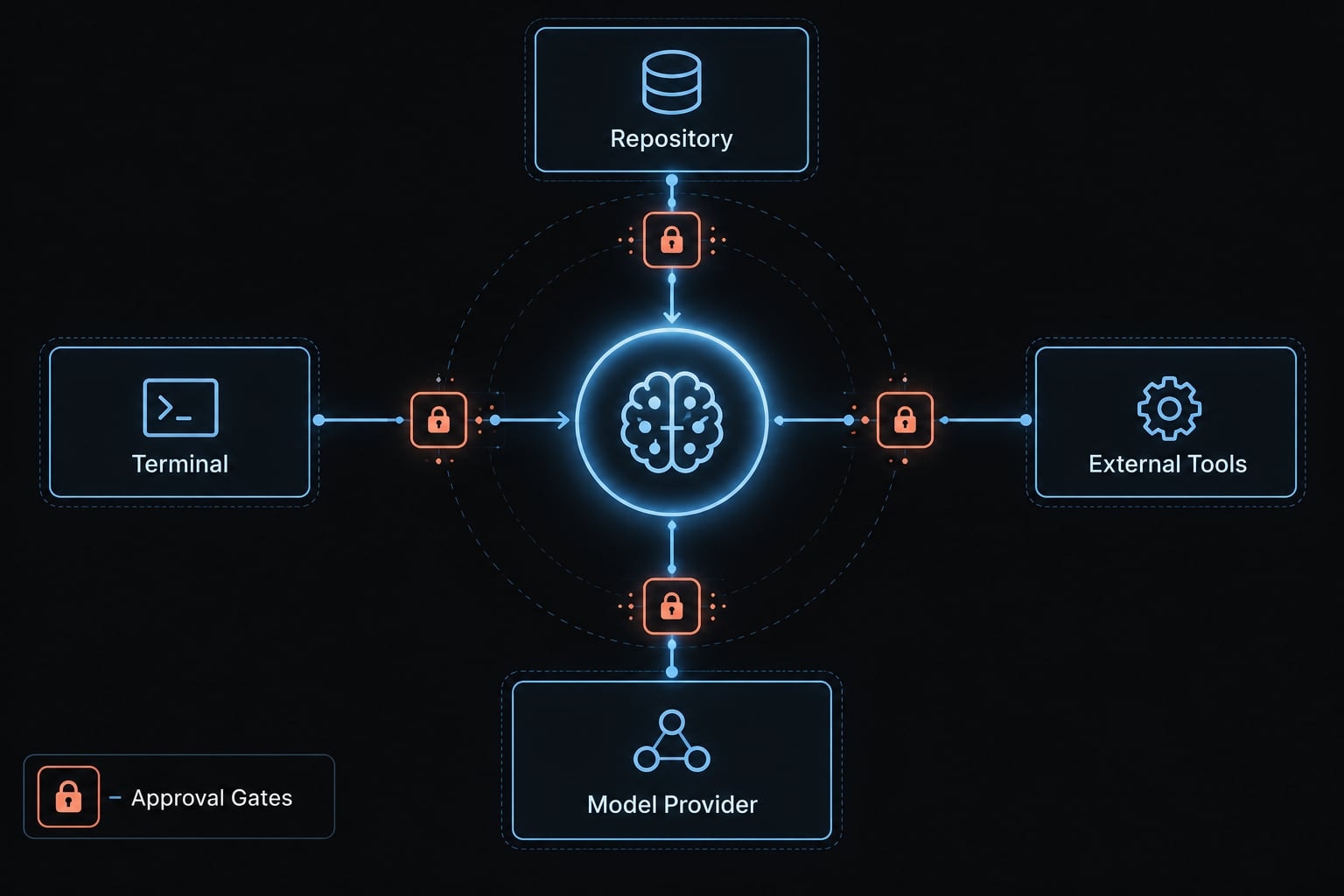
Repository access can expose proprietary code or secrets. Excessive terminal, network, and external-tool permissions can enable unsafe dependency or infrastructure changes.
Untrusted repository content or tool output can contain prompt injection: Instructions intended to redirect the assistant. OWASP’s guidance on Prompt Injection, Sensitive Information Disclosure, and Excessive Agency describes these risk categories.
Local-first does not mean local-only processing. Local interfaces or indexes may use remote inference, logging, or tools. Check the selected provider’s current processing and retention terms. MCP connections do not inherently guarantee safe execution.
Minimum safeguards
- Enforce least-privilege access.
- Restrict sensitive files and secrets with supported controls.
- Require visible plans and diffs.
- Separate changes; use a real sandbox for execution isolation.
- Run appropriate checks before approval.
- Preserve human review and a recovery plan.
- Log relevant activity without unnecessarily retaining secrets.
Branches and worktrees separate changes; they are not security sandboxes. Neither .gitignore nor written rules enforce access boundaries. Reverting code may not reverse migrations or external actions.
How to evaluate a project-aware AI coding tool
Evaluate observable behavior on a contained task. This AI coding evaluation checklist is a decision aid, not a certification.
Project-awareness checklist
- Searches beyond the open file.
- Finds relevant modules, symbols, and dependencies.
- Uses repository-specific, persistent instructions.
- Identifies likely affected files.
- Plans before multi-file edits.
- Shows relevant files or sources used.
- Supports appropriate access and execution limits.
- Runs or recommends suitable checks.
- Produces inspectable diffs.
- Refreshes repository context.
- Supports sensitive-resource restrictions.
- Preserves approval, rejection, and recovery control.
Copy the checklist and mark each item Observed / Not observed / Not applicable, with supporting evidence.
A read-only assistant should not fail solely because it cannot execute tests. Terminal access requires stronger execution controls. Indexing is unnecessary if current repository retrieval works effectively. Transparency means visible files, actions, and results—not disclosure of private model reasoning.
A simple evaluation test
- Choose a non-critical task spanning schema, API, and UI in a disposable or appropriately isolated environment.
- Request an affected-file list before permitting edits.
- Check whether it identifies dependencies and downstream consumers.
- Verify its plan follows current conventions and test commands.
- Compare the approved plan with the actual diff.
- Inspect validation reporting for passed, failed, blocked, and unrun checks.
- Expand access gradually only when observed behavior justifies it.
Record the tool/version, repository commit, starting conditions, permissions, files inspected and changed, checks attempted, and human corrections. Track missed dependencies and unrelated edits without inventing a universal pass threshold.
Copyable evaluation record preview
Criterion | Status | Evidence to record |
|---|---|---|
Dependency coverage | Observed / Not observed / Not applicable | References found and missed |
Reviewable changes | Observed / Not observed / Not applicable | Plan-to-diff differences |
Validation honesty | Observed / Not observed / Not applicable | Commands and actual results |
Warning Signs
- Opaque “entire codebase” claims.
- Broad edits before a plan.
- Unnecessary unrestricted access.
- No evidence of inspected files or tools.
- Hidden or misrepresented failed checks.
- Unapproved unrelated changes.
A polished explanation is not sufficient evidence. Favor reproducible artifacts that another developer can inspect.
Operationalizing project-aware workflows with AgentKit
AgentKit provides reusable agent workflow infrastructure. Its role is to organize repeatable development practices around the host coding tool—not guarantee complete repository understanding. Relevant building blocks include:
- Specialized planning, development, testing, debugging, and review agents.
- Reusable skills and project instructions.
- Automated workflows and validation steps.
- MCP integrations, a CLI (command-line interface), and desktop configuration management.
These components can organize how context is gathered and work is reviewed. Actual retrieval, execution, and permission enforcement depend on the host tool and environment. Configuration assistance is not an access-control boundary, and installation alone does not establish repository coverage or correctness.
Frequently asked questions
What is project-aware AI coding?
Project-aware AI coding is an approach where AI assistants utilize the specific structure, dependencies, coding conventions, and documentation of a codebase to generate code. Unlike generic tools, these agents use the repository's structure, dependencies, conventions, and documentation relevant to the current task. Rather than treating a request in isolation, the agent inspects how a proposed change fits existing components — selectively, and within the limits of what it retrieves.
Why is project awareness important for complex software development?
Real-world software is highly interconnected. An AI agent lacking project context may generate code that is syntactically correct but functionally incompatible with existing modules or business logic. Project awareness helps agents respect architectural boundaries, use existing API contracts, and update downstream tests when refactoring shared components.
What are the main layers of project awareness in AI tools?
This guide groups project awareness into six layers: repository structure, code relationships and dependencies, project rules and conventions, task and decision history, development tools and workflows, and permissions and validation controls. That grouping is an editorial framework, not an industry standard — layers one to four supply context, layer five supplies access, and layer six constrains action.
Does project-aware AI coding guarantee error-free results?
No. While project-aware tools reduce context-related errors, they are not infallible. They rely on the quality of retrieved information, the accuracy of instruction files, and the agent's ability to plan correctly. Human review remains essential to validate architectural decisions, security implications, and adherence to undocumented business rules.
How can I evaluate if an AI coding tool is truly project-aware?
To evaluate a tool, perform a contained multi-file task in your repository, such as adding a new feature that impacts several components. Observe if the agent correctly identifies affected files, respects existing coding conventions, produces a verifiable plan before editing, and provides an honest summary of validation checks.
Are project-aware AI agents safe to use on proprietary codebases?
Security depends on how the tool handles data, processes inferences, and manages repository access. You should enforce least-privilege permissions, restrict access to sensitive files, and ensure the tool is configured to run within secure environments. Always verify your provider's data retention and processing policies before integrating them into production environments.
Read more:
- Human in the loop AI coding: Optimize speed and quality
- Master a repeatable AI coding workflow for faster development
- AI coding rework: How to measure and reduce hidden debt
Conclusion
Project-aware AI coding connects requests to codebase context rather than generating code in isolation. While project instructions and dependency tracing improve completeness, accuracy relies on observable standards: scoped execution, reviewable diffs, honest validation, and human approval. Begin with a single, controlled cross-file task under limited permissions to evaluate what the assistant discovers, modifies, and verifies before expanding its repository access.