AI mobile app development workflow: 10 practical steps
AI mobile app development workflow: 10 practical steps
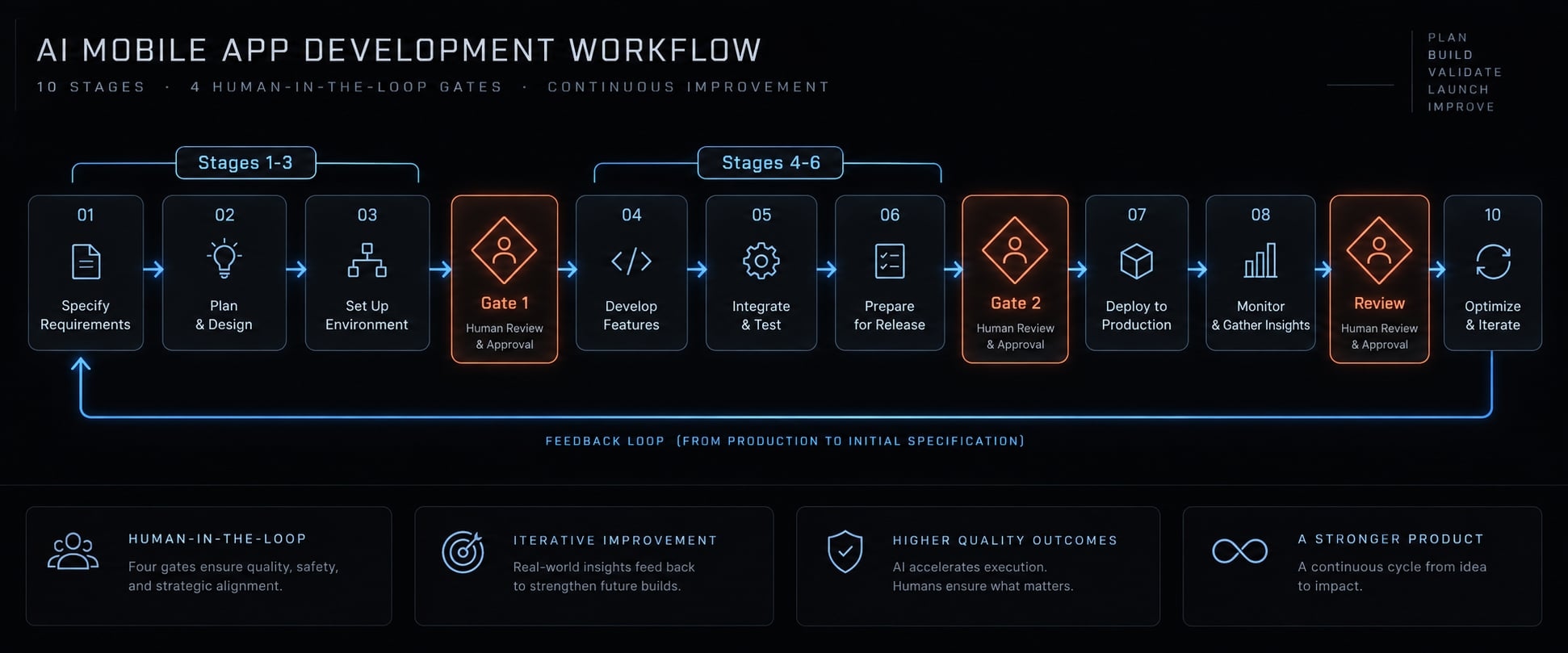
An AI mobile app development workflow uses AI across requirements, planning, coding, testing, review, release, and monitoring, while keeping humans in control of scope, architecture, and security. Beyond code generation, mobile apps require validation for offline capability, device variability, permissions, and store deployment—demonstrated throughout this guide through an offline-first field-service application.
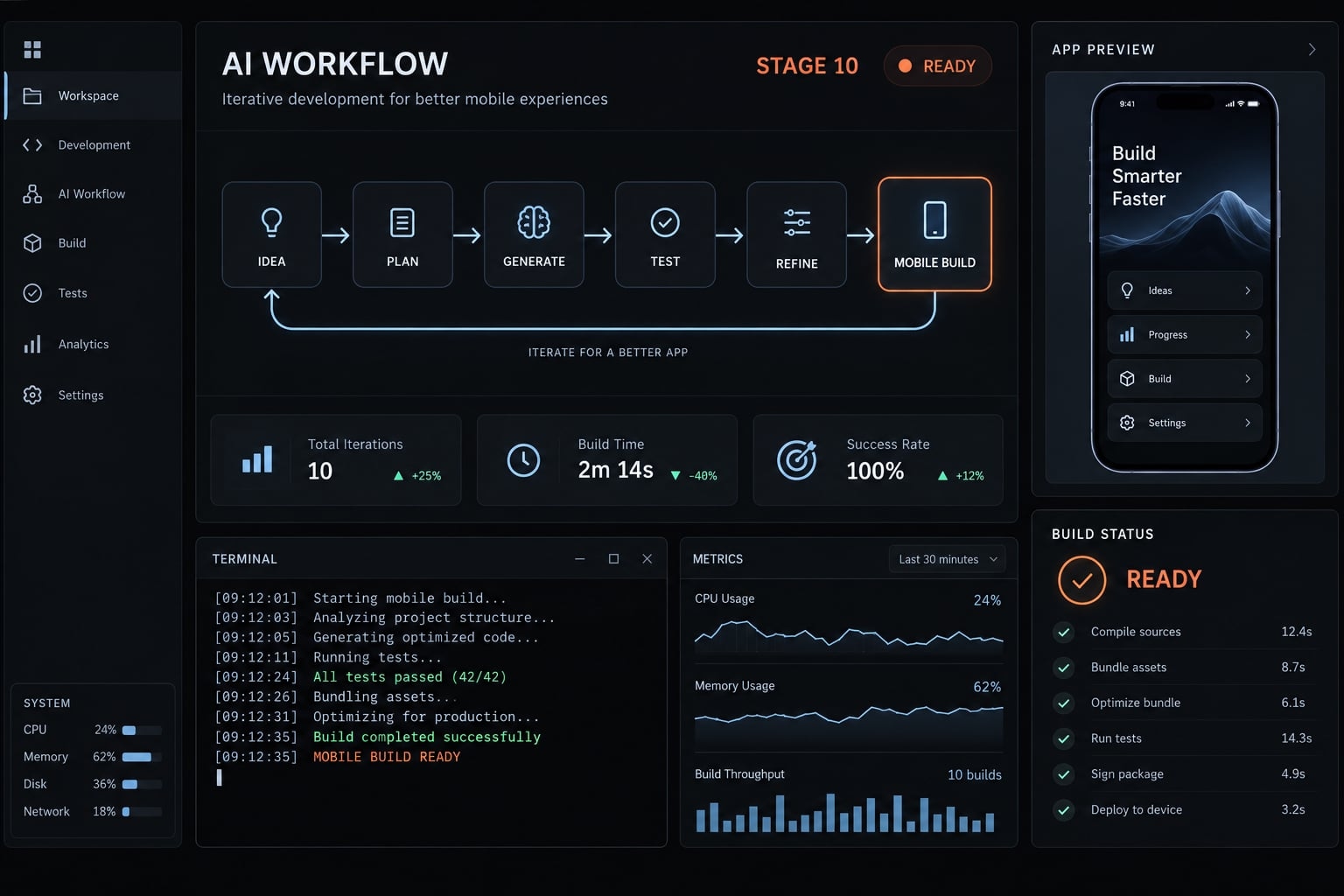
What is an AI mobile app development workflow?
An AI mobile app development workflow coordinates AI assistance across requirements, planning, implementation, testing, review, release, and production monitoring. It connects approved context to bounded tasks and verifiable outputs. Humans retain responsibility for scope, architecture, security, and production decisions, while agents perform permitted work within explicit constraints.
- Create an approved product brief.
- Create repository-level agent instructions.
- Write a mobile-specific feature specification.
- Generate and approve the Implementation plan.
- Implement one reviewable increment at a time.
- Generate tests, run them, and debug systematically.
- Conduct human code and security review.
- Validate on representative devices and conditions.
- Prepare and release the build safely.
- Monitor production and feed findings back Into the workflow.
Compare AI assistance vs. Agentic development:
Mode | Typical capability | Context | Required control |
|---|---|---|---|
Code completion | Suggest code | Nearby code | Developer inspection |
Conversational assistance | Explain or draft solutions | Supplied material | Verify assumptions |
Repository-aware coding agent | Inspect, edit, run permitted commands | Accessible project files | Task boundaries and permissions |
Coordinated agents | Divide work and exchange outputs | Shared artifacts | Handoff checks and approvals |
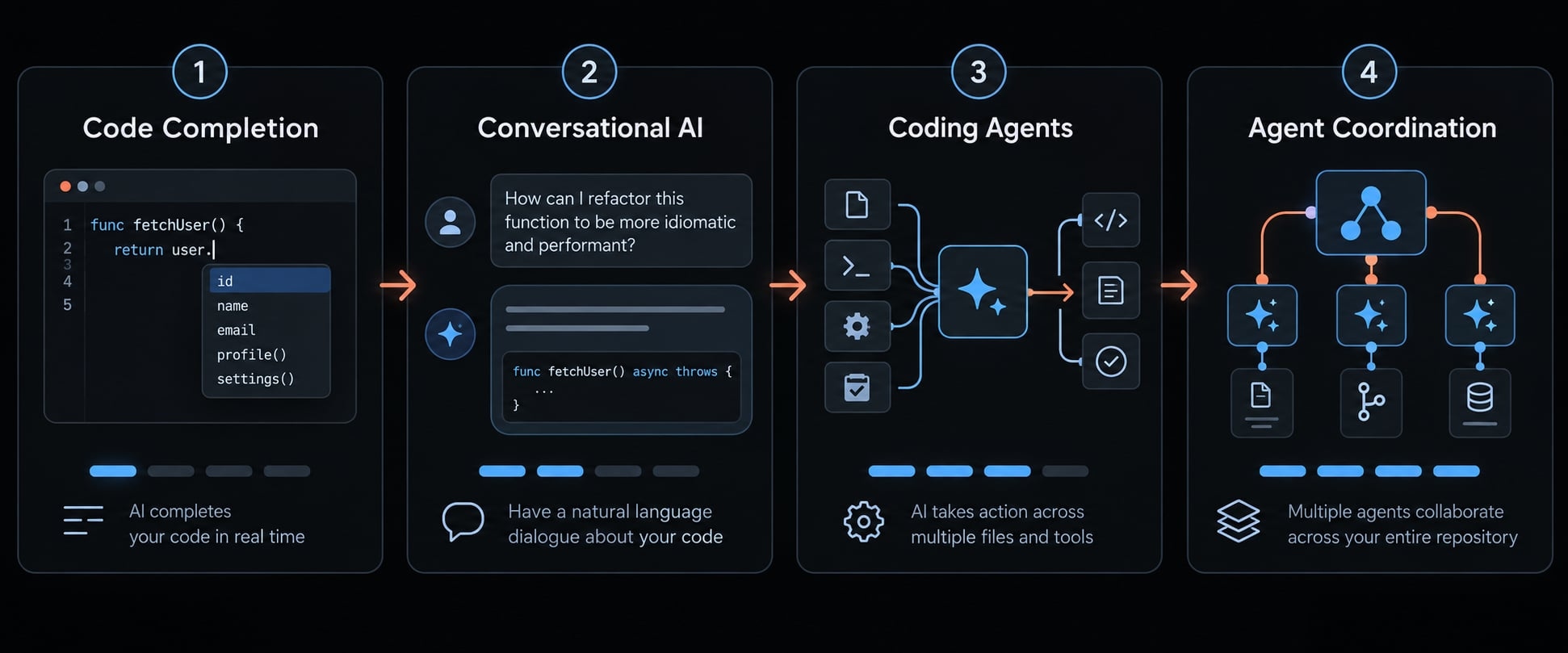
Workflow orchestration coordinates context, tasks, outputs, and approvals. Human-in-the-loop development keeps people responsible for consequential decisions. Greater autonomy requires stronger controls.
Stage 1-3: Define the product, project context and feature specification
Specification-driven development starts with approved artifacts rather than repeatedly rebuilding context through ad-hoc prompts. Missing requirements should trigger clarification, not silent invention by the AI.
Stage 1 - Create an approved product brief
AI can organize requirements and highlight ambiguity. A product owner or lead developer must explicitly approve scope.
- Include: Target user, core journey, business objective, supported platforms, explicit exclusions, and measurable success criteria.
- Illustrative app example: Technicians need previously downloaded assignments when connectivity disappears. Offline editing remains excluded from release 1.0.
- Required output: Approved one-page brief.
Stage 2 - Create repository-level agent instructions
Use AGENTS.md or the tool’s supported equivalent. Confirm how the selected tool discovers instructions; support is not universal.
Keep this repository-context checklist current:
- Stack: Frameworks, dependencies, and supported versions.
- Conventions: Architecture, folders, state management, and design system.
- Commands: Build, lint, and test procedures.
- Compatibility: Supported OS versions.
- Restrictions: Dependency policy, protected files, systems, and actions.
- Security: Sensitive-data handling and access rules.
Context window management means keeping relevant instructions concise, current, and easy to locate within the material an agent can process.
Never put secrets in context files. Version-controlled instructions support consistency but do not enforce permissions.
Required output: Version-controlled repository instructions.
Stage 3 - Write a mobile-specific feature specification
Describe behavior before implementation choices. Group requirements into:
- Screen behavior: Navigation, loading, empty, error, and retry states.
- Device behavior: Permissions, lifecycle transitions, relevant deep links, and notifications.
- Resilience and inclusion: Offline operation, degraded networks, accessibility, and localization.
- Platform differences: Only those affecting this feature.
Illustrative acceptance criterion: After assignments download successfully, a technician can close and reopen the app in airplane mode and view those assignments without another network request.
Also define cache freshness, sign-out handling, and what happens when no assignments were downloaded. Specify access restrictions for expired sessions rather than letting the agent choose.
Android Developers’ app lifecycle and data-storage guidance helps identify relevant platform behaviors. Equivalent Apple documentation should inform iOS requirements.
Required output: Approved specification with testable acceptance criteria.
Stage | Required input | Approved output |
|---|---|---|
1 | User problem and constraints | Product brief |
2 | Existing repository and policies | Agent instructions |
3 | Brief and platform requirements | Feature specification |
Stage 4-6: Plan, implement, test and debug in bounded increments
The iterative development execution cycle follows a strict order:
Plan → Approve → Implement → Test → Inspect → Commit
Failed checks return the change to the relevant earlier step. A commit records work; it does not replace pull-request approval or release authorization.
Stage 4 - Generate and approve the implementation plan
Require the AI agent to inspect relevant repository files before proposing changes to prevent plausible plans that ignore existing storage or authentication patterns.
- The plan must identify: Affected files, data flow changes, API/schema updates, test strategy, and security risks.
- Human gate: Humans approve architecture changes, dependency additions, and material scope changes.
- Required output: Ordered, approved plan.
Stage 5 - Implement one reviewable increment at a time
Choose bounded increments that can be tested independently. For offline work orders, one increment could download, persist, and display a minimal assignment list.
Require focused changes, forbid unrelated refactoring, and require explanations for deviations. Treat AI-generated code like an external contribution: useful, but untrusted until validated.
Required output: Coherent, reviewable diff - the recorded set of changes.
Stage 6 - Generate tests, run them and debug systematically
Automated mobile testing must map to acceptance criteria, not merely exercise newly generated code.
Test layer | AI helps draft | Human verifies |
|---|---|---|
Unit | Business-rule tests | Meaningful assertions and edge cases |
Component/widget/UI | Screen-state interactions | Realistic behavior and accessible controls |
Integration | Persistence and contract tests | Storage, data contracts, and state transitions |
End-to-end | Critical journey scenarios | Coverage across relevant environments |
For the illustrative app, a mocked screen test may pass while cached assignments disappear after restart. Add persistence and lifecycle validation rather than assuming the UI test proves offline readiness.
Debug systematically:
Reproduce → inspect evidence → form a hypothesis → make a bounded fix → rerun checks.
Do not weaken assertions merely to obtain a green build. Any legitimate expectation change must trace back to an approved requirement.
Required output: Test report recording commit, commands, environment, results, and unresolved failures. Failed required checks block progression.
Stage 7-10: Review, validate on devices, release and learn from production
Stage 7 - Conduct human code and security review
AI code review can prepare summaries and risk checklists, but an agent must not grant final approval to its own work.
Review architecture, error handling, concurrency, sensitive data flows, maintainability, and dependency provenance. Prioritize authentication, authorization, payments, local storage, tokens, deletion, and cryptographic choices.
For offline assignments, check whether sign-out removes protected cached data as specified.
Required output: Approved pull request - a proposed change - with reviewer identity and documented risks.
Stage 8 - Validate on representative devices and conditions
Simulators and emulators help during early testing, but they do not replace physical device validation under real-world conditions.
Select supported OS versions, screen sizes, and performance tiers. Include offline conditions, denied permissions, lifecycle transitions, accessibility settings, and relevant hardware behavior.
Simulators and emulators help, but do not cover every release risk.
Device/OS | Condition | Expected behavior | Result | Build |
|---|---|---|---|---|
Selected supported iPhone/iOS | Offline restart | Cached orders visible | Pending | Record ID |
Selected lower-tier Android/OS | Interrupted download | Clear retry state | Pending | Record ID |
Required output: Completed matrix with actual device details, build identifier, conditions, and results.
Stage 9 - Prepare and release the build safely
CI/CD automation - continuous integration and delivery - can execute approved build and release steps. It does not own production authorization.
Check:
- Signing, versioning, and environment configuration.
- Protected secrets and access controls.
- Privacy declarations and data disclosures.
- Store metadata, screenshots, and release notes.
- Beta evidence, monitoring, and rollout plan.
- Explicit human production approval.
Production secrets must remain outside agent prompts, context, and directly accessible execution environments. Approved CI/CD systems may use protected credentials behind access controls and human release gates.
Approved beta testing may supply evidence. Final approval must precede production or staged-production rollout.
Check current Apple App Review Guidelines, App Store Connect documentation, Google Play policies, and Play Console requirements for app-store compliance. Passing checks does not guarantee acceptance.
Mitigation may require pausing rollout, disabling a feature, or shipping a corrected build - not instant rollback.
Required output: Approved release artifact and controlled rollout plan.
Stage 10 - Monitor production and feed findings back into the workflow
Track crashes, startup latencies, API errors, and user feedback.
Monitor → cluster → prioritize → fix → update instructions.
Production monitoring should track crashes, startup behavior, API failures, and relevant feedback. For offline assignments, investigate failed downloads and stale-data reports.
AI can summarize sanitized evidence. Humans prioritize fixes and approve changes.
Required output: Improvement backlog and reviewed specification or instruction updates.
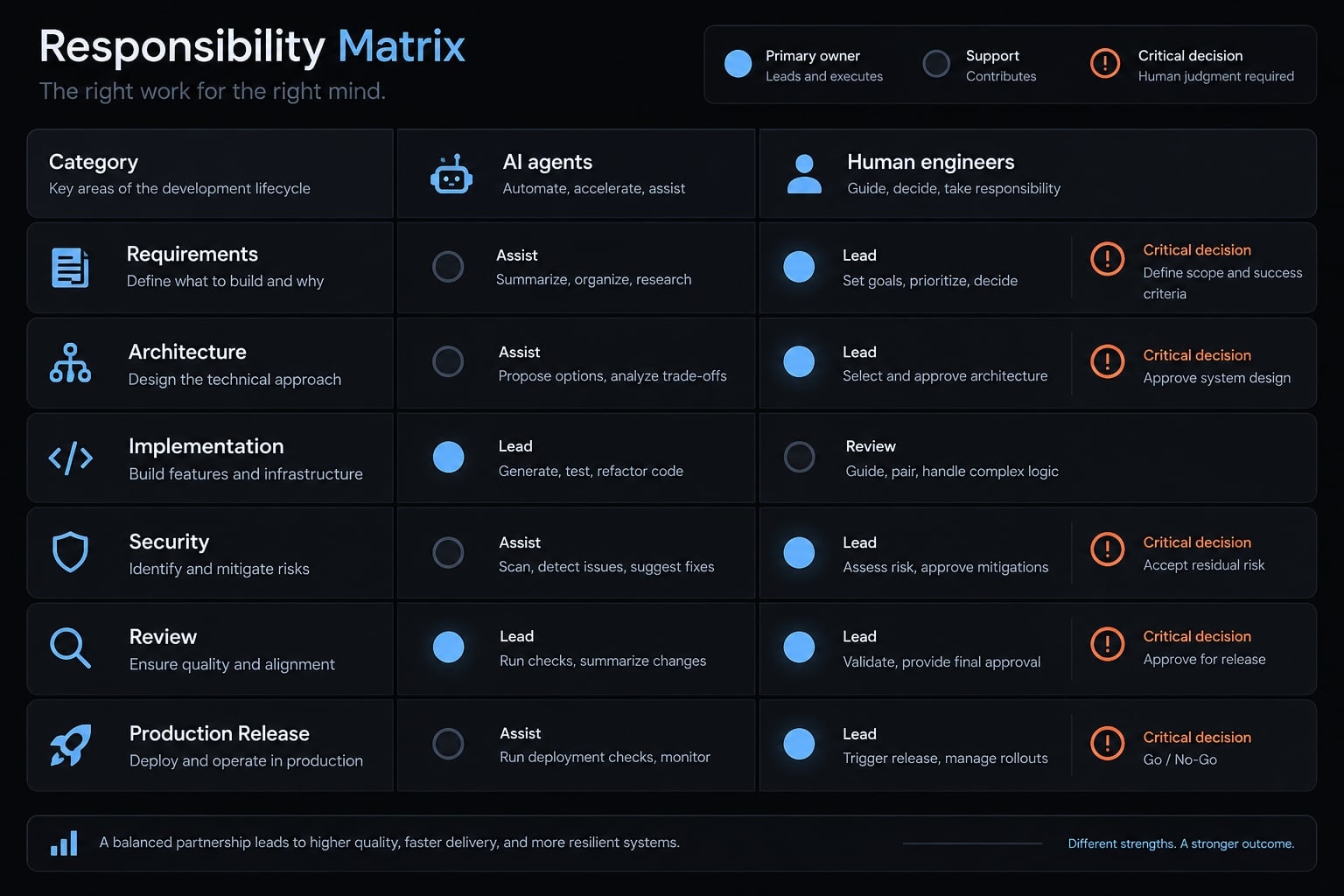
How to define AI mobile app development workflow responsibilities
Use three delegation levels:
- Execute within approved boundaries: Routine implementation and permitted checks.
- Draft or recommend for human approval: Specifications, plans, dependencies, and risk assessments.
- Remain human-owned: Consequential acceptance, security, and production decisions.
Autonomy should decrease as sensitivity, production impact, or irreversibility increases. Human-in-the-loop development does not require manual approval of every routine command. It requires clear task authorization and escalation boundaries.
Human–AI responsibility matrix
Activity | AI role | Approval point | Accountable owner |
|---|---|---|---|
Requirements | Organize questions | Scope acceptance | Product owner |
Specifications | Draft behavior | Criteria accepted | Product/engineering lead |
Planning and architecture | Propose approach | Plan accepted | Technical lead |
UI and routine implementation | Execute bounded tasks | Change acceptance | Maintainer |
Authentication and payments | Draft approved changes | Before implementation and merge | Security-qualified lead |
Dependencies | Recommend options | Before addition | Technical lead |
Testing | Draft and run checks | Coverage and evidence accepted | Test owner |
Code review | Identify risks | Pull-request approval | Human reviewer |
Production credentials | No direct access | Protected-system authorization | Infrastructure owner |
Store submission preparation | Draft materials | Submission authorization | Release owner |
Production approval | Summarize evidence | Before rollout | Release owner |
Crash analysis and prioritization | Cluster sanitized evidence | Priority decision | Engineering lead |
Mandatory agent stop conditions
An AI agent must immediately halt execution and request human intervention upon encountering:
- Conflicting or materially incomplete requirements.
- A new dependency, SDK, service, or paid API.
- Schema or public API changes.
- Sensitive authentication, payment, personal-data, or permission changes.
- Unexplained test failures.
- Production access requirements.
- Changes outside the approved boundary.
An SDK is a software development kit supplied for integrating platform or vendor capabilities.
These agent stop conditions require enforcement through agent permissions, protected branches, CI policies, and approval controls. AI guardrails cannot rely on prompts alone. Apply least-privilege access: grant only what the approved task needs.
Human approval establishes accountability; it does not mean every defect has been eliminated.
Mobile quality gates for AI-generated code
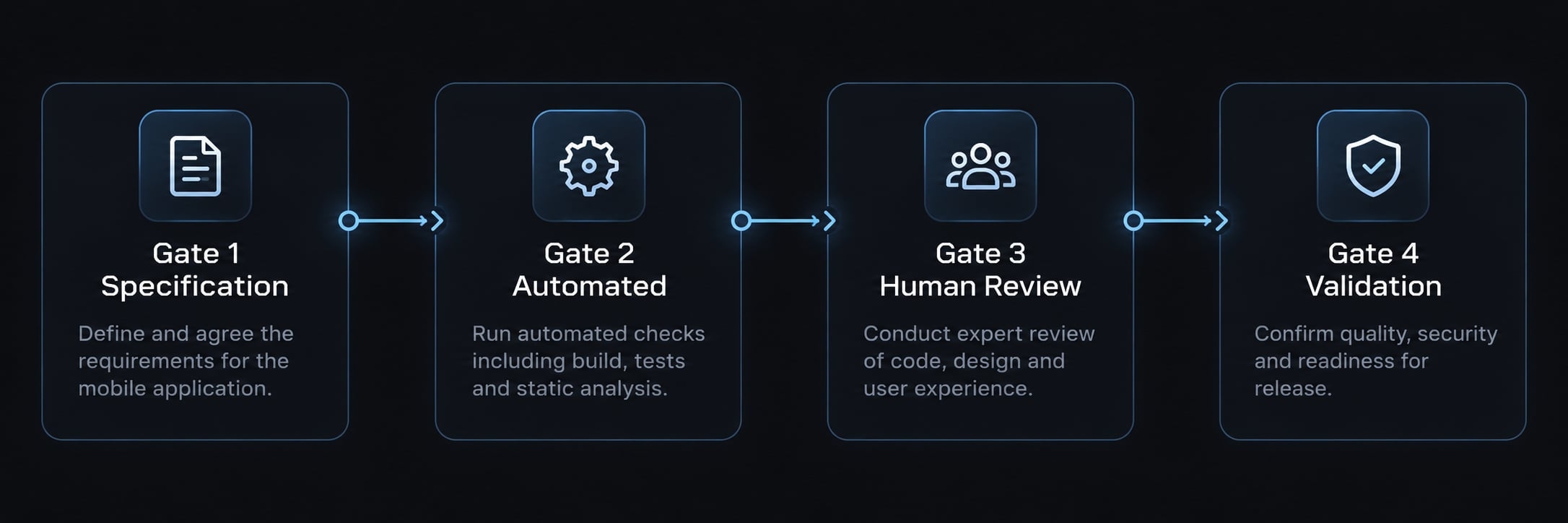
Mobile quality gates are evidence-based checkpoints that determine whether a change may advance. Each gate connects required artifacts to a named human owner and explicit pass criteria. They organize decisions around observable results, rather than an agent’s confidence, and preserve a record of what was actually validated.
The four-gate model
This is a practical framework for organizing approvals, not an official industry standard.
Gate | Required evidence | Human owner | Failure prevented |
|---|---|---|---|
Specification approved | Behavior, edge cases, acceptance criteria | Product/engineering lead | Implementing assumptions |
Automated checks passed | Required build, lint, applicable test results | Engineering owner | Advancing known failures |
Human and security review complete | Approved pull request and risk review | Reviewer | Unexamined sensitive changes |
Device and release validation complete | Device results, applicable beta evidence, release checklist, production authorization | Release owner | Unvalidated production rollout |
Tie evidence to a commit or build, environment, and reviewer. A test report from an earlier build is not automatically valid for later changes.
Solo founders may own several gates. Keep the evidence and decisions separate even when one person performs them.
Mobile-specific checks before release
- Security and privacy: storage and token handling satisfy requirements; permissions are justified; disclosures match behavior; dependencies are reviewed.
- Resilience: offline access survives restart; synchronization, retries, and failures follow the approved specification.
- Device experience: performance, battery impact, accessibility, lifecycle events, and localization meet project-defined criteria.
- Distribution: release configuration and applicable store policies are checked. If the app includes generative AI features, validate relevant safety and disclosure requirements separately.
OWASP MASVS provides a mobile application security verification standard; OWASP MASTG provides testing guidance. Use applicable requirements to structure evidence. Alignment is not certification.
Failed mandatory criteria block progression. Any permitted risk exception needs documented ownership, rationale, and mitigation; non-waivable requirements remain blocking.
Passing automated checks does not establish device readiness or store acceptance. Review current platform requirements when preparing publication and each release, because policies and capabilities change.
A lightweight AI mobile development toolkit
Recommended project files and templates
These are recommended templates, not claims about previously deployed assets.
Asset | Purpose | Update trigger |
|---|---|---|
Repository instructions | Shared working rules | Stack or policy change |
Product brief | Scope and objective | Product decision |
Feature specification | Testable behavior | Requirement change |
Implementation plan | Bounded work | Approved approach changes |
Pull-request checklist | Review evidence | Review gap identified |
Device matrix | Coverage and results | Build or support changes |
Release checklist | Readiness and ownership | Release or policy change |
Reusable skills | Repeatable task procedures | Procedure improvement |
Small projects can combine these in one issue or document. Eight assets do not require eight systems.
Copyable workflow checklist:
- Feature and specification version:
- Approved task boundary and exclusions:
- Implementation owner and reviewer:
- Required commands and test evidence:
- Device/build results:
- Open risks and stop conditions:
- Gate approvals and production authorization:
- Monitoring owner and follow-up:
Tool categories, not mandatory products
- Coding agents and IDEs: Claude Code, Codex, and GitHub Copilot are examples; verify current capabilities and configuration.
- Testing, scanning, and CI/CD: Select tools compatible with native development, React Native, or Flutter.
- Beta distribution and monitoring: Retain build-linked feedback and diagnostic evidence.
- Approved integrations: Connect only necessary tools and data.
MCP, or Model Context Protocol, connects tools and data to AI applications. It does not automatically make access safe.
Measure workflow quality, not code volume
Track:
- Approved-specification-to-merge lead time.
- Pull-request review time.
- Escaped defects found after acceptance.
- AI tool cost per completed feature.
Optional extensions include rewrite rate, reopened tasks, test failures, and crash-free sessions.
Use consistent definitions and comparable periods. Tool cost is not total delivery cost. Before-and-after differences alone do not prove AI caused an improvement.
Common AI mobile development workflow mistakes
Avoid shortcuts that remove evidence or expand authority without review. These are risks to control, not claims about observed project outcomes.
Mistake | Better practice |
|---|---|
One oversized prompt | Separate context, specification, and bounded tasks |
Missing specification | Approve testable behavior before implementation |
Unrestricted repository changes | Limit changes to named files and tasks |
Automatic dependency selection | Require justification and approval |
Trusting compilation alone | Test behavior, persistence, and failure paths |
Simulator-only validation | Add representative real-device checks |
Weakened test assertions | Investigate failures against approved requirements |
Convenient production access | Use protected systems without direct agent access |
Code-volume metrics | Measure lead time, review effort, and defects |
Adding agents before proving the workflow | Validate one controlled execution path first |
A practical correction is usually smaller than a new tool purchase: tighten the task boundary, repair context management, or make the missing approval explicit.
Frequently asked questions
How does an AI coding agent differ from traditional code completion?
Traditional tools offer line-by-line syntax suggestions, while agentic systems are repository-aware, capable of multi-file refactoring, autonomous testing, and complex task planning. Agents function as a co-pilot for the entire feature set, but require human oversight to validate architectural integrity, performance, and platform-specific compliance.
Can AI mobile app development workflows be used for cross-platform apps?
Yes, frameworks like React Native and Flutter are highly compatible with AI workflows. Their declarative, component-driven nature allows AI agents to reason effectively across UI states, state management, and business logic.
Does using AI agents guarantee faster mobile app delivery?
AI agents accelerate scaffolding and routine coding tasks, but speed gains depend on the quality of your specifications and existing project context. Without a clear workflow, excessive agent usage can lead to "prompt-drift" or technical debt.
What are the human-owned responsibilities in an AI-assisted workflow?
Humans must remain responsible for high-level architecture, security risk assessments, sensitive data handling, final code reviews, and production release authorizations. While agents can draft documentation, run tests, and propose implementation plans, they cannot provide final accountability.
What is a mobile-specific "stop condition" for AI agents?
A stop condition is a defined scenario where an agent must cease execution and request human intervention. Examples include encountering conflicting requirements, handling sensitive user data or authentication, modifying public API schemas, or failing automated tests.
Read more:
- AI root cause debugging: How to find the cause not just patch
- AI coding rework: How to measure and reduce hidden debt
- AI feature development workflow: 7 stages to production success
Conclusion
A reliable AI mobile app development workflow connects approved context, bounded implementation, independent validation, and human accountability. The important output is not generated code alone. It is a reviewable change supported by tests, device evidence, and an authorized release decision.
Start with one feature, such as offline access to downloaded work orders. Record review effort, defects, and lead time before expanding agent responsibilities. Keep the setup small enough that evidence remains easy to inspect. Copy the workflow checklist above into your next feature issue, assign each approval owner, and use it to run a controlled pilot.