How to debug with Claude Code: A reliable 7-step workflow
How to debug with Claude Code: A seven-step workflow
To debug reliably with Claude Code, separate investigation from modification. Use structured tasks like repository searches, call-path inspections, error analysis, and test executions instead of vague prompts. This guide presents a practical Claude Code debugging workflow complete with copy-ready prompts, an illustrative case study, and essential verification controls to keep you in total command of code changes.
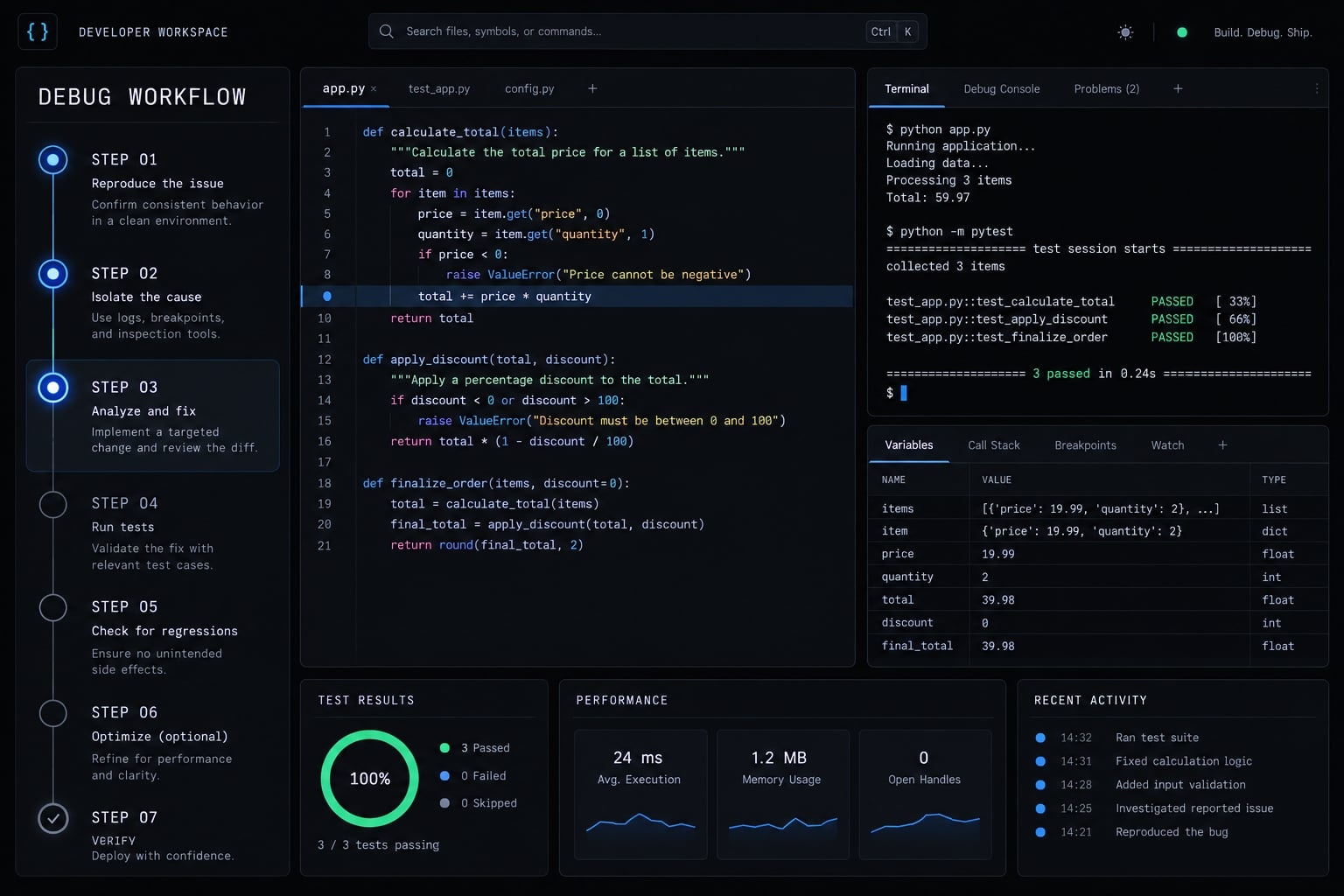
How debugging with Claude Code works
Debugging with Claude Code is an evidence-driven process in which the coding agent searches repository files, analyzes errors and execution paths, runs approved tests, and proposes focused changes. The developer remains responsible for supplying context, evaluating hypotheses, reviewing evidence, authorizing modifications, and deciding whether the verified patch is safe to deploy.
Claude Code can connect information across repository files, tests, logs, stack traces, and Git history. This makes it useful for tracing multi-file execution paths that would otherwise require repeated manual searches.
However, repository context is not runtime truth. Claude Code may not see production state, external-service behavior, timing conditions, or configuration differences unless those artifacts are supplied.
Task | What Claude Code can do | What it cannot guarantee |
|---|---|---|
Repository search | Trace symbols, callers, and dependencies | The first suspicious pattern is causal |
Log and stack-trace analysis | Map errors to application-owned code | Missing production state or external behavior |
Test execution | Run approved commands and interpret output | Generated tests reproduce the real failure |
Patch proposals | Produce a focused implementation and diff | No downstream behavior will change |
Evidence summaries | Record findings and unresolved questions | Deployment approval or business-risk acceptance |
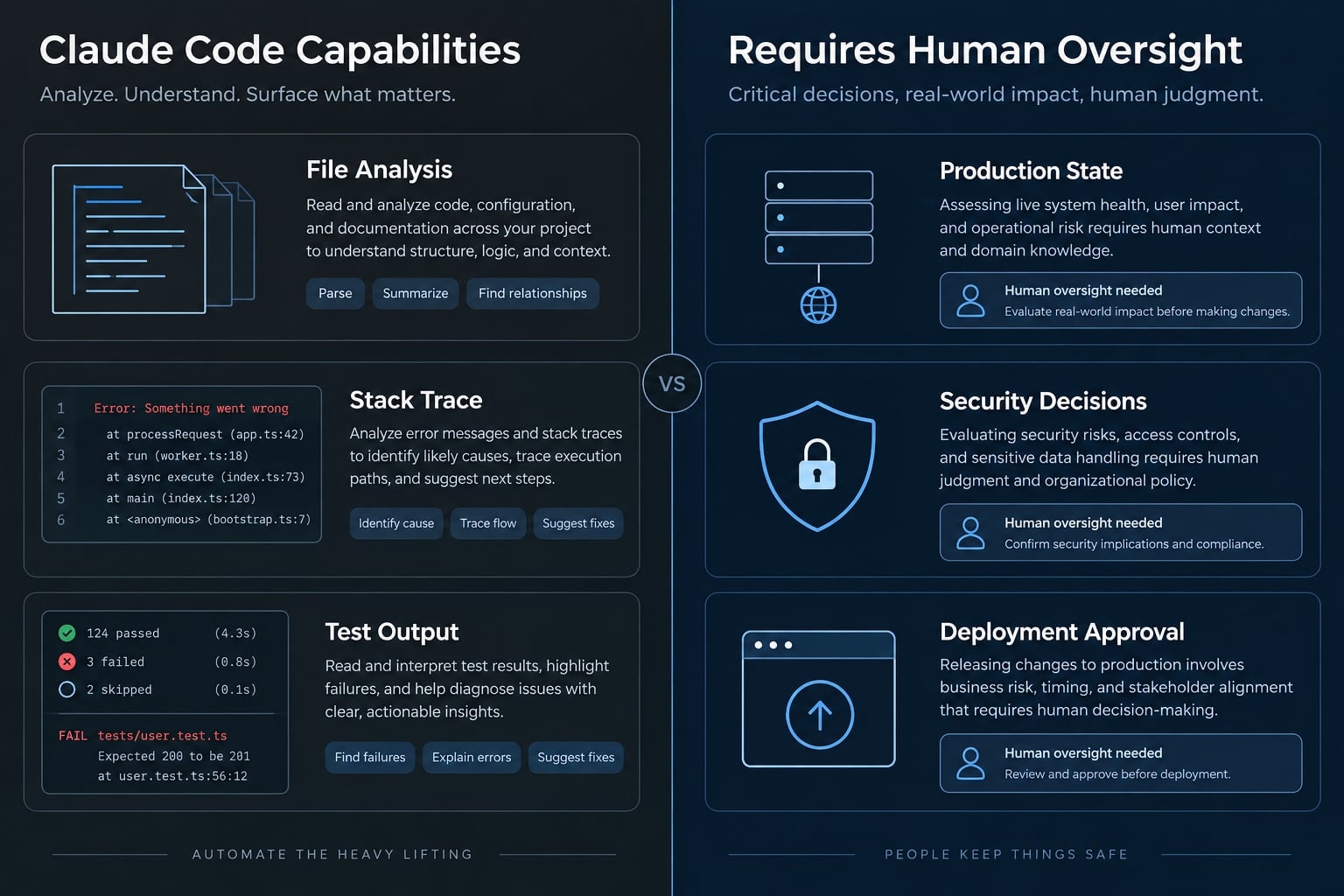
Editorial note: Claude Code capabilities, permissions, and command behavior may change. Confirm current behavior in the official documentation before using this workflow in production.
Investigation before modification prevents a plausible code smell from becoming an unverified patch. Start with a read-only investigation that produces a code-path map, missing-evidence list, and testable hypotheses. A suspected defect becomes a root cause only when it explains the original symptom and predicts an observable result.
Use this instruction before allowing edits:
Investigate this issue without modifying files.Map the relevant code path, separate evidence from inference,list missing information, and propose ranked, falsifiable hypotheses.Do not refactor or recommend a patch yet.
How to debug with Claude Code step by step
Use this Claude Code debugging workflow during active incidents:
- Define the expected and actual behavior.
- Reproduce the failure reliably.
- Provide focused project context.
- Map the code path and rank hypotheses.
- Test one hypothesis at a time.
- Patch the verified root cause.
- Verify the behavior and final diff.
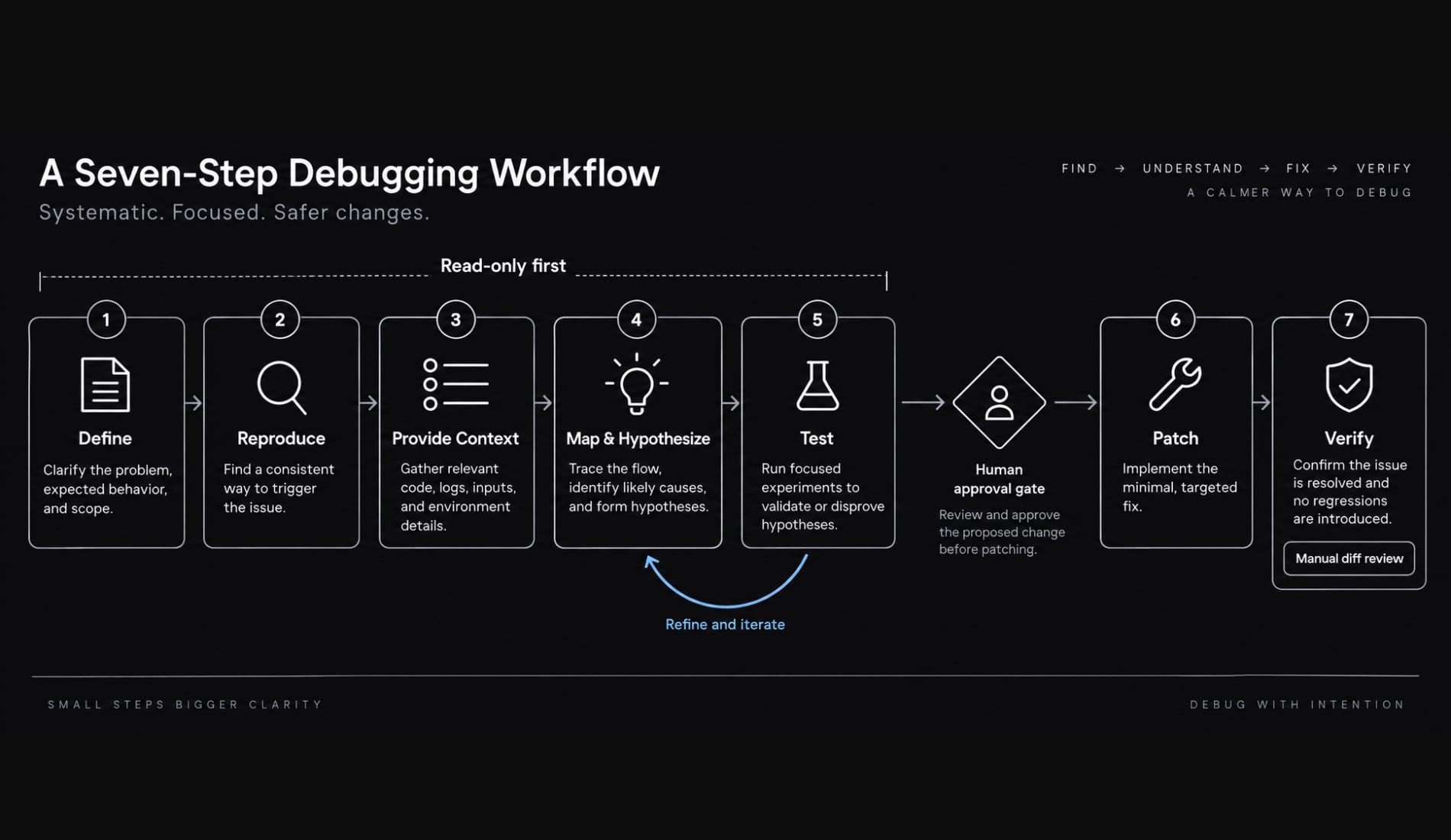
Step 1: Define the expected and actual behavior
A useful investigation begins with observable facts, not a diagnosis. Record:
- Expected behavior
- Actual behavior
- Complete relevant error or stack trace
- Runtime, operating system, framework, and dependency versions
- Environment where the issue occurs
- Recent code or configuration changes
- Interfaces and behaviors that must remain unchanged
- Evidence that remains unavailable
Do not shorten the error before supplying it. Redact secrets, tokens, customer data, internal addresses, and other sensitive values.
Do not edit files. Summarize [issue] using the expected behavior,actual behavior, environment, recent changes, and complete error output.Separate confirmed facts from assumptions and missing information.Preserve [interfaces and constraints] throughout the investigation.
Stopping condition: Claude Code can state the symptom precisely without inventing its cause.
Step 2: Create the smallest reliable reproduction
A reliable reproduction records the initial state, inputs, actions, observed output, failure frequency, and relevant timing conditions. For concurrency defects, include request order, parallel activity, retries, and shared state.
Ask Claude Code to locate the closest existing test and propose a minimal failing regression test. Where practical, capture the failure before changing production code.
Weak reproduction | Reliable reproduction |
|---|---|
“The page sometimes hangs” | Exact actions, initial state, and failure frequency |
Test passes on a mocked helper | Test observes the reported system behavior |
Timing omitted | Concurrency and timing conditions recorded |
Find the smallest reliable reproduction for [symptom].Locate the closest existing test and propose a failing regression test.List assumptions you cannot verify. Do not modify production code yet.
A generated test is invalid if it only encodes the proposed implementation. It must capture the original user-visible or system-level failure.
Stopping condition: The failure can be triggered consistently or captured with sufficient instrumentation.
Step 3: Give Claude Code focused project context
Effective context engineering supplies the smallest relevant evidence set. Prioritize:
- Entry point
- Failing module or component
- Direct callers and dependencies
- Relevant configuration
- Test, lint, type-check, and build commands
- Logs and stack traces
- Recent Git diff
- Failed attempts
- Relevant dependency versions
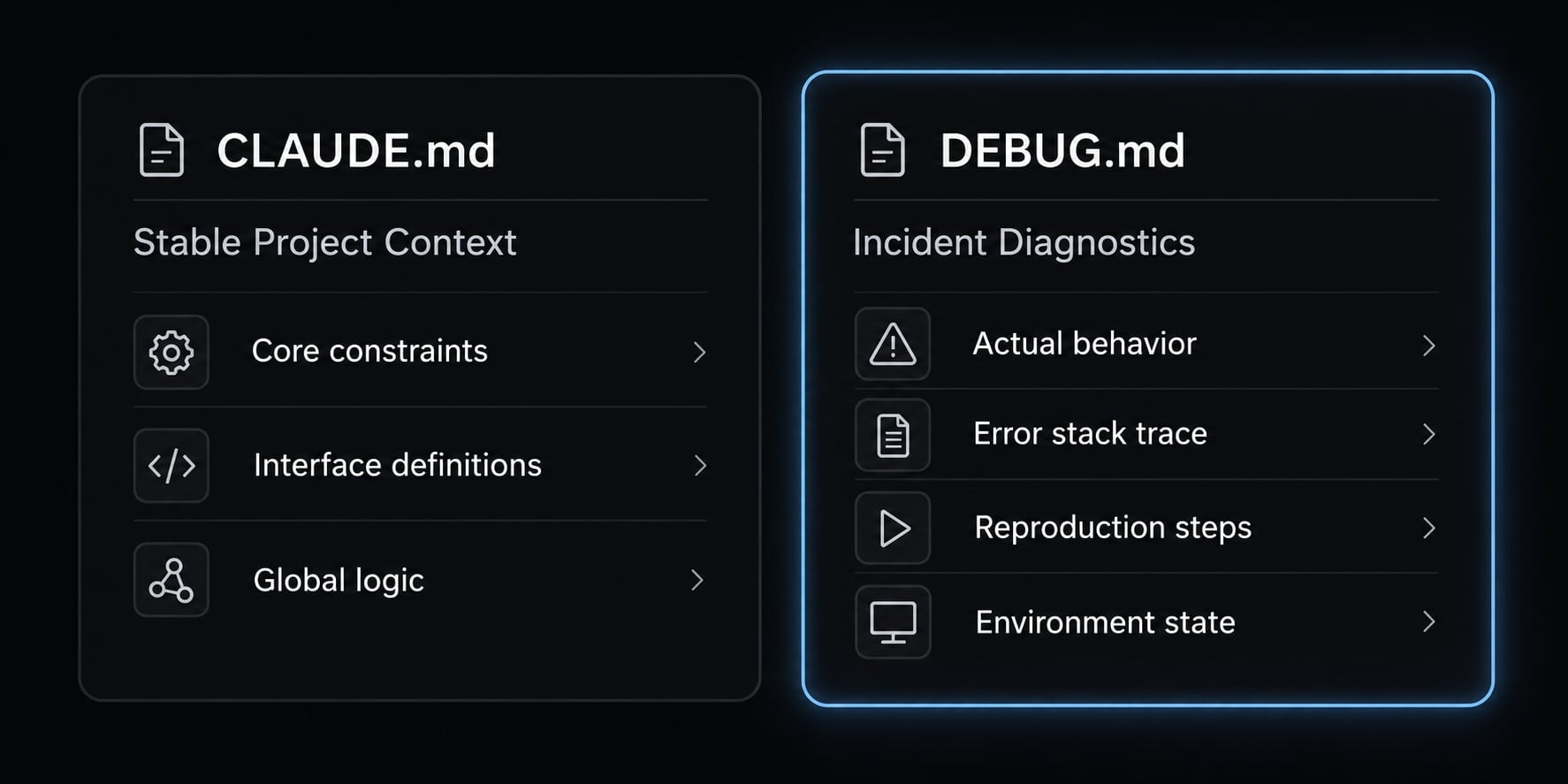
Use CLAUDE.md for stable repository guidance: Setup commands, validation commands, architecture conventions, important directories, security restrictions, and generated files that must not be edited.
Use DEBUG.md for temporary incident state:
# Issue## Expected and Actual Behavior## Reproduction and Environment## Evidence## Ranked Hypotheses## Experiments and Results## Verified Root Cause## Patch and Validation## Remaining Risks
Attribute |
|
|
|---|---|---|
Purpose | Stable project instructions | Incident investigation record |
Lifetime | Persistent | Temporary or archived |
Content | Commands, conventions, restrictions | Evidence, tests, conclusions |
Avoid | Temporary incident notes | Secrets and irrelevant context |
Never include API keys, access tokens, production credentials, private keys, raw customer data, sensitive logs, or unrelated proprietary material. Redact evidence and grant least-privilege access.
Stopping condition: Claude Code can trace the relevant area without searching unrelated systems.
Step 4: Ask for a code-path map and evidence-based hypotheses
Ask Claude Code to map the trigger, entry point, function calls, state transitions, database operations, network requests, asynchronous boundaries, and failure point.
Then require evidence-based hypotheses. Each explanation must connect to observed evidence and include a falsifiable experiment.
Do not edit files. Map the code path from [trigger] to [failure].Rank specific hypotheses using supporting and contradicting evidence.For each hypothesis, propose a test that could reject it and predictthe result expected if the hypothesis is correct.
Hypothesis | Supporting evidence | Contradicting evidence | Falsifying test | Predicted result |
|---|---|---|---|---|
Connection is held for the full stream lifetime | Hang follows streaming security check | Pool handles similar idle count elsewhere | Bypass connection-owning check in isolation | Hang disappears |
Pool size is too small | Many idle connections appear in logs | Load test reaches same count without hanging | Reproduce with increased pool limit | Failure threshold moves |
Retry loop blocks progress | Repeated request entries appear | No matching retry delay | Disable retries in test environment | Hang no longer occurs |
Suspicious code, code smells, and secondary defects do not establish causality. Systematic root-cause analysis requires an explanation that accounts for the reported failure.
Stopping condition: Every leading hypothesis can be supported or rejected through an observable result.
Step 5: Test one hypothesis at a time
Use iterative testing to avoid combining unrelated variables. For every controlled experiment, document:
- Hypothesis under test
- Variable changed or observed
- Predicted result
- Command or procedure
- Actual result
- Interpretation
- Status: supported, weakened, or rejected
Start with the least invasive experiment that produces the most information. Do not stack speculative patches or reinterpret every failed prediction to preserve the first explanation.
Test only [hypothesis]. State the predicted result first,then propose the least invasive command or observation.Do not edit unrelated files or combine this with another fix.Record whether the result supports, weakens, or rejects the hypothesis.
Failed predictions are useful evidence. Human intervention is required if Claude Code repeatedly returns to a rejected explanation.
Stopping condition: One hypothesis explains the symptom and survives attempts to disprove it.
Step 6: Apply the smallest reasonable patch
Allow modification only after evidence supports a root cause. Before editing, require Claude Code to report:
- Root cause being addressed
- Files that must change
- Reason for each change
- Public interfaces affected
- Regression test added or updated
- Remaining risks
Propose the smallest patch for the verified root cause: [cause].List files, rationale, interface impact, regression coverage, and risks.Avoid unrelated cleanup, public-interface changes, and dependency updates.Wait for approval before editing.
The smallest patch does not always mean the fewest lines. It means the narrowest correct change that resolves the verified condition without weakening safeguards.
Require explicit approval for destructive commands, database writes, migrations, infrastructure changes, dependency changes, authentication or authorization edits, secret changes, payment flows, data deletion, and public API changes.
Stopping condition: The proposed change has a clear causal relationship to the verified defect and an approved scope.
Step 7: Verify the fix and review the diff
Use this patch verification order:
- Re-run the original reproduction.
- Confirm the regression test captures the original failure.
- Run the targeted test.
- Run related unit and integration tests.
- Run relevant lint and formatting checks.
- Run the type checker.
- Run the build.
- Run applicable security checks.
- Review the final Git diff manually.
- Document assumptions and remaining risks.
During Git diff review, check for:
- Unrelated changed files
- Changed function signatures
- Disabled validation
- Weakened assertions
- Suppressed exceptions
- Hard-coded values
- New dependencies
- Unhandled edge cases
- Behavior changes outside the issue
Verify the fix against the original reproduction and review the Git diff.Report the symptom, root cause, changed files, patch rationale, executedchecks, affected behavior, and remaining risks. Flag unrelated changes,weakened validation, API changes, and unsupported assumptions.
Passing automated checks does not make deployment automatically safe. Manual review, environment-specific validation, permission control, and production approval remain human responsibilities.
Stopping condition: The original failure is resolved, regression coverage is valid, and the final diff contains no unapproved changes.
Copy-ready Claude Code debugging prompts
These Claude Code prompts provide narrow instructions for common investigation stages.
Prompt for analyzing a stack trace
Use this for stack-trace analysis before forming a root-cause conclusion.
Analyze this stack trace using the repository context: [output].Map relevant frames to repository files and identify the first meaningfulapplication-owned frame. Separate direct evidence, interpretation, andmissing information. Do not edit files or assume the top frame is causal.
Prompt for an Intermittent bug
Use this when timing, state, or resource behavior may influence an intermittent bug.
Investigate [intermittent symptom] without editing files.Evaluate timing, concurrency, shared state, caches, retries, environmentdifferences, external services, and resource lifecycles. Recommendobservable signals and controlled experiments before proposing a fix.
Prompt for preventing unrelated changes
Use this scope-control prompt when troubleshooting with Claude Code could expand into broad refactoring.
Limit the investigation to [allowed files] and their direct call sites.Do not change public interfaces, dependencies, unrelated tests, orconfiguration. Request approval before expanding scope. Report anyrequired evidence that exists outside the allowed files.
Prompt for generating a regression test
Use this before accepting a patch.
Design a failing regression test for [reported behavior].It must fail against the current implementation and test the user-visibleor system-level outcome without encoding implementation details.Explain why this test would have caught the defect. Do not patch code.
Prompt for reviewing an AI-generated patch
Use this for a skeptical, read-only patch review.
Review this Git diff as an independent technical reviewer. Do not editthe code. Rank findings by severity and flag unsupported assumptions,unrelated changes, API incompatibility, weakened validation, missingedge cases, security risks, ineffective tests, and new dependencies.
Practical case study: Isolating a connection-lifetime bug
Illustrative example: This scenario demonstrates the workflow and should not be presented as a verified AgentKit or customer incident.
Symptom and initial evidence
A streaming application becomes unresponsive after several rapid user actions. Restarting the service temporarily restores normal behavior.
- Environment: Application uses server-sent events (SSE) to stream responses.
- Symptom: New requests stop progressing after repeated interactions.
- Initial evidence: Logs show many idle database connections.
- First hypothesis: Connection-pool exhaustion blocks incoming requests.
If you debug with Claude Code, remember that a high connection count correlates with the hang, but correlation does not prove causation.
Rejecting the red herring
Claude Code ranks connection-pool exhaustion as a likely explanation. The developer then runs a controlled load test that reaches the observed connection count without reproducing the hang.
A second experiment lowers the number of idle connections, but the original interaction sequence still freezes the application. The predicted result does not occur, so the hypothesis is rejected as the root cause.
The idle connections may still represent an engineering concern. They are a secondary issue, not an explanation for the reported behavior. In this case, the workflow does not treat the initial suggestion as truth. Iterative testing correctly identifies it as a red herring.
Finding and validating the root cause
A code-path map reveals a pre-stream security check near an async/sync boundary. The check acquires a database connection before streaming begins, but its scope extends across the full stream lifetime.
An isolation experiment narrows the connection scope immediately after the security check. The original interaction sequence no longer causes the hang, supporting the resource-lifecycle explanation.
The minimal patch closes or releases the database connection after the check rather than retaining it for the stream duration. Validation covers:
- Original reproduction
- Concurrent streaming behavior
- Database integration tests
- Authentication and authorization behavior
- Manual review of the final diff
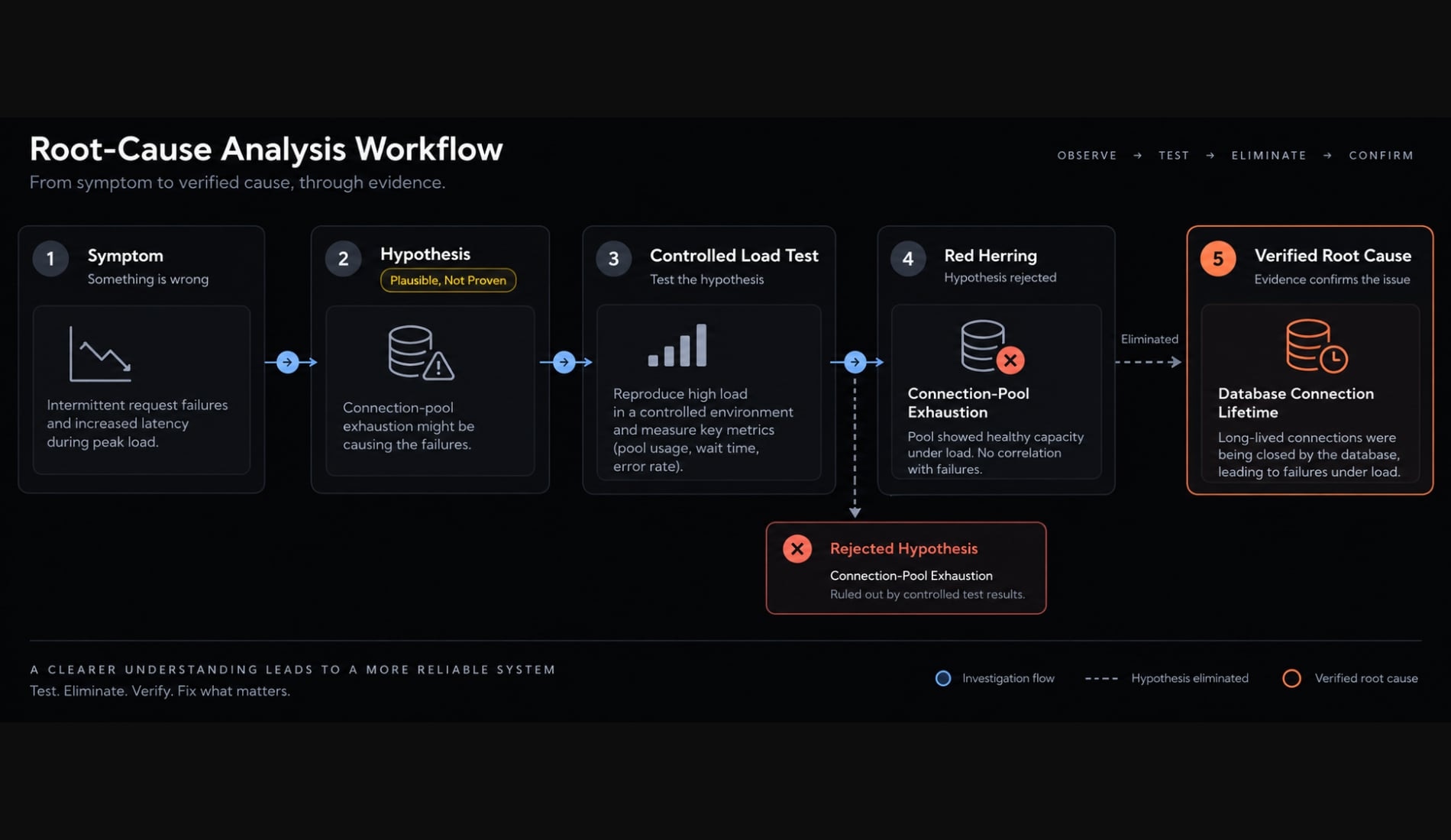
A small patch can require difficult root-cause analysis. Patch size is not a reliable measure of diagnostic complexity.
When Claude Code is not enough
Claude Code is most useful when the required evidence exists in repository files, test output, logs, Git history, or supplied artifacts. Use tools that directly observe runtime behavior when repository reasoning cannot answer the question.
Situation | Primary tool | Claude Code’s supporting role |
|---|---|---|
Deterministic logic defect | Tests and repository inspection | Trace logic and propose regression coverage |
Incorrect runtime state | Traditional debugger | Identify breakpoints and interpret captured state |
CPU or memory bottleneck | Profiler | Connect hot paths to repository code |
Distributed production failure | Observability: logs, metrics, traces | Correlate supplied evidence and map services |
Browser rendering or network issue | Browser DevTools | Analyze console, DOM, and network artifacts |
Database contention | Query analysis and database monitoring | Trace query origins and transaction paths |
Security vulnerability | Security tooling and specialist review | Map affected code and organize findings |
Intermittent race condition | Instrumentation and reproduction harness | Suggest signals and controlled experiments |
For production debugging, do not grant unrestricted infrastructure access to an AI coding agent. Use least-privilege permissions and follow the current Claude Code security and permission guidance.
Pause the session when:
- Claude Code repeatedly returns to rejected hypotheses.
- The failure cannot be reproduced or observed.
- Required evidence exists only in live runtime state.
- A proposed change exceeds the approved scope.
- The patch affects authentication, authorization, payments, deletion, security, or a public API.
- Available evidence conflicts with the generated explanation.
- Tests cannot prove the original symptom.
- The investigation requires unavailable domain expertise.
Preserve DEBUG.md, escalate to the relevant specialist, and switch to the tool capable of capturing the missing evidence. Resume Claude Code analysis only after new evidence becomes available.
Common Claude Code debugging mistakes and guardrails
Most AI debugging mistakes result from weak evidence, uncontrolled scope, or incomplete patch verification.
Common mistake | Practical guardrail |
|---|---|
Asking “fix this bug” without context | Provide expected behavior, actual behavior, environment, and reproduction |
Allowing edits before diagnosis | Require a read-only investigation |
Treating the first plausible issue as causal | Demand falsifiable hypotheses |
Providing excessive unrelated context | Limit context to the failing path and direct dependencies |
Applying several speculative fixes | Change one controlled variable at a time |
Accepting an irrelevant passing test | Require a user-visible regression test |
Allowing broad incident refactoring | Apply the smallest reasonable patch |
Skipping final diff review | Review every changed file manually |
Automatically running destructive commands | Require explicit approval and least privilege |
Losing findings during a long session | Maintain a structured |
These guardrails are part of the debugging workflow, not optional cleanup after Claude Code finishes.
Debugging with Claude Code requires evidence, not prompt tricks
A reliable way to debug with Claude Code follows seven stages: define, reproduce, provide context, map hypotheses, test, patch, and verify. Its strongest roles are repository search, code-path mapping, hypothesis organization, controlled experiment support, and investigation documentation.
Reliability still depends on reproducible evidence, narrow permissions, valid regression coverage, and manual Git diff review. Claude Code can support the investigation, but it should not approve its own assumptions or production deployment.
Save or copy the DEBUG.md template and use it during the next incident. AgentKit can package the same investigation rules, permission gates, validation checks, and reporting structure into a reusable debugging workflow.
Frequently asked questions
What is debugging with Claude Code?
Debugging with Claude Code is an AI-assisted investigation process where developers use Claude to search repositories, analyze stack traces, and execute tests. Unlike a chatbot, Claude Code acts as a partner that proposes hypotheses and patches, while the developer retains full control over validation and deployment.
How does Claude Code compare to traditional debuggers?
Traditional debuggers are best for inspecting live runtime memory and execution state. Claude Code excels at repository-wide reasoning, mapping call paths across files, and analyzing logs or error patterns. Use traditional debuggers for state-specific issues and Claude Code for systematic root-cause analysis.
Should I let Claude Code automatically fix my bugs?
No. You should never allow an AI agent to apply patches without human review. The safest workflow involves using Claude Code to define hypotheses, verify them through controlled tests, and propose patches that you manually review via a Git diff before deploying to production.
How can I prevent Claude Code from making unrelated changes?
You can prevent unwanted changes by using specific "scope control" prompts that list only the files or modules relevant to the current bug. Always instruct Claude Code to operate in a read-only mode until a root cause is verified through a regression test.
What information must I provide for effective debugging?
To get accurate results, provide the expected behavior, the actual error (including full stack traces), environment details, and the steps to reproduce the issue. Always redact sensitive credentials, API keys, or proprietary data from logs and files before sharing them with any AI tool.
When should I stop using Claude Code for an incident?
Stop the AI investigation if Claude Code repeatedly cycles through rejected hypotheses, the bug involves sensitive production state that cannot be replicated locally, or the required fix involves security-sensitive areas like authentication or payment flows that require manual expert oversight.
Read more:
- Mastering the Claude Code workflow for reliable AI development
- Master Claude Code Python: A practical workflow for AI coding
- Claude Code prompt engineering: A practical guide for developers
Conclusion
Debugging with Claude Code is most effective when approached as a structured, evidence-driven process that separates investigation from modification. By maintaining control over root-cause verification, enforcing narrow scopes, and thoroughly reviewing final diffs, you can leverage AI to accelerate repository analysis while ensuring code quality and system safety.