Claude Code vs Kiro: Choose the right AI coding workflow
Claude Code vs Kiro: Choose the right AI coding workflow
Choosing between Claude Code and Kiro comes down to balancing adaptable execution with structured planning. For developers, founders, and engineering managers, the real test is which workflow delivers reviewable changes without adding extra supervision, overhead, or cost. This comparison examines planning, repository execution, collaboration, pricing, and safety controls to help you choose the right approach for your team.
Claude Code vs Kiro: Quick verdict and comparison at a glance
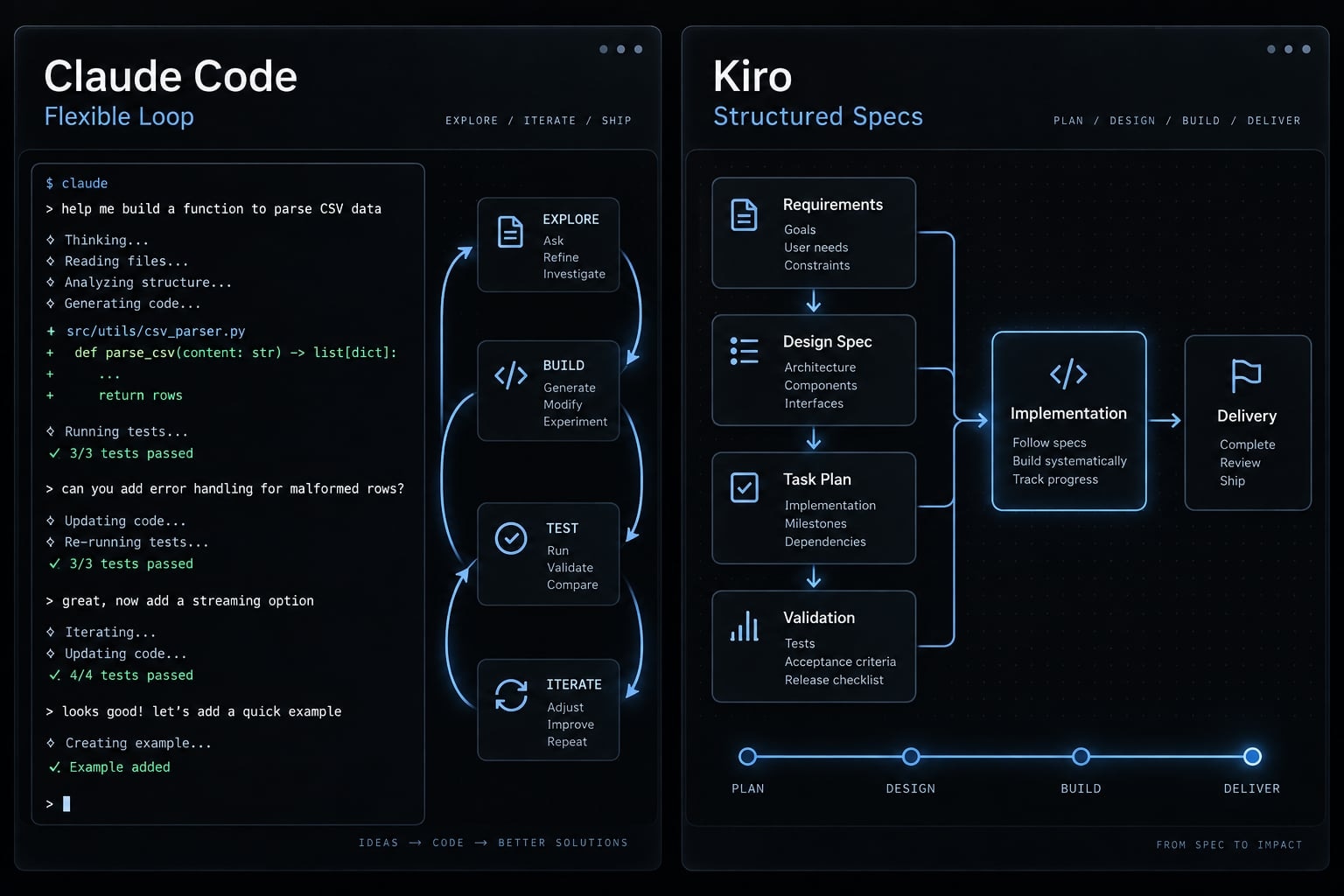
Start with Claude Code when adaptable repository execution is your priority. Start with Kiro when reviewable requirements, design, and task artifacts are central to delivery. These are workflow emphases, not exclusive capabilities. Existing engineering processes, available interfaces, usage costs, and required controls can change which tool is the better starting point.
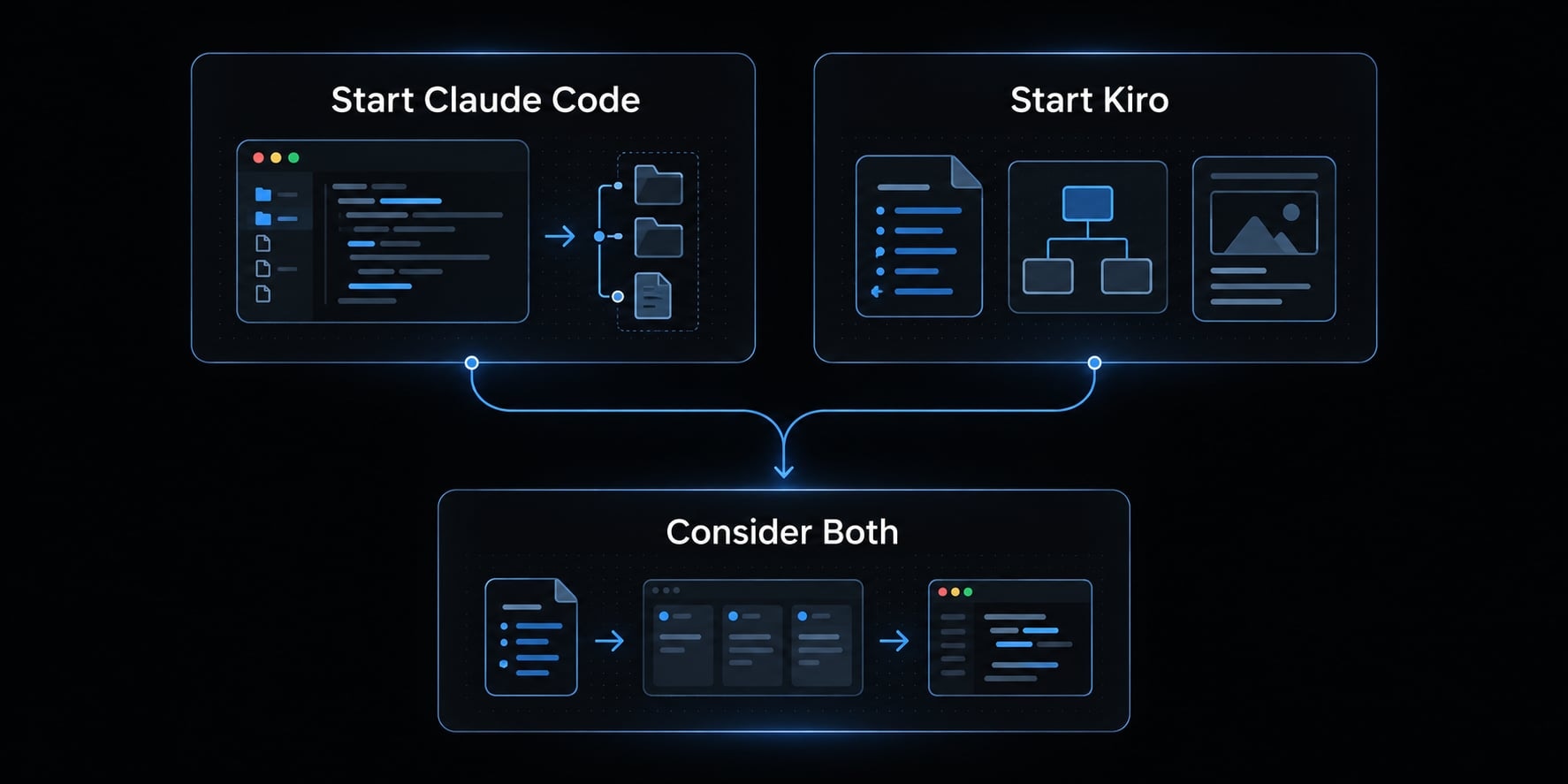
If you only need the answer:
- Start with Claude Code when established tests and reviews already guide implementation.
- Start with Kiro when the team needs clearer planning before implementation.
- Consider both when an explicit planning-to-implementation handoff removes ambiguity.
Claude Code vs Kiro comparison table:
Criterion | Claude Code | Kiro | Decision implication |
|---|---|---|---|
Workflow emphasis | Adaptable repository execution | Specification-oriented development | Choose around your coordination bottleneck. |
Planning approach | Planning within iterative agent work | Requirements, design, and task artifacts | Decide how much durable planning you need. |
Supported interfaces | CLI and supported editor integrations | IDE and CLI offerings | Check capabilities on your intended surface. |
Repository execution | Inspect, edit, run commands, verify | Implement tasks and iterate on code | Evaluate representative repository tasks. |
Persistent instructions | CLAUDE.md and related configuration | Steering files and specification artifacts | Assign maintenance ownership. |
Automation | Hooks and non-interactive execution | Agent hooks and interface-specific automation | Do not assume feature parity. |
Collaboration | Fits existing repository review processes | Makes planning artifacts reviewable | Identify missing handoff information. |
Model availability | Depends on access and configuration | Depends on supported product options | Check the actual available model. |
Pricing structure | Eligible subscriptions or usage-based access | Plan allowances and credit metering | Compare completed work, not billing units. |
Best-fit scenario | Established process, varied implementation tasks | Features requiring explicit planning checkpoints | Pilot before standardizing. |
A CLI (command-line interface) supports terminal interaction. An IDE (integrated development environment) combines editing and development tools. Neither label defines the product’s entire workflow.
The real difference: Structured specifications vs flexible execution
The meaningful difference is how teams organize decisions, not simply where developers type. Durable planning artifacts help coordinate intent. An adaptable execution loop helps investigate and implement changes within existing engineering practices.
Consider one illustrative task: Adding tenant-level role permissions to a B2B application. Both tools need clear answers about administrators, account boundaries, prohibited actions, and backward compatibility.
How Kiro’s spec-driven workflow works
Kiro’s documented specification workflow moves through requirements → design → tasks. A requirements document captures expected behavior; design explains the approach; tasks divide implementation into reviewable units.
For tenant permissions, acceptance criteria should include denying cross-tenant access and defining which roles can invite users. These spec artifacts give product and engineering a shared reference before code review.
Steering files serve a different purpose: They provide recurring project guidance, such as conventions and architectural constraints. They are not substitutes for feature-specific requirements.
This structure adds work. For a small patch, a lighter conversational workflow may be more appropriate than producing a full planning package.
How Claude Code’s flexible agent loop works
Claude Code can follow inspect → plan → edit → run → verify while working within repository conventions. Persistent instructions in CLAUDE.md can explain test commands, project boundaries, and implementation expectations.
For the same permission feature, a developer can first request an investigation, approve a plan, then authorize bounded implementation.
Instructions provide guidance; skills package reusable procedures; hooks react to events; subagents delegate tasks. MCP (Model Context Protocol) connects supported tools and context—it does not make integrations automatically authorized or reliable.
Weak instructions, broad permissions, and incomplete tests can undermine either workflow.
Claude Code vs Kiro by the criteria that matter in real work
Methodology: Capabilities below reflect the identified product documentation. Workflow recommendations are editorial judgments, not measured outcomes. No original testing or current price verification is claimed.
Planning and persistent project context
Persistent context is valuable only while it remains accurate. Claude Code’s repository instructions and Kiro’s steering files can preserve conventions across sessions. Kiro’s specs additionally preserve feature decisions.
Temporary conversation context is different: An important decision in a session is not necessarily durable project guidance.
Assign an owner for each instruction or planning file. Update it when architecture, acceptance criteria, dependencies, or test commands change.
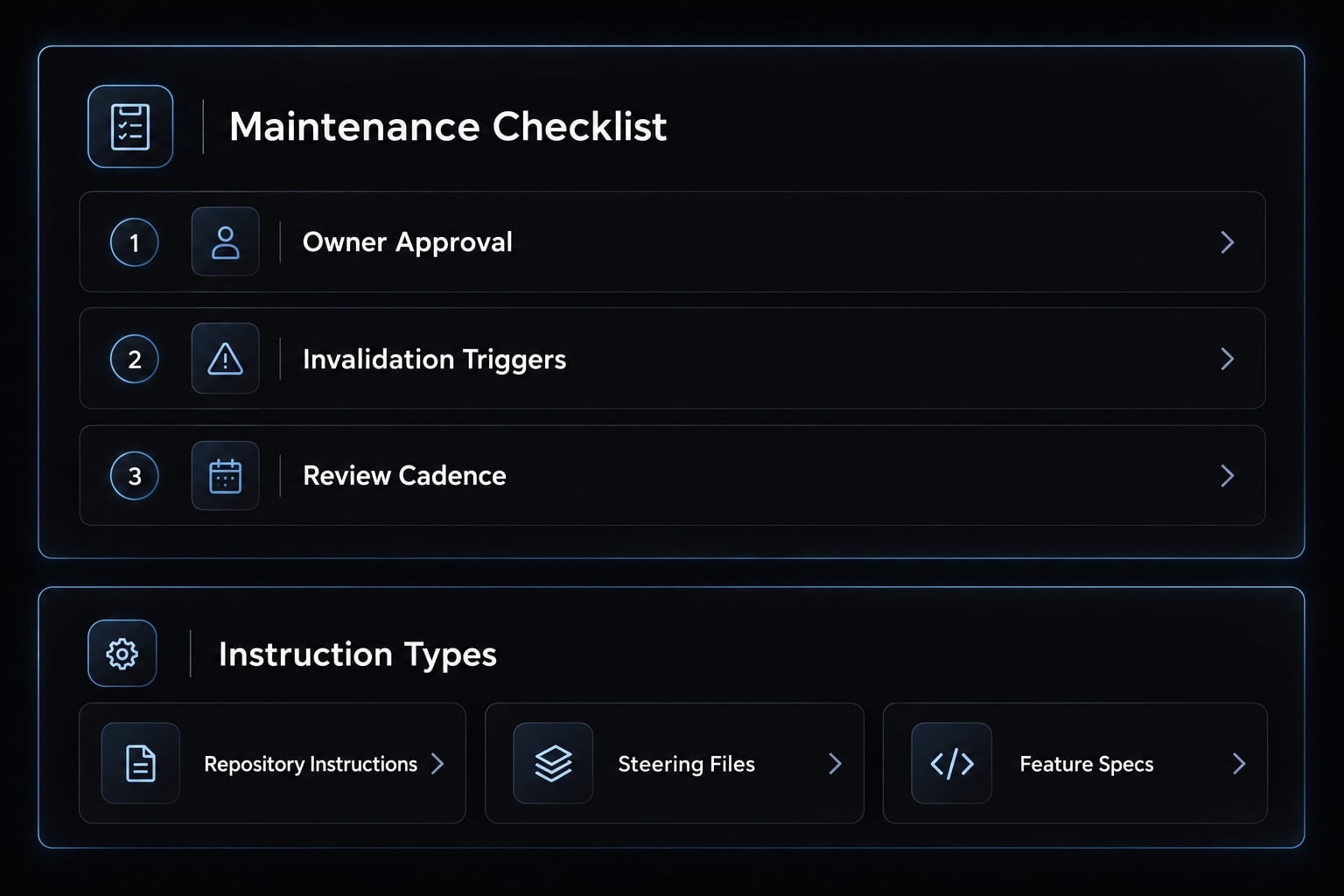
Use this maintenance check:
- Owner: Who approves the guidance?
- Update trigger: Which changes invalidate it?
- Review cadence: When is stale material removed?
This prevents context drift, where stored guidance no longer matches the repository.
Coding, debugging and repository execution
Compare accepted changes, not code volume. The following table describes plausible workflow fit, not demonstrated quality differences.
Task | Claude Code workflow fit | Kiro workflow fit | What to validate |
|---|---|---|---|
Bug investigation | Iterative inspection and command execution | Investigation with documented findings | Reproduction and root cause |
New B2B feature | Implement within existing plans | Develop requirements into tasks | Acceptance criteria and authorization |
Multi-file refactoring | Coordinate repository-wide changes | Plan boundaries before changes | Behavior remains unchanged |
Test repair | Inspect failures and revise implementation | Link repairs to intended behavior | Tests retain meaningful assertions |
Build failure diagnosis | Inspect commands, logs, and dependencies | Investigate within project guidance | Clean build in expected environment |
For tenant permissions, successful automated testing must include forbidden actions, not only permitted ones. A passing test suite can still miss cross-tenant data leaks." hoặc "A green test suite can still overlook cross-tenant security vulnerabilities.
Reject changes that weaken assertions merely to pass tests. Review the implementation and the tests together.
Automation, hooks and external integrations
Claude Code documents non-interactive execution and lifecycle hooks. Kiro documents agent hooks; verify automation separately for its IDE and CLI rather than assuming identical behavior.
For headless automation (execution without an interactive interface), start with a scoped validation task on a test branch.
In CI/CD (continuous integration and delivery), define credentials, permitted commands, timeout behavior, and approval requirements independently.
A hook triggers behavior; policy enforcement depends on what it can block and how it is configured. MCP connectivity does not preconfigure every external service. A headless command does not establish suitability for unattended production work.
Team collaboration and traceability
Is Kiro better for team collaboration? Potentially, when missing planning artifacts cause handoff problems. Shared requirements and design decisions can support onboarding and clarify why an implementation exists.
That advantage narrows when a team already maintains useful tickets, architectural records, and review checkpoints. Duplicating those systems may create competing sources of truth.
Claude Code can operate within an established process, but the team must still preserve important decisions outside temporary sessions. Shared files support traceability. They do not, by themselves, establish real-time collaboration, enterprise administration, or audit compliance.
Pricing and usage predictability
Claude Code pricing and Kiro pricing require different usage assumptions. Exact prices are omitted because current checkout terms have not been independently verified for this comparison.
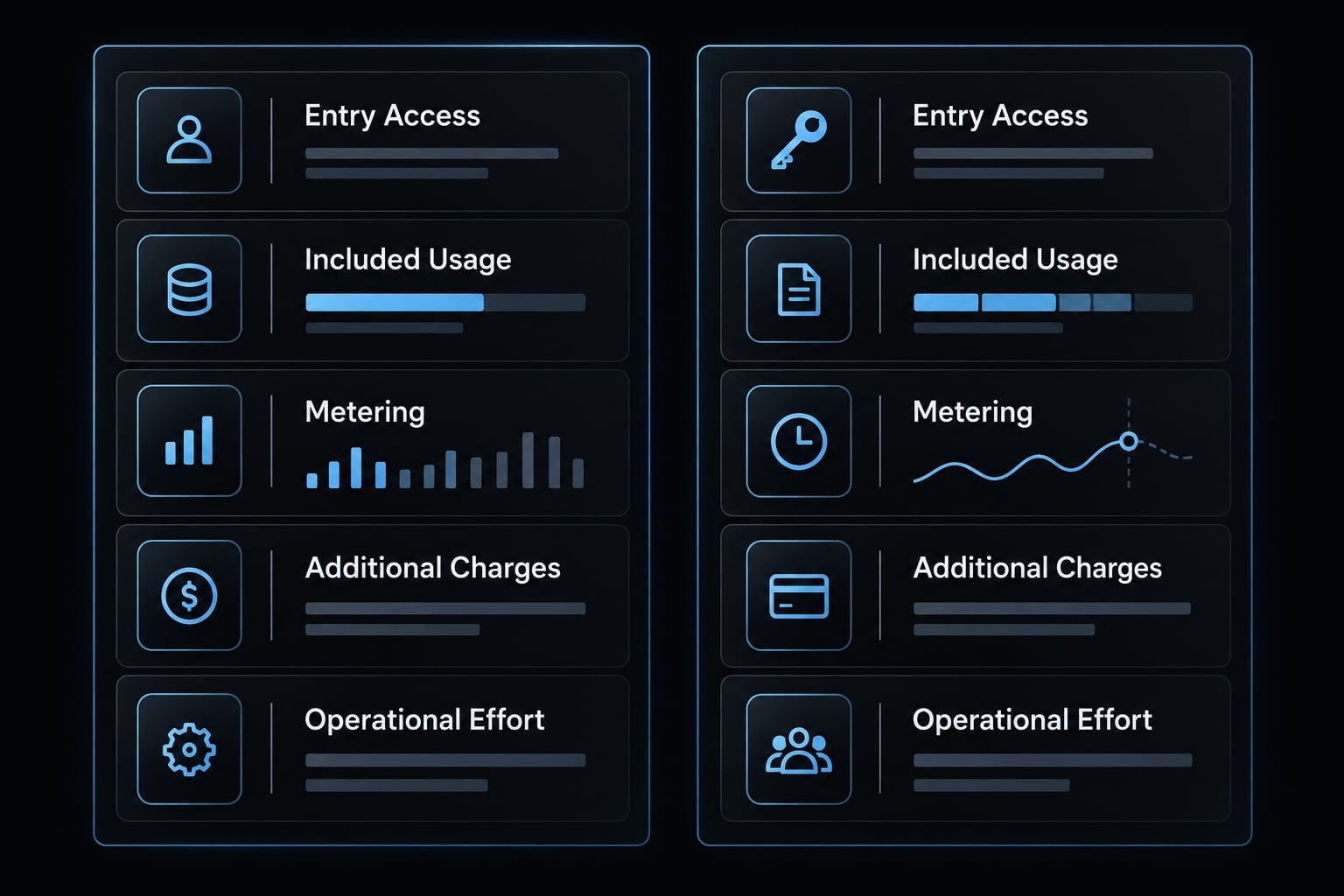
Cost factor | Claude Code | Kiro | Budget implication |
|---|---|---|---|
Entry access | Eligible subscription or usage-based route | Available plan and allowance | Confirm currency and billing commitment. |
Included usage | Access-dependent limits | Plan-specific credits | Check expected workload coverage. |
Metering and resets | Subscription limits or API token billing | Credit rules and reset schedule | Model representative tasks. |
Additional charges | Separate API or enabled extra usage | Plan-specific additional usage terms | Confirm opt-ins and spending boundaries. |
Operational effort | Setup, supervision, review, rework | Planning upkeep, review, rework | Include engineering labor. |
A Claude subscription does not automatically cover separately billed API (application programming interface) usage. Likewise, Kiro credits should not be treated as equivalent to Claude tokens.
Total adoption cost = access and usage charges + setup, maintenance, review, and rework labor.
This is a budgeting framework, not a vendor billing formula. Confirm model multipliers, team terms, regional availability, and monthly versus annual commitments.
Safety, permissions and human control
Neither a CLI nor an IDE is inherently safer. AI agent governance depends on configured boundaries:
- Scope: Bounded tasks and isolated branches or worktrees.
- Access: Least privilege, protected secrets, command approvals.
- Verification: Diff review, tests, and relevant security scans.
- Release: Human approval and controlled deployment.
Branches and worktrees separate changes; they are not security sandboxes. Before procurement, assess code handling, retention, administrative controls, and applicable contractual terms. Usage dashboards provide visibility, not necessarily hard spending limits.
Also check model availability in the selected interface and plan. A model’s advertised context capacity should not be assumed to be a product-wide default.
Which tool fits your role and project type?
Choose by the work and its constraints, not the job title. A founder implementing account permissions may need more planning than a large team repairing a narrow regression.
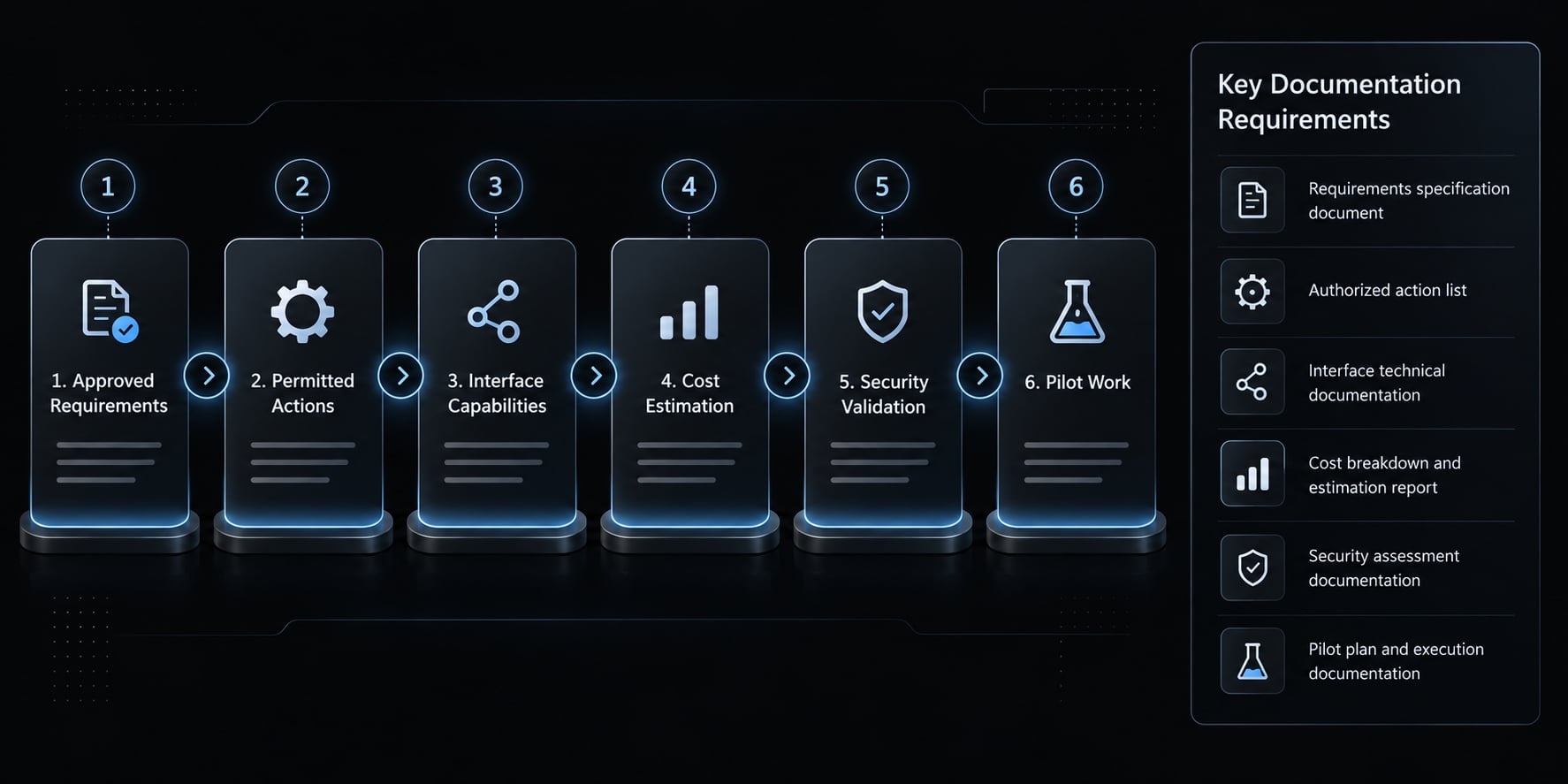
Use this six-step selection process:
- Identify which changes require approved requirements.
- Define permitted actions and mandatory approvals.
- Check preferred interfaces and required capabilities.
- Estimate usage, setup, and review costs.
- Validate security and procurement requirements.
- Pilot representative work before wider adoption.
Decision matrix by user and scenario
Scenario | Starting point | Condition |
|---|---|---|
Solo founder | Either | Choose the process you can maintain |
Terminal-oriented senior developer | Claude Code | Terminal execution matches daily work |
Product team formalizing a feature | Kiro | Requirements need explicit approval |
Team without consistent planning | Kiro | Someone owns and maintains specifications |
Team with established processes | Claude Code | Existing artifacts already guide implementation |
Complex bug investigation | Claude Code | Iterative repository exploration is central |
Compliance-sensitive project | Further control assessment | Validate data, access, audit, and release controls |
Urgent small patch | Existing approved tool | Avoid switching overhead and unnecessary planning |
AWS-centered environment | Conditional evaluation | Verify concrete identity, procurement, or integration benefits |
Cross-repository standardization | Either | Reusable guidance fits repository differences |
AWS association alone is not an integration benefit. Establish which supported connection or procurement arrangement matters before weighting it.
Choose Claude Code If…
- You need adaptable repository execution across varied tasks.
- Existing requirements, tests, and reviews already provide discipline.
- Its documented automation meets your chosen interface’s requirements.
Choose Kiro If…
- Reviewable planning artifacts are a central delivery requirement.
- Product and engineering need explicit approval checkpoints.
- Its supported interfaces and workflows match team preferences.
Put the AI coding workflow through a controlled pilot. Use the same starting repository, acceptance criteria, and permission boundaries. Record the evaluator, date, version, interface, model, and plan.
Test a failing integration, tenant permissions, and a behavior-preserving refactor. Measure setup time, human effort, elapsed time, interventions, usage, and review acceptance. Different model configurations must be disclosed. A small pilot supports a local decision—not a universal ranking.
Honest limitations and adoption risks
Both products create maintenance and review work. Structure can add coordination overhead; flexible execution can increase supervision requirements. Neither trade-off disappears because the underlying model improves.
Claude Code limitations
Adaptable execution requires explicit boundaries around commands, files, and task scope. Incomplete repository guidance leaves more decisions to inference.
Usage and review effort also vary by task. A difficult investigation may involve repeated attempts without producing an acceptable change. Budget for intervention, not just access.
Kiro limitations
Specification work can be disproportionate to a narrow change. Requirements and designs also become liabilities when implementation evolves but documents remain unchanged.
Usage forecasting requires understanding the current credit rules and workload. A predictable subscription fee does not necessarily mean predictable total adoption cost.
Tool/context | Risk | Operational impact | Mitigation |
|---|---|---|---|
Claude Code execution | Unbounded task | Unrelated edits | Define allowed scope |
Claude Code instructions | Stale guidance | Incorrect assumptions | Assign instruction ownership |
Claude Code usage | Repeated attempts | More cost and review | Set intervention thresholds |
Kiro planning | Excessive specification | Delayed small changes | Use proportionate planning |
Kiro artifacts | Duplicate requirements | Conflicting implementation targets | Maintain one authoritative source |
Kiro usage | Misread credit rules | Budget surprises | Track representative task consumption |
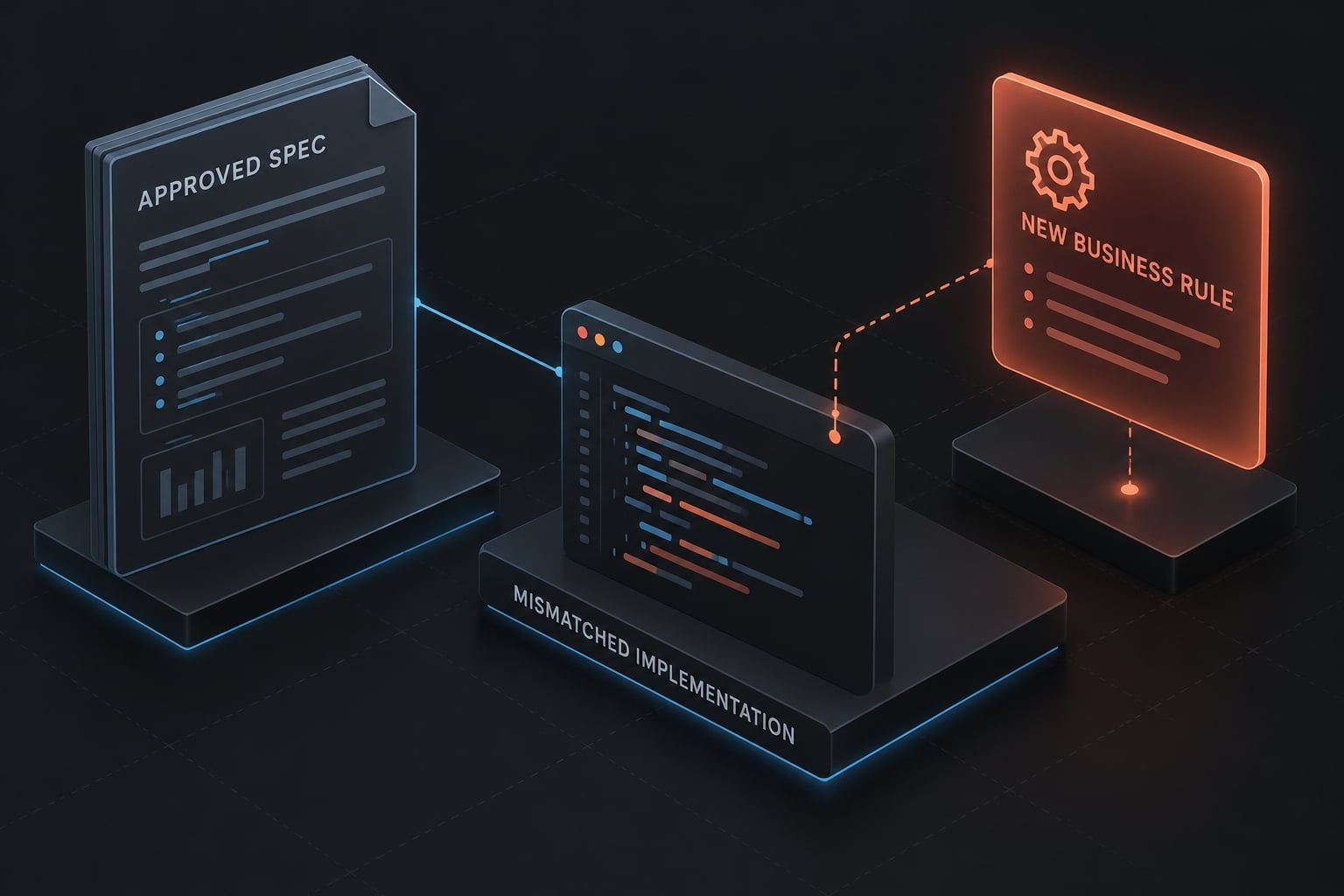
Potential failure mode: An outdated permission specification permits an action the product owner has since prohibited. The implementation may match the document yet violate business intent. Require acceptance-criteria review whenever authorization rules change.
Shared risks
Apply these risk-to-control checks to both products:
- Ambiguous requirements → acceptance review.
- Stale context → ownership and updates.
- Excessive access → least privilege.
- Secret exposure → credential isolation and scanning.
- Incorrect changes → diff review and tests.
- Dependency problems → dependency checks.
- Unsafe external instructions → inspect repository and tool inputs.
- Premature deployment → approval gates.
External content can contain instructions designed to redirect an agent. Treat retrieved material as input, not authority. Tests and scanners reduce exposure; they do not detect every defect.
Can Claude Code and Kiro be used together?
Yes, through a repository-based artifact handoff. That does not establish native integration, automatic synchronization, or shared session context.
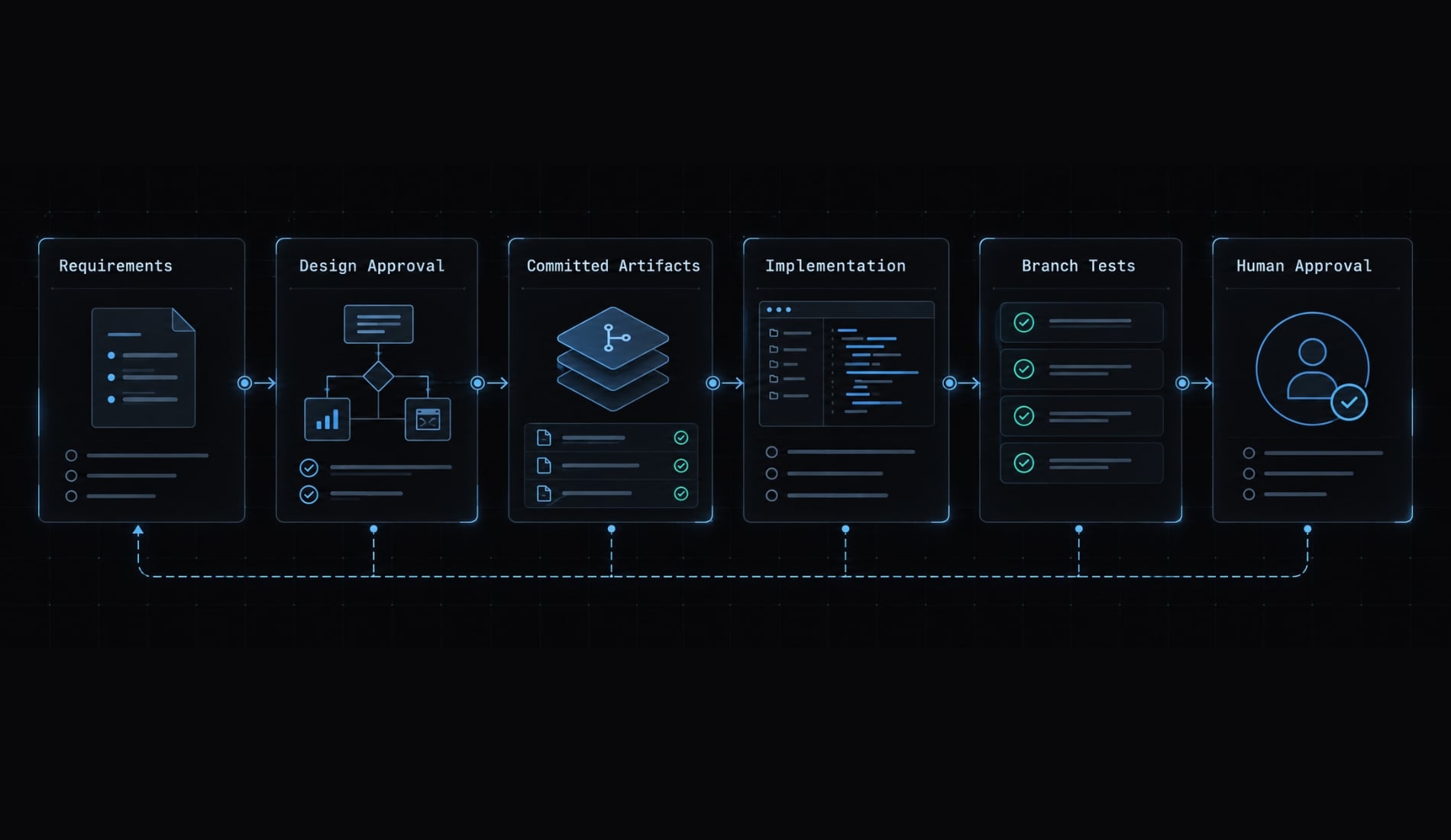
A hybrid AI coding workflow is useful only when the handoff reduces ambiguity enough to justify operating two tools:
- Capture requirements and acceptance criteria.
- Review design and task boundaries.
- Commit approved planning artifacts.
- Explicitly provide the approved task and constraints to the implementation tool.
- Implement and verify on a controlled branch.
- Review the diff against approved criteria.
The feature owner must manage the specifications. If implementation invalidates an approved assumption, update and reapprove the relevant document before proceeding.
Hybrid workflow example:
- For tenant permissions, Kiro can help develop spec artifacts covering role behavior and access boundaries. Approved files become the repository handoff.
- Claude Code can then implement a bounded task and run authorization tests. A human reviews both the code and its alignment with the approved requirements.
Do not combine them when changes are small, planning is duplicated, or competing documents create multiple sources of truth.
How AgentKit can standardize workflow setup
AgentKit addresses repeated configuration, not the choice between coding tools. Teams often rebuild instructions, roles, checks, and integrations across repositories.
AgentKit’s product description includes reusable AI skills, specialized subagents, workflows, MCP integrations, and CLI and desktop management. These can provide shared operating patterns; compatibility must be checked for the intended environment.
Native Kiro support is not established here. Reusing ordinary planning files is different from supported AgentKit integration.
Example standardized agent workflow
An example configured workflow—not an automatic default—is:
- Scope approved work.
- Delegate implementation.
- Run configured tests.
- Review changes.
- Run configured security checks.
- Require human merge or deployment approval.
AgentKit engineer solution snapshot
Area | Product-described capability and boundary |
|---|---|
Reusable assets | Skills, subagents, and workflows; adapt to project conventions |
Management | CLI and desktop functions; check environment support |
Integrations | MCP connections; configure authorization separately |
Compatibility and controls | Confirm supported tools; visibility does not establish enforcement |
Standardization can reduce repeated setup, but it does not guarantee correct changes or productivity gains. Explore AgentKit Engineer on AgentKit for relevant workflow assets, then validate compatibility against the same pilot criteria used for the underlying coding tool.
Frequently asked questions
What is the primary difference between Claude Code and Kiro?
Claude Code is a terminal-first autonomous agent designed for rapid repository-wide execution and flexible iteration. Kiro emphasizes specification-oriented development, moving through requirements, design, and tasks before implementation. Claude Code emphasizes adaptable repository execution within existing conventions. These are workflow emphases, not exclusive capabilities.
Can I use Claude Code and Kiro in the same workflow?
Yes. You can use Kiro to define requirements and technical design artifacts, then pass those approved documents to Claude Code for autonomous implementation and test verification. This hybrid approach leverages Kiro's planning structure and Claude Code's flexible execution engine.
Do Claude Code and Kiro use the same AI models?
Both tools integrate with Anthropic’s model family (such as Claude Sonnet and Opus). Model availability depends on the product, plan, and interface you select. Check which models your chosen plan actually exposes rather than assuming parity between the two tools.
Does Kiro replace the need for manual testing?
No. While Kiro incorporates requirements analysis and property-based testing, neither tool guarantees error-free code. Both require human intervention for diff reviews, manual test validation, and authorization of production-level changes to ensure system safety.
How does the pricing structure differ between the two?
Claude Code typically operates on Anthropic's subscription or API usage-based billing models. Claude Code uses subscription or usage-based access; Kiro uses plan allowances with credit metering. The two units are not comparable, so model a representative workload on each rather than comparing headline prices — and include setup, review, and rework labor.
Read more:
- Codex vs Claude Code: Which AI coding agent suits you best?
- Claude Code vs Devin: Choosing between steering and delegation
- Claude Code vs Replit: Which AI coding tool is best for you?
Conclusion
Choosing between Claude Code and Kiro comes down to your governance model: opt for Kiro when reviewable requirements and structured design artifacts drive delivery, or choose Claude Code when flexible, repository-wide execution aligns better with your existing engineering processes. Regardless of the choice, neither tool replaces human oversight for testing, permissions, and deployment approvals.