Claude Code visual regression: Setup, workflow and best practices
Claude Code visual regression testing: Tools, workflow and setup
Claude Code visual regression testing pairs a screenshot comparison tool with AI-assisted review to catch hidden UI bugs like clipped mobile buttons. By separating capture from AI inspection, teams gain release confidence through reproducible states and clear approvals. This guide covers tool selection, setup, and false-positive controls using a B2B SaaS example.
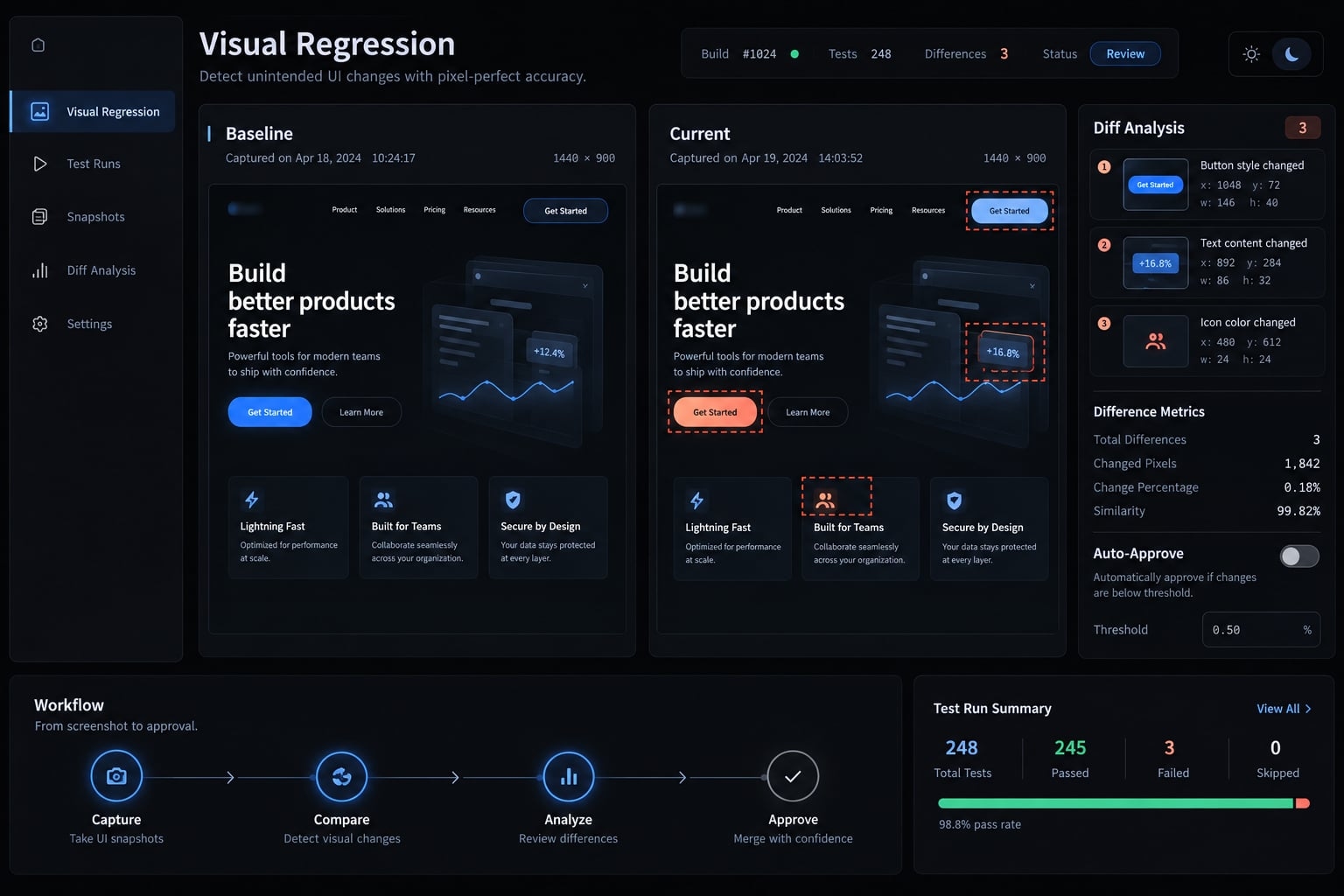
How Claude Code fits into visual regression testing
Claude Code visual regression testing is a workflow that compares screenshot artifacts against approved baselines using a configured testing tool, then uses Claude-assisted interpretation to explain differences and suggest remediation. Capture, comparison, and controlled approval remain explicit responsibilities; Claude coordinates work rather than serving as the sole testing authority.
The three-layer visual regression model
Layer | Responsibility | Typical implementation |
|---|---|---|
Capture | Reproduce a state and obtain screenshots. | Playwright; Storybook states captured through automation or an integration. |
Detection | Compare against approved references under configured rules. | Playwright assertions, BackstopJS, Chromatic, or Percy. |
Interpretation | Explain observed changes and propose next actions. | Claude Code orchestrating tools and reviewing accessible images. |
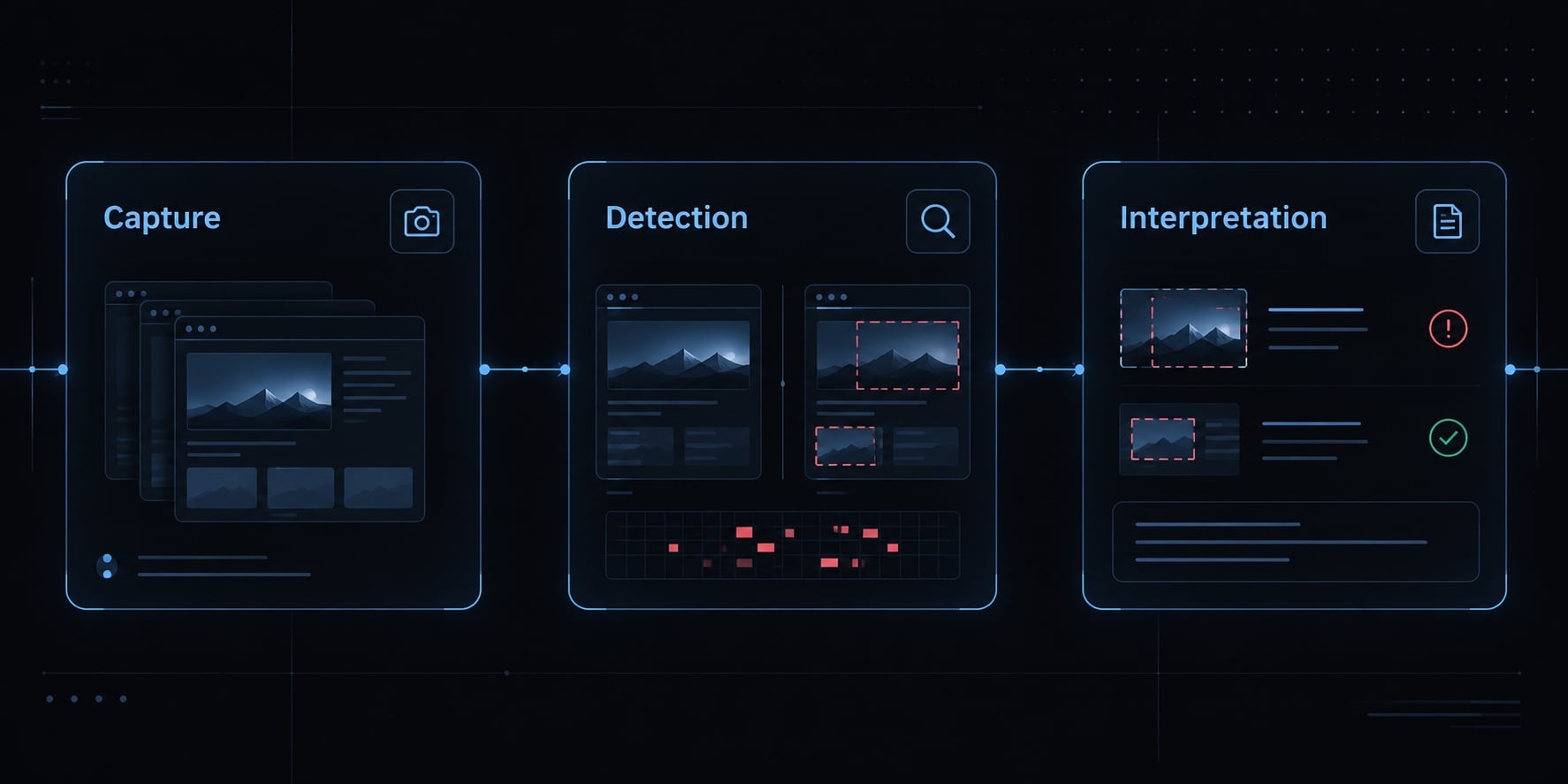
Hosted products can own multiple layers. Their comparison methods vary; automated visual diffing does not always mean raw pixel comparison.
Claude Code documentation on common workflows and permissions describes image-assisted work and controlled tool execution. Playwright’s Visual comparisons documents screenshot assertions and reference updates. Supported image access and model capabilities remain prerequisites for interpretation.
What Claude Code can and cannot reliably do
Can assist with | Cannot guarantee |
|---|---|
Generate and execute tests | Exhaustive state coverage |
Inspect accessible screenshots | Detection of every subtle defect |
Suggest a likely cause | Proof of causation |
Propose focused fixes | Approval of its own baseline changes |
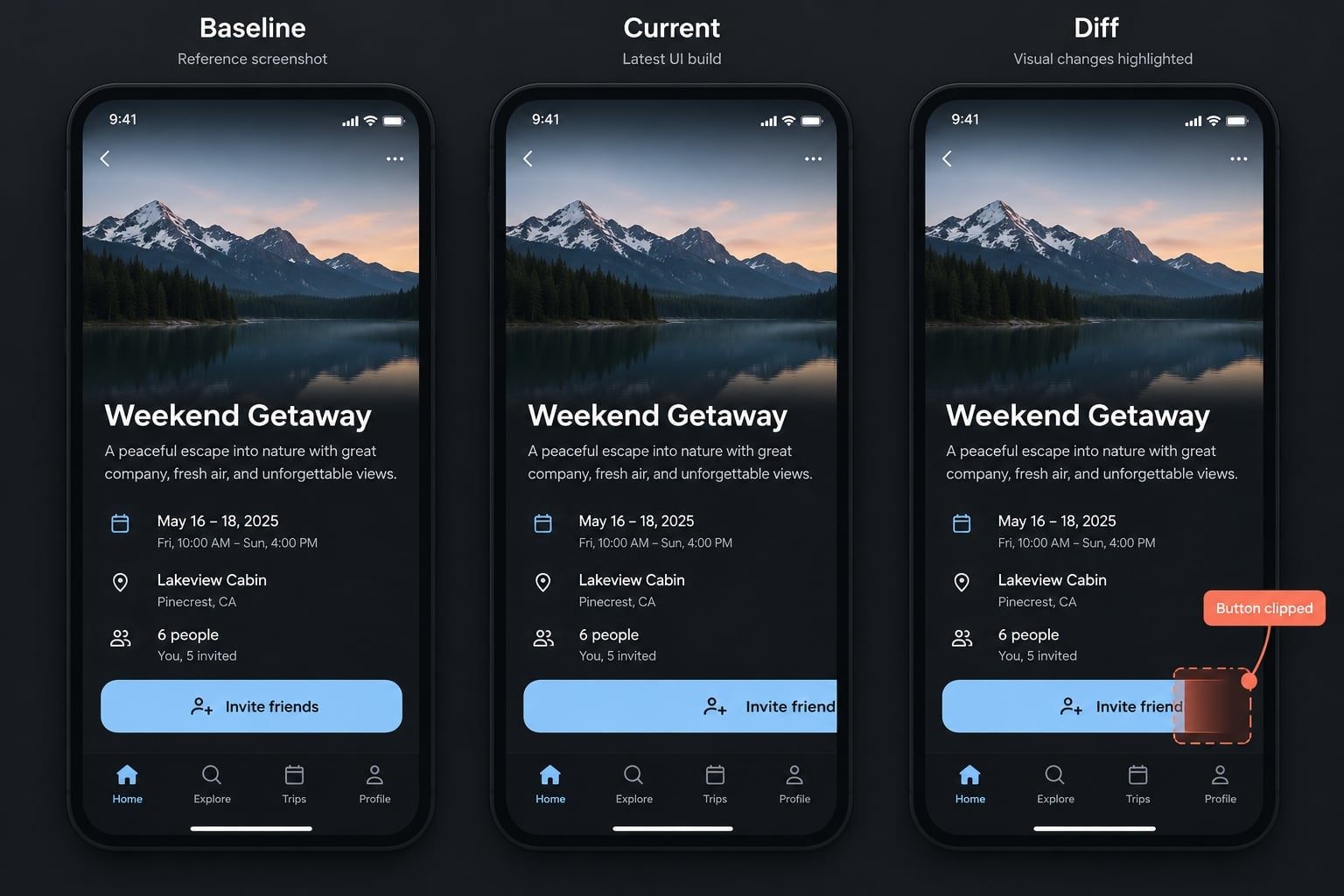
In the illustrative team-management scenario, functional checks confirm that invitation submission works. A narrow-screen screenshot reveals that its primary action is clipped.
“Semantic diffing” here means contextual interpretation of differences, not a guaranteed native testing feature. Claude can misread an image or infer the wrong cause. Screenshot checks complement functional, accessibility, and cross-browser testing; they do not replace them.
Which visual regression tool should you use with Claude Code?
Playwright screenshot assertions are a practical starting point for small application teams, especially when browser tests already exist. Choose other visual regression tools when component coverage, review collaboration, or infrastructure requirements justify them.
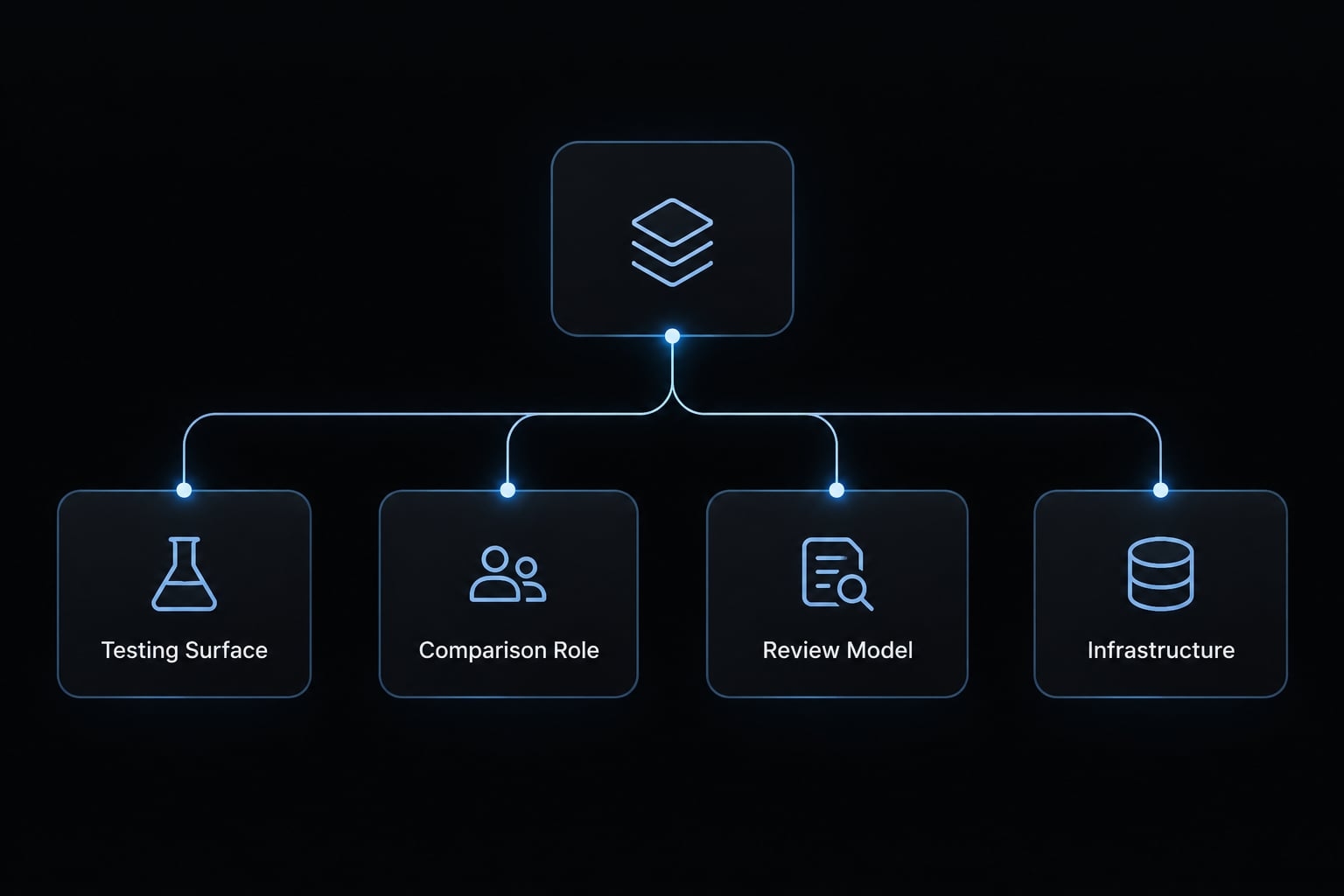
Tool-selection matrix
Tool | Primary surface | Comparison role | Review model | Main consideration |
|---|---|---|---|---|
Playwright | Routes, states, responsive screens | Built-in screenshot assertions | Repository and test reports | Maintain a consistent execution environment |
Storybook | Isolated component states | Requires testing integration | Integration-dependent | Not a standalone comparison engine |
Chromatic | Supported component/application integrations | Hosted visual testing | Hosted review | Check supported surfaces and data handling |
Percy | Supported browser/component integrations | Hosted visual comparison | Hosted review | Requires integration and upload governance |
BackstopJS | Configured page scenarios | Self-managed comparison | Generated reports | Own infrastructure and scenario maintenance |
Direct screenshot review | Ad hoc screens | Interpretation only | Manual or AI-assisted | No reliable automated gate by itself |
Playwright Visual comparisons, Storybook Visual tests, Chromatic, BrowserStack Percy, and the BackstopJS repository explain these respective roles. Check integration support against your installed versions before standardizing.
A dedicated Claude Code visual regression plugin is not required. Claude can invoke existing test commands when execution is configured and authorized.
An MCP (Model Context Protocol) browser integration can support navigation or capture, but does not establish comparison rules or baseline governance. Browser control alone does not create a screenshot assertion suite.
For community plugins, check maintenance, compatibility, permissions, and ownership. Avoid granting broad repository or credential access merely to simplify screenshot review.
Recommended choice by project type
- Small application: Playwright visual testing for critical routes and responsive states.
- Component library: Storybook visual testing through a configured comparison integration.
- Hosted collaboration: Percy or Chromatic, depending on supported surfaces and review needs.
- Self-managed environment: Playwright or BackstopJS with owned baseline storage.
- One-time refactor: Targeted screenshots plus comparison, followed by Claude-assisted review.
Hosted services can simplify collaboration, but screenshots leave the local environment. Evaluate access controls, retention, plan limits, and processing terms. Self-managed setups avoid that specific dependency while adding browser maintenance, artifact storage, and review responsibilities. Neither approach removes the need for approved references.
How to set up a Claude Code visual regression workflow
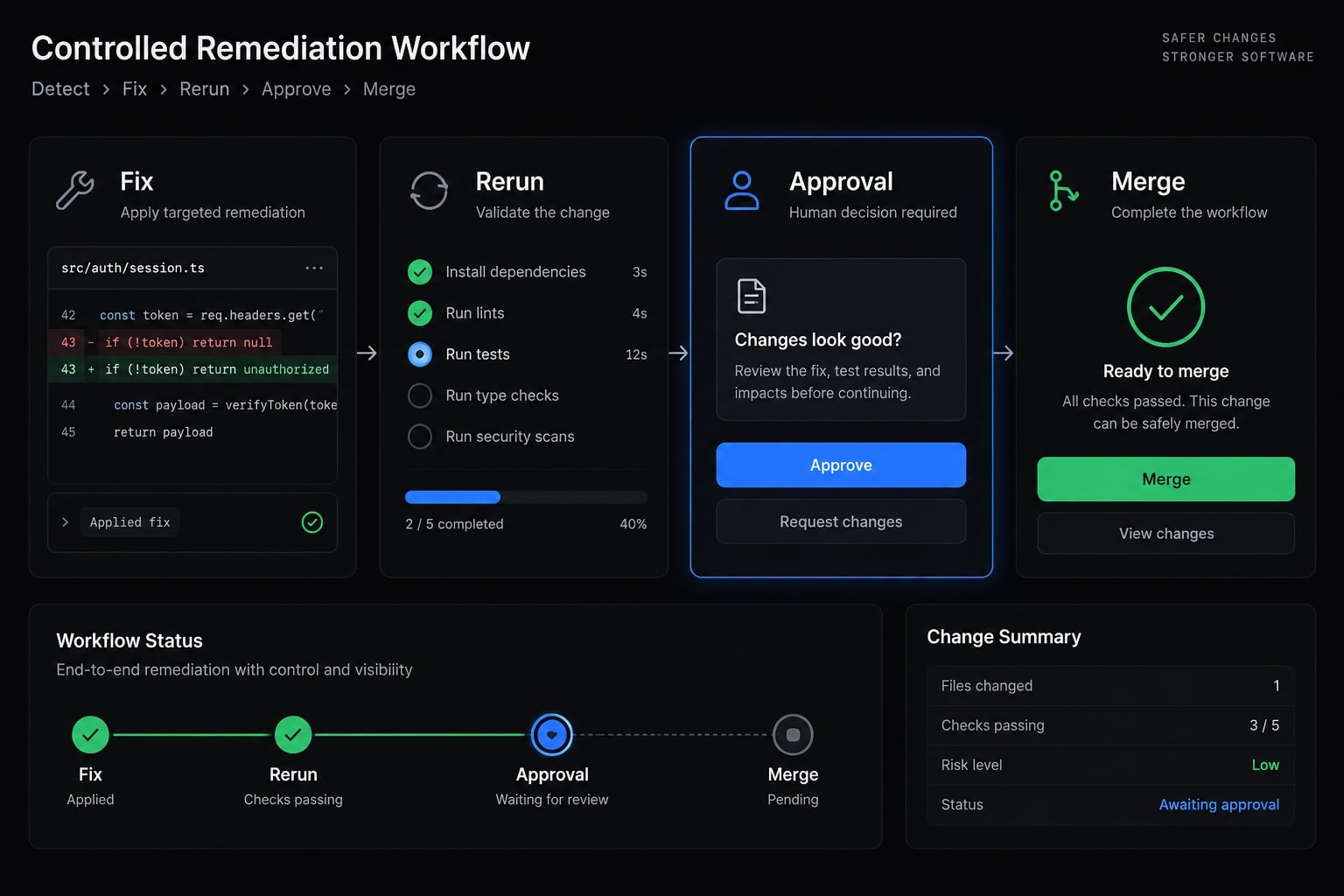
- Enumerate routes, states, and viewports.
- Create stable, approved baselines.
- Capture the current UI and generate differences.
- Ask Claude to classify and explain changes.
- Fix, rerun, and approve.
To automate visual regression with Claude Code, establish this testing contract before expanding its scope.
Step 1 - Enumerate routes, states and viewports
Prioritize UI state coverage by business impact: the team list, invitation dialog, validation error, and empty state. Extend coverage to permissions and subscription administration as risk justifies.
Record routes, fixture identifiers, width, height, and device scale in a repository-readable manifest. Start with desktop and mobile; add intermediate widths for known breakpoint behavior.
Transient loading states need deliberately controlled fixtures, not accidental timing.
Output: A state-and-viewport plan.
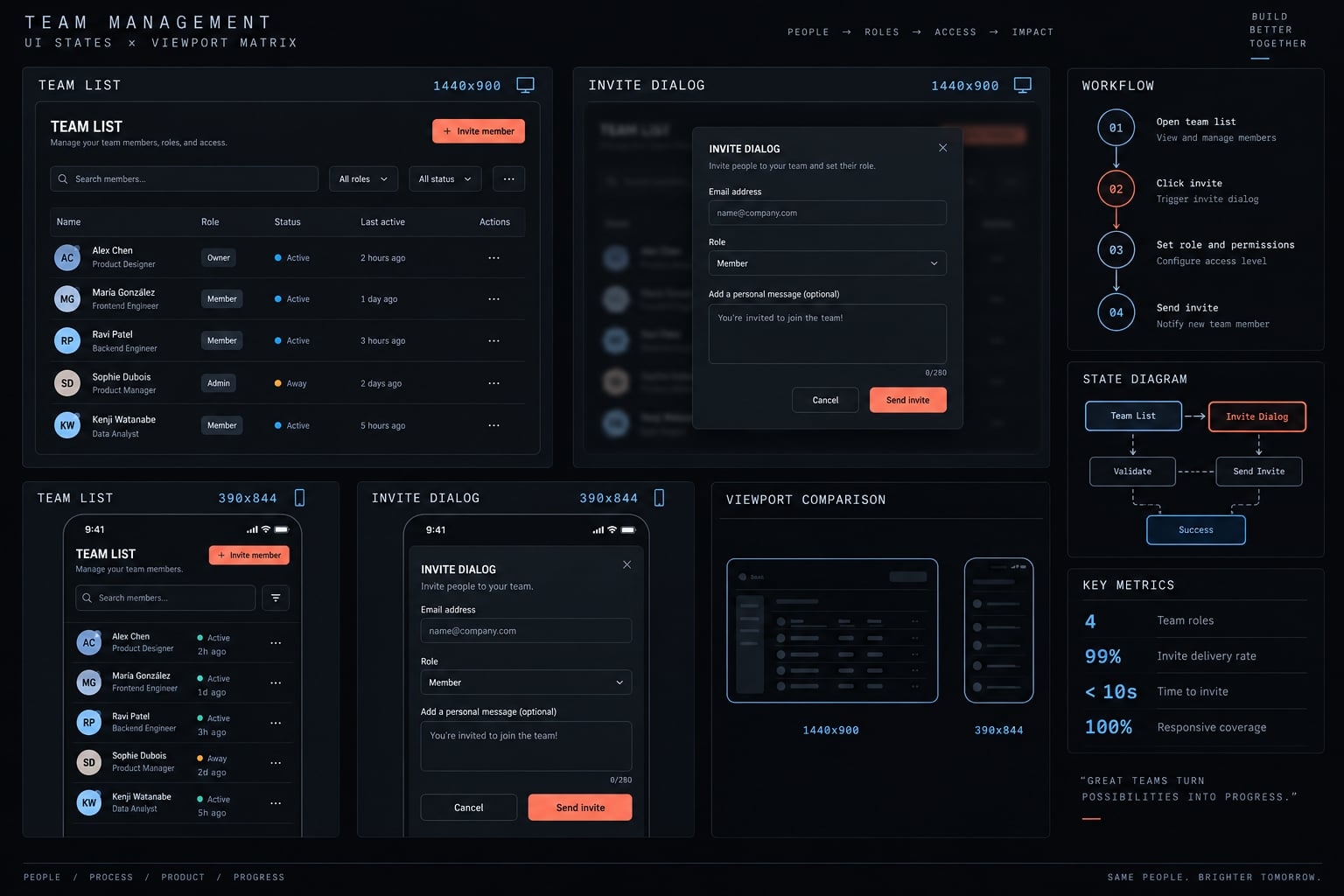
Step 2 - Create stable baseline screenshots
Use synthetic account data, a known authenticated state, and a controlled browser environment. Have an authorized developer inspect every initial baseline before accepting it.
Store approved references in version control or an equivalent managed baseline system. Associate them with the commit, browser version, configuration, and reviewer.
For Playwright screenshots, adopt explicit naming where useful.
Custom artifact convention, not Playwright’s default structure:
visual/team-admin/invite/mobile/baseline.pngvisual/team-admin/invite/mobile/current.pngvisual/team-admin/invite/mobile/diff.png
Record fixture, dependency versions, execution environment, scenario, observed outcome, and reviewer in run metadata.
Output: Approved baseline artifacts with traceable context.
Step 3 - Capture the current UI and generate diffs
Run identical routes, states, and viewport settings against the changed application. Wait for relevant fonts, images, and application data before capture.
Use Playwright screenshot assertions, such as await expect(page).toHaveScreenshot('team-invite.png'), rather than screenshot capture alone. The assertion performs baseline comparison under configured rules.
Preserve baseline, current, and highlighted difference artifacts where supported. A configured comparison threshold determines the test result; Claude’s interpretation does not override it.
Output: A reviewable result plus accessible comparison artifacts.
Step 4 - Ask Claude Code to classify and explain changes
Provide the images, route, state, viewport, run metadata, relevant Git diff, and intended UI changes.
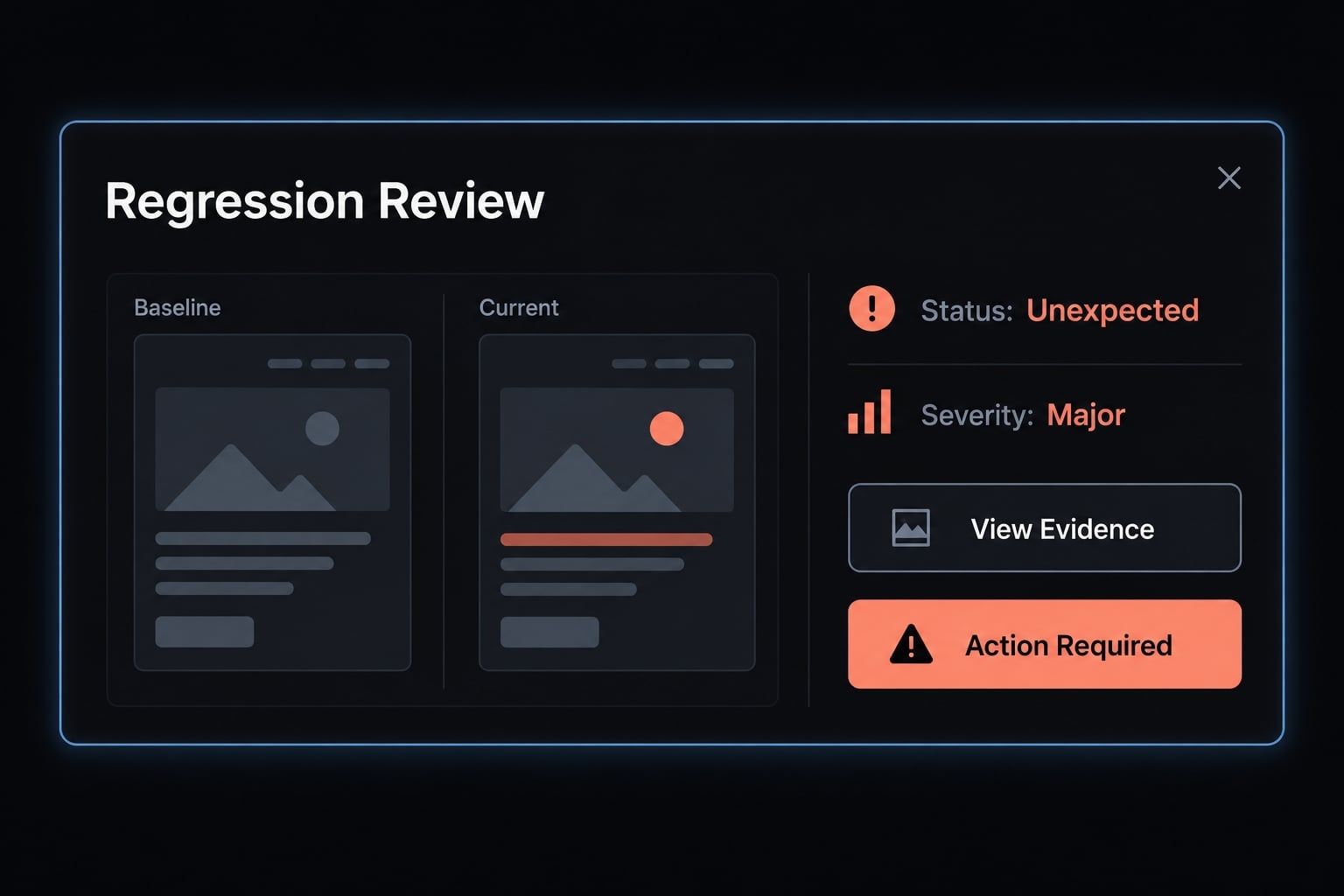
Request a structured report containing:
- Screen, state, and viewport.
- Changed region.
- Impact or severity.
- Expected, unexpected, or uncertain classification.
- Likely cause.
- Recommended action.
- Confidence with supporting evidence.
In this example, desktop spacing changes are intended; mobile clipping is not. Claude might identify a fixed-height dialog container as the likely cause.
That is semantic visual analysis, not proof. A developer must verify the hypothesis against code and a rerun.
Output: A structured triage report distinguishing observation from inference.
Step 5 - Fix, rerun and approve
Apply focused fixes through normal development review, then rerun the same scenarios. Preserve failure evidence until classification and remediation are complete.
Intentional visual changes require an authorized human decision before baseline replacement. Configure CI (continuous integration) checks so failures block progression according to repository policy.
CI/CD visual tests—checks within integration and delivery workflows—should use the same controlled environment as baseline generation.
Output: Verified remediation or a human-reviewed baseline update.
How to reduce false positives and flaky visual tests
Stabilize rendering before asking AI to explain noise. Visual false positives consume review attention, but broad tolerances can conceal genuine failures. Reliability depends on both environment controls and disciplined decisions.
Stabilize the render before comparing screenshots
- Disable irrelevant animations and transitions.
- Freeze time-dependent and randomized values.
- Seed fixtures and control API responses.
- Wait for relevant fonts, images, and application state.
- Pin browser and important dependency versions.
- Fix viewport dimensions and device-scale settings.
- Standardize the screenshot execution environment.
- Mask only regions outside the test objective.
“Deterministic rendering” should mean repeatability within a controlled environment—not identical browser output across every operating system. Browser consistency includes fonts, rendering dependencies, and execution configuration.
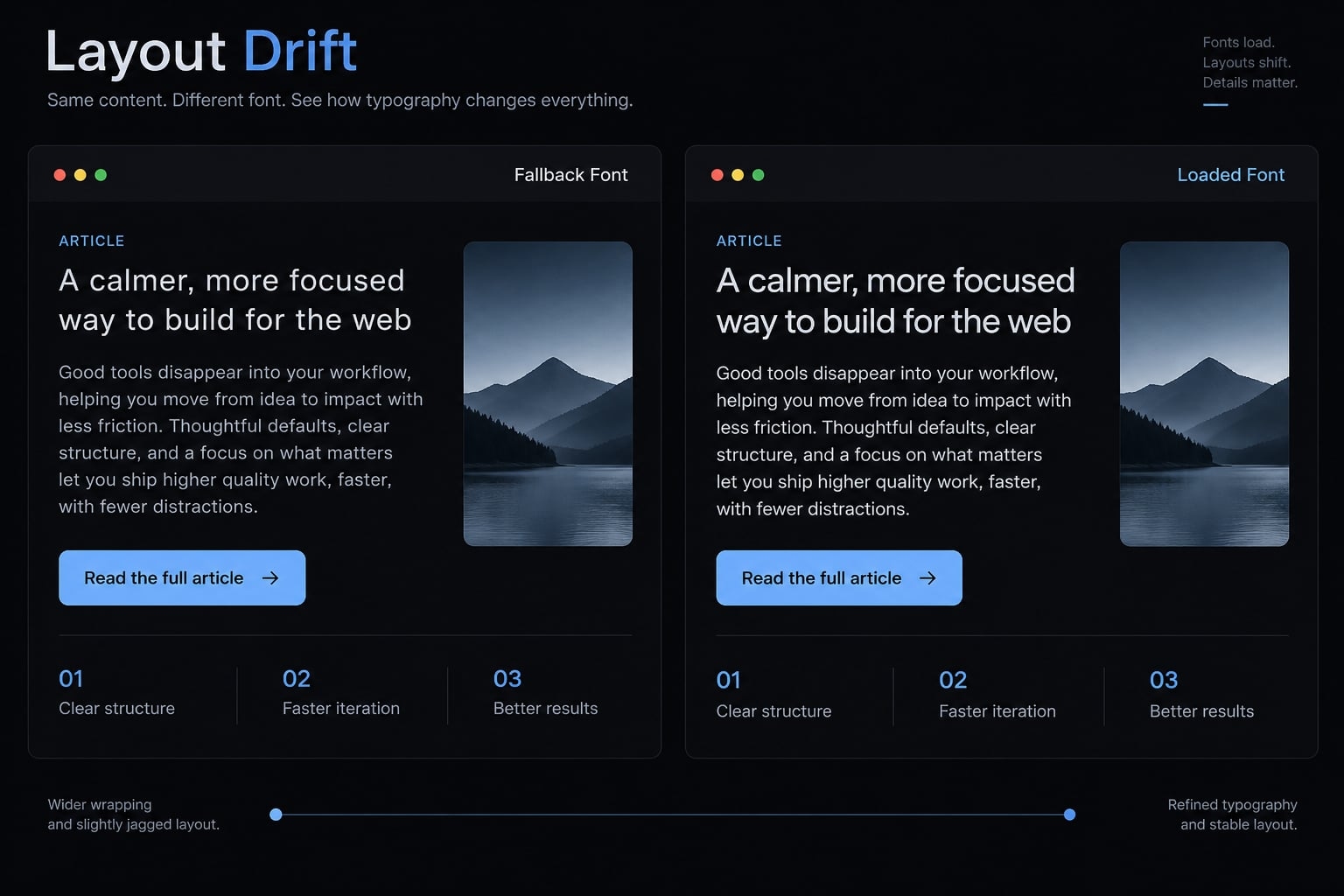
An unloaded web font can change line wrapping in the invitation dialog. The resulting difference resembles a layout regression even when the CSS is unchanged.
Justify tolerance changes against known defects. Do not increase thresholds until CI passes. Likewise, masking the entire dialog would hide the clipped action rather than fix test instability.
Use AI for triage, not silent approval
Claude can triage visual differences, but should not silently approve baseline changes. Escalate clipped content, overlapping elements, missing controls, unexpected design-token changes, responsive breakage, suspected readability problems, and insufficient evidence.
A small pixel difference can represent a significant defect: A nearly hidden action or changed permission indicator may occupy little screen area.
Screenshot interpretation can flag suspected contrast issues; dedicated checks must verify accessibility requirements. Static comparisons reveal positional differences but do not measure runtime Cumulative Layout Shift, which tracks unexpected movement during a page’s lifecycle.
Low-confidence judgments remain review items. Baseline governance requires named approval ownership, including when a separate agent performs the review.
Protect sensitive data in screenshots
Screenshot privacy: Use synthetic accounts and nonproduction fixtures. Redact sensitive material before upload or model analysis. Restrict artifact access, set retention limits, and review hosted-tool data-processing terms. Apply the same scrutiny to Git context, which may expose secrets or internal business logic.
A screenshot mask does not remove information from the browser session, DOM (the page’s document structure), logs, or traces. Protect those artifacts separately.
A passing check demonstrates consistency only for the tested states, environments, and viewports, not the entire application.
Reusable Claude Code prompt for visual regression review
Use this Claude Code visual testing prompt after generating comparison artifacts. It separates review from remediation and requests an actionable regression report rather than an unsupported pass/fail opinion.
Copy-ready visual review prompt
Review this visual regression run. This is a review-only task.Inputs:- Baseline/current/diff artifact paths: [paths]- Run metadata and comparison result: [path]- Relevant Git context: [diff or commit range]- Expected UI changes: [description]- Required screens, states, and viewports: [manifest]Check artifact access and coverage before analysis. Report missing,unreadable, or mismatched evidence. Do not invent observations.For each changed region, report:1. Screen or component.2. State and viewport.3. Changed region and supporting observation.4. Severity: critical, major, minor, or undetermined.5. Status: expected, unexpected, or uncertain.6. Likely cause, clearly separated from observed facts.7. Recommended action.8. Confidence and evidence supporting that confidence.Rules:- Do not modify code, tests, thresholds, or baselines.- Do not approve baseline changes.- Do not infer harmlessness from pixel count alone.- Escalate clipping, missing controls, overlap, responsive breakage, unexpected design-token changes, and insufficient evidence.- Treat suspected accessibility issues as requiring verification.- Label probable rendering noise separately from severity; it is not a confirmed harmless outcome.- End with unresolved questions and required human decisions.
Where to run the prompt
Run screenshot review after local artifact generation, in a dedicated pre-PR (pull request) session, or against accessible CI artifacts. A documented reusable command or skill can preserve the review contract.
A path does not guarantee file access. Confirm permissions and image readability.
Operationalizing visual regression with an AgentKit workflow
Standardize the repeatable work only after the underlying tests operate reliably. Shared state inventories, artifact conventions, review schemas, and approval rules are more useful than repeatedly rewriting review instructions.
AgentKit provides reusable skills, specialized subagents, and workflow building blocks for AI development. The pattern below is a proposed implementation, not a claim that a dedicated visual regression kit or plugin is available.
AgentKit visual QA workflow
Repository context → State plan → Configured visual tests → Artifacts → Review agent → Report → Human decision → Remediation and CI recheck
A reusable agent skill can carry the review schema and execution conventions. Repository-specific configuration still determines routes, fixtures, commands, browser versions, artifact access, and approval ownership.
Storybook requires an accompanying visual testing integration. The standardization layer does not replace capture or comparison tooling.
A separate review agent limits task mixing, but creates neither an independent approval authority nor a security guarantee. Enforce separate permissions and review ownership through repository and CI controls where necessary.
AgentKit solution specifications
Item | Proposed pattern |
|---|---|
Workflow name | Repository visual QA review |
Availability | Proposed implementation using general workflow building blocks |
Best fit | Multi-repository teams, founders, and agencies using Claude Code |
Prerequisites | Working runner, accessible artifacts, repository configuration, approved baselines |
Scope | State planning, execution conventions, review schema, remediation handoff |
Outputs | Manifest, artifacts, report, reusable instructions, approval policy |
Controls | Human baseline approval and configured CI checks |
Measurement | Covered states, triage time, recurring false positives, escaped defects |
Cost and effort | Depends on configuration, runner infrastructure, storage, model usage, and hosted services |
For this Claude Code workflow, measure covered states against the documented priority inventory. Measure triage time from available failure artifacts to a recorded decision. Recurring false positives are repeated alerts humans attribute to irrelevant variation. Escaped defects are confirmed visual problems discovered after release.
These definitions make visual QA automation assessable without inventing productivity gains. Start with one repository and validate the handoff before extending the pattern.
Frequently asked questions
Can Claude Code perform visual regression testing?
Claude Code can orchestrate visual regression testing by running browser automation, capturing screenshots, and interpreting visual differences. However, you need a configured comparison tool, such as Playwright screenshot assertions or a hosted service, to handle baseline comparison and artifact generation
What is the difference between visual capture and visual comparison?
Capture is the process of generating reproducible screenshots of specific application states and viewports. Comparison is the automated detection of differences against an approved baseline. Claude Code acts as the intelligent layer that analyzes these differences and proposes actionable remediations.
How do I reduce false positives in visual tests?
To minimize false positives, you must stabilize the rendering environment by disabling animations, mocking time-dependent values, pinning browser versions, and ensuring fonts are fully loaded before capture. Claude can then help label probable rendering noise for human review, separately from intentional design changes.
Does Claude Code automatically approve visual baseline updates?
No. While Claude can categorize and explain visual changes, all baseline updates require explicit human verification and authorization to prevent unintended regressions from entering your production environment.
Where should I run visual regression checks?
It is best to run lightweight checks locally during development using pre-configured agent skills, perform more comprehensive triage in a pre-PR session, and run the full visual suite in CI using the same controlled environment as baseline generation.
Are screenshots secure when analyzed by AI?
Screenshots may contain sensitive business data. You should always use synthetic data fixtures, redact sensitive information before analysis, and verify that your testing tools and AI providers comply with your organization’s data retention and privacy policies.
Read more:
- Claude Code regression testing: A practical workflow guide
- Claude Code unit testing: Guide to generate reliable tests
- Build a Claude Code tester agent: Setup & QA workflow guide
Conclusion
Visual regression testing thrives when roles remain clear: use tools for comparisons, and let Claude interpret artifacts while humans authorize baselines. Start with core views (like team lists and dialogs) across devices, stabilize fixtures, and rerun tests after fixes. Finally, scale responsibly by standardizing workflows rather than stacking tools prematurely.