Claude Code monorepo setup: A practical guide & best practices
Claude Code monorepo setup: A practical guide to context, CLAUDE.md and cross-package work
A Claude Code monorepo setup becomes unreliable when irrelevant context crowds out package conventions or when shared changes fail to reach downstream consumers. The goal is not to expose every file. It is to supply the smallest complete task context needed to implement, validate, and review a change.
This guide establishes a practical baseline: where to launch Claude Code, how to organize instructions, what permissions actually control, and how to validate cross-package changes. It uses one small repository throughout, without requiring advanced integrations.
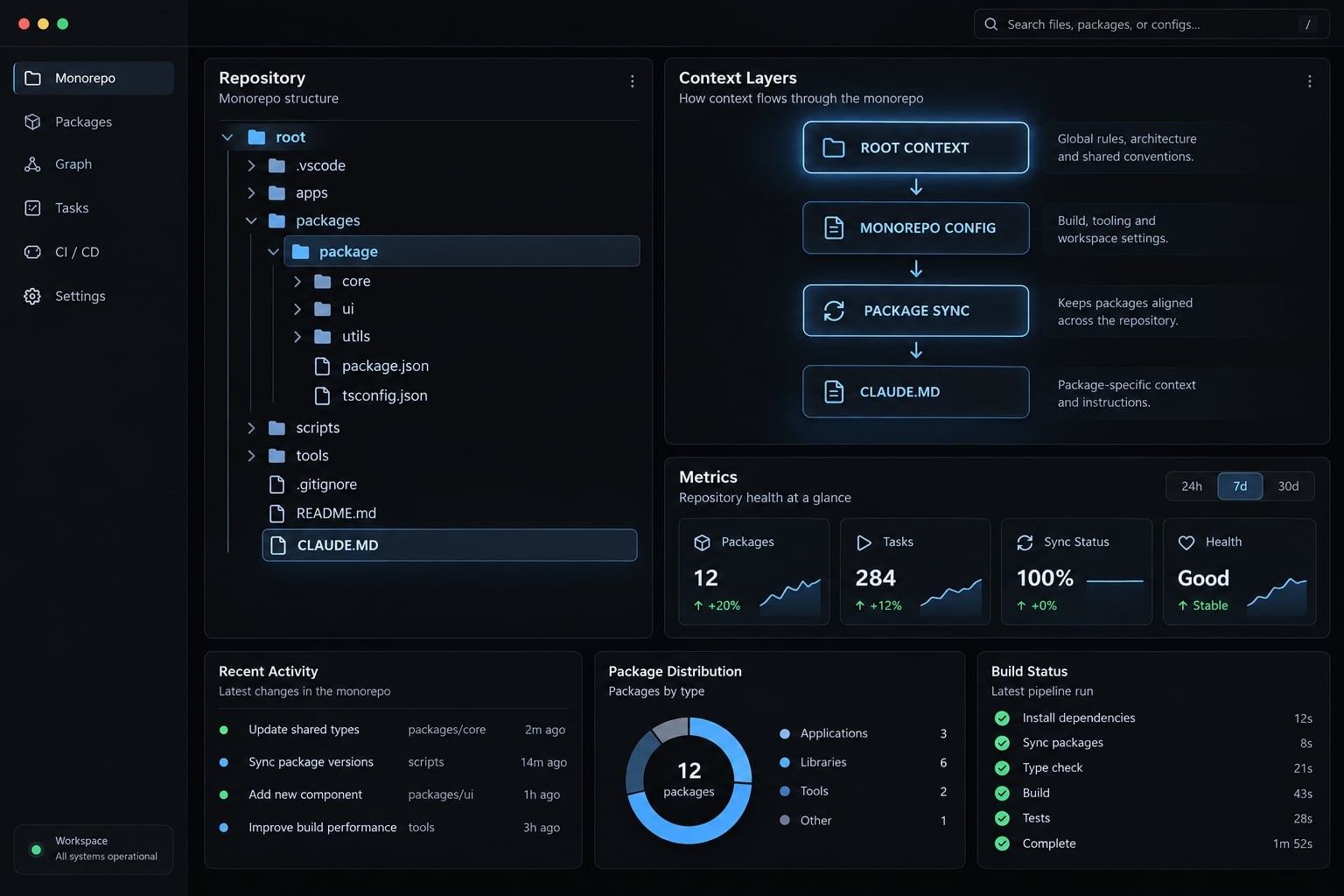
Optimized Claude Code monorepo setup
Configure Claude Code for a monorepo by choosing a task-appropriate launch location, placing shared guidance in root instructions and package differences locally, verifying tool permissions, keeping sensitive data outside the working environment where possible, and validating affected packages. Complete every change with recorded checks and human review of the full diff.
Use these six recommendations as the baseline:
- Put repository-wide conventions at the root: Document the workspace map, package manager, public boundaries, and completion requirements in CLAUDE.md.
- Add local instructions only where rules differ: Package-level instructions should explain meaningful exceptions, not duplicate root guidance.
- Choose a working directory that fits the task: Start locally for isolated work and centrally for coordinated changes.
- Reduce irrelevant reads and protect sensitive operations: Focus instructions help navigation; permissions and environment controls address different risks.
- Expand directory access only when necessary: Identify missing dependencies before adding more working directories.
- Validate affected packages and review the complete diff: Passing checks in the edited package does not establish consumer compatibility.
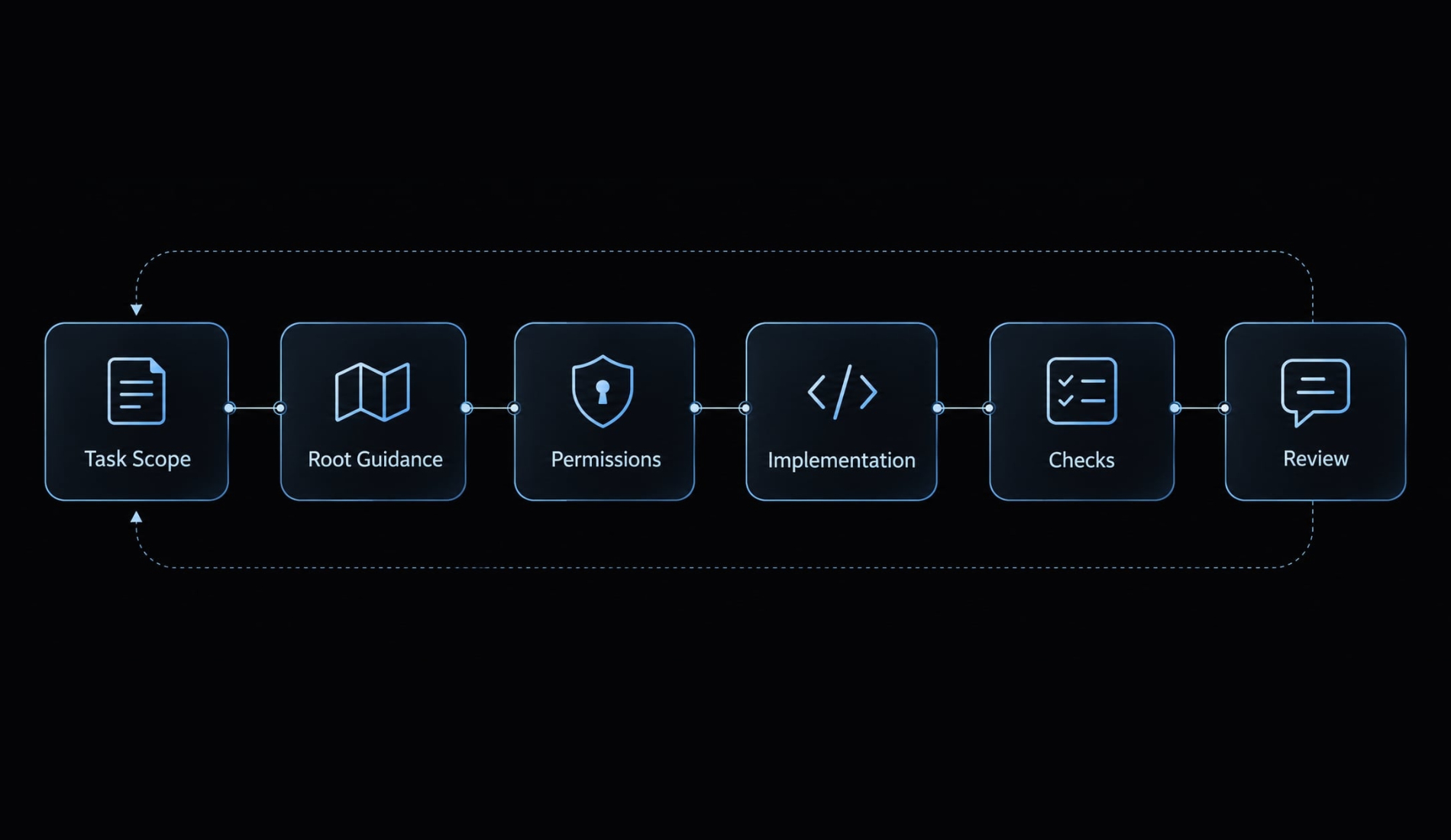
Create a minimal monorepo configuration structure
Start with a small shared configuration. Add files only when they have a clear owner and purpose.
The demonstration repository contains two applications and two shared packages:
monorepo-root/├── CLAUDE.md├── pnpm-workspace.yaml├── .claude/│ ├── settings.json│ ├── settings.local.json # Developer-local; keep untracked│ └── skills/ # Optional reusable procedures├── apps/│ ├── web/│ │ ├── package.json│ │ └── CLAUDE.md│ └── api/│ ├── package.json│ └── CLAUDE.md└── packages/ ├── ui/ │ ├── package.json │ └── CLAUDE.md └── shared/ └── package.json
packages/shared deliberately has no local instruction file. Root guidance is sufficient until that package develops distinct requirements.
For the command examples, assume the manifests declare @demo/web, @demo/api, @demo/ui, and @demo/shared. Assume each defines typecheck and test scripts. These are example prerequisites, not claims about your repository.
What belongs in shared configuration?
Layer | Purpose | Version control |
|---|---|---|
Root | Repository-wide guidance | Normally committed |
Package | Package-specific differences | Normally committed |
| Supported team configuration | Commit after review |
| Supported developer-local overrides | Keep untracked |
| Optional reusable procedures | Commit team-approved skills |
What should remain local?
Keep machine-specific paths, approved temporary overrides, and supported personal preferences local. Promote useful team behavior through normal review rather than copying local settings wholesale.
Local configuration is not secret storage. Untracked JSON files are neither encrypted nor inherently safe to share. Use approved authentication mechanisms and secret management systems for credentials.
Keep team settings minimal initially. Each additional permission, integration, or automatic action creates another behavior to understand and maintain.
Decide where to launch Claude Code
Choose the start location based on the task boundary. The working directory influences initial context and configuration discovery, but it is not a complete security boundary.
Starting at the repository root does not mean Claude Code reads the entire repository. Starting inside a package does not inherently prevent access to siblings or ancestors.
Root vs package decision table
Task | Recommended start location | Reason |
|---|---|---|
One application |
| Encourages a focused workflow around application conventions. |
One library |
| Keeps library responsibilities central; consumer checks may still be needed. |
Shared package plus consumer | Repository root | Simplifies coordinated inspection and workspace commands. |
Repository-wide tooling | Repository root | Matches shared configuration and build responsibilities. |
Repository-wide refactoring | Repository root | Supports dependency discovery across workspaces. |
Subsystem review | Nearest common subsystem directory | Keeps exploration aligned with the review boundary. |
Separate repositories | Primary repository, with explicit additional access | Makes cross-repository requirements deliberate. |
For a web-only task:
cd apps/webclaude
Claude Code documents --add-dir for adding working directories. Its settings documentation also describes additionalDirectories under permissions configuration. Check supported path semantics and settings scope before persisting it.
Additional access does not remove existing access. It also does not mean every added directory’s instructions load automatically; verify instruction discovery separately.
When to start a new session
Start fresh when:
- Switching to an unrelated subsystem.
- Previous exploration introduces irrelevant assumptions.
- Extensive exploration or compaction leaves task state unreliable.
Compaction summarizes conversation context; it does not automatically require a reset. Preserve the objective, decisions, outstanding checks and known risks before restarting.
No launch location is universally correct; choose based on the task boundary.
Layer root and package-level instructions correctly
Keep global rules stable and package conventions specific. Resolve contradictions directly rather than assuming “the closest instruction always wins.”
Root CLAUDE.md responsibilities
The root file should answer four questions: what exists, how work runs, which boundaries matter, and what completion requires.
This illustrative template assumes the package names and scripts established above:
# Repository guidance## Map- apps/web: Next.js administration application.- apps/api: SaaS account API.- packages/ui: shared React components.- packages/shared: account types and shared exports.## CommandsUse pnpm. Run workspace commands from the repository root.Approved shared-package checks:- pnpm --filter @demo/shared run typecheck- pnpm --filter @demo/shared run test## BoundariesImport workspace packages through their public exports.Do not introduce imports into another package's private source.Inspect generated contracts when relevant, but regenerate themthrough the approved generator rather than editing them manually.## CompletionIdentify affected consumers before changing shared contracts.Run their applicable checks.Report failed or skipped checks and request human diff review.
Replace the demonstration package names and commands before adoption. “Approved” should mean approved by the repository owner, not merely suggested by the model.
Package-level CLAUDE.md responsibilities
A package file should explain what changes locally. For apps/web/CLAUDE.md:
# Web applicationPurpose: internal account administration using Next.js.From the repository root:- pnpm --filter @demo/web run typecheck- pnpm --filter @demo/web run testFollow existing App Router and server/client component conventions.Keep server-only credentials and dependencies out of client code.Import shared account types through @demo/shared public exports.For shared account changes, check API serialization compatibility.For shared UI changes, test the affected web interactions.Complete only after relevant checks and human diff review.Report any checks that could not run.
This is package-specific guidance, not permission enforcement. Before relying on discovery, use harmless files in a disposable branch and inspect the session’s loaded-instruction information where available.
What not to put in CLAUDE.md
Include | Avoid |
|---|---|
Stable repository rules | Temporary debugging notes |
Relevant, executable commands | Instructions for unrelated packages |
Validation expectations | Repeated root paragraphs |
Concise documentation references | Large documentation dumps |
Restrictions and escalation rules | Secrets, tokens, keys, environment values |
A reminder to run continuous integration checks is useful. Reproducing every lint rule is not.
Reduce context noise and protect the repository
Separate instruction selection, tool permissions, focused exploration, and environment security. They solve different problems.
Reducing unnecessary input may lower token usage, but it does not enlarge the model’s context window.
Control | What it addresses | What it does not establish |
|---|---|---|
Instruction organization or exclusions | Irrelevant guidance | Source-file isolation |
Tool permissions | Particular tool actions | Universal blocking across every access route |
Focused task instructions | Exploration relevance | Enforced access boundaries |
Environment controls | Available files, credentials, network access | Correct implementation |
Exclude irrelevant instruction files
Keep obsolete guidance out of active instruction locations. Consolidate duplicates and move historical notes into ordinary documentation.
If your installed version supports claudeMdExcludes, confirm its supported scope, patterns, and behavior in Anthropic’s Claude Code memory and settings documentation. No copy-ready exclusion JSON is supplied here because that behavior has not been verified for a specific version.
Excluding an instruction file does not inherently block access to the source files beside it.
Deny reads of generated and sensitive files
Treat permissions.deny rules as tool-specific controls, not a universal ignore system. Verify syntax and matching against the installed version’s permissions documentation.
Use a disposable fixture set before applying candidate rules:
- A root dummy sensitive file.
- A nested dummy sensitive file.
- A generated build artifact.
- A generated interface required by a consumer.
- A sanitized
.env.example. - An ordinary source file that should remain readable.
Test both intended blocks and intended allowances. Record the requested tool, matched path, observed result, and active permission mode.
A likely false positive is a broad generated-file restriction blocking an interface needed for validation. If reproduced, narrow the rule and repeat both blocked and allowed cases. This is a proposed test scenario, not an observed failure.
Read restrictions do not automatically cover every shell command, write operation, or external integration. Inspect those routes separately. Keep live credentials outside the agent environment where possible.
Never test security guardrails using real secrets.
Add code intelligence before expanding raw access
When navigation becomes a bottleneck, consider supported LSP (Language Server Protocol) integrations for symbol definitions and references.
Check Anthropic’s Claude Code code-intelligence documentation for supported languages and setup requirements. Symbol-aware navigation can improve discovery, but it neither guarantees complete consumer detection nor replaces automated testing.
Handle cross-package changes and validate the result
Shared-code changes require consumer discovery before editing. The implementation boundary and validation boundary are often different.
Consider an illustrative account contract in packages/shared. Replace an existing isActive boolean with status: "active" | "suspended".
The API serializes account responses, while the web application renders status and enables administrative actions. This is potentially a breaking contract change, not simply a local type edit.
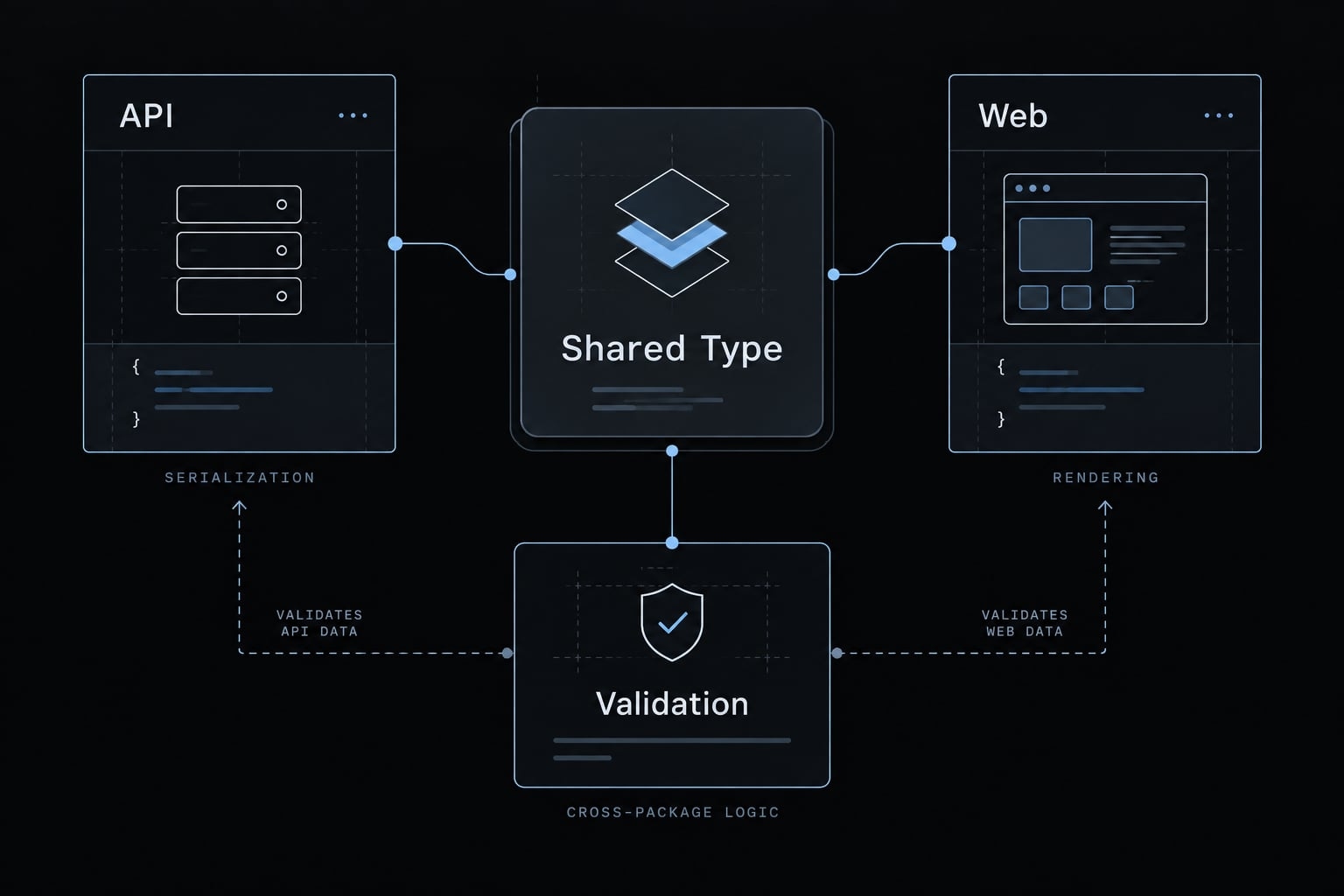
Example workflow - Updating a shared type
- Define the change: Establish status semantics and whether compatibility with existing clients is required.
- Select the starting directory: Use the repository root because the task spans shared code and two applications.
- Discover consumers: Inspect imports, re-exports, runtime schemas, fixtures, generated clients, and downstream dependencies.
- Confirm access: Add working directories only if required; naming three directories does not remove other access.
- Confirm instructions: Inspect root guidance and applicable web/API instructions before planning changes.
- Plan compatibility: Decide whether to migrate directly, support both fields temporarily, or version the contract.
- Update the contract and consumers: Include serializers, validation schemas, UI behavior, and relevant tests.
- Run focused and dependency-aware checks: Validate edited workspaces and additional affected packages.
- Require developer review: Review the full diff for behavior, compatibility, generated outputs, and unrelated changes.
- Record the outcome: Include commands, results, failures, skipped checks, and unresolved concerns.
For the assumed manifests and scripts, run these illustrative commands from the root:
pnpm --filter @demo/shared --filter @demo/api --filter @demo/web run typecheckpnpm --filter @demo/shared --filter @demo/api --filter @demo/web run testgit diff --checkgit diffgit status --short
Explicit filters select named packages; they do not prove that all affected consumers were selected. Official pnpm filtering documentation explains package selectors and dependency/dependent selection.
Validation matrix
Layer | Required check | Evidence |
|---|---|---|
Shared package | Types, exports, unit tests | Recorded command results |
Consumers | Compilation and relevant behavior | Consumer check results |
Dependency graph | Additional affected workspaces | Verified affected selection |
Repository diff | Intended scope and unrelated changes | Human diff review |
Security | Restricted-file changes and available access evidence | Relevant logs, with limitations |
Human approval | Architectural and behavioral suitability | Developer approval |
Record this example as not executed, with no observed results or reviewed diff. In a real change record, capture the Claude Code version, permission mode, commit, commands, exit statuses, and reviewer.
Use affected commands where available
Nx affected tasks, Turborepo affected selection, and pnpm workspace filters are not interchangeable.
Consult official Nx, Turborepo, or pnpm documentation for the selected mechanism. Correctness depends on dependency declarations, task configuration, comparison bases, and dependent selection.
Broaden validation when impact is uncertain. Successful checks provide evidence, not guaranteed correctness.
Avoid common mistakes and standardize the baseline
Claude Code monorepo best practices become useful when the team can verify and maintain them. Start with repeatable decisions, not a large configuration collection.
Seven common monorepo mistakes
- Launching every task at the root → Choose the starting point from the task boundary.
- One oversized instruction file → Keep global guidance concise and package differences local.
- Duplicating global instructions → Maintain one authoritative location for shared rules.
- Treating focus as enforcement → Test permissions and environment boundaries separately.
- Missing downstream consumers → Inspect imports, contracts, and dependency relationships before editing.
- Choosing validation poorly → Run focused checks during iteration; broaden according to risk and repository policy.
- Adding integrations too early → Establish reliable instructions, controls, and checks first.
Full-suite testing is not inherently wasteful. Release policy, architectural uncertainty, or high-risk changes may justify it.
Claude Code monorepo checklist
Use this copyable baseline alongside the instruction templates above:
- Root guidance describes the current repository.
- Package instructions document meaningful differences.
- Shared and developer-local configuration are separated.
- Settings are supported by the installed version.
- Permissions pass harmless blocked-and-allowed fixture tests.
- Credentials use approved storage and access mechanisms.
- The launch location matches the task.
- Necessary cross-package access is confirmed.
- Direct and downstream consumers are identified.
- Affected-package checks have recorded results.
- A developer reviews the complete diff.
- Configuration owners and review responsibilities are assigned.
AgentKit offers editable skills and subagents for Claude Code — such as /ak:plan and /ak:code-review — that teams can adapt to include their workspace map, affected-package checks, and review steps. It's a commercial kit with full source access and production support for Claude Code and Codex. It packages the procedure; permissions, CI, and reviewers still enforce it.
Frequently asked questions
What is the most efficient way to start Claude Code in a monorepo?
Launch Claude Code from the specific package subdirectory you are working in (e.g., cd packages/ui && claude). This automatically loads relevant local conventions while still allowing Claude to traverse the directory tree upward to access essential root-level repository governance.
How should instruction files be organized in a monorepo?
Use a hierarchical approach: place repository-wide standards in the root CLAUDE.md and package-specific conventions in leaf-directory CLAUDE.md files. Claude Code automatically resolves these layers, loading global rules first and specific package instructions on demand, which optimizes context usage.
Does starting in a subdirectory isolate the agent?
No. Starting in a subdirectory focuses the agent's initial workflow and instruction discovery but does not strictly restrict filesystem access. Always combine your launch location with permissions.deny rules and explicit path scopes to maintain secure guardrails across the entire repository.
How can I prevent Claude Code from reading irrelevant files?
Use the claudeMdExcludes setting to skip irrelevant instruction files and implement permissions.deny rules in your configuration to block access to generated build artifacts, vendor directories, or sensitive files. This reduces context noise and strengthens your repository's security posture.
How do I handle cross-package changes safely?
Identify all affected consumers before making edits. After modifying shared code, use workspace-aware commands-such as affected-package filters-to run focused tests. Finally, perform a comprehensive human diff review to ensure the changes are correct and that no unintended files were modified.
Should I keep local settings in version control?
Keep shared project configurations (like team-wide settings.json) in version control to ensure consistency. However, keep settings.local.json files untracked in Git, as these should only contain machine-specific overrides or personal preferences rather than credentials or team-standardized rules.
Read more:
- Claude Code Astro: A practical workflow to build or migrate
- Claude Code session handoff: Continue Work Without context loss
- Claude Code OWASP skills: Secure implementation and best practices
Conclusion
A reliable Claude Code monorepo setup provides complete, relevant context—not unrestricted access. Choose the launch location from the task, separate root guidance from package conventions, and distinguish instructions from enforceable controls. Validate affected consumers, record unsuccessful or skipped checks, and require human review.
Pilot the baseline on one representative shared-contract change before expanding it. Confirm instruction discovery, exercise permissions with dummy files, and inspect whether validation includes every relevant consumer. Document your environment and observed results rather than inheriting assumptions from another repository.
Use the reusable monorepo checklist with the root and package templates above, then add your team’s verified settings and test record