Claude Code CSRF: Understand, check and fix vulnerabilities
Claude Code CSRF: What it means and how to check your setup
“Claude Code CSRF” can refer to an integration vulnerability, an exposed development tool, or a flaw in your application. CVE-2025-52882 is the relevant historical identifier for a reported Claude Code IDE-integration WebSocket authentication issue. The supplied research names 1.0.24 as the fix boundary, but that component/version mapping has not been independently verified here. Confirm it against the maintainer’s advisory before using it as a patch target.
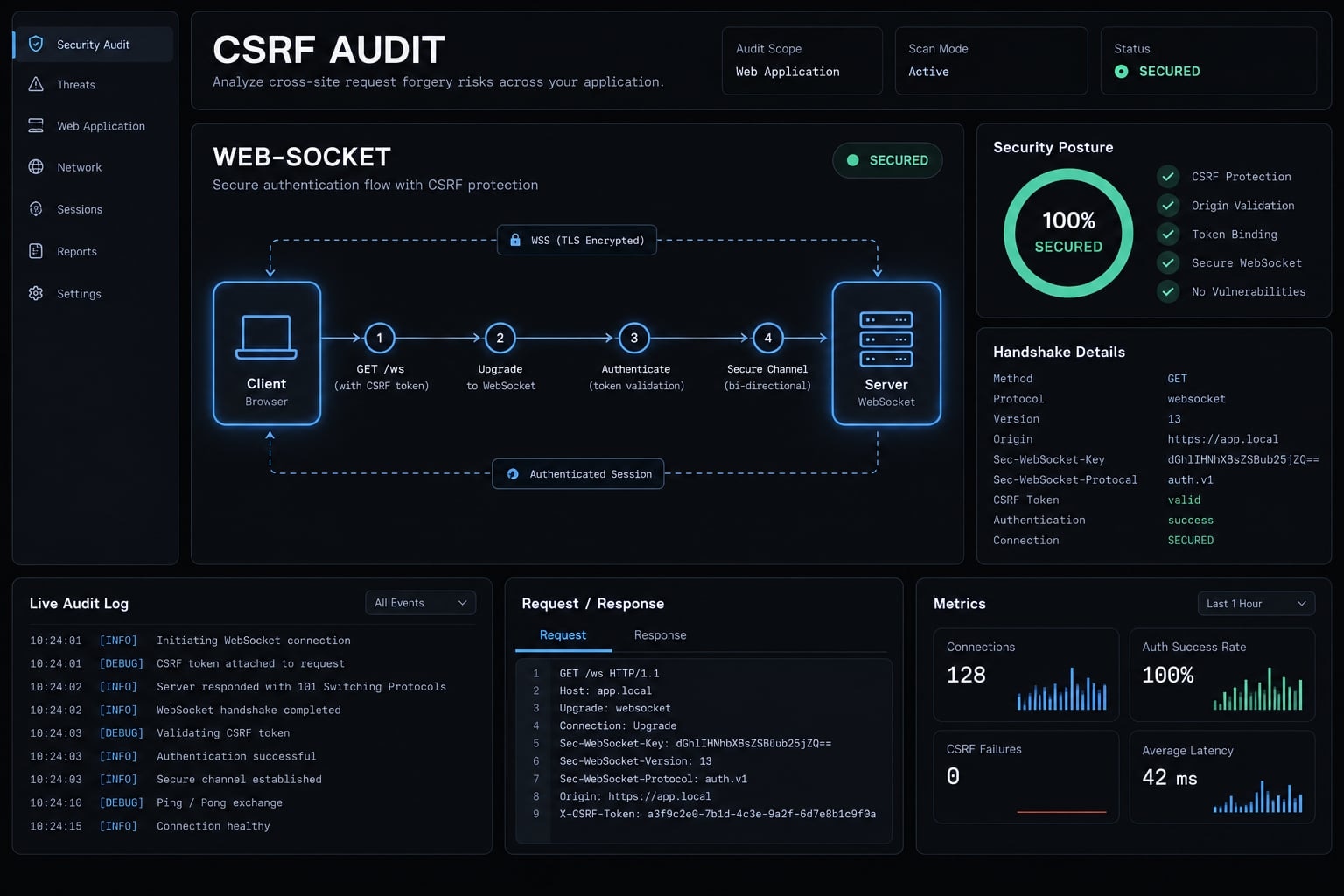
What does “Claude Code CSRF” refer to?
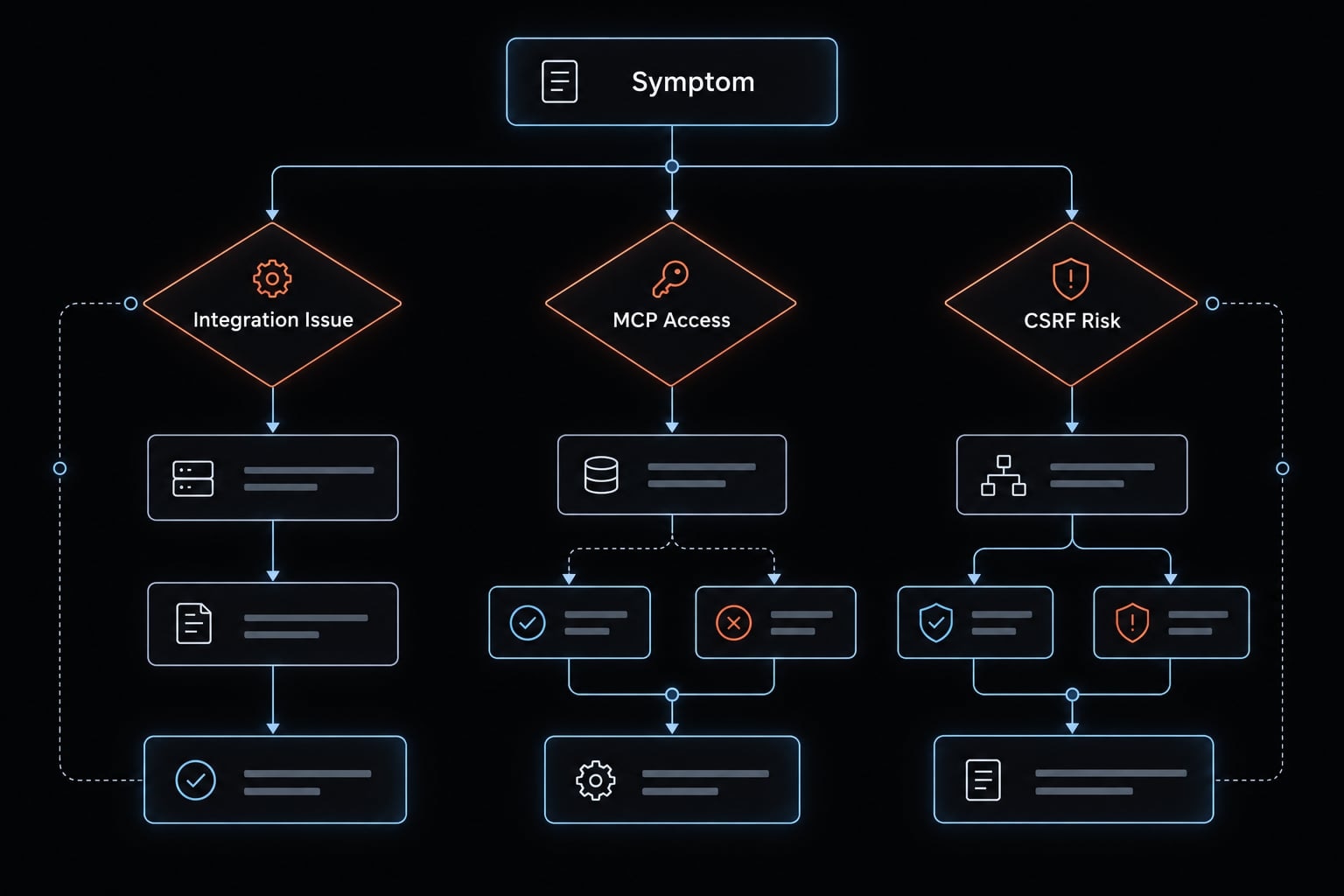
This search term does not point to a single root cause. First, isolate which specific component triggered the warning or unexpected behavior.
Observed concern | Possible category | Next action |
|---|---|---|
An advisory names Claude Code or an IDE integration | Historical integration vulnerability | Match the advisory’s component and version scope |
An MCP tool accepts unexpected connections | Tool-specific access-control problem | Check transport, authentication, binding, and permissions |
Your application accepts an unwanted account change | Application CSRF | Review request authentication and server-side controls |
Login or tool connection returns | Authentication or policy failure | Inspect the rejecting component’s documented flow |
Infrastructure vulnerabilities
Some integrated development environment (IDE) integrations expose local HTTP or WebSocket services. Browser-originated access can matter even when those services run locally.
However, not every MCP implementation opens a network port. A local stdio connection exchanges messages through process input and output. Its access boundary differs from a network service.
CSRF in code written or reviewed by Claude Code
Application CSRF depends on how requests authenticate and how the server validates them. Review middleware, route exclusions, and server-side token validation - not whether AI helped write the code.
Authentication errors that are not CSRF
Use the symptom to select the next check:
- Expired token: Inspect documented session or token status.
- OAuth callback failure: Compare redirect URI and authorization-flow settings.
- MCP failure: Check required environment-variable names and sanitized server logs.
- Post-update failure: Restart the relevant process and confirm its active version.
A 403 status can signal various security policy violations. Temporarily disabling security protections is never an acceptable diagnostic shortcut.
Was Claude Code affected by a CSRF vulnerability?
The historical issue associated with this query concerns a WebSocket authentication boundary, rather than simply missing CSRF middleware in a web application. Its exact affected distribution must determine remediation.
Advisory field | Reference and limitation |
|---|---|
Identifier |
|
Reported component | Claude Code’s IDE-integration functionality; confirm the exact package in the maintainer record |
Reported weakness | Insufficient client authentication at a local WebSocket service |
Affected range | Requires confirmation against the primary advisory |
Historical fix candidate |
|
Severity | Omitted because score, scoring version, and attribution were not independently checked |
Impact and prerequisites | Confirm enabled integration, active service, reachable capabilities, and documented attack conditions |
Technical-review status | Live advisory and release verification not performed for this guide |
How the vulnerability worked
Conceptually, a local integration service bridges the editor and another client. If the service accepts an unauthorized client, that client may reach capabilities intended for the legitimate integration.
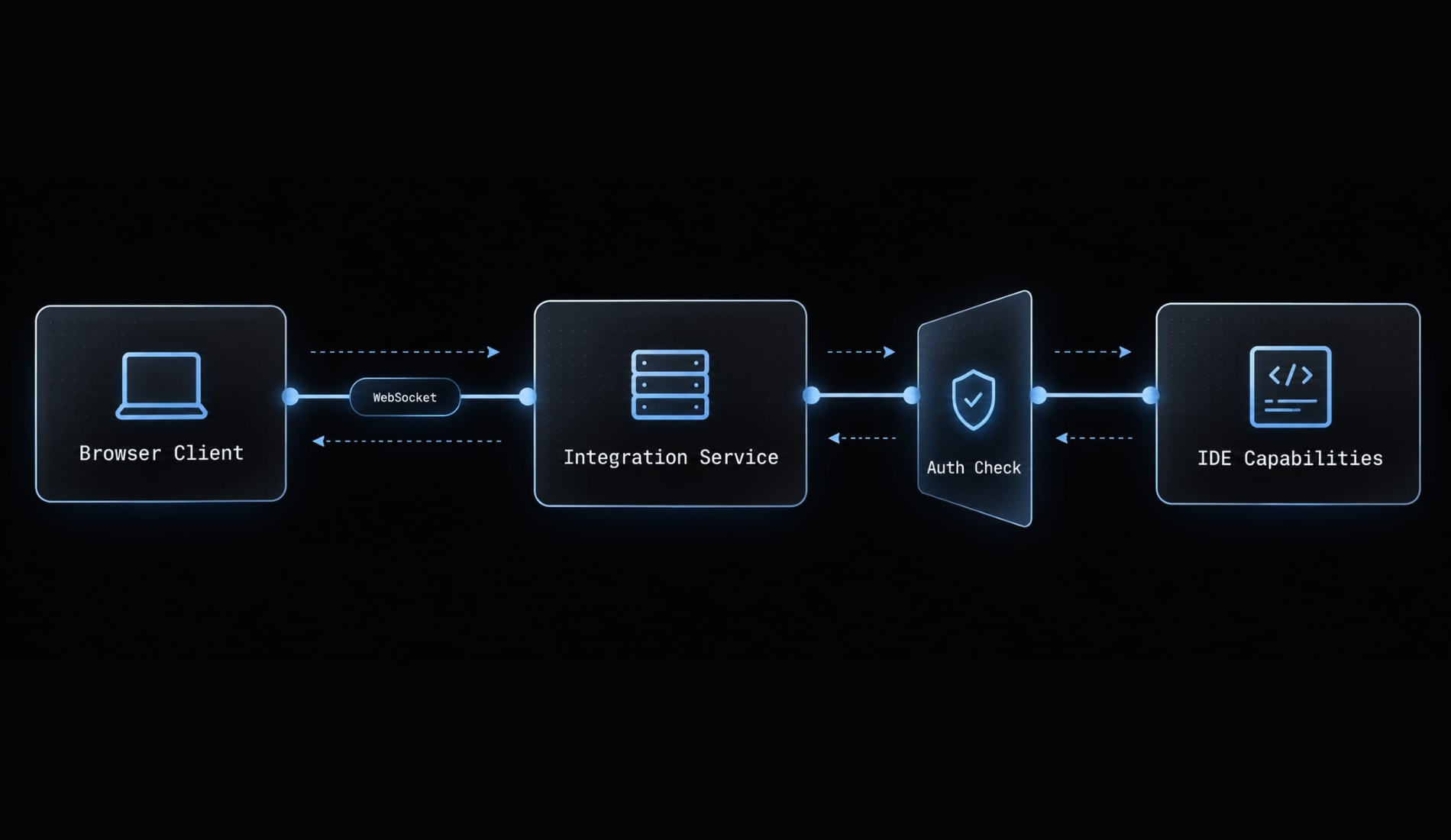
The actual consequences depend on exposed tools and permissions. Do not infer arbitrary command execution or unrestricted file access solely from the presence of a local port.
What the patch changed
Verify the patch mechanism in the maintainer’s security advisory and release notes. The supplied research describes added authentication, but does not establish independently checked handshake or token-storage details.
A historical fix boundary addresses one vulnerability. Install the current supported, approved release, not an old release simply because it first contained a fix.
Scope and limitations
An integration vulnerability does not establish identical exposure for every CLI-only installation. Custom bridges, separately distributed extensions, and third-party servers require their own component and runtime checks.
CSRF vs. WebSocket authentication bypass
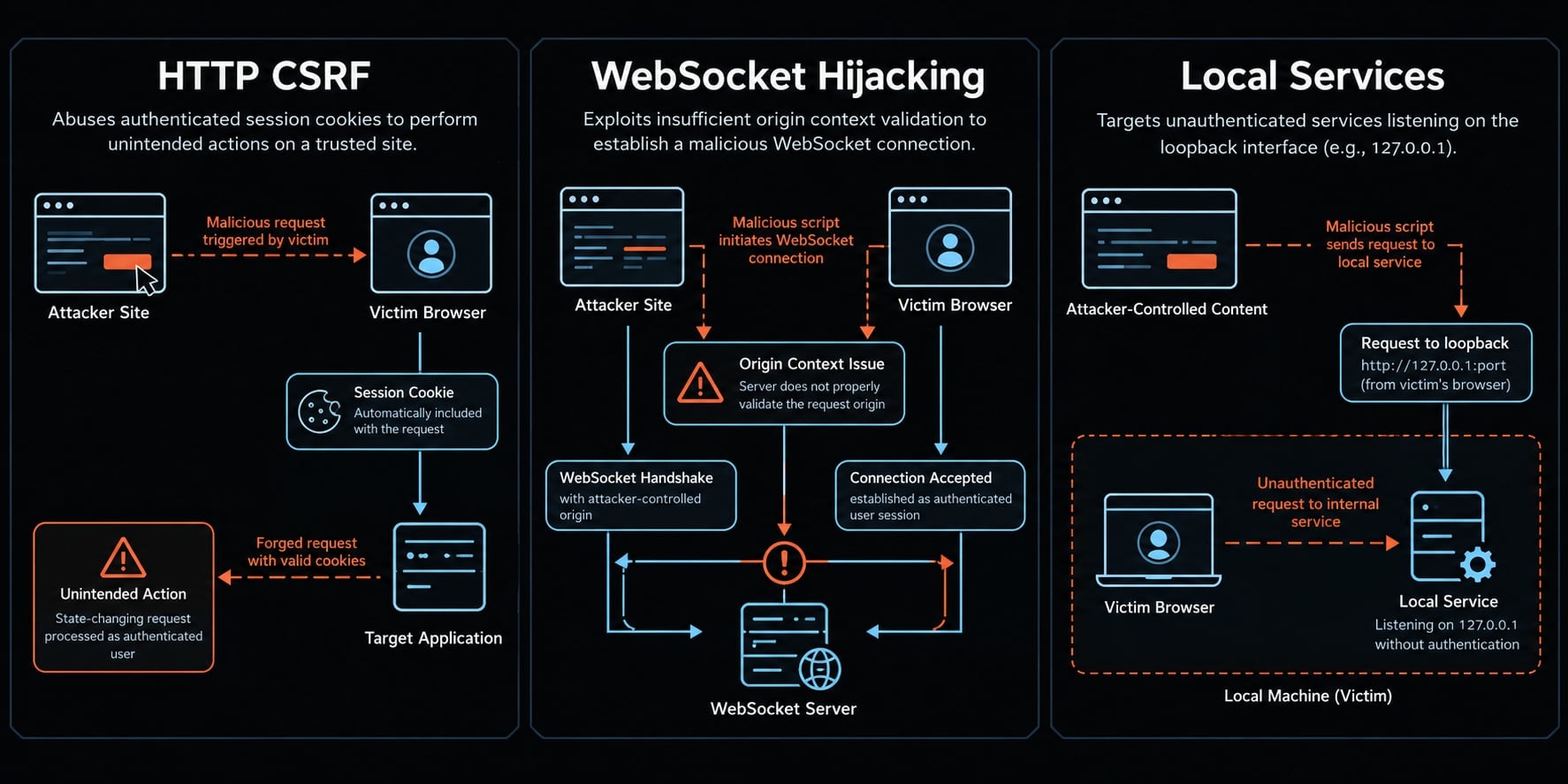
Different trust failures require different controls. Adding an HTTP CSRF token does not automatically protect a separate WebSocket service.
Traditional CSRF
Cross-Site Request Forgery causes a browser to send an unwanted request using credentials it attaches automatically, commonly session cookies.
For example, a small B2B SaaS team’s application might accept an unauthorized change to organization notification settings. The issue is whether the server distinguishes the intended action from a forged request.
Cross-origin WebSocket and localhost risks
Browser WebSocket connections follow a different origin model from ordinary script access governed by the Same-Origin Policy. Servers need appropriate authentication and origin handling.
Cookie-authenticated Cross-Site WebSocket Hijacking differs from a service accepting callers without authentication.
Localhost reduces network exposure, but it is not an authentication boundary.
Issue | Credential or trust assumption | Missing control | Appropriate defense |
|---|---|---|---|
HTTP CSRF | Browser attaches session credentials | Request-intent validation | Framework CSRF protection and appropriate origin checks |
Cross-site WebSocket hijacking | Browser supplies authenticated context | Origin restrictions or handshake protection | Authentication plus approved-origin enforcement |
Unauthenticated local service | Local callers are implicitly trusted | Client authentication | Supported authentication and capability authorization |
OAuth authorization-response CSRF | Callback belongs to the initiating session | Flow/session correlation | Library-supported |
Why the distinction matters
SameSite cookie settings cannot repair a service that accepts unauthenticated calls. Cross-Origin Resource Sharing (CORS) is neither universal authentication nor universal CSRF protection.
OAuth state correlates an authorization response with its initiating flow. OpenID Connect (OIDC) nonce supports ID-token replay protection and correlation. They are not interchangeable.
How to check and fix an affected Claude Code setup
Identify the component before selecting the update. Installation, restart, and active-version verification are separate steps.
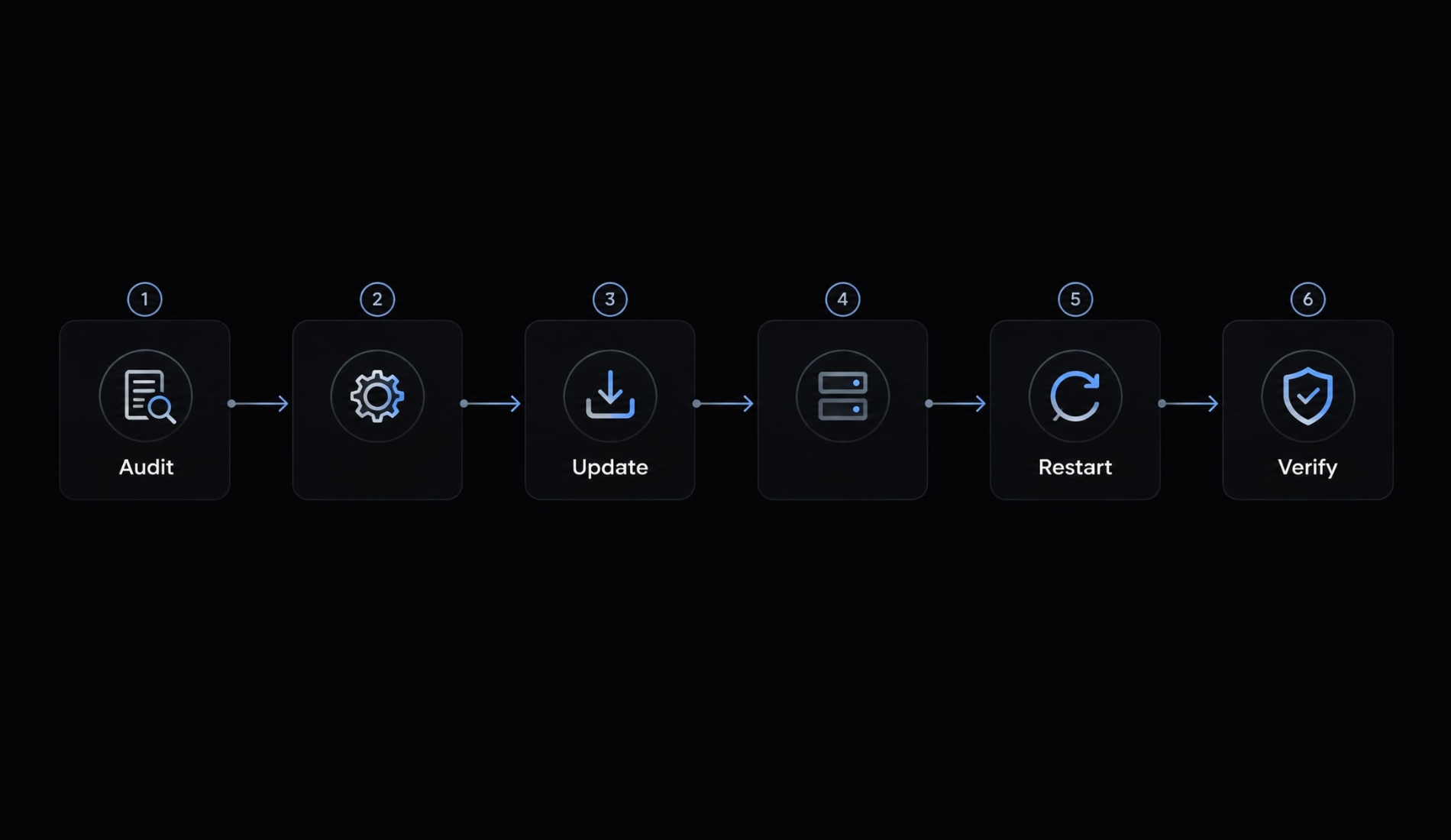
Step 1: Identify the component in use
Inventory the Claude Code command-line interface (CLI), IDE integration, MCP Inspector, custom bridges, and project MCP servers.
For each, record the installation channel, package identifier, owner, and transport. A CLI version does not necessarily establish the version of a separately installed extension.
In an illustrative example, a SaaS team updates Claude Code but leaves an independently installed MCP development tool unchanged. The successful CLI update proves nothing about that tool.
Step 2: Check the installed version
For the CLI, claude --version identifies the invoked Claude Code installation. Record its installation source as well.
For extensions, inspect the IDE’s installed-extension details. Use that version only when the advisory identifies that extension as the affected distribution.
For project dependencies, inspect package metadata and lockfiles. Confirm whether the running process uses that project copy, a global installation, or another environment.
Step 3: Update and restart related processes
If you are determining how to fix CVE-2025-52882, confirm the advisory’s affected component and first fixed release first.
Then update Claude Code or the relevant integration through its official installation channel. Follow the current update instructions appropriate to that channel.
Restart affected processes. For a VS Code integration, this may require restarting VS Code and the related CLI session. Do not terminate unrelated services indiscriminately.
Step 4: Inventory other MCP components
Use the template below; note that these entries are input fields to complete, not actual test results.
Component | Installed / approved version | Transport / binding | Access boundary | Required action |
|---|---|---|---|---|
IDE integration | Record both | Confirm | Document authentication | Update and restart |
MCP Inspector | Record both | Confirm local service | Verify supported controls | Review independent advisory |
Project MCP server | Record both |
| Process and OS permissions | Review launch and tool scope |
Remote MCP service | Record both | HTTP / approved endpoint | Authentication and authorization | Review server separately |
CVE-2025-49596 concerns MCP Inspector independently. Confirm its patch boundary in the Inspector advisory; updating Claude Code does not update Inspector automatically.
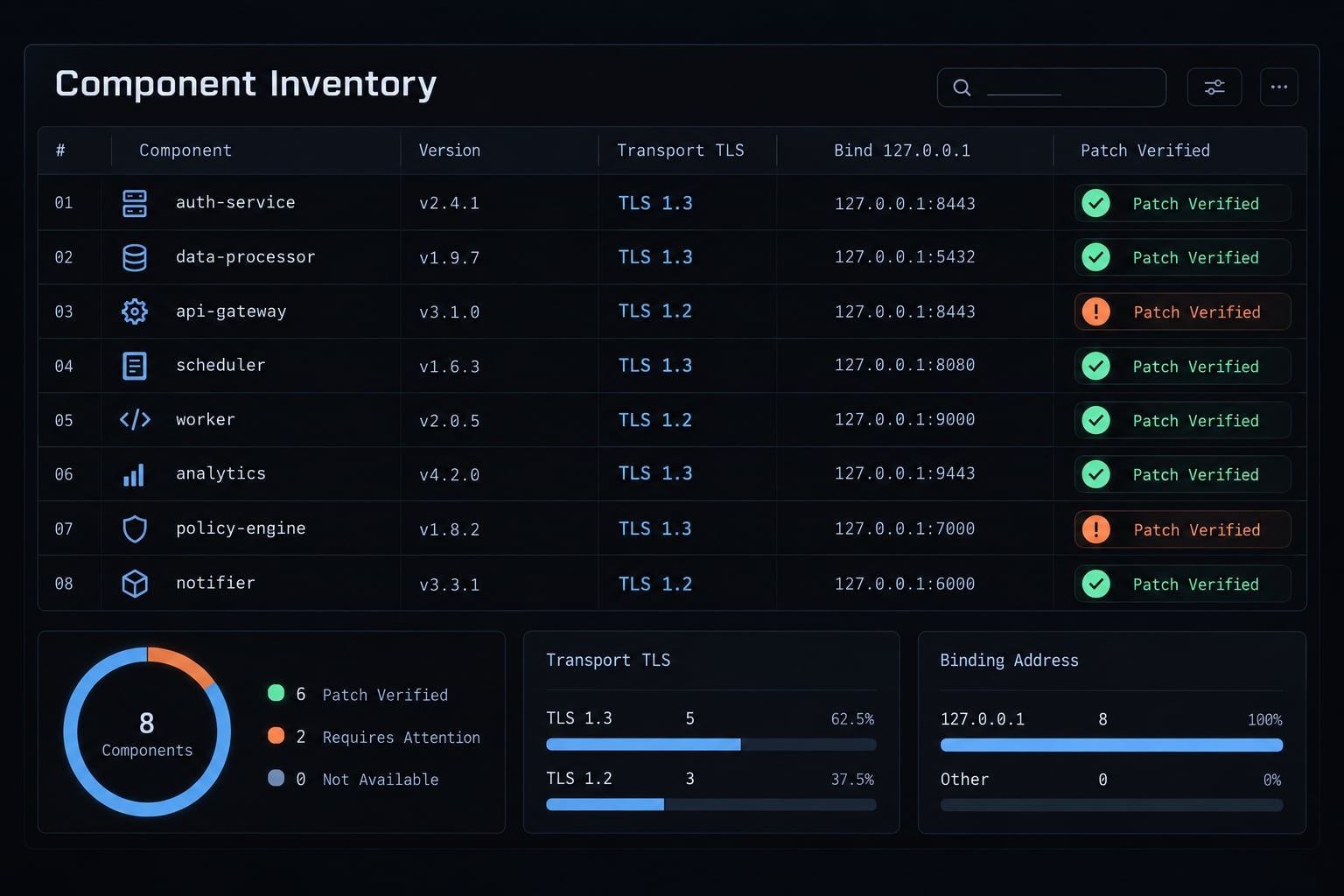
Step 5: Verify the fix
Check | Expected result |
|---|---|
Active version | Approved patched component is actually running |
Legitimate workflow | Intended client still connects and operates |
Authorized negative test | Unauthorized access stops before sensitive capability use |
Tool permissions | Access remains restricted |
Sanitized logs | Expected authorization behavior appears without secrets |
Use official diagnostics or an authorized test environment to verify WebSocket authentication. If no safe procedure is documented, obtain qualified review rather than inventing a probe.
Record environment, component, version, expected behavior, actual result, and test date. Passing one test does not establish complete security.
Step 6: Respond to suspected exposure
Contain suspected active compromise under your incident-response process. Preserve relevant evidence where feasible, without delaying containment.
Review tool calls, repository changes, and accessible credentials. Revoke or rotate potentially exposed secrets from a trusted environment.
Escalate to the security owner. Updating does not determine whether earlier compromise occurred, and quiet logs do not prove absence of exploitation.
How to secure custom and third-party MCP servers
A secure MCP server needs transport-specific controls. Network authentication and local process restrictions solve different problems.
Deployment | Primary access boundary |
|---|---|
Local | Executable provenance, launch configuration, environment, OS permissions |
Local HTTP service | Network authentication, request validation, binding, tool authorization |
Remote HTTP or custom WebSocket bridge | Authentication, authorization, transport protection, origin/host policy |
Apply seven controls: Identify transport, authenticate network access, validate applicable origins and hosts, restrict binding, authorize tools, limit privileges, and maintain operational ownership.
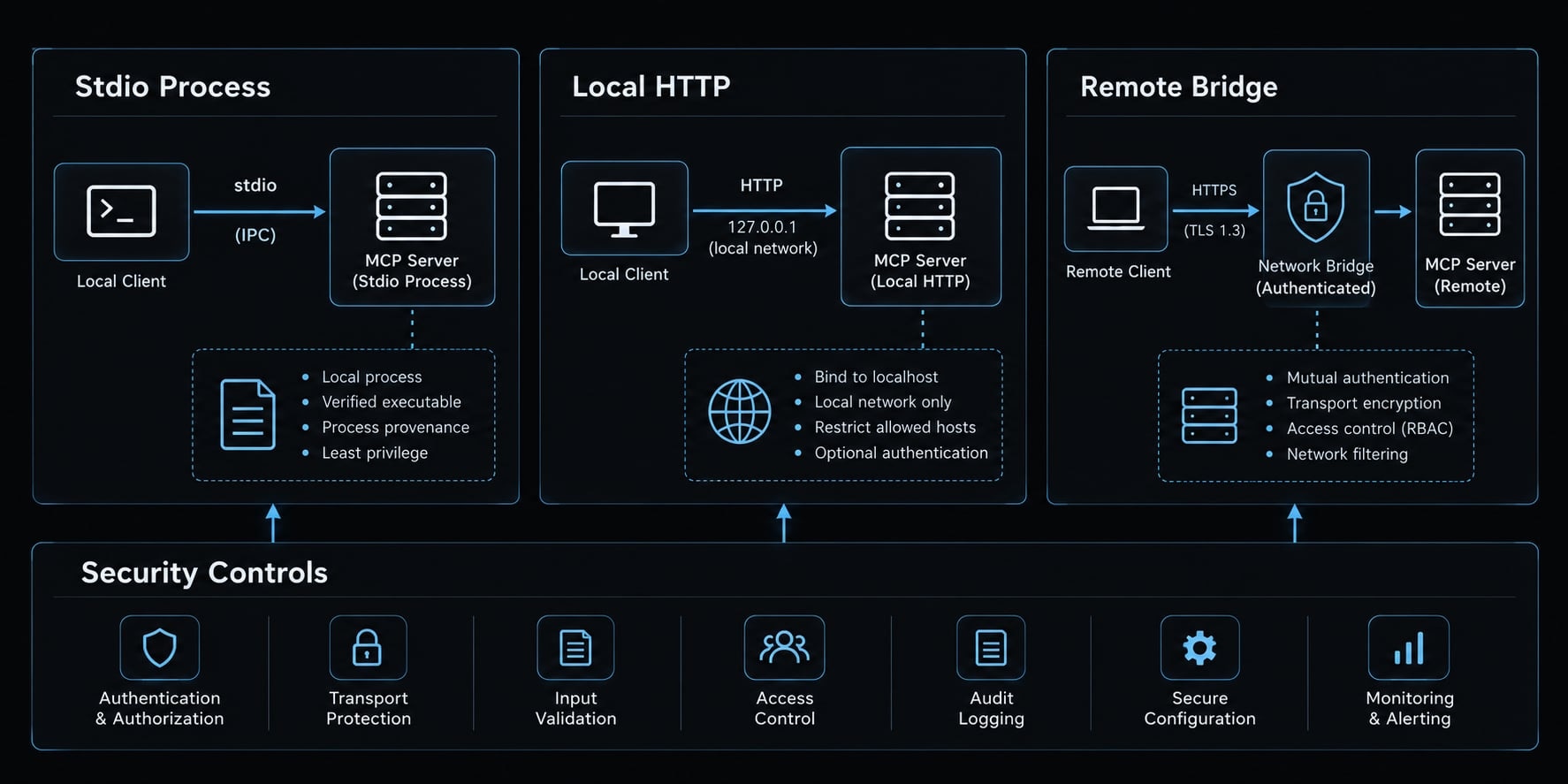
Require authentication for every network connection
This requirement applies to network services - not a universal WebSocket-token requirement for stdio.
Use the vendor’s supported MCP authentication flow. Authentication identifies the client; authorization determines what that client may do.
Keep tokens out of URLs, screenshots, source control, and logs. Tokens alone do not encrypt transport.
Validate Origin and Host where applicable
Use explicit allowlists and define how supported non-browser clients are handled. Origin validation informs browser-origin defenses, but an Origin header is not proof of identity.
CORS configuration does not substitute for WebSocket access control. Host validation can also matter when defending local services against unexpected browser-directed access.
Bind conservatively
127.0.0.1 restricts IPv4 listening to loopback; 0.0.0.0 listens on all IPv4 interfaces. Check equivalent IPv6 settings, including ::1 versus ::.
Remote access needs deliberate authentication, authorization, and protected transport. Dynamic ports are not a security boundary.
Enforce tool-level authorization
Capability | Practical restriction |
|---|---|
Shell | Restricted execution context and safe argument handling |
Files and secrets | Approved paths; exclude unnecessary credentials |
Databases | Read-only access by default; separate mutation privileges |
Deployments | Environment-scoped credentials and controlled approval |
Apply least privilege to the server’s operating-system identity as well as its tools. Approval prompts do not prevent command injection or replace restricted execution.
Add logging, version governance, and kill controls
Record an owner, approved version, review date, and disable procedure. Log security-relevant metadata without secret values.
Define patch deadlines as team policy based on exposure and capability. The SaaS team’s read-only project tool and production deployment bridge should not receive identical risk treatment.
How to use Claude Code to find CSRF vulnerabilities in an application
Focus on overall authentication logic rather than searching for specific token names. While Claude Code assists in tracing control flows, static code review alone cannot guarantee runtime security.
Inventory state-changing endpoints
Inspect POST, PUT, PATCH, DELETE, and mutations incorrectly exposed through GET. Prioritize organization settings, roles, billing, account access, and administration.
Distinguish automatically attached credentials from explicitly attached authorization headers. Bearer-token usage alone does not establish immunity; cookie fallbacks and surrounding login flows may change exposure.
Inspect existing CSRF controls
Review middleware, exclusions, CSRF token validation, session binding, cookie settings, and origin/referrer policy.
Prefer framework-supported, signed or session-bound double-submit designs over merely comparing two matching values.
HttpOnlyrestricts script access to cookies; it does not independently stop CSRF.- SameSite cookies provide useful defense in depth.
- Custom headers require server enforcement and correct cross-origin policy.
- Review OAuth state validation separately from OIDC
noncechecks.
When implementing CSRF protection in AI-generated code, verify server-side enforcement rather than accepting token presence as evidence.
Generate negative security tests
Test missing and invalid required tokens, cross-session tokens where binding is required, and unapproved origins where rejection is required.
Test expired tokens only when expiration is specified. Test token reuse only when single-use behavior is required. Include invalid OAuth state.
For every rejection, verify no unauthorized state change occurred. Include a legitimate-request test to detect broken workflows.
Suggested defensive audit prompt
Review this repository for application-level CSRF risks. Inventory state-changing routes and their authentication mechanisms. Identify existing server-side protections, exclusions, and suspected gaps, citing relevant files and line numbers. Separate confirmed code behavior from unverified runtime assumptions, and assign confidence to each finding. Prioritize findings by reachable capability and likely impact. Propose negative tests and a legitimate-request test that verify resulting application state. Do not send production requests, access production secrets, or modify code without approval.
Limits of AI-assisted security review
A Claude Code security audit may miss proxy, framework, runtime, or business-logic context. It can also produce false positives.
Review workflow: Endpoint inventory → control inspection → negative tests → staging results → qualified review.
Keep production secrets, session cookies, and unapproved sensitive captures out of the workflow. Validate material findings in staging with human review.
Claude Code and MCP security checklist
Use this Claude Code security checklist as an evidence record. Assign an owner and retain the supporting version output, configuration reference, or test result for each completed item.
Claude Code and IDE integration
- Exact affected package or integration identified.
- Installed and active versions recorded separately.
- Current advisory and approved release checked.
- Relevant IDE, CLI, and integration processes restarted.
- Legitimate client workflow tested after restart.
- Third-party tools reviewed independently.
MCP services
- Transport and transport-specific access boundary documented.
- Network authentication verified where applicable.
- Applicable origin and host rules reviewed.
- Binding, IPv6 behavior, and remote exposure documented.
- Tool permissions restricted to necessary capabilities.
- Sanitized logs, owner, and disable procedure available.
Application-level CSRF
- State-changing routes and credential behavior inventoried.
- Appropriate CSRF controls tested server-side.
- OAuth and OIDC checks reviewed separately.
- Rejected requests verified to leave state unchanged.
- Legitimate requests verified to remain functional.
- AI findings validated through runtime tests and human review.
A secure MCP configuration and application CSRF prevention need separate evidence. Mark unresolved checks as pending rather than treating a completed update as proof for every category.
Frequently asked questions
Was Claude Code affected by a CSRF vulnerability?
Yes. Specifically, CVE-2025-52882 involved a cross-origin WebSocket authentication bypass in IDE extensions for Claude Code. This was resolved in patched releases by implementing mandatory origin verification and authentication handshakes.
Why are WebSocket and HTTP CSRF protections different?
HTTP CSRF exploits auto-attached browser credentials (like cookies), whereas unauthenticated local WebSocket services fail because the browser can initiate connections across origins to localhost without traditional Same-Origin Policy restrictions. WebSocket security requires explicit handshakes, token authentication, and strict binding.
How do I check if my Claude Code setup is secure?
Identify your exact integration component (CLI, IDE extension, or MCP server). Check the installed version against official advisories, update through official channels, restart associated processes, and ensure local MCP services bind strictly to loopback addresses (127.0.0.1).
Can Claude Code help find CSRF vulnerabilities in my application?
Yes. You can use scoped prompts or automated PR workflows to audit your codebase. Claude Code can trace state-changing routes, evaluate cookie security flags, and suggest negative security tests to verify server-side rejection.
How can I secure custom MCP servers?
Secure custom MCP servers by enforcing authentication for every network connection and validating Origin and Host headers. Bind services exclusively to 127.0.0.1 to limit network reachability. Additionally, implement least-privilege tool authorization, maintain clear version governance, and ensure that security logs are generated without capturing sensitive secret values.
Read more:
- Claude Code toolkit: Scale your AI development workflow easily
- Claude Code sandbox: A guide to secure AI command execution
- Claude Code stuck? How to recover and troubleshoot fast
Conclusion
Investigating “Claude Code CSRF” starts with identifying the failed trust boundary. A historical IDE-integration vulnerability, an exposed MCP service, and application-level CSRF are distinct problems requiring specific defenses.
Teams that repeat this review can package it as a reusable workflow. AgentKit, for example, provides a security-audit subagent and pre-tool approval hooks, but these support the checklist above rather than replace advisory checks, runtime tests, and qualified review.