Claude Code Bedrock: Enterprise setup and best practices guide
Claude Code Bedrock: What it is, when to use it, and the simplest setup path
When enterprise teams adopt Claude Code, the biggest hurdle isn't the AI's coding ability - it's integrating it with IAM, AWS SSO, and audit controls. Moving from personal use to a shared environment introduces friction around access, governance, and billing. This guide explains what Claude Code on Amazon Bedrock actually means, when to choose it over the direct Anthropic API, and how to deploy a minimum viable setup before rolling it out.
What Claude Code on Amazon Bedrock actually means
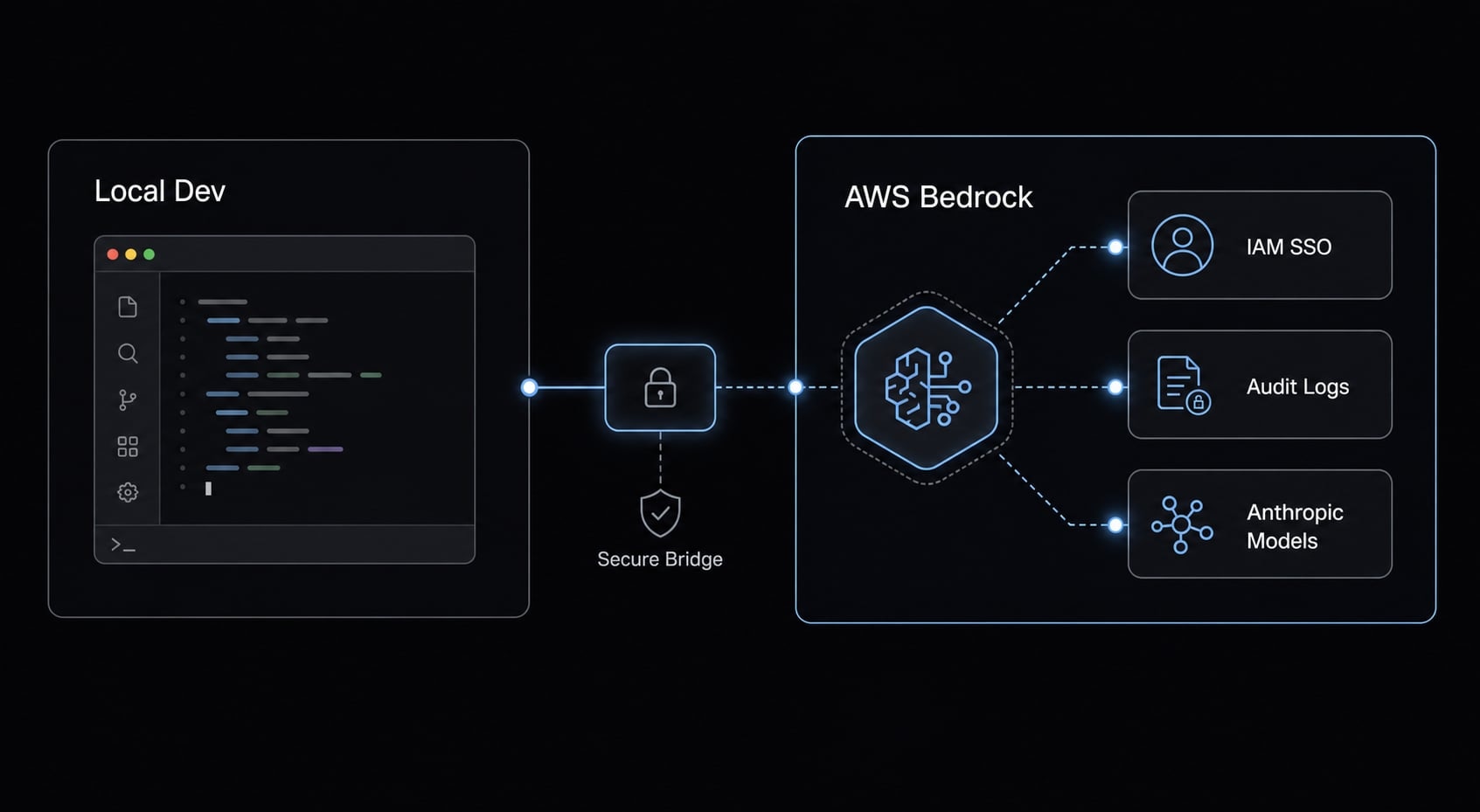
Claude Code on Amazon Bedrock is a setup where Claude Code uses Anthropic models through Amazon Bedrock instead of calling Anthropic directly. The coding workflow stays largely the same, but the operating layer changes: Authentication, billing, governance, auditability, and region control are handled through AWS-native services.
In practical terms, Claude Code still feels like Claude Code. Developers still work from the terminal, still prompt against a codebase, and still use it for implementation and debugging tasks. What changes is the control plane around access. Amazon Bedrock becomes the managed path for model usage, while Anthropic remains the model provider underneath.
This distinction is important because many teams mistakenly assume that Bedrock changes model behavior, when in fact it usually does not. It mainly changes how access is controlled, tracked, and governed. If your team is evaluating running Claude Code on AWS Bedrock, the real question is less about coding quality and more about operational fit.
Claude Code in plain English
Claude Code is a terminal-based coding assistant that behaves more like a lightweight coding agent than a simple chat window. It can understand project context, work across multiple files, and help with iterative development tasks.
It is commonly used to:
- Write or update code across several files.
- Debug, refactor, and explain code paths.
- Help developers understand unfamiliar parts of a repository.
Why Bedrock enters the picture
For many teams, Amazon Bedrock becomes relevant because it adds AWS-native controls around model access:
- IAM and AWS SSO make access management easier to standardize.
- Centralized billing improves visibility for engineering and finance teams.
- Governance becomes easier to enforce in shared environments.
- Region-aware access helps with compliance and data boundary requirements.
- It is often the better fit for AWS-native organizations already operating inside the AWS stack.
When Bedrock is the right choice vs when the direct Anthropic API is simpler
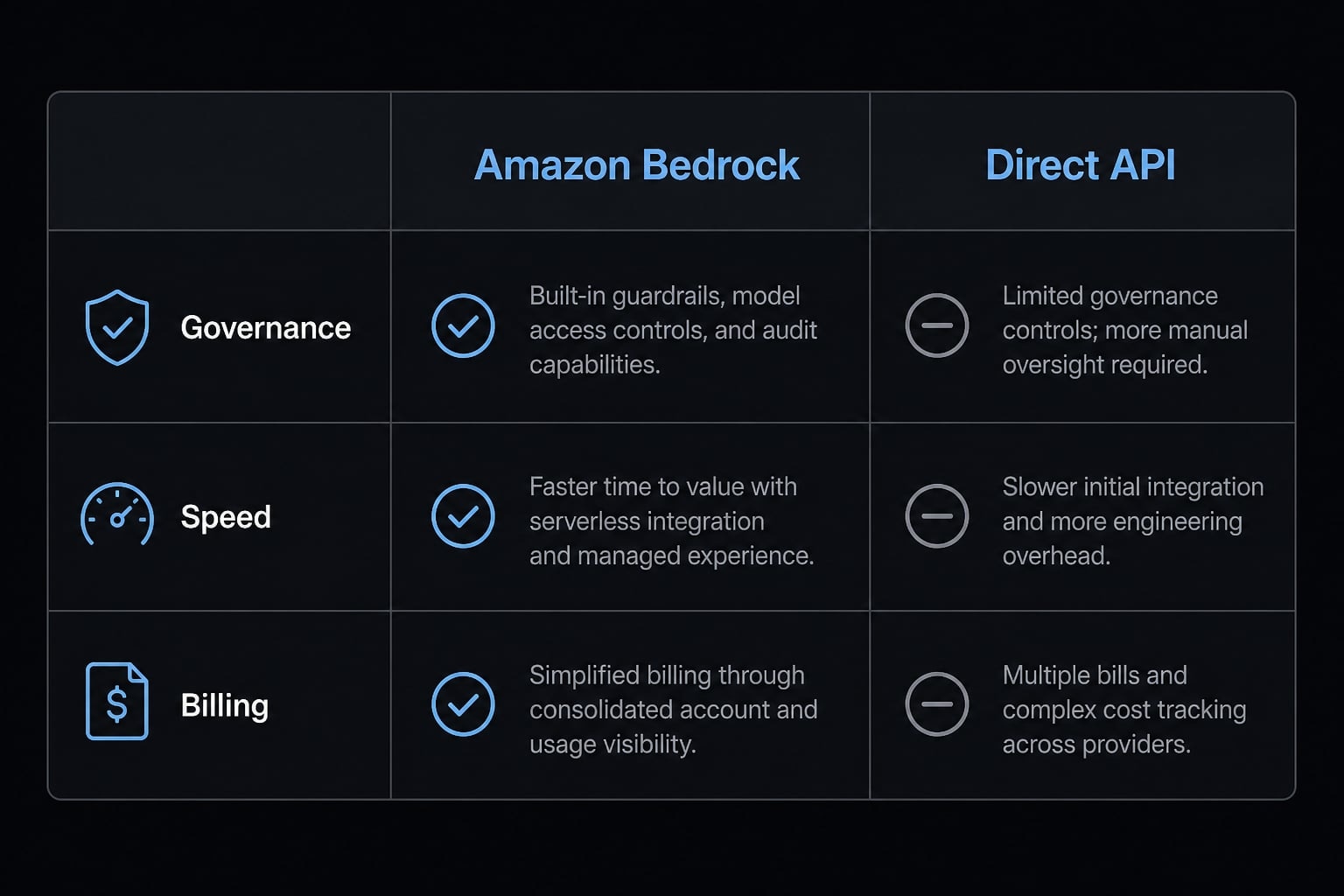
For solo users, the direct API is often the fastest route. For teams with governance requirements, Bedrock is often the cleaner long-term path. That is the real frame for Bedrock vs Anthropic API.
In practice, most teams should not choose based on vendor preference alone. They should choose based on operational needs: Who needs access, how credentials are managed, whether billing must be centralized, whether data residency matters, and whether audit trails are required.
Fast decision framework
- Solo developer or indie builder: Use the direct Anthropic API first if speed and simplicity matter most
- AWS-native startup team: Bedrock is often the better path if the team already uses AWS profiles and shared cloud controls
- Enterprise or regulated environment: Bedrock is usually the stronger fit because of governance and auditability
- Low governance needs: Choose the simpler path first and add complexity only when required
Comparison table
Criteria | Amazon Bedrock | Direct Anthropic API | Best fit |
|---|---|---|---|
Setup speed | More steps due to AWS config | Usually faster for first-time use | Direct API for fast testing |
IAM / SSO support | Strong native fit | Not AWS-native | Bedrock for managed team access |
Auditability | Better alignment with AWS CloudTrail and account controls | More limited from an AWS operations perspective | Bedrock for audited environments |
Billing consolidation | Centralized in AWS billing | Separate vendor billing path | Bedrock for shared finance visibility |
Data residency / region control | Stronger region-aware setup options | Depends on provider path and account structure | Bedrock where location control matters |
Best for | AWS-native teams, governed rollouts, enterprise AI governance | Solo users, prototypes, lightweight experiments | Depends on operational model |
If your organization already standardizes on AWS, Bedrock often reduces operational friction even if initial setup is less direct. If not, the direct API may be the more pragmatic starting point.
Minimum requirements before you set up Claude Code with Bedrock
Many failed setups happen before Claude Code itself is even involved. The usual causes are simple: Missing model access, the wrong region, an expired session, or missing invoke permissions.
That is why pre-checking the environment matters more than jumping straight into troubleshooting. If you validate the account, region, auth, and model path first, setup becomes much more predictable.
Prerequisites checklist
- Your AWS account is active and can access Amazon Bedrock.
- Amazon Bedrock is enabled in the target AWS region.
- Claude model access has been requested and approved for that region.
- AWS CLI is installed and authenticated with the intended profile.
- Claude Code is installed locally on the machine you will use.
- Your IAM policy allows Bedrock model invocation.
Common setup blockers to avoid early
- The selected model is not enabled in the chosen region
- The configured model ID does not match the approved model path
- The role or profile is missing
bedrock:InvokeModel - The AWS session has expired or AWS SSO login needs refresh
- Inference profiles are required for your setup but not visible or permitted
Doing a quick readiness check upfront will usually save you more time than debugging errors after they occur. Teams usually get blocked by identity, region, or model access-not by prompting.
How to configure Claude Code with Amazon Bedrock: The simplest setup path
This is the simplest reproducible path for how to configure Claude Code with Amazon Bedrock. It is not a full troubleshooting reference. Exact variable names and product behavior may evolve, so it is worth checking current vendor documentation before production rollout.
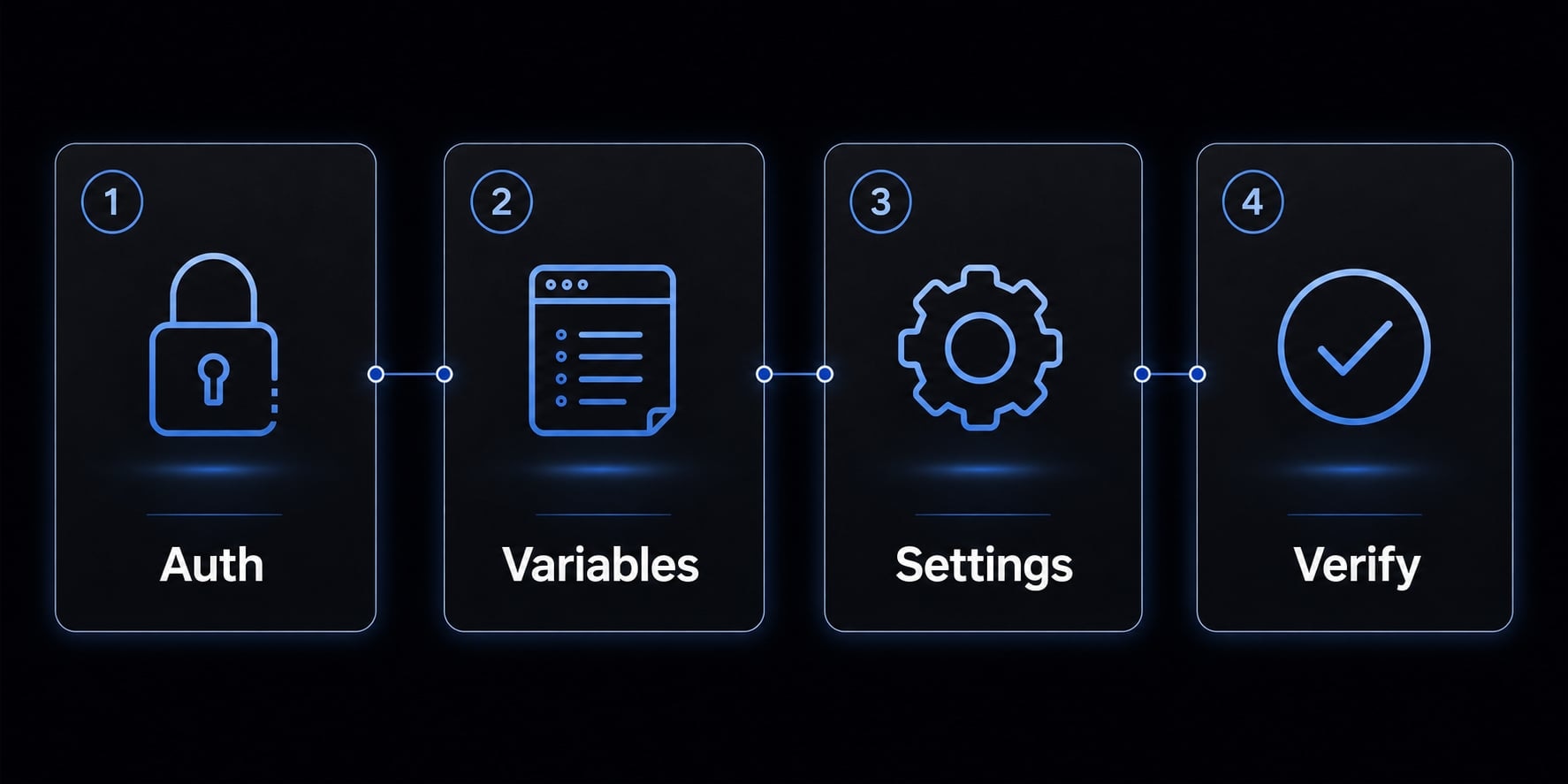
The goal is to keep the Claude Code Bedrock setup process linear: Authenticate first, configure environment variables, add optional settings, and finally verify the result.
Step 1: Install Claude Code and verify AWS access
Start by installing Claude Code locally. Then confirm that your AWS authentication is working before you touch Claude-specific settings. In team environments, an SSO-backed AWS profile is usually the safer default because it simplifies credential hygiene and offboarding.
Use this command to confirm the active identity:
aws sts get-caller-identity --profile myprofile
If this command fails, stop there first. In practice, most setup failures happen because the AWS identity path is broken, not because Claude Code is misconfigured.
Step 2: Enable Bedrock usage in Claude Code
Once AWS auth is working, set the minimum required variables for Claude Code Bedrock integration. These variables tell Claude Code to use Bedrock, specify which AWS profile and region to use, and define the target model ID.
CLAUDE_CODE_USE_BEDROCK=1→ Tells Claude Code to route through Bedrock.AWS_PROFILE→ Selects the AWS credential profile.AWS_REGION→ Selects the target AWS region.ANTHROPIC_MODEL→ Specifies the Claude model identifier exposed through Bedrock.
Example:
export CLAUDE_CODE_USE_BEDROCK=1export AWS_PROFILE=myprofileexport AWS_REGION=us-east-1export ANTHROPIC_MODEL='us.anthropic.claude-sonnet-4-20250514-v1:0'
Then launch Claude Code normally:
claude
If your region and model access are aligned, the workflow should feel familiar. The main change is that requests are now going through the Bedrock operating layer rather than the direct Anthropic path.
Step 3: Optional settings teams often add
Once the minimum setup works, some teams standardize convenience and governance settings in settings.json. These are helpful, but they are not prerequisites.
Common optional settings include:
awsAuthRefresh→ Refreshes authentication, often through an SSO login command.CLAUDE_CODE_MAX_OUTPUT_TOKENS→ Caps long outputs.MAX_THINKING_TOKENS→ Helps control reasoning depth and token use.
A small settings.json example:
{ "awsAuthRefresh": "aws sso login --profile myprofile", "env": { "CLAUDE_CODE_USE_BEDROCK": "1", "AWS_PROFILE": "myprofile", "AWS_REGION": "us-east-1", "ANTHROPIC_MODEL": "us.anthropic.claude-sonnet-4-20250514-v1:0", "CLAUDE_CODE_MAX_OUTPUT_TOKENS": "16384", "MAX_THINKING_TOKENS": "10000" }}
For teams, this helps reduce local variation and support overhead.
Step 4: Run a simple verification test
Launch Claude Code and run a short prompt. Keep the test simple. The goal is to confirm the auth path, region, and model routing - not to benchmark output quality on day one.
A practical verification prompt could be:
claude "What model are you using for this session?"
If there is a failure, the likely causes are usually clear: Region mismatch, missing permission, expired session, or an invalid model identifier. What working looks like is straightforward: Claude Code launches, reaches the expected model, and does not throw an auth or invoke error.
Working outcome checklist:
- AWS identity resolves correctly.
- Claude Code launches without authentication errors.
- The expected model is reachable through Bedrock.
- No region or invoke permission failure appears.
A useful next step after successful setup is to document a standard local baseline for your team. If you are validating multiple developer machines, agentkit.best can help review your rollout pattern and reduce avoidable configuration drift before wider adoption.
IAM, SSO, Regions, and Model IDs: The 4 things that usually cause confusion
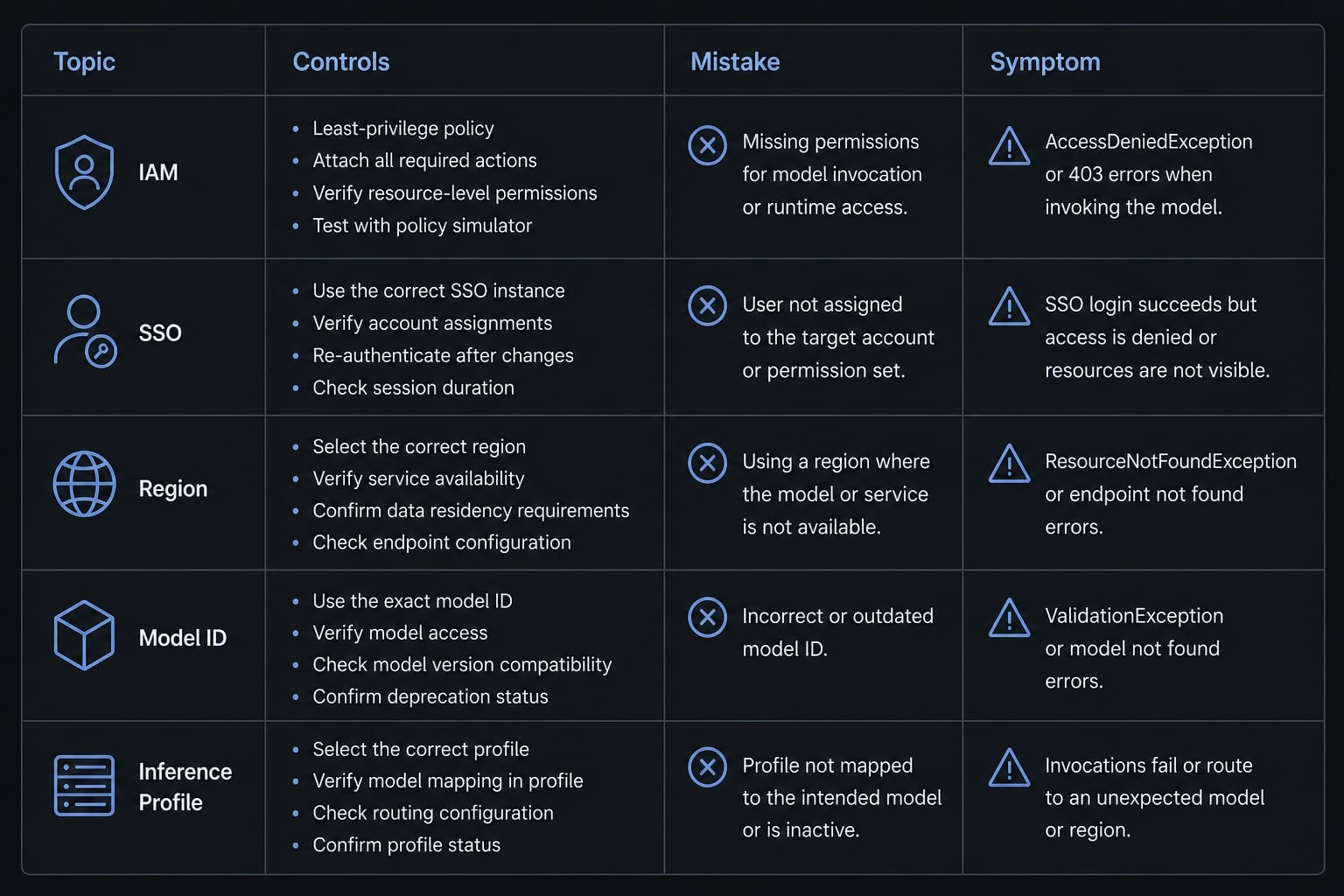
This is where many teams move from “technically supported” to “operationally usable.” A setup can look correct on paper and still fail in practice because one of these four layers is misaligned.
IAM permissions in simple terms
For IAM policies for Claude Code Bedrock access, the core permissions are usually straightforward:
bedrock:InvokeModel→ Allows the system to call the selected model.bedrock:InvokeModelWithResponseStream→ Allows streamed responses during interaction.bedrock:ListInferenceProfiles→ Allows visibility into available routing or inference profile options.
If these are missing, Claude Code may launch but fail when it tries to use the model.
Why SSO is usually the better default
AWS SSO is usually a better team default than static credentials because it improves credential hygiene, makes offboarding easier, and simplifies access changes when roles shift. It also fits enterprise governance better because identity can be managed centrally instead of being distributed across long-lived local secrets.
For solo testing, static credentials may feel faster. For shared environments, SSO is usually easier to maintain responsibly.
How to think about regions and model IDs
- The AWS region affects both model availability and the governance boundary.
- Model IDs may include scope prefixes such as
us.,eu., orglobal.. - The selected region, approved access, and configured model identifier must all match.
- A region/model mismatch is one of the most common failure points.
- Inference profiles may influence how routing or access is presented in your account.
A useful mental model is simple: Bedrock will not bridge mismatched assumptions for you. If the region, access approval, and model path do not line up, the request fails.
Cost, prompt caching, and quotas: What actually affects day-to-day usage
Daily cost is shaped more by developer behavior than by Bedrock alone. Model choice, context size, output length, repeated sessions, and team concurrency usually have more impact than the decision to use Bedrock versus a direct endpoint.
That matters because many buyers overfocus on list pricing and underfocus on workflow shape.
What drives spend
- Higher-end models generally cost more than lighter-weight models.
- Large codebase context increases token consumption.
- Long outputs increase spend.
- Repeated sessions across the same workstream compound usage.
- Team concurrency changes cost patterns at the account level.
Why prompt caching matters for coding workflows
Prompt caching is a mechanism that reuses previously processed context so the same prompt prefix does not need to be recomputed every time. For coding workflows, that matters most when developers repeatedly work against similar codebase context or iterate through the same files across multiple sessions.
In the right usage pattern, prompt caching can reduce latency and improve token usage optimization. Its value is strongest in repeated workflows, not one-off prompts.
Quotas teams should check
- Request Per Minute affects how many calls can be made concurrently.
- Token Per Minute affects how much total throughput your team can consume.
- Quota planning should happen before a wider rollout.
- Larger teams may need account or capacity planning to avoid bottlenecks.
This is also where finance and platform teams should align. Bedrock pricing is only one side of the equation. Real cost control comes from model selection, session behavior, quota planning, and basic usage policy.

If your team wants a practical baseline for token controls, output limits, and rollout guardrails, a short implementation review can surface cost risks early without slowing developers down.
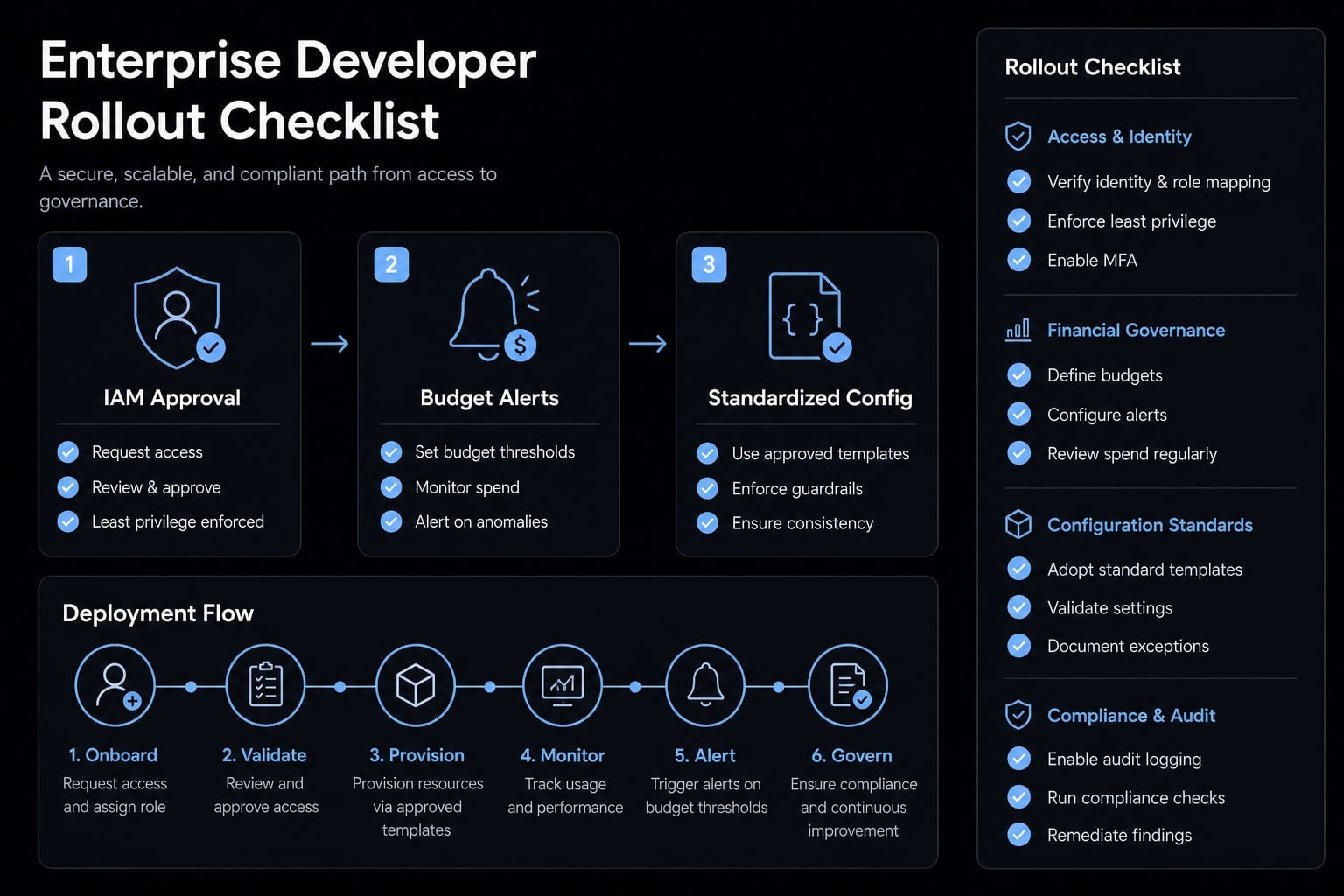
A lightweight rollout checklist for teams and enterprises
A successful local setup is not the same as a repeatable team rollout. The moment more developers join, inconsistencies in auth paths, region defaults, and local config start creating support overhead.
The goal of an enterprise Claude Code Bedrock deployment is not just access. It is standardization. If access works but every developer gets there differently, governance weakens and support costs rise.
Team rollout checklist
- Bedrock model access is approved for the target region.
- A standard AWS profile or AWS SSO path is defined.
- The required IAM policy is approved by the platform or security team.
- AWS Budgets alerts are configured for spend visibility.
- Region and model defaults are documented.
- A simple verification workflow is documented.
- Monitoring and audit expectations are defined, including CloudTrail visibility where relevant.
- Local developer config is standardized to reduce setup drift.
A good rollout checklist does not need to be heavy. It just needs to be consistent enough that onboarding, support, and governance remain predictable.
Frequently asked questions
What is Claude Code on Amazon Bedrock?
Claude Code on Amazon Bedrock is an AI-powered coding assistant that runs in your terminal, using the Anthropic Claude model delivered through the Amazon Bedrock infrastructure. It enables teams to use the same advanced coding agent workflow while maintaining AWS-native governance, auditability, and identity controls.
Should I use Amazon Bedrock or the direct Anthropic API?
Use the direct Anthropic API if you are a solo developer or need the simplest setup for quick experiments. Choose Amazon Bedrock if you are an AWS-native organization requiring centralized billing, IAM-based access control, data residency, and audit logs via CloudTrail.
What are the prerequisites to set up Claude Code with Bedrock?
Before configuring your environment, ensure you have:
- An active AWS account with Bedrock enabled in your target region.
- Approved access to the Claude models within Bedrock.
- The AWS CLI installed and configured.
- Appropriate IAM permissions (
bedrock:InvokeModel) for your user or role.
How do I configure Claude Code to use Amazon Bedrock?
To configure your environment, follow these steps:
- Install Claude Code via
npm. - Set the environment variable
CLAUDE_CODE_USE_BEDROCK=1. - Configure
AWS_PROFILEandAWS_REGIONto match your authorized environment. - Set the
ANTHROPIC_MODELvariable to the specific Bedrock model ID you are approved to use.
Why is prompt caching important for AI-assisted coding?
Prompt caching in Amazon Bedrock saves the model state after processing your codebase context. By reusing these checkpoints in subsequent requests, you significantly reduce latency and lower token costs, making iterative coding tasks like refactoring or debugging more economically viable and faster.
What commonly causes Claude Code Bedrock setup failures?
Most setup issues arise from environmental mismatches rather than the agent itself. Common blockers include:
- Model access not enabled in the selected AWS region.
- Mismatched or incorrect Model IDs.
- Expired SSO sessions or missing AWS profile credentials.
- Insufficient IAM permissions (specifically
bedrock:InvokeModel).
What should teams consider for a scalable rollout?
For team deployments, move beyond local setup by standardizing IAM policies, configuring AWS budget alerts, and documenting region/model defaults. Centralizing configuration via settings.json and using AWS SSO helps maintain security, governance, and auditability as your team scales its usage of AI coding agents.
Read more:
- Claude Code VS Code: Installation and setup guide 2026
- Claude Code tutorial: Set up and master your AI coding agent
- Everything Claude Code: A guide to streamlined AI coding
Conclusion
Claude Code Bedrock is primarily a decision about governance, identity, billing visibility, and operational fit - not about making Claude inherently better at coding. For solo developers or lightweight testing, the direct Anthropic API is often simpler. For AWS-native teams and enterprises, Bedrock is often the more maintainable path because it supports a more repeatable rollout model around access, auditability, and cost control.
If you are moving beyond individual testing, the smartest next step is to validate your IAM and SSO path, standardize the baseline config, and confirm quotas before a wider deployment. If needed, agentkit.best can support your team in reviewing rollout design and minimizing avoidable friction prior to production-scale adoption.