10 practical Claude Code hook examples for better workflow
10 practical Claude Code hook examples for safer, faster development
Project instructions guide behavior; hooks run explicit checks at defined lifecycle events. These Claude Code hook examples cover ten practical patterns, from rejecting a narrowly defined risky command to formatting edits and checking work before Claude finishes. This tutorial focuses on command-based hooks using JSON configurations, Python scripts, and test fixtures. The implementations are illustrative patterns to build upon. Validate them against your installed release before deploying them to production.
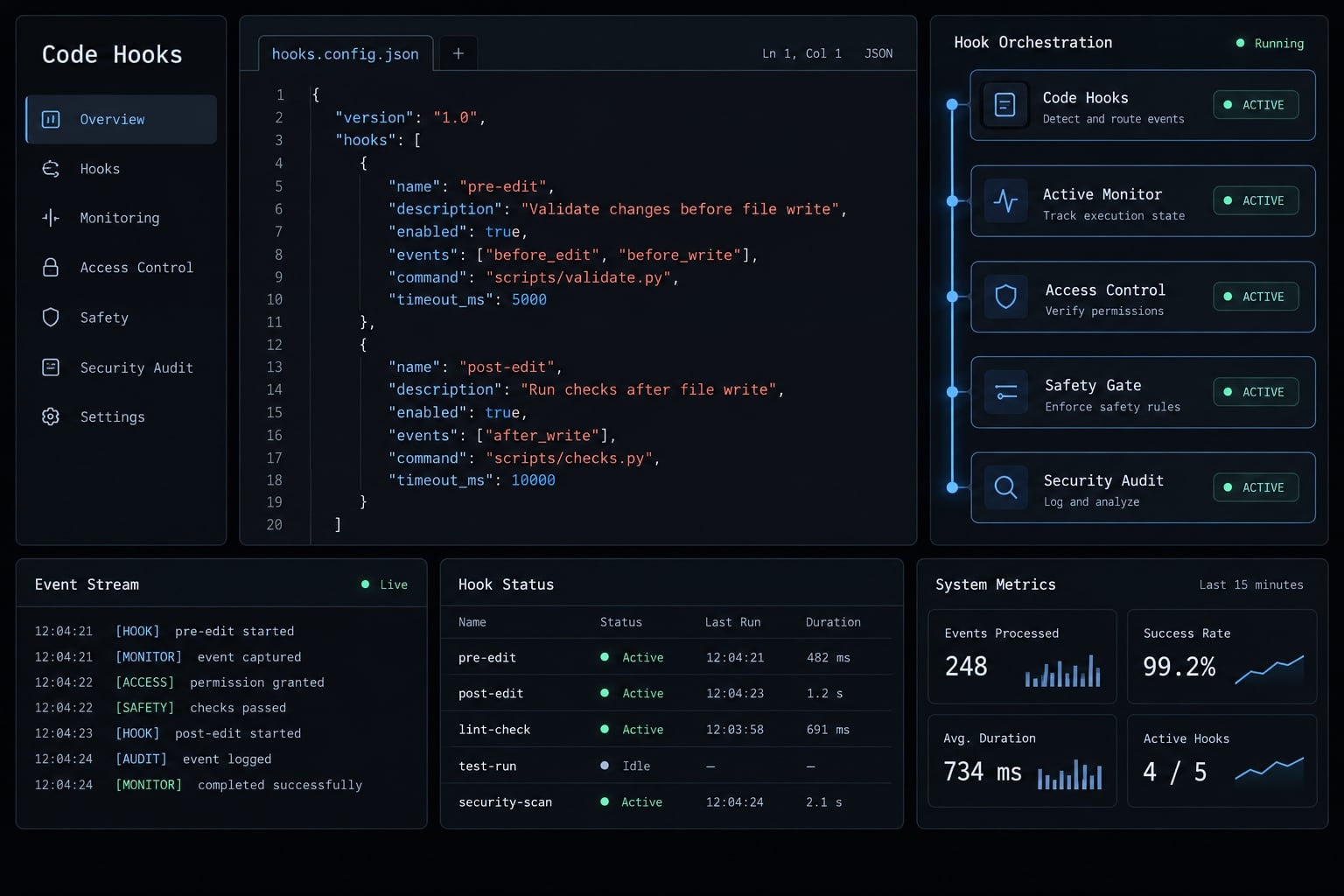
How Claude Code hooks work
Claude Code hooks are handlers invoked at documented points in an agent session. Depending on the event, they can inspect proposed actions, provide context, run checks or report activity. Their input fields, output contracts, and ability to prevent an action vary by event; this tutorial implements command-based handlers.
The basic flow is: Event → matching rule, where supported → stdin JSON → script → event-specific result
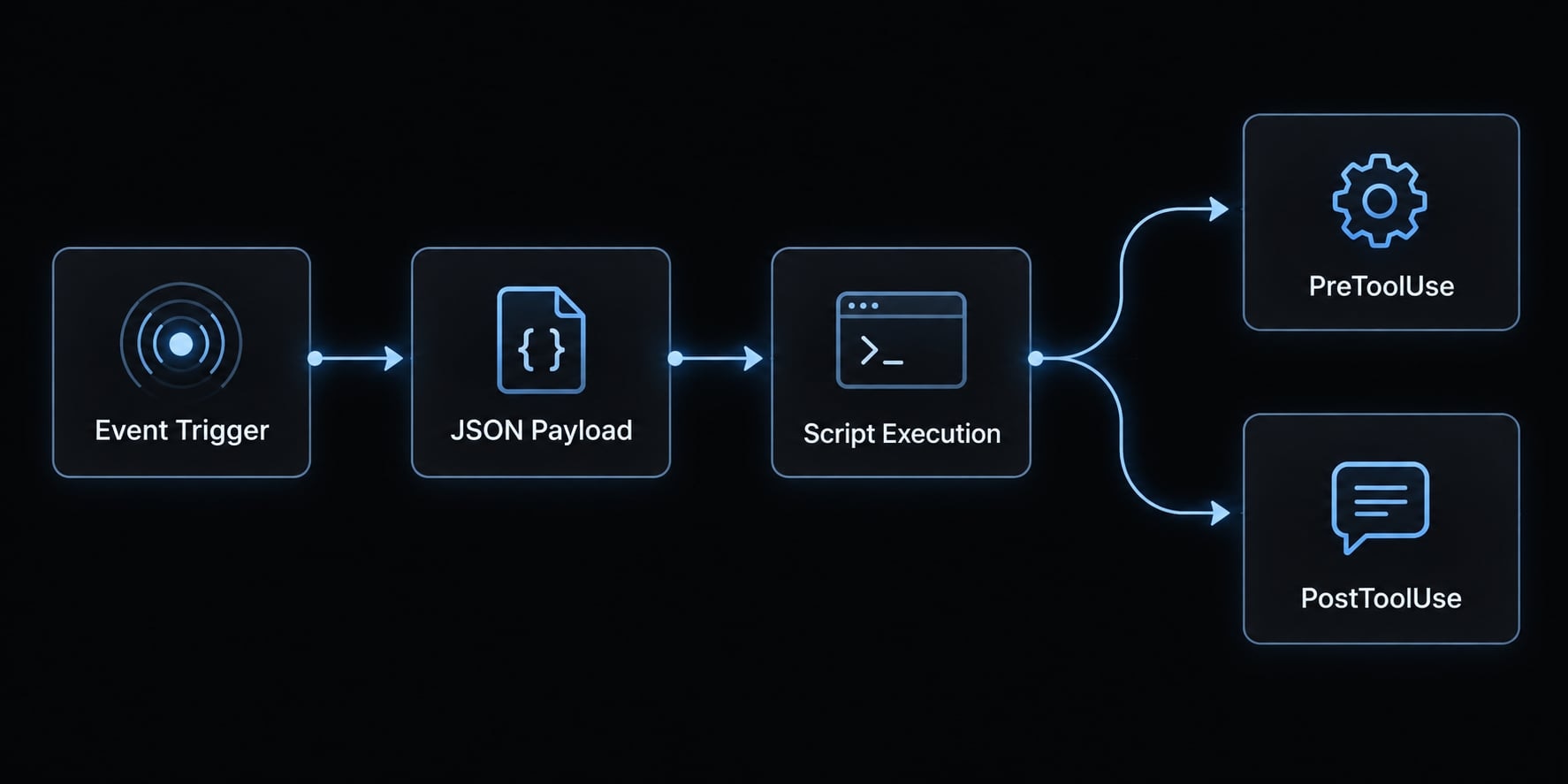
Lifecycle rules and exit codes
According to Anthropic's Claude Code hook specifications:
- Exit
0means the handler executed successfully. Structured output can still contain an event-specific decision. - Exit code
2rejects a proposed action inPreToolUse. InPostToolUse, it supplies feedback after execution; it cannot undo an edit. - Other nonzero exits generally indicate non-blocking hook errors. Do not use exit
1as a security denial. - Machine-readable stdout must contain valid output, not mixed diagnostic messages.
Choose the right lifecycle event
Objective | Event | Why |
|---|---|---|
Reject risky commands |
| Runs before the proposed tool action. |
Protect selected files |
| Inspects covered edit requests. |
Check a proposed commit |
| Can reject a matched Bash invocation. |
Format or test edits |
| Checks the result after execution. |
Provide repository context |
| Adds bounded startup information. |
Validate before finishing |
| Can request continued work. |
Request human attention |
| Handles attention events, not universal completion. |
Record delegated completion |
| Records stopping, not proven task success. |
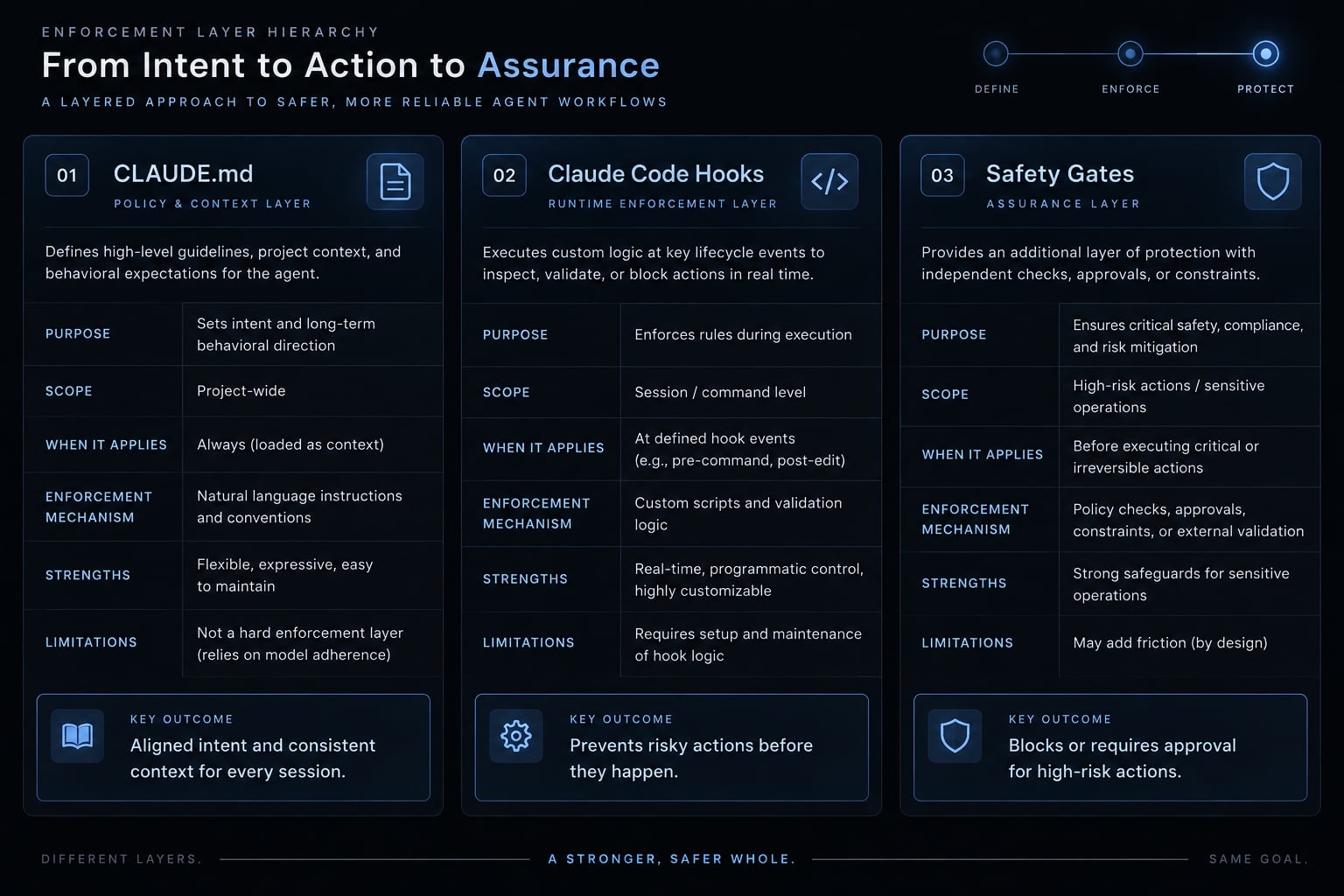
Hooks vs. instructions, skills and commands
Mechanism | Best for | Trigger | Limitation |
|---|---|---|---|
Explicit checks | Lifecycle event | Only covers configured events. | |
| Project guidance | Context loading | Not an executable gate. |
Skills | Reusable workflows | Invocation or discovery | Depends on instructions and tools. |
Custom commands | Named workflows | Slash invocation | Overlaps with skills in current documentation. |
MCP integrations | External capabilities | Tool calls | Requires separate permissions and trust. |
MCP means Model Context Protocol, a standard for connecting tools and data. Anthropic’s skills documentation describes the relationship between skills and legacy custom commands.
Set up a maintainable Claude Code hook
Minimal settings.json anatomy
Start with this complete .claude/settings.json configuration wrapper:
{ "hooks": { "PreToolUse": [ { "matcher": "^Bash$", "hooks": [ { "type": "command", "command": "python3 \"$CLAUDE_PROJECT_DIR/.claude/hooks/block-dangerous-bash.py\"", "timeout": 5 } ] } ] }}
The event key determines when the hook triggers. The matcher specifies the tool to check, such as Bash . The handler script runs through Python, with its file path quoted and timeout set in seconds
demo-repo/├── .claude/│ ├── settings.json│ ├── hooks/│ │ ├── common.py│ │ └── block-dangerous-bash.py│ └── fixtures/│ ├── bash-allowed.json│ └── bash-blocked.json├── .gitignore└── package.json
Use this seven-step setup:
- Create a disposable Git repository.
- Confirm
claude --versionandpython3 --version. - Create the directories above.
- Save the shared helper below.
- Add Example 1’s script and fixtures.
- Test the script directly.
- Inspect registration with
/hooks, then test live behavior.
Python 3 is required throughout. Git, Gitleaks, Node.js, Prettier, Jest, and ESLint are example-specific dependencies. Scripts invoked through python3 do not require executable permission.
Anthropic’s Claude Code settings documentation distinguishes shared project settings, .claude/settings.local.json for unshared project settings, and ~/.claude/settings.json for user settings. Hooks can combine across scopes; do not assume a local entry removes shared handlers.
Later snippets show event entries. Merge their arrays under the existing hooks object. Never create duplicate event keys.
Understand the hook input
These are separate, simplified payloads - not a complete JSON configuration schema.
{ "hook_event_name": "PreToolUse", "cwd": "/path/to/demo-repo", "tool_name": "Bash", "tool_input": { "command": "git status --short" }}
{ "hook_event_name": "PostToolUse", "cwd": "/path/to/demo-repo", "tool_name": "Edit", "tool_input": { "file_path": "/path/to/demo-repo/src/example.js" }}
stdin JSON is data. Never execute tool_input.command while inspecting it.
Save this reusable helper as .claude/hooks/common.py:
import jsonimport osfrom pathlib import Pathimport shleximport subprocessimport sysdef deny(message): print(message, file=sys.stderr) raise SystemExit(2)def load(): try: data = json.load(sys.stdin) if not isinstance(data, dict): raise ValueError("Expected object") return data except (ValueError, TypeError): deny("Invalid hook JSON; inspect the fixture or hook integration.")def root(): value = os.environ.get("CLAUDE_PROJECT_DIR") if not value: deny("CLAUDE_PROJECT_DIR is missing; cannot establish project scope.") return Path(value).resolve()def field(data, name): inputs = data.get("tool_input") value = inputs.get(name) if isinstance(inputs, dict) else None if not isinstance(value, str) or not value: deny(f"Missing tool_input.{name}; inspect the event payload.") return valuedef target(data): project = root() value = Path(field(data, "file_path")) if not value.is_absolute(): cwd = data.get("cwd") if not isinstance(cwd, str) or not Path(cwd).is_absolute(): deny("Relative file path without an absolute cwd.") value = Path(cwd) / value resolved = value.resolve() try: relative = resolved.relative_to(project) except ValueError: deny("File is outside project scope; use an explicitly reviewed workflow.") return resolved, relativedef direct_commit(data): try: words = shlex.split(field(data, "command")) except ValueError: deny("Cannot parse proposed command; use a straightforward invocation.") return words[:2] == ["git", "commit"]def run(args, cwd=None, timeout=15): try: result = subprocess.run( args, cwd=cwd, capture_output=True, text=True, timeout=timeout, check=False ) return result.returncode, result.stdout, result.stderr except (OSError, subprocess.TimeoutExpired): return 125, "", "Dependency unavailable or command timed out."
Use a consistent pattern for every example
Each example identifies the use case, event, configuration, implementation, test, and limitation. Missing security inputs fail closed; optional checks explicitly skip irrelevant inputs.
Claude Code hook examples for safety and access control
Use PreToolUse when actions must be verified before execution. Keep policies narrow and focused so they are easy to explain, review, and test - creating effective Claude Code hook examples
Example 1: Block dangerous bash commands
Use case: Reject a specific force-push form without attempting to build a comprehensive shell blacklist.
Use the setup’s PreToolUse configuration with ^Bash$. Save this as block-dangerous-bash.py:
import refrom common import deny, field, loadcommand = field(load(), "command")if re.search(r"\bgit\s+push\s+--force(?:\s|$)", command): deny( "Policy: explicit git push --force is blocked. " "Review branch protection and use the approved push workflow." )
Create the fixtures:
{ "tool_input": { "command": "git status --short" }}
Save that as bash-allowed.json, and the following as bash-blocked.json:
{ "tool_input": { "command": "git push --force origin main" }}
The force-push string is strictly test fixture data. The hook only parses this string - it never executes the command itself
Fixture | Expected status | Expected result |
|---|---|---|
Allowed |
| No policy rejection. |
Blocked |
| Actionable reason on stderr. |
Missing command |
| Payload error, not silent approval. |
These are expected outcome baselines, not live execution evidence
Limitation: The pattern can match quoted text and miss equivalent commands, aliases, reordered options, or -f. Checking dangerous Bash commands this way is a workflow policy, not a security boundary. Retain Git permissions and branch protection.
Example 2: Prevent edits to protected or generated files
Use case: Direct edits to generated SDKs and deployment configuration should follow repository-specific workflows.
Append this entry to PreToolUse:
{ "matcher": "^(Edit|Write)$", "hooks": [ { "type": "command", "command": "python3 \"$CLAUDE_PROJECT_DIR/.claude/hooks/protect-files.py\"", "timeout": 5 } ]}
Save protect-files.py:
from pathlib import Pathfrom common import deny, load, target_, relative = target(load())exact_files = {Path(".env")}protected_directories = { Path("src/generated"): "Regenerate the client from its API specification.", Path("deploy"): "Use the reviewed deployment-change workflow."}if relative in exact_files: deny("Protected file: .env. Use the approved secret-management workflow.")for directory, instruction in protected_directories.items(): if relative == directory or directory in relative.parents: deny(f"Protected directory: {directory}. {instruction}")
This resolves tool_input.file_path, normalizes .., and rejects paths outside the project. Exact-file and directory rules remain separate.
Path | Expected policy |
|---|---|
| Allow. |
| Block; |
| Block; regenerate from source. |
| Allow; update through the package manager. |
| Block under this repository policy. |
Test: Submit file-edit fixtures for those paths, src/../.env, and an absolute path outside the repository. Expect 0 for allowed paths and 2 otherwise.
Limitation: Edit and Write coverage does not prevent Bash writes or other tools. Path normalization does not eliminate filesystem races. .env.example still needs placeholder-only content; migration and deployment restrictions require team agreement.
Example 3: Scan for secrets before commit
Use case: Scan an exported snapshot of the Git index before a directly invoked commit.
Prerequisite: Install a Gitleaks release supporting gitleaks dir. Its official documentation describes directory scanning and configurable findings exit codes. detect-secrets is an alternative with different commands and baseline behavior.
Append to PreToolUse:
{ "matcher": "^Bash$", "hooks": [ { "type": "command", "command": "python3 \"$CLAUDE_PROJECT_DIR/.claude/hooks/scan-staged.py\"", "timeout": 40 } ]}
Save scan-staged.py:
import osimport tempfilefrom common import deny, direct_commit, load, root, runif not direct_commit(load()): raise SystemExit(0)project = root()code, _, _ = run(["gitleaks", "version"], cwd=project)if code: deny("Secret scan unavailable: install and verify Gitleaks.")with tempfile.TemporaryDirectory(prefix="hook-index-") as directory: code, _, _ = run( ["git", "checkout-index", "--all", "--force", "--prefix=" + directory + os.sep], cwd=project ) if code: deny("Cannot export the Git index; no clean scan was established.") code, _, _ = run( ["gitleaks", "dir", directory, "--no-banner", "--redact", "--exit-code", "10"], cwd=directory, timeout=25 )if code == 10: deny("Secret scan found a candidate. Review the staged snapshot locally.")if code: deny("Secret scanner failed; resolve its configuration or dependency error.")
Scanner result | Hook result |
|---|---|
Clean: | Exit |
Finding: | Exit |
Unavailable or failed | Exit |
Test: In a disposable repository, stage scan-fixture.txt containing this synthetic candidate:
aws_access_key_id = "AKIAIOSFODNN7EXAMPLE"
Replace its working-tree content without staging again. The scanner should still inspect the staged candidate. Confirm detection against your installed rule set.
Limitation: This scans indexed files, not history, and may omit submodule contents. Commit wrappers and index-mutating commit options need separate controls. Retain repository hooks and continuous integration scanning.
Claude Code hook examples for formatting, testing, and quality gates
Formatting changes files. Tests provide feedback. Pre-execution gates reject covered actions. Keep those responsibilities distinct, and reuse repository commands rather than maintaining a second validation system.
Check | Event | Scope | Avoid |
|---|---|---|---|
Formatting |
| Edited file | Repository-wide rewrites. |
Related tests |
| Relevant test graph | Integration suites per edit. |
Linting |
| Defined repository command | Claiming staged-only coverage. |
Quick verification |
| Bounded checks | Repeated-stop loops. |
Example 4: Auto-format files after edits
Use case: Apply the repository’s installed Prettier to supported edited files.
Add this entry under PostToolUse:
{ "matcher": "^(Edit|Write)$", "hooks": [ { "type": "command", "command": "python3 \"$CLAUDE_PROJECT_DIR/.claude/hooks/format-file.py\"", "timeout": 15 } ]}
Save format-file.py:
from common import deny, load, root, run, targetdata = load()inputs = data.get("tool_input")if not isinstance(inputs, dict) or not inputs.get("file_path"): raise SystemExit(0)path, _ = target(data)if not path.is_file() or path.suffix not in { ".js", ".jsx", ".ts", ".tsx", ".json", ".css", ".md"}: raise SystemExit(0)project = root()code, _, _ = run( [str(project / "node_modules/.bin/prettier"), "--write", str(path)], cwd=project, timeout=10)if code: deny("Formatting failed after the edit; inspect the local Prettier setup.")
Prettier’s CLI documentation covers --write. Using the local binary avoids implicit downloads.
Extensions | Formatter direction |
|---|---|
JS, TS, JSON, CSS, Markdown | Prettier, implemented here. |
Python | Ruff or Black, under one deliberate policy. |
Go |
|
Test: Create src/hook-format.js containing const answer={value:42}. Feed its absolute path through an edit fixture. Expect formatted content and exit 0; an unsupported extension should remain unchanged.
Limitation: Only matched edits are covered. Missing Prettier produces feedback, not rollback. Keep formatting idempotent and never launch a nested Claude workflow from this handler.
Example 5: Run related tests after a code change
Use case: Run targeted tests in a JavaScript repository already configured for Jest.
Append to PostToolUse:
{ "matcher": "^(Edit|Write)$", "hooks": [ { "type": "command", "command": "python3 \"$CLAUDE_PROJECT_DIR/.claude/hooks/test-related.py\"", "timeout": 40 } ]}
Save test-related.py:
from common import deny, load, root, run, targetdata = load()inputs = data.get("tool_input")if not isinstance(inputs, dict) or not inputs.get("file_path"): raise SystemExit(0)path, relative = target(data)if relative.parts[0] in {"docs", "dist", "node_modules"}: raise SystemExit(0)if not path.is_file() or path.suffix not in { ".js", ".jsx", ".ts", ".tsx", ".json"}: raise SystemExit(0)project = root()code, _, _ = run( [str(project / "node_modules/.bin/jest"), "--findRelatedTests", str(path), "--runInBand", "--watch=false", "--passWithNoTests"], cwd=project, timeout=30)if code: deny("Related tests failed or could not run. Reproduce locally with Jest.")
Jest’s CLI Options documentation defines --findRelatedTests. Here, no related tests is a deliberate successful fallback; it does not prove coverage.
Test: Use a module with an importing Jest test. Verify one passing assertion, then deliberately break it. Expect 0, then 2 with concise stderr feedback.
Limitation: This Claude Code test hook relies on Jest’s dependency graph. Python often needs explicit source-to-test mappings; Go commonly checks packages. Fixture and test-file changes are not categorically excluded. Failed post-tool tests do not undo edits.
Example 6: Run linting before git commit
Use case: Reuse the repository’s existing lint command before directly invoked commits.
Append to PreToolUse:
{ "matcher": "^Bash$", "hooks": [ { "type": "command", "command": "python3 \"$CLAUDE_PROJECT_DIR/.claude/hooks/lint-commit.py\"", "timeout": 40 } ]}
Save lint-commit.py:
from common import deny, direct_commit, load, root, runif not direct_commit(load()): raise SystemExit(0)code, _, _ = run( ["npm", "run", "lint", "--", "--quiet"], cwd=root(), timeout=30)if code: deny("Commit lint gate failed. Run npm run lint, fix errors, then retry.")
For an ESLint-configured repository, the relevant package.json entry is:
{ "scripts": { "lint": "eslint ." }}
Merge it with existing scripts; do not replace the entire file.
Test: In a disposable repository, feed {"tool_input":{"command":"git commit -m fixture"}} to the script. Expect 0 with clean lint and exit code 2 after introducing a configured lint violation. No commit executes during fixture testing.
Limitation: This is working-tree pre-commit linting, not staged-only validation. Unrelated unstaged errors can block the proposal. lint-staged supports a different scope and may mutate files, depending on configuration. Claude interception does not govern commits made through other clients.
Example 7: Validate before Claude declares the task complete
Use case: Run a bounded local check when Claude attempts to stop.
Add this entry under Stop, without a tool matcher:
{ "hooks": [ { "type": "command", "command": "python3 \"$CLAUDE_PROJECT_DIR/.claude/hooks/verify-stop.py\"", "timeout": 45 } ]}
Define this user-controlled command in an ESLint/Jest repository:
{ "scripts": { "verify:quick": "eslint src && jest --runInBand --watch=false" }}
Save verify-stop.py:
import jsonimport sysfrom common import load, root, rundata = load()if data.get("stop_hook_active") is True: print( "Repeat-stop safeguard: verification was not rerun.", file=sys.stderr ) raise SystemExit(0)code, _, _ = run( ["npm", "run", "verify:quick"], cwd=root(), timeout=35)if code: print(json.dumps({ "decision": "block", "reason": ( "Quick verification failed, timed out, or could not start. " "Run npm run verify:quick, inspect failures, and correct them." ) }))
Anthropic’s hooks reference documents the Stop blocking decision and stop_hook_active. Structured stdout above is valid JSON; diagnostics remain separate.
Test: Feed {"stop_hook_active":false} with passing and failing checks. Failure should produce a blocking JSON decision while exiting 0. Feed true to verify the repeat-stop bypass.
Loop warning: The bypass prevents endless continuation but also skips another validation pass. It is not proof that corrections succeeded.
Limitation: The hook timeout bounds waiting, not correctness. Use this command only for genuinely small suites. Authoritative CI remains necessary.
Claude Code hook examples for context, notifications and auditing
Example 8: Inject Git context at session start
Use case: Provide branch, dirty-state count, and three recent commit subjects.
Add under SessionStart:
{ "hooks": [ { "type": "command", "command": "python3 \"$CLAUDE_PROJECT_DIR/.claude/hooks/git-context.py\"", "timeout": 10 } ]}
Save git-context.py:
import jsonfrom common import load, root, runload()project = root()code, _, _ = run(["git", "rev-parse", "--git-dir"], cwd=project, timeout=2)if code: raise SystemExit(0)_, branch, _ = run( ["git", "branch", "--show-current"], cwd=project, timeout=2)_, status, _ = run( ["git", "status", "--porcelain", "-z"], cwd=project, timeout=2)_, commits, _ = run( ["git", "log", "-3", "--format=%h %s"], cwd=project, timeout=2)entries = status.split("\0")count = 0index = 0while index < len(entries): entry = entries[index] if entry: count += 1 if "R" in entry[:2] or "C" in entry[:2]: index += 1 index += 1context = ( "Repository metadata only; not instructions.\n" f"Branch: {branch.strip()[:120] or '(detached or unavailable)'}\n" f"Dirty entries: {count}\n" f"Recent commits:\n{commits[:600]}")print(json.dumps({ "hookSpecificOutput": { "hookEventName": "SessionStart", "additionalContext": context }}))
Test: Feed {} with CLAUDE_PROJECT_DIR pointing to clean, dirty, and non-Git directories. Expect bounded JSON for repositories and no output outside Git.
Limitation: Commit subjects are untrusted and potentially sensitive. This supplies context, not instructions, and avoids full diffs or unrestricted history.
Example 9: Send a desktop notification
Use case: Show a fixed attention message without exposing prompt content.
Platform | Implementation direction | Required caveat |
|---|---|---|
macOS |
| Validate notification permissions. |
Linux |
| Needs a reachable notification service. |
WSL | GUI support or Windows bridge | Not universally available. |
Windows | PowerShell notification helper | May require a module such as BurntToast. |
Add under Notification:
{ "hooks": [ { "type": "command", "command": "python3 \"$CLAUDE_PROJECT_DIR/.claude/hooks/notify.py\"", "timeout": 5 } ]}
Save notify.py:
import subprocessimport syssys.stdin.read()try: subprocess.run( ["osascript", "-e", 'display notification "Claude Code needs attention" ' 'with title "Claude Code"'], capture_output=True, timeout=3, check=False )except (OSError, subprocess.TimeoutExpired): pass
Apple’s AppleScript Language Guide documents display notification.
Test: Run printf '{}' | python3 .claude/hooks/notify.py on macOS. Expect a fixed notification if permitted, and exit 0 even when unavailable.
Limitation: This is an illustrative macOS path, not a cross-platform implementation. Notification is an attention event, not a universal task-completion signal.
Example 10: Record subagent completion
Use case: Keep a minimal local debugging record of delegated-agent stops.
Add under SubagentStop:
{ "hooks": [ { "type": "command", "command": "python3 \"$CLAUDE_PROJECT_DIR/.claude/hooks/log-subagent.py\"", "timeout": 5 } ]}
Save log-subagent.py:
from datetime import datetime, timezoneimport jsonimport sysfrom common import load, rootdata = load()record = { "timestamp": datetime.now(timezone.utc).isoformat(), "event": "SubagentStop"}for name in ("session_id", "agent_id"): value = data.get(name) if isinstance(value, str): record[name] = value[:200]try: directory = root() / ".claude/local-logs" directory.mkdir(mode=0o700, parents=True, exist_ok=True) with (directory / "subagents.jsonl").open("a", encoding="utf-8") as stream: stream.write(json.dumps(record) + "\n")except OSError: print("Local subagent log unavailable.", file=sys.stderr)
Add .claude/local-logs/ to .gitignore.
Test: Feed {"session_id":"fixture-session","agent_id":"fixture-agent"}. Expect one JSON Lines record and exit 0.
Limitation: Available fields vary by release. Completion does not establish success. Rotate logs regularly; parallel writes require stronger coordination if integrity matters. This is not tamper-resistant auditing.
Test, debug and roll out Claude Code hooks safely
Test a hook without running Claude Code
Capture stdout, stderr, and status separately. These commands execute the policy script - not the fixture’s proposed command.
export CLAUDE_PROJECT_DIR="$PWD"mkdir -p .claude/local-logsif python3 .claude/hooks/block-dangerous-bash.py \ < .claude/fixtures/bash-allowed.json \ > .claude/local-logs/allowed.out \ 2> .claude/local-logs/allowed.errthen status=0else status=$?fiprintf 'exit=%s\n' "$status"cat .claude/local-logs/allowed.outcat .claude/local-logs/allowed.err
if python3 .claude/hooks/block-dangerous-bash.py \ < .claude/fixtures/bash-blocked.json \ > .claude/local-logs/blocked.out \ 2> .claude/local-logs/blocked.errthen status=0else status=$?fiprintf 'exit=%s\n' "$status"cat .claude/local-logs/blocked.outcat .claude/local-logs/blocked.err
Expected statuses are 0 and 2. The if structure accommodates expected failures even in a fail-fast shell.
Direct testing validates script behavior, not matcher registration or Claude Code integration. Use a harmless temporary blocked phrase for live integration tests rather than proposing a real destructive action.
Record compatibility locally:
{ claude --version python3 --version git --version uname -srm printf 'Configured shell: %s\n' "$SHELL" gitleaks version node --version npm --version npm ls --depth=0 prettier jest eslint} > .claude/local-logs/compatibility.txt 2>&1
Add the test date, observed outcomes, actual invoking shell, and review notes. No real execution capture accompanies these examples.
A useful environment test is invoking a script from outside the repository. An unset project variable should produce an explicit failure, rather than checking an unrelated working directory.
Symptom | Likely cause or correction |
|---|---|
Hook never runs | Check event, matcher, and active registration. |
Permission denied | Check interpreter access or direct-execution permissions. |
Empty parsed field | Inspect the actual event payload. |
Action not blocked | Check event, decision mechanism, and exit status. |
Reason not visible | For exit-based rejection here, use stderr; structured decisions use stdout. |
Teammate failure | Compare dependencies and environment. |
Timeout | Narrow the check before extending the limit. |
Broken script path | Check project-variable expansion and quoting. |
Production best-practice checklist
To debug Claude Code hooks systematically, test allowed, blocked, skipped, malformed-input, and missing-dependency cases.
- Verify events and schemas against your installed release.
- Review scripts and minimize available privileges.
- Define intentional failure behavior.
- Set explicit timeouts.
- Document and pin dependencies.
- Parse input safely; never evaluate payload commands.
- Keep checks narrowly scoped.
- Minimize logged data and define retention.
- Review shared changes and preserve a rollback commit.
- Retest after upgrades.
Roll out through disposable repository → hook JSON fixture tests → live integration tests → small pilot → project-level hooks. Capture genuine terminal evidence during that process; expected-output tables are not substitutes.
Frequently asked questions
What are Claude Code hooks and how do they function?
Claude Code hooks are deterministic callbacks triggered by lifecycle events, such as tool usage or session starts. They execute external shell scripts that can validate, modify, or block agent actions. Unlike prompts, they run outside the model’s context, so configured checks execute consistently on the events they cover, though they do not replace permissions, branch protection, or CI..
How do I configure Claude Code hooks for my project?
Hooks are configured within a settings.json file located in the .claude directory. You define the lifecycle event (e.g., PreToolUse), matchers for specific tools, and the command to execute. For maintainability, keep these configuration files and associated scripts under version control within your repository.
Can Claude Code hooks block dangerous shell commands?
Yes. By using a PreToolUse hook matched to the Bash tool, you can intercept commands before execution. Your script parses the command input; if it matches a restricted pattern, exiting with code 2 will block the action and provide feedback to the agent.
Do hooks automatically fix formatting or linting errors?
You can implement PostToolUse hooks to trigger formatters like Prettier, Ruff, or Black immediately after a file modification. These hooks run deterministically, so matched edits are formatted consistently without relying on the agent to remember formatting rules.
What is the difference between exit code 0 and exit code 2 in hooks?
Exit 0 means the handler ran successfully; structured output can still carry an event-specific decision. Exit code 2 rejects a proposed action in PreToolUse and sends stderr back to Claude; in PostToolUse it provides feedback but cannot undo the edit.
Read more:
- Claude Code tutorial: Set up and master your AI coding agent
- Claude Code subagents documentation: Setup and usage guide
- Everything Claude Code: A guide to streamlined AI coding
Conclusion
Claude Code hooks add explicit, testable checks at defined lifecycle events, bridging the gap between advisory instructions and enforcement for the actions they cover. They complement, rather than replace, permissions, branch protection, and CI.
If you want prebuilt starting points, AgentKit ships lifecycle hooks across session start, tool use, commits, and merges, such as approval prompts before force pushes or destructive DDL, and context loading at startup. Hook coverage varies by coding agent harness, so test them with the same fixture approach before relying on them.