Vibe Coding with Three.js: How to Build 3D Web Projects with AI
Describing 3D ideas is easy, but getting cameras, controls, and objects to behave consistently is harder. Vibe coding with Three.js bridges that gap by using natural-language instructions to generate and revise browser-based 3D projects with AI coding agents. While an AI can implement much of a small scene or game testing, code review, and engineering judgment remain essential before relying on the final result.
What is vibe coding with Three.js?
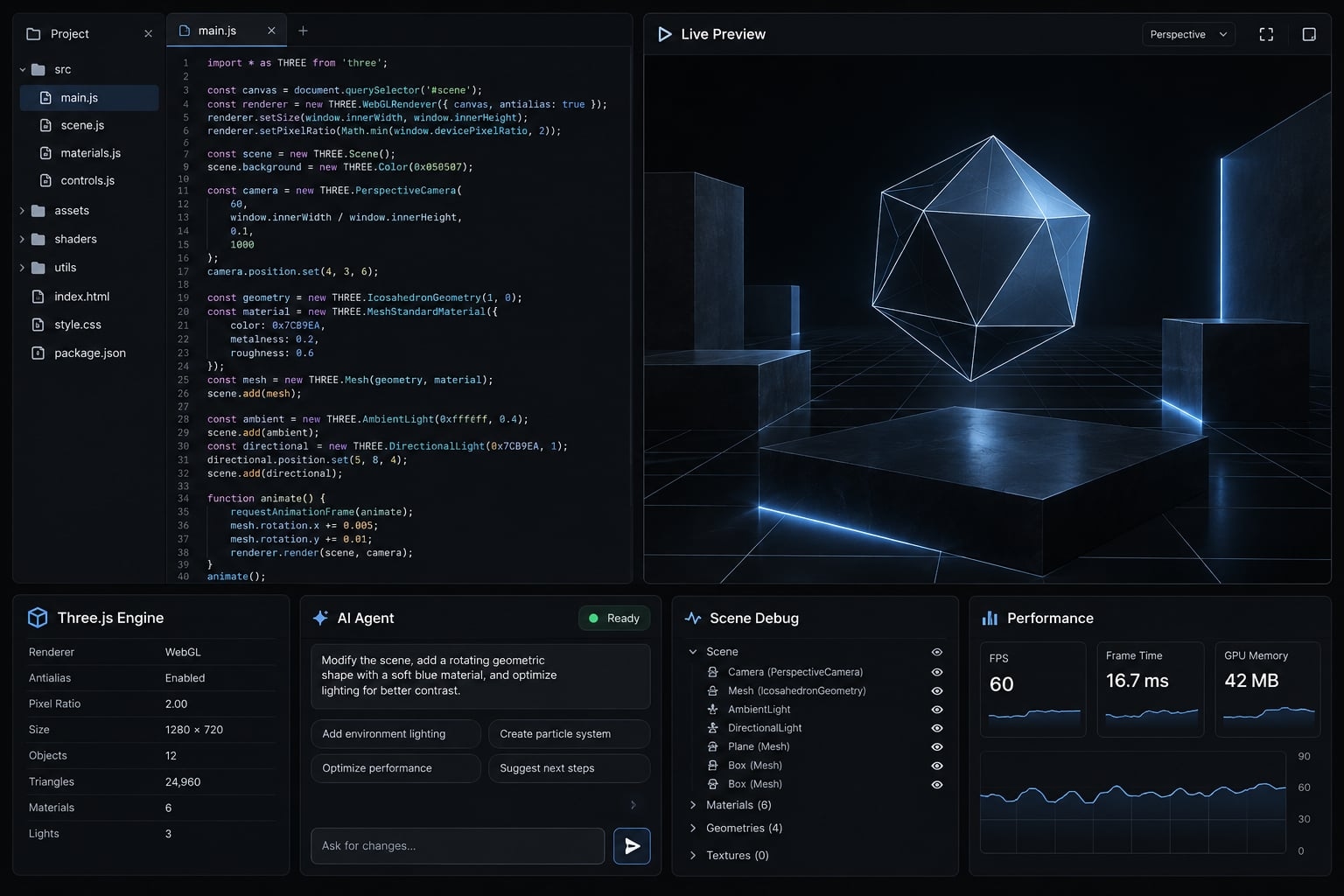
Natural-language prompts become the starting point for implementation. You describe behavior, inspect the generated result, and request changes instead of writing every line manually. The final output of vibe coding with Three.js remains actual JavaScript and Three.js code. It has dependencies, browser constraints, and maintenance requirements. This is not a no-code artifact.
The term originally emphasized accepting AI-generated changes with limited code inspection. Its broader usage now includes many prompt-led workflows. These are informal distinctions, not technical standards.
This guide adds deliberate validation. When you inspect, test, and maintain the implementation, the process overlaps with disciplined AI-assisted coding.
Three.js provides graphics building blocks, not a complete game engine. Movement rules, collision behavior, application state, and release decisions remain your responsibility. Use the official Three.js documentation as the library reference, rather than relying on the model’s recollection.
Traditional coding vs. AI-assisted coding vs. Vibe coding
These are typical tendencies; any public deployment still requires appropriate review.
Approach | Implementation direction | Typical review intensity | Best suited to |
|---|---|---|---|
Traditional coding | Developer writes most implementation | Developer-led inspection and testing | Fine-grained control and unfamiliar requirements |
AI-assisted coding | Developer delegates bounded tasks | Generated changes receive deliberate review | Scaffolding, maintenance, and reviewed applications |
Prompts steer implementation and iteration | Often visual-first; inspection varies | Exploration and narrowly scoped prototypes |
What the human still controls
- Scope and visual direction: What belongs in the project.
- Acceptance criteria: Specific, observable conditions that define success.
- Files and permissions: Which assets, dependencies, commands, and edits are allowed.
- Testing and deployment: What evidence justifies publication.
- Expansion decisions: When to refactor, seek help, or stop adding features.
Reducing manual coding changes how implementation happens. It does not reduce responsibility for deployed behavior.
What can you build by vibe coding Three.js?
Projects with one clear interaction are easier to generate, inspect, and correct. A complete prototype means complete against a defined feature list - not ready for every possible user or device.
The suitability labels below are qualitative judgments, not benchmarks. Outcomes depend on scope, tools, assets, and reviewer skill.
Project type | Example output | AI suitability | Main review requirement |
|---|---|---|---|
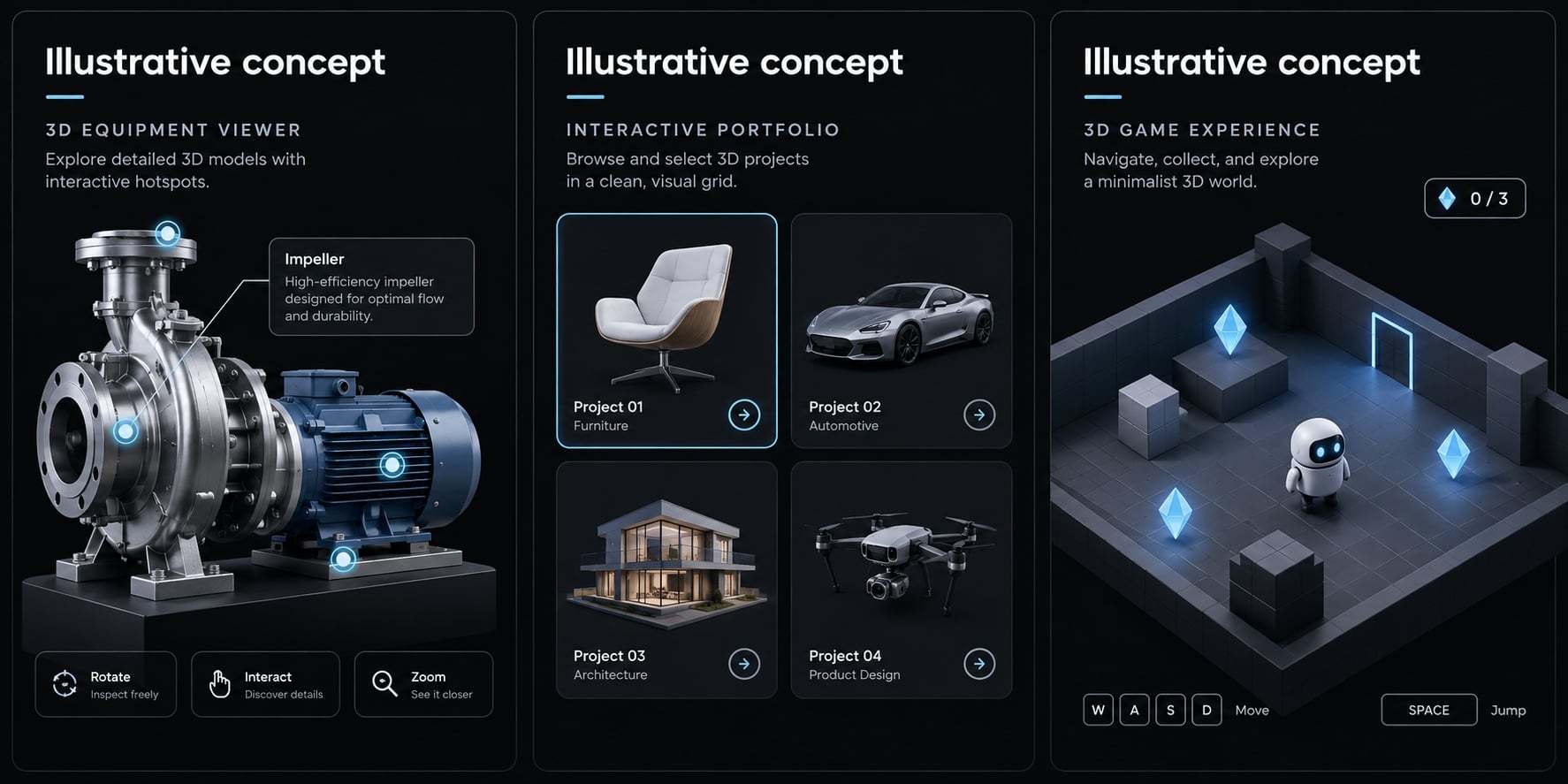
3D landing page | Rotating shape behind page content | Strong for bounded effects | Loading, accessibility, mobile rendering |
Interactive portfolio | Selectable objects revealing project details | Good with limited navigation | Input behavior and readable content |
Product visualization | Equipment model with labeled components | Good with prepared assets | Visual accuracy and model delivery |
Small browser game | Sphere collecting ten objects | Good for simple rules | Movement, boundaries, state transitions |
Procedural environment | Parameter-generated terrain or trees | Moderate | Object count and repeatable generation |
Advanced 3D application | CAD-like editor or multiplayer world | Limited without specialist oversight | Architecture, correctness, synchronization |
For a B2B product visualization, start with a rotatable industrial equipment model and three component hotspots. Review model weight, label accuracy, and mobile behavior before adding configuration options.
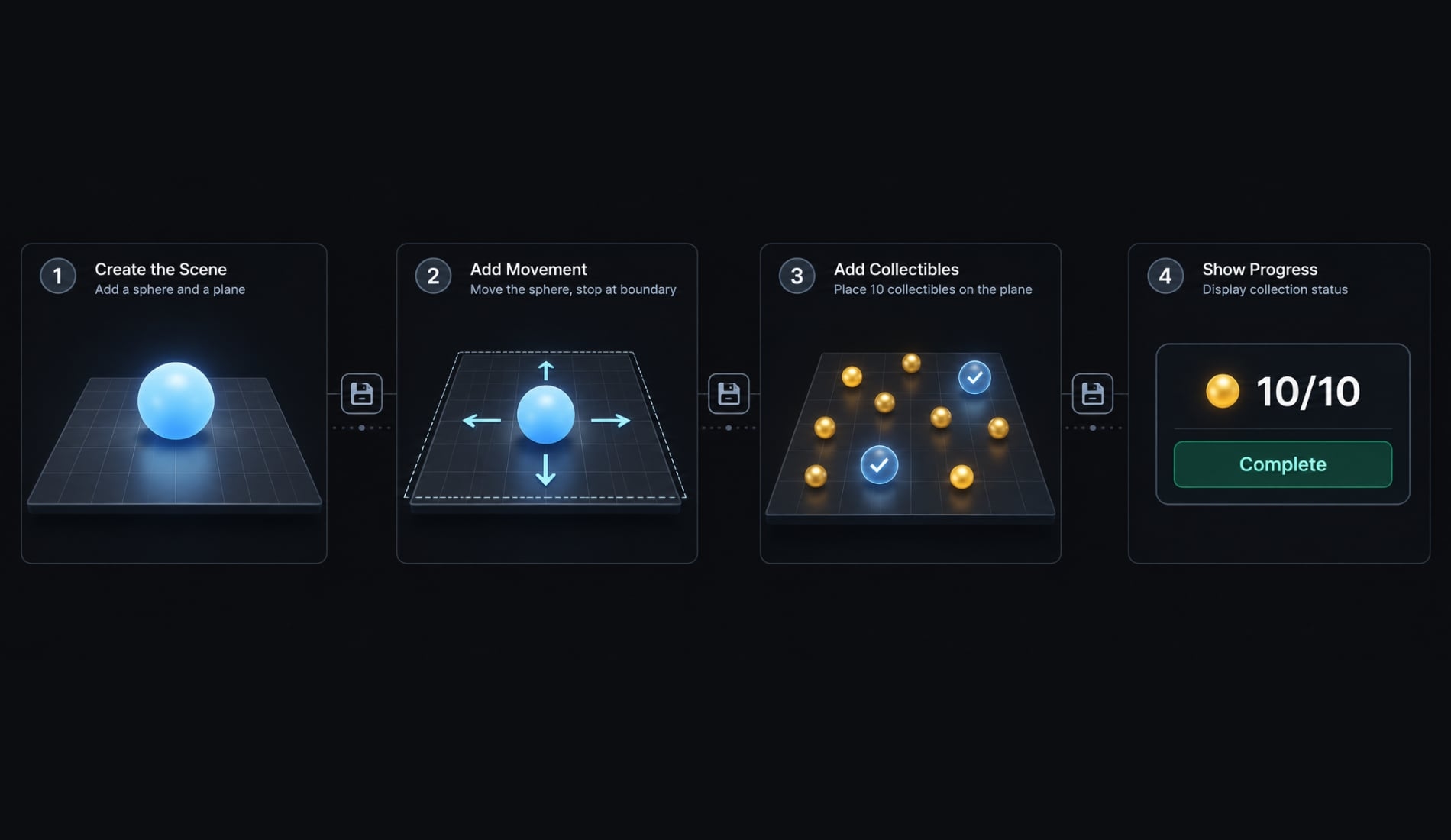
The reference browser game is similarly constrained. An AI-generated Three.js game with movement, ten collectibles, and a completion message has observable endpoints.
Adding inventories, physics, and networking multiplies interactions between systems. That increases debugging effort and regression risk-the risk that a change breaks previously working behavior.
A simple vibe coding workflow for a Three.js project
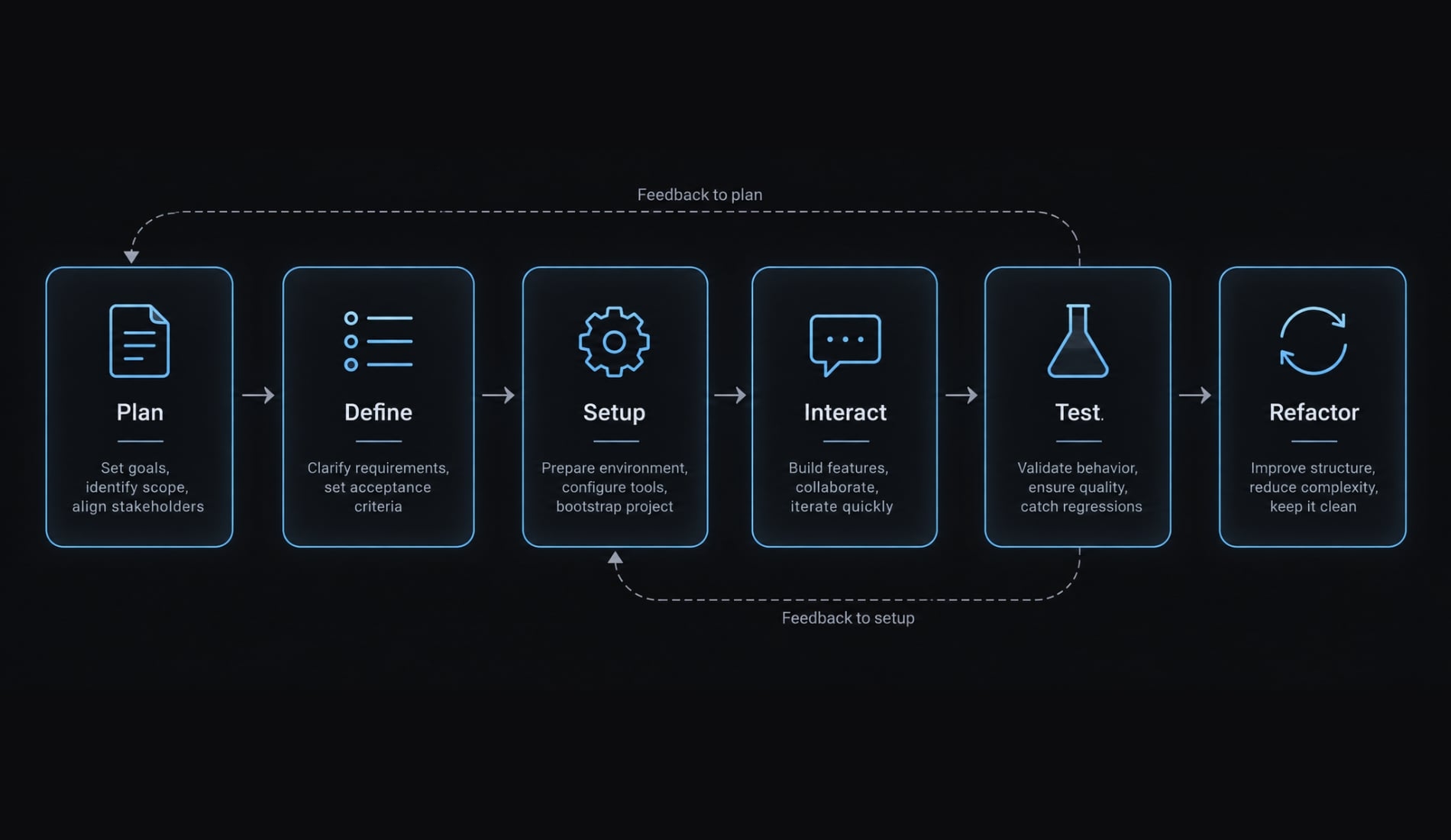
Build a walking skeleton: The smallest end-to-end version that runs and can be tested.
- Define a small, testable concept.
- Ask the AI to plan before writing code.
- Generate the minimum working scene.
- Add one interaction at a time.
- Test every meaningful change.
- Review and refactor before expanding.
Step 1 - Define a small, testable concept
Use this scope template:
Build [concept] with [primary interaction] for [device/browser]. Include [must-haves]. Exclude [non-goals]. Success means [observable checks].
For the reference game, choose desktop keyboard controls first. The sphere must move, remain inside the plane, and collect each object once. The counter must reach ten and display completion.
Exclude accounts, networking, external models, and realistic physics. This creates a feature list you can verify directly.
Step 2 - Ask the AI to plan before writing code
Request the stack, file structure, dependencies, implementation stages, assumptions, risks, and validation steps. Require explicit human approval before implementation.
A minimal setup could use JavaScript, Three.js, and Vite as the local development server. Additional frameworks are optional, not prerequisites.
Choose an AI coding agent with project-file access, command approval, diff review, and visible test results. Keep control over installations, destructive commands, credentials, and deployment operations.
Step 3 - Generate the minimum working scene
Start with a scene, camera, one sphere, and suitable lighting. Add a renderer - the component that draws the scene into the browser canvas. Use WebGLRenderer consistently for this workflow, with one render loop and resize handling. Confirm that the canvas has visible dimensions.
Select and verify a Three.js release, pin its exact version, and save the lockfile. Keep addon imports compatible. “Current APIs” means APIs appropriate to that pinned release. Confirm the scene renders before adding gameplay.
Step 4 - Add one interaction at a time
Use iterative prompting in this order:
- Keyboard movement and plane boundaries.
- Ten collectibles with collection detection.
- Counter and completion feedback.
- Optional touch controls after earlier checks pass.
Ask the agent to change named files and preserve existing behavior. File boundaries are instructions, not guarantees: Review the diff.
Use delta time-the elapsed time between frames-to make movement less dependent on frame rate. Test diagonal movement and edge behavior separately.
Step 5 - Test every meaningful change
After each meaningful edit, check:
- Console errors and failed requests.
- Movement, boundaries, and collection counts.
- Resize and initial loading.
- Frame-rate behavior on target devices.
- Relevant browsers and input methods.
- Focus loss, pause, and resume.
- A saved working checkpoint.
Record exact errors and reproduction steps before requesting fixes. Ask what the agent actually executed. A successful build command does not establish browser correctness, and browser testing requires suitable tool access plus evidence.
Step 6 - Review and refactor before expanding
Separate input, game state, and rendering when their interactions become difficult to follow. A small demo does not automatically need a complex architecture.
Remove unused dependencies and check for duplicate loops or event listeners. Perform resource disposal: Release graphics resources no longer needed.
Then repeat the original acceptance checks. Save a checkpoint and a short log containing the requested change, observed result, and correction. Expand only when the previous stage remains understandable and stable.
Practical prompts for vibe coding Three.js
These reusable templates are not recorded test results. Replace placeholders with your project details. Good prompts clarify direction; they do not guarantee correctness.
Aim for: goal → current state → constraints → allowed changes → acceptance criteria → verification.
Project planning prompt
Plan a Three.js game where a sphere moves on a bounded planeand collects ten objects. Starting state: [project state].Propose a minimal JavaScript stack, files, dependencies, stages,assumptions, and risks. Define checks for movement, boundaries,one-time collection, and completion. Exclude networking and physicsengines. Wait for my explicit approval before writing code.
Minimum scene prompt
Implement only the approved minimum scene using[verified Three.js version]; do not invent a version.Include WebGLRenderer, camera, lit sphere, visible canvas,one render loop, and resize handling. Centralize adjustableparameters. Change only [relevant files]. Provide local runinstructions and verification steps for [target device/browser].State exactly which commands or tests you executed.
Interaction prompt
The minimum scene renders correctly. Add sphere movement andplane boundaries in [relevant files]; request approval for otherfiles. Support [keyboard only / keyboard and touch], delta-timemovement, and input reset on focus loss. Preserve camera andlighting behavior. Verify diagonal speed, boundary limits, andresume behavior. Report untested interactions instead of assumingthey work.
Debugging prompt
Diagnose [exact error and reproduction steps] using[relevant files] and the supplied browser evidence.Separate confirmed findings from hypotheses. Explain the likelyroot cause before proposing the smallest patch. Avoid unrelatedrefactoring and dependency upgrades. Include a verification stepand regression checks. If browser access is unavailable, statewhat I must inspect and provide next.
Performance review prompt
Review [relevant files] for performance risks on[target device/browser]. Rank likely bottlenecks and proposea measurement plan. Inspect per-frame allocations, assets,shadows, draw calls, cleanup, and effects. Separate staticfindings from measured results. Aim to preserve appearance,but explain trade-offs. Request approval before edits andreport the environment and procedure behind any measurements.
Keep each request tied to a saved project state. When a task becomes unclear, ask for a revised plan rather than another broad rewrite.
Where vibe coding works well and where it struggles
Familiar, bounded tasks are generally easier to generate and verify. Reliability still depends on the model, project context, pinned version, assets, and reviewer - not the task name alone.
These ratings are editorial guidance for small prototypes, not measured success rates.
Task | AI suitability | Typical risk | Human review needed |
|---|---|---|---|
Basic scene setup | Strong | Incorrect framing or imports | Basic visual and runtime verification |
Standard materials and lights | Good | Unintended appearance | Lighting and material checks |
Camera and input controls | Good | Conflicting listeners or motion | Input and focus testing |
Model loading | Good with context | Decoder or asset-path failures | Loading and failure-path checks |
Simple collection logic | Good | Double counting or missed contact | State and boundary tests |
Procedural content generation | Moderate | Excessive object counts | Repeatability and rendering measurements |
Physics integration | Moderate | Unstable collisions or timing | Simulation expertise |
Custom shader programming | Variable | Plausible-looking but incorrect effects | Visual, mathematical, and performance review |
WebGPU and Three Shading Language (TSL) | Version- and tooling-sensitive | Unsupported combinations or imports | Release-specific documentation review |
Production optimization | Useful for investigation | Fixes that move the bottleneck | Profiling and regression testing |
High rendering success doesn't guarantee scalability, performance, or bug-free code. Excessive draw calls increase overhead, while hidden issues like memory leaks, unverified shaders, and broken physics require rigorous testing rather than blind prompting.
Always check official Three.js, TSL, and MDN documentation for version-sensitive updates, and consult experienced engineers when handling security-sensitive features like authentication or data handling.
Common AI-generated Three.js problems and how to fix them
Start with observable symptoms and exact errors, not a request to “rewrite everything.” One symptom can have several causes. Change one plausible cause at a time and preserve a recovery point.
Symptom-based troubleshooting table
Symptom | Likely causes | Corrective action |
|---|---|---|
Blank canvas | Import/runtime failure, zero-size canvas, incorrect camera framing, missing loop | Read the first error; inspect dimensions, object placement, and loop execution |
Dark scene | Unsuitable lighting, material settings, or exposure | Temporarily use an unlit basic material to isolate lighting; then review light and material settings |
Missing model | Failed response, loader configuration, missing compression support, scale or position | Inspect the request, |
Unpredictable controls | Frame-dependent motion, duplicate listeners, competing input systems | Use delta time, reset input on blur, remove duplicate listeners, and isolate control ownership |
Asset request or CORS failure | Wrong path, server response, or cross-origin headers | Check hosting and server headers; never disable browser security as a deployment fix |
Poor mobile performance | High pixel ratio, shadows, oversized assets, rendering load | Measure on the target device before adjusting resolution, effects, or assets |
Performance degrades over time | Retained resources, listeners, or duplicate loops | Inspect repeated mounting/restarts; dispose unused graphics resources and separately remove listeners and loops |
Regression after a prompt | Unrelated edits or changed assumptions | Restore the working checkpoint; request a smaller change and rerun earlier checks |
CORS, or Cross-Origin Resource Sharing, governs browser access to resources hosted on another origin. A loading failure is not automatically a CORS problem; inspect the actual response first.
Resource cleanup is similarly specific. Unused geometries, materials, and textures may need explicit disposal, as described in the Three.js cleanup manual. Removing an object from the scene is not equivalent to releasing every resource it used.
Do not dispose shared resources while other objects still need them. There is no universal .dispose() call that also fixes application listeners and loops.
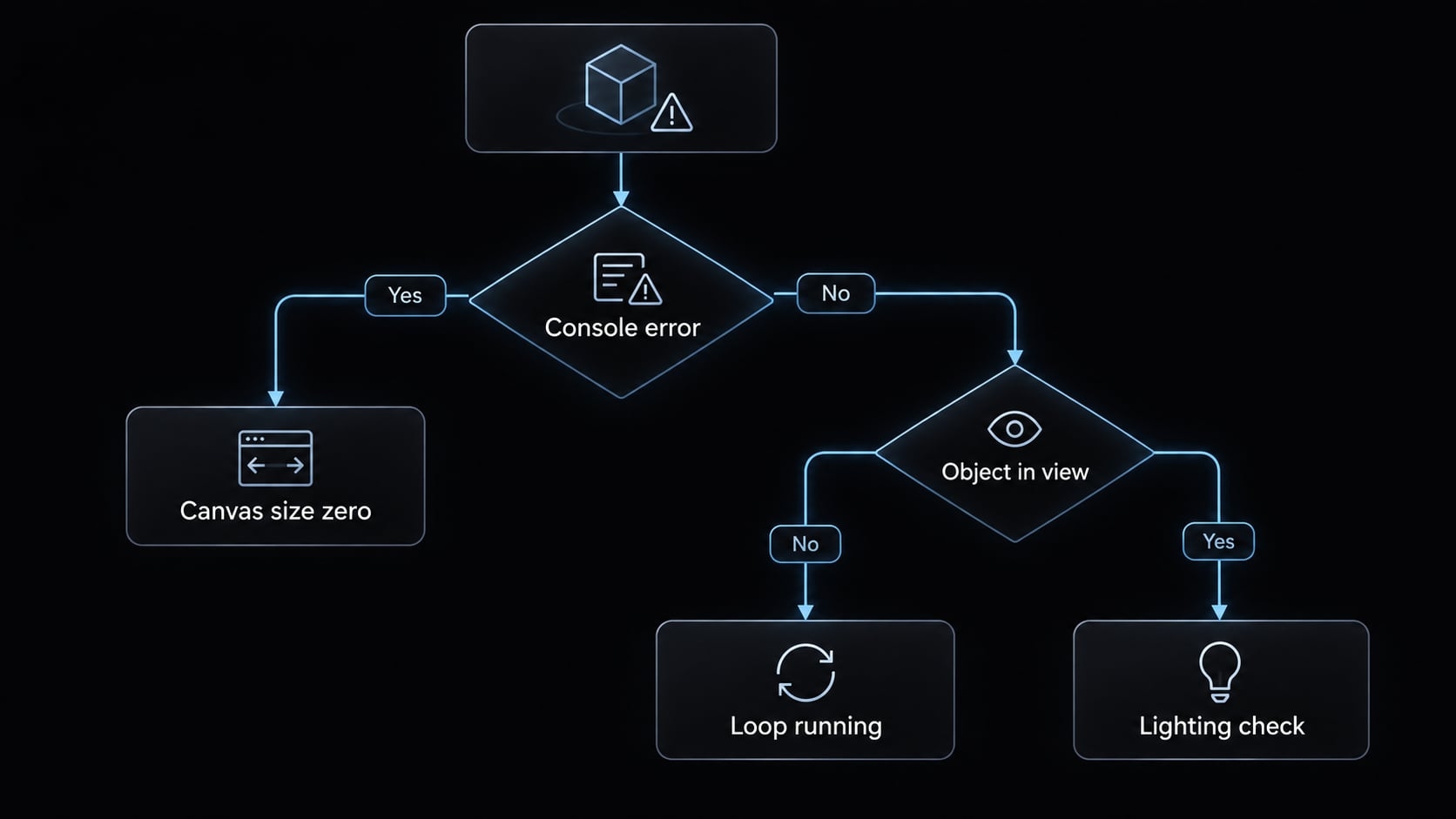
Three rules for AI-assisted debugging
- Preserve the exact error and reproduction steps: Include the pinned version, browser, and last working checkpoint.
- Ask for a likely root cause before changes: Separate observations from assumptions.
- Apply and test the smallest fix: Repeat both the failing action and previously working behavior.
Illustrative failure: After switching tabs, the sphere jumps forward. One possible cause is an unusually large elapsed-time value on resume. Inspect timing first; then test resetting the movement clock or limiting the resumed movement step. This is a diagnostic example, not a verified project result.
Is a vibe-coded Three.js project production-ready?
Not automatically. Successful rendering proves only that one observed path works. Readiness requires review against defined target devices, interactions, assets, and release risks. A private experiment and a public product viewer have different requirements, even when both display the same model.
Production-readiness gate
- Runtime: No unresolved critical console or runtime errors.
- Performance: Measurements meet project-specific targets on declared devices.
- Interaction: Keyboard, touch, resize, focus, pause, and resume work where supported.
- Assets: Models and textures are appropriately optimized and delivered.
- Cleanup: Obsolete graphics resources, listeners, and loops are released.
- Dependencies: Packages are reviewed, pinned, and captured in the lockfile.
- APIs: No unresolved incompatible, deprecated, or invented API usage remains.
- Maintainability: Major responsibilities are separated enough to understand and change.
- Rights: Asset licensing and usage permissions are verified, including generated assets.
- Compatibility: Target browsers are tested, with appropriate unsupported-device fallback.
- Resilience and accessibility: Loading failures, keyboard access, focus visibility, and essential nonvisual information are addressed.
- Human review: Code and public-release risks are checked, including exposed secrets, unsafe dependencies, and command choices.
Passing this gate is a minimum review milestone - not certification of production quality or a complete security audit. Choose release criteria according to the audience, devices, and consequences of failure.
Who should use this approach?
Good fit | Requires experienced oversight |
|---|---|
Learning and visual exploration | Security-sensitive applications |
Small, bounded prototypes | Complex multiplayer systems |
Developer-led scaffolding | Demanding commercial 3D applications |
Experiments with explicit limits | Unsupervised feature expansion |
For a public collection game, ensure instructions, score, completion, and errors remain understandable outside the canvas. For an equipment viewer, provide essential product information without requiring 3D interaction.
Frequently asked questions
What is vibe coding with Three.js?
Vibe coding with Three.js is a development approach where you use natural-language prompts to instruct AI coding agents to generate 3D scenes, interactions, and visuals. Instead of manually writing syntax for every matrix or lighting calculation, you steer the AI to build functional web-based 3D experiences.
Can AI help me build a Three.js project without mastering every detail first?
Yes, AI coding agents can generate the boilerplate, scene setup, and interaction logic for Three.js projects efficiently. However, because AI can produce code with performance issues or deprecated patterns, you must still verify the output, test it across browsers, and manage graphics resources like a traditional developer.
How does vibe coding differ from traditional Three.js development?
Traditional development requires manual implementation of shaders, rendering logic, and coordinate mathematics. Vibe coding uses natural language to guide AI, which performs the heavy lifting. While faster for prototyping, vibe coding still requires human review, testing, and responsibility for the final quality and stability of the application.
What are the most common problems when vibe coding Three.js?
Common issues include blank screens due to deprecated API usage, memory leaks from failing to dispose of geometries or textures, and poor frame rates caused by generating thousands of individual meshes instead of using efficient InstancedMesh techniques. Always ask the AI to check for resource cleanup and performance overhead.
Is an AI-generated Three.js project ready for production?
Not automatically. A project that renders correctly is not necessarily production-ready. Before deployment, you must verify the code against your target devices, perform rigorous memory management, check asset licensing, confirm performance benchmarks, and ensure the project is maintainable. AI should be viewed as a prototype accelerator, not a finished product.
How can I fix performance issues in a vibe-coded scene?
Start by measuring the frame rate and analyzing draw calls in your browser’s performance tools. Ask your AI agent to refactor inefficient mesh instantiation into InstancedMesh, optimize texture resolutions, and ensure that all unused materials, geometries, and listeners are properly disposed of to prevent memory growth over time.
Read more:
- How to vibe code an AI agent: Build prototypes to production
- How to vibe code: A practical beginner guide to AI development
- Vibe coding documentation: A guide for AI-assisted projects
Conclusion
Vibe coding accelerates development, but reliability requires an incremental approach: define observable behavior, pin dependencies, and test features—like movement and collection—one checkpoint at a time. Visual success is just a starting point, so use structured prompts and checklists to ensure maintainability and production readiness before release.