Vibe coding launch checklist: Move AI apps to production safely
Vibe Coding launch checklist: How to move an AI-built app into production
A working demo shows a feature functions—not that security, recovery, or monitoring will hold in production. This launch checklist helps evaluate app readiness by linking security, data, user journeys, and operations directly to clear pass conditions and concrete evidence. Use it to evaluate readiness and prioritize critical fixes before release.
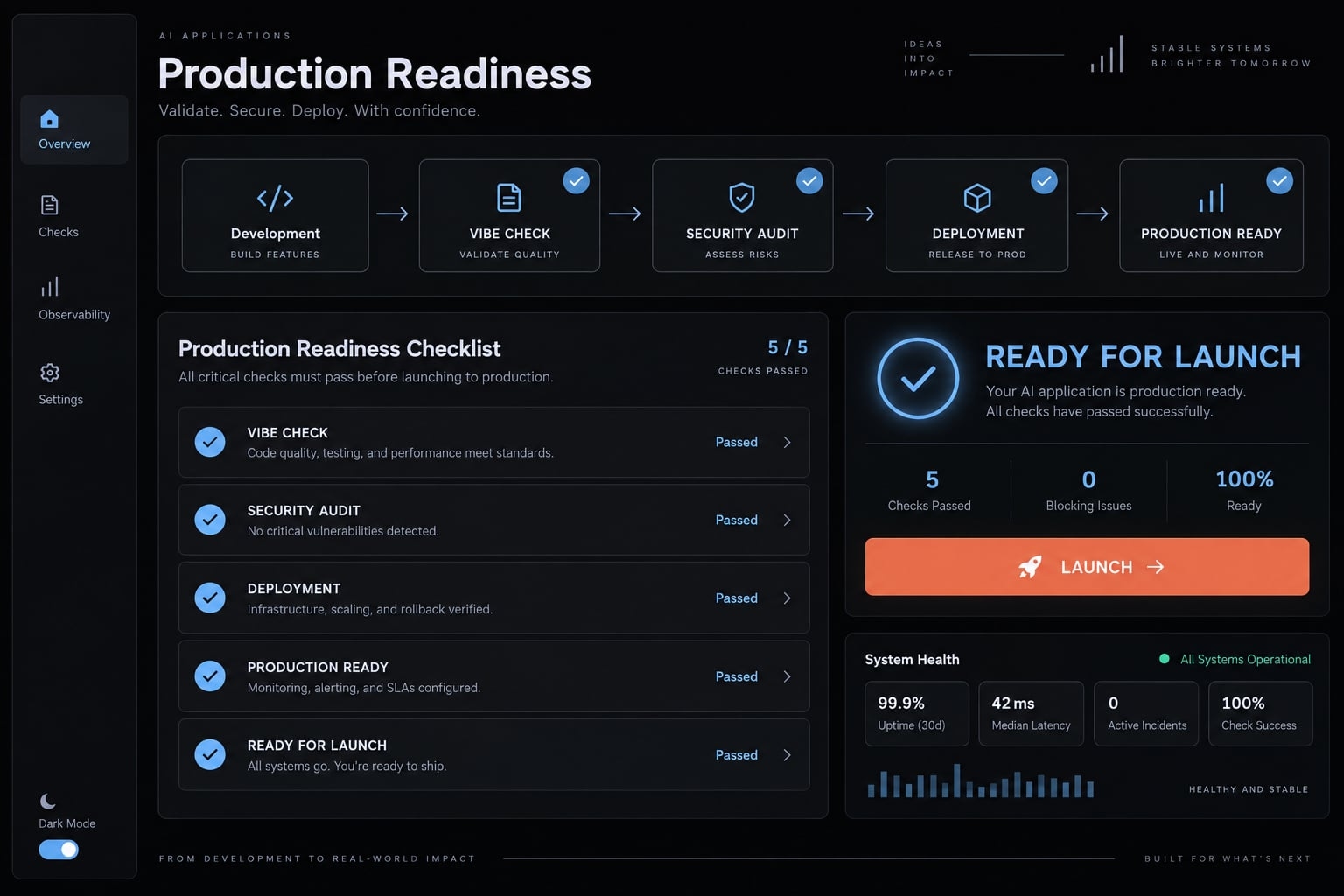
Start here: The one-minute vibe coding launch checklist
Review risk-critical controls before cosmetic improvements. “One-minute” describes scanning this summary, not completing the tests.
Both Launch Blocker and Required items must pass before general release. Deferred work cannot conceal critical risk or unusable core flows.
Priority | Minimum check | Pass condition |
|---|---|---|
Launch Blocker | Secrets | No active credentials found within the inspected scope; suspected exposures resolved. |
Launch Blocker | Authentication and authorization | Account access follows policy; unauthorized actions fail server-side. |
Launch Blocker | Data isolation | Two ordinary accounts cannot read or modify another workspace’s records. |
Launch Blocker | Backups and rollback | Restoration succeeds; a compatible application rollback path is tested. |
Launch Blocker | Critical journeys | Core workflows pass; payment and duplicate-handling tests pass if applicable. |
Required | Monitoring and ownership | Test alerts reach a named responder and backup contact. |
Required | Dependencies and configuration | Production settings are verified; unexplained high-risk dependency findings are resolved. |
First Week | Performance and usage review | An owner reviews actual latency, failures, and consumption against agreed limits. |
First Month | Non-critical optimization | Tracked improvements receive decisions, owners, and deadlines. |
How to use the checklist:
- Review blockers first. Stop release preparation when a critical control fails.
- Verify with evidence. Personal memory and local success do not constitute formal verification.
- Assign unresolved work to an owner and deadline.
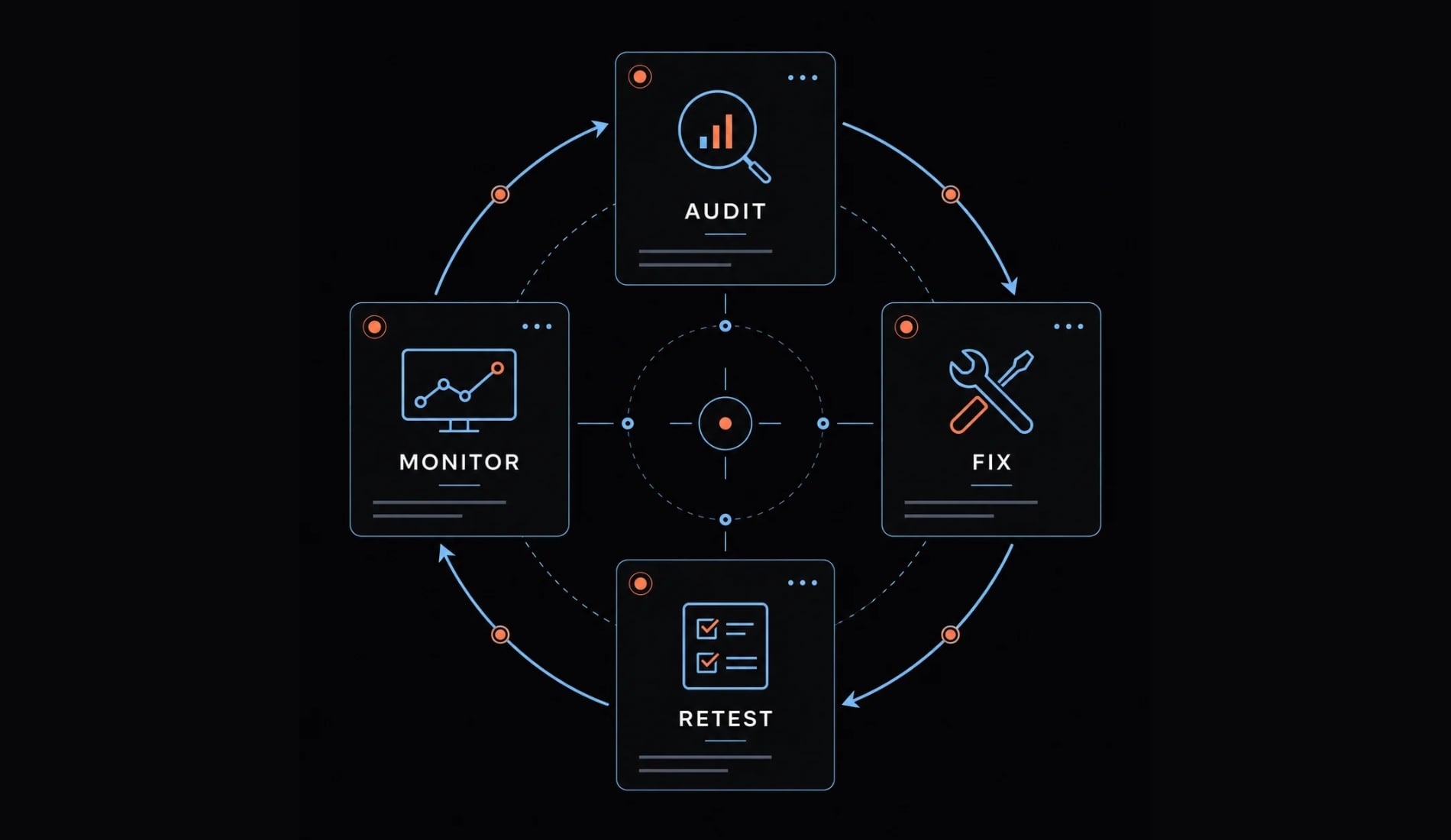
- Retest after fixes, including affected neighboring workflows.
Record each result:
Check ID | Result | Evidence | Owner | Release/Commit | Review Date
Add the environment and test scope to evidence. Mark untested controls Not Verified, not Passed. Record a reason for every Not Applicable decision.
Security, secrets, authentication and access control
Quarantine secrets and credentials
Secrets management requires inspecting where credentials travel, not simply moving them into environment variables.
Inspect | Verification and expected outcome |
|---|---|
Browser-visible output | Inspect bundles and network responses. Private credentials must not appear; review |
Repository and history | Scan source, configuration, generated output, and Git history for hard-coded secrets. Exclude |
Agent sessions and logs | Review authorized chat records, tool output, and logs for credential exposure. Resolve suspected leaks. |
Environments | Confirm development, staging, and production use separate, least-privilege credentials. |
Intentionally publishable identifiers may reach the browser when appropriately restricted. Private credentials must not.
Revoke and replace exposed credentials, remove unsafe copies, and retest. Code cleanup alone leaves an exposed credential usable.
Retain a redacted scan report, scope, and remediation record. Pass only when no known active private credential remains exposed within that scope. A clean scan is limited evidence, not proof of absence.
Test authentication and account recovery
Test in an incognito session using ordinary accounts:
- Signup and verification complete; verification-required actions remain blocked beforehand.
- Login, logout, and session expiration follow documented policy.
- Recovery links expire and cannot be reused beyond intended behavior.
- Disabled and deleted accounts lose access according to policy.
- Invalidated sessions stop granting access within the documented design.
Some token architectures do not invalidate every session instantly. Compare observed behavior with your authentication provider’s session and recovery documentation. Retain test results and the expected policy, including any invalidation delay and its implications.
Enforce authorization on the server
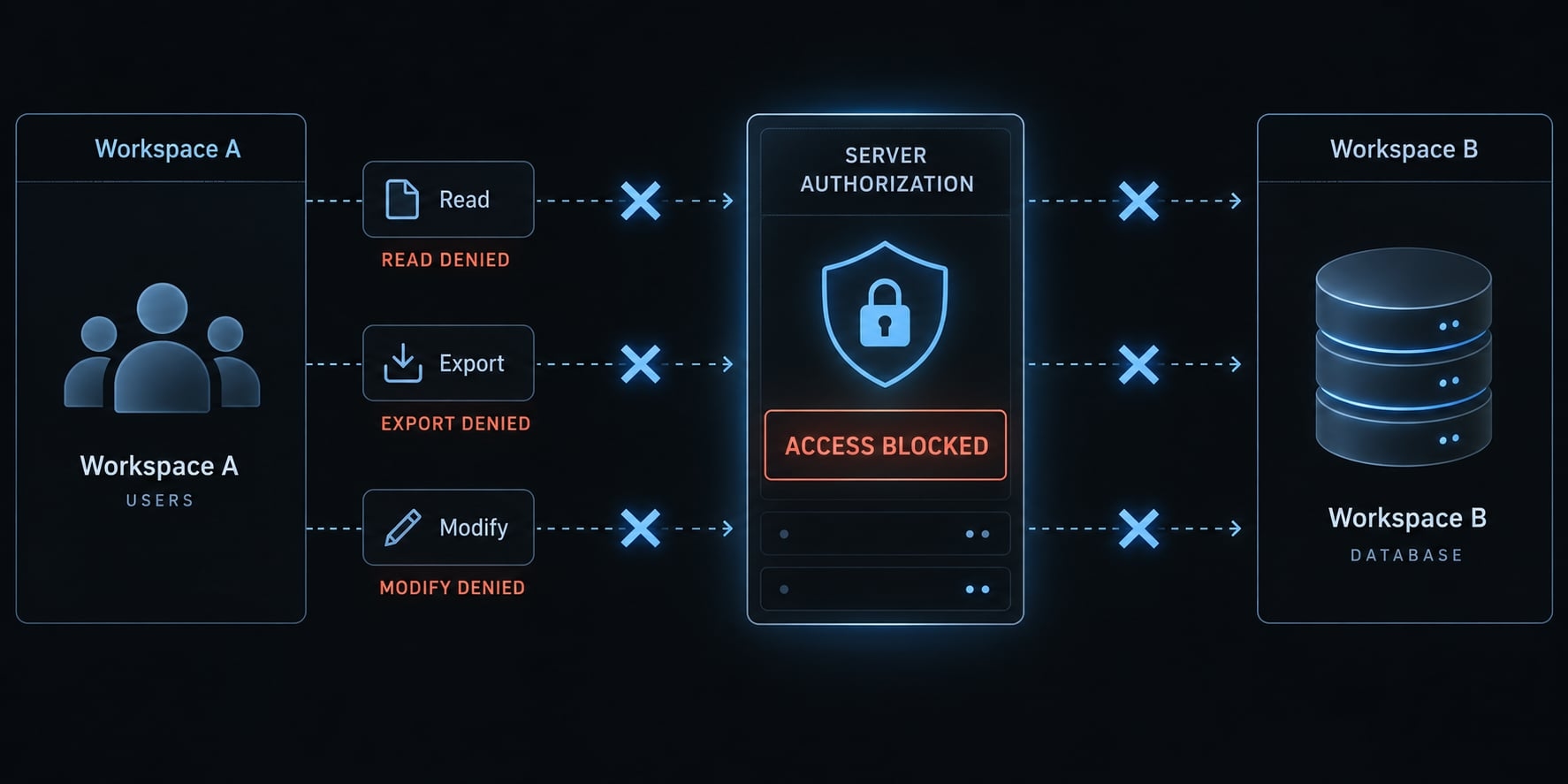
Server-side authorization must protect every privileged read and write, regardless of what the interface displays. Role-Based Access Control (RBAC) assigns permissions by role; test those permissions rather than assuming role labels enforce them.
Test | Passing outcome |
|---|---|
Logged-out protected request | Access denied without protected data. |
Cross-user or cross-workspace request | Another account’s records cannot be read, exported, or changed. |
Ordinary-user administrator action | Privileged operation rejected server-side. |
Subscription entitlement request | Restricted capability denied without a valid entitlement. |
Illustrative example: A small subscription app has organization workspaces and private customer records. A Workspace A member must not access Workspace B’s records by changing an identifier.
A hidden administrator button, frontend redirect, or difficult-to-guess URL is not protection. Retain redacted request-and-response results for both reads and writes.
Validate inputs and protect public endpoints
Test input validation outside the browser:
- Server-side schemas reject invalid types, excessive lengths, and out-of-range values.
- Database queries use parameterized operations.
- Uploads enforce size, content, and file-type restrictions.
- Login, recovery, email, and costly routes have tested abuse limits.
- Client errors omit credentials, stack traces, and internal details.
- External content is treated as untrusted; rendered output uses context-appropriate escaping.
Public login and recovery routes need abuse controls, not an existing login requirement. Retain rejection and limit-test results. OWASP’s Input Validation Cheat Sheet provides a useful review baseline; validation alone does not replace output encoding or authorization.
Verify data, dependencies, AI features and cost controls
Test isolation, restoration, and usage limits through actual application paths. Configuration screens and successful model responses cannot establish these controls.
Test database isolation and integrity
Row Level Security (RLS) enforces row-level database access rules. It is one enforcement option, not a universal requirement.
Control | Test and passing outcome |
|---|---|
Isolation | Two ordinary accounts attempt cross-workspace reads and writes; both fail. |
Record integrity | Invalid or conflicting records are rejected by appropriate database constraints. |
Migration safety | Apply schema changes in staging; existing records and supported application versions remain usable. |
Query behavior | Representative data volumes produce correct results within agreed response limits. |
Prove that backups can be restored
Database backups count as recovery evidence only after a restoration test.
- Restore into an isolated, non-production environment.
- Check representative records, relationships, and required files.
- Measure recovery time and the recoverable data window.
- Assign recovery and customer-communication owners.
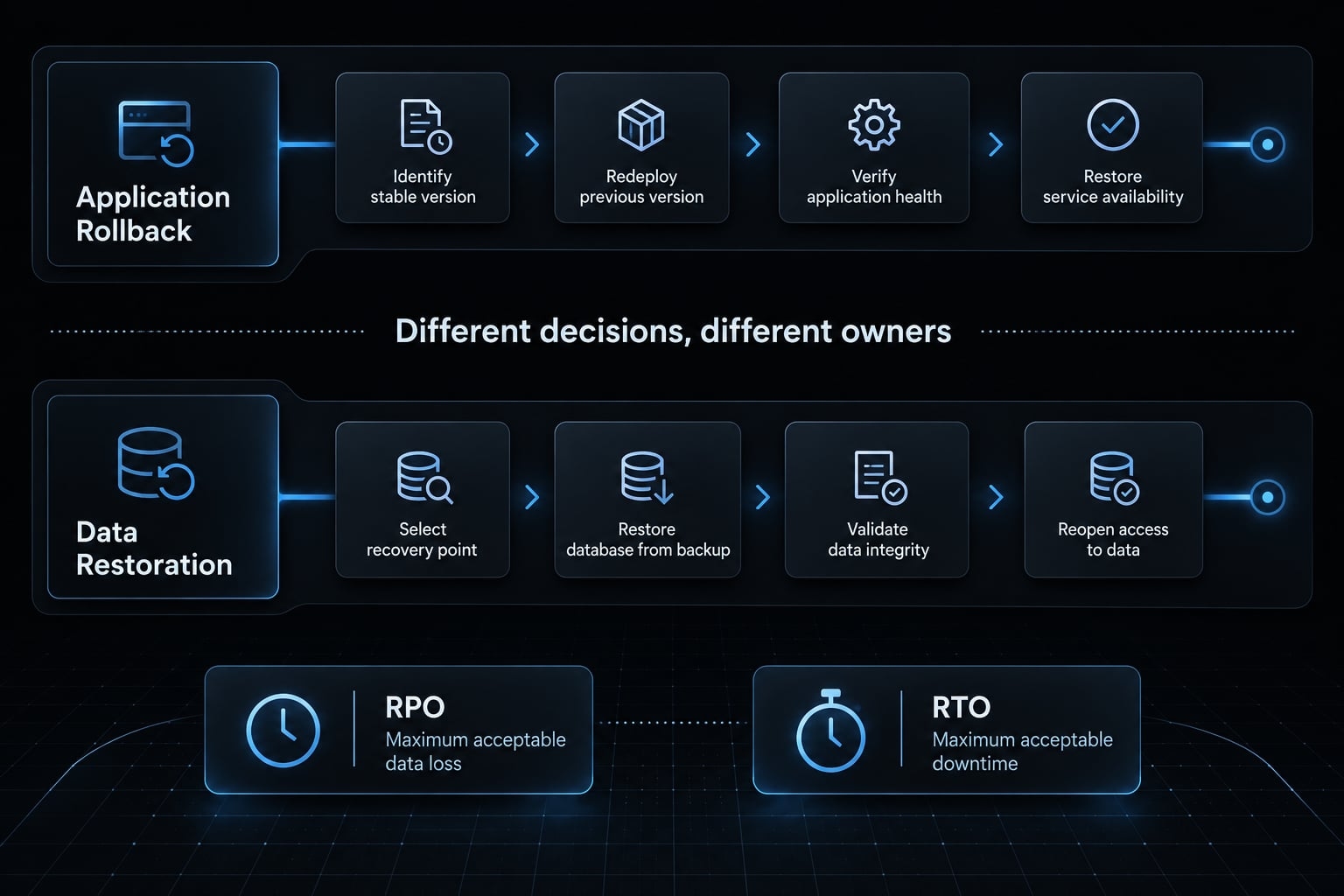
Define RPO as tolerable recent data loss and RTO as tolerable recovery duration. Confirm provider retention and restoration limitations against those targets.
Blank restore evidence templateBackup timestamp:Restore-test date:Restored environment:Integrity checks and results:Restore duration:Recovery owner:
Reverting to an older app version will not restore lost data or undo database schema migrations.
Audit dependencies and the software supply chain
Dependency auditing must establish purpose and reviewed risk—not just registry presence. Check package identity, registry entry, repository, maintainer context, release history, known vulnerabilities, and lockfile use. Review unused packages too.
Assign each dependency a decision:
- Keep: Purpose and risk are understood.
- Update: A reviewed change addresses compatibility or security.
- Replace: Trust, maintenance, or suitability is insufficient.
- Remove: No longer needed.
Hallucinated dependencies are package names invented by an AI system. Slopsquatting occurs when attackers publish packages matching such names.
npm’s package-provenance documentation helps explain origin evidence, but provenance does not prove safety. Retain inventory and triage decisions. New, outdated, and vulnerable are different findings; unresolved severe risk must not silently pass.
Add AI-specific and cost-abuse guardrails
Prompt injection protection is risk mitigation, not complete prevention. OWASP’s guidance for LLM applications emphasizes prompt injection and excessive agency as separate concerns.
Risk | Control and verification |
|---|---|
Untrusted instructions | Limit tool permissions; test adversarial documents and confirm forbidden actions remain unavailable. |
Unverified packages | Review provenance and purpose before agent-proposed installation. |
Cost abuse | Test appropriate authentication, abuse limits, per-user quotas, alerts, and enforced cutoffs. |
Destructive actions | Constrain permissions and require approval proportionate to impact. |
Illustrative example: The workspace app’s AI assistant reads uploaded documents. Document content must not grant permission to delete customer records or send unrestricted external messages.
Use billing circuit breakers—enforced usage controls—not alerts alone. If providers lack reliable hard caps, enforce application limits and a tested kill switch.
Retain quota and permission-test results. Mark runtime AI checks Not Applicable with justification when no AI feature exists; ordinary infrastructure cost controls still apply.
Test real user journeys and production operations
Test complete journeys with ordinary permissions and realistic failures. Include onboarding, the primary product action, email delivery, and save, edit, and export behavior.
Test critical user journeys end to end
Journey | Passing outcome |
|---|---|
Signup | Account creation, verification, and workspace onboarding complete correctly. |
Recovery | An eligible user regains access; expired or reused recovery links fail as designed. |
Payment, if applicable | Valid payments provision once; failures and repeated submissions behave correctly. |
Cancellation | Billing and access changes follow the published subscription policy. |
Deletion | Data removal and retained records match the documented retention policy and applicable exceptions. |
For payments, verify webhook signatures: these authenticate incoming provider notifications. Replay the same provider event in a sandbox and confirm duplicate delivery does not duplicate entitlements or downstream actions.
Separately test repeated payment submissions for duplicate-charge prevention. Webhook deduplication does not prove charging idempotency—safe repetition without an additional charge.
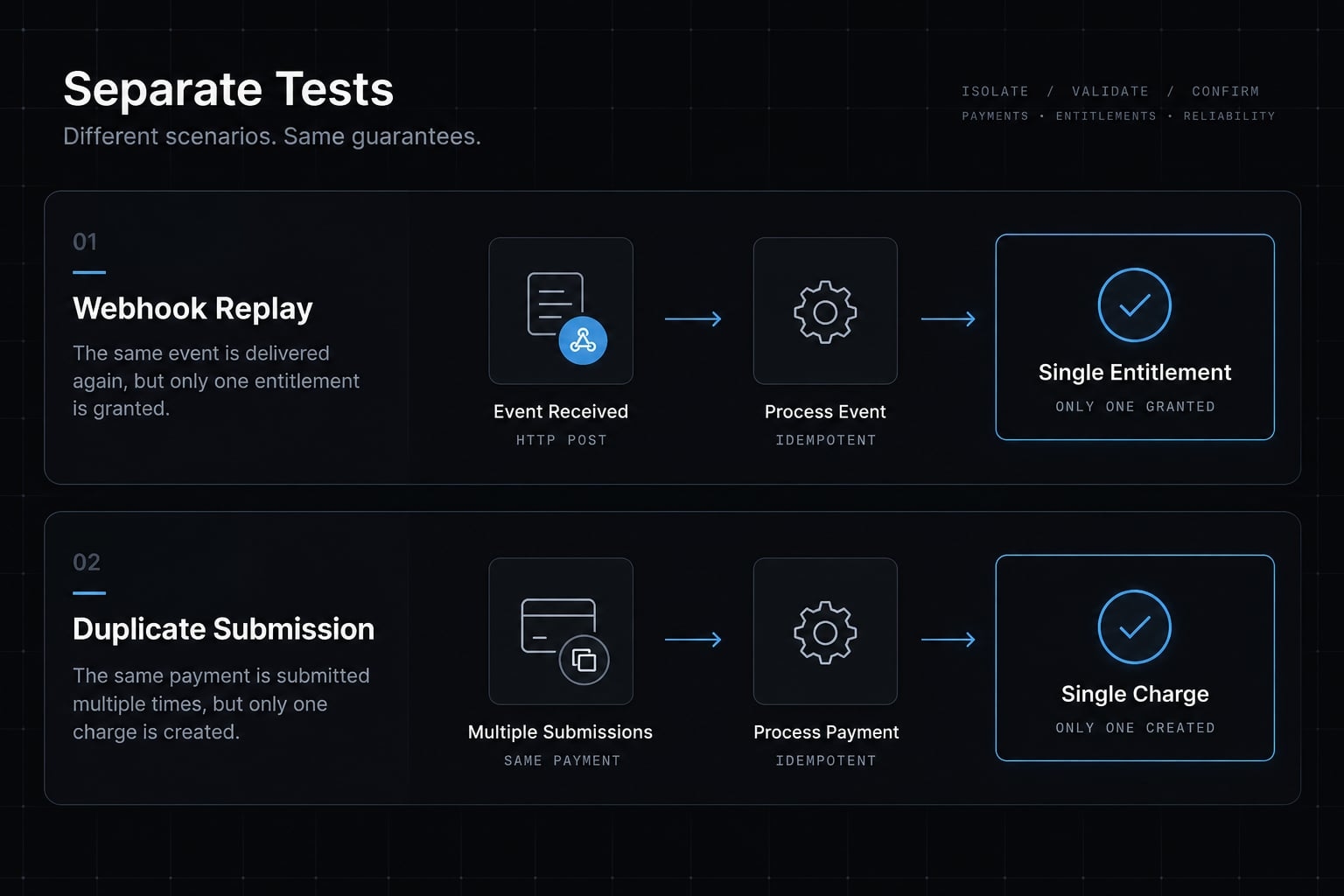
Stripe’s “Webhooks” and “Idempotent requests” documentation describe these distinct concerns. Use equivalent documentation for your provider.
Retain journey results, sandbox replay evidence, environment, and release identifier. Repeat affected critical user flows after fixes, not just the previously failing step.
Check performance and mobile usability
Classify performance testing by consequence:
- Blocker: Core use fails, payment interaction breaks, or requests corrupt data.
- Required: Loading, timeout, retry, and error states work; realistic usage is acceptable.
- Post-launch: Optimize non-critical behavior using observed usage.
Test slower networks, mobile screens, delayed API responses, large assets, and representative data volumes.
Use Google Core Web Vitals, described in web.dev’s “Web Vitals,” directionally. Lab measurements help diagnose issues; field data reflects actual users. A Lighthouse score alone is not a release verdict.
Record conditions, results, and acceptance limits.
Validate production configuration and deployment
Review production independently of local success. Differences between environments often change payment, email, and access behavior.
Setting | Staging check | Production check |
|---|---|---|
Endpoints and credentials | Isolated services and test permissions | Intended services and restricted production credentials |
Payments and email | Sandbox behavior and test recipients | Correct live configuration, sender, and destinations |
Network and diagnostics | Test hostnames and controlled debugging | HTTPS, DNS, certificates, and no unintended debug output |
Browser access | Known test origins | Reviewed origins for sensitive APIs; public resources assessed separately |
CORS (Cross-Origin Resource Sharing) governs browser-origin access. It is not authentication or authorization; wildcard access is not inherently wrong for public resources. Use a reviewed, source-controlled release through your deployment pipeline. Record named deployment approval.
After deployment, run non-destructive smoke tests-short checks of essential behavior. Pass only when intended production settings and critical journeys work. Retain configuration review and smoke-test evidence against the deployed commit.
Set up monitoring, alerts and recovery
Installed error monitoring is not proof that someone will respond. Trigger a test alert and verify receipt by the owner and backup contact.
Signal or action | Owner and backup | Trigger and response |
|---|---|---|
Application errors | Named engineer and alternate | Agreed error threshold; identify release and affected journeys. |
Uptime | Named operator and alternate | Failed availability check; assess service and dependencies. |
Payments | Named billing responder and alternate | Processing or provisioning failures; reconcile provider events. |
Rollback | Named release owner and alternate | Defined regression threshold; restore a compatible known-good release. |
Use structured logs without credentials or unnecessary personal data. Keep a rollback plan identifying triggers, the last known-good release, database compatibility, and communication responsibility.
Illustrative example: Workspace invitations fail after deployment. The responder receives an alert, identifies the release, and follows the rehearsed recovery procedure.
Retain alert receipt and rollback-rehearsal records. Application rollback and data restoration require separate decisions.
Make the Go/No-Go launch decision
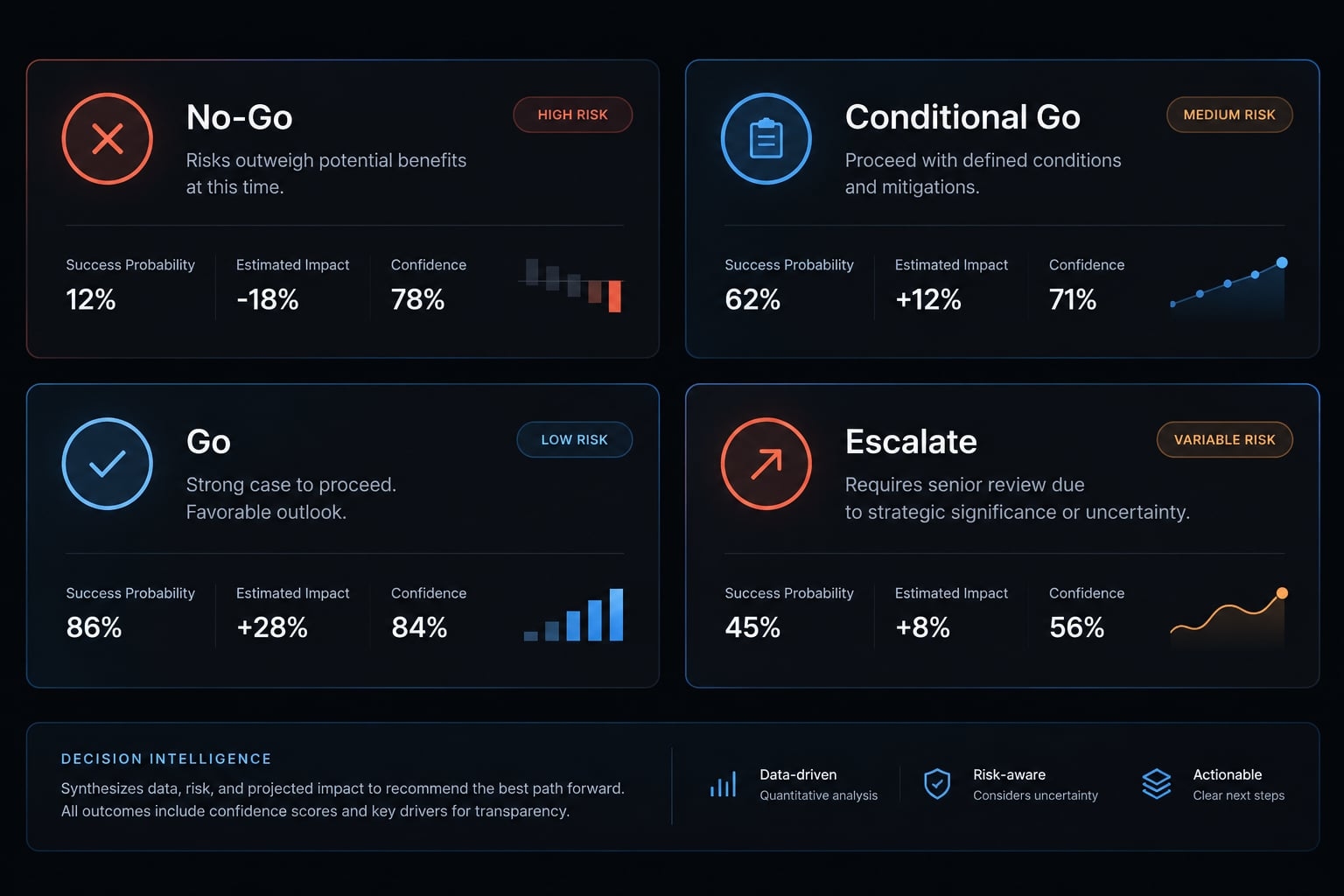
A critical failure cannot be averaged into a passing score. Treat the launch readiness scorecard as evidence-backed decision gates, not a numerical average.
Do not launch if any of these conditions apply
- Private credentials are exposed or suspected exposure remains unresolved.
- Cross-user or cross-workspace reads or writes succeed.
- Privileged actions rely on frontend-only restrictions.
- Required authentication or session controls remain unverified.
- Restoration or the compatible rollback path is untested.
- Payment submissions or duplicate events create duplicate charges or entitlements.
- Severe dependency risk remains unresolved.
- Costly public endpoints lack effective abuse controls or enforced limits.
- Critical failures lack detection, a responder, or recovery ownership.
- Agents retain unrestricted destructive production permissions.
Public login routes do not need an existing authenticated session; they do need abuse protection. These are launch blockers, not backlog suggestions. Missing evidence leaves a critical check unresolved.
Launch readiness decision table
Status | Decision rule |
|---|---|
No-Go | A blocker or required check has failed or remains unverified. Fix and retest before approval. |
Conditional Go | All blockers and required checks pass. Lower-risk exceptions have explicit scope limits, owners, deadlines, and approval. |
Go | All release-scope checks pass with evidence. Routine future optimization is tracked separately. |
Escalate | The risk profile requires additional expert review before release approval. Known blockers still require resolution. |
Record the go/no-go decision against a specific release. A later code, configuration, or permission change may invalidate earlier evidence. Not Applicable requires a documented reason; it must not become a way to bypass inconvenient tests.
When a checklist is not enough
Production risk | Additional review |
|---|---|
Uncertain authentication, tenancy, or private-data architecture | Senior engineering and targeted security review |
Financial, health, identity, or other regulated data | Appropriate security and compliance specialists |
Agents executing code or modifying external systems | Threat modeling and adversarial testing |
Requirements depend on product behavior, jurisdiction, and customer commitments. Do not infer legal applicability from a checklist alone.
Even complete evidence cannot establish total security. Specialist findings must feed back into the same remediation, retesting, and human approval process.
Reuse the checklist with an AI audit prompt and agent workflow
An AI code audit can organize findings and propose tests. It cannot establish unobserved production behavior from source code alone.
Copyable production-readiness audit prompt
Review this repository for production readiness. The first pass isread-only. Use only authorized access and synthetic test data.Review eight categories:1. Secrets, credentials, and environment separation.2. Authentication, recovery, and server-side authorization.3. Database isolation, integrity, migrations, and restoration.4. Dependency identity, provenance, vulnerabilities, and lockfiles.5. Runtime AI permissions, prompt injection risks, and cost limits.6. Critical journeys, payments, cancellation, and deletion.7. Production configuration, performance, and deployment.8. Monitoring, alert ownership, rollback, and incident recovery.Do not request, print, or transmit production secrets, private customerdata, or unredacted logs. Do not run destructive tests or alter production.Do not modify files, install packages, or change permissions in this pass.Separate observed evidence from assumptions. Include file or routereferences only when actually observed. Mark inaccessible systems andunperformed runtime checks Not Verified. Explain Not Applicable items.Report each finding as:Priority | Location | Evidence | Impact | Remediation | Verification TestFor each proposed test, state its authorized environment, expectedpassing result, evidence to retain, and required human approval.Identify release/commit, reviewed scope, and limitations. Treat cleanscans as scoped evidence, not proof of complete security.Recommend No-Go, Conditional Go, Go, or Escalate using the article’sdecision rules. Failed or unverified required checks prevent approval.Never issue a definitive Go from static inspection when requiredruntime checks remain unverified.The final recommendation is provisional and requires human release approval.
Optional multi-agent launch review with AgentKit
An AgentKit workflow can serve as an optional coordination approach. The following are suggested review scopes, not claims about built-in agent names or automatically supported tests:
- Security review.
- Dependency review.
- Database and recovery review.
- Journey and regression testing.
- Deployment and operations review.
- Coordination and report consolidation.
Start with read-only access. Confirm available integrations and permissions before configuration. Require human approval before remediation, migrations, deployment, or destructive actions.
For any automated launch review, consolidate evidence against the same release. Agent agreement is not a substitute for runtime verification.
Add the checklist to repository rules
- Store coding agent rules in repository instructions, such as tool-specific
CLAUDE.md. - Connect supported tests and CI security scanning to continuous integration.
- Rerun checks after relevant changes.
- Treat instructions as guidance, not runtime enforcement.
Repository-ready template: VIBE_CODING_LAUNCH_CHECKLIST.md
# Production Launch Review## Release Context- Application:- Release/commit:- Review scope:- Environment:- Review date:- Release approver:## Decision Rules- Launch Blocker and Required checks must pass before general release.- Not Verified never counts as Passed.- Not Applicable requires a recorded reason.- Deferred work must not conceal critical risk.- Conditional Go cannot waive failed or unverified required checks.- Retest controls affected by code, configuration, or permission changes.## Check Record — Duplicate for Each Control- Check ID:- Priority: Launch Blocker | Required | First Week | First Month- Applicability: Applicable | Not Applicable — reason:- Control:- Verification:- Pass condition:- Evidence:- Environment: Development | Staging | Production- Release/commit:- Owner:- Status: Not Started | Not Verified | Failed | In Progress | Passed | Not Applicable- Review date:- Due date:- Exception approval: - Scope: - Rationale: - Approver: - Expiry:## Control Register| Check ID | Priority | Control | Verification → Pass condition ||---|---|---|---|| SEC-01 | Launch Blocker | Private credentials | Inspect source, history, output, logs, and bundles → known exposures resolved and credentials rotated. || SEC-02 | Launch Blocker | Authentication | Test account lifecycle and sessions → documented policy enforced. || SEC-03 | Launch Blocker | Authorization | Test ordinary accounts and privileged routes → unauthorized reads and writes denied. || SEC-04 | Required | Inputs and abuse | Test invalid inputs, uploads, and request limits → unsafe operations rejected. || DATA-01 | Launch Blocker | Workspace isolation | Test two ordinary workspaces → cross-workspace access denied. || DATA-02 | Required | Integrity and migrations | Test constraints and staging migrations → valid data preserved and compatible behavior confirmed. || REC-01 | Launch Blocker | Restoration | Restore in isolation → integrity, recovery time, and data-loss targets met. || REC-02 | Launch Blocker | Application rollback | Rehearse compatible rollback → core service restored without incompatible database behavior. || DEP-01 | Required | Dependencies | Review inventory, provenance, lockfile, and findings → purpose understood and high-risk findings resolved. || AI-01 | Launch Blocker | Runtime AI permissions | Test adversarial content and action boundaries → forbidden actions remain unavailable. || COST-01 | Launch Blocker | Usage limits | Trigger quotas and cutoff → costly requests stop as designed. || FLOW-01 | Launch Blocker | Critical journeys | Test ordinary-user journeys → expected outcomes achieved. || PAY-01 | Launch Blocker | Payments | Test signatures, event replay, and repeated submissions separately → no duplicate charges or provisioning. || OPS-01 | Required | Production configuration | Review live settings and smoke tests → intended configuration and core behavior verified. || OPS-02 | Required | Alerts and response | Trigger alerts → owner and backup receive actionable notifications. || PERF-01 | Required | Baseline usability | Test mobile, delays, and realistic volume → core use remains acceptable. || FOLLOW-01 | First Week | Observed performance and usage | Review production measurements → findings assigned and limits reassessed. || FOLLOW-02 | First Month | Non-critical improvements | Review optimization backlog → decisions, owners, and deadlines recorded. |## Final Decision- Release status: No-Go | Conditional Go | Go | Escalate- Unresolved blockers:- Required checks not verified:- Approved lower-risk exceptions:- Specialist review status:- Release approver:- Approval date:- Monitoring and rollback owner:- Backup contact:- Customer-communication owner:
Frequently asked questions
What is a vibe coding launch checklist?
A vibe coding launch checklist provides a structured review process to transition an AI-built prototype into a secure, production-ready application. It ensures that security, performance, data integrity, and operational controls are manually verified before exposing the app to real users.
Are vibe-coded apps secure by default?
No - and neither is any app that skips these checks. Generation method alone does not establish security; what matters is whether access control, data isolation, and recovery have been verified with evidence.
What are the most common vulnerabilities in AI-built apps?
Common risks include exposed credentials, cross-workspace data access, authorization enforced only in the interface, hallucinated dependencies, and missing input validation on public routes. These issues often stem from the AI optimizing for the "happy path" rather than defensive, production-grade security.
How do I prevent billing surprises in AI-integrated apps?
Use enforced controls rather than alerts: per-user quotas, abuse limits on costly routes, and a tested kill switch. Provider dashboards help where reliable hard caps exist; where they do not, enforce limits in the application.
Why is a staging deployment not enough for production readiness?
Staging rarely matches production credentials, endpoints, or data volume, so verify production configuration separately - then confirm with non-destructive smoke tests after deployment, against the deployed commit.
Can I automate the vibe coding launch audit?
You can use AI-assisted audit prompts to organize findings, identify potential risks, and suggest test cases. However, automated scans cannot verify runtime application logic or complex authorization flows. A human must always review the audit results, perform critical manual tests, and provide final approval for release.
Read more:
- Vibe coding security: Risks and pre-deployment checklist
- Vibe coding deployment: How to take an AI-built app live
- Vibe coding threat model: Secure AI-assisted development guide
Conclusion
An effective vibe coding launch checklist organizes five key priorities—access control, data protection, AI limits, critical journeys, and operational recovery—around clear evidence, observable outcomes, and accountable owners.
Production readiness relies on verified system behavior rather than a working demo or agreement among coding agents. To launch safely, embed the checklist in your repository, retest affected controls after fixes, and keep final release decisions strictly under human control.