Vibe coding Kotlin: A professional workflow for Android apps
Vibe coding Kotlin: A proposed workflow for building and verifying an Android app
While AI quickly generates plausible Kotlin code, passing compilation is not a guarantee of correct behavior. True production readiness requires navigating distinct milestones: code generation, successful build, verified runtime behavior, and final release preparation. Using a simple Android reading-list app as a model, this article proposes a practical workflow and review checklist to help you delegate tasks effectively, catch Kotlin-specific risks early, and gather concrete proof before shipping.
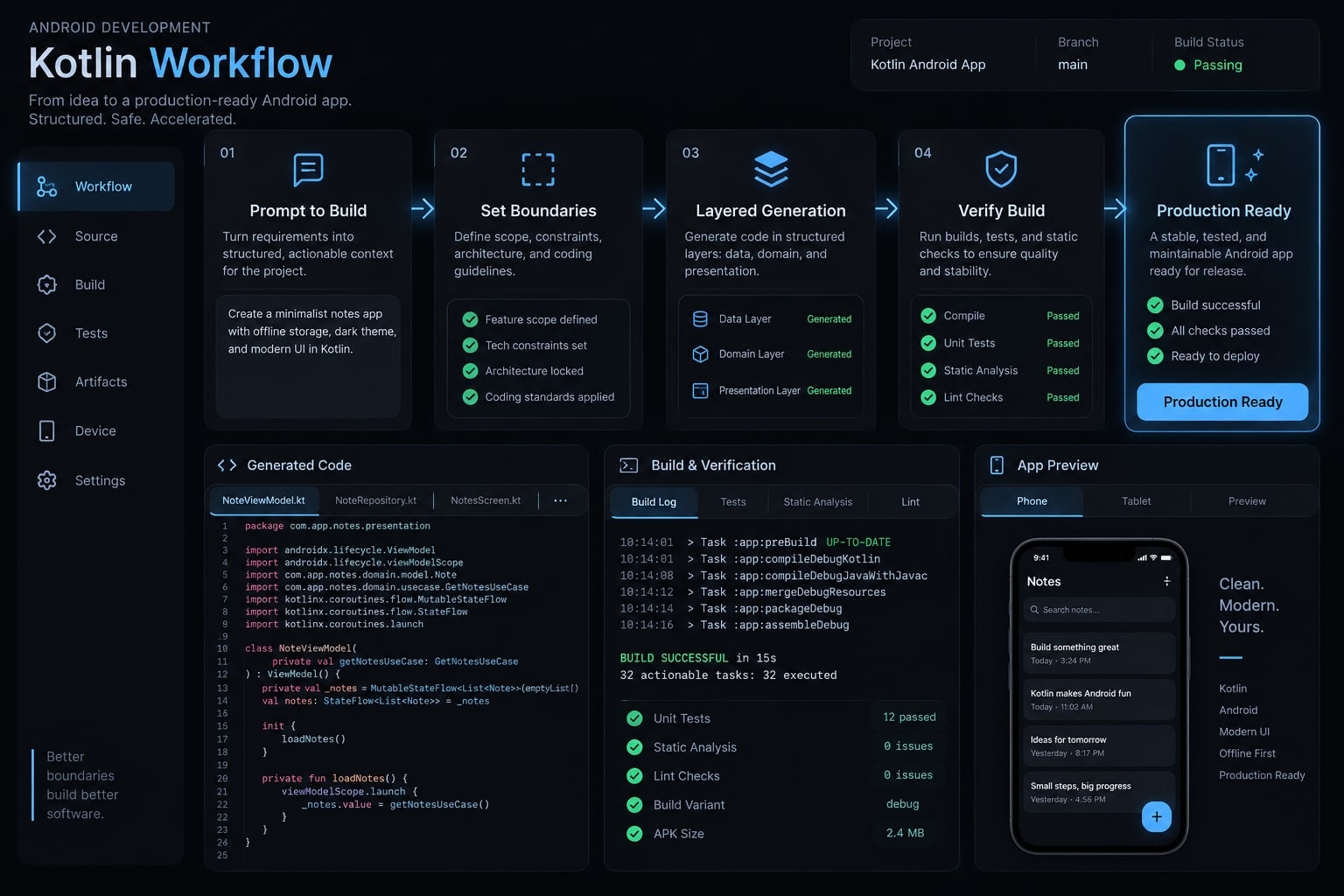
What is vibe coding Kotlin and its role in this workflow?
Vibe coding Kotlin means directing AI to generate or modify Kotlin software through natural-language instructions, often with loosely supervised implementation. This proposed workflow adds explicit scope, behavioral tests, and human review. Those controls make it a reviewed AI-assisted approach, rather than implying that rigorous verification is part of every definition of vibe coding.
The illustrative app lets users add a book title, mark it as read, and retain their list after reopening. Accounts, synchronization, recommendations, and store publication are initially excluded.
Android is the selected example, not a proxy for every Kotlin environment. Jetpack Compose, Android’s declarative UI toolkit, introduces state and lifecycle concerns that differ from backend Kotlin.
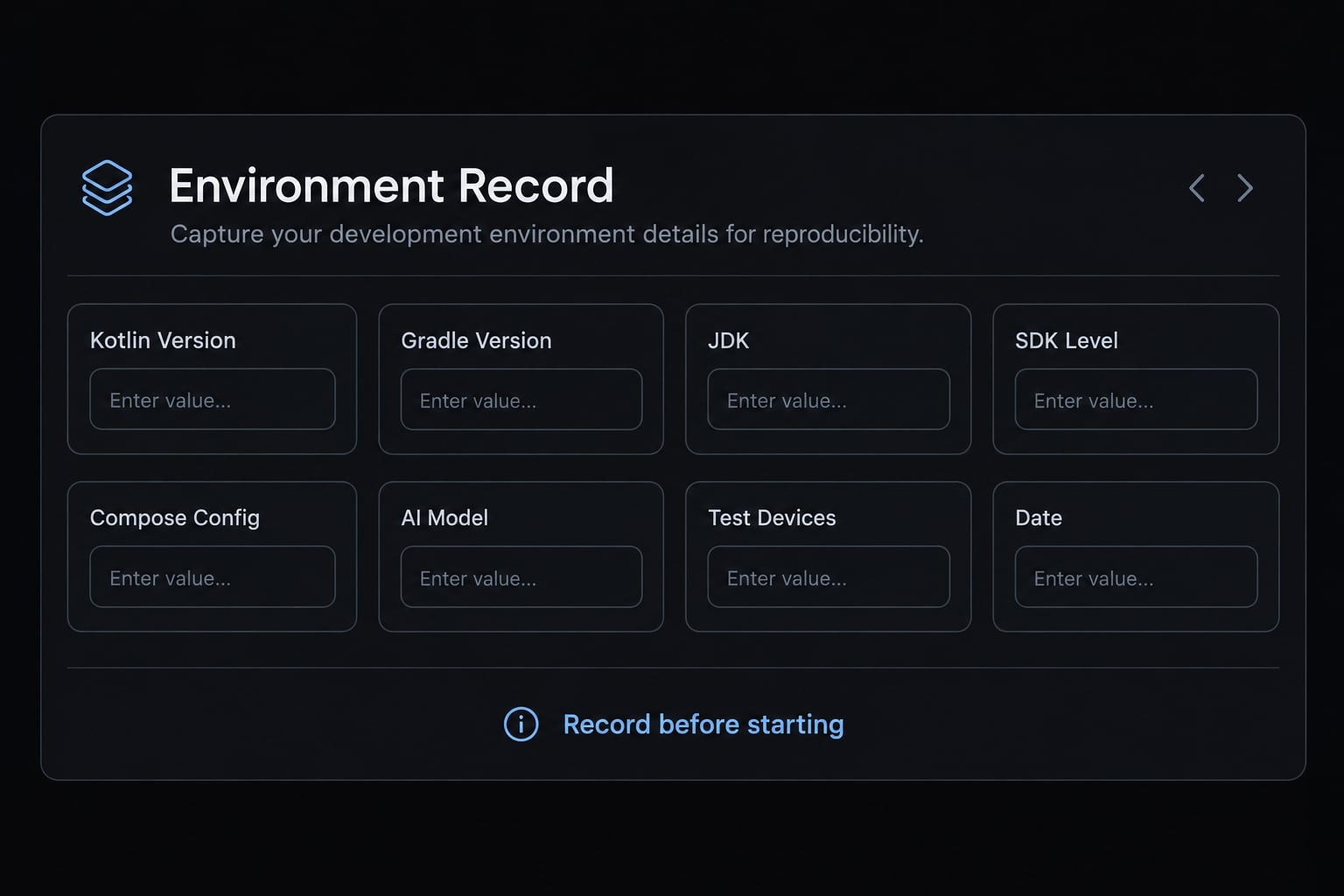
Project snapshot:
Field | Proposed scope or evidence status |
|---|---|
Goal and core flow | Add title → mark read → reopen with saved state |
Target platform | Android, using Kotlin and Jetpack Compose |
Developer’s Kotlin experience | Not supplied; record before starting |
AI tool, model, use date | Not selected or recorded |
IDE/CLI environment | Not selected; record editor and command-line tooling |
Kotlin, Gradle, libraries | Unspecified; establish a compatible baseline |
Android configuration | Record Android Gradle Plugin, JDK, SDK levels, Compose configuration, and test devices |
Last-tested date | None; this workflow has not been executed |
Observed status and evidence | No implementation, test results, or release evidence supplied |
Reproducing AI-assisted Kotlin programming requires this environment record, not merely the prompt.
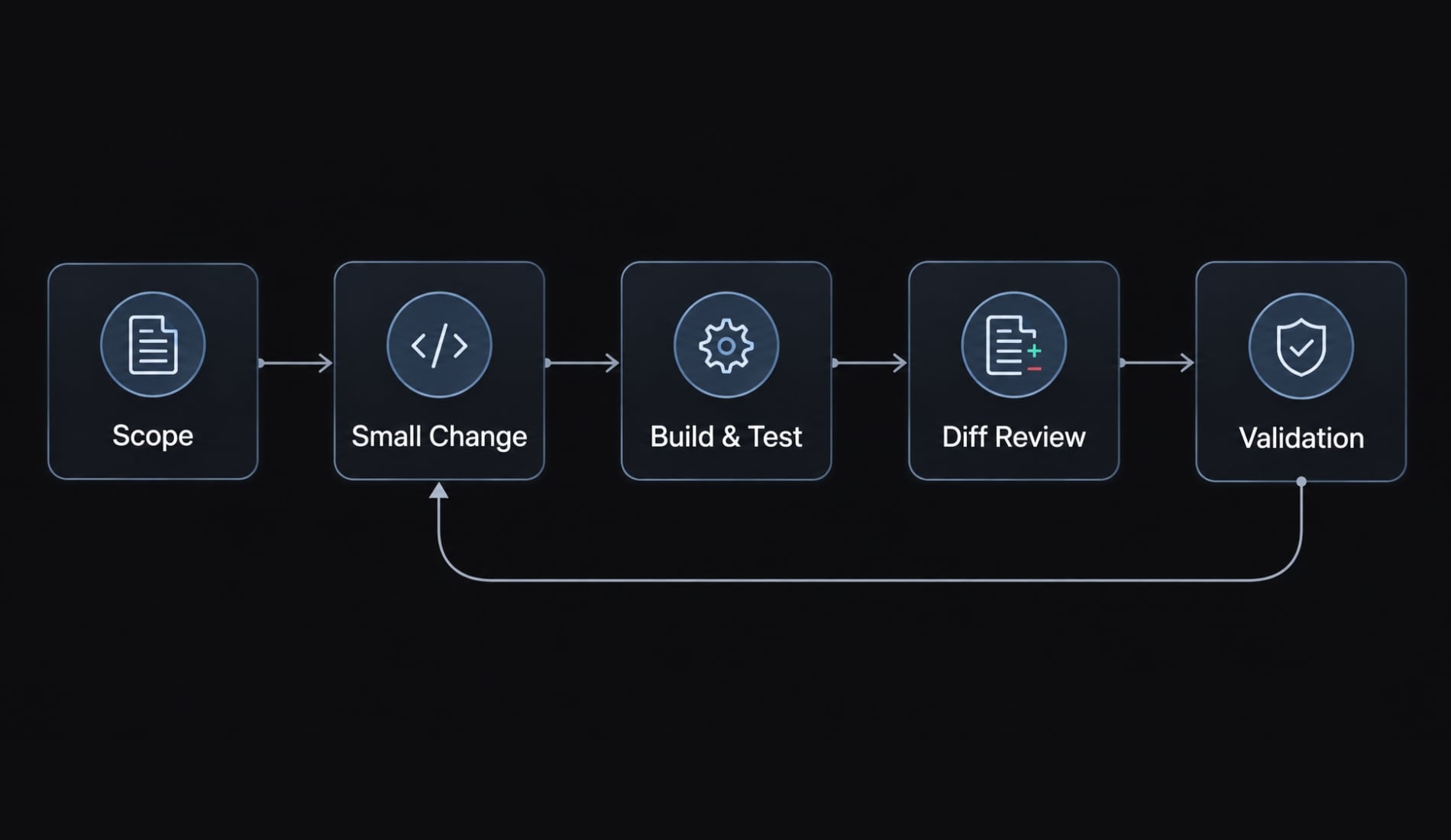
A proposed workflow from prompt to verified build
- Define the user goal and excluded features.
- Establish essential models and interfaces.
- Specify observable acceptance criteria.
- Generate one reviewable change.
- Compile and run applicable tests.
- Review the diff and reject unrelated complexity.
- Validate on the target runtime, including physical-device checks.
Step 1 - Set boundaries before generating code
- Start with one outcome: A user can save a nonblank book title. Exclude authentication, networking, and dependency changes from this first task.
- Use scoped prompting: Identify permitted files, existing conventions, and acceptance criteria. Require the agent to propose a short plan before editing, so unnecessary abstractions become visible early.
For example, whitespace-only input should create no record and display a validation message. Define that behavior before asking for implementation.
Step 2 - Generate by layer, not by screen count
Establish a book model and storage contract, implement saving and loading, then connect presentation. These architectural boundaries help isolate failures without imposing an elaborate architecture.
A small vertical slice is also reasonable. The objective is reviewable changes, not a mandatory folder structure. Keep persistence requirements explicit. Holding data in memory may satisfy a demonstration while failing the reopening requirement.
Step 3 - Make verification part of the prompt
The following is a reusable template, not an original project transcript:
Implement nonblank-title validation using the existing storage interface. Change only the agreed files; add no dependencies. Valid titles must be trimmed and saved once. Blank input must show an error and save nothing. Run the repository-confirmed build and relevant test commands. Report changed files, captured results, failures, and checks not executed. Do not claim success without supporting output.
For an Android module named app, possible commands include ./gradlew :app:assembleDebug and ./gradlew :app:testDebugUnitTest. Confirm task names first; these are illustrative, not executed commands.
Compilation, local tests, static analysis, and device-based tests are distinct checks. This AI-assisted Kotlin workflow should record each separately rather than treating one green task as complete verification.
Where AI may help Kotlin development
Constrained drafting tasks are sensible delegation candidates because their outputs can be checked against explicit requirements. No productivity measurements or accepted changes are available here, so these are proposed uses-not observed successes.
For the reading-list example, ask AI to draft the book model, a basic entry form, and validation tests separately. Each request should produce a small diff, meaning the changed lines compared with the previous revision.
Tasks suitable for AI assistance:
Task | Potential value in this workflow | Required human check |
|---|---|---|
Boilerplate and scaffolding | Draft repetitive models and interface implementations | Naming, necessity, serialization, and compatibility |
Basic Compose UI | Translate specified controls and states into an initial screen | Accessibility, state behavior, and error presentation |
Initial test scaffolding | Prepare fixtures and candidate test cases | Independent expectations and meaningful assertions |
Compiler-error correction | Suggest targeted repairs from concrete diagnostics | Root cause and unintended behavior changes |
A generated model needs inspection for unnecessary nullable fields and defaults. A generated form needs checks for blank input, duplicate submission, and readable validation feedback.
For test generation, a human must decide what correctness means. A test that mirrors generated implementation can preserve the same mistake.
Compiler feedback helps expose unresolved references, type mismatches, and certain invalid null operations. It does not establish correct persistence, accessible UI, or safe lifecycle handling.
Evaluate AI-assisted Kotlin programming by total effort: Drafting, reviewing, correcting, and verifying. Reduced typing alone does not demonstrate shorter delivery time or lower maintenance cost.
What can go wrong in AI-generated Kotlin
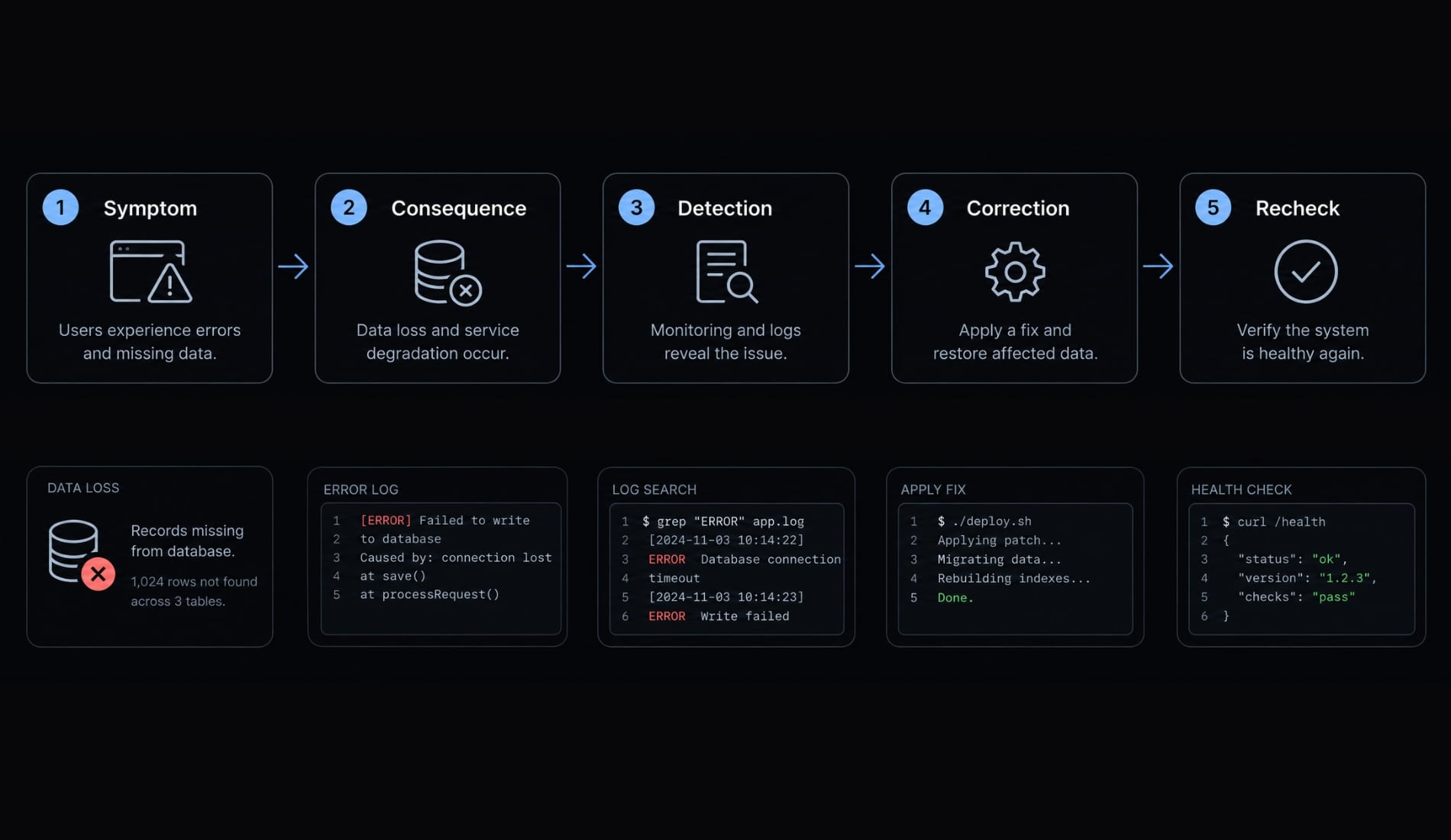
The risks of AI-generated Kotlin code include plausible implementation choices that satisfy compilation but violate user expectations. The following failure chain is hypothetical, not an observed incident:
- Possible symptom → Saved books disappear after reopening.
- Consequence → User data is lost.
- Detection → Save, terminate the process, reopen, and inspect the list.
- Correction → Replace session-only storage with durable persistence.
- Recheck → Repeat the sequence and verify storage behavior.
All six rows below describe additional risks to investigate.
Failure type | Why it looks plausible | Detection | Correction |
|---|---|---|---|
Dependency or Gradle incompatibility | Each version exists individually | Build diagnostics and compatibility documentation | Select a supported combination |
Unsuitable or deprecated Android API | Familiar examples still compile | Warnings and API behavior review | Replace when justified |
Nullability assumptions | Sample data always contains values | Missing-data and interoperability tests | Handle absent values explicitly |
Coroutine/lifecycle behavior | Background work succeeds while visible | Navigate away during pending work | Correct scope and cancellation handling |
Compose state handling | Initial screen renders correctly | Recreation and state-transition checks | Match storage to required lifetime |
Weak generated tests | Tests pass against normal input | Inspect assertions and missing cases | Add independent behavioral expectations |
Dependency and gradle drift
For Gradle dependency management, compare the proposed toolchain with the Android Gradle Plugin release notes and Kotlin compatibility guidance. An older dependency is not automatically incompatible.
Pinning deliberately declares a version. Gradle dependency locking records resolved versions for supported configurations. Neither replaces maintenance, provenance checks, or security review.
Lifecycle, state and coroutine traps
A coroutine is a suspendable computation. Coroutine cancellation matters when work should stop after its owning task or screen ends.
Compose state held with remember survives recomposition, not arbitrary activity recreation or process death. Android Developers’ “State and Jetpack Compose” explains these distinctions. Test the intended lifetime; a screenshot cannot establish it.
Plausible tests that prove too little
“Save returns without throwing” is weaker than “blank input writes nothing.” Test both the validation result and absence of storage calls. Kotlin’s “Null safety” documentation also identifies remaining runtime risks, including !! and Java interoperability. Static typing does not eliminate behavioral defects.
Guardrails for safer Kotlin changes
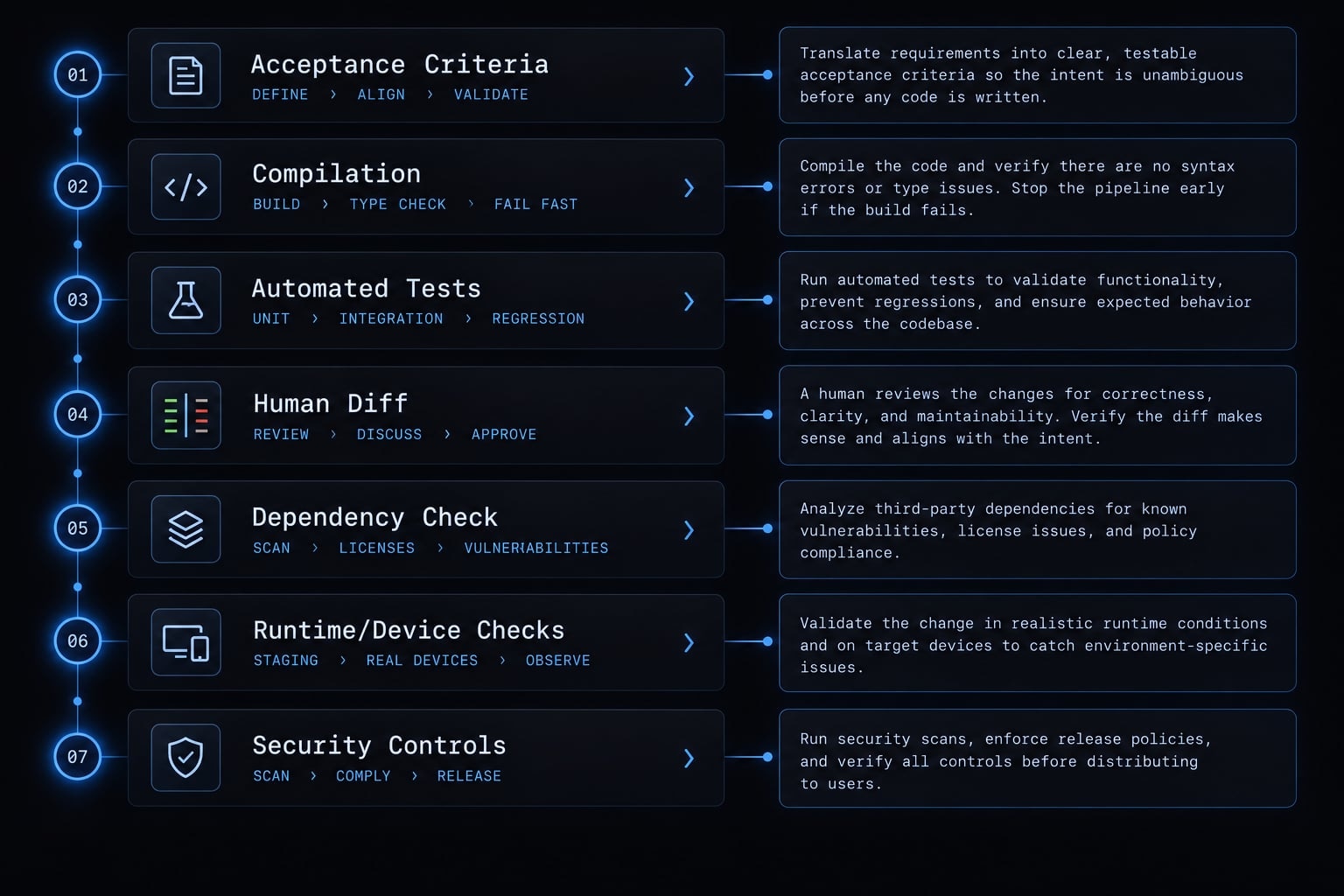
Useful code quality guardrails address different failure modes:
- Acceptance criteria: Establish intended behavior.
- Compilation: Detect structural and type errors.
- Automated tests: Check selected behaviors.
- Human diff review: Identify unnecessary or misleading changes.
- Dependency verification: Assess compatibility and provenance.
- Runtime and device checks: Expose environment-dependent failures.
- Security and release controls: Govern distribution risks.
No single control replaces the others. A human-in-the-loop workflow retains an accountable person at approval points.
Tests as executable contracts
Tests are executable checks of selected expectations, not complete proofs of correctness. For the proposed app, specify a test such as blankTitleDoesNotWriteToStorage. It should assert rejection of whitespace-only input and verify that storage receives no write. A separate valid-input test should assert the trimmed title and exactly one write.
If the implementation violates either expectation, preserve the failing output, apply a minimal correction, and capture the passing recheck. Record the command, test identifier, and commit for both states.
These are sample test requirements; this article makes no claim about actual passing or failing test executions. Call the process Test-Driven Development only when the behavioral test was written and observed failing before implementation. Prioritize data retention, invalid input, storage failure, and repeated submission over an impressive coverage percentage. Coverage measures execution, not the quality of expectations.
Adversarial self-review
Use this reusable review template:
Inspect the current diff without editing. Identify correctness, lifecycle, dependency, security, and test-quality risks. Rank findings by impact. Cite affected files and supporting evidence; label uncertainty. Propose minimal corrections and missing checks. Wait for human approval before making changes.
AI self-review is useful, but it is not independent verification. Another model may find additional issues, but agreement between agents is not proof. Have a human inspect critical paths and verify claimed command execution against captured results.
Human-versus-AI responsibility matrix
Task area | AI contribution | Human ownership |
|---|---|---|
Planning | Draft tasks | Scope and priorities |
Implementation | Generate changes | Compatibility and necessity |
Tests | Suggest cases | Behavioral expectations |
Dependencies | Suggest options | Compatibility, provenance, licensing |
Architecture | Explore alternatives | Final design |
Review | Surface potential issues | Validation and approval |
Security | Assist with checks | Remediation and risk acceptance |
Release | Prepare artifacts and checklists | Signing, compliance, approval |
Keep credentials outside agent-readable context wherever practical. Restrict filesystem, network, and publishing permissions to the task. Automated scans can assist security review, but their success does not establish that an application is secure.
Shipping requires more than generated Kotlin code
There is no observed release status for this proposed app. No build, automated test, device check, or distribution step has been completed within the evidence available for this article.
For an actual run, preserve separate records for local verification and distribution. An installable debug build is not a validated release build, and neither establishes public availability.
Prototype-ready vs. Production-ready:
Level | Evidence needed |
|---|---|
Prototype-ready | Repeatable build and demonstrated core flow in a limited environment |
Beta-ready | Defined testers, verified core behavior, known issues, appropriate privacy handling, and feedback path |
Production-ready | Risk-appropriate security/privacy review, supported-device checks, release configuration, monitoring, and maintenance/recovery ownership |
These are practical evaluation criteria, not universal certifications. Beta readiness means ready to enter testing; it does not mean external testing has already validated the app.
Production-released is a separate claim requiring evidence of actual distribution.
For the Android example, remaining work includes release-build validation, real-device testing, permission review, signing, and storage behavior under supported conditions. Test configuration changes and process recreation according to explicit expectations.
If publishing through the Google Play Store, verify current target API, app-content, and data-safety obligations against Google Play Console Help. Requirements can change and depend on the app.
Recovery planning also matters. Mobile applications may require rollout controls or a corrective release rather than an instant rollback.
A device screenshot proves a rendered state on that device. It does not prove persistence, broad compatibility, or distribution.
A repeatable Kotlin vibe coding checklist
Copy this Kotlin review checklist into a pull request or release record. It consolidates the proposed controls above; it is not derived from an executed project.
Before code generation
- Write the user outcome, excluded features, and expected failure behavior.
- Record toolchain versions, AI tool/model identifier when exposed, environment, and date.
- Define essential interfaces, data contracts, and architectural boundaries.
- Save repository conventions and durable agent instructions in reviewed files.
- Split work into small changes with observable acceptance criteria.
Before merging generated code
- Build from a fresh checkout using declared prerequisites and captured output.
- Run applicable unit, integration, and UI tests; record omissions.
- Review the full diff manually and remove unrelated complexity.
- Verify dependency compatibility, provenance, licensing, and relevant security advisories.
- Investigate warnings and deprecated APIs; document decisions rather than suppressing blindly.
- Check nullability, coroutine cancellation, lifecycle, state retention, and failure paths.
- Confirm assertions express intended behavior rather than repeat implementation logic.
Before release
- Validate the release build on representative target devices and supported configurations.
- Inspect permissions, privacy behavior, logs, secrets, and agent-access boundaries.
- Verify signing, release configuration, and ownership of publishing credentials.
- Complete applicable distribution declarations and data-safety requirements.
- Establish monitoring appropriate to the product and its privacy model.
- Record maintenance ownership, incident recovery, known limitations, and final evidence.
Each unchecked item needs either completion or a documented decision by its owner. This keeps the AI coding workflow accountable without pretending every app has identical risks.
AgentKit can optionally package planning, testing, review, and security steps into reusable workflows. Automation does not replace qualified human review.
Frequently asked questions
What is "vibe coding" in the context of Kotlin development?
Vibe coding is a methodology where developers steer software construction through natural-language prompts, delegating the implementation, scaffolding, and iterative debugging to AI agents. With Kotlin, this approach helps the compiler catch structural and type errors early—providing a useful filter, but not a behavioral guarantee.
How does Kotlin help prevent errors during AI-assisted coding?
Kotlin’s strict static typing, null safety, and sealed class patterns provide immediate feedback. Unlike loosely typed languages, the Kotlin compiler acts as an automated filter, identifying hallucinated methods, invalid null assignments, or incompatible type signatures before the code ever executes. Runtime risks remain, including !! operators and Java interoperability.
What are the biggest risks when vibe coding a Kotlin application?
The primary risks include outdated or conflicting Gradle configurations, deprecated API usage, and compose state handling across recreation and process death. AI models suggest build scripts that drift from the project’s specific Kotlin compiler or library version matrix, requiring manual human verification for build stability.
Do I need to be an expert in Kotlin to use these AI tools?
While AI can reduce typing, you must understand the architecture. AI models often struggle with complex Android lifecycle states and coroutine scoping. You need enough technical judgment to review generated code, validate dependency provenance, and identify performance traps in UI state management.
How do I ensure my AI-generated Kotlin code is reliable?
Implement a "test-first" loop where you define acceptance criteria and behavioral tests before generating implementation code. Use adversarial self-review prompts to force the AI to critique its own work, and record compilation, unit tests, static analysis, and device checks separately — a green build task is not behavioral verification.
Read more:
- Vibe code Android: How to build apps faster with AI prompts
- Vibecode iOS: A practical guide to building apps with AI
- Vibe code mobile app: Build ideas faster with AI development
Conclusion
Vibe coding Kotlin effectively requires a controlled workflow rather than relying on plausible code alone. Success depends on three core principles: Defining strict scope constraints, verifying runtime behavior through rigorous testing and human review, and maintaining developer oversight for security, dependencies, and release decisions.
To put this into practice, test the proposed checklist on a single, bounded Kotlin feature, documenting prompts, code diffs, and execution logs to build verifiable proof before going to production.