Vibe coding analytics: From conversational questions to dashboards
Vibe coding analytics: From conversational questions to reliable dashboards
“Vibe coding analytics” is an emerging, ambiguous phrase. It can mean using generative AI to analyze data, measuring user behavior in AI-built applications, or monitoring how people work with coding agents. This article focuses on the first meaning: Vibe analytics, where natural-language prompts guide data exploration, query generation, visualization, and dashboard creation.
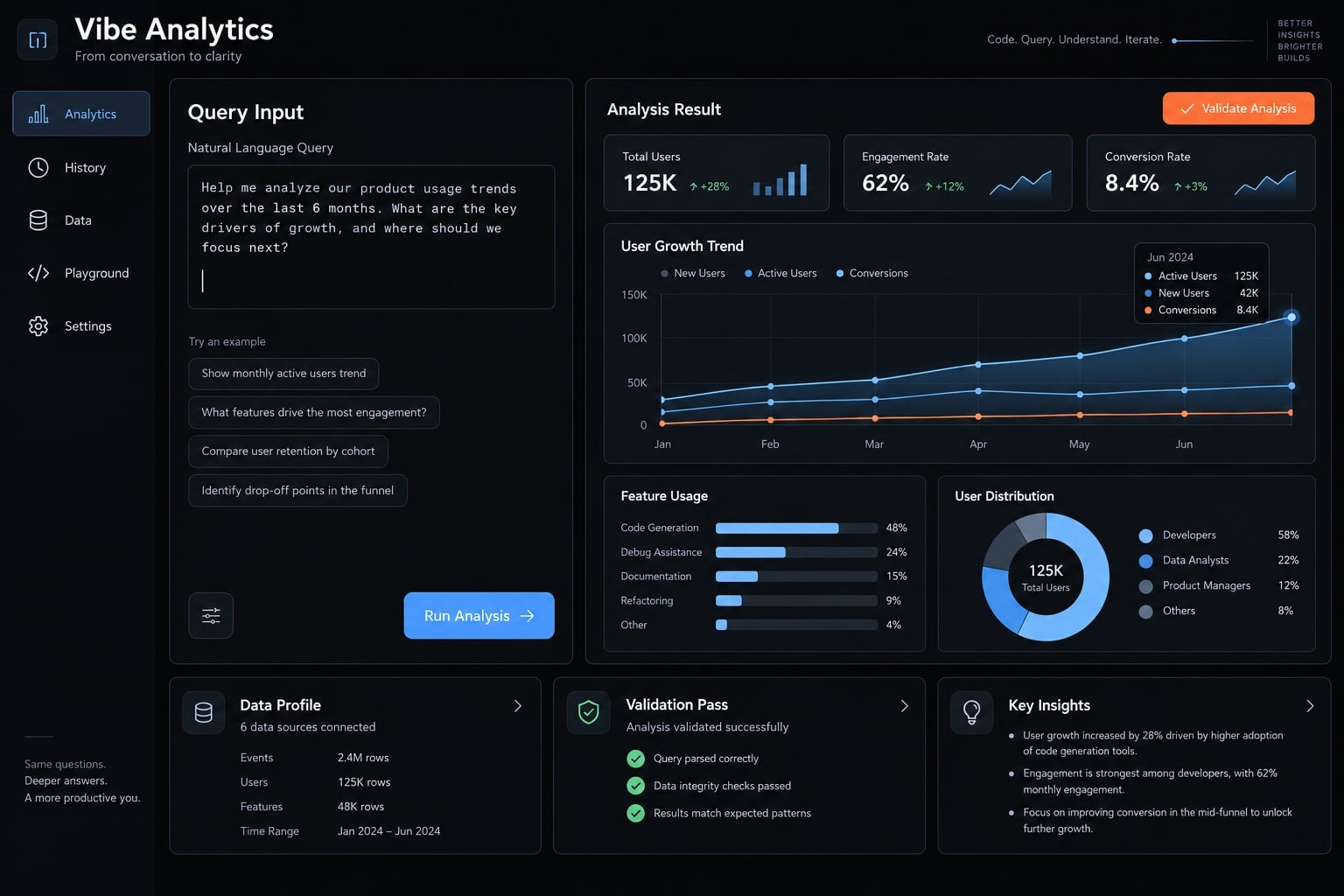
Vibe coding & vibe analytics meaning
Vibe coding generally describes prompt-led software creation in which AI generates much of the implementation. Usage varies. In its narrower sense, it involves relying on generated output without closely inspecting the code; it is not an exact synonym for all AI-assisted development. The analytics workflow described here deliberately adds inspection and validation.
Consider a request:
“Show voluntary cancellation by onboarding path, recent usage, and support history.”
An AI tool may turn that into a convincing dashboard. But “voluntary cancellation” may be undefined, event joins may duplicate accounts, reporting periods may be incomplete, and support contact may be associated with cancellation without causing it. A plausible screen is a candidate analysis, not yet a trustworthy answer.
These three meanings involve distinct objects and verification processes:
Usage of the phrase | Object being analyzed | Example question | Essential checks |
|---|---|---|---|
Vibe analytics | Business, product, operational, customer, or research data | Which patterns are associated with cancellation? | Definitions, transformations, data quality, validation |
Product analytics for vibe-coded apps | Observed user behavior in an application | Where do users abandon onboarding? | Event implementation, privacy, funnel interpretation |
Analytics of vibe-coding workflows | Human–agent development activity and delivery | How much review, rework, latency, or resource use occurs? | Telemetry quality, review evidence, delivery outcomes |
Conversational analytics and natural-language querying overlap with vibe analytics, but querying is only one capability within a broader workflow. Product analytics, meanwhile, is defined by what it studies-not by whether AI generates the analysis.
The practical principle is straightforward: Conversation helps discover questions and draft implementations; explicit definitions, independent checks, and operational controls make those implementations usable.
What changes when analytics becomes conversational?
Generative AI changes how an initial implementation is produced. It does not remove the need to define metrics, understand data, inspect calculations, or interpret results.
Conventional and conversational workflows compared
Two simplified paths illustrate the difference:
- Conventional: Question → data preparation and query/model → visualization → review and interpretation.
- Conversational: Question and data context → generated candidate → inspection and refinement → validation and interpretation.
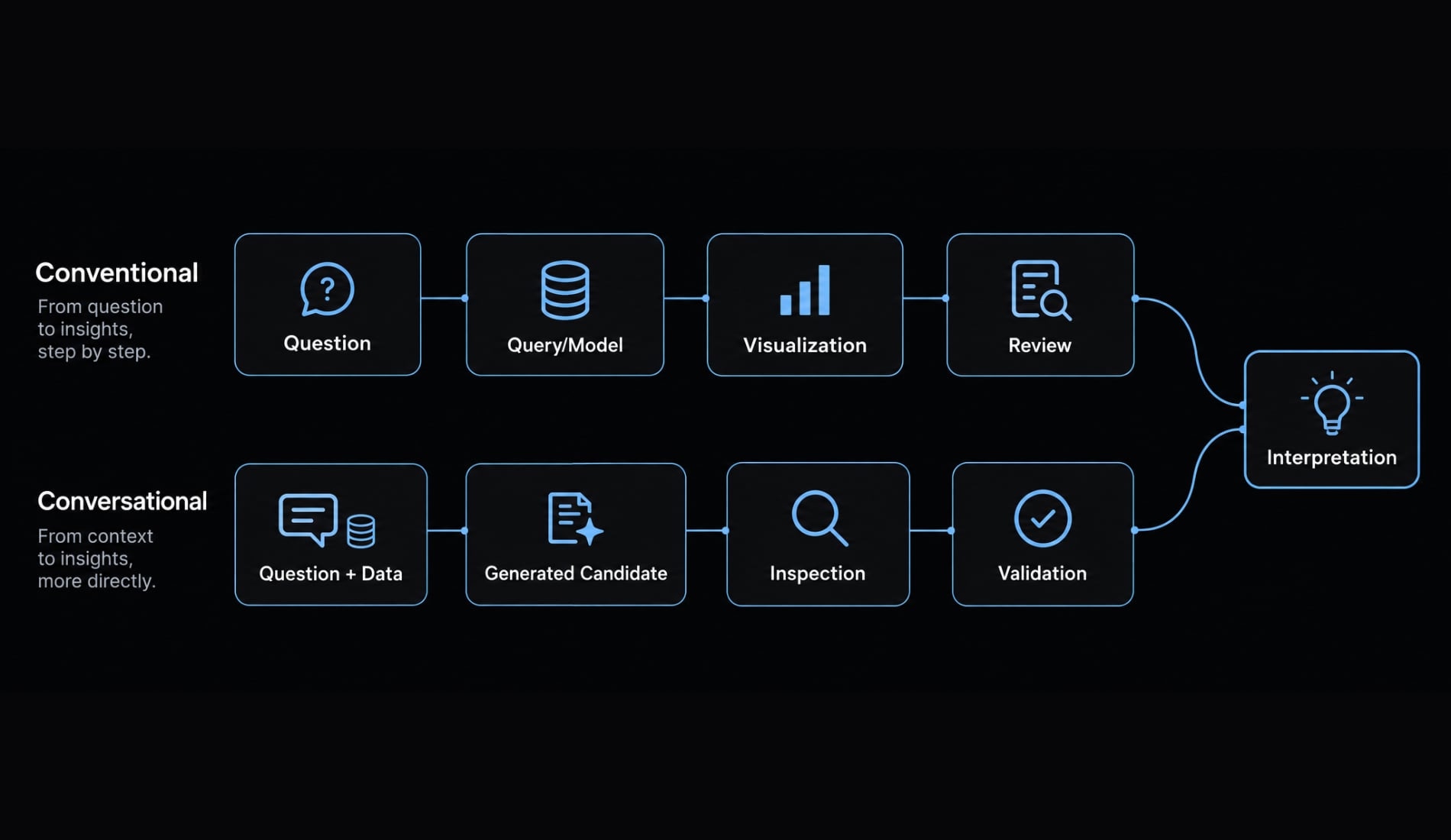
Both paths can be iterative, automated, and rigorous. Conventional business intelligence (BI) is not necessarily static, and conversational tools still depend on queries, models, and transformations.
Dimension | Conventional workflow | Conversational workflow |
|---|---|---|
Starting input | Question translated into queries, models, notebooks, or BI configuration | Natural-language question plus schema and data context |
Initial implementation | Written or configured directly | Drafted by an AI-enabled tool |
Iteration | Edit calculations, queries, models, or visual settings | Revise prompts, specifications, generated logic, or visual settings |
Potential benefit | Explicit implementation control | Less manual work to reach a candidate output |
Characteristic risk | Manual errors, opaque legacy logic, implementation bottlenecks | Plausible generated output hiding incorrect assumptions |
Human responsibilities | Define, implement, check, interpret | Define, inspect, check, interpret; implement corrections where needed |
Neither approach automatically wins on speed or accuracy. A conversational interface may help with an unfamiliar visualization while creating extra review work for a complex eligibility rule. An established BI model may answer a recurring question more directly than generating a new application.
“Vibe” describes the interaction, not the rvidence
MIT Sloan Management Review frames vibe analytics around conversational, iterative interaction with data, including alignment between human intent and AI interpretation. That is a useful conceptual framing, not a guarantee that a tool understands the business question correctly.
Apparent agreement in conversation can conceal undefined metrics:
- Revenue: Booked, billed, collected, gross, or net?
- Active customer: Paying, using the product, under contract, or some combination?
- Churn: Voluntary cancellation, payment failure, non-renewal, inactivity, or downgrade?
- Support issue: A recorded category, a free-text complaint, or a model-generated topic?
If you ask for “revenue from active customers,” the tool needs a defensible definition of both terms. Repeating the request more confidently does not resolve that ambiguity. The next decision is therefore not which chart to generate. It is what the analysis will be used for and what consequences an error could have.
Match the controls to how the analysis will be used
A one-off exploratory chart and a customer-facing dashboard require different operational arrangements. Neither intended use nor visual polish proves analytical quality.
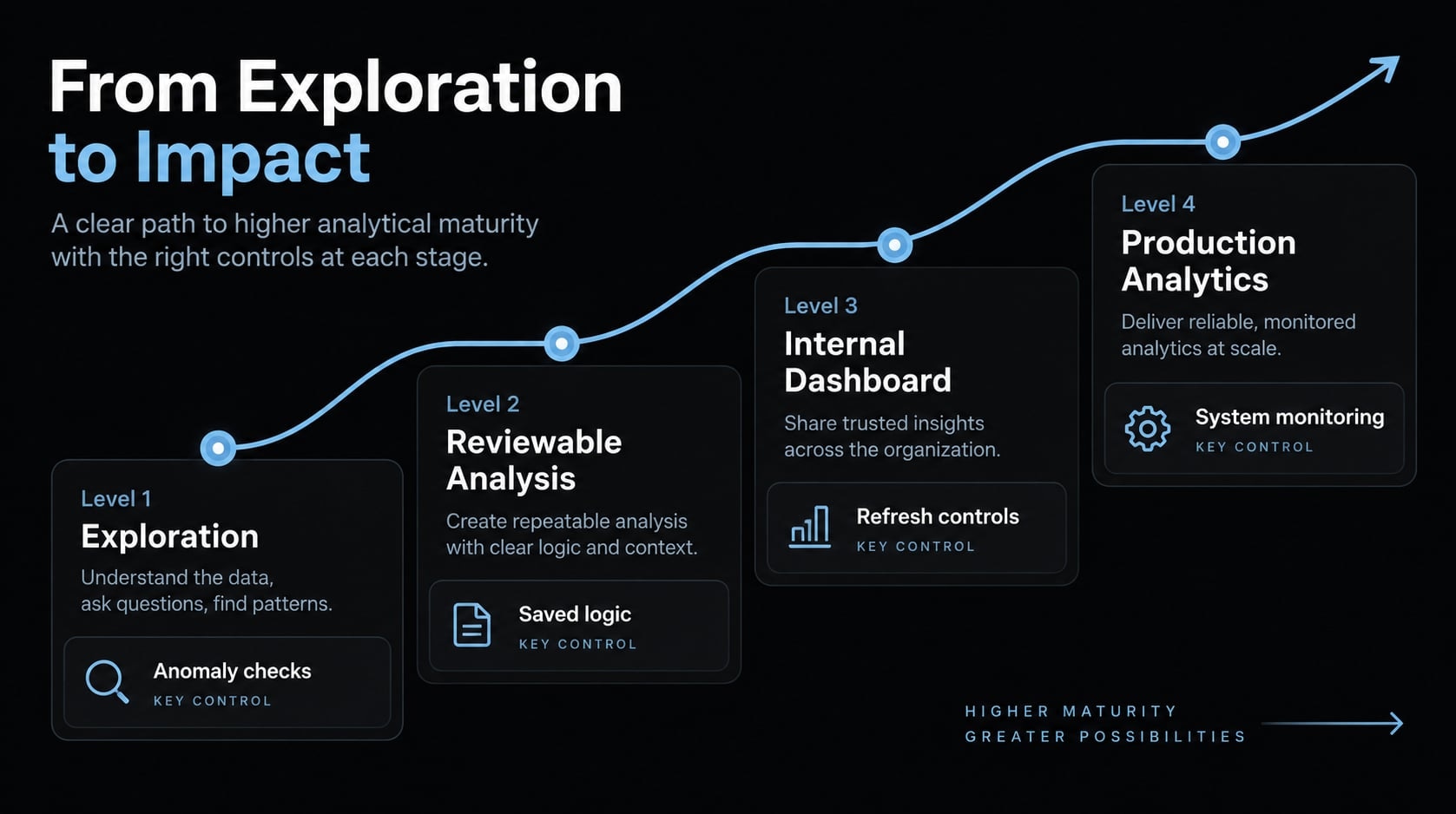
The following four usage levels are a practical control framework, not an industry maturity model or a compulsory sequence. A high-impact one-off analysis may need more review than a low-stakes recurring report. Privacy and authorization apply at every level when relevant.
Usage level | Intended use | How to treat the output | Controls to establish |
|---|---|---|---|
1. Exploration | Investigate data, try segmentations, generate hypotheses | Provisional | Approved data, known source, recorded question, anomaly checks |
2. Reviewable working analysis | Support a bounded internal discussion or decision | Usable only within checked assumptions | Defined metrics, saved logic, reconciled totals, documented limitations |
3. Repeatable internal dashboard | Recurring team reporting | Reusable after validation and refresh controls | Stable definitions, version history, tests, refresh ownership, failure handling |
4. Production or customer-facing analytics | Embedded reporting or operational use | Deployable only after analytical and system controls are assessed | Authentication, authorization, tenant isolation where applicable, testing, monitoring, incident ownership |
Exploration and one-Off Working Analysis
Exploration produces questions worth investigating. A working analysis provides checked evidence for a particular discussion or decision.
To move between them, record the population, period, exclusions, joins, filters, time zone, and assumptions. Save the executable logic and reconcile key totals. State what kind of conclusion the analysis supports:
- Descriptive: What happened in the observed data?
- Associative: Which characteristics occurred alongside an outcome?
- Predictive: How well can a defined method estimate an unknown or future outcome?
- Causal: What effect would changing something have?
A basic comparison of cancellation rates across segments is purely descriptive and correlational. It does not constitute a predictive model or prove causation.
Repeatable internal reporting
Recurring reporting needs a stable basis for comparison. Preserve a specification and change history, identify source and refresh owners, and check for missing, late, duplicated, or partial data. Readers also need clear “last updated” information and an alert when a refresh fails. A dashboard that silently displays old data can be misleading even when its formulas are correct.
Decide how corrected historical data will be handled. Will prior reports be restated, or will published snapshots remain fixed with corrections documented separately? Either can be appropriate, but unexplained changes undermine comparisons.
Production and customer-facing analytics
Production use adds responsibilities for access, deployment, concurrency, latency, cost, availability, monitoring, and incidents. If analytics trigger consequential actions, those actions need appropriate review and safeguards. Recurring metrics across users and surfaces may also require governed definitions.
Three properties must remain distinct:
- Inspectability: Someone can review the underlying logic. This does not mean anyone has reviewed it.
- Reproducibility: A result can be recreated under stated conditions. The same wrong result can be reproducible.
- Production readiness: The complete system is suitable for its intended operation. A correct calculation can still sit inside an insecure or unreliable application.
These distinctions become clearer when applied to a complete workflow.
A structured vibe analytics workflow
A useful workflow preserves the connection between the original question and the final result:
Intent → data inspection → analytical specification → generated implementation → inspection → independent validation → saved and monitored analysis
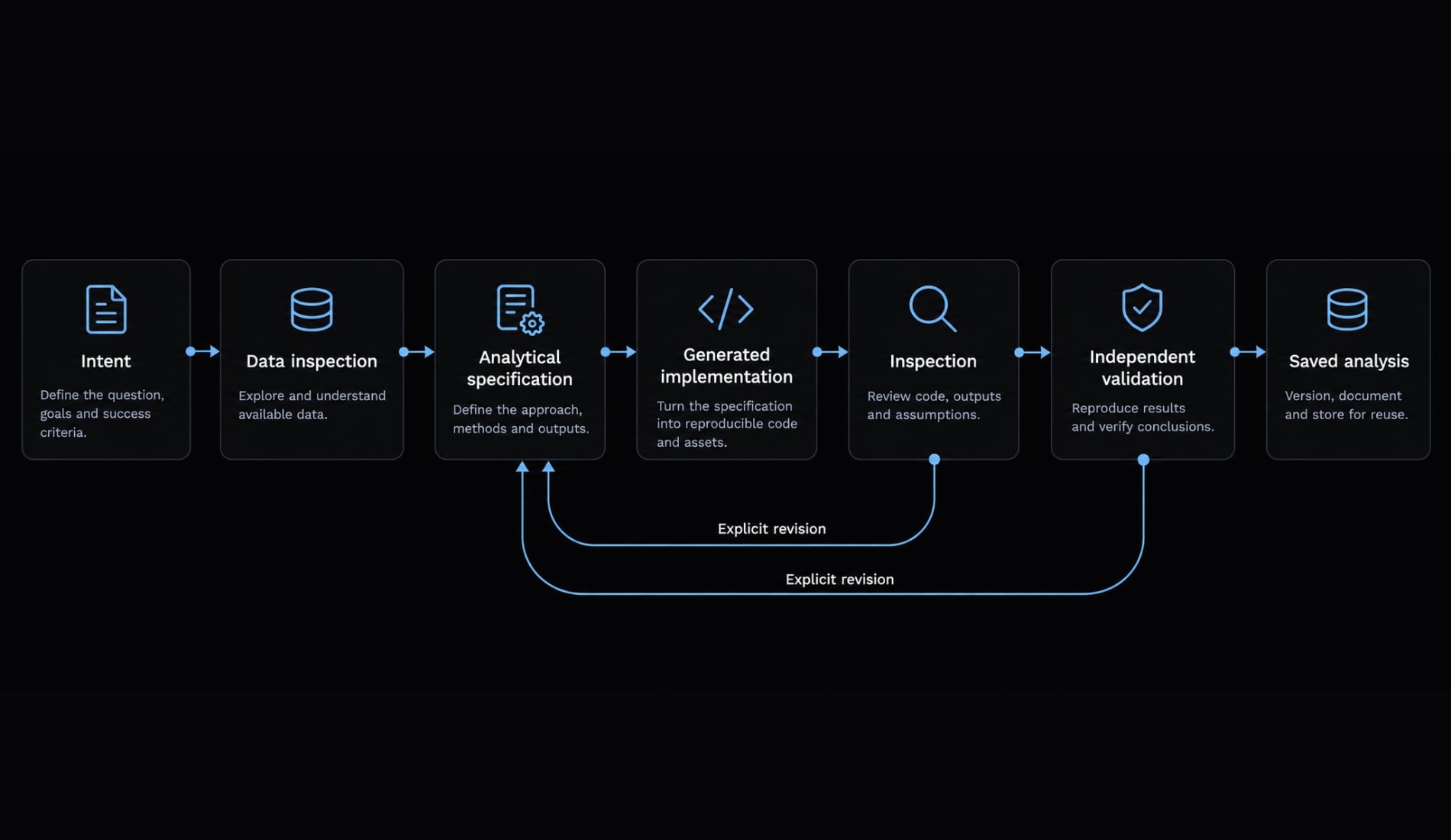
Inspection or validation may send the work back to the specification or implementation. That is normal refinement, provided changes are explicit rather than silently introduced.
Running example: Investigating voluntary cancellation requests
Suppose a small subscription software product wants to investigate which onboarding, usage, and support patterns are associated with voluntary cancellation requests.
Available sources include billing records, subscription-status records, product events, onboarding paths, support tickets and permitted support text, and cancellation-request records. The purpose is to prioritize further research-not automatically target customers or claim to know why they cancel.
This hypothetical example contains no numerical findings. Its metric choices are specific to the question, not a universal churn standard. One important assumption is one eligible primary monthly subscription per account. Check that before using account-level metrics. If accounts can have multiple concurrent subscriptions, either analyze subscriptions separately or explicitly define what account-level cancellation means.
1. State the Decision, Not Just the Dashboard
“Build a churn dashboard” leaves too much for the tool to invent.
A better request is:
Compare monthly voluntary cancellation-request rates across onboarding paths, prior usage bands, and prior support-contact groups for eligible subscribers over the last six completed months. Use the comparison to identify segments for further investigation.
Even this request remains provisional until data inspection confirms that the required fields and definitions are supportable. Use the following template to make a request reviewable:
Field | What to state |
|---|---|
Question | What uncertainty or decision should the analysis inform? |
Population | Who or what is eligible, and who is excluded? |
Period | Which observation and reporting windows apply? |
Outcome | Which recorded action or state counts? |
Comparisons | Which dimensions or groups matter? |
Intended use | Exploration, one-off review, recurring reporting, or deployment |
Data constraints | Approved fields, sensitive-data exclusions, permitted processing |
Limits | What the output must not infer or automate |
For this example, voluntary requests must be separated from payment failure, involuntary closure, inactivity, downgrade, and non-renewal. If the source combines those events, the team cannot claim to have isolated voluntary cancellation without a defensible classification rule. A well-phrased question establishes intent. It does not establish that the data can answer it.
2. Inspect and profile the data
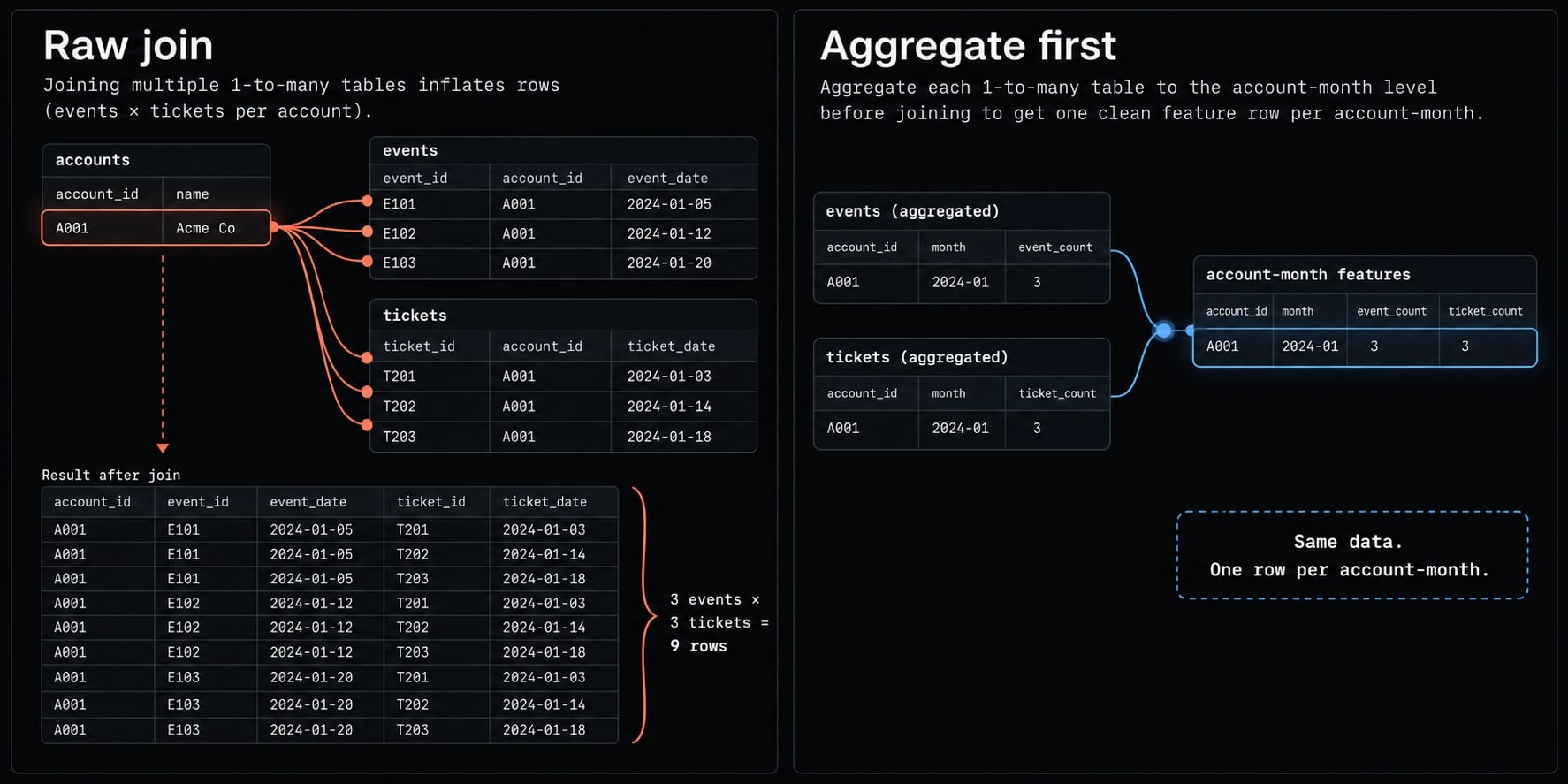
- Start with grain: What one row represents.
- Then check join cardinality: How many rows on one side can match a row on the other.
An account can have many usage events, support tickets, and invoices. Joining all three raw sources can multiply rows and inflate counts without producing an obvious visual error.
Source | Possible grain to verify | Useful fields | Risk to resolve |
|---|---|---|---|
Billing | Invoice or account-period | Payment status, invoice date | Confusing payment failure with voluntary cancellation |
Subscriptions | Subscription, status snapshot, or status event | Account, plan, start/end/status timestamps | Current status may not reconstruct historical eligibility |
Product usage | Event | Account/user identifier, event type, timestamp | Raw-event joins can multiply account rows |
Onboarding | User or account | Path, completion, assignment date | Multiple users per account or changing path definitions |
Support | Ticket or message | Opened date, account, category, permitted text | Sensitive information, duplicate messages, post-outcome information |
Cancellation | Request or status event | Request date, effective date, reason/status | Mixing request dates with service-end dates |
For each source, inspect ownership, freshness, keys, duplicates, missing values, time coverage, time zones, category changes, sensitive fields, and allowed use.
The example requires several specific decisions:
- Confirm that historical subscription records can reconstruct eligibility at each month’s start. Current status alone may be insufficient.
- Use the original account signup path for onboarding comparisons. Keep unknown or unmapped paths visible.
- Aggregate usage and support data before joining them to account-month records.
- Keep cancellation-request timestamps separate from effective service-end timestamps.
- Exclude text that is not approved for model processing.
- Check whether event names, onboarding paths, or support categories changed during the reporting period.
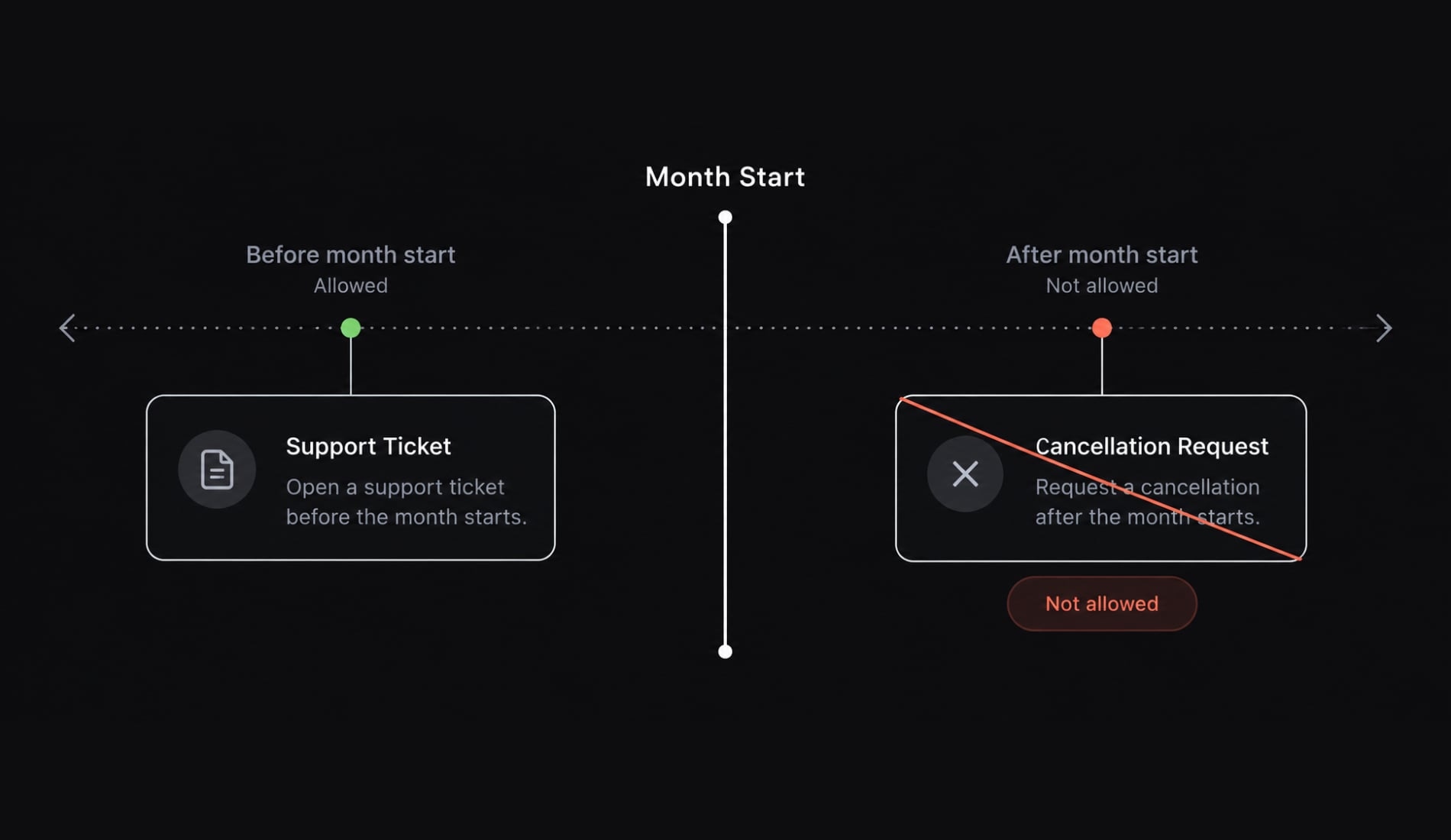
Also check for data leakage: Using information that was unavailable at the time a comparison or prediction is supposed to describe. Here, that is an analytical timing problem, distinct from unauthorized disclosure of data.
For example, a support ticket opened before the month began might receive a cancellation-related message later. Using the updated ticket text to describe “prior support topics” introduces future information.
MIT Sloan Management Review highlights data quality and sensitive-data concerns in conversational analytics. AI can help surface anomalies, but it cannot reliably reconstruct undocumented business meaning.
3. Create an analytical specification
An analytical specification records the definitions, assumptions, source relationships, filters, and presentation rules an implementation should follow.
It can be a short document, a notebook section, a configuration file, a semantic model, or a tool-generated artifact. A formal system is unnecessary for every exploratory prompt, but reusable work needs its analytical choices preserved somewhere outside conversational memory.
Artifact | Function |
|---|---|
Prompt | Communicates a request and context |
Specification | Records approved analytical choices and unresolved assumptions |
Query, transformation, formula, or code | Implements those choices |
Validation record | Documents how implementation and results were checked |
Plotly describes a prompt-to-specification-to-code approach for Plotly Studio. That provides a product-specific example of separating intent from implementation. A specification remains a review aid, however-not proof that the definitions or data are correct. For the running example, the specification is:
Field | Chosen definition |
|---|---|
Metric | Monthly voluntary cancellation-request rate |
Purpose | Identify segments for further investigation |
Reporting period | Each of the last six completed calendar months, using UTC |
Unit of analysis | Account-month |
Eligibility | A paid primary monthly subscription active at month start, with no earlier pending cancellation request |
Numerator | Distinct eligible accounts submitting a recorded voluntary cancellation request during that month |
Denominator | Distinct eligible accounts at that month’s start |
Formula and unit | Numerator ÷ denominator × 100; percentage per calendar month |
Exclusions | Test accounts, nonmonthly plans, accounts outside eligibility; payment-failure and other nonvoluntary closures do not enter the numerator |
New accounts during a month | Excluded from that month’s start-population metric; potentially eligible the next month |
Request versus termination | Use request timestamp, not service-end date; the metric measures recorded cancellation intent, not realized customer loss |
Rescinded requests | Count an authentic submitted request; report completed cancellations separately if needed |
Comparison attributes | Original account onboarding path; usage and support-contact bands from the 30 days before month start |
Lower-grain data | Aggregate events and tickets into one feature row per eligible account-month before joining |
Missing data | Distinguish verified zero from missing coverage; retain unknown categories |
Interpretation | Descriptive associations, not causal drivers or individual predictions |
Several implementation details are essential:
- Freeze usage-band thresholds before comparing outcome rates. Choose thresholds from documented product meaning or a stated exploratory rule. Do not repeatedly change them to obtain a more dramatic cancellation pattern.
- Count distinct support tickets opened in the lookback window, not messages. Any text-derived pre-month label must use only text recorded before month start.
- Keep short histories visible. Accounts with less than 30 days of prior history need a flag or separate group. Limited observation is not equivalent to low engagement.
- Preserve uncertainty in cancellation classification. Missing reasons must not silently become voluntary requests. Apply the documented classification rule and report unresolved records.
- Keep numerator and denominator aligned. Each segment’s numerator must come from its own eligible denominator. A segment with no eligible accounts has an undefined rate, not 0%.
The monthly metric is also not a six-month cohort cancellation probability. If results are pooled, divide total qualifying requests by total eligible account-months and label the result accordingly. Do not take an unweighted average of segment percentages or describe the pooled rate as the share of unique customers lost over six months.
For recurring measures, a semantic layer can help. It contains governed metric definitions and data relationships that tools use to calculate measures consistently; it is more than a glossary. It may implement parts of a specification, but the two are not identical, and a semantic layer is not required for every one-off analysis.
4. Generate the first analysis or dashboard
Generate against the approved choices rather than asking the model to fill in missing definitions.
Request the following alongside the dashboard:
- The specification followed.
- Queries, transformations, formulas, or code behind important charts.
- Source fields, assumptions, unresolved questions, and proposed checks.
- Any generated narrative or summary.
Useful panels for the example include:
- Monthly cancellation-request rate, with numerator and denominator.
- Rates by original onboarding path.
- Rates by pre-month usage band.
- Rates by pre-month support-contact group.
- Exploratory support-topic comparisons, if processing is permitted and labels are reviewed.
- Filters for completed month, plan, and account-history group.
A signup-cohort churn chart would require a separate cohort definition. Calendar-month reporting and cohort survival answer different questions. Ask for bounded edits and clear component boundaries. Changing one chart should not require regenerating unrelated metric logic.
Every generated factual summary must be traceable to a displayed or queryable value. A statement such as “accounts with more prior support contacts had a higher request rate” needs a specific comparison behind it. A model-generated support topic remains an inferred attribute, not a confirmed reason for cancellation.
5. Inspect and challenge the output
Review the logic and interpretation before judging the visual polish.
Area | What to inspect in the example |
|---|---|
Data and joins | One row per account-month after joins; correct keys; no raw-event multiplication |
Metric logic | Correct eligibility, voluntary-request classification, numerator, denominator, windows, exclusions |
Visualization | Accurate labels, visible counts, consistent filters, unknown groups, zero-event groups, small segments |
Interpretation | Association rather than causation; no unsupported claims; provisional text labels |
Application changes | Scoped edits, visible diffs, preserved metric logic, permissions enforced outside prompts |
Suppose a chart appears to show a higher cancellation-request rate among accounts with multiple prior support contacts. Before interpreting it, investigate:
- Does “contact” mean distinct tickets or repeated messages?
- Were all contacts and source text available before the month began?
- Do the groups differ in account tenure or product usage?
- Are missing support records being treated as zero?
- Does any account appear more than once?
- Is the pattern concentrated in one small group or a single month?
If support logging is incomplete, the comparison may need an unknown group or a narrower period with reliable coverage. If the chart counts messages rather than tickets, the implementation must be corrected.
Even if these checks pass, the result is an association. It does not establish that support interactions cause cancellation or that discouraging contact would improve retention.
6. Validate with independent checks
Asking the same model to confirm its answer is not an independent validation protocol. AI-generated tests can be useful drafts, but they may encode the same misunderstanding as the implementation. Validation should add evidence outside the generated narrative:
- Reconstruct a trusted eligible population from billing and historical subscription records.
- Reconcile the monthly numerator and denominator separately-not only the percentage.
- Manually classify selected accounts and cancellation records.
- Compare row counts and distinct account-month keys before and after joins.
- Test deliberate edge cases.
- Compare executable logic with the approved specification.
- Review selected support labels against permitted source records, including ambiguous and minority categories.
- Have another person review definitions when the consequences warrant it.
- Rerun saved logic against the same data snapshot.
- Compare another completed period to explore stability, without treating persistence as proof of causality.
The following edge cases make the example’s rules testable:
Case | Expected treatment |
|---|---|
Account active at month start requests cancellation midmonth | Included in denominator and numerator |
Account fails payment without a voluntary request | May remain in the start-population denominator; not in the voluntary numerator |
Account joins and requests cancellation within the same month | Excluded from this month’s start-population metric |
Account already has a pending request at month start | Excluded under this specification |
Account has many usage events | Still one eligible account-month |
Support ticket receives text after month start | Later text excluded from pre-month labels |
Verified complete logging shows no usage events | Zero usage |
Event collection is missing or interrupted | Unknown/incomplete usage, not zero |
Segment has eligible accounts but no requests | Display 0% and its denominator |
Segment has no eligible accounts | Rate undefined; do not display 0% |
Request occurs at a month boundary | Assigned using the specified UTC boundary |
When a check fails, identify what failed before changing the analysis:
Result | Meaning | Action |
|---|---|---|
Join, window, or formula violates the specification | Implementation failure | Correct the logic and rerun checks |
Definitions or eligibility do not match the intended question | Specification failure | Revise explicitly, document the change, and revalidate |
Correct implementation does not show the expected association | Hypothesis not supported | Accept the result or ask a new question; do not prompt until the desired story appears |
A trusted existing report may use a different definition-for example, effective cancellations rather than requests. Reconcile that difference instead of forcing the totals to match. Agree on tolerances for rounding or late-arriving data before interpreting discrepancies.
Repeated account-months also are not independent observations: the same account can contribute to multiple months. Formal significance testing or predictive modeling would require additional statistical design beyond this descriptive dashboard.
7. Save, share and monitor the Analysis
A checked result becomes reusable only when its context survives beyond the chat. Preserve source references and snapshot identifiers, the specification, executable logic, relevant dependency versions, validation records, and documented limitations. Keep useful prompts, material model or tool settings, and the change and approval history.
For recurring use, record the refresh schedule and owner, rollback behavior, and incident responsibility.
Rerunning saved logic is different from regenerating code with the same prompt. Regeneration may produce a different implementation, even when the wording is unchanged. Monitor recurring or deployed outputs for:
- Freshness, missing or failed refreshes, and schema changes.
- Query failures and changes to protected metrics.
- Latency, access failures, and availability.
- Model and database usage and costs where relevant.
- Unexpected shifts in distributions, missingness, or text-label behavior.
Observability means understanding system behavior through telemetry such as metrics, logs, and traces. It can reveal a failed refresh or unusual query latency. It does not, by itself, establish that a cancellation denominator is correct.
Where generative AI adds practical value
The potential value of vibe analytics is reducing manual movement between questions, queries, charts, and explanations. That value depends on the task, data, tool, and review requirements.
Translating questions into analytical artifacts
AI can draft queries and transformations, explain existing SQL, propose comparison dimensions, scaffold an application, suggest tests, and prepare documentation. These artifacts are useful only if they match the actual schema, grain, permissions, and specification. A syntactically valid query against the wrong relationship is not a successful translation.
For example, an agent can draft the account-month transformation while a reviewer concentrates on historical eligibility and timing rules. That division of work preserves human responsibility for the analytical choices without requiring every line to be written manually.
Iterating on visualizations and follow-up questions
Conversational tools can help explore chart types, layouts, filters, drill-downs, and segmentation views. A reader might move from a monthly trend to a comparison by onboarding path without configuring every visual from scratch.
Follow-up questions still must respect available data, approved metrics, and user permissions. A request to “show the underlying accounts” should not bypass access restrictions simply because the previous response showed an aggregate. Conversational interaction can complement established BI models and dashboards. It does not make them obsolete.
Exploring unstructured data
Support tickets can supply candidate topics and summaries that structured fields do not capture. A model might propose labels such as setup difficulty, billing confusion, or missing functionality. Those labels are interpretations. Review them against permitted source text, including ambiguous cases and less common experiences. Summaries may omit exceptions, and joining a topic label to account records does not validate the label.
Source traceability must also respect permissions: a dashboard viewer authorized to see aggregate topics may not be authorized to read the underlying ticket text. Most importantly, support summaries do not prove customer motivation. Using inferred topics for high-impact decisions requires additional review and domain-appropriate controls.
Generating alternative questions and stress tests
AI can help challenge an initial interpretation:
- Which assumptions could reverse this conclusion?
- What changes under another documented metric definition?
- Does the pattern persist in another completed period?
- Which missing-data or join problems could create this chart?
- What alternative explanation should we investigate?
MIT Sloan Management Review discusses applications involving KPI questions, support records, combined sources, and assumption testing.
Plotly also discusses the risk of a local minimum: Repeatedly polishing an initially weak approach instead of reconsidering it. In analytics, that might mean endlessly improving a churn chart when the more useful question concerns failed setup or a change in eligibility.
A fresh approach is another candidate-not an exemption from validation.
The main failure modes of vibe analytics
The central risk is not inevitable failure. It is apparent completeness before verification.
Failure mode | What it looks like | Why it matters | Control |
|---|---|---|---|
Plausible but wrong logic | Incorrect joins, denominators, windows, or null handling | Coherent charts can support false conclusions | Inspect implementation, reconcile totals, test edge cases |
Irreproducibility | Hidden context, changing data, regenerated logic | Others cannot recreate or audit results | Preserve data version, specification, executable artifacts |
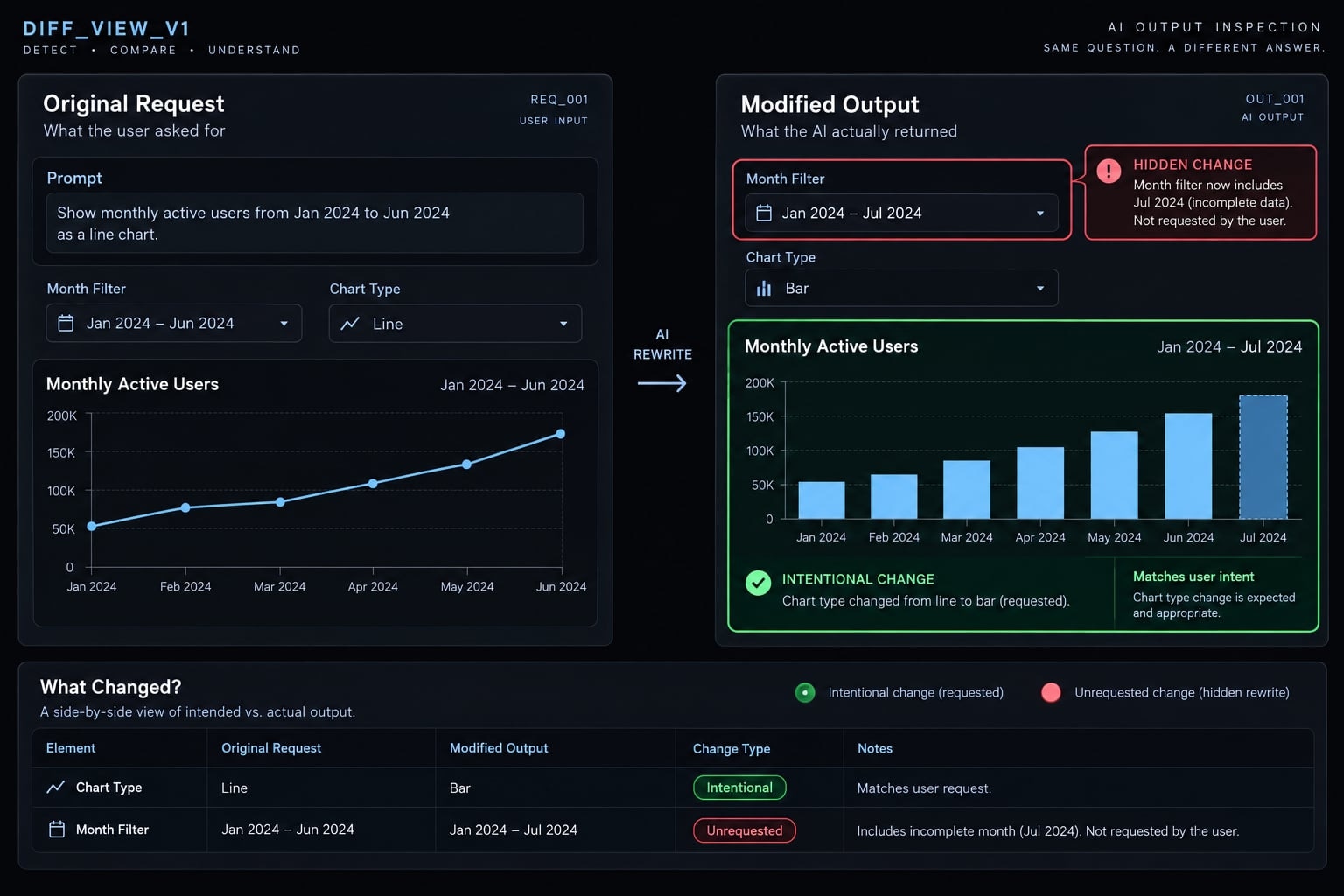
Hidden rewrites | A layout request changes shared filters or calculations | Earlier checks no longer cover the output | Scoped edits, diffs, regression tests, rollback |
Inconsistent semantics | Different definitions of the same metric | Reports disagree for preventable reasons | Governed definitions and explicit relationships |
Poor data quality | Stale, missing, duplicated, or undocumented fields | Generation amplifies input uncertainty | Profiling, ownership, coverage checks |
Sensitive-data exposure | Unapproved uploads, retention, or output disclosure | Confidentiality and privacy risks | Minimize data, approve environments, check access and retention |
Broken tenant isolation | A prompt is trusted to restrict records | Unauthorized users may receive data | Enforce authorization in data/application access controls |
Unbounded execution | Open-ended queries or repeated model calls | Cost, latency, and availability problems | Limits, timeouts, monitoring, safe caching, fallbacks |
Semantic drift and hidden rewrites
Suppose you ask the tool to replace a line chart with bars. It makes the visual change but also modifies a shared month filter, including the current incomplete month. The requested edit succeeds visually while changing the analysis. Previously validated results no longer cover the current implementation.
Plotly describes hidden rewrites as a risk in generated applications. The practical response is to inspect diffs-records of what changed-and run regression checks around protected metric logic. A saved specification helps reveal drift; it does not prevent drift automatically.
Privacy, security and tenant isolation
Authentication establishes identity. Authorization determines which data and actions that identity may access. Row-level security restricts which records a user or tenant can access at a governed data-access layer. It can be part of tenant isolation, but it does not replace application security.
A prompt such as “only show this customer’s records” is not an access-control boundary. Enforcement belongs in the data and application access controls, outside model instructions. A natural-language interface must not obtain broader permissions than the user it serves.
Before processing data:
- Minimize fields and use approved environments.
- Check retention, training, logging, and administrative-access policies.
- Keep secrets and unnecessary personal information out of prompts and outputs.
- Treat uploaded text as data, not trusted operational instructions.
- Test permissions rather than relying on interface labels.
Removing names does not necessarily anonymize records. Masked or pseudonymized data can remain sensitive or identifiable when combined with other information.
Cost, latency and availability
An apparently simple question may trigger multiple database queries, model calls, retries, or chart-generation steps. Set query limits, timeouts, rate limits, and concurrency controls appropriate to the workload.
Define what happens when a request fails: return an error, show a clearly labeled last-successful result, or offer a narrower query. Do not silently present stale cached data as current.
Caches must respect authorization boundaries. Reusing a result for efficiency is not permission to expose it across users or tenants.
How to evaluate vibe analytics tools and architectures
Evaluate the full path from data access to maintained output, not only the first successful demo.
Evaluate capabilities with a test task
Use an approved dataset with known totals and deliberate edge cases. Give each candidate the same bounded task and compare evidence rather than presentation quality alone.
Evaluation area | Questions to ask | Evidence to request |
|---|---|---|
Data grounding | Can it expose sources, schema, grain, freshness, and join relationships? | Source mapping and row-count/join diagnostics |
Specification and semantics | Are formulas, windows, exclusions, and approved metrics explicit? | Saved specification or governed metric definition |
Inspectability | Can reviewers see and edit the logic? | Query, transformation, code, or equivalent calculation detail |
Controlled editing | Can one component change without unrelated rewrites? | Diff, version history, rollback demonstration |
Validation | Can known totals and edge cases become repeatable checks? | Test results and discrepancy explanations |
Security | Where is data processed, retained, and accessed? | Current policy/configuration evidence and permission tests |
Reproducibility | Can a second person recreate the result? | Portable artifacts and a successful rerun |
Operations | Who owns refreshes, failures, latency, usage, and incidents? | Ownership and monitoring plan |
User roles | Can people explore without changing protected definitions? | Role-specific permission and approval behavior |
For multi-tenant systems, test both authorized and unauthorized access using non-sensitive test tenants. Check direct data requests as well as normal interface behavior. A product checkbox labeled “security” is not evidence that the required boundary is enforced.
Compare implementation approaches
Different architectures move responsibilities rather than eliminating them.
Approach | Potential strength | Ownership or constraint to examine | Reasonable starting context |
|---|---|---|---|
Coding agent + database + visualization library | Flexible implementation and code access | Team owns architecture, validation, permissions, deployment, maintenance | Technical team building a specialized analysis or internal application |
AI-native analytics product | Analytics-focused dataset-to-output workflow | Product-specific semantics, exportability, limits, deployment controls | Exploration and dashboard development where required controls are demonstrated |
BI platform with conversational features | Can reuse existing models, permissions, reporting processes | Flexibility depends on platform and model coverage | Team with established BI infrastructure |
Custom embedded analytics | Product-specific experience and integration | Significant responsibility for tenancy, semantics, testing, operation | Specialized customer-facing requirements |
These approaches overlap. A custom embedded application might use a BI platform, coding agents, or both. According to Plotly, Plotly Studio follows a dataset-first, specification-driven approach. That makes it an example of an implementation pattern, not independently verified evidence of superior accuracy or production readiness.
The right choice may be a controlled pilot, an existing BI workflow, or no conversational layer at all. If a governed report already answers a stable question well, generating a replacement may add work without improving the decision.
When vibe analytics is-and is not-a good fit
Fit depends on data suitability, reviewability, consequence, and ownership-not novelty.
Starting fit | Examples | Conditions or boundaries |
|---|---|---|
Strong for exploration | New datasets, visualization alternatives, candidate questions, internal prototypes | Approved data; clearly provisional results |
Strong with bounded review | One-off analysis, query drafting, documentation, analytical scaffolding | Explicit definitions and proportionate human validation |
Conditional | Recurring reporting, operational dashboards, team-wide metrics | Governed definitions, tests, refresh controls, accountable owner |
Conditional with stronger controls | Embedded analytics, customer dashboards, automated actions | Appropriate security, tenant isolation, monitoring, review, incident handling |
Conditional text analysis | Support topics or summaries for investigation | Permitted processing, source traceability, label review |
Poor as currently designed | Undefined metrics, hidden transformations, no data owner, unapproved sensitive uploads | Resolve missing prerequisites before relying on output |
Inappropriate as sole evidence | High-impact decisions based only on generated narratives; causal claims from segment comparisons | Additional domain methods, validation, and safeguards |
More controls do not turn an observational association into causal evidence. That requires an appropriate research design. Vibe analytics is an interaction and implementation approach. It can operate on top of BI, analytics engineering, statistics, and data science; it does not replace those disciplines.
The other two meanings of “vibe coding analytics”
The broader phrase also describes measuring AI-built applications and human–agent development workflows. These domains can coexist with conversational analytics, but they answer different questions.
Product analytics for apps built with AI coding tools
Product analytics examines observed behavior: Events, task completion, funnels, abandonment, errors, feature adoption, unexpected navigation, and session behavior or replay where privacy and permissions allow.
For an onboarding flow, you might track:
- Onboarding started.
- Required setup completed.
- First intended task completed.
Each event needs a defined trigger, identity rules, and deduplication. A completion event should not fire merely because a screen loaded if the intended task requires a successful action.
Validate instrumentation before interpreting drop-off. Missing completion events might indicate user difficulty-or a broken tracking implementation.
Product analytics can show whether people reach intended outcomes. It does not, by itself, establish code security, accessibility, maintainability, or overall software correctness.
Analytics and observability of coding-agent workflows
Engineering analytics studies how people and agents perform development work. Different metric families serve different purposes:
Metric family | Examples and measurement context | Interpretation limit |
|---|---|---|
Activity | Prompts, commits, or pull requests per stated week or release | More activity does not establish more value |
Resources | Tokens per task/model; latency in seconds; failures per attempted call over a stated period | Definitions and telemetry coverage vary |
Review | Review time per change; rework or rejection under an explicit rule | Acceptance is not proof of quality |
Delivery outcomes | Cycle time between defined endpoints; escaped defects by release; operational reliability | Attribution to AI requires more than a before/after impression |
For example, lower time to an initial pull request may coexist with longer review and more rework. Measuring only the first interval would miss part of the delivery process.
OpenTelemetry is an instrumentation framework for collecting and exporting telemetry. Coding-agent data may flow through such infrastructure when the relevant tools support it; compatibility and available fields must be checked against actual documentation. Neither token counts nor traces reveal whether a dashboard’s business interpretation is correct.
How the three meanings connect
A single application can involve all three verification domains:
Question | Relevant domain | What it does not establish |
|---|---|---|
Does this dashboard implement the intended metric? | Analytical validation | Application security or usability |
Can users complete the intended task? | Product analytics and usability evidence | Correctness of the metric formula |
Can the team review and operate the human–agent workflow? | Engineering analytics and observability | Accuracy of the dashboard’s interpretation |
These domains are complementary, not a hierarchy. Strong evidence in one does not substitute for the others.
Run a low-risk vibe analytics pilot
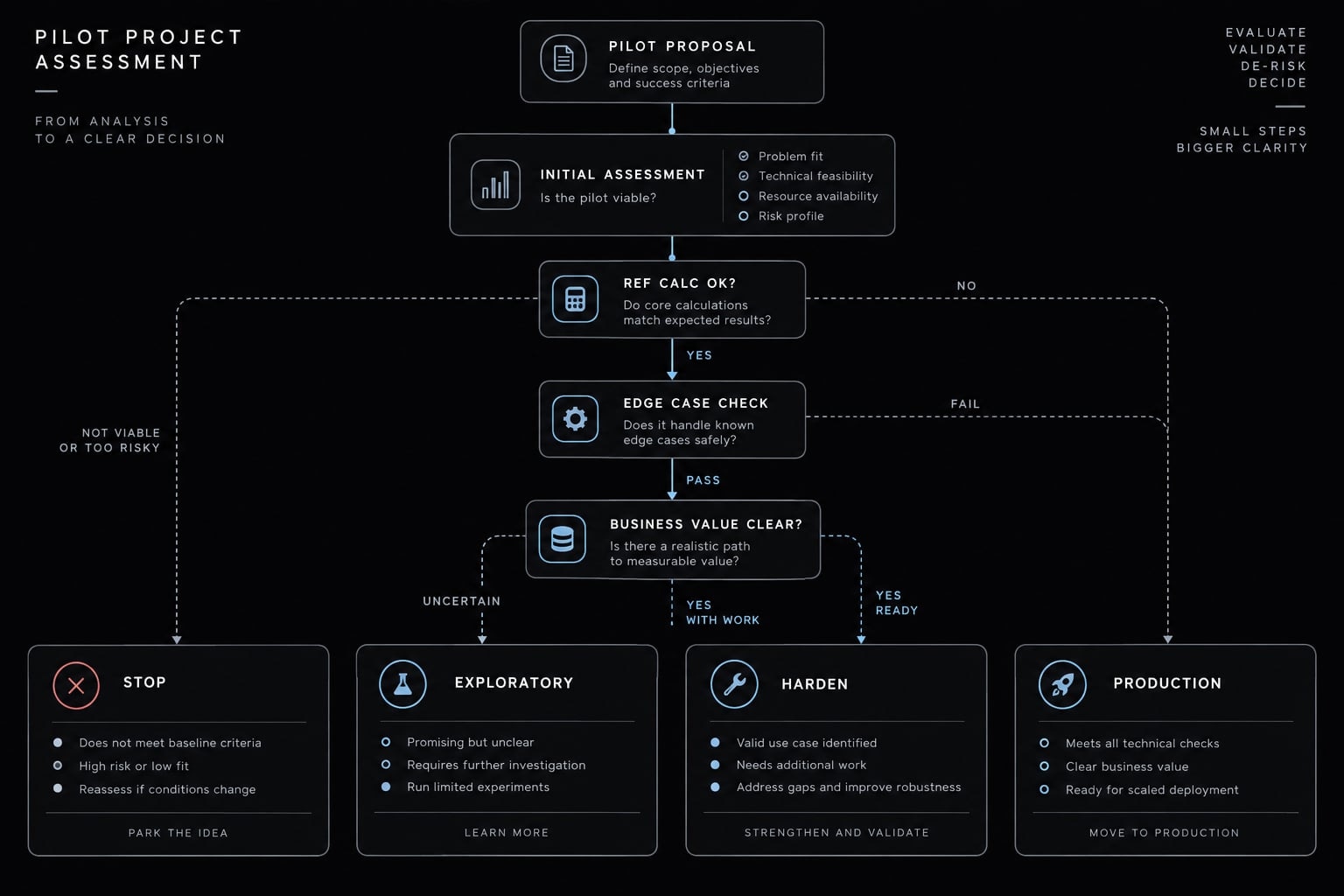
Start with one bounded question and approved data. Judge whether the workflow produces an inspectable, checked, reusable analysis-not merely an attractive screen.
Pilot procedure
- Select one question and its intended use. Keep the decision narrow enough to check.
- Choose non-sensitive data or an approved, minimized extract. Confirm permitted processing.
- Define one or two metrics. Include units, population, windows, exclusions, and unknown handling.
- Establish an independent reference calculation. Do this before interpreting generated results.
- Request the specification and executable logic alongside the charts.
- Reconcile the population, numerator, denominator, and one segmented result.
- Introduce an edge case in a test copy. Confirm the expected treatment.
- Change one visual component. Inspect whether unrelated logic changed.
- Have another person rerun the saved artifacts against the same data version.
- Choose the next state: stop, retain as exploratory, harden for internal use, or assess separately for production.
If comparing tools, use the same data snapshot, definitions, expected outputs, and edge cases. Compare review and correction effort as well as generation effort. A tool that drafts quickly but obscures mistakes may be a poor fit for a recurring report.
Pilot decision record
Check | Pass condition |
|---|---|
Definition | Formula, unit, eligibility, period, exclusions, and unknown handling are explicit |
Data grounding | Source, grain, joins, coverage, and freshness are documented |
Inspectability | Reviewer can access the relevant executable logic |
Validation | Key results reconcile under aligned definitions; discrepancies are explained |
Edge cases | Expected outcomes match the specification |
Change control | Scoped edits preserve unrelated logic or expose changes for approval |
Reproducibility | Another person recreates the checked result from saved artifacts |
Security | Processing and access match the approved context |
Operations | Reuse has an owner and a plan for refreshes, failures, latency, and costs |
Apply the decision record to the cancellation example. Suppose the dashboard reconciles with the independent calculation, but changing a chart silently changes eligibility. Do not promote it to recurring reporting. Preserve the validated version, correct the editing workflow, add a regression check for eligibility, and retest.
Now suppose validation passes, but the expected association between prior support contact and cancellation requests is absent. That can still be a successful analytical result. The workflow answered the question without manufacturing the desired pattern.
A passing pilot supports a bounded conclusion about that task and environment. It does not establish general accuracy, security certification, or production readiness for unrelated workloads.
From conversation to evidence
Vibe analytics can make it easier to explore questions and draft candidate implementations. Specifications make analytical choices explicit. Independent validation checks whether those choices were implemented and interpreted appropriately. Permissions and operational controls determine whether the result is suitable for its actual use.
The goal is not to remove conversation from analytics. It is to preserve the connection between what you asked, what the data supports, what the system calculated, and what you can responsibly conclude.
Start with one approved dataset, one metric, and one independent reference calculation. Use that pilot to decide whether conversational analytics improves your workflow without weakening your evidence.
Frequently asked questions
What is the difference between "vibe coding" and "vibe analytics"?
- "Vibe coding" is a software development paradigm where natural-language prompts drive the generation of code and application features, often with minimal manual review.
- "Vibe analytics," in the context of this paradigm, refers to using the same conversational, prompt-led interaction to query data, draft visualization logic, and build dashboards.
While the former focuses on generating functional software, the latter focuses on generating business intelligence and data insights.
What makes vibe analytics unreliable for business reporting?
Not the conversation itself - the risk is apparent completeness before verification. The term implies a conversational, fast-paced workflow that can bypass rigorous analytical stages like data profiling, metric governance, and join verification.
An AI-generated dashboard might display a mathematically valid chart that is conceptually wrong—for instance, by using an undefined definition of "churn" or by failing to account for how different database tables join. Without explicit definitions and independent validation, the "vibe" (the AI's interpretation) may not align with the actual business logic required for accurate reporting.
How does conversational analytics change the role of a data analyst?
Conversational analytics shifts the analyst’s role from manual query writing to "analytical orchestration." Instead of writing SQL or configuring BI tools from scratch, the analyst becomes responsible for:
- Defining the specification: Establishing governed metric definitions and data relationships.
- Inspecting generated logic: Reviewing the queries or formulas drafted by the AI for implementation errors.
- Validating outputs: Ensuring the generated results reconcile with independent checks.
- Establishing controls: Determining the appropriate level of review for the intended use (e.g., distinguishing between a one-off hypothesis check and a production-facing report).
Is "vibe coding analytics" the same as product analytics?
No. While the terms are sometimes used in related discussions, they analyze different things:
- Vibe analytics (as discussed here) analyzes business or operational data through conversational prompts.
- Product analytics for vibe-coded apps analyzes how users interact with the software, such as tracking abandonment in an onboarding funnel, to see if the AI-generated application is actually usable.
- Engineering analytics analyzes the development process itself, tracking metrics like token usage, cycle time, and review rework to monitor the performance of coding agents.
Read more:
- Vibe coding SEO: Build AI-powered assets without developers
- Vibe coding PRD template: Streamline AI development projects
- Vibe coding threat model: Secure AI-assisted development guide
Conclusion
Vibe analytics streamlines the journey from natural-language questions to analytical dashboards, but conversational speed should never replace analytical rigor. By combining prompt-driven discovery with clear metric definitions, data validation, and operational controls, organizations can transform simple AI interactions into trustworthy, decision-ready insights.