Vibe code file upload: Prompts, security checks and fixes
A vibe-coded file upload that works locally can easily fail after deployment due to missing storage, broken permissions, or orphaned files. Because successful generation does not guarantee security or correctness, this guide helps you build and troubleshoot PDF and image uploads for an authenticated customer portal - covering storage decisions, security controls, and deployment checks so you can verify the entire file lifecycle rather than just a working button.
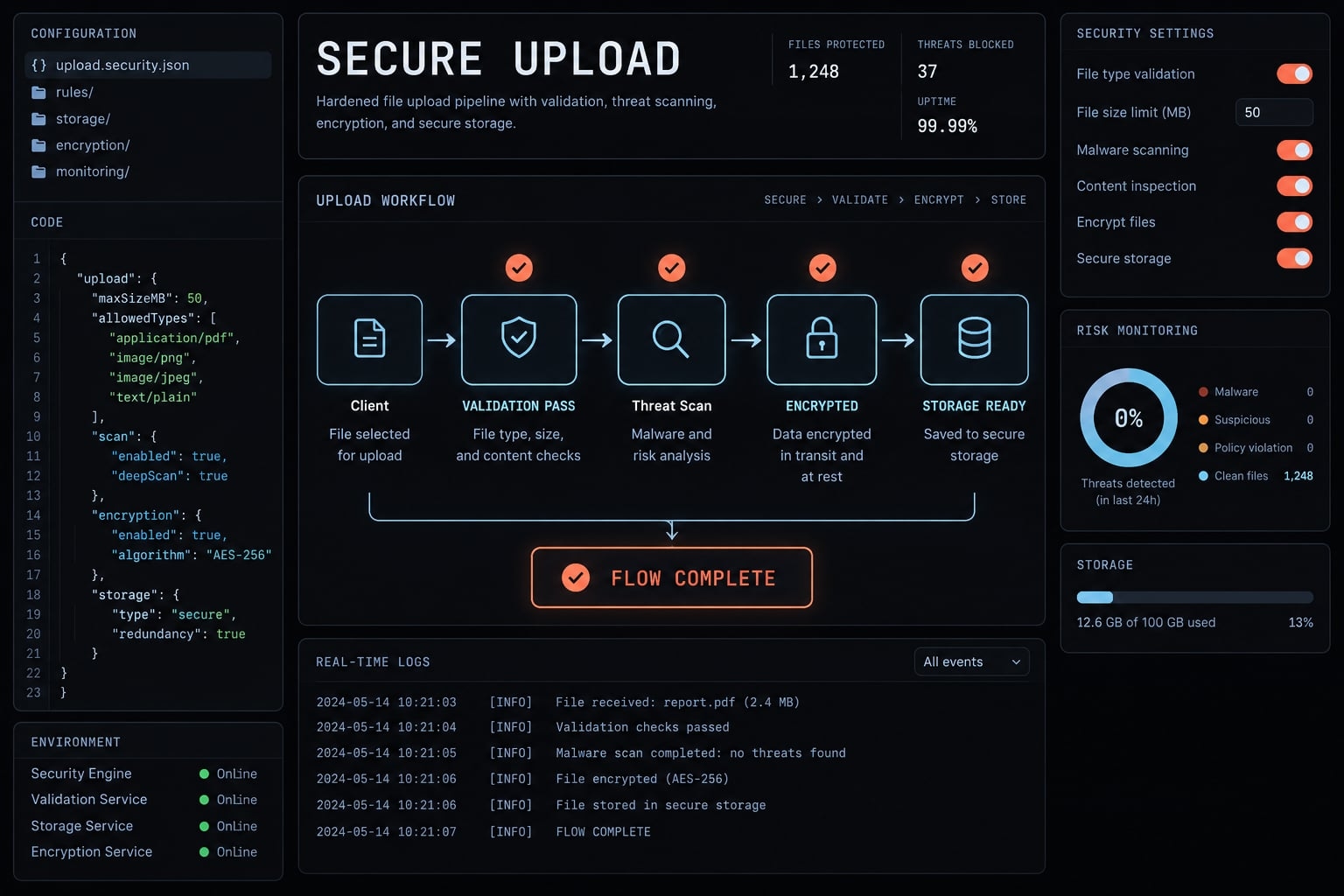
What a vibe-coded file upload actually needs
A vibe-coded file upload is a feature built with AI assistance that transfers user-selected content into application-controlled storage. A complete implementation also governs identity, permissions, validation, metadata, retrieval, and cleanup. AI changes how the code is produced; it does not change the application’s responsibility to enforce those boundaries.
The file upload workflow has seven conceptual stages:
- Select the file.
- Authenticate the user and authorize the operation.
- Transfer content.
- Validate or quarantine content.
- Finalize storage.
- Record or reconcile metadata.
- Control retrieval, replacement, deletion, and retention.
This is not a universal execution order. Direct uploads may place untrusted content in restricted storage before validation.
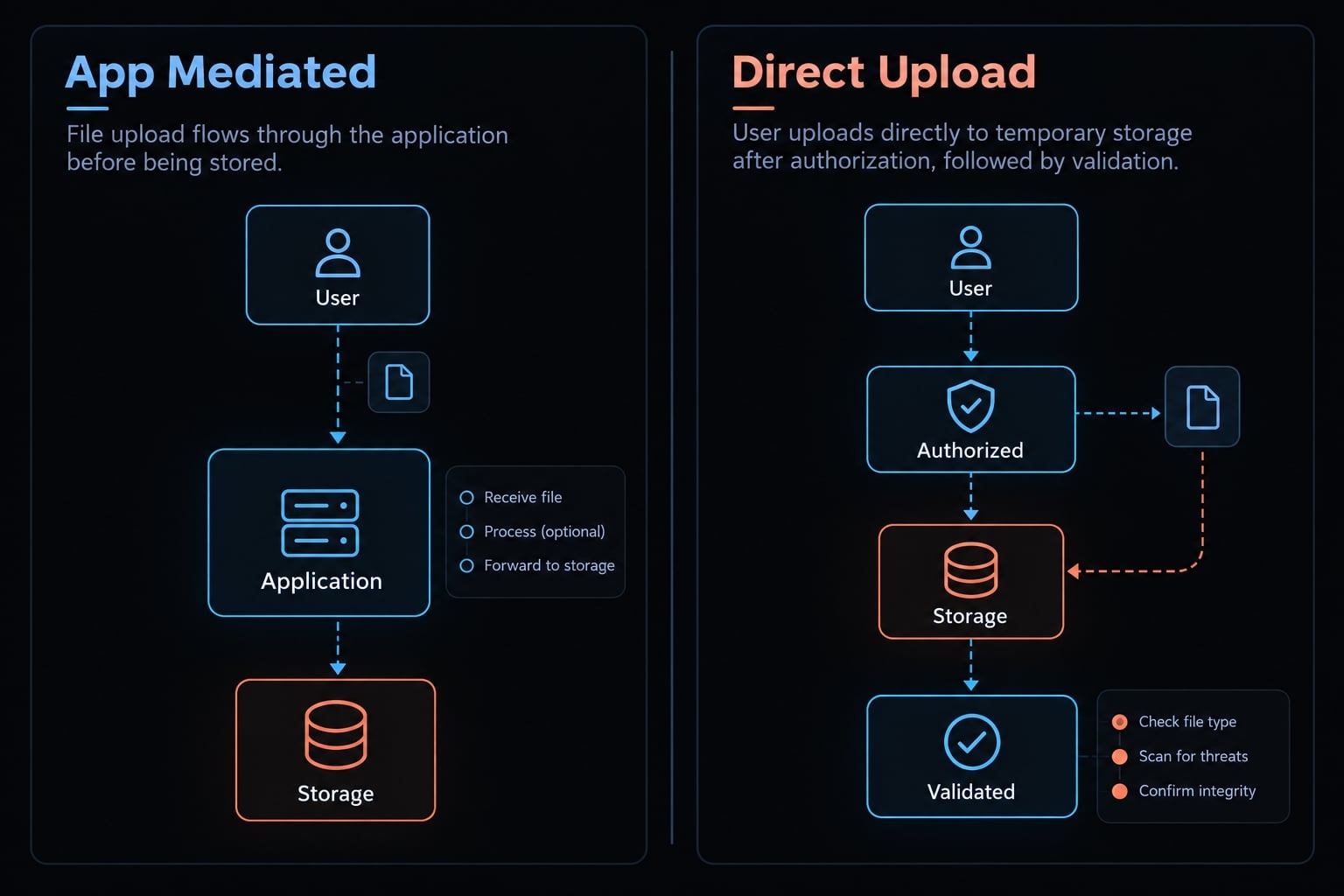
The standard application-Mediated upload flow
Browser → application → storage.
The browser commonly uses multipart/form-data, an encoding combining form fields and file content. The application checks permissions and processes the transfer. Streaming - processing data incrementally - avoids unnecessary whole-file buffering, but bandwidth and runtime limits still apply.
The direct-to-storage upload flow
Authorization → temporary upload permission → browser transfer → verified finalization.
A signed URL can grant scoped, temporary upload access. The application or trusted service must inspect the resulting object before releasing it. A browser’s “upload complete” message is insufficient proof.
File content and file metadata are different assets
Content is the file’s bytes. File metadata includes owner or tenant, storage key, original name, detected type, size, and status. Original names are display metadata. Unpredictable storage keys do not replace authorization.
Define the upload requirements before generating code
Decide the behavior before generating the interface. In an illustrative support portal, “customers can attach documents” leaves ownership, retention, and deployment persistence unspecified. Those gaps can create document exposure, abandoned storage, or broken support cases.
File-upload requirements table
Use these upload requirements as decisions, not universal defaults.
Decision | Specify | Portal example |
|---|---|---|
Types | Narrow allowlist | PDF, JPEG, PNG |
Size | Enforceable file size limit | Example: 10 MB per support document |
Volume | Count, rate, and storage quotas | Limits per case and tenant |
Storage | Durable destination | Private storage compatible with hosting |
Access | Upload and object permissions | Authorized case participants only |
Naming | Storage identity and display name | Generated key; separate original name |
Retention | Expiry and exceptions | Defined case-closure policy |
Scanning | Required checks and pending behavior | Unavailable until required checks pass |
Deployment | Runtime and upstream constraints | Proxy, credentials, persistence |
Testing | Positive and rejection cases | Ownership, interruption, deletion |
Demo-ready vs. Production-ready file upload
“Production-ready” means reviewed against stated requirements, not universally secure or compliant.
Area | Demo-ready behavior | Production-ready evidence |
|---|---|---|
Validation | Browser rejects some files | Trusted checks reject invalid content |
Access | Unrestricted retrieval works | Object-level authorization passes tests |
Persistence | File survives one request | Survives intended deployments and restarts |
Limits | Small sample succeeds | Size and usage limits are enforced |
Naming | Original name becomes key | Independent keys prevent unintended overwrite |
Failure handling | Success path works | Partial operations reconcile |
Operations | Manual configuration | Documented settings and cleanup monitoring |
Durable local storage can satisfy production requirements in controlled hosting. The issue is deployment design, not whether storage is local.
Acceptance criteria the AI agent must satisfy
Write observable pass/fail conditions:
- An authorized, allowed upload becomes retrievable.
- Invalid types and excessive sizes are rejected.
- Unauthenticated uploads are denied.
- Cross-user or cross-tenant retrieval and deletion are denied.
- Interrupted operations reconcile without permanent orphaned objects.
- Deletion removes content or schedules verifiable cleanup.
- The workflow passes on the intended hosting platform.
These acceptance criteria make input validation, permissions, and storage architecture inspectable rather than implied.
Use a complete vibe-coding prompt for file upload
A useful AI coding prompt specifies controls, tests, and deployment assumptions—not just a component. Fill in the placeholders before using this specification.
Copy-ready secure file-upload prompt
Implement file upload for [WORKFLOW] in this existing project.Configuration:- Allowed formats: [FORMATS]- Maximum bytes per file: [LIMIT]- Per-user/tenant count, rate, and storage quotas: [QUOTAS]- Storage and hosting: [PROVIDER / DEPLOYMENT]- Upload, view, replace, and delete permissions: [RULES]- Required scanning and pending-state behavior: [POLICY]- Retention and deletion: [POLICY]Before editing:Inspect the framework, authentication, authorization, database,error handling, and test conventions. Reuse existing patterns.Identify proxy, runtime, and storage constraints.Present assumptions, proposed changes, and missing decisions.Separate application changes from infrastructure configuration.Wait for human approval.Implementation:Authenticate users and enforce object-level and tenantauthorization, including access to the parent business record.Enforce allowed types, byte limits, and usage quotas throughtrusted controls appropriate to this upload architecture.Treat filenames and declared MIME headers as untrusted.Use trusted type detection and format validation appropriateto supported formats. Document their limitations.Use a generated storage key independent of the original name.Prevent unintended overwrite. Keep content private.Record owner/tenant, storage identity, original name, detectedtype, actual size, and lifecycle status.For direct uploads, issue narrowly scoped temporary permission.Keep unvalidated content inaccessible to ordinary retrieval.Verify the actual object and required checks before finalizing;do not trust browser completion or browser-supplied metadata.Ensure the finalized object cannot be silently replaced.Avoid unnecessary whole-file buffering. Distinguish HTTPmultipart form submission from provider multipart upload,which transfers an object in parts.Handle failed, partial, expired, retried, and orphaned uploads.Make cleanup retryable. Return safe errors without secrets.Add success, invalid-content, oversized, unauthorized,cross-user/tenant, interrupted-upload, and deletion tests.Document credentials, permissions, limits, storage settings,cleanup jobs, and deployment requirements.Report tests actually run, actual results, tests not run,remaining assumptions, and unresolved risks.
How to adapt the prompt
Keep the AI coding prompt specific to the workflow:
- Customer documents: Define permitted formats, scanning decisions, and retention.
- Large training media: Request direct upload and provider-supported resumability.
- Sensitive records: Specify access scope, encryption, audit logging, and location requirements.
- Dataverse: Request native File column operations through verified supported APIs.
Upload authorization and secure file handling remain requirements in every variation.
Ask the agent to plan before it edits
Require four checkpoints:
- Inspect current project patterns.
- Propose the upload flow and assumptions.
- Separate code changes from infrastructure configuration.
- Obtain human approval.
A strong prompt improves specification. Project context, tooling, implementation, and verification still determine the result.
Apply the minimum security controls
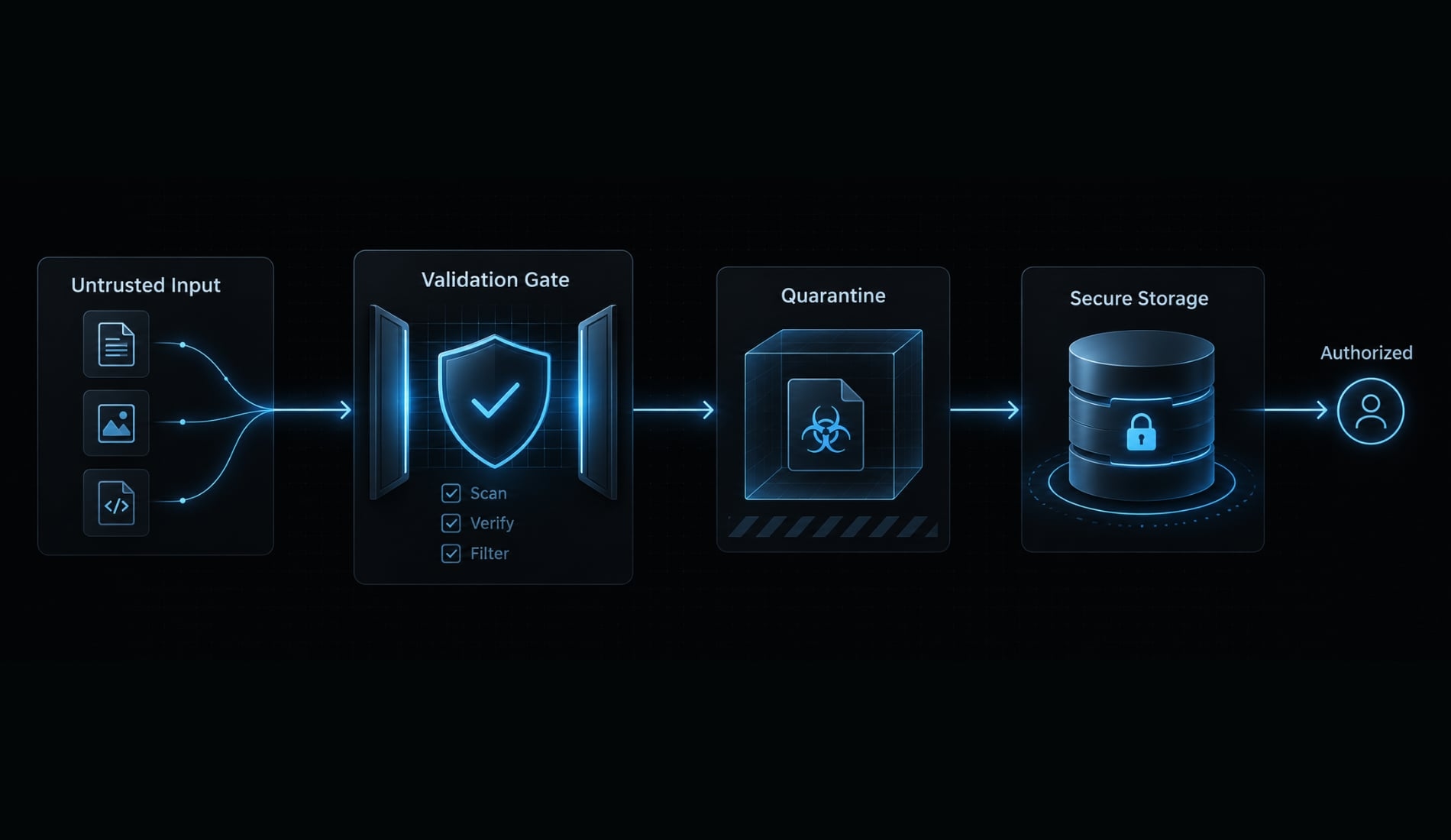
Treat uploaded files as untrusted until the required checks pass. The OWASP File Upload Cheat Sheet recommends layered protections rather than relying on one extension check or scanner.
Client-side validation improves UX but is not a security boundary. Authentication establishes identity; authorization determines whether that identity may act on a particular file.
Minimum file-upload security table
Risk | Consequence | Minimum control |
|---|---|---|
Path traversal | Writes outside the intended directory | Independent keys; local path containment |
Extension spoofing | Disallowed content appears permitted | Allowlist plus trusted content checks |
False MIME headers | Misleading declared media type | Detect and validate supported formats |
Excessive size | Resource exhaustion or unexpected cost | Architecture-enforced byte limits and quotas |
Public exposure | Confidential documents become accessible | Private storage and restricted delivery |
Collisions or overwrite | Existing content is replaced | Random keys plus overwrite prevention |
Broken access control | Another tenant’s document is exposed | Object and tenant checks on every action |
Active content or stored XSS | Uploaded scripts execute in browsers | Restrict active formats and isolate delivery |
Malicious content | Harmful files reach users or processors | Required scanning; quarantine until checks pass |
Orphaned files | Costs and retention failures accumulate | Expiry, reconciliation, retryable cleanup |
XSS means cross-site scripting: attacker-controlled content executing in a browser context.
Do not use the original filename as a path
- Conceptually unsafe:
uploadDirectory + suppliedFilename. - Safer identity:
generatedStorageKey, with the original name stored separately for display.
String replacement alone is insufficient because path interpretation varies. For local storage, verify destination containment and store files outside public or executable directories. Random names reduce collisions; conditional writes or equivalent controls prevent unintended overwrite.
Validate type and content server-side
Extension, declared MIME type, detected signature, and format validity are different signals. MIME is a media-type label; the browser’s declaration is not evidence.
Trusted MIME validation should use content checks appropriate to the format. PDFs and images may require parsing beyond their opening bytes. Magic-byte inspection does not prove harmlessness, and malware scanners can miss threats.
Exclude HTML, SVG, and other active formats unless explicitly required and safely handled. Unrestricted file upload increases risk, but exploitability depends on storage, processing, and delivery behavior.
Protect storage and retrieval
Authorize before serving content or issuing download URLs. Signed URLs are bearer credentials: Their holders can use the granted access until expiration, subject to provider conditions.
Private storage does not prevent application-level authorization mistakes. Check view, replace, and delete operations separately. Use safe download headers and isolated delivery where appropriate.
For cookie-authenticated browser requests, apply relevant CSRF protections-controls against unwanted actions initiated through another site.
Choose the right storage model
Storage must survive your deployment model. Private object storage is a common default, but every option requires permissions, lifecycle management, and operational planning.
Storage comparison table
Option | Suitable use | Advantage | Limitation |
|---|---|---|---|
Local disk | Controlled hosting with persistent volumes | Simple access and infrastructure | Requires persistence, backups, and multi-instance design |
Database binary field | Modest files closely tied to records | Can simplify transactional consistency | Increases database and backup load |
Dataverse File column | Applications governed through Dataverse | Platform-native permissions and operations | Permissions and supported operations need configuration |
Object storage | Shared, scalable file workloads | Separates file traffic from application compute | Requires access, finalization, and lifecycle integration |
A local filesystem is viable when its persistence and availability are intentional. Temporary runtime directories are not a substitute for durable storage. Database binary storage may suit constrained workloads, but evaluate backup growth and retrieval patterns. Storage-provider durability does not automatically provide application-level recovery, retention, or deletion policies.
Practical storage decision rules
- Confirm persistence: Files must survive restarts, deployments, and instance changes.
- Prefer native governance when useful: Platform permissions may fit existing business records.
- Assess scale and portability: Shared access should not depend on one application instance.
- Match size and volume: Verify current provider limits and supported transfer methods.
- Separate concerns: Manage content and business metadata distinctly, even when both remain within a platform’s record model.
Consult the chosen provider’s documentation for upload constraints, signed permissions, lifecycle rules, and incomplete-transfer cleanup. Do not assume equivalent behavior across providers.
Fix common vibe code file upload errors
Diagnose the failing layer before changing code. File upload troubleshooting often involves the browser, proxy, runtime, storage service, and finalization process - not just the upload handler.
Common problems and recommended checks
Symptom | What to inspect |
|---|---|
No file received | Field names, applicable multipart parsing, middleware order, request encoding |
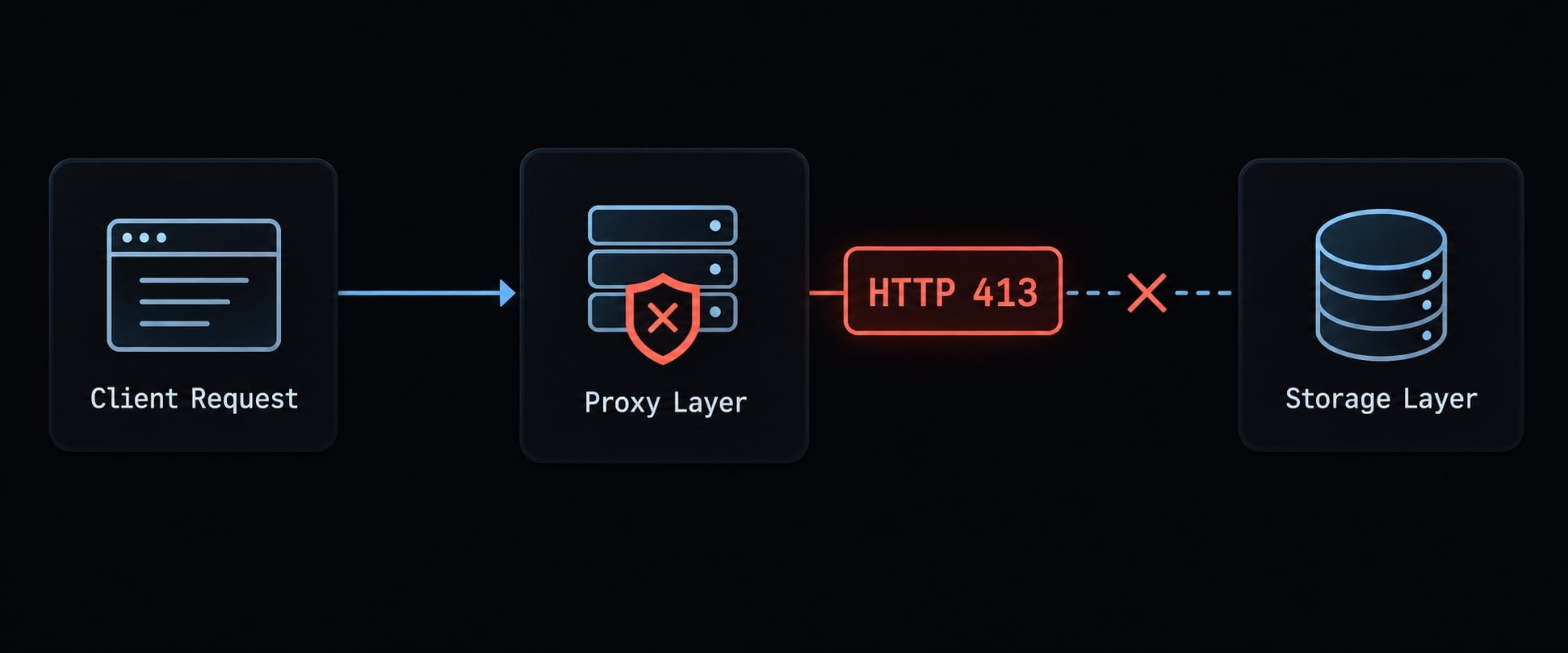
HTTP 413 | Which CDN, proxy, framework, runtime, or storage layer rejected the size |
Hangs or times out | Buffering, transfer completion, runtime timeouts, storage response |
Fails after deployment | Filesystem behavior, credentials, permissions, environment configuration |
File disappears | Persistent storage, instance changes, shared-volume behavior |
Download fails | Storage key, metadata, validation status, authorization |
CORS error | Preflight and actual response; precise allowed origins, methods, headers |
Corrupted large file | Completed transfer, actual size/checksum, chunk order, supported upload API |
Content remains after deletion | Cleanup status, retries, failed storage deletion |
Cross-user exposure | Object ownership, parent-record access, tenant authorization |
Signed URL fails | Expiry, method, signed headers, exact key, signing permissions |
CORS - cross-origin resource sharing - controls browser cross-origin access; it is not authorization.
When sending FormData, normally let the browser set the multipart Content-Type and boundary. MDN’s Using FormData Objects documents this behavior. Manually setting the header can omit the boundary needed to parse the request.
A simple diagnostic sequence
- Reproduce with a small, permitted file.
- Inspect the browser’s failing request and response.
- Identify the component that returned the error.
- Check authentication, authorization, and request encoding.
- Trace the application transfer or signing, storage transfer, and finalization for direct uploads.
- Compare stored bytes, key, size, and metadata status.
- Inspect deployed limits, permissions, and persistence.
- Retest success, rejection, and interrupted-transfer cases.
Do not broadly raise limits, disable authorization, or allow every origin. Database and storage deletion are usually separate operations; coordinate them with retryable cleanup.
Power apps code apps and dataverse considerations
A Dataverse file upload through a File column differs from a Canvas attachment control. Check Microsoft Learn’s Use file column data and Power Apps Code Apps documentation for currently supported APIs, generated client capabilities, and environment permissions.
Block-based operations may apply to supported workflows. Do not assume an existing generated client exposes every required file operation.
Review AI-generated upload code before deployment
Verification is a separate stage from generation. A secure AI coding workflow requires evidence about behavior and configuration, not confidence in the generated explanation.
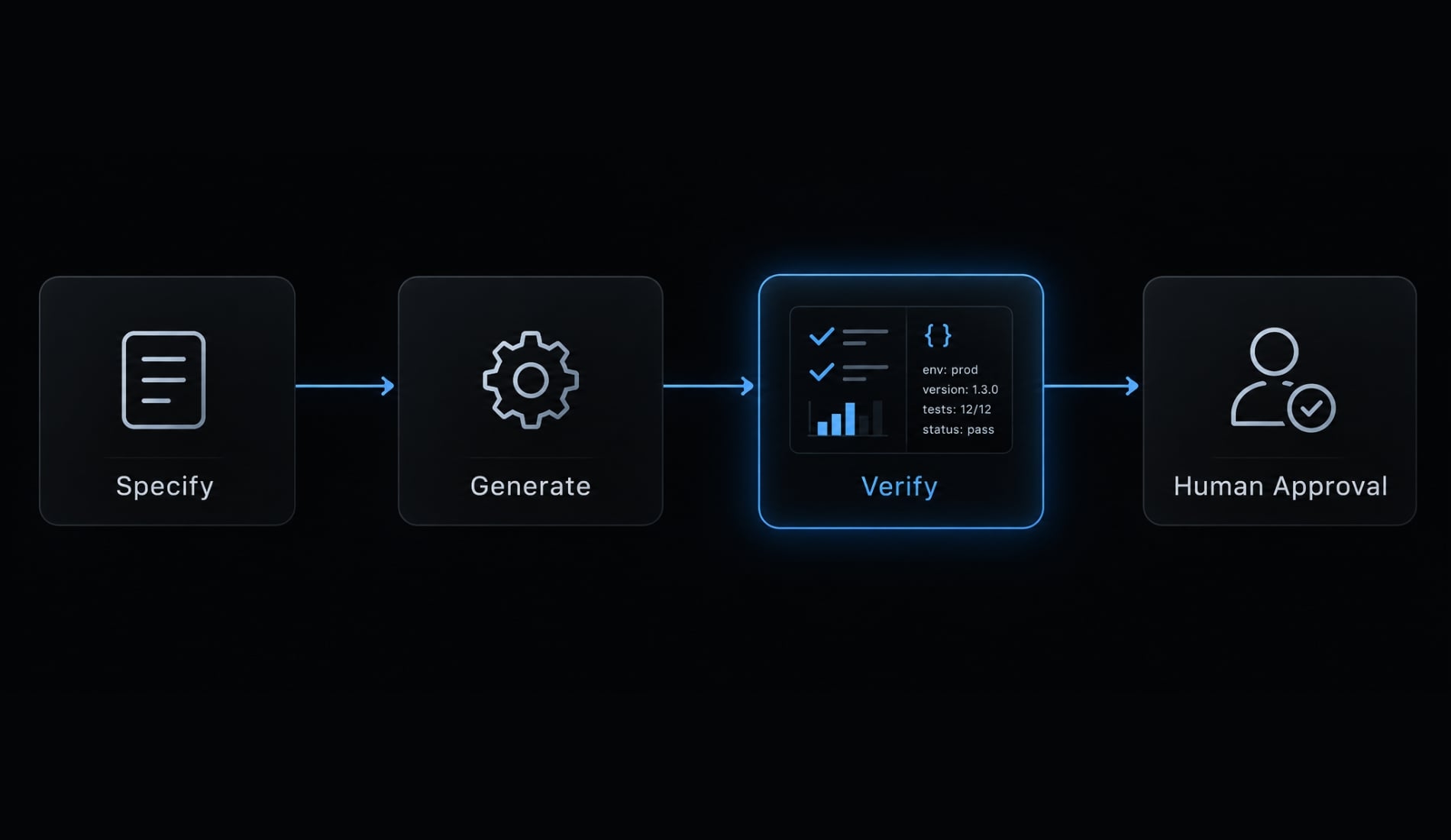
The specify, generate, verify workflow
- Specify: Produce agreed requirements and measurable acceptance criteria.
- Generate: Implement within the project’s established conventions.
- Verify: Collect test results, inspect configuration, and obtain human review.
Useful evidence includes cross-user rejection tests and a sanitized record containing owner, storage key, actual size, detected type, and status.
Use separate review roles
Assign responsibility for requirements, implementation, security, testing, deployment, and human approval. These are responsibilities, not a requirement for six people.
Multiple agents do not provide independent assurance merely because their role labels differ. Human-in-the-loop review keeps an accountable person responsible for unresolved assumptions. Call the work a security audit only when its scope genuinely supports that description.
Run automated checks without overtrusting them
Include:
- Dependency scanning for known vulnerable packages.
- Static application security testing for suspicious code patterns.
- Authorization and ownership tests.
- Storage configuration inspection.
- Negative and interrupted-upload tests.
Review findings and exclusions. Scanners can miss vulnerabilities and do not establish business-rule correctness. An authorized user accessing the wrong tenant’s document may require a targeted behavioral test.
Package the workflow for reuse
Store the specification, checklist, and regression tests in project instructions, AGENTS.md where supported, or reusable skills.
AgentKit provides reusable skills, specialized subagents, and automated workflows for coordinating development and review tasks. Teams can use those building blocks to package upload requirements and repeatable checks rather than reconstructing instructions each time. This supports consistency; it does not certify security or replace human approval.
Final production checklist
Use this upload security checklist as an evidence-based release gate for a production-ready file upload.
- Unauthenticated uploads are rejected.
- Object and tenant permissions govern every action.
- Narrow type allowlists and trusted content checks pass.
- Byte, rate, count, and storage limits are enforced.
- Independent storage keys prevent unintended overwrite.
- Storage is private; delivery requires authorization.
- Direct uploads require verified finalization, where applicable.
- Required scanning blocks retrieval until checks pass.
- Persistence survives the intended deployment lifecycle.
- Partial, expired, and orphaned uploads receive cleanup.
- Retention and deletion produce verifiable outcomes.
- Cross-user retrieval and deletion tests reject access.
- Configuration and operational requirements are documented.
- Automated findings and unrun tests are reviewed.
- A human approves remaining assumptions and risks.
Every checked item needs a test, configuration record, or review decision. This is a minimum gate, not a compliance certification or exhaustive audit.
Frequently asked questions
What does "vibe coding" mean for file upload implementation?
Vibe coding is the practice of building software conversationally through AI agents. For file uploads, this means the AI generates code based on your intent, but it often defaults to the "happy path," which prioritizes functionality over security. Developers must explicitly prompt for security controls to avoid common vulnerabilities like path traversal or unchecked file types.
How do I prevent path traversal in AI-generated file uploads?
To prevent path traversal, never use the user-provided filename directly when saving files. Require your AI agent to generate a unique, randomized storage key (such as a UUID) and store the file outside the public web root. Always sanitize input and ensure the application path resolution is strictly controlled.
Can I trust an AI coding agent to validate file types?
No, you should not rely on an AI agent's default validation, which often trusts client-side MIME headers or file extensions. Require your agent to implement server-side validation that inspects magic bytes (file signatures) to verify the content truly matches the expected format, while blocking dangerous types like SVG or executables.
Are direct-to-storage uploads safer than application-mediated uploads?
Both are safe if implemented correctly, but they have different requirements. Direct-to-storage uploads reduce application bandwidth but require the application to issue time-limited, authorized signed URLs and verify the object post-upload. Application-mediated uploads are easier to manage but must include robust server-side processing, streaming, and strict request limit enforcement.
Why do AI-generated upload features often fail in production?
Failures typically occur because AI agents generate code for a local development environment that lacks production infrastructure. Common issues include incorrect permissions for storage directories, missing environment variables for cloud buckets, improper handling of multi-instance deployments, and failure to account for production-level rate or size limits.
What is the most critical check before deploying an AI-coded upload feature?
Before deployment, perform a security audit pass using a dedicated prompt that instructs the AI to check the endpoint against OWASP standards. Ensure your acceptance criteria include negative tests, such as verifying that unauthenticated users, invalid file types, and excessively large files are rejected by the system.
Read more:
- Vibe coding security: Risks and pre-deployment checklist
- Vibe coding admin dashboard: Practical guide for AI builds
- Vibe coding a customer portal: Process, tools and checklist
Conclusion
A reliable vibe-coded file upload follows a strict specify-generate-verify workflow that prioritizes permissions, storage durability, and cleanup over a working button. Because direct transfers, private buckets, and scanners each solve only part of the problem, you should copy the provided prompt and checklist into your project instructions, enforce rigorous deployment tests, and require concrete evidence of security before releasing the feature.