Agent skill security: Risks, threat models and best practices
Agent skill security: Risks, threat model and best practices
AI agent skill security is critical because these reusable modules allow AI to interact directly with files, commands, credentials, and deployment systems-exposing operational workflows to malicious, compromised, or overly permissive configurations. Because a skill's actual risk depends on its source, code, dependencies, and execution authority, this guide provides a practical threat model, permission matrix, runtime controls, and an incident-response workflow to keep your AI agents secure.
What is agent skill security?
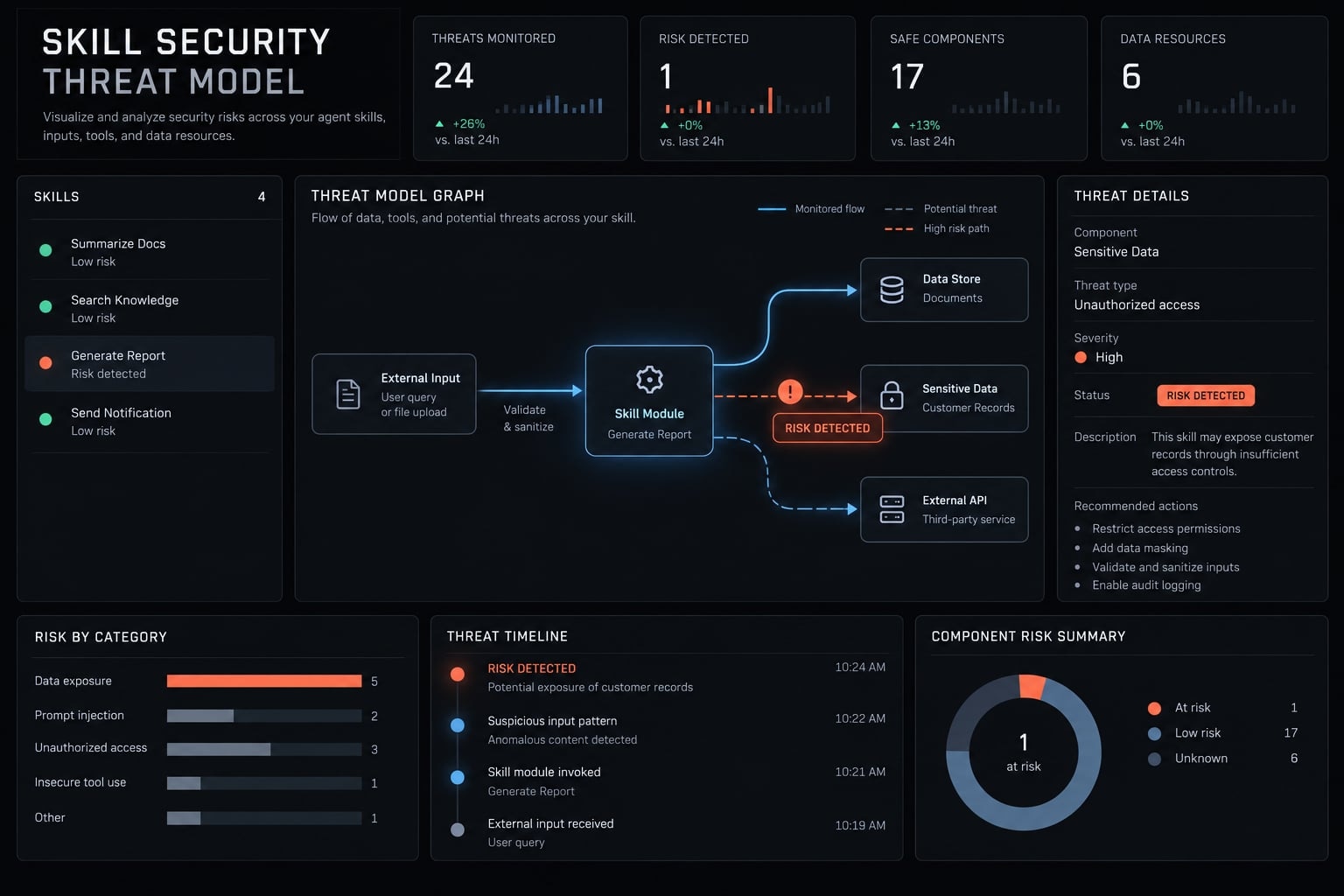
Agent skill security is the practice of verifying, restricting, isolating, and monitoring reusable agent capabilities throughout sourcing, installation, execution, updating, revocation, and removal. It covers instructions, scripts, dependencies, permissions, connected tools, credentials, external services, and the skill’s observable runtime behavior.
Evaluating AI agent skill security requires going far beyond inspecting a single instruction file. Security must cover the full lifecycle, including who published the skill, which version was approved, what it can access, how it behaves, and how it can be disabled.
An Agent Skills implementation may range from a documentation-only folder to a workflow that coordinates shell commands, package installation, Model Context Protocol tools, and external APIs. Risk should therefore be evaluated by capability and access scope, not file count.
What can an agent skill contain?
SKILL.mdor instruction files: Define when and how the capability should operate.- YAML or JSON metadata: May control discovery, execution, or tool selection.
- Skill manifest: Declares capabilities, requirements, and permissions where supported.
- Executable scripts: Python, JavaScript, Bash, or other files that create direct effects.
- Dependencies: Introduce conventional software supply-chain and vulnerability risks.
- Workflow logic: Determines task sequencing, tool use, and decision points.
- Templates and assets: May expose data or influence generated artifacts.
- Hooks and configuration: Can change startup behavior or persist beyond one session.
- Memory: May retain sensitive information or untrusted instructions.
- MCP tools and services: Extend access to external data, applications, and infrastructure.
Official Agent Skills implementations can differ across platforms. Publishers and users should verify the current platform specification rather than assuming identical formats or permission behavior.
Why skills are more than prompt templates
Prompt | Agent skill |
|---|---|
Primarily influences interpretation or output | May coordinate tools, files, scripts, dependencies, and services |
Usually instruction-focused | May create direct operational effects |
Risk centers on interpretation and data exposure | Risk also includes execution, permissions, updates, and persistence |
Not every skill contains code. However, even an instruction-only skill can affect prompt security if its content redirects the agent toward unsafe tools or sensitive resources.
A simple threat model for agent skills
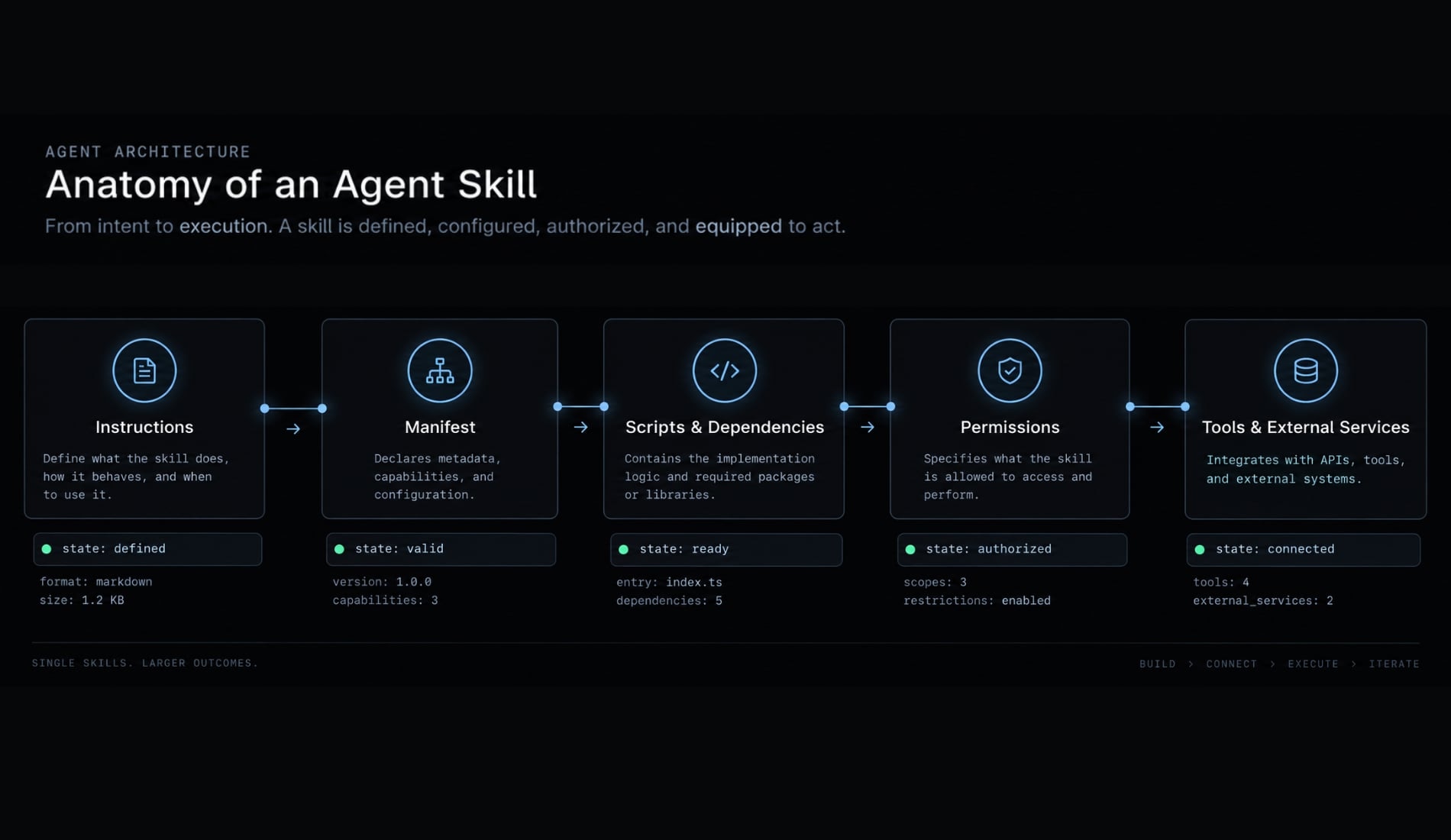
This practical threat modeling framework helps teams screen a skill without conducting a formal security assessment.
- What untrusted instructions or inputs can the skill receive?
- What sensitive resources can it access?
- What actions can it perform?
- Where can it send data or persist changes?
Combined capabilities matter more than labels such as “trusted,” “third-party,” or “internal.” A single permission does not prove harmful intent, while several moderate permissions can create a critical attack path.
1. What untrusted instructions or inputs can the skill receive?
Inputs may come from repository files, web pages, documents, emails, issue tickets, generated files, or unknown publishers. These sources can contain untrusted instructions, including content hidden from normal visual inspection.
Prompt injection means instructions that attempt to redirect or manipulate model behavior. A trusted agent can still be influenced when it processes untrusted content as part of its working context.
2. What sensitive resources can it access?
Relevant resources include source code, private repositories, environment variables, API keys, SSH keys, cloud credentials, customer records, browser sessions, and persistent memory.
Access to one designated project directory is materially different from access to the entire home directory. The latter may expose credential stores, shell history, unrelated repositories, and personal configuration.
3. What actions can it perform?
Review capabilities in increasing order of potential impact:
- Read data.
- Modify data.
- Execute commands.
- Install packages.
- Publish or deploy.
- Delete resources.
- Change persistent configuration.
Destructive, externally visible, financial, or production-level actions should require explicit human approval.
4. Where can it send data or persist changes?
Network egress is outbound communication from the environment. It may include APIs, webhooks, remote servers, package registries, shared repositories, or telemetry endpoints.
Persistence means changes that remain after execution, such as modified agent settings, startup files, hooks, memory, or configuration. Persistent changes may not become apparent during the first run.
Practical capability comparison
A document-extraction skill limited to one non-sensitive directory, without shell access or network egress, has a constrained impact radius.
A skill that can read the home directory, access credentials, run arbitrary commands, and contact unknown endpoints creates a much higher risk. One realistic defensive attack path is:
Untrusted repository content → hidden instruction → environment variable access → outbound request
The concern is the capability combination: Untrusted input, sensitive data, powerful tools, and an available route for data exfiltration.
The most important agent skill security risks
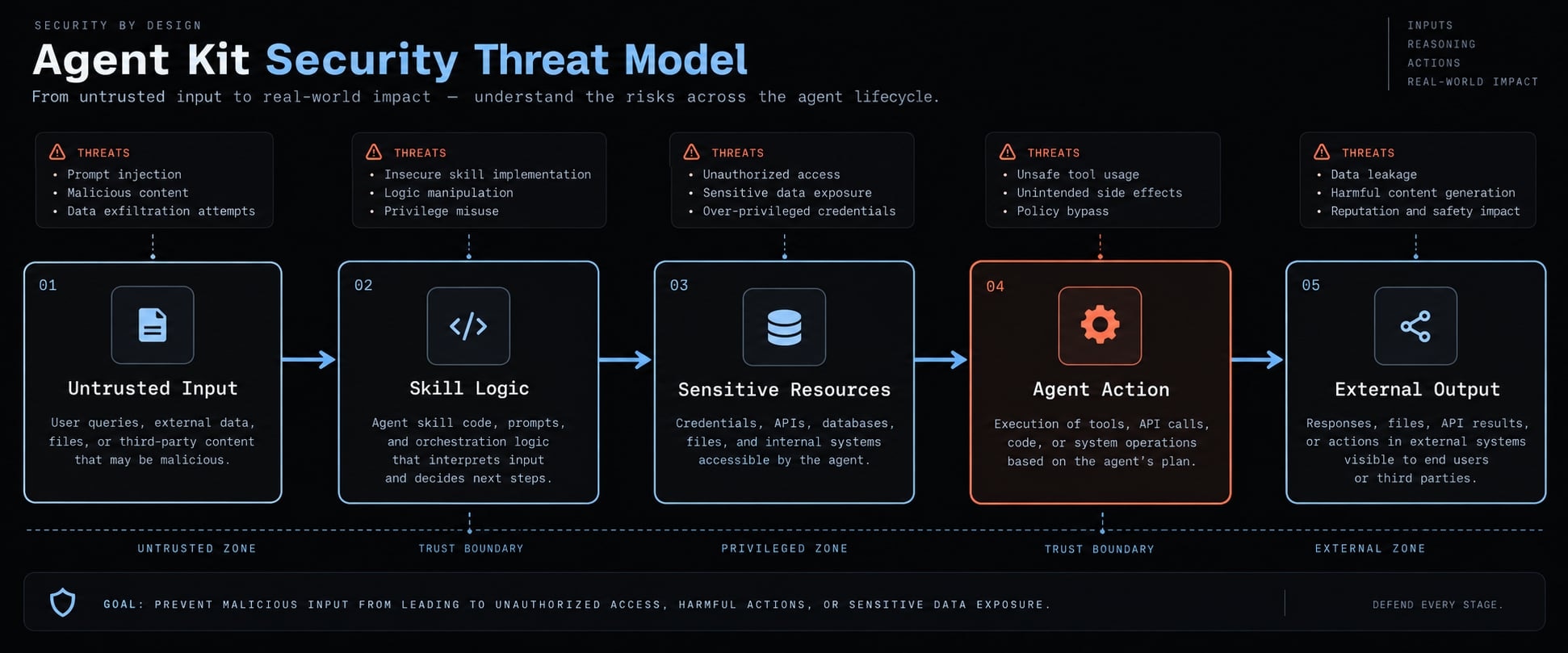
The principal agent skill security risks arise when a skill is malicious, compromised, vulnerable, or over-privileged:
- Malicious: Intentionally designed to cause harm.
- Compromised: Previously legitimate but altered through account or repository takeover.
- Vulnerable: Contains exploitable or unsafe code.
- Over-privileged: Requests more access than its stated task requires.
These conditions overlap with conventional software supply chain security, but skills add model-directed tool selection and exposure to untrusted context.
Risk | Typical priority | Main exposure | First control |
|---|---|---|---|
Arbitrary shell execution | Critical | Full user-level command execution | Deny or require approval |
Broad credential access | Critical | API, cloud, SSH, or production secrets | Inject scoped credentials only |
Unrestricted network egress | High | External transmission of data | Deny by default; allowlist destinations |
Broad filesystem writes | High | Code, settings, or persistence changes | Restrict writable paths |
Unverified dependencies | High | Malicious or vulnerable packages | Pin and scan dependencies |
Automatic updates | High | Unreviewed behavior changes | Require update reapproval |
Memory or configuration writes | High | Persistent behavior manipulation | Restrict and log changes |
Documentation-only manipulation | Medium | Unsafe agent interpretation | Separate instructions from content |
Priority changes with the environment, exposed data, runtime identity, and reversibility of actions.
Malicious or compromised skills
Malicious skills may use misleading descriptions, unexpected scripts, or hidden permission changes. A legitimate skill can also become unsafe after a publisher account compromise, repository takeover, or malicious update.
First-line controls include:
- Verify repository and publisher provenance.
- Compare the description with the manifest and code.
- Verify signatures or hashes where supported.
- Pin the reviewed version.
- Require reapproval after code or permission changes.
Cryptographic signing verifies origin and integrity. It does not prove that signed content is safe.
Direct and indirect prompt injection
Direct prompt injection | Indirect prompt injection |
|---|---|
Harmful instructions appear in the skill or user request | Harmful instructions are embedded in processed content |
The impact increases when an agent can access credentials, invoke powerful tools, modify systems, or communicate externally. OWASP guidance on prompt injection treats this as a trust-boundary problem, not merely an input-filtering issue.
Controls include:
- Separate trusted instructions from untrusted content.
- Minimize available tools and data.
- Require approval for sensitive actions.
- Monitor unusual tool calls.
- Use guardrails as one defensive layer.
No guardrail reliably identifies every context-dependent manipulation.
Excessive permissions and privilege escalation
An over-privileged skill may request full home-directory access, arbitrary shell execution, production deployment rights, or broad configuration writes.
Apply least privilege by granting only task-required access. Use separate development and production identities, deny access by default, and require approval before privilege expansion.
Credential and sensitive data exposure
Credentials may leak through environment variables, files, logs, tool output, generated artifacts, or external requests. Secret scanning helps identify hardcoded values but cannot protect secrets deliberately exposed to the runtime.
Use:
- Scoped, short-lived tokens.
- Task-specific credential injection.
- Redaction for logs and artifacts.
- Separate development and production secrets.
- Restricted network destinations.
Unsafe scripts, parsers and dependencies
Skill code remains subject to conventional software risks, including unsafe shell behavior, parser vulnerabilities, dependency confusion, vulnerable packages, and unpinned versions.
Apply code review, static analysis, dependency scanning, approved registries, version pinning, and isolated testing. The NIST Secure Software Development Framework provides a broader foundation for secure development practices. Static analysis and code scanning reduce risk but cannot detect every malicious or runtime-dependent behavior.
Uncontrolled network access and data exfiltration
A defensive exfiltration model is: Access → collect → transmit
Legitimate API access can become an exfiltration channel after prompt injection or compromise. Use deny-by-default egress, destination allowlists, request logging, upload restrictions, and controlled proxies where appropriate.
Insecure updates and version drift
A review loses value when the executed version differs from the approved version. Pin skill and dependency versions, record hashes, review changes, test updates, and maintain rollback instructions.
Weak inventory, monitoring and ownership
Shadow AI describes unapproved or unmanaged agent and skill use. It often develops when installation is easy but approval processes are slow or unclear. Maintain a skill inventory containing:
- Skill name and original source.
- Named owner.
- Version or hash.
- Approved permissions.
- Approval status.
- Last review date.
- Removal and rollback procedures.
Inventory and audit logging provide evidence. They do not prevent unsafe execution by themselves.
How to review an agent skill before installation
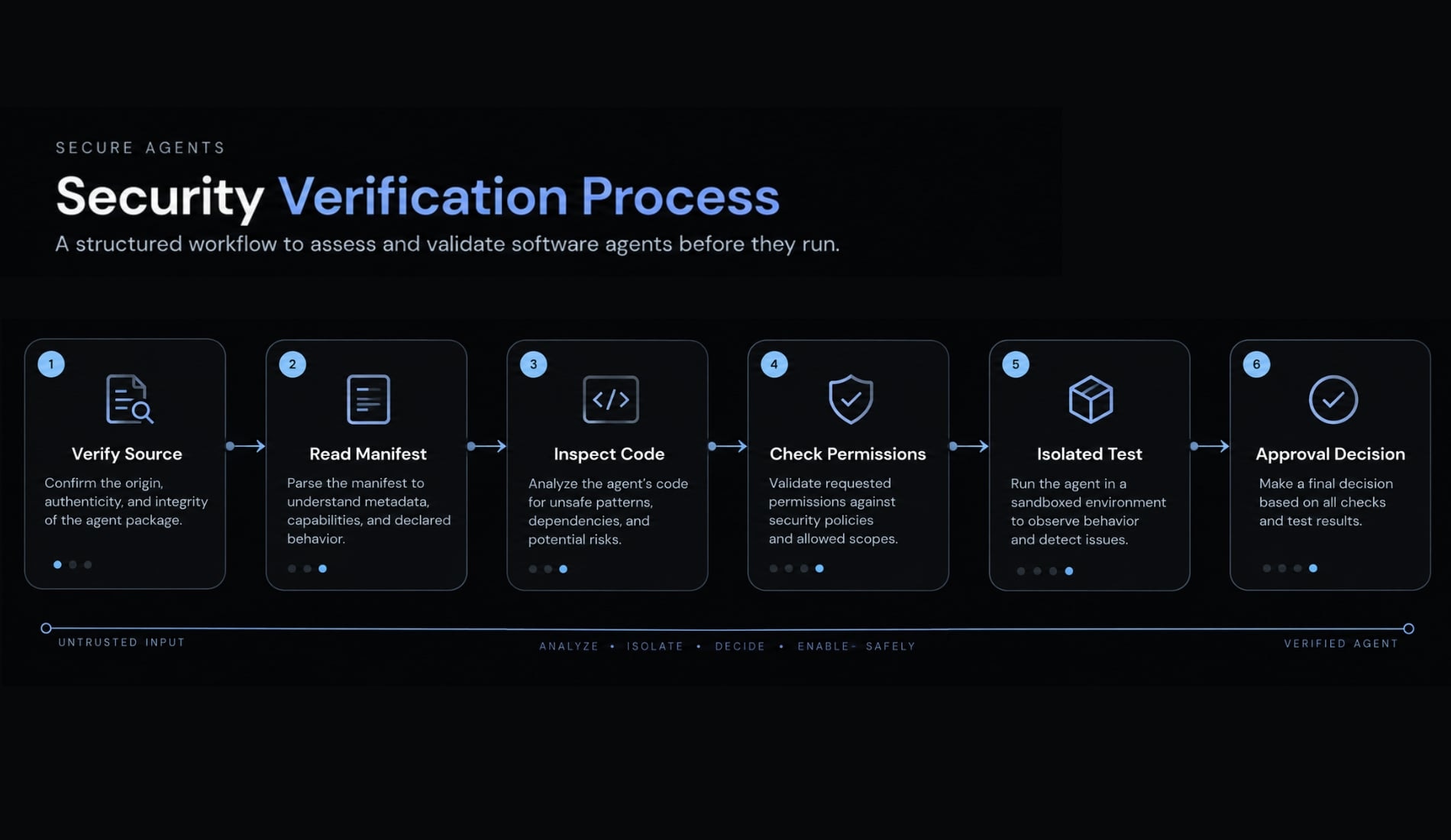
Source reputation alone is insufficient. Use this six-step skill review before enabling a capability.
- Verify the source and publisher.
- Read the manifest and instructions.
- Inspect scripts and dependencies.
- Compare permissions with the stated task.
- Pin, isolate, and test the reviewed version.
- Record an approval decision.
Step 1: Verify the source and publisher
Confirm the original repository, publisher identity, license, ownership, release history, and maintenance activity. Determine whether the source is an original project, fork, mirror, or copied repository.
Check signed artifacts or hashes where available. A verified publisher, download count, or repository popularity is a useful signal, not proof of safety.
Step 2: Read the manifest and instructions
Inspect SKILL.md, YAML or JSON metadata, permission declarations, referenced files, hooks, and startup behavior. Look for instructions that suppress approval, conceal actions, alter configuration, or exceed the stated purpose. The description and actual behavior should align.
Step 3: Inspect scripts and dependencies
Identify every executable file, subprocess, shell command, package-installation step, file operation, and external request. Review direct and transitive dependencies where practical.
Use static analysis, dependency scanning, secret scanning, and isolated behavioral testing as complementary controls. No single scanner provides complete coverage.
Step 4: Review permissions against the task
Ask:
- Which directories can it read?
- Which files can it modify or delete?
- Does it require shell access?
- Which credentials can it use?
- Which destinations can it contact?
- Can it modify memory, hooks, settings, or other skills?
- Can it deploy, publish, purchase, delete, or communicate externally?
Require a documented purpose for every permission. Narrow access when the requested scope exceeds that purpose.
Step 5: Pin, isolate and test
Record the skill version, dependencies, release, and hash. Test with non-sensitive data in a disposable or isolated environment when behavior carries elevated risk.
Observe file, process, and network activity. Review logs for unexpected destinations, configuration changes, package installation, or accidental secret exposure.
Step 6: Record an approval decision
Decision | Use when | Required record |
|---|---|---|
Approve | Behavior and permissions match the task | Owner, version, date, permissions |
Approve with restrictions | Useful skill requests avoidable access | Disabled tools, narrowed paths, restricted credentials or destinations |
Reject | Provenance is weak or permissions are unjustified | Rejection reason and blocked version |
Copyable agent skill security checklist
- Publisher identified.
- Original source confirmed.
- License reviewed.
- Version and hash recorded.
- Manifest and instructions inspected.
- Scripts inspected.
- Dependencies identified and pinned.
- Static and dependency scans completed.
- Filesystem permissions justified.
- Shell access restricted.
- Credentials scoped.
- Network egress restricted.
- Hooks and persistence reviewed.
- Isolated test completed.
- Owner assigned.
- Approval decision recorded.
- Rollback documented.
Agent skill permission risk matrix
A permission manifest is useful only when declared access is compared with the task, environment, data sensitivity, and reversibility of actions. Least privilege means granting only the access required for the current task and duration.
Capability | Typical risk | Recommended default | Escalation condition |
|---|---|---|---|
Read designated project files | Medium | Allow scoped paths | Sensitive source or customer data |
Read full home directory | Critical | Deny | Documented exceptional need |
Modify repository files | High | Restrict and review diffs | Protected or release branches |
Delete files | High | Require approval | Irreversible or shared data |
Execute fixed commands | Medium | Allowlist commands | Commands affect external systems |
Execute arbitrary shell commands | Critical | Deny or require approval | Controlled isolated environment |
Read environment variables | High | Allow selected variables only | Secrets or production values |
Use API or cloud credentials | Critical | Scoped, short-lived tokens | Production or privileged operations |
Install packages | High | Approved registry and pinned versions | New or unverified dependencies |
Access external networks | High | Destination allowlist | Uploads or unknown endpoints |
Modify memory or configuration | High | Restrict and log | Persistent behavioral changes |
Deploy or publish externally | Critical | Human approval required | Production or public release |
Call MCP tools | Medium–Critical | Allow approved tools only | Downstream tool has broad authority |
Permission risk depends on available data and connected systems. Several medium-risk capabilities can combine into a critical path, especially when read access, command execution, and network communication coexist.
Production, customer-data, financial, and deployment permissions require stronger network restrictions, identity separation, and approval. Temporary permissions should expire or be revoked when the task ends.
For Model Context Protocol tools, risk depends on the downstream permissions of the MCP server. The matrix is a decision aid, not a substitute for contextual review.
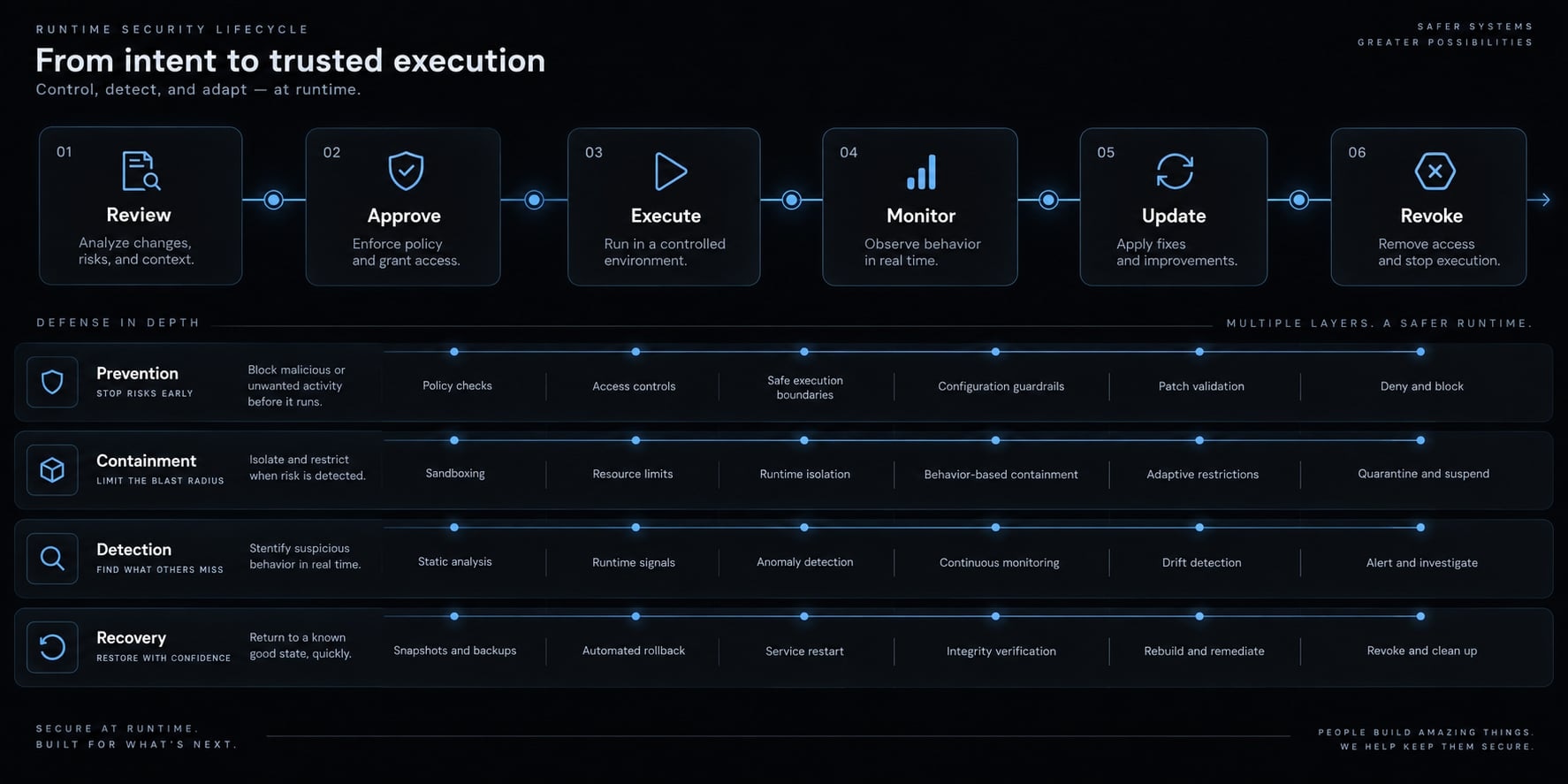
Secure agent skills at runtime and across their lifecycle
Effective runtime security combines four defensive layers:
Layer | Purpose |
|---|---|
Prevention | Reduce unnecessary access and unsafe execution |
Containment | Limit damage if behavior becomes unsafe |
Detection | Identify unexpected actions or changes |
Recovery | Revoke, restore, rotate, and improve controls |
Runtime protection cannot rely on one scanner, guardrail, signature, or sandbox. Apply these seven controls across the skill lifecycle:
- Enforce least privilege during execution.
- Isolate higher-risk skills.
- Restrict network egress.
- Protect credentials and sensitive data.
- Require approval for high-impact actions.
- Log and monitor activity.
- Control updates, revocation, and removal.
1. Enforce least privilege during execution
Restrict accessible files, commands, tools, and credentials. Separate development, test, and production identities, and avoid root or administrator privileges.
Remove temporary permissions after execution. One skill should not be able to silently expand another skill’s authority through configuration, hooks, or shared credentials.
2. Isolate higher-risk skills
Use containers, sandboxes, disposable virtual machines, or microVMs where the impact justifies them. Limit mounted directories, prefer read-only mounts, and restrict processes and system calls.
Sandboxing limits selected effects; it does not protect secrets or files deliberately mounted inside the sandbox.
3. Restrict network egress
Use deny-by-default outbound access and a network allowlist for approved destinations and ports. Log outbound requests and separate package-download access from unrestricted internet access. Shared environments may benefit from controlled gateways or proxies that enforce destination policies and retain suitable evidence.
4. Protect credentials and sensitive data
Use short-lived tokens, minimum scopes, and task-specific secret injection. Keep development and production credentials separate.
Redact secrets from prompts, outputs, logs, and generated artifacts. An .env file is not an adequate security boundary when the agent can read it. Rotate credentials after suspected exposure, even when exfiltration has not been conclusively confirmed.
5. Require human approval for high-impact actions
Use a human-in-the-loop checkpoint for:
- Production deployments.
- Data deletion or overwrite.
- Infrastructure changes.
- External publishing.
- Customer communications.
- Production credential use.
- Purchases or material API costs.
- Persistent memory, hook, or configuration changes.
Approval should show the intended action, target, identity, data scope, and expected effect.
6. Log and monitor agent activity
Record:
- Skill name and version.
- Tool calls and commands.
- File changes.
- Network requests.
- Approval events.
- Permission changes.
- Configuration writes.
Assign named ownership and alert on unusual destinations, large file reads, unexpected commands, or repeated approval failures. Protect audit logging records from modification by the same agent process.
Retention should minimize unnecessary personal or sensitive data while preserving enough evidence for investigation.
7. Control updates, revocation and removal
Review code, dependency, and permission differences before approving updates. Retest higher-risk releases in isolation and maintain an approved-version record.
Revocation should remove tokens, hooks, cached files, configuration changes, and other persistence mechanisms. Central disablement is useful where the platform supports it, but teams still need tested rollback instructions.
Respond to a suspected skill compromise
- Stop the agent and disable the skill.
- Revoke credentials and active sessions.
- Isolate the affected environment.
- Review logs, file changes, processes, and outbound requests.
- Restore known-good files and configurations.
- Block the affected version and update the inventory.
- Document the cause and improve the failed control.
Security controls by team size
Security controls should primarily reflect data sensitivity, action impact, production exposure, and regulatory requirements. Company size is an operational proxy, not the main measure of risk.
Level | Suitable for | Minimum controls |
|---|---|---|
Level 1: Personal safeguards | Solo developers and indie makers | Source checks, script review, restricted files, no production secrets, pinned versions, isolated tests |
Level 2: Team controls | Product teams and agencies | Approved inventory, owners, permission review, sandboxing, egress controls, shared logs |
Level 3: Formal governance | Enterprises and regulated organizations | Signed artifacts, policy enforcement, discovery, non-human identities, monitoring, incident response |
Individual developers
- Verify original sources.
- Limit local permissions.
- Use version control.
- Keep production credentials unavailable.
- Test unknown skills with non-sensitive data.
- Remove unused skills and stale tokens.
Small product teams
Create a shared approved-skill library with named owners, version records, approved permissions, and risk-tiered review requirements. Automate basic scanning and maintain a clear exception process. An excessively slow or unusable review process encourages Shadow AI rather than effective AI skill governance.
Enterprise and regulated environments
Treat agents as non-human identities within Identity and Access Management controls. Connect the skill inventory with data classification, central discovery, policy enforcement, and incident response.
Retain approval and tool-call evidence where required. Multi-agent workflows also need explicit agent-to-agent permissions to reduce cascading privilege and data exposure.
Agent skills vs. MCP servers, plugins, tools and prompts
Agent skills, prompts, tools, plugins, MCP servers, and runtimes occupy different positions in the execution chain. Their security boundaries overlap but are not interchangeable.
Component | Primary purpose | Main security concern |
|---|---|---|
Prompt | Provides instructions or context | Injection, interpretation, data exposure |
Agent skill | Encodes a reusable workflow | Instructions, scripts, permissions, dependencies, updates |
Tool | Performs a specific action | Unauthorized or incorrectly scoped execution |
Plugin or extension | Adds platform functionality | Third-party code and broad application permissions |
MCP server | Connects agents to tools and data | Authentication, authorization, exposed tools, downstream compromise |
Agent runtime | Plans and invokes actions | Combined privileges, identity, monitoring, containment |
The Model Context Protocol (MCP) is an open protocol for connecting AI applications to tools and contextual data. MCP is not inherently insecure, but every exposed tool requires appropriate authentication, authorization, and scope.
A reviewed skill can call an over-privileged MCP tool. A securely configured MCP server can be misused after prompt injection. A restricted tool can also expose sensitive output to another component.
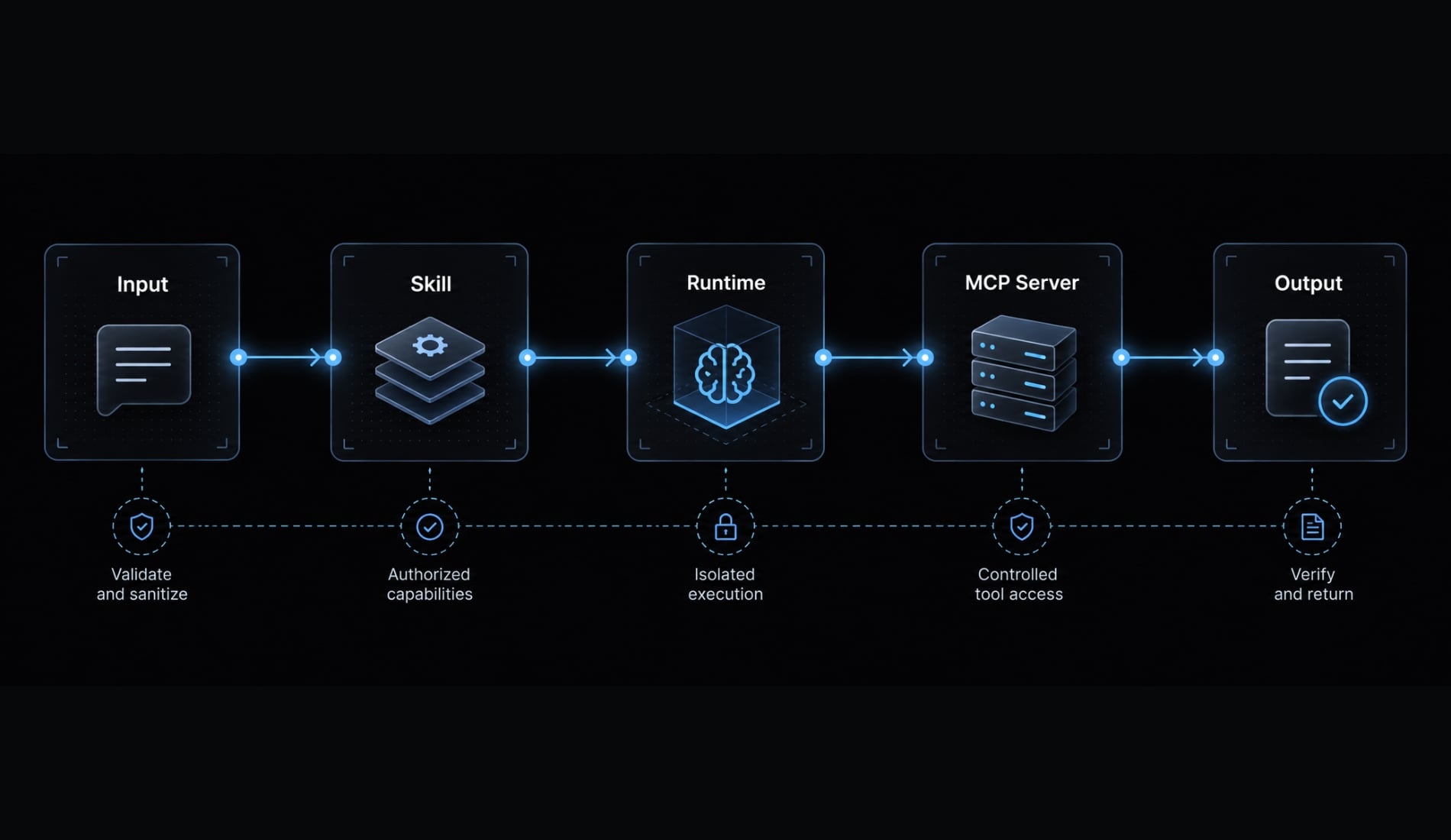
Review the complete execution chain:
- Input.
- Skill instructions.
- Agent decision.
- Tool or MCP call.
- Data access.
- External output.
- Persistent change.
Implementation details vary by platform. Security review should follow actual data and authority across the chain rather than assuming the skill is the only control boundary.
Build agent skill security into the entire lifecycle
Agent skill security requires controls across installation, execution, updates, revocation, and incident response. Before enabling a skill, verify its source and reviewed version, apply least privilege, and isolate higher-risk behavior through appropriate sandboxing and monitoring.
No individual scanner, signature, guardrail, permission matrix, or sandbox eliminates all risk. Security checks should remain proportional to the sensitivity of accessible data and the impact of available actions.
Use the pre-installation checklist and permission matrix before enabling each new capability, then maintain ownership, runtime evidence, version control, and tested revocation procedures. For teams that need centralized workflow visibility and consistent skill management, AgentKit can help coordinate inventories, configurations, approvals, and security checks without positioning any single control as complete protection.
Frequently asked questions
What is agent skill security?
Agent skill security is the practice of verifying, restricting, and monitoring the instructions, scripts, and external tools used by AI agents. It covers the entire lifecycle-from source review and installation to runtime execution, monitoring, and revocation-to prevent unauthorized actions, data exfiltration, and privilege escalation.
How do agent skills create security risks?
Skills introduce third-party code and logic directly into an agent’s decision-making context. A compromised or malicious skill can manipulate an agent to execute unauthorized shell commands, access sensitive credentials, exfiltrate private data, or perform unintended actions through indirect prompt injection when processing untrusted content.
What should I check before installing an agent skill?
Before installation, verify the publisher’s reputation, review the manifest and instruction files (like SKILL.md), and inspect all associated scripts for suspicious logic. You must also pin the skill version, audit requested permissions against the stated task, and test the skill in an isolated, non-production environment.
Are signed agent skills automatically safe?
No. Cryptographic signing verifies the origin and integrity of a skill, ensuring it has not been tampered with since publication. It does not guarantee that the skill’s code is safe, functional, or free from malicious intent, design flaws, or hidden vulnerabilities.
How can I mitigate the risk of prompt injection in skills?
Mitigate injection by separating trusted instructions from untrusted data, applying the principle of least privilege to agent permissions, and requiring human approval for high-impact actions. Additionally, use runtime guardrails to monitor tool calls and restrict outbound network access to prevent agents from exfiltrating data.
Which permissions are most dangerous for AI agents?
Permissions that grant arbitrary shell execution, broad filesystem write access, production-level deployment rights, and unrestricted outbound network egress are the most dangerous. These capabilities provide an attacker with the necessary leverage to execute commands, modify system configurations, and communicate externally to bypass standard security boundaries.
What is the difference between Agent Skills and MCP security?
Agent skills represent reusable instruction packages that expand an agent's logic and capabilities. MCP (Model Context Protocol) servers provide a standardized way for agents to connect to enterprise data and tools. Both must be secured independently; AgentKit provides the centralized governance to manage these risks across your agentic fabric.
Read more:
- Agent skills vs prompts: Choosing the right AI architecture
- AI feature development workflow: 7 stages to production success
- Master a repeatable AI coding workflow for faster development
Conclusion
In conclusion, securing AI agent skills requires a continuous, multi-layered approach across their entire lifecycle-from initial source verification and permission scoping to runtime isolation and monitoring. Because reusable skills bridge the gap between AI decisions and real-world system actions, relying on source reputation or static checks alone is insufficient.
By enforcing least privilege, restricting network access, and maintaining strict human oversight for high-impact operations, organizations can safely leverage agentic capabilities without exposing critical workflows to compromise, data exfiltration, or operational failure.