
MCP server security: Risks, best practices and deployment checklist
Model Context Protocol (MCP) server security is critical because it grants AI agents delegated access to local files, databases, and cloud infrastructure. Conventional API controls aren't enough when an AI model can autonomously select tools and execute commands. This guide explains the real attack surface of MCP integrations and provides practical controls, a risk-scoring model, and a deployment checklist to secure your agentic workflows without sacrificing development speed.
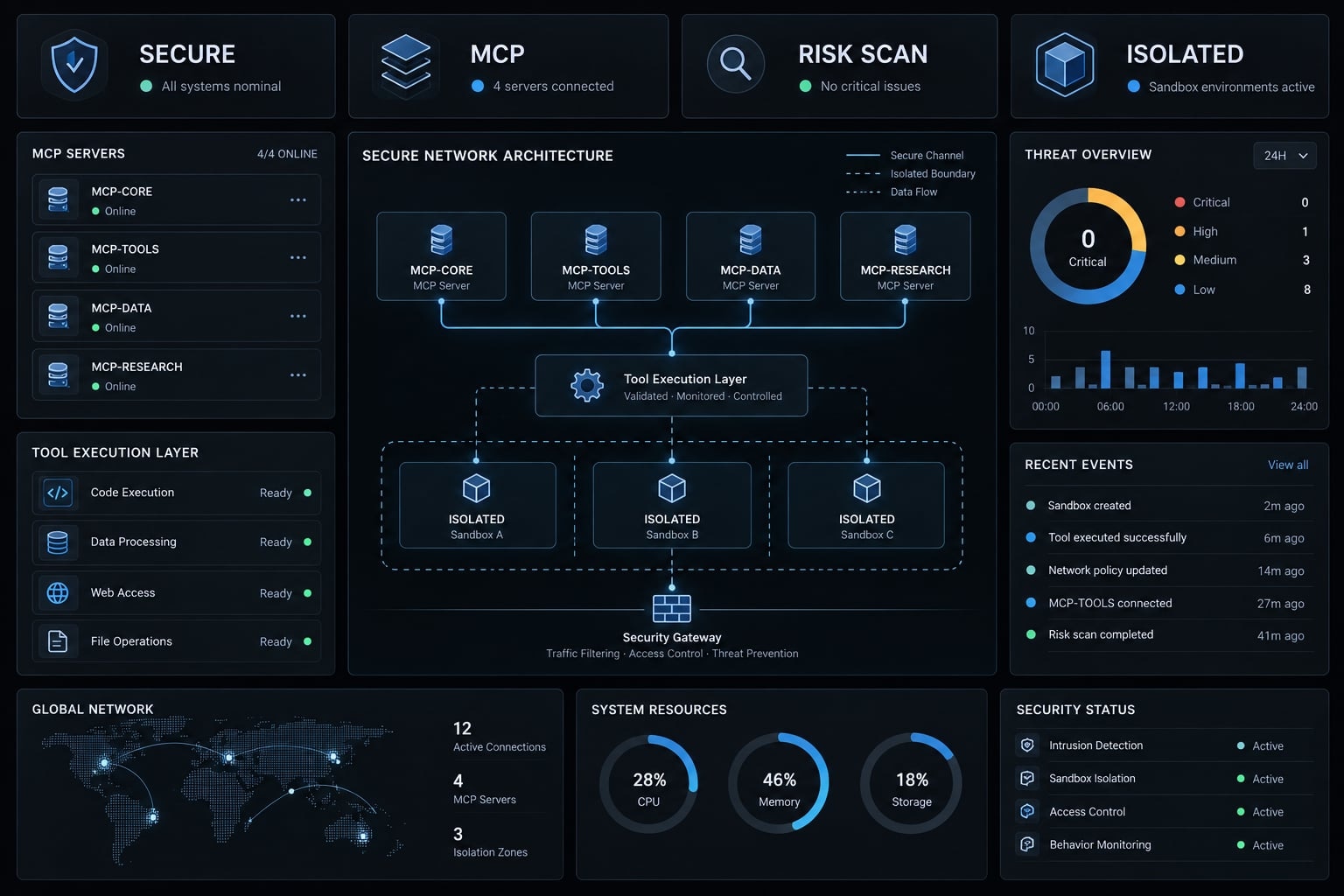
Key takeawaysTreat every MCP server as software operating across defined trust boundaries.Review combined tool-chain authority, not only individual server permissions.Apply least privilege, runtime isolation, restricted egress, explicit approval, and centralized logging.
What is MCP server security?
MCP server security protects the systems, credentials, data, tools, execution environments, and authorization boundaries used in Model Context Protocol (MCP) integrations. A secure implementation ensures that an MCP server performs only the actions required for an authorized user and task, while limiting unintended access, execution, data movement, and downstream impact.
An MCP server exposes tools, resources, or prompts to an MCP client. The server may connect to a database, external API, workspace directory, source-code platform, or another business system.
The client may be an AI application, coding agent, desktop tool, or development environment. The exact division of responsibility varies, so teams must document which component selects tools, requests approval, handles credentials, and records activity.
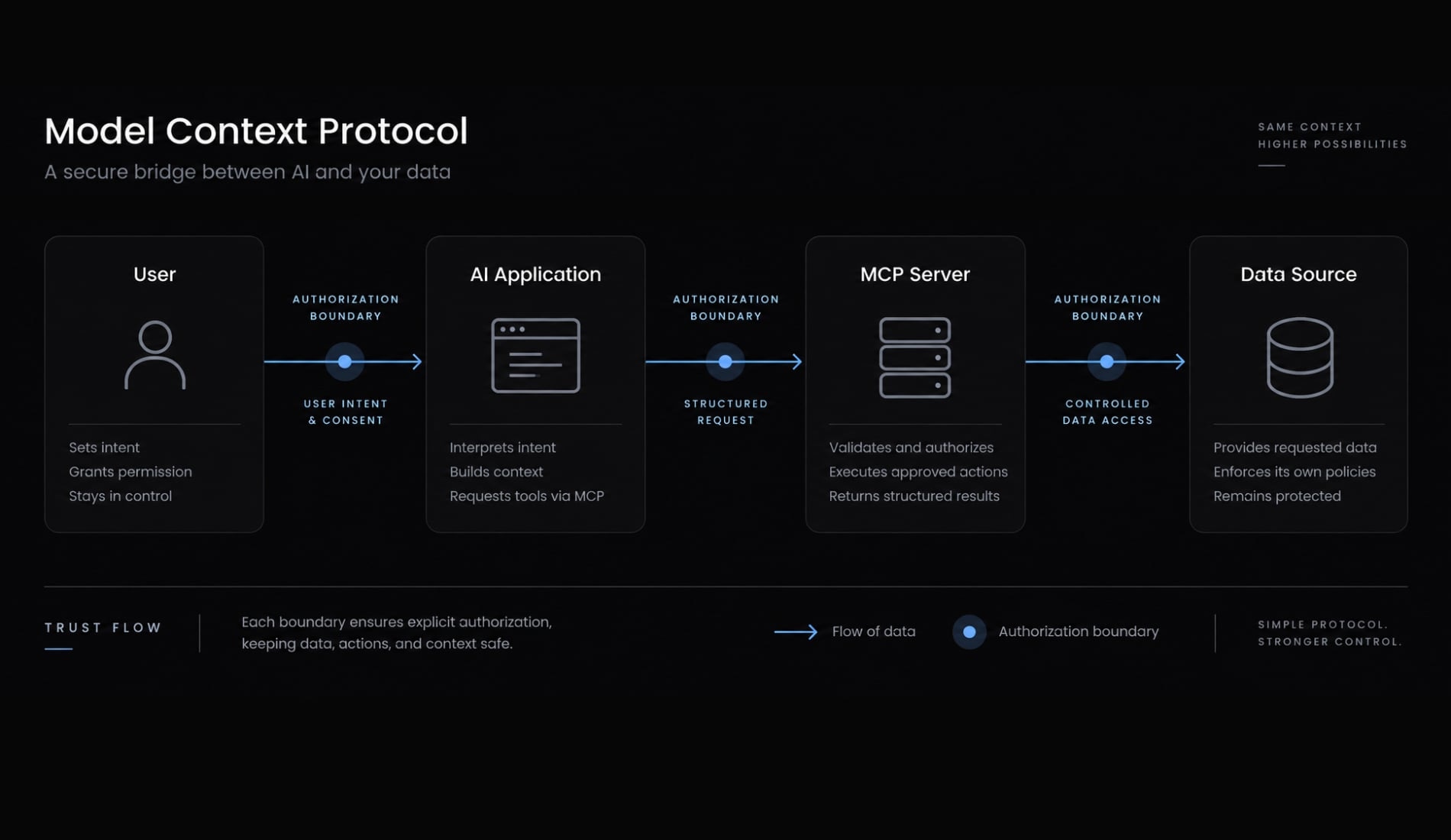
The basic MCP trust flow
- A user submits a request.
- The MCP client or AI application interprets it.
- The model or client selects an available tool.
- The client calls the MCP server.
- The server accesses a tool, API, file, database, prompt, or resource.
- The result returns to the client, model, and user.
Every transition may require identity verification, authorization, input validation, output filtering, and audit logging. The official Model Context Protocol architecture documentation describes the core host, client, and server relationships.
Why MCP security is different from chatbot safety
Text-only assistant | MCP-enabled agent |
|---|---|
Primarily generates or transforms content | May interact with external systems |
Harm is usually limited to output quality or disclosure | Harm may include writing, deleting, executing, publishing, or sending data |
Controls focus heavily on model input and output | Controls must also cover identity, tools, permissions, runtime, and data movement |
Chatbot safety addresses generated content and information disclosure. A secure MCP implementation must also control real actions performed through an LLM integration architecture.
The objective of MCP server security is not to prevent every incorrect model response, but to prevent an incorrect, manipulated, or unauthorized response from becoming an uncontrolled system action.
Why MCP servers create a distinct attack surface
MCP combines established security disciplines: API security, Identity and Access Management, OAuth authorization, local process security, supply-chain security, prompt injection defense, tool authorization, and data governance. The difference is how these controls interact when natural-language context influences tool selection.
An MCP client may expose several tools with different permissions. Tool output from one server may also become input for another, producing a less predictable action path than a fixed integration workflow.
The confused deputy problem occurs when a trusted component uses its authority to perform an action the requesting user did not intend or should not be permitted to initiate. Allowing a user to connect to a server is therefore not sufficient authorization for every tool, resource, and action.
Five conditions that increase MCP risk
- Local execution with broad user-level operating-system privileges.
- Access to credentials, source code, customer data, or production systems.
- Permission to write, delete, execute, publish, deploy, or administer.
- Unrestricted outbound network connectivity.
- Sensitive actions without explicit human approval.
One condition does not prove that a server is compromised. Several conditions in the same workflow increase both the likelihood and potential impact of misuse.
Broad permissions are often granted because they are easier to configure than resource-specific rules. A local server may inherit environment variables, SSH keys, or file access without the installer realizing it. An “always allow” decision can then turn a limited integration into an unattended execution path.
Risk increases when authority, sensitive data, autonomous execution, and unrestricted egress exist in the same workflow.
MCP security vs. Conventional API security
Security area | Conventional API workflow | MCP-enabled workflow |
|---|---|---|
Action selection | Usually defined by application logic | May be influenced by model interpretation and context |
Authorization | Endpoint and resource permissions | User, tool, resource, action, environment, and chain |
Input risk | Structured or user-provided input | User input, model output, retrieved content, and tool output |
Execution | Defined service operation | May include dynamic tool or process selection |
Approval | Usually embedded in application flow | May require contextual human approval |
Chaining | Predetermined service calls | Tools may be combined dynamically |
Monitoring | API and application events | Identity, prompts, tools, approvals, processes, and data movement |
MCP does not replace API security. Authentication, scoped authorization, validation, encryption, rate limits, and logging remain mandatory.
It adds agent, context, tool-selection, metadata, and approval concerns. Teams must evaluate the combined authority of the client, server, acting identity, connected tools, and possible chained actions. OWASP’s secure MCP server development guidance provides a practical reference for these overlapping controls.
Local vs. Remote MCP server security
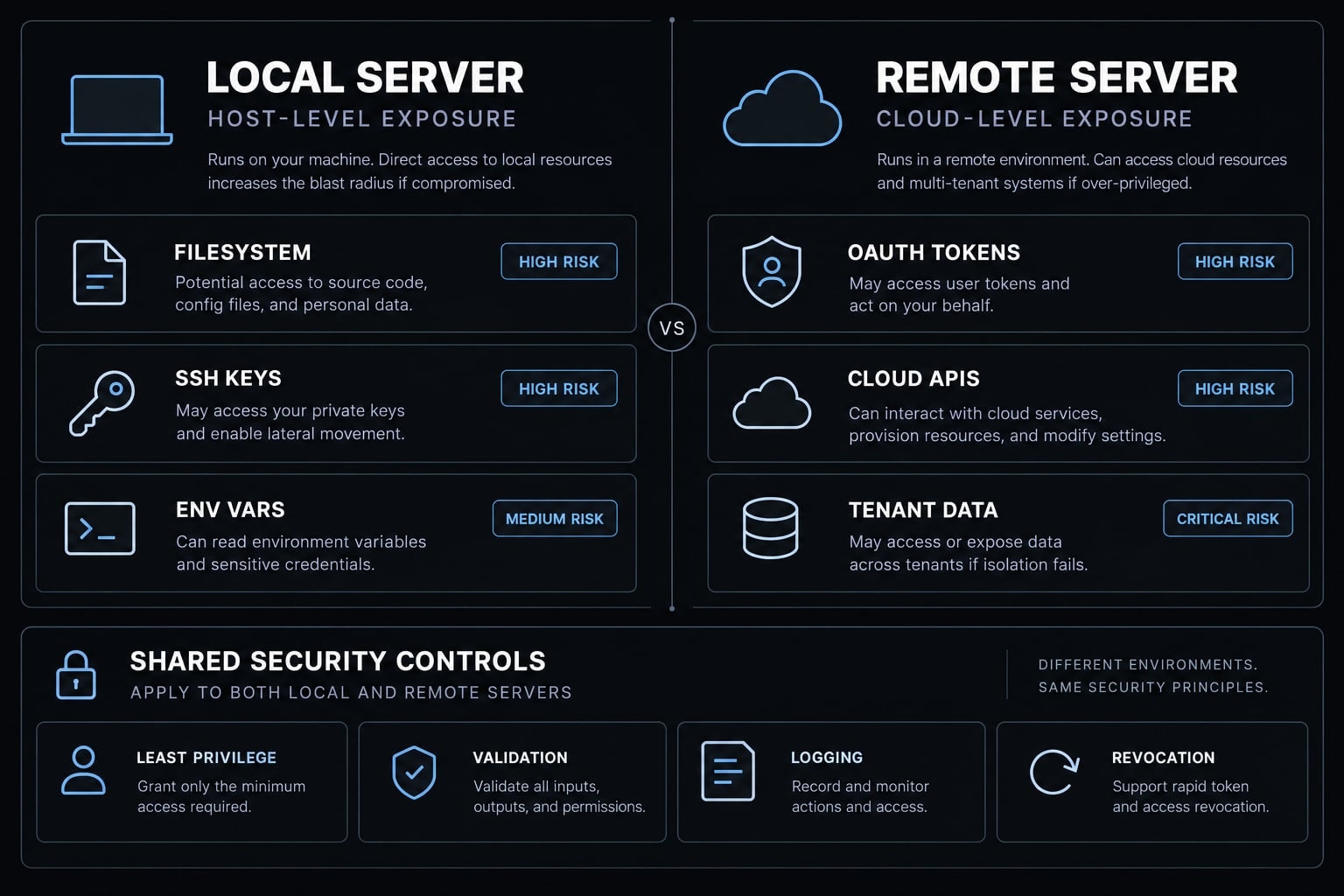
Neither deployment model is inherently safe. Local MCP servers directly expose the host environment and user context to risk, whereas remote MCP servers put cloud accounts, SaaS data, APIs, and tenant resources on the line.
Local MCP Server Risks
Local servers may inherit access to:
- Workspace and home directories.
- Environment variables.
- SSH keys.
- Browser profiles.
- Credential stores.
- Local network services.
- Shells and child processes.
- Unrestricted outbound destinations.
Command injection becomes especially relevant when a server inserts model-generated or untrusted parameters into shell commands. Command injection is an input-handling flaw that may lead to arbitrary code execution, but the terms are not interchangeable.
Local red flags include:
- Full user privileges.
- Broad directory access.
- Inherited environment secrets.
- Shell command construction.
- Dynamic file downloads or execution.
- Unrestricted network destinations.
Remote MCP Server Risks
Remote servers usually operate through OAuth tokens, service identities, or provider-managed credentials. Teams must review scopes, token lifetime, tenant isolation, data retention, provider ownership, revocation, and audit visibility.
OAuth establishes an authorization framework, but insecure scopes or token handling can still produce excessive access. Current implementations should follow the official MCP authorization guidance and OAuth 2.0 Security Best Current Practice.
Remote red flags include:
- Tenant-wide OAuth scopes.
- Unclear ownership or data handling.
- Weak cross-user separation.
- Long-lived credentials.
- Destructive actions without contextual authorization.
- Limited logging or revocation.
Dimension | Local MCP server | Remote MCP server |
|---|---|---|
Primary exposure | Host files, processes, credentials, local network | SaaS data, cloud resources, APIs, tenant data |
Code execution risk | Direct when local process or shell access exists | Typically indirect or server-side |
Credential risk | Environment variables, keys, local stores | OAuth tokens, service identities, provider secrets |
Main authorization concern | Host and workspace permissions | Scopes, tenant boundaries, resource authorization |
Network concern | Data leaving the host | Provider egress and cross-service access |
Main controls | Sandboxing, file restrictions, process controls | Scoped authorization, tenant isolation, token controls |
Monitoring focus | Processes, files, child commands, destinations | API calls, user separation, scopes, exports |
A container can reduce host exposure, but containerization alone may not provide a complete security boundary. Likewise, a hosted provider is not trustworthy merely because users cannot see its runtime.
The most important MCP server security risks
MCP security risks must be prioritized according to permissions, data sensitivity, action capability, network access, deployment location, approval policy, and connected-system authority. The following matrix is a review baseline rather than a universal ranking.
Risk | Primary impact | Most affected deployment | Priority control |
|---|---|---|---|
Excessive permissions | Unauthorized access or destructive action | Both | Resource- and action-level least privilege |
Prompt injection | Manipulated tool selection or action | Both | Treat retrieved content as untrusted; independent policy checks |
Tool poisoning | Misleading or changed tool behavior | Both | Version pinning and metadata change review |
Command injection | Unintended command or code execution | Primarily local | Avoid shell construction; validate allowlisted arguments |
Supply-chain compromise | Malicious package or dependency execution | Both | Provenance review, locked versions, SAST and SCA |
Credential exposure | Account compromise or privilege expansion | Both | Scoped short-lived credentials and secret isolation |
Data exfiltration | Unauthorized transmission of sensitive data | Both | Egress restrictions and data-access monitoring |
Unsafe server chaining | Combined permissions produce higher impact | Both | Cross-server flow controls and sensitive-action approval |
Session or tenant confusion | One user accesses another user’s resources | Primarily remote | Strong session binding and tenant isolation |
Missing audit logs | Delayed detection and weak investigation evidence | Both | Centralized, tamper-resistant security logging |
Excessive permissions and the confused deputy problem
Connection access is not action-level authorization. Authorization should evaluate the user, tool, resource, action, environment, and time.
Read, write, execute, delete, deploy, publish, and administrative rights should remain separate. Shared high-privilege credentials weaken accountability because actions cannot be reliably tied to an individual identity or approved task.
Prompt injection and indirect prompt injection
Direct prompt injection originates from user instructions. Indirect prompt injection appears inside retrieved websites, emails, tickets, repositories, documents, or other external data.
That content must remain untrusted, even when it comes from a familiar SaaS platform. Sensitive-action policy checks should operate independently of the model’s recommendation. Text filtering may reduce obvious attacks, but it does not resolve the underlying authorization problem.
Tool poisoning and misleading metadata
Tool names, descriptions, schemas, and metadata influence how a model or client interprets capabilities. A compromised server or update may change a tool’s purpose, required permissions, or hidden behavior.
Teams should pin reviewed versions, compare tool definitions after updates, and require approval for material metadata changes. Repository popularity or inclusion in a public directory does not equal security approval.
Command injection and arbitrary code execution
Risk is highest when untrusted parameters are inserted into shell command strings. Developers should prefer direct process APIs, fixed operations, and allowlisted arguments.
Validate file paths, target operations, URLs, and parameters before execution. A sandbox can contain some impact, but it does not repair unsafe command construction.
Software supply-chain compromise
Supply-chain attacks may involve:
- Typosquatting packages.
- Compromised maintainer accounts.
- Abandoned package names.
- Malicious direct or transitive dependencies.
- Unsafe installation scripts.
- Unreviewed automatic updates.
Controls should verify the publisher, repository, package name, release provenance, dependency integrity, and installed artifact. Teams should use Static Application Security Testing (SAST) and Software Composition Analysis (SCA) within the secure development lifecycle.
Credential exposure and data exfiltration
Servers may inherit secrets through environment variables, local configuration files, credential stores, or mounted directories. Tokens can also appear in logs, stack traces, error messages, or tool output.
Use scoped, short-lived credentials and redact secrets from telemetry. A server with sensitive data access and unrestricted outbound connectivity deserves elevated scrutiny because legitimate networking features may be abused for unauthorized export.
Unsafe tool chaining
A server may retrieve untrusted content and pass it to another server with write, publish, deployment, or execution authority. The combined chain can create more risk than either server presents independently.
Apply cross-server data-flow restrictions, validate intermediate output, and require explicit approval before sensitive downstream actions. Security research has demonstrated that chained MCP workflows can create practical attack paths, but a proof of concept does not establish widespread exploitation.
MCP server security best practices
The minimum MCP server security best practices are:
- Inventory every server and owner.
- Apply least privilege at every layer.
- Sandbox and isolate local servers.
- Restrict outbound network access.
- Protect secrets and tokens.
- Validate tool inputs and outputs.
- Require approval for high-risk actions.
- Secure the software supply chain.
- Centralize logging and monitoring.
- Patch, review, and decommission integrations.
Controls must be layered because no single safeguard addresses identity, execution, data, supply-chain, network, and agent-behavior risks simultaneously.
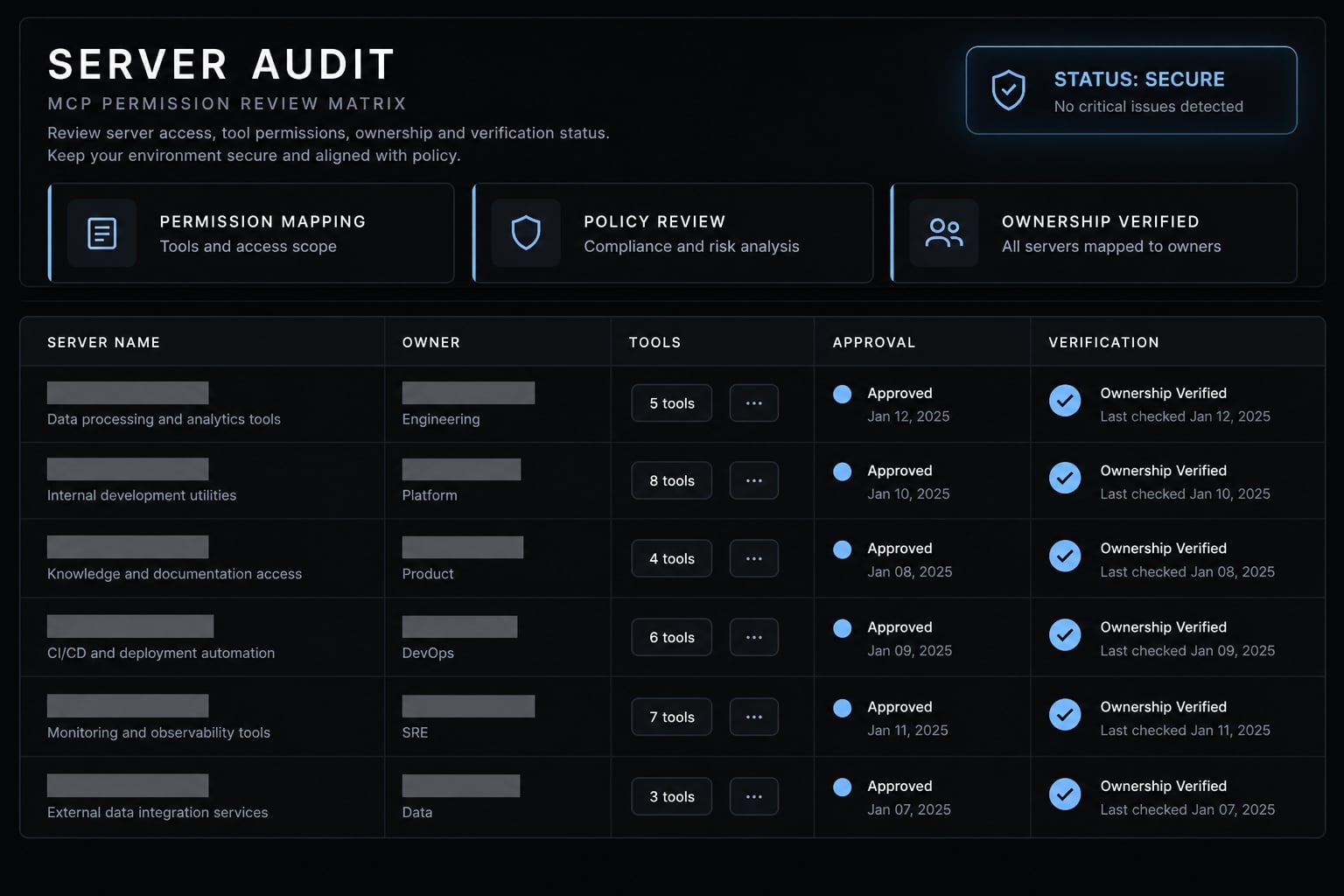
1. Maintain an Inventory of MCP servers and owners
Record the server name, publisher, source, version, owner, location, connected systems, permissions, credentials, approval status, review date, and expiration date. Include developer-installed and shadow MCP servers that bypass standard platform provisioning.
- Owner: Engineering Manager or Platform Team
- Verification: Confirm every active server has an accountable owner. Disable unowned or unused servers.
2. Apply least privilege at every layer
Scope authorization by user, tool, resource, action, environment, and time. Separate read access from writing, execution, deletion, publishing, deployment, and administration.
Avoid shared production credentials and tenant-wide scopes when a resource-specific identity is available.
- Owner: Platform and Security Teams
- Verification: Map every granted permission to a documented use case and owner.
3. Sandbox and isolate local servers
Run local servers inside restricted processes, containers, or virtual machines appropriate to the risk. Limit file access to required workspaces and block unrelated repositories, home directories, and credential stores.
Restrict child processes and separate experimental servers from production development environments.
- Owner: Developer and Platform Teams
- Verification: Attempt to access files and services outside the approved workspace.
- Limitation: Containers reduce exposure but may not create a complete security boundary.
4. Restrict outbound network access
Use destination allowlists, protocol restrictions, Domain Name System monitoring, and network telemetry. Review analytics, update, and telemetry endpoints before deployment. Apply stronger egress controls when a server can read source code, credentials, customer information, or production data.
- Owner: Platform or Infrastructure Team
- Verification: Compare observed traffic with documented server behavior.
5. Protect secrets and tokens
Use a secret manager instead of plaintext configuration. Issue scoped, short-lived credentials and minimize environment-variable inheritance.
Redact logs and traces. Define rotation and revocation procedures before the integration enters production.
- Owner: Platform and Security Teams
- Verification: Scan configuration and logs, then confirm each credential can be revoked independently.
6. Validate tool inputs and outputs
Enforce strict schemas, operation allowlists, path normalization, URL restrictions, and permitted file types. Protect against directory traversal and symbolic-link bypass.
Keep executable instructions separate from retrieved data. Validate output before passing it to another tool or server.
- Owner: Server Developer
- Verification: Test malformed input, unexpected paths, additional arguments, and encoded instructions.
7. Require human approval for high-risk actions
Require explicit approval before:
- Shell or code execution
- File deletion
- Production changes
- Permission changes
- Financial actions
- External publishing
- Large data exports
- Deployment or administration
Approval prompts should name the action, target resource, environment, acting identity, and likely impact. Vague confirmation dialogs encourage approval fatigue.
- Owner: Product, Platform, and Security Teams
- Verification: Confirm chained calls cannot bypass the approval gate.
- Limitation: Human review fails when users receive incomplete or overly broad prompts.
8. Secure the software supply chain
Verify publishers, repositories, package names, releases, checksums, and installation scripts. Pin reviewed versions and detect changes in tool definitions.
Use SAST, SCA, malware scanning, and dependency locking. Rescan after every update rather than assuming version pinning alone provides safety.
- Owner: Development and Security Teams
- Verification: Reproduce installation from a locked dependency set and compare the resulting artifact.
NIST’s Secure Software Development Framework provides broader lifecycle guidance for protecting software and dependencies.
9. Centralize logging and monitoring
Record:
- User or client identity
- Server and tool
- Redacted arguments
- Resource accessed
- Approval decision
- Result status
- Network destination
- Version and configuration changes
Alert on large exports, new destinations, repeated denials, unexpected child processes, permission changes, and sudden tool-definition changes.
- Owner: Platform and Security Operations
- Verification: Reconstruct a sensitive action without exposing credentials or confidential payloads.
- Limitation: Logging supports detection and investigation; it does not prevent misuse by itself.
10. Patch, review, and decommission
Review MCP clients, servers, Software Development Kits, packages, and dependencies. Reassess effective permissions and network behavior after updates.
Decommission credentials, cached data, startup entries, persistent processes, and configuration records alongside the server.
- Owner: Server Owner and Platform Team
- Verification: Confirm a retired server can no longer authenticate, start, connect, or execute.
How to assess a third-party MCP server before installation
A public listing does not equal security approval. Open-source availability and repository popularity do not replace code, provenance, permission, and runtime review.
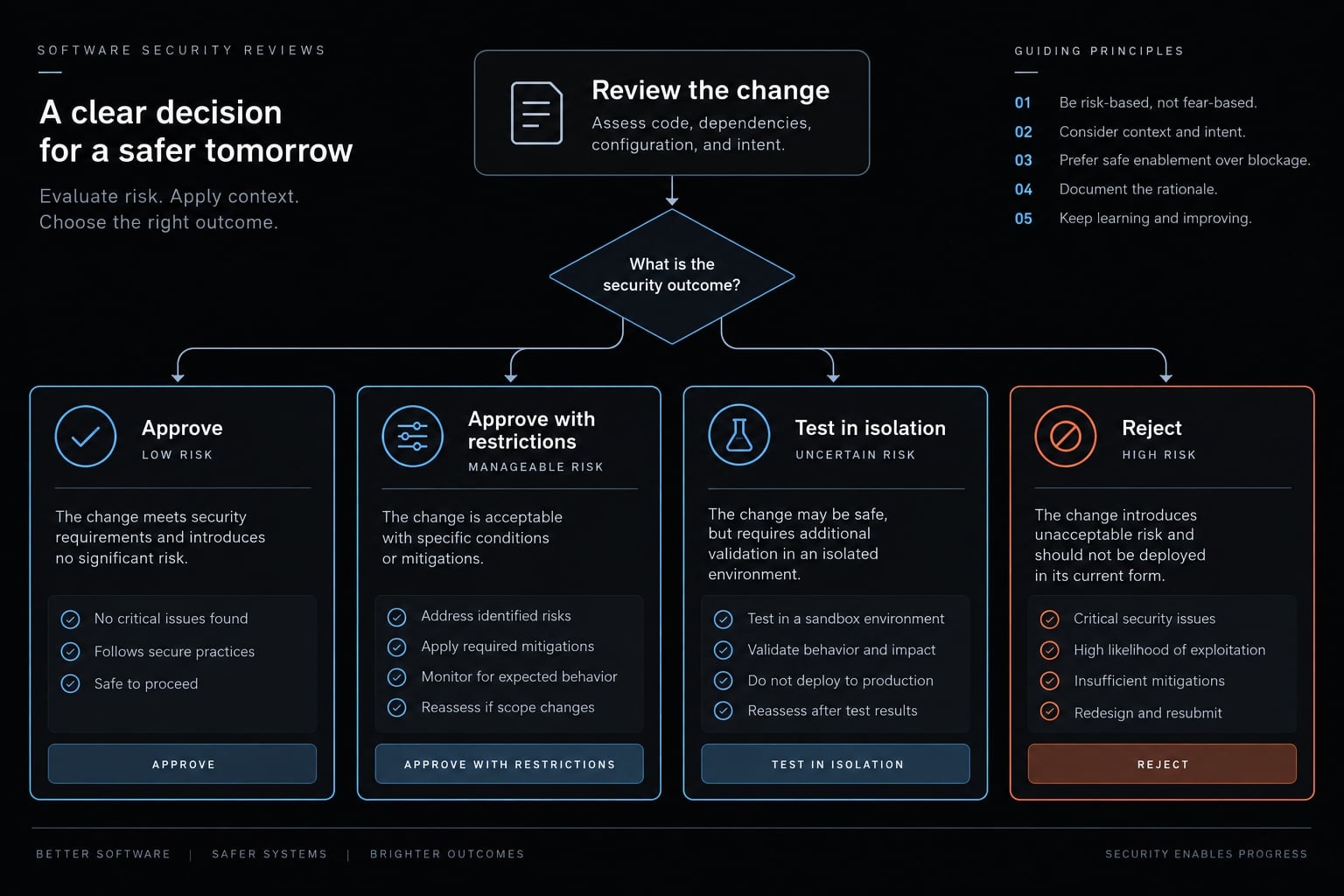
The final decision should be approve, approve with restrictions, test in isolation, or reject.
Source and ownership review
Verify:
- Publisher identity and official organization relationship
- Repository ownership and history
- License and maintainer activity
- Security policy and contact
- Signed or otherwise verifiable releases
- Suspicious package-name variants
- Recent repository or package ownership transfers
Code and dependency review
Inspect installation and startup scripts, dynamic downloads, runtime code loading, direct dependencies, and transitive dependencies.
Check known advisories and abandoned packages. Confirm the reviewed source matches the package or binary that will be installed. A clean static scan is useful evidence, but it cannot prove safe runtime behavior.
Permission and data review
Document access to:
- Files and directories
- Databases and external APIs
- SaaS accounts
- Credentials and secret stores
- Customer, production, or regulated data
- Write, deployment, administration, or execution functions
Remove every permission without a clear operational requirement.
Runtime and network review
Determine which processes the server can start and which destinations it can contact. Identify whether telemetry, prompts, files, or tool output leave the environment.
Test whether the server can run inside a restricted environment with allowlisted egress. Compare observed behavior with its documented purpose.
Update and maintenance review
Review version-pinning support, release cadence, advisories, patch history, tool-definition changes, removal procedures, and credential revocation. An update can materially change network behavior, dependencies, metadata, or effective permissions. Treat significant changes as a new review event.
Third-party MCP server red flagsObfuscated installation or runtime codeBroad file access without a documented purposeAdministrative or long-lived credentialsUnrestricted shell executionUndocumented network connectionsAutomatic remote-file executionNo version transparencyNo identifiable owner or security contact
Decision | Evidence quality | Permission level | Runtime behavior |
|---|---|---|---|
Approve | Strong provenance and review evidence | Narrow and justified | Matches documentation |
Approve with restrictions | Generally credible, with manageable gaps | Can be materially reduced | Controllable through isolation or egress rules |
Test in isolation | Incomplete evidence | Uncertain or potentially broad | Requires observation before approval |
Reject | Unverifiable or suspicious | Excessive or unjustified | Obfuscated, undocumented, or uncontrollable |
A lightweight MCP server risk-scoring model
This MCP risk assessment model supports triage and consistent approval decisions. It is not a mathematical prediction or an industry standard.
Score each dimension from 0 to 2.
Dimension | 0 | 1 | 2 |
|---|---|---|---|
Local execution | No local execution | Restricted local runtime | Broad host or shell execution |
Data sensitivity | Public or synthetic data | Internal non-sensitive data | Credentials, customer, regulated, or production data |
Action capability | Read-only | Limited write actions | Delete, execute, publish, deploy, or administer |
Network access | No outbound access | Allowlisted destinations | Unrestricted outbound access |
Approval policy | Explicit approval for material actions | Mixed or contextual approval | Automatic or “always allow” execution |
Add the five values to produce a score from 0 to 10.
Score | Tier | Decision |
|---|---|---|
0–2 | Low | Standard ownership and logging |
3–5 | Medium | Restrict permissions and test in isolation |
6–7 | High | Require security review, sandboxing, and explicit approval |
8–10 | Critical | Do not deploy until architecture or permissions are materially reduced |
A read-only server using synthetic test data, no outbound network, and explicit approval may score near the low end. That does not mean the implementation is safe without verification.
Classify a deployment as high or critical regardless of its total score when it has:
- Production credentials
- Regulated data access
- Production deployment authority
- Administrative cloud access
- Unrestricted shell execution
- Unrestricted sensitive-data export
One severe exposure may matter more than a low aggregate score. The model does not replace code review, architecture review, dependency analysis, or incident investigation.
MCP server security checklist across the deployment lifecycle
This MCP server security checklist converts the recommendations into pass-or-fail controls. Every checked item should have supporting evidence, an owner, and a review date.
Before installation
- Verify the publisher, repository ownership, package name, and release provenance.
- Review installation scripts, startup behavior, dependencies, and known advisories.
- Document requested files, systems, credentials, actions, and network destinations.
- Assign an accountable server owner.
- Calculate and record the initial risk score.
- Reject unexplained shell, administrative, or broad file access.
During deployment
- Pin the reviewed server and dependency versions.
- Run the server inside an appropriately restricted runtime.
- Limit file, process, child-process, and network access.
- Issue scoped, short-lived credentials.
- Configure explicit approval gates for sensitive actions.
- Send redacted events to centralized audit logging.
- Confirm the deployed artifact matches the reviewed release.
During operation
- Monitor tool calls, resources accessed, and acting identities.
- Monitor file, database, SaaS, and production-data access.
- Detect unexpected processes and network destinations.
- Review denied and automatically approved actions.
- Detect changes to tool names, schemas, descriptions, and permissions.
- Remove permissions that are no longer required.
- Revoke inactive integrations and credentials.
After an update
- Compare code, packages, dependencies, and installation behavior.
- Compare requested permissions and network destinations.
- Review changes to tool metadata and schemas.
- Test the updated server in isolation.
- Recalculate the deployment risk score.
- Repeat logging and approval regression tests.
During decommissioning
- Disable the server and prevent automatic startup.
- Revoke tokens, API keys, service identities, and OAuth grants.
- Remove scheduled tasks and other persistence mechanisms.
- Delete sensitive caches and obsolete configuration files.
- Confirm the server cannot authenticate, connect, or execute.
- Retain required audit evidence under the organization’s retention policy.
What to do if an MCP server is compromised
Deleting or uninstalling a compromised MCP server is insufficient. It may have accessed credentials, modified files, established persistence, called downstream systems, or transmitted data.
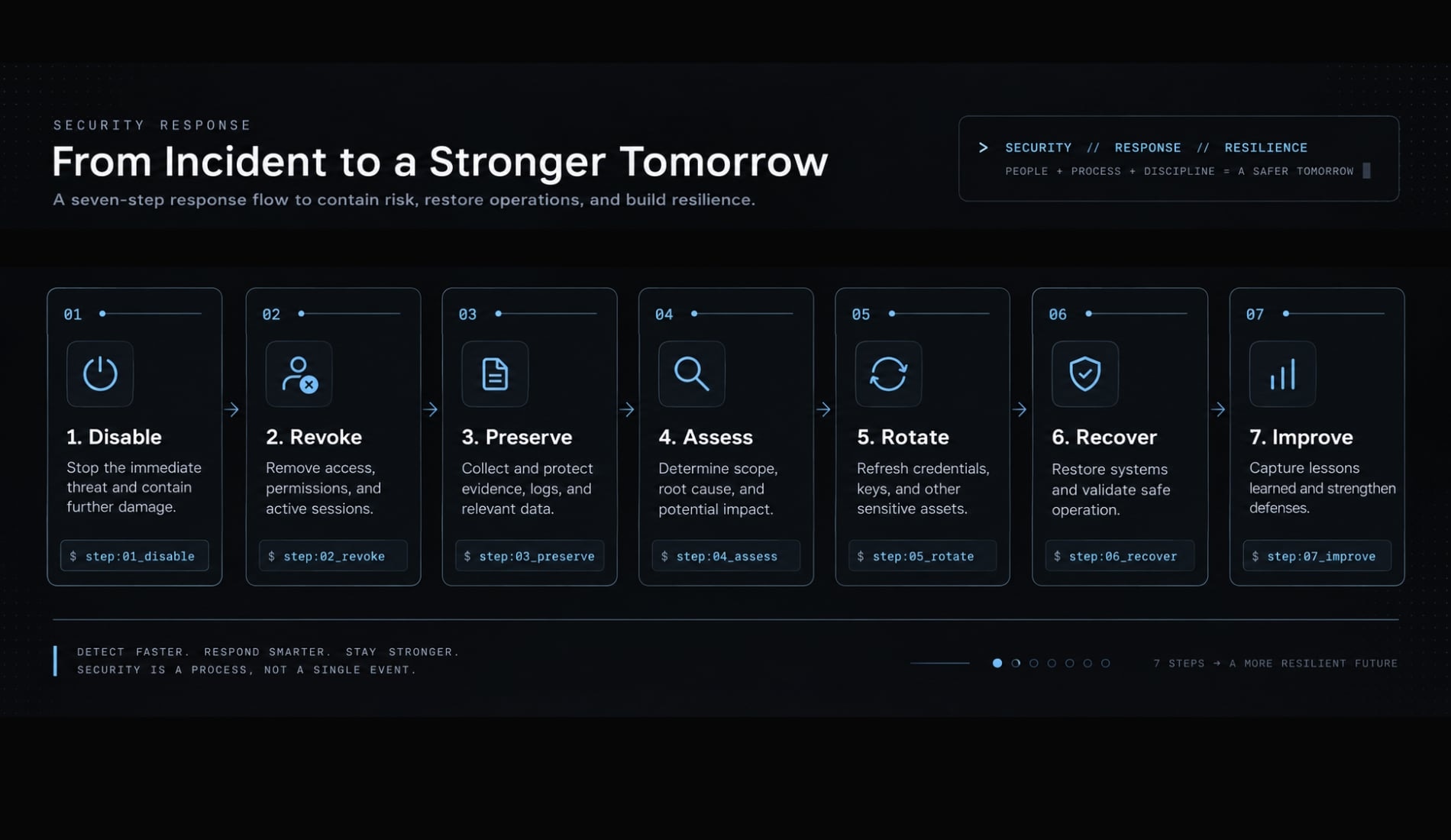
- Disable the server: Stop tool access and block further execution without destroying evidence.
- Revoke access: Revoke OAuth grants, API keys, service accounts, session tokens, and connected-system permissions.
- Preserve evidence: Retain security logs, process telemetry, configuration, package versions, file changes, and network records.
- Assess exposure: Review tool calls, accessed files, network destinations, downstream changes, SaaS activity, and cloud audit events.
- Rotate secrets: Rotate every credential the server could read, not only credentials confirmed as stolen.
- Remove persistence and recover: Inspect startup mechanisms, scheduled tasks, child processes, modified files, cached data, and connected systems.
- Prevent recurrence: Correct the root cause, reduce permissions, update detection rules, and repeat the risk assessment before redeployment.
An absence of suspicious chat output does not establish that no compromise occurred. Tool activity, authentication records, process telemetry, file changes, and network logs provide stronger evidence.
This short MCP incident-response playbook does not replace professional forensic, privacy, legal, or regulatory support when sensitive systems are involved. NIST’s incident-response guidance provides a broader framework for containment, investigation, recovery, and improvement.
Build MCP security around effective authority
MCP server security requires layered controls across identity, permissions, execution, data, network access, software supply chains, approval workflows, monitoring, and decommissioning. Neither local nor remote deployment provides safety by default. Risk depends on what the server can access, change, execute, and transmit.
Teams should begin with a complete server inventory, least privilege, sandboxing for local execution, restricted outbound access, explicit approval for sensitive actions, and centralized logging. Updates and decommissioning deserve the same scrutiny as initial installation because permissions, dependencies, and runtime behavior can change over time.
Frequently asked questions
What is the Model Context Protocol (MCP)?
The Model Context Protocol (MCP) is an open-source standard that enables AI assistants and agents to securely connect to external tools, databases, and data sources. It provides a consistent way for models to access information and perform actions through defined, authenticated, and authorized tool integrations.
Can MCP servers execute code on my machine?
Yes. Locally hosted MCP servers run as processes with the privileges of the user who launched them. If an MCP server is compromised or maliciously designed, it can execute arbitrary shell commands, access files, install persistence, or exfiltrate sensitive data directly from your host environment.
What is MCP server chaining?
MCP server chaining occurs when an AI agent links multiple servers together to complete a task. This creates a security risk if a malicious server intercepts data processed by a legitimate, trusted server, potentially allowing an attacker to leverage legitimate access to trigger unauthorized actions or data exfiltration.
Is MCP server security the same as Minecraft server security?
No. While both use the "MCP" acronym, they are completely unrelated. MCP (Model Context Protocol) security focuses on protecting AI agent integrations and data connections. Minecraft server security focuses on protecting game server software, player accounts, and network infrastructure from DDoS attacks or unauthorized access.
How can I verify if an MCP server is safe to use?
Before installing, you should verify the publisher’s identity, check the repository history, review installation scripts for suspicious commands, pin specific versions, and perform static analysis on the source code. Always run untrusted or experimental servers within an isolated sandbox environment to limit their access to your host system.
What should I do if an MCP server is compromised?
Immediately disable the server and revoke its access to all connected systems, APIs, and cloud services. Preserve logs for forensic analysis, rotate all credentials the server may have accessed, and perform a full audit of your environment to remove any persistence mechanisms or unauthorized changes made by the server.
Read more:
- Claude Code permissions security: Guide to safe workflows
- Blender MCP with Claude Code: A secure AI scripting setup guide
- Connect Notion to Claude Code: Official Notion MCP setup guide
Conclusion
Securing an MCP server means managing the intersection of AI capability and system access. By applying least privilege, isolating runtimes, enforcing human approval, and monitoring tool activity, organizations can harness the speed of AI agents without handing over the keys to their infrastructure.