Local vs remote MCP server: Security, differences & use cases
Local vs remote MCP server: Differences, security and when to use each
Choosing between a local vs remote MCP server depends on your resource locations, access controls, and operational ownership—rather than chasing technical trends. MCP standardizes AI-to-tool connections, supporting local processes for machine-bound tasks and remote services for shared integrations like CRMs. Weighing their differences in data access, latency, and security helps you select the right model or build a balanced hybrid architecture.
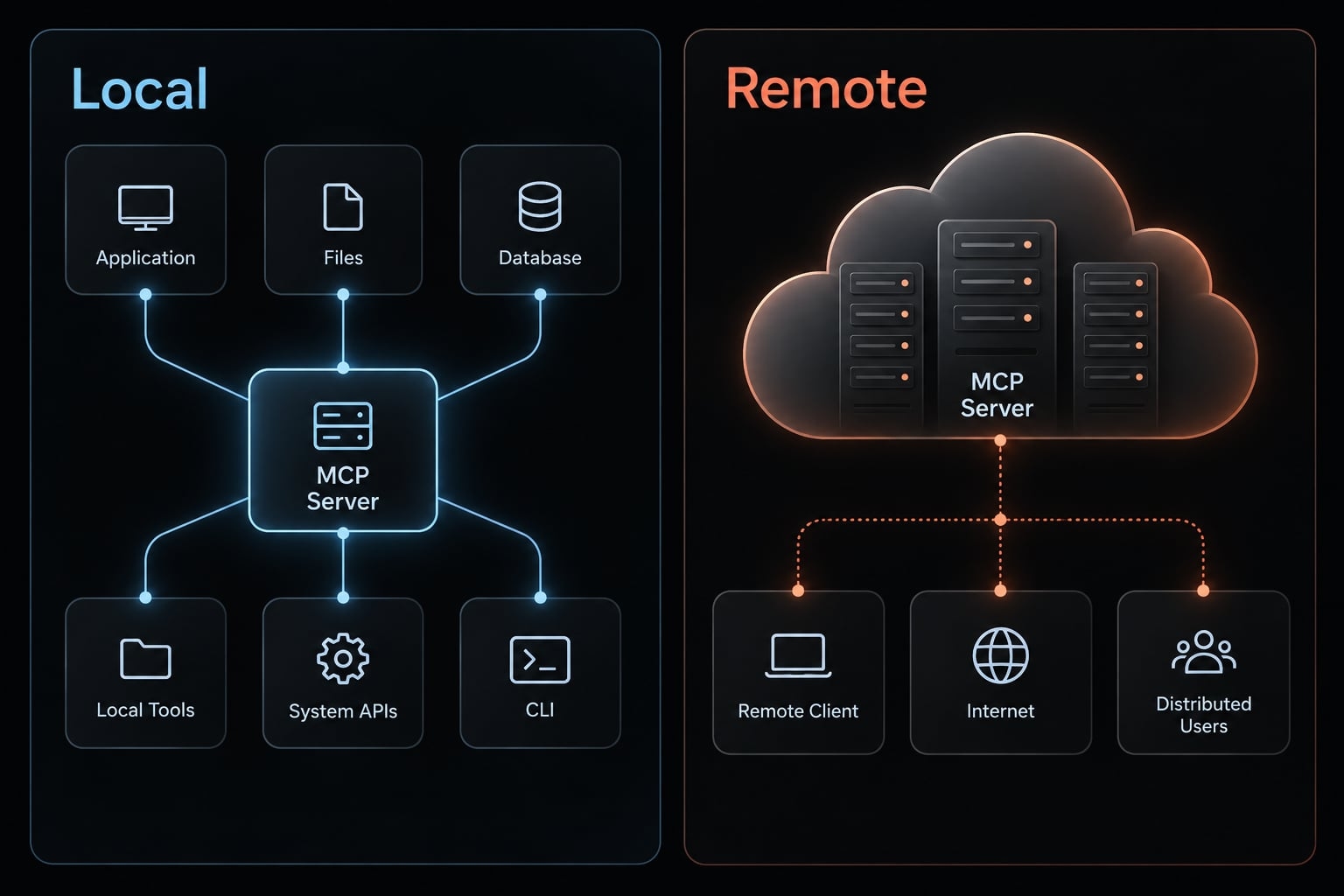
Short answer: A local MCP server runs as a process in the user’s execution environment, commonly supporting repository and file operations. A remote MCP server runs as an independently operated service accessed over a network, commonly supporting shared integrations. Both can coexist, with each capability placed where its resources and access requirements fit.
Local vs remote MCP server at a glance
These are typical operational patterns, not protocol restrictions; official MCP transport documentation distinguishes communication methods from deployment choices.
Local and remote MCP deployment comparison
Dimension | Local MCP server | Remote MCP server |
|---|---|---|
Typical location | User’s workstation or execution environment | Independent service; private network or cloud |
Common transport |
| Streamable HTTP |
Suitable resources | Local repositories and files | Shared CRM and internal services |
Access model | Commonly per-user | Commonly shared, with separated permissions |
Credentials | Often local environment or credential store | Often managed secrets or delegated credentials |
Latency | Low local communication overhead | Network-dependent; resource proximity matters |
Scaling | Distributed installations across machines | Central scaling possible; requires design |
Main security concern | Package trust and process permissions | Endpoint protection and user authorization |
Maintenance | Per-machine packages and configuration | Service deployment and availability |
Offline operation | Possible if all required components work offline | Requires network reachability; not necessarily internet |
Choose around the resource and permission boundary, rather than declaring one model universally superior.
How local vs remote MCP server architectures work
Official Model Context Protocol architecture documentation separates the AI application, connection, server, and exposed capabilities. For deployment decisions, distinguish four layers:
Layer | Role |
|---|---|
Host/client | The MCP host is the AI application; it manages an MCP client connection. |
Server | Exposes capabilities such as tools. |
Transport | Carries protocol messages between client and server. |
Resource | The actual files, API, database, or business system accessed. |
What is a local MCP server?
A local MCP server is a process running within the user’s execution environment that exposes capabilities to an MCP client. It commonly handles files, repositories, or development commands. Its effective access depends on process identity, sandboxing, mounted directories, and runtime restrictions—not simply the label “local.”
Commonly, the client launches a local binary as a subprocess and manages its lifecycle. Each machine needs the appropriate runtime and configuration.
What is a remote MCP server?
A remote MCP server is an independently deployed service that an MCP client accesses over a network. It can run in a private network, on-premises infrastructure, or cloud environment. It commonly exposes shared capabilities, such as business-system integrations, with access determined by the service’s identity and authorization design. Its operator owns availability, monitoring, and endpoint protection.
Deployment location is not the same as resource location
Illustrative example: A small B2B SaaS team uses local repository tools for development and a shared CRM (customer relationship management system) integration for revenue operations.
- Local process → Remote development database.
- Remote service → Shared CRM.
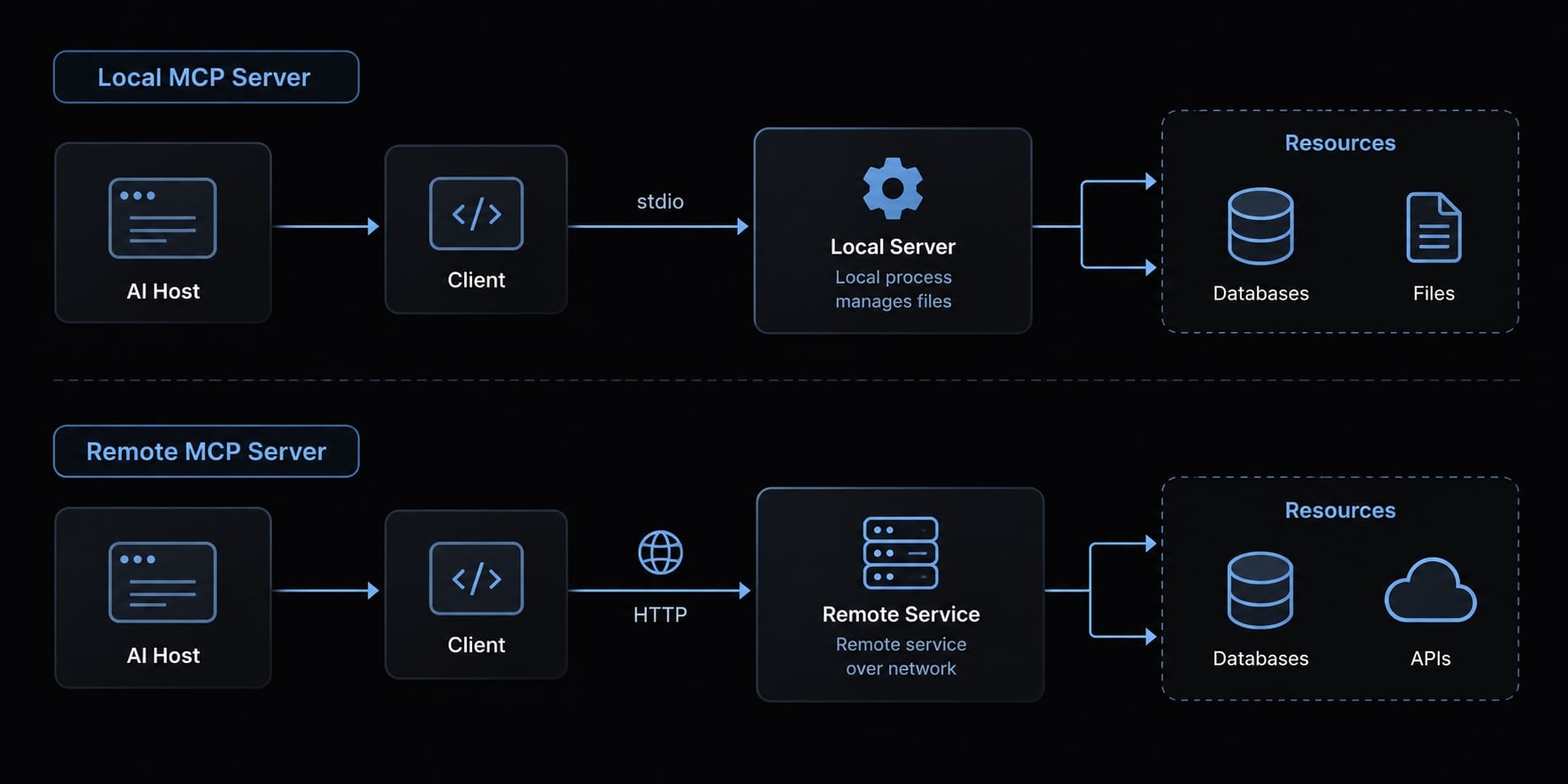
Trace the complete data path across each trust boundary—where permissions or control pass between environments or parties.
Key differences between local and remote MCP servers
Resource and data access
Local tools use permissions available to their process; remote tools use permissions available within their service environment. Repository editing often favors local execution, while shared CRM access often favors a service.
Data residency concerns where data is located. Data sovereignty also concerns applicable jurisdiction and control. Neither is established by server location alone: Model processing, downstream systems and logs matter.
Performance and latency
Local communication avoids a network hop, but tool execution may still wait on a remote database or API. A remote server located near that resource may perform well.
Measure end-to-end execution, including authorization and downstream calls. Transport-only comparisons cannot establish which deployment is faster for your workload.
Team access and scalability
A shared endpoint centralizes updates, helping users invoke a consistent implementation. However, its operator must plan concurrency, downstream rate limits, and availability.
Local installations distribute execution across machines but can drift between versions. Choose shared deployment when consistency matters and someone can operate it; preserve separate user permissions either way.
Credentials and access control
Local configuration files and environment variables are common credential delivery patterns, not inherently secure defaults. Distributed tokens can become stale or difficult to revoke.
Central secret storage can simplify credential management, but increases the consequences of central compromise. Authenticating a caller does not establish permission to export CRM records or modify them; authorize downstream actions separately.
Setup, maintenance and ownership
Local deployment requires package verification, runtime installation, and per-machine updates. Remote deployment adds hosting, endpoint protection, monitoring, and incident response. Moving a wrapper onto a server does not resolve who may invoke each operation. In the illustrative team, developers and revenue operators should not automatically inherit identical CRM permissions.
Responsibility checklist:
- User or endpoint team: Local installation, approved versions, machine restrictions.
- Service operator: Remote deployment, availability, endpoint monitoring.
- Named credential owner: Secret storage, rotation, and access revocation in either model.
- Incident owner: Investigation and containment across the complete workflow.
Select the model whose deployment overhead your team can reliably support.
Security: Is a local MCP server safer than a remote server?
Neither deployment model is inherently safer. MCP server security depends on what code executes, which resources it can reach, and how actions are authorized. Local deployments concentrate package and process-permission risks. Remote deployments introduce service endpoints, shared authorization, and operator dependencies. Both require restricted access, trustworthy software, and accountable maintenance.
Official MCP Security Best Practices and Authorization documentation provide relevant guidance; the following controls also reflect architectural recommendations.
Local MCP security risks
- Untrusted packages: Verify provenance and pin reviewed versions. Pinning prevents unexpected changes; it does not prove safety.
- Broad filesystem or shell access: Apply least privilege—only the access needed—through restricted paths, commands, and execution identities.
- Long-lived secrets: Use appropriate secret storage and credential rotation: replacing credentials and retiring old ones.
- High-impact actions: Limit write access and require meaningful approval describing the intended action.
- Assumed isolation: Review container mounts, runtime privileges, and host controls. Containers are not automatic security boundaries.
Remote MCP security risks
- Network exposure: Protect transport with HTTPS and restrict reachability where appropriate.
- Misused tokens: Validate authorization credentials, narrow their scope, and support revocation.
- Cross-user access: Enforce application-level permissions and tenant isolation, preventing one customer or team from accessing another’s data.
- Centralized secrets: Use managed storage and narrowly scoped downstream access.
- Operational blind spots: Log useful audit events without unnecessarily recording secrets or sensitive payloads.
OAuth authorization does not replace identity authentication or operation-level permissions. Follow applicable MCP HTTP authorization requirements. Origin validation is another relevant protection, including for local HTTP endpoints—not a substitute for authorization.
Compact threat-model comparison
Security boundaries and control implications
Dimension | Local | Remote |
|---|---|---|
Trust boundaries | Host, process, files, external APIs | Caller, service, downstream systems |
Blast radius: what compromise affects | Accessible machine resources | Accessible users, tenants, and systems |
Secret exposure | Files, environment, process access | Storage, runtime, logs |
Revocation and auditability | Require endpoint or identity controls | Require implemented service controls |
Supply chain and endpoints | Packages; local listeners if used | Packages, service images, network endpoints |
Prompt injection can influence unsafe tool use in either model. Deployment location is not a defense.
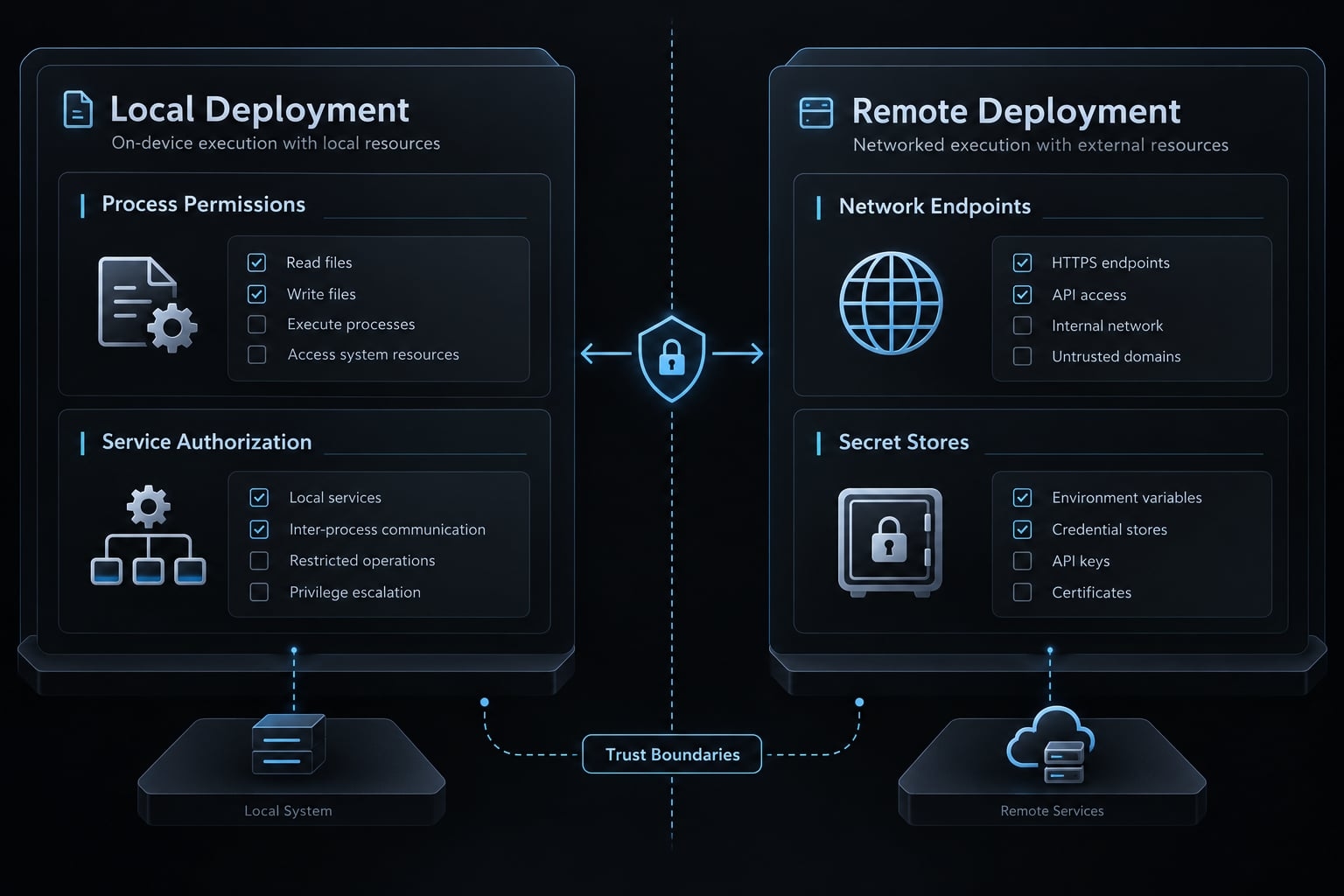
stdio vs streamable HTTP: Related to deployment, but not identical
Transport describes how MCP messages move between client and server. Official MCP transport documentation defines stdio as communication over standard input and output with a subprocess. Streamable HTTP provides HTTP-based communication with an MCP service.
These are common deployment pairings, not synonymous labels. A local server can expose HTTP on localhost. Conversely, a locally launched bridge can forward requests to a remote service.
Shared protocol concepts do not make clients behave identically. Check supported transports, authorization behavior, configuration, and lifecycle handling for your chosen application.
Choose stdio when
- The host/client can launch the server process.
- Tools need machine-local resources.
- Per-user lifecycle and configuration are acceptable.
- Any offline requirement is supported by the complete workflow.
Offline capability depends on the model, dependencies, authentication, and downstream resources—not merely the local server.
Choose streamable HTTP when
- The service must run independently of a client.
- Multiple clients need a shared capability.
- A web or cloud client needs a reachable endpoint.
- Central access controls and service operations are being implemented.
Reachability does not require public internet exposure. A private-network endpoint can work when the client has an authorized network path.
When to choose local, remote or hybrid MCP
Choose a local MCP server when
- Files, repositories, tests, or commands are machine-bound.
- One user owns the workflow.
- Per-machine setup is acceptable.
- Required isolation or offline conditions can actually be met.
Local execution is not automatically air-gapped. A cloud model or external API may still receive data.
Choose a remote MCP server when
Use remote deployment for shared capabilities, independent service lifecycles, or cloud-hosted clients requiring network access.
Central credential operations and monitoring are useful reasons to choose remote, provided someone implements and maintains them. Sensitive resources still require scoped access.
Choose a hybrid MCP architecture when
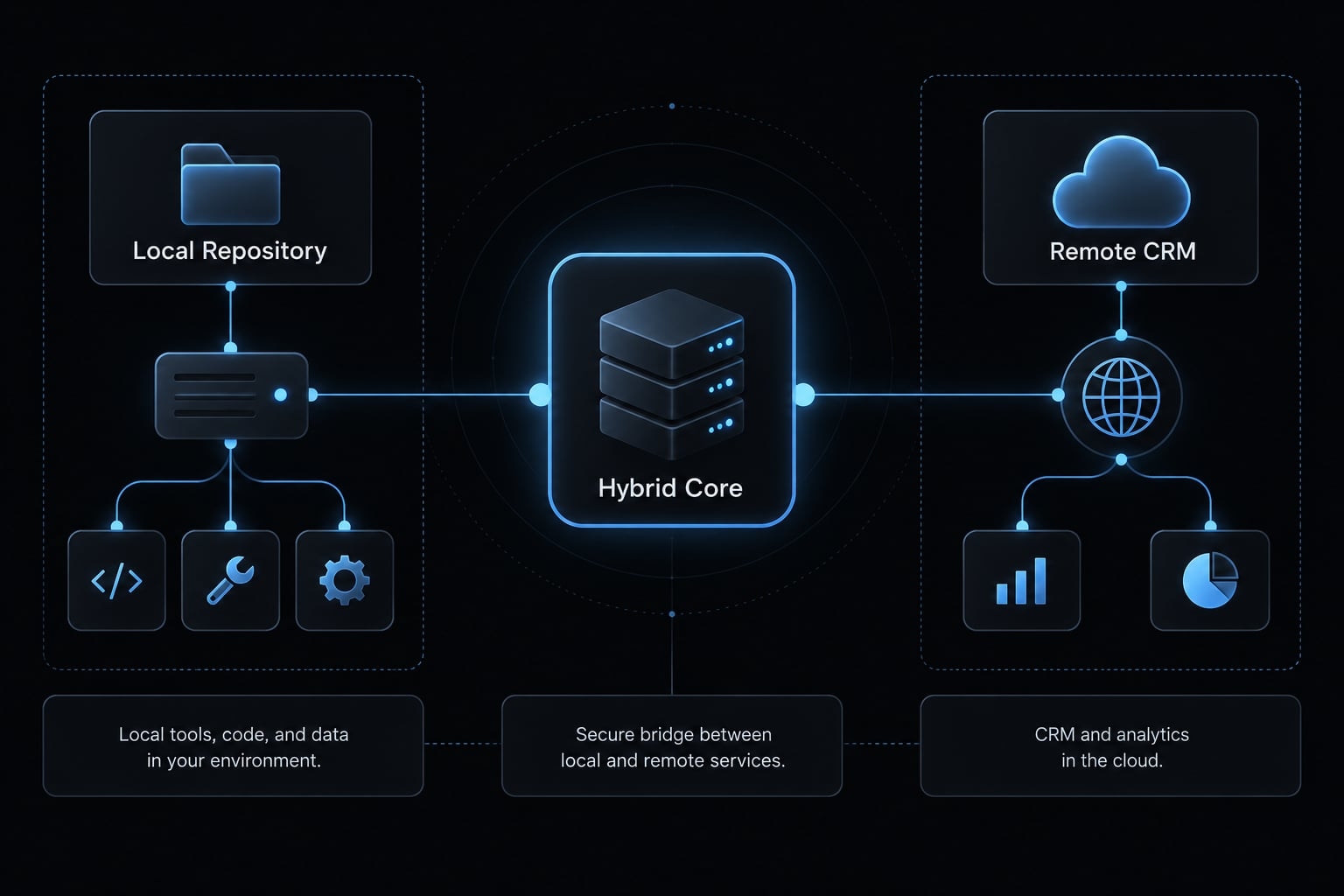
In the illustrative SaaS team, local servers handle repositories, tests, and restricted shell operations. Remote services handle shared CRM and organizational analytics.
A hybrid MCP architecture assigns capabilities across distinct resource boundaries. However, it does not automatically unify discovery, permissions, or logging—those remain dependent on the host and connected services.
60-second decision matrix
Deployment choices by situation
Situation | Typical fit | Reason | Main control |
|---|---|---|---|
Laptop files | Local | Machine-bound data | Restricted paths |
Git operations | Local for working copies | Repository context | Scoped writes; destructive-action approval |
Offline operation | Local, conditionally | No external dependencies | Verify entire workflow offline |
Shared CRM | Remote | Shared integration | User-level authorization |
Production access | Controlled remote service, often | Governed access path | Scoped, preferably read-only access |
Customer-facing capability | Remote, typically | Independent availability | Tenant isolation and quotas |
Local and shared systems | Hybrid | Distinct boundaries | Separate permissions and owners |
Production suitability follows operational controls, not remote placement alone.
An operational framework for managing MCP across environments
The PLACE framework
PLACE is this article’s practical checklist, not an official MCP standard. Use it to reduce configuration drift and ownership gaps:
- Placement: Identify the resource, data path, and suitable execution environment. Include model processing and external dependencies.
- Least Privilege: Restrict paths, commands, API scopes, and write access. Separate read-only tasks from consequential operations.
- Access and Authentication: Identify callers, enforce permitted actions, and assign responsibility for credential rotation and revocation.
- Configuration Consistency: Version approved definitions, package requirements, and environment expectations without committing secrets. Record supported client versions.
- Execution Visibility: Capture useful events with appropriate access and retention controls. Name the person responsible for investigating failures.
Apply these checks per capability, not just per server. A CRM integration may expose both low-risk lookups and consequential bulk updates.
Where AgentKit fits
AgentKit’s product scope includes MCP integrations, reusable skills, automated workflows, and CLI/desktop configuration management. These address setup repetition; they are not evidence of runtime security enforcement.
AgentKit’s role in repeatable setup
Need | Relevant product area |
|---|---|
Repeated configuration | MCP integrations and configuration management |
Rebuilt agent workflows | Reusable skills and workflows |
Tooling administration | CLI and desktop management |
Confirm current support separately for Claude Code, Codex, and GitHub Copilot; do not assume feature parity.
AgentKit does not secure an unsafe MCP server or architecture by default. Authorization, secret handling, and operational controls remain implementation responsibilities.
How to make the final decision
Make the MCP deployment decision per capability, rather than choosing one model for every integration. Answer five questions:
- Where does the tool or data live? Include downstream systems and model processing.
- Who needs the capability? One developer, an internal team, or external customers?
- Where should credentials be stored and rotated? Identify credential ownership and revocation paths.
- What could a compromise expose? Consider files, secrets, business records, and other tenants.
- Who deploys, updates, monitors and revokes access? Assign operational ownership explicitly.
Record three outputs: Deployment choice, permission boundary, and accountable owner for each capability.
Resource proximity is useful, but access control, residency obligations, and operational control take precedence. The simplest defensible architecture is preferable to a more centralized design nobody can maintain.
Frequently asked questions
What is an MCP server?
An MCP server is a standard interface that lets AI applications connect to external tools, data, and APIs. The protocol standardizes the connection; it does not make the connection secure — authorization and permissions remain implementation responsibilities.
What is the difference between a local and a remote MCP server?
A local MCP server runs as a subprocess on your machine, typically using stdio transport for direct access to local resources. A remote MCP server runs as an independent network service accessed via Streamable HTTP, making it ideal for shared team resources and cloud-based AI environments.
Which transport protocol should I use for my MCP server?
Transport is related to deployment but not identical to it. stdio suits a client-launched subprocess accessing machine-local resources; Streamable HTTP suits a service running independently of any one client. A local server can still expose HTTP on localhost, so decide by lifecycle and reachability rather than by the label.
Is a local MCP server safer than a remote server?
Neither is inherently safer; the blast radius differs. A local compromise reaches accessible machine resources; a remote compromise can reach multiple users, tenants, and downstream systems. Both need least privilege, verified packages, and accountable credential ownership.
Can I use both local and remote MCP servers together?
Yes, and it makes sense when the resource boundaries genuinely differ — local servers for repositories and files, a remote service for shared CRM data. Hybrid does not automatically unify discovery, permissions, or logging.
How do I secure a remote MCP server?
Secure your remote MCP server by implementing standard web protections: use HTTPS with valid certificates, enforce robust authentication such as OAuth 2.1, apply rate limiting at your API gateway, and ensure that your server logic strictly validates all incoming request headers and parameters.
Read more:
- How to manage multiple MCP servers: Best practices & strategy
- Claude Code MCP configuration: A practical setup guide
- Claude Code MCP: Connect servers, setup guide, and fix errors
Conclusion
Choosing between a local and remote MCP server centers on resource location, access control, and operational ownership. Local deployments best serve machine-bound development, while remote services suit shared, independently operated capabilities, with hybrid models bridging genuine boundary gaps.
Because neither architecture inherently guarantees security or speed, start by mapping a single capability's data path and access controls, expanding automation only as governance remains manageable.