Agent skills vs prompts: Choosing the right AI architecture
Agent skills vs prompts: What’s the difference and when should you use each?
When AI outputs are inconsistent, teams often respond by making their prompts longer, leading to unmanageable prompt sprawl. Fixing this is an architectural decision, not a writing problem. This guide explains the differences between agent skills, prompts, and instructions, and provides a framework for deciding which layer should handle which responsibility.
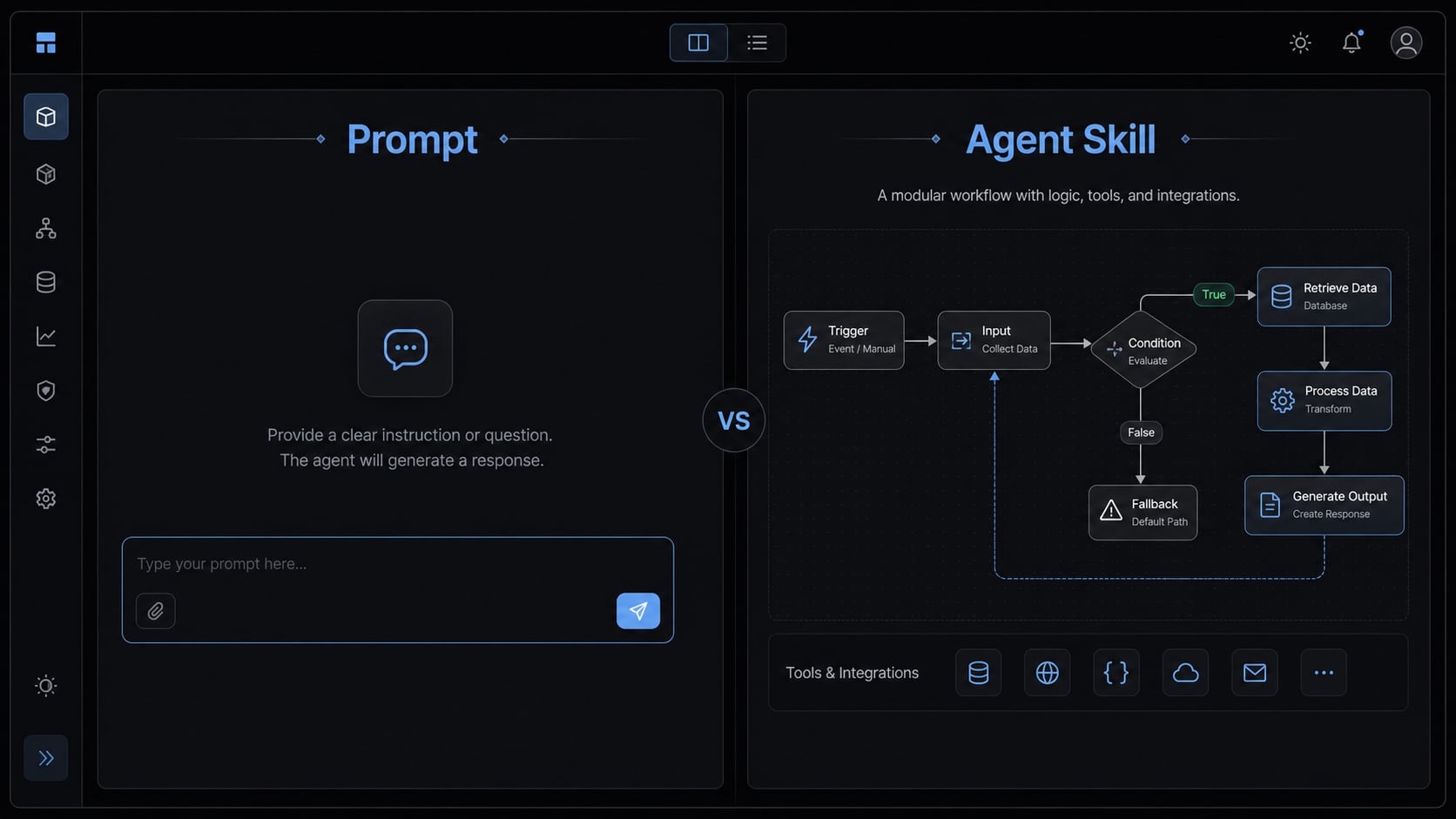
Agent skills vs prompts: The short answer
In agent skills vs prompts, a prompt is a task request for a specific moment, while an agent skill is a reusable procedure for a repeatable type of work. In AI agent architecture, prompts tell the system what to do now, skills define how recurring work should be done, and custom instructions provide broad background guidance.
That distinction matters because teams often try to solve repeated workflow problems by rewriting the same prompts again and again. In practice, that creates more ambiguity, not less.
Prompt vs skill vs instruction layer:
- Prompt: An immediate request for one task or output.
- Agent skill: A reusable, scoped procedure the agent can apply to a recurring class of work.
- Custom Instructions: Always-on background guidance that should apply broadly across a workspace, repository, or environment.
Notice:
- Prompts and skills can both operate under broader instructions.
- Different tools implement these layers differently, so exact behavior will vary.
- Skills usually improve consistency and reliability, but they do not guarantee perfect output.
Side-by-side comparison: Agent skills vs prompts
The fastest way to understand the difference between agent skills and prompts is to compare how they operate in practice.
Criteria | Prompts | Agent skills |
|---|---|---|
Primary purpose | Ask for a task right now | Standardize a repeatable procedure |
Activation | Manually invoked by the user | Activated when relevant, often through trigger-based execution |
Scope | Narrow and situational | Scoped to a repeatable workflow or domain |
Reusability | Reusable only if copied or saved as a template | Designed as reusable agent skills across tasks or teammates |
Structure | Usually a request artifact | Usually a procedure with rules, boundaries, output, and validation |
Reliability | Depends heavily on wording and context | More stable when the process is well-defined |
Maintenance | Often grows through ad hoc edits | Better maintained through versioning and ownership |
Best for | One-off asks, style control, ad hoc analysis | Workflow automation, recurring review tasks, domain procedures |
This is the practical difference between procedural skills vs static prompts. A prompt is usually optimized for the current request. A skill is optimized for repeat use. That also helps with context window optimization because stable procedures do not need to be rewritten in every request.
Teams confuse them because both are text-shaped inputs that influence AI behavior. But they do different jobs. A prompt is a request artifact. A skill is a reusable operating pattern. One is for asking; the other is for standardizing. Neither is universally better. The right choice depends on whether the work is situational or repeatable at team scale.
What a prompt is good at
A prompt is best when you need a clear response to a specific request. That includes one-off tasks, ad hoc analysis, situational drafting, and cases where the user wants direct control over wording, structure, or tone.
This is where prompt engineering helps. In plain terms, prompt engineering means writing clearer requests so the model has better context, better constraints, and a better target output. It is useful, but it does not turn every repeated workflow into a durable system.
Prompts are especially useful when:
- The task is irregular.
- The output is mainly response-oriented.
- The user wants hands-on style control.
- The process does not need formal validation.
- The task can rely on lightweight contextual guidelines.
You can also save recurring prompt formats as prompt files. That improves convenience and can boost AI productivity, especially for repeat requests inside chat tools. But prompt files are still templates for manual use. They are not the same as reusable procedures with boundaries and checks.
Example prompt use cases
- Draft release notes from a list of commits.
- Summarize a customer interview into themes and action items.
- Create a blog outline from a topic and audience brief.
- Review code readability and suggest clearer naming.
Prompts are often the right tool for these cases because the user is asking for an answer, not operationalizing a procedure.
Signs a task should stay a prompt
- It is one of many one-off tasks.
- It does not happen on a predictable cadence.
- It does not need repeatable validation.
- The output matters more than the process.
- The user wants direct wording or format control.
The limit appears when prompts start carrying too many rules, exceptions, and process steps. A common mistake is writing a prompt that tries to function as a procedure manual, style guide, QA checklist, and workflow policy all at once. At that point, prompting becomes fragile. Small wording changes can produce very different results, and teammates start maintaining their own private versions.
What an agent skill is good at
An agent skill is best for repeatable work that benefits from a stable procedure. Instead of asking the agent from scratch every time, you define a reusable capability for a recurring class of tasks. This is the clearest answer to agent capabilities vs instructions: A skill is not broad background guidance. It is a scoped operating method.
The most useful way to think about a skill is as a contract. A good skill does not just tell the agent what good looks like. It defines when the skill applies, what it owns, what it may do, what it must avoid, what output it should return, and how the result should be checked.
That is why skills fit recurring, domain-specific procedures. If the work is stable enough to standardize, a skill can create more predictable outcomes and reduce repeated team rework.
Anatomy of a strong skill
- Trigger: The condition that tells the agent when to use the skill.
- Scope: The specific job or domain the skill owns.
- Rules: The approved steps, conventions, or methods.
- Boundaries: What not to do, where not to expand, what to avoid.
- Output: The expected deliverable or result format.
- Validation: The checks used to confirm the work was done correctly.
This contract structure matters because it limits interpretation. It also supports more deterministic workflows, meaning the agent follows a more consistent path when the task repeats.
Example skill use cases
- PR review workflow with required review criteria and reporting format.
- Test generation that follows repository conventions and required checks.
- Git commit handling with staging rules, commit scope, and verification steps.
- SEO content QA with title, structure, factual, and internal-link checks.
- Lead enrichment workflow using fixed fields, source rules, and output format.
A strong skill also defines boundaries. For example:
- Do not modify unrelated files.
- Do not change public APIs unless requested.
- Do not add dependencies without justification.
- Do not mark a workflow complete without reporting skipped checks.
This is why skills are effective for domain-specific functions. They support team reuse, easier review, and cleaner governance. In mature environments, skills can also be versioned so the team knows which procedure is active and who owns updates. That matters for maintainability, especially when multiple contributors rely on the same operational standard.
Skills can improve consistency, but only when they are well-scoped. If the process is still changing weekly, formalizing it too early may create friction instead of clarity.
When to use prompts, skills, or instructions
The cleanest model is to think in layered configurations. Custom instructions or system prompts hold broad standards that should apply all the time. A prompt handles the immediate ask. A skill handles the repeatable procedure that sits between broad guidance and a one-time request.
This model is tool-neutral. Different platforms may package the layers of agent skills and prompts differently, but the underlying logic remains the same.
If X, use Y logic
- If it should always apply across the workspace or repository, use custom instructions.
- If it is a one-time ask, use a prompt.
- If it is a repeatable procedure with boundaries, use a skill.
Why this matters
- Reduces prompt sprawl.
- Creates a cleaner agent workflow.
- Improves consistency across teammates.
- Makes workflows easier to share and reuse.
- Simplifies onboarding for new contributors.
- Supports basic AI agent governance without overcomplicating the setup.
In practice, teams work better when these layers are not forced into one place. Broad standards should not be hidden inside a prompt. A repeatable procedure should not be rewritten from memory every time. And a one-time request should not always become a formalized system.
Common mistakes when teams mix up skills and prompts
Wrong layer selection usually creates the wrong outcome. The issue is not that prompts are bad or skills are better by default. The issue is fit.
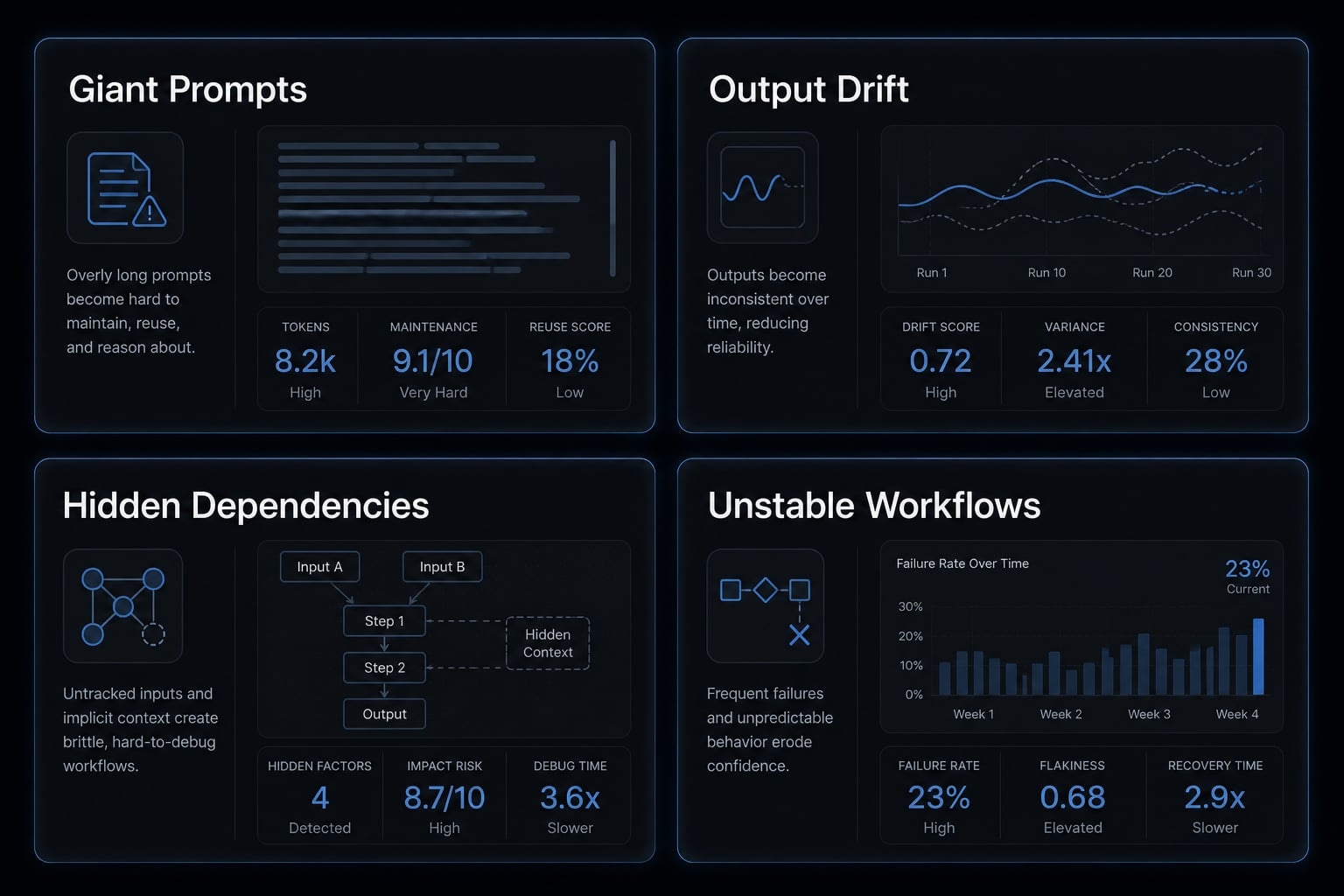
Symptom checklist
- “We keep rewriting the same prompt”
- “Only one teammate knows the right wording”
- “The agent behaves differently every time”
- “The prompt is longer than the task”
1. Turning repeated workflows into giant prompts
This is the classic form of prompt sprawl. Teams keep adding rules to a single request instead of separating permanent standards from repeatable procedures. The result is harder to maintain and easier to break.
2. Formalizing too early before the process is stable
Not every repeated task deserves workflow automation or a formal skill. If the process is still changing, locking it into the wrong structure adds maintenance overhead and confusion.
3. Using prompts where state or consistency matters
If a workflow depends on prior steps, approved output structure, or repeatable checks, loose prompts can struggle with state management. You may get acceptable output once, but weak reliability over time.
4. Letting one teammate’s “secret prompt” become the workflow
A common failure mode in agent architecture is hidden dependency on one person’s private wording. That slows onboarding, makes collaboration harder, and prevents the team from standardizing what actually works.
The cost of confusion is not just inconsistent output. It is team friction, duplicated effort, and unclear ownership of how work should be done.
A simple decision framework you can apply today
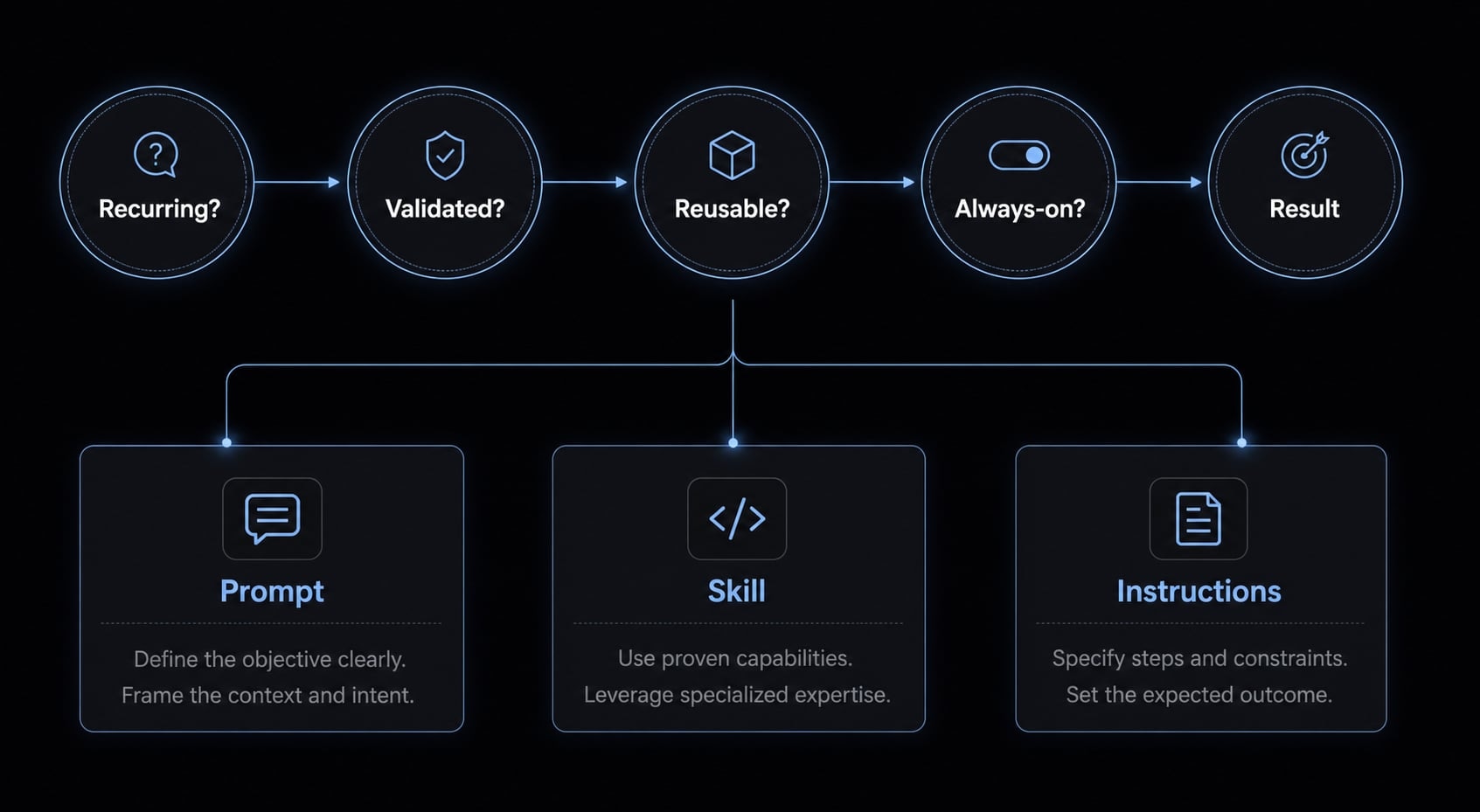
If you are deciding between a prompt, a skill, or instructions, use this four-question checklist.
“Use prompts for requests, skills for repeatable procedures, and instructions for persistent standards.”
4-question checklist:
- Is this task recurring?
- Does it need clear boundaries or validation?
- Should more than one person reuse it?
- Should it be triggered repeatedly or operationalized for triggerability?
Before writing a new prompt or creating a skill, quickly assess the task with these four questions:
- If most answers are yes, move toward building reusable agent skills.
- If most answers are no, keep it as a prompt.
- If the rule should apply broadly all the time, move it into instructions.
This framework helps with improving AI agent reliability because it pushes you to separate ad hoc requests from operational patterns. It also supports modularity, which makes workflows easier to maintain over time. The goal is not to make everything contract-based on day one. Start simple. Formalize only what repeats often enough to justify the overhead.
Practical example: How this looks in a real agent workflow
Imagine a small team producing technical content for product launches.
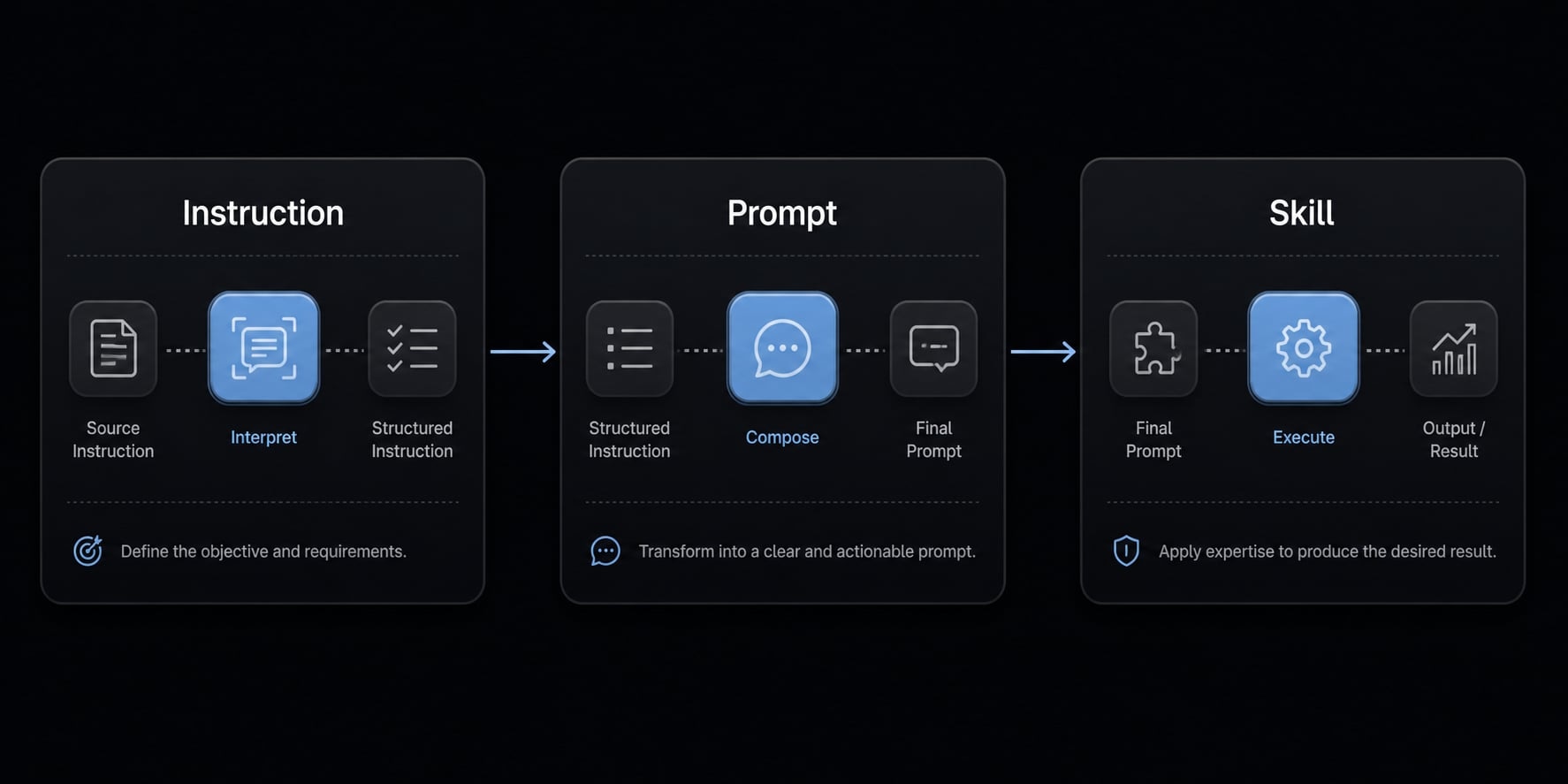
The instruction layer holds persistent standards: Use the company’s product naming, avoid unsupported claims, keep release summaries concise, and follow the repository’s style rules. The prompt layer handles the immediate ask: “Draft release notes from these merged changes for a technical but non-expert audience”. The skill layer handles the repeatable QA process before publishing: Check title clarity, verify feature claims against source notes, confirm internal links, flag missing proof points, and return a structured pass/fail summary.
This same three-layer model can show up inside tools such as Claude Code, GitHub Copilot, or Codex, even if each tool implements the mechanics differently.
Cross-Functional Example:
- Instruction: Brand and style rules that always apply.
- Prompt: Generate one campaign outline for this week’s launch.
- Skill: Content QA workflow before publishing.
In a structured environment, that becomes a reusable workflow instead of tribal knowledge. This is also where organized execution matters. For teams managing repeatable tasks across environments, a cross-platform CLI or workflow hub such as AgentKit can help keep instructions, prompts, and skills separated by purpose rather than mixed into one brittle layer.
Frequently asked questions
What is the core difference between agent skills and prompts?
A prompt is a one-time request for an immediate task, acting like a specific instruction for an AI to follow once. An agent skill is a reusable, scoped procedure or capability that acts as a documented "contract" for repeatable, recurring tasks within an agent-based workflow.
When should I use an agent skill instead of a prompt?
Use an agent skill when the task is recurring, requires consistent validation, benefits from defined boundaries, and needs to be shared or reused by others. If the task is a one-off request that doesn't need a formal structure or repeatable procedure, use a standard prompt.
Can I use agent skills and custom instructions together?
Yes, they are designed to work in layers. Custom instructions provide the always-on, persistent background guidance (like coding standards), while agent skills are modular procedures loaded when specific tasks are triggered. Prompts then serve as the immediate, situational requests you send to the agent.
Why do my AI agents keep failing despite having long prompts?
This is often due to "prompt sprawl." When you pack too many rules, exceptions, and procedural steps into a single prompt, it becomes fragile and lacks clear boundaries. Converting those instructions into discrete, modular agent skills with specific triggers and validation steps significantly improves reliability and maintenance.
What does "contract-based" mean for an agent skill?
A "contract-based" skill defines a strict set of inputs, triggers, and expected outputs. It explicitly states the domain, the permitted actions, the prohibited actions (boundaries), and how the agent should validate its own success. This reduces reliance on the AI’s guesswork and forces adherence to a repeatable process.
Where can I apply these AI workflow improvements?
You can start by auditing your recurring tasks, such as pull request reviews, test generation, or documentation updates. By standardizing these into reusable skills within your development environment or cross-platform CLI tools, you create a more predictable and scalable AI-assisted workflow for your team.
Read more:
- Claude Code skills best practices: Build reusable AI workflows
- Claude Code toolkit: Scale your AI development workflow easily
- Claude Code vs OpenCode Features: Choosing the right CLI agent
Conclusion
The core answer to agent skills vs prompts is straightforward. Prompts are for specific asks. Skills are for repeatable procedures. Instructions are for persistent guidance that should apply broadly. When teams understand that layering, they usually stop trying to solve every workflow problem with a longer prompt.
In practice, better AI output often comes from better separation of responsibilities, not more text. Use prompts when the request is situational. Use skills when the process repeats and needs boundaries. Use instructions when the rule should always be present. If you are standardizing reusable agent workflows, start with a lightweight checklist, document what repeats, and build only the layers your team actually needs.