How to use Claude Code for QA automation: A practical guide
How to use Claude Code for QA automation: A practical guide for technical teams
Repetitive browser checks, manual regression habits, and PR validation overhead still slow down many engineering teams. That is exactly why interest in how to use Claude Code for QA automation is growing among QA leads, engineering managers, and developers who want more coverage without adding process noise. This guide explains what Claude Code actually does inside a QA automation workflow, where it fits, the simplest setup to start with, and how to adopt it safely in phases.
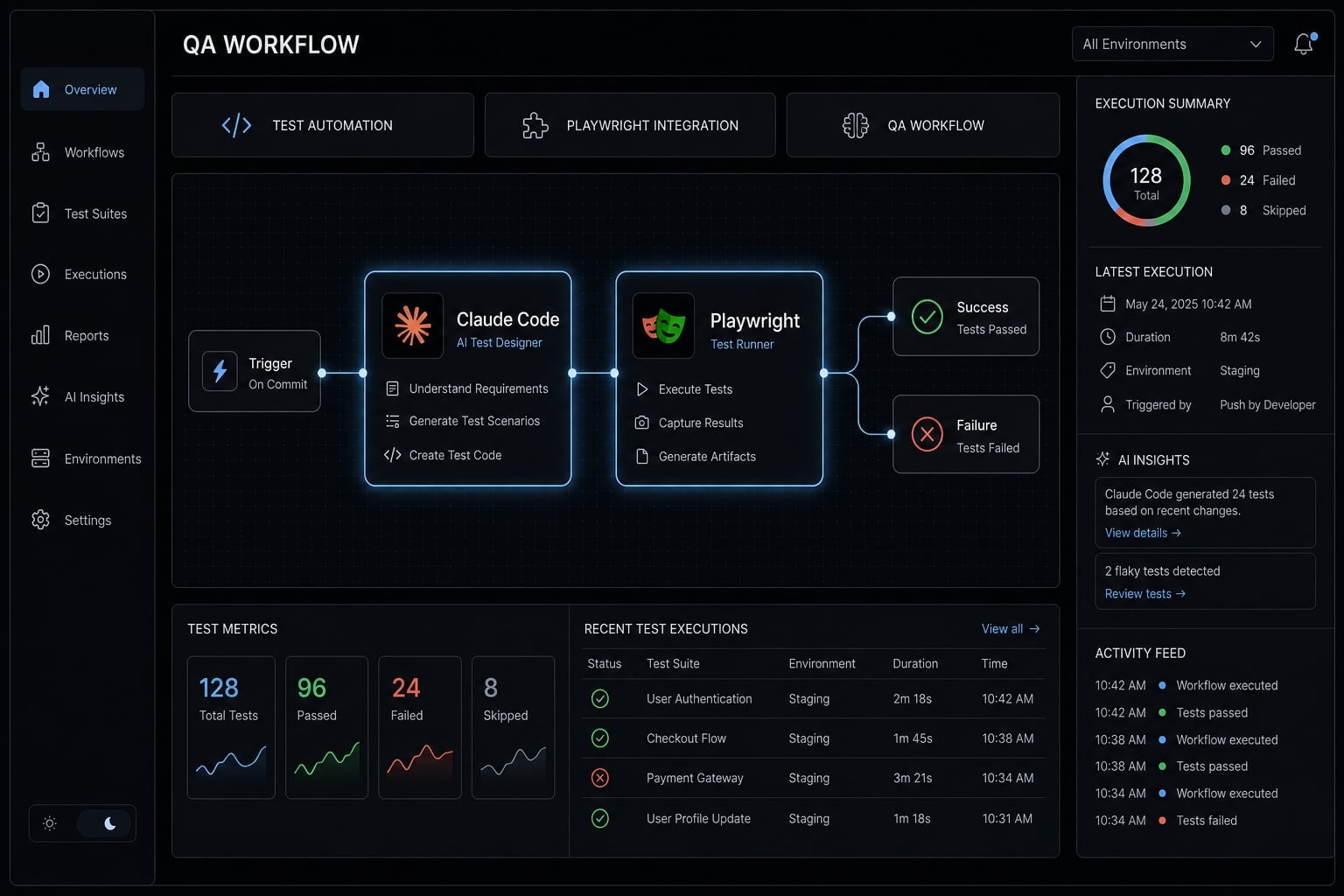
What Claude Code actually does in a QA automation workflow
Claude Code in QA automation is a terminal-based AI agent that can understand your codebase, inspect files, run commands, and coordinate with connected tools to support testing work. It is not a test framework by itself, and it should not replace Playwright, deterministic tests, or human release decisions.
What makes Claude Code useful is not just text generation. It can work inside your real project context, follow multi-step instructions, and use external tools through Model Context Protocol (MCP). In practice, that means it can help inspect recent changes, suggest test coverage, run browser-focused workflows, and summarize findings in a readable format.
For QA teams, that makes it more useful than a chat-only assistant. Instead of answering in the abstract, it can operate closer to the actual delivery workflow.
What makes Claude Code relevant for QA
- Codebase aware: It can read the project structure, recent changes, and existing test patterns.
- Command execution: It can run terminal tasks, which matters in real QA workflows.
- MCP connectivity: It can connect to tools such as Playwright for browser automation.
- Multi-step reasoning: It can inspect, test, summarize, and propose next actions in sequence.
Where it fits best in the QA stack
- Exploratory testing for real user flows.
- Test case generation based on code or changed behavior.
- Risk-based validation for pull requests and scoped releases.
- Test maintenance after UI, selector, or logic changes.
Its role is best understood as an orchestration and support layer. It adds useful signal around testing work, but the testing foundation still belongs to deterministic frameworks and human review.
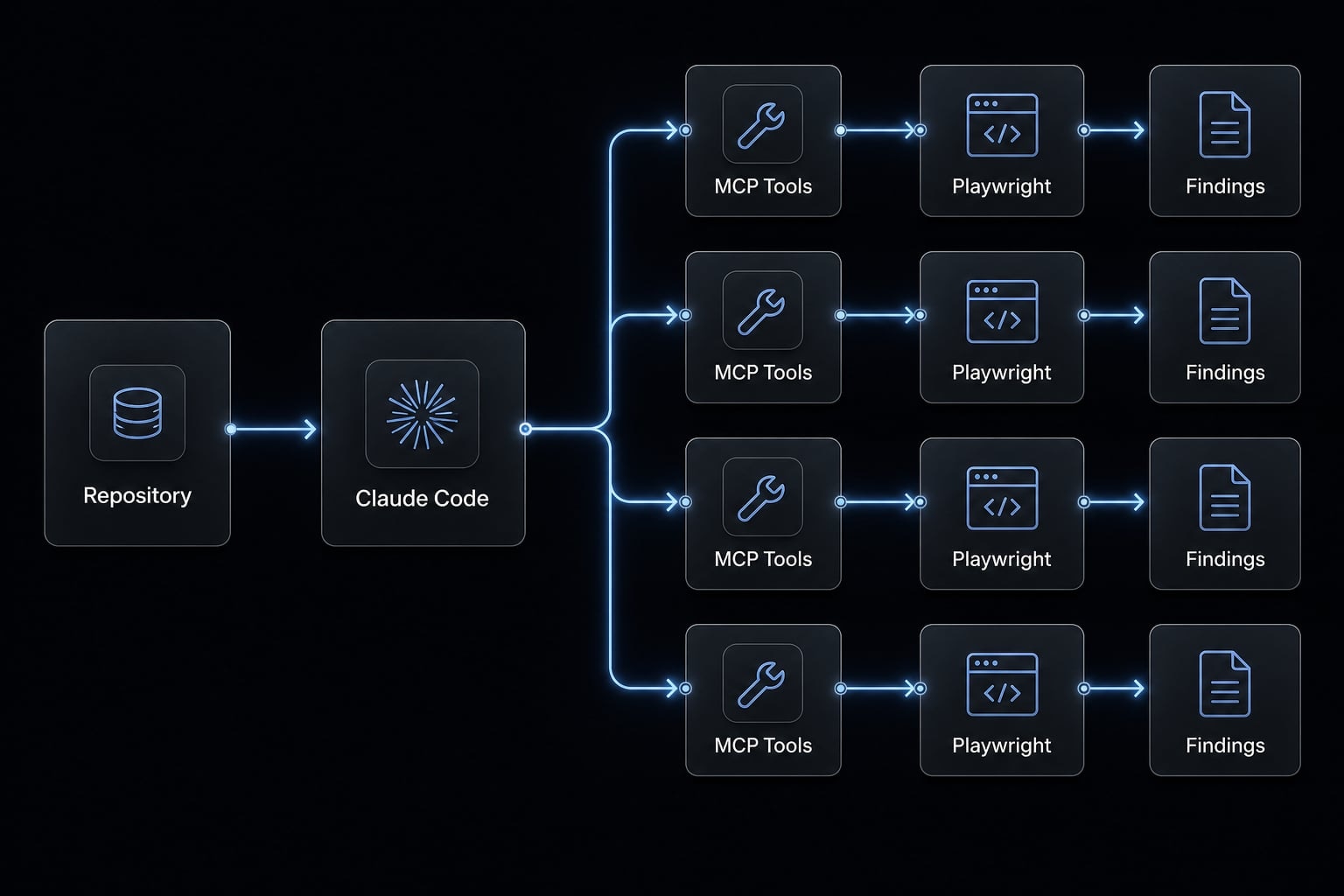
When to use Claude Code for QA Automation and when not to
The right question is not whether AI can test software. The better question is where it adds useful signal without increasing release risk. Claude Code is strongest when testing requires context, judgment, and targeted exploration. It is weaker when the workflow demands strict repeatability, hard pass/fail enforcement, and audit-grade precision.
Best use cases vs not ideal use cases:
QA scenario | Good fit for Claude Code | Not ideal as primary method |
|---|---|---|
Exploratory browser checks | Yes, especially for real user journeys and quick validation | No, if you need exact repeatability every run |
Edge-case discovery | Yes, useful for odd inputs and unexpected flow behavior | No, if coverage must be formally predefined |
Test drafting | Yes, for generating candidate test cases or Playwright scripts | No, if code is merged without human review |
Flaky test diagnosis | Yes, for investigating likely causes and suggesting updates | No, if it becomes the only debugging method |
PR-level validation | Yes, when scoped to changed behavior | No, if every PR triggers broad unreviewed automation |
Release signoff | Useful as supporting evidence only | Not suitable as final release gate |
Compliance evidence | Helpful for screenshots and artifacts | Not enough by itself for governance-heavy environments |
Full deterministic regression ownership | Useful as a supplement | Not suitable as the primary method |
Claude Code works best where judgment and targeted exploration matter. It works less well where deterministic testing, strict QA governance, and formal regression testing pipeline ownership are mandatory.
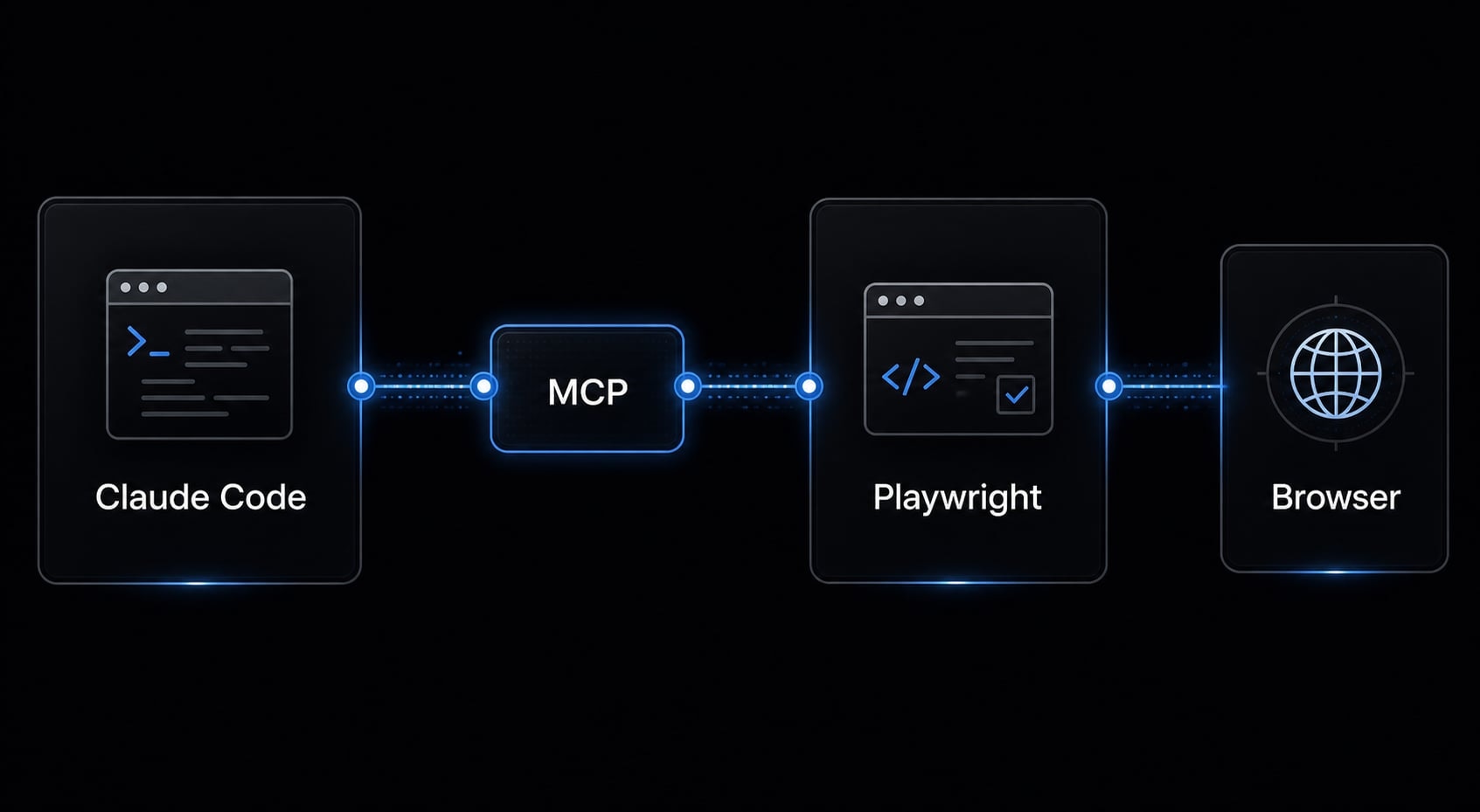
The simplest setup: Claude Code + Playwright + MCP
The simplest place to start is a minimal workflow, not a full automation program. You do not need a large framework redesign to begin using Claude Code in testing. A practical setup pairs Claude Code with Playwright, with MCP acting as the bridge to browser tools.
- Prepare a local or staging environment.
- Confirm Playwright is installed and working.
- Connect Playwright through MCP.
- Start with one business-critical flow.
- Review outputs before expanding.
Step 1: Prepare the environment
- Open your project in Claude Code from the CLI.
- Make sure the application runs reliably in one environment, either local or staging.
- Confirm browser tooling is available and usable before adding AI-driven steps.
- Pick one stable environment and stick with it for early testing.
- Start with a flow that already works most of the time, such as login or signup.
This local-first approach reduces false signals. In most teams, unstable environments create more QA noise than the model itself.
Step 2: Connect Playwright through MCP
- Use Playwright as the browser layer for clicks, inputs, navigation, and screenshots.
- Connect that browser capability to Claude Code through Model Context Protocol (MCP).
- Keep the setup conceptual at first. The goal is tool access, not advanced orchestration.
- If you later move into CI, use headless testing so browser checks can run without a visible window.
- Validate that Claude Code can successfully trigger a basic browser interaction before expanding scope.
Model Context Protocol (MCP) is a standardized way for Claude Code to connect to external tools such as Playwright.
This relationship matters because Claude Code provides context and orchestration, while Playwright provides reliable browser control.
Step 3: Start with one flow, not the entire app
- Choose one business-critical user journey, such as signup, checkout, or account settings.
- Write a clear prompt that focuses on that flow only.
- Avoid vague instructions like “test everything.”
- Ask for specific outputs such as steps performed, failures found, and screenshots captured.
- Review result quality before scaling into more flows or CI triggers.
The goal is to prove usefulness in a narrow lane first. This is the safest approach for teams asking how to use Claude Code for QA automation without overengineering from day one.
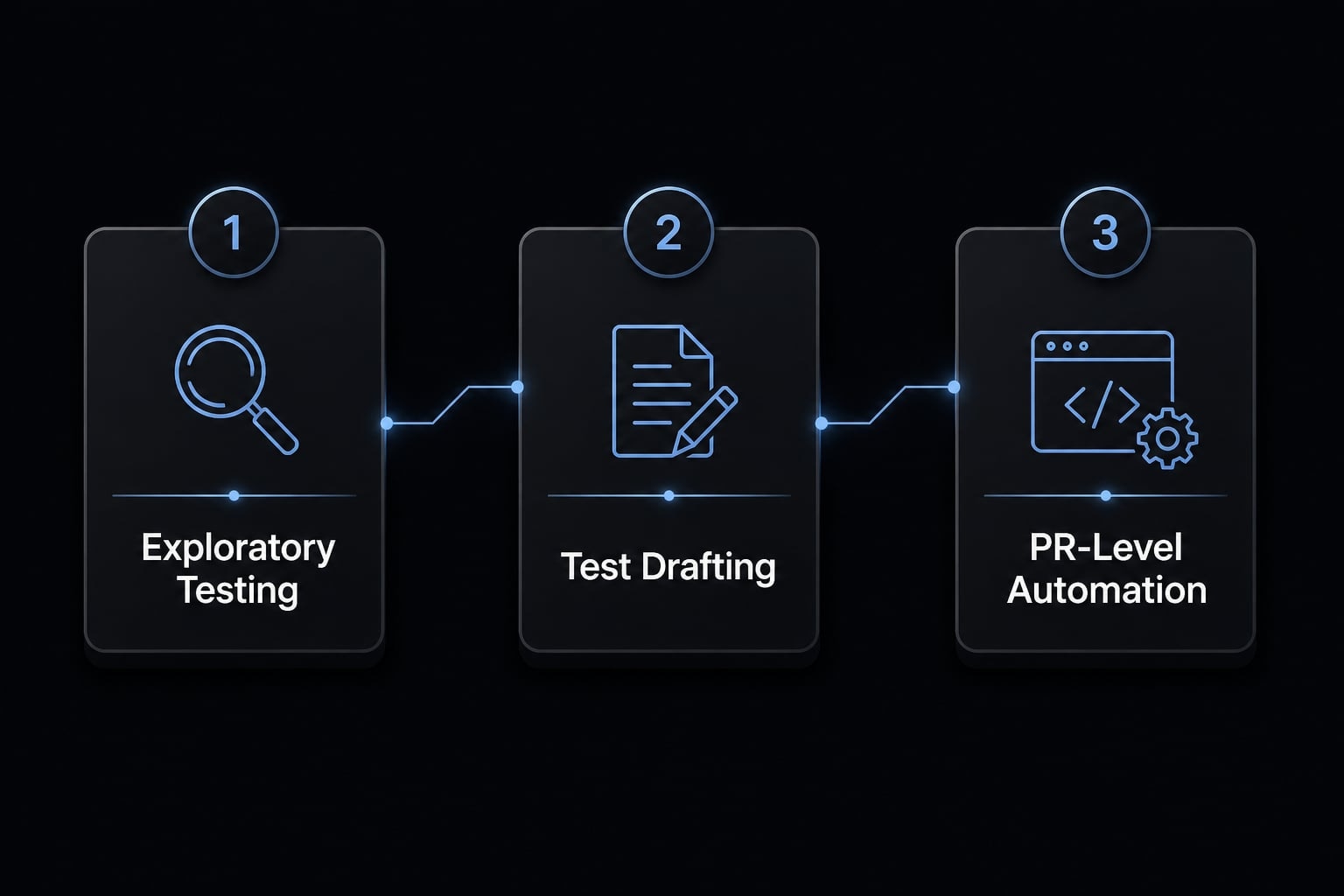
A practical 3-stage adoption path for QA teams
Phased adoption is a risk-control method. It helps teams learn where Claude Code produces useful QA signal before tying it to delivery pressure. In practice, the cleanest rollout moves from manual exploration support to test support, and only then to limited PR or CI automation.
- Exploratory testing.
- Test drafting and maintenance.
- PR-level automation.
Stage 1: Use Claude Code for exploratory testing
- Ask Claude Code to navigate a real user flow in the browser.
- Focus on forms, validation rules, unusual inputs, and viewport behavior.
- Capture screenshots when a problem appears.
- Use it for quick wins, bug discovery, and coverage gaps that scripted checks may miss.
- Keep the scope narrow, such as one signup or settings flow.
A simple example is asking Claude Code to test a signup flow with missing fields, invalid email input, and mobile viewport behavior. That type of task is easy to review and often reveals practical issues quickly.
Stage-exit signal: Outputs are consistently useful, scoped, and low-noise.
Stage 2: Use Claude Code to draft or update tests
- Use Claude Code to generate candidate Playwright tests from a validated flow.
- Ask it to revise aging tests after UI or logic changes.
- Review selectors, assertions, and waits before accepting any generated script.
- Watch closely for flaky tests, especially where timing or unstable locators are involved.
- Keep human review mandatory for all changes.
A realistic example is a login form update. Claude Code can revise an existing Playwright test to match the new UI, but your team should still manually verify selectors, assertions, and waiting logic before merging.
Stage-exit signal: Generated tests usually require only moderate edits and align with team standards.
Stage 3: Add PR-level or CI-based QA automation
- Start with narrow PR validation, not broad full-suite ownership.
- Scope runs using changed files, affected modules, or the PR description.
- Output findings in Markdown so reviewers can scan them quickly.
- Include screenshots or artifacts when relevant.
- Begin with non-critical workflows before adding any merge pressure.
- Keep your existing regression testing pipeline in place.
A good example is a pull request that changes checkout validation. Instead of rerunning the full test estate, run targeted browser checks against the impacted form behavior and summarize the results for reviewers.
If you later operationalize this in GitHub Actions, keep the purpose focused: Support review quality, not replace release governance.
Stage-exit signal: Findings are stable, actionable, and easy for reviewers to evaluate.
This maturity path works because it narrows risk before increasing automation pressure. Teams that skip directly to CI usually discover the same problem: too much noise, unclear ownership, and low confidence in outputs.
Example workflow: How to use Claude Code on a pull request
A practical pull request workflow should mirror how engineering teams already review change risk. The goal is not to test everything. The goal is to validate changed behavior in a way that gives reviewers useful signal.
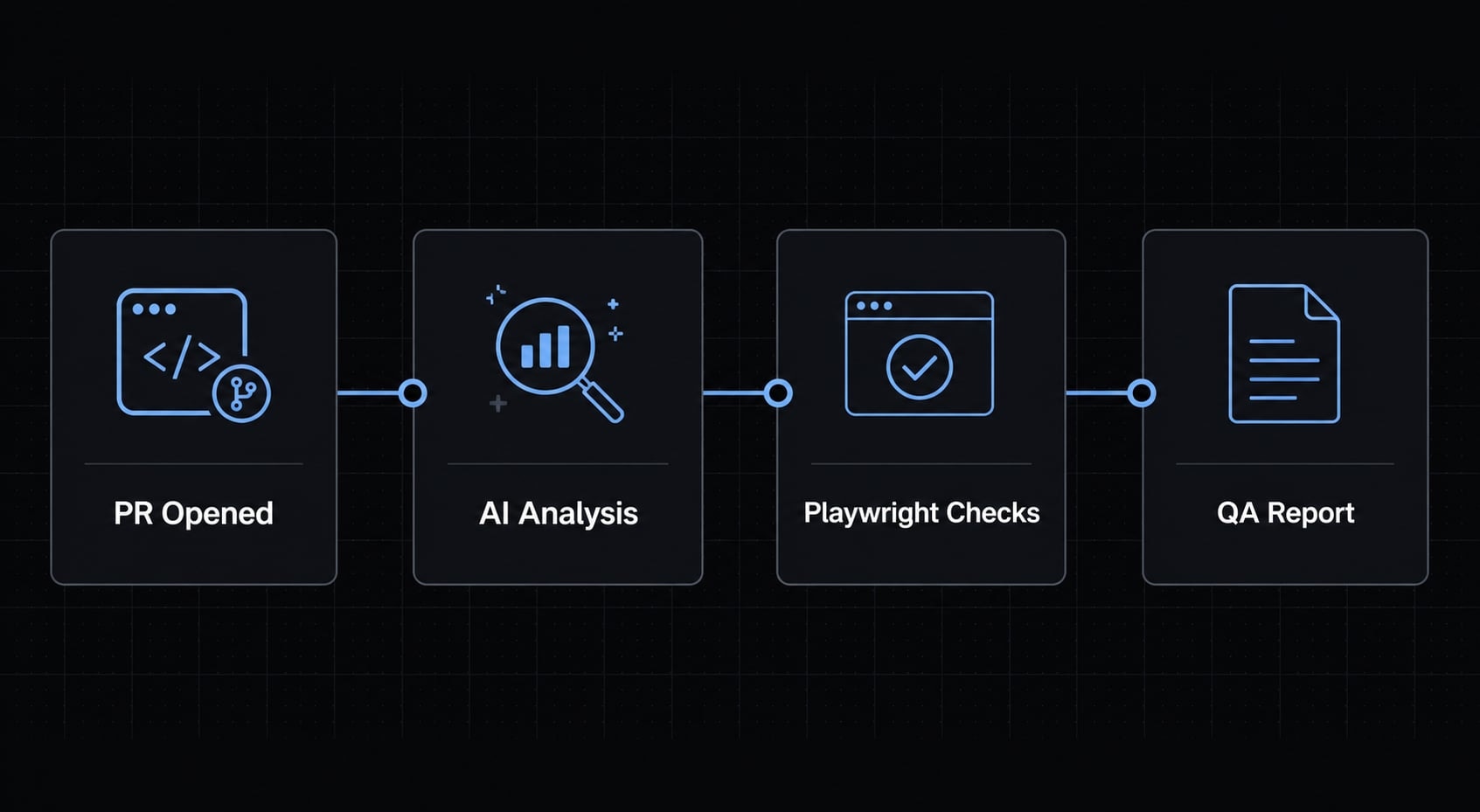
What a good PR QA workflow looks like:
- A developer opens a pull request with a clear summary of what changed.
- Claude Code reads the PR context, affected files, and related application behavior.
- Playwright runs targeted checks against the impacted flow through browser automation.
- Findings are summarized as a readable QA report in Markdown, with screenshots where useful.
- Human reviewers decide whether the findings affect merge readiness.
PR-scoped runs should test changed behavior, not rerun the entire regression suite by default.
This approach reduces noise because it keeps automation proportional to the actual change. For reviewers, a focused report is far more useful than a large volume of weak signal. It also fits real delivery workflows better, especially when using headless browser testing in CI and attaching artifacts through GitHub Actions.
Common mistakes that make Claude Code QA workflows less useful
The most common mistakes are:
Broad prompts: Asking Claude Code to “test the whole app” usually creates noisy output and inconsistent coverage.
- Do this instead: Define one flow, one environment, and one expected output format.
No clear test or reporting guardrails: Without pass/fail criteria, result quality becomes harder to judge.
- Do this instead: Specify what should be tested, what counts as a failure, and how findings should be reported.
No evidence capture: Findings without screenshots, logs, or reproducible context are harder to trust.
- Do this instead: Require screenshots or artifacts for visible issues, especially in browser workflows.
No human review owner: AI-generated findings can stall if no one owns the review decision.
- Do this instead: Assign a QA lead, developer, or engineering manager to approve usefulness and next actions.
No layered testing strategy: Relying on Claude Code alone weakens confidence, especially near release.
- Do this instead: keep unit, integration, and deterministic end-to-end coverage in place, then use Claude Code as a support layer.
Most workflow failures come from process design, not the model alone. Weak prompt design, unstable environments, missing QA governance, and unclear ownership all make outputs harder to trust. Once workflows move closer to release decisions, those controls matter even more.
First-week checklist for getting started
Keep the first week deliberately narrow. The goal is not full automation. The goal is a working AI testing workflow with low risk and clear review points.
Day-by-day rollout:
- Day 1: Install Claude Code and confirm it can access your project files.
- Day 2: Connect Playwright through MCP and verify basic browser access.
- Day 3: Choose one critical flow, such as signup or login, and run exploratory testing.
- Day 4: Draft one reusable Playwright test from that flow and review it manually.
- Day 5: Review findings with a human owner and document what to improve next.
- Optional: Try a non-critical PR-triggered workflow to test reporting and reviewer experience.
This rollout pace is realistic for small teams and avoids the common mistake of expanding scope before proving output quality.
Frequently asked questions
What is Claude Code for QA automation?
Claude Code is a terminal-based AI agent that acts as a workflow assistant within your development environment. It uses codebase awareness and the Model Context Protocol (MCP) to help QA teams with exploratory testing, test case drafting, and targeted validation-serving as a complement to, rather than a replacement for, deterministic testing frameworks.
How does Claude Code differ from traditional testing frameworks?
Traditional frameworks like Playwright are deterministic, meaning they run predefined scripts to guarantee specific outcomes. Claude Code is an intelligent agent that provides reasoning, interprets context, and can execute dynamic tasks (like exploratory sessions or code-aware test maintenance) that human testers typically manage.
Can Claude Code replace my regression testing pipeline?
No. Claude Code should not replace your regression testing pipeline or act as a sole release authority. It is best used for augmenting your workflow through exploratory testing, drafting new test cases, and performing risk-based validation on specific code changes within pull requests.
What is the simplest way to set up Claude Code for QA?
The most effective setup is a minimal loop: open your project in the Claude Code terminal, connect Playwright via the Model Context Protocol (MCP) to enable browser control, and begin by targeting one stable, business-critical user flow rather than attempting to automate the entire application at once.
Why should QA teams use Playwright with Claude Code?
Pairing these tools allows the AI to act as a skilled test engineer. Claude Code provides the reasoning to navigate your application, while the Playwright MCP server provides the engine to execute browser commands, capture screenshots, and handle complex interactions like form submissions or viewport testing consistently.
When should I use Claude Code for exploratory testing?
Use it during the early stages of a feature cycle to navigate user journeys, stress-test form validations, or check mobile responsiveness. Because Claude Code is codebase-aware, it can identify potential edge cases that a human might overlook, providing a rapid feedback loop before you commit to writing permanent regression tests.
What is a "stage-exit signal" for AI QA adoption?
A stage-exit signal is a performance benchmark that tells your team it is safe to progress to the next level of automation. For example, you should only move from exploratory testing to PR-level automation once the AI's output is consistently actionable, low-noise, and requires minimal human correction.
Read more:
- Claude Code automation: Build repeatable and low-risk workflows
- Claude Code Vue: Practical guide for AI-assisted development
- Mastering the Claude Code workflow for reliable AI development
Conclusion
Instead of trying to replace the entire workflow, the most effective answer to how to use Claude Code for QA automation is to treat it as a helpful assistant that improves efficiency. It is most useful for exploratory testing, test drafting, test maintenance, and PR-level targeted validation. It is less suitable for full regression ownership or final release authority.
Teams that get value fastest usually start small, review outputs carefully, and keep deterministic tests in place as the core quality foundation. If you want a practical next step, use an internal PR QA checklist, a Playwright workflow template, or an MCP integration guide to standardize the first rollout.