How to fix Claude Code TypeScript errors: A 5-step workflow
Claude Code TypeScript errors: A safe fix-and-validate workflow
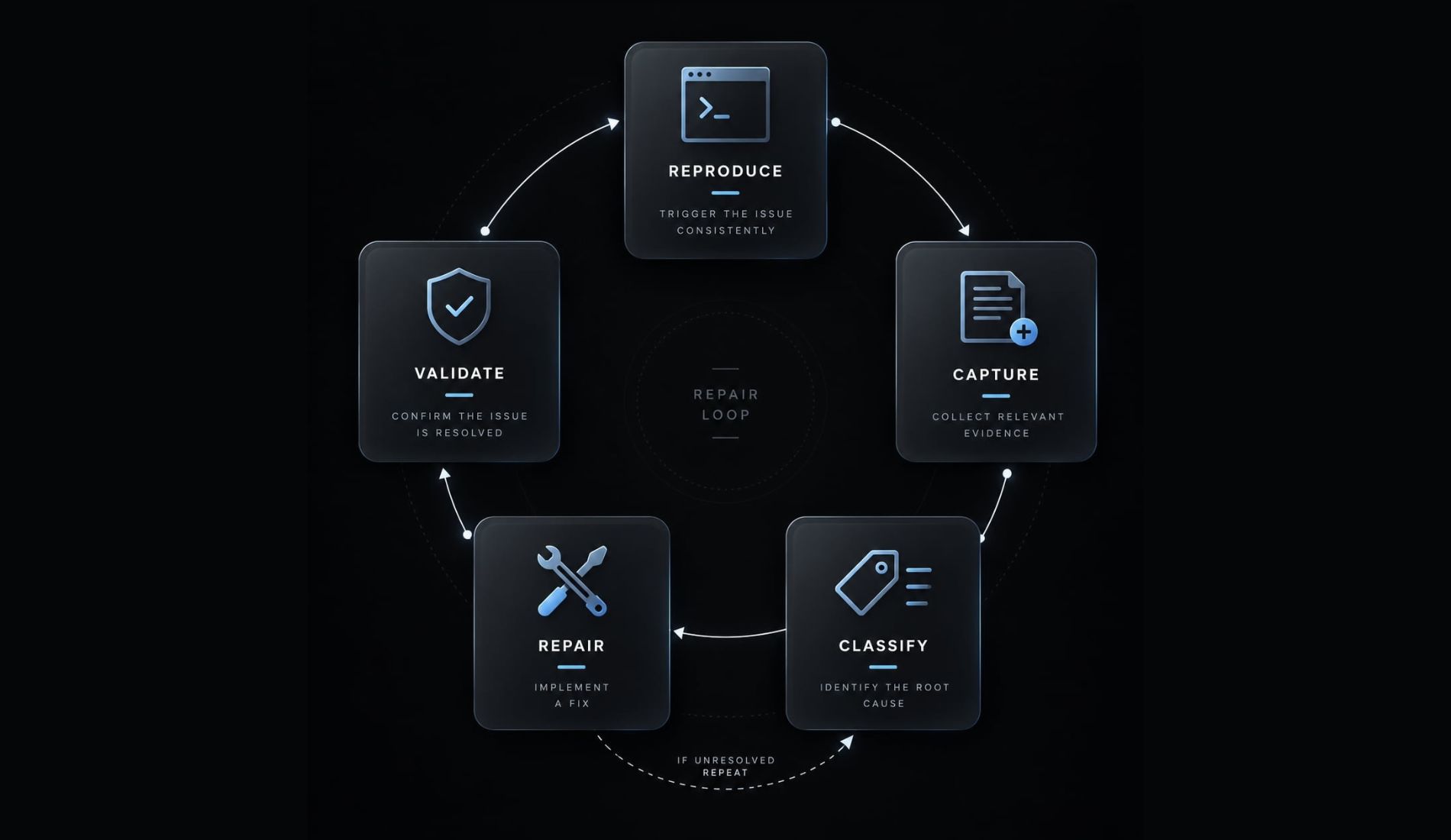
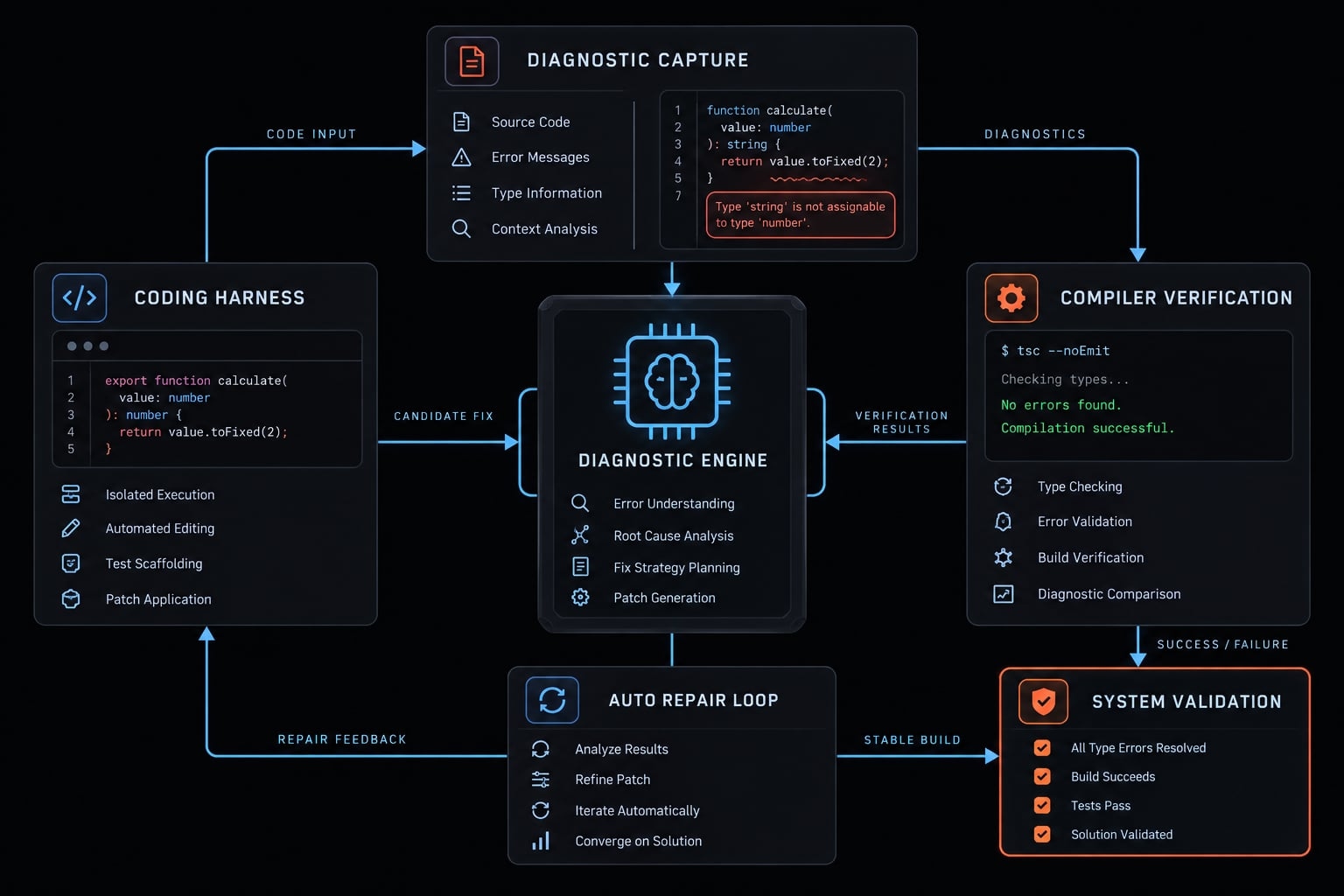
When validation fails after a refactor, scattered Claude Code TypeScript errors often stem from a single underlying contract mismatch or pre-existing environment issues. To fix AI-generated code without compromising type safety or masking defects, teams should execute a controlled sequence: Reproduce, Capture, Classify, Repair, and Validate. By starting with established checks, investigating dependencies before consumers, and applying a reusable repair framework with a strict review checklist, you can systematically restore service integrity.
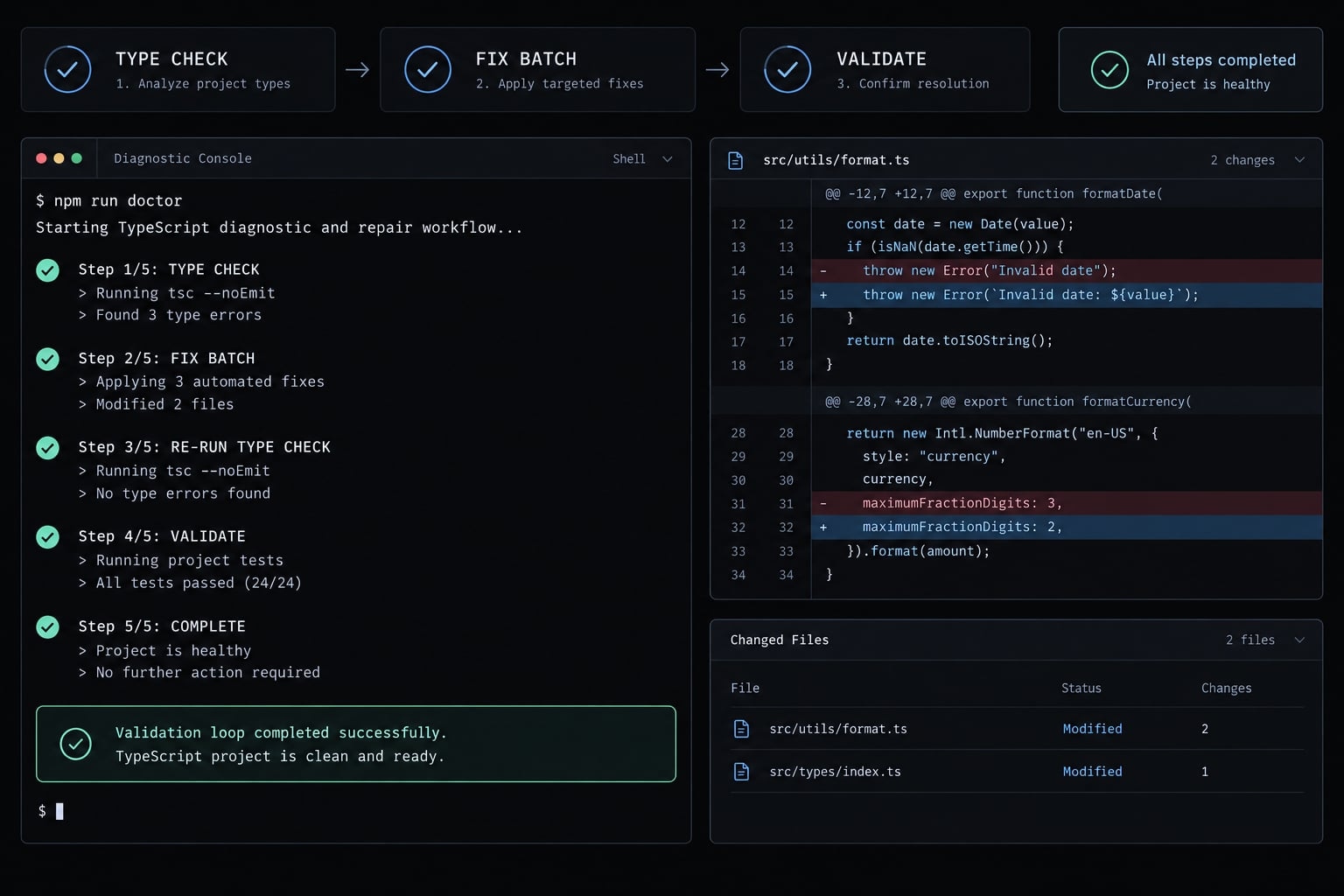
How to fix Claude Code TypeScript errors: The short answer
Fix Claude Code TypeScript errors by reproducing them with the repository’s established validation command, capturing complete diagnostics, and grouping failures by likely cause. Ask Claude to propose scoped changes before editing, repair the underlying contract or implementation, and rerun checks after each batch. Verify behavior separately before declaring completion.
The Five-step repair loop:
- Reproduce: Run the established repository check.
- Capture: Preserve the complete diagnostics and command scope.
- Classify: Group failures by likely shared cause.
- Repair: Approve scope and address foundational issues first.
- Validate: Recheck each batch and perform broader verification.
This compiler-in-the-loop approach grounds repair decisions in compiler output rather than guesses. tsc --noEmit is one possible command, not a universal replacement for repository scripts.
Compiler checks perform static analysis: they inspect code without proving its runtime behavior. Quick batch checks provide feedback during repair; the final gate includes the repository’s required tests, linting, and build checks. Neither stage should silently exclude affected packages.
Step 1 - Run the repository’s real type-check command
Reproduce the failure using the project’s own toolchain. A successful command is meaningful only when it checks the intended files and configuration.
Identify the canonical validation command
The canonical command is the repository’s established validation command. Identify it using this checklist:
- Inspect
package.jsonscripts and contributor documentation. - Compare commands in CI (continuous integration) workflows.
- Identify the affected package or workspace.
- Check the active
tsconfig.jsonor framework configuration. - Confirm expected Node.js, package-manager, and installed dependency versions.
These are repository-dependent alternatives, not a sequence to run indiscriminately:
npm run type-checkpnpm run type-checkyarn run type-checkpnpm --filter @example/web run type-check
A script named type-check might invoke framework tooling, multiple workspaces, or project-reference checks. It is not necessarily equivalent to tsc --noEmit.
The TypeScript CLI documentation explains how compiler invocation determines project selection. Supplying individual source files can bypass the project configuration you intended to check. Prefer the installed compiler rather than downloading another version.
In a monorepo, which contains multiple packages, confirm coverage explicitly. A root command may check only selected workspaces.
Capture the complete diagnostic output
Save the command, working directory, error codes, paths, line numbers, complete relevant messages, and exit status. Record a diagnostic count only when reliably available.
If logging through a pipe, preserve the compiler’s failure status; the logger’s success is not compiler success.
Illustrative output - not an executed repository result:
Directory: packages/webCommand: npm run type-checksrc/services/team.ts(18,3): error TS2322:Type 'string | undefined' is not assignable to type 'string'. Type 'undefined' is not assignable to type 'string'.Exit status: 2
Type checking checks compatibility; linting checks configured rules; tests exercise behavior; builds verify packaging. Runtime verification remains separate. Preserve existing failures as the comparison baseline.
Steps 2 and 3 - Give Claude Code context and group errors by root cause
Diagnostic order is not a repair plan. Several errors may originate from one shared API contract, while identical error codes may have unrelated causes.
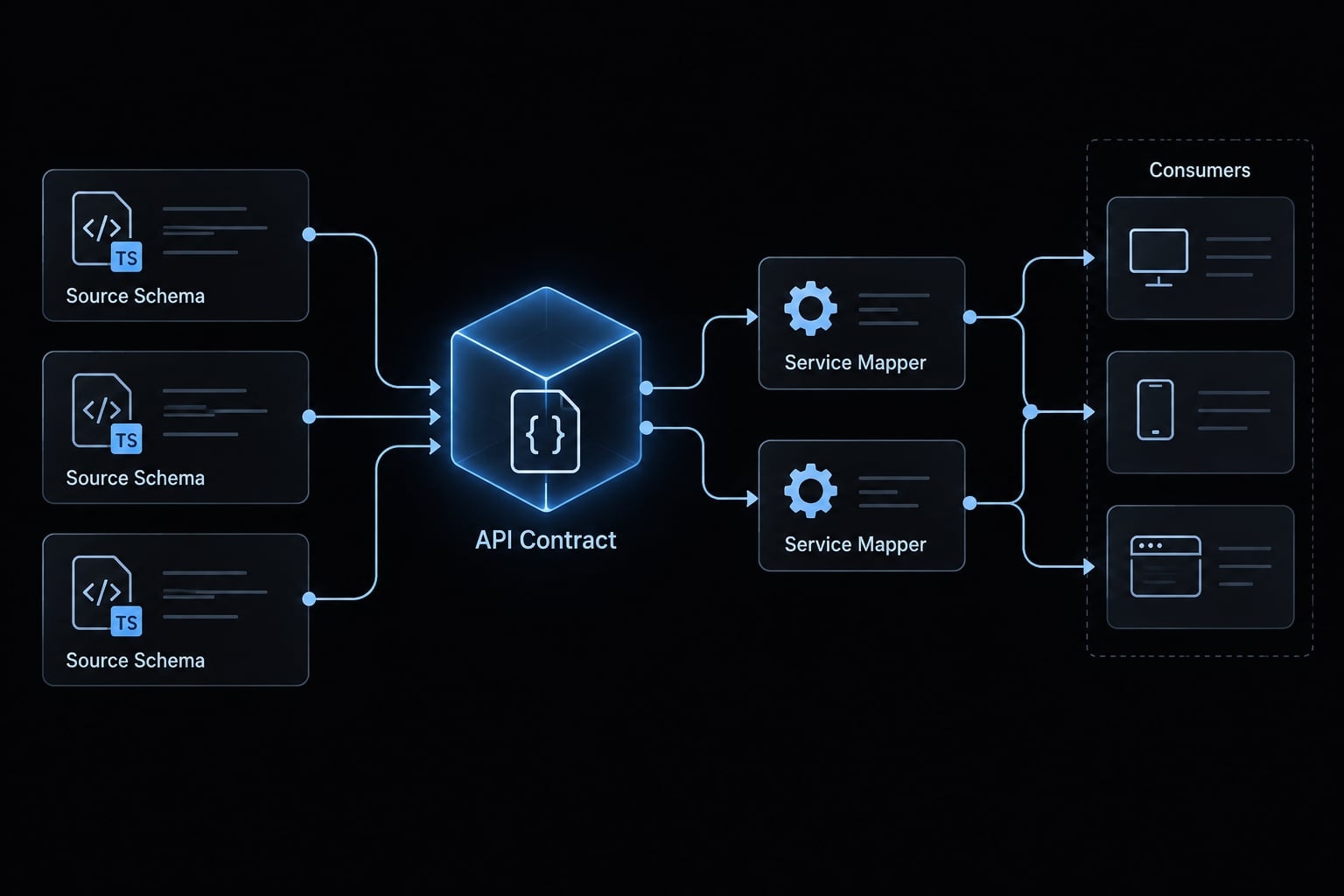
Useful Claude Code context includes shared types, source schemas, function definitions, callers, generated clients, and generation scripts. Also inspect imports, package exports, dependency versions, configuration and package boundaries.
In this teaching example, a team-management SaaS application receives an API response with an optional displayName. A refactor treats that value as required. The mismatch affects the shared response type, service logic and consuming components. The correct repair depends on actual API behavior - not whichever interface change removes the message.
Common root causes of Claude Code TypeScript errors
Symptom | Likely cause | First check | Safe fix direction |
|---|---|---|---|
| Source and target shapes differ | Compare both types | Correct mapping or validate input |
| Caller may violate function signature | Read definition and arguments | Align caller with intended contract |
Missing required properties | Incomplete object or outdated fixture | Inspect required fields | Supply legitimate values |
Missing property or method | Wrong name, version or receiver | Inspect actual declaration | Use supported API |
Duplicate declarations or exports | Conflicting declarations may coexist | Inspect declarations and re-exports | Remove the unintended conflict |
Module resolution failure, such as | Dependency or resolution mismatch | Check installation, exports, configuration | Restore intended resolution |
Null or undefined handling | Optional data treated as guaranteed | Check runtime absence rules | Narrow, reject, or apply approved fallback |
Generated-artifact errors | Source or generated types may be stale | Inspect source contract and generator | Regenerate, then adjust consumers |
Error codes describe incompatibilities, not complete diagnoses. Generated types are derived artifacts; the authoritative contract may live in an API or database schema.
Use the Four-element context pattern
Provide:
- Exact diagnostic: Include location and complete mismatch.
- Relevant target type: Show the expected shape.
- Runtime data origin: Explain what can actually arrive.
- Anti-suppression constraint: Require a justified repair.
The team API may omit displayName. TeamSummary requires a string.Inspect the API schema, response type, mapper, and callers.Decide whether validation, narrowing, or contract review is needed.Do not hide the mismatch with assertions or suppressions.
Step 4 - Make Claude Code fix foundational errors first
Require a plan and expected file scope before editing. Repair one root-cause group at a time, using minimal changes. Escalate uncertain product behavior, public API changes, or architectural decisions instead of letting Claude invent requirements.
Copy-Ready prompt for safe TypeScript repair
Before editing- Run the established repository check; inspect full diagnostics.- Identify shared causes and foundational dependencies.- Inspect source contracts, generated artifacts, imports, and callers.- Propose the smallest justified change.- List expected files and explain each change.- Report blockers and wait for scope approval before editing.During repair- Preserve strict settings, intended runtime behavior, and conventions.- Repair one root-cause group; avoid unrelated cleanup.- Do not add any, suppression directives, or broad assertions merely to silence errors.- Do not change public contracts for one incorrect consumer.- Do not hand-edit generated output unless explicitly permitted.After each group- Rerun appropriate checks.- Report resolved, remaining, and new diagnostics.- Stop expanding scope if new failures appear; revise the plan.- Escalate decisions requiring a human owner.- Disclose unavailable checks and unresolved blockers.
This prompt guides behavior; it does not enforce compliance. Review the proposed plan and resulting diff.
Recommended repair order
Use dependency order as a default:
- Environment, dependency, and configuration problems.
- Source schemas and regeneration of derived types.
- Shared interfaces and domain models.
- Function signatures and module exports.
- Service and state-management layers.
- Components and other downstream consumers.
- Tests, mocks and fixtures.
Actual dependencies can change this order. Write or update behavioral tests during repair when needed; the list does not postpone behavioral thinking.
In this example, suppose the API schema already permits omission, and product requirements explicitly allow “Unnamed team.” The response type is correct. Repair the mapper rather than making the API promise a value it does not guarantee:
function toTeamSummary(team: TeamResponse): TeamSummary { return { id: team.id,- displayName: team.displayName,+ displayName: team.displayName ?? "Unnamed team", }; }
This illustrative diff preserves strict type safety while implementing the approved absence rule. It does not validate arbitrary external input; the API boundary still needs whatever validation the repository requires.
The fallback preserves an empty string. If empty names are invalid, establish that requirement and handle it explicitly. If omission indicates a failed request instead, a fallback would hide the defect.
Reject team.displayName! here: it removes the warning without making an absent value exist. If generated types incorrectly require the field, inspect their source and regenerate before repairing consumers.
Step 5 - Validate every repair batch
Validate the current group before broadening scope. For the team mapper, focused tests should cover both a supplied name and an omitted name with the approved fallback.
Use a compiler-in-the-loop workflow
Use two validation levels:
- After each batch: Run the relevant type-check command, focused tests, and appropriate changed-file checks. Compare diagnostics against the baseline.
- Before integration: Run the canonical required scope, linting, relevant broader tests and production build. Include dependent packages after shared-contract changes.
Repository-dependent examples, executed individually as checkpoints:
npm run type-check
Inspect the result before continuing:
npm run test
Then run the repository’s remaining required checks. These examples assume the scripts exist; use documented commands and supported options.
Stop on failure means stop advancing or claiming completion, inspect the failure, and revise the plan. Known baseline failures require comparison - not an unsupported demand that every intermediate check already pass.
Record results from the same revision and environment. No results are claimed for this teaching example.
Revision / environment:Command / scope:Exit status:Resolved / new / remaining diagnostics:Changed files:Behavioral checks and outcomes:Skipped checks / reasons:Remaining blockers:
Review the diff, not only the exit code
Inspect git diff and confirm:
- Approved scope is preserved.
- Public interfaces received appropriate review.
- Generated changes trace back to their generator.
- Strict settings remain unchanged unless separately justified.
- Tests were not deleted or weakened.
- Runtime behavior matches requirements.
For the example, verify the mapper preserves supplied names and handles omission correctly. A compiler pass alone establishes neither behavior.
If rollback is necessary, revert the relevant repair batch without discarding unrelated developer changes.
Unsafe TypeScript fixes you should reject
An unsafe repair makes diagnostics disappear by bypassing checks or weakening contracts without establishing correctness. The danger is not a particular token in isolation; it is replacing evidence with an assumption. Review whether the change resolves the runtime mismatch or simply prevents TypeScript from reporting it.
Reject these shortcuts:
- Unjustified
anythat removes useful checking. @ts-ignoreor@ts-nocheckadded to conceal defects.- Unnecessary
@ts-expect-erroraround ordinary application errors. - Unsupported double assertions through
unknown. - Non-null assertions on genuinely optional values.
- Weakened strict settings or reduced validation scope.
- Required properties made optional merely to silence consumers.
- Tests removed or weakened to force a pass.
In the team example, casting an optional name to string leaves the missing-value behavior unchanged. The code may compile while still returning undefined.
Prevent recurring errors with CLAUDE.md, hooks and controlled agents
Repository instructions reduce ambiguity; automation makes checks repeatable. Neither guarantees correct changes. Keep guidance specific enough that Claude can identify the command, permitted scope, and escalation point without guessing.
Recommended CLAUDE.md TypeScript policy
Replace placeholders before adding this policy to CLAUDE.md:
## TypeScript repair policy- Run <actual validation command> for <required workspace scope>.- Preserve strictness; obtain approval for configuration changes.- Diagnose shared causes before editing downstream consumers.- Inspect authoritative source contracts; use documented generators.- Do not add unjustified assertions, any, or suppression directives.- Review public-contract changes and inspect affected consumers.- Keep edits within the approved minimal file scope.- Run relevant behavioral tests and required integration checks.- Report blockers, remaining diagnostics, and skipped checks honestly.
Official Claude Code memory documentation describes repository instructions as guidance. Treat CLAUDE.md as a working agreement, not an enforcement mechanism.
Claude Code hooks may automate checks at supported events. Confirm exact syntax, event behavior, and blocking behavior against current official hooks documentation before implementation.
Place expensive checks at suitable workflow boundaries rather than after every small edit. Retain required CI checks independently; local automation may be absent, misconfigured or unable to run.
Rules for multi-agent TypeScript repair
Separate folders do not establish independence. Shared contracts, generated outputs, dependencies, and configuration can connect apparently isolated changes.
Scenario | Decision | Required control |
|---|---|---|
Independent packages | Conditionally suitable | Confirm dependency independence |
Non-overlapping files | Inspect first | Check shared contracts and outputs |
Unresolved shared schema | Single owner first | Approve source contract |
Shared interface edits | No simultaneous owners | Assign one accountable editor |
Central function-contract change | Resolve before parallel consumers | Agree signature and semantics |
Integrated changes | Validate together | Run repository-wide required checks |
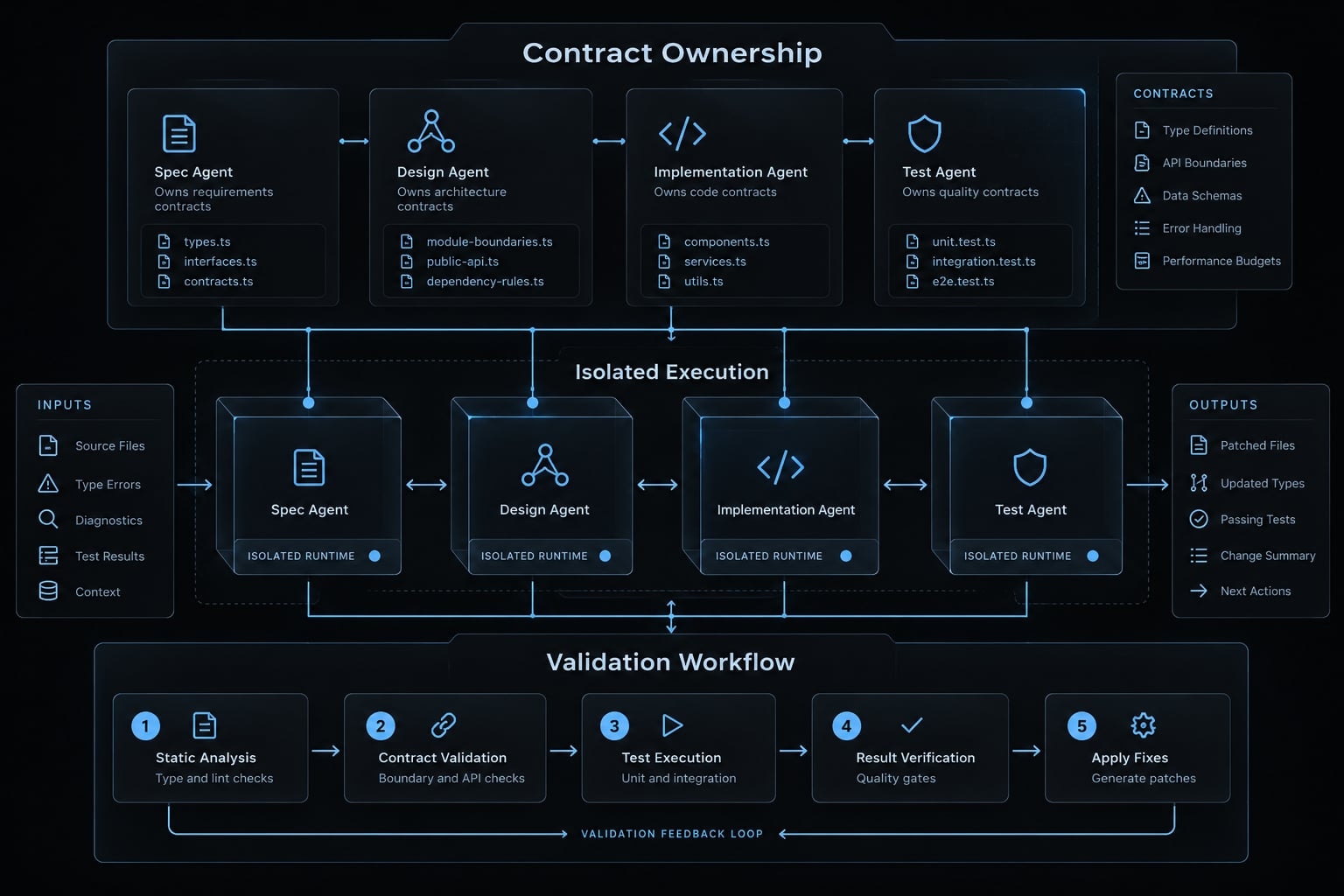
A coordinator should track contract ownership and combine changes before final validation. Passing isolated checks does not establish that the integrated revision passes.
AgentKit system integration
If your team runs this loop often, AgentKit provides editable Claude Code skills and commands that you can adapt to include the repair prompt, baseline capture, and review checklist above. It's a commercial kit with full source access. It structures the loop; your compiler, tests, CI, and reviewers still decide whether a repair is correct.
AgentKit provides the foundational scaffolding framework for building resilient AI Engineering Systems. Rather than relying on unstructured prompt iterations, AgentKit enables engineering teams to package this exact five-step repair loop into automated, reusable workflows and specialized skills.
Frequently asked questions
What should I do if Claude Code leaves TypeScript errors in my project?
Avoid ignoring them or relying on broad type suppressions. Follow a controlled five-step loop: Reproduce the failure using the repository’s canonical command, capture the full diagnostic output, classify errors by shared root causes, approve a minimal repair scope, and validate each batch before moving forward.
How do I identify the correct command to check for TypeScript errors?
Check your package.json scripts, repository documentation, or CI workflow configuration. Use the canonical command defined by your team, such as npm run type-check or tsc --noEmit. Avoid guessing; ensure the command covers the affected workspace, configuration, and environment to establish an accurate baseline for repairs.
Why does Claude Code sometimes suggest using any or @ts-ignore to fix errors?
Do not ignore them or rely on broad type suppressions. Follow a controlled five-step loop: Reproduce the failure using the repository’s canonical command, capture the full diagnostic output, classify errors by shared root causes, approve a minimal repair scope and validate each batch before moving forward.
Should I edit generated types to resolve compiler errors?
No. Generated files are derived artifacts. If an error stems from a generated type, inspect the authoritative source contract (such as an API schema or database definition), run the documented generation script, and verify that the output correctly reflects the updated source before adjusting any consuming code.
How can I prevent recurring TypeScript errors in future Claude Code sessions?
Use project-level guardrails like a CLAUDE.md policy to mandate repository-specific validation commands and strictly prohibit type suppression directives. Configure hooks to automate validation triggers and maintain a "compiler-in-the-loop" workflow that forces the agent to report remaining diagnostics after every batch of changes.
Is a passing type check proof that my code is production-ready?
No. A successful type check confirms only that your code satisfies the TypeScript compiler’s static analysis rules. It does not verify business logic, runtime correctness, or edge-case handling. Always complement type checks with appropriate behavioral testing, integration validation, and human code review before final deployment.
Read more:
- Claude Code plugin structure: Guide to directory & file layout
- Claude Code output-style guide: Customize your AI responses
- Claude Code dependency audit: A safe, step-by-step workflow
Conclusion
Reliable repair starts with evidence, not a request to “fix everything.” Reproduce the failure with the correct command, capture complete diagnostics, and classify likely shared causes. Approve a small repair scope, address foundational mismatches, and validate each group before expanding. Preserve baseline failures so new problems remain distinguishable from existing ones.
Claude Code TypeScript errors are not resolved safely merely because a command turns green. Type safety depends on accurate contracts, while verified behavior requires appropriate tests and review. Report skipped checks and unresolved decisions rather than presenting partial validation as completion.
Reuse the repair prompt for your next failing change, then adapt the CLAUDE.md policy to your actual scripts. That turns the TypeScript repair workflow into a repeatable engineering practice without surrendering control over scope or correctness.