Claude Code Rust: Practical AI workflows and use cases
Claude Code Rust: Where it helps, where it doesn’t, and what to expect
Using Claude Code with Rust isn't about handing your project over to AI-it's about using it as an accelerator to speed up learning and cut out repetitive boilerplate. Whether you are getting to grips with ownership rules or porting TypeScript modules to Rust, the secret is knowing where AI excels and where human judgment must take over. This guide breaks down practical use cases, core limits, and five supervision rules to keep your Rust workflows safe and effective.
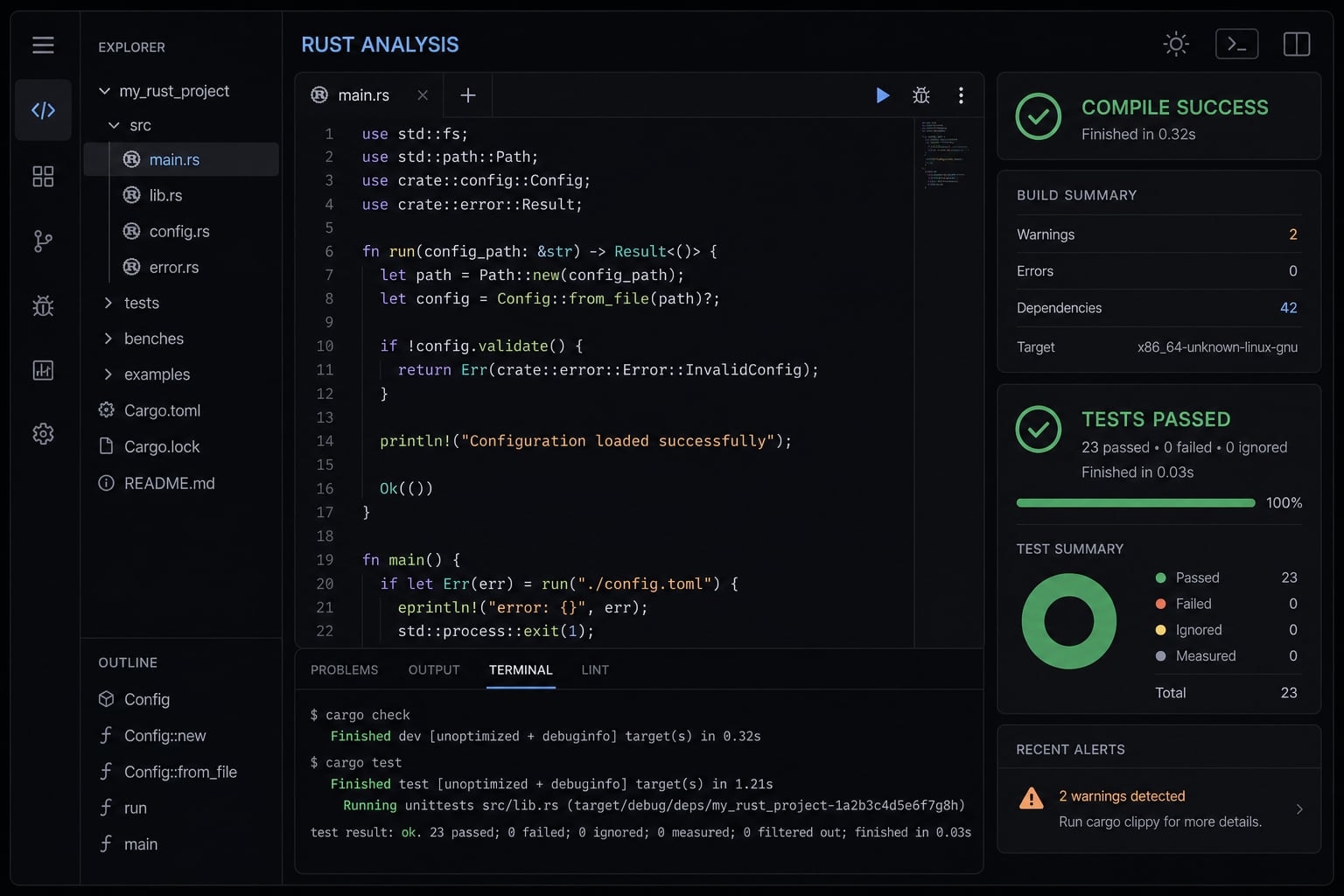
What “Claude Code Rust” usually means in practice
Claude Code Rust usually refers to the practical use of Claude Code in Rust-related workflows, not one single feature or tutorial. It usually reflects exploratory interest in how Claude Code supports learning Rust, building tools, porting codebases, or understanding why Rust appears in local AI tooling and runtimes.
Where Claude Code helps most when working in rust
Claude Code is most useful in Rust when the task is narrow, reviewable, and tied to a concrete outcome. It works best as an accelerator inside the Rust project lifecycle, not as a substitute for engineering judgment.
Claude Code as a Rust learning accelerator
For many developers, the strongest early value comes from project-based learning. Instead of studying syntax in isolation, they learn by building a small CLI, a local server, an internal automation utility, or a lightweight Actix Web service.
That is where using Claude Code to learn Rust programming idioms becomes practical. It can explain ownership and borrowing in the context of the code you are writing, rather than as abstract theory.
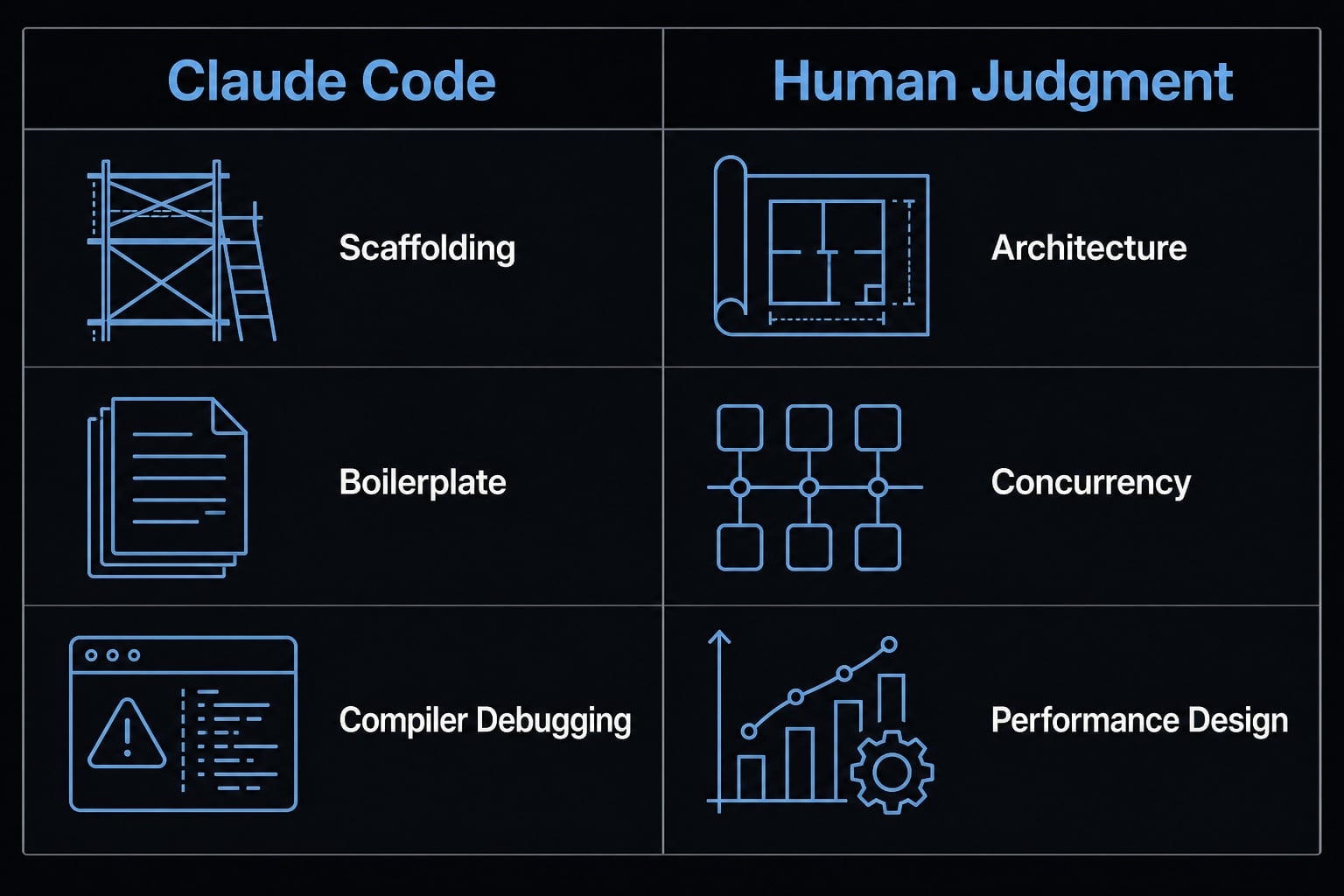
Claude Code is especially useful for:
- Scaffolding project structure.
- Explaining ownership and borrowing in context.
- Writing boilerplate.
- Drafting initial tests.
- Helping debug compiler errors.
This matters because Rust’s learning curve is less about syntax and more about mental models. Patterns such as Result, Option, lifetimes, and async Rust feel easier to absorb when they appear inside a working project.
A good example is a developer building a local HTTP utility. Claude Code can draft command-line parsing, route structure, and basic error handling, then explain why the borrow checker is unhappy in a specific handler. That shortens feedback loops without pretending the tool understands the whole architecture.
Claude Code as a productivity layer for experienced developers
For experienced developers, the value is different. The main benefit is not learning momentum. It is throughput.
In practice, Claude Code helps with repetitive, bounded implementation tasks such as:
- Narrow-scope code generation.
- Refactoring repetitive patterns.
- Drafting tests and fixtures.
- Writing docs or README files.
- Suggesting file and module layouts.
This can speed up the operational parts of a developer workflow, especially when a team already knows what the system should do. In that sense, using Claude Code to learn Rust programming idioms serves beginners through explanation, while experienced developers use the same tool to reduce repetition across the Rust project lifecycle.
What still requires human engineering judgment
There are clear limits. Claude Code should not own the decisions that shape long-term maintainability or runtime behavior. Human review is still essential for:
- System architecture.
- Trait boundary design.
- Concurrency model decisions.
unsafecode.- Performance-critical design choices.
That separation is important. AI can make a Rust file compile. It can even produce clean-looking code. But compiling is not the same as choosing the right abstraction for a system that will need to evolve over time.
Claude Code for porting projects to Rust: Real potential, real limits
Claude Code can help port TypeScript code to Rust. The migration works best when it is modular, test-driven, and closely supervised by developers.
That is where many teams get misled. Automated code migration sounds attractive, but one-shot rewrites usually create hidden risk. The generated code may compile while drifting away from the original domain model, integration logic, or edge-case behavior.
Why modular porting works better than one-shot rewrites
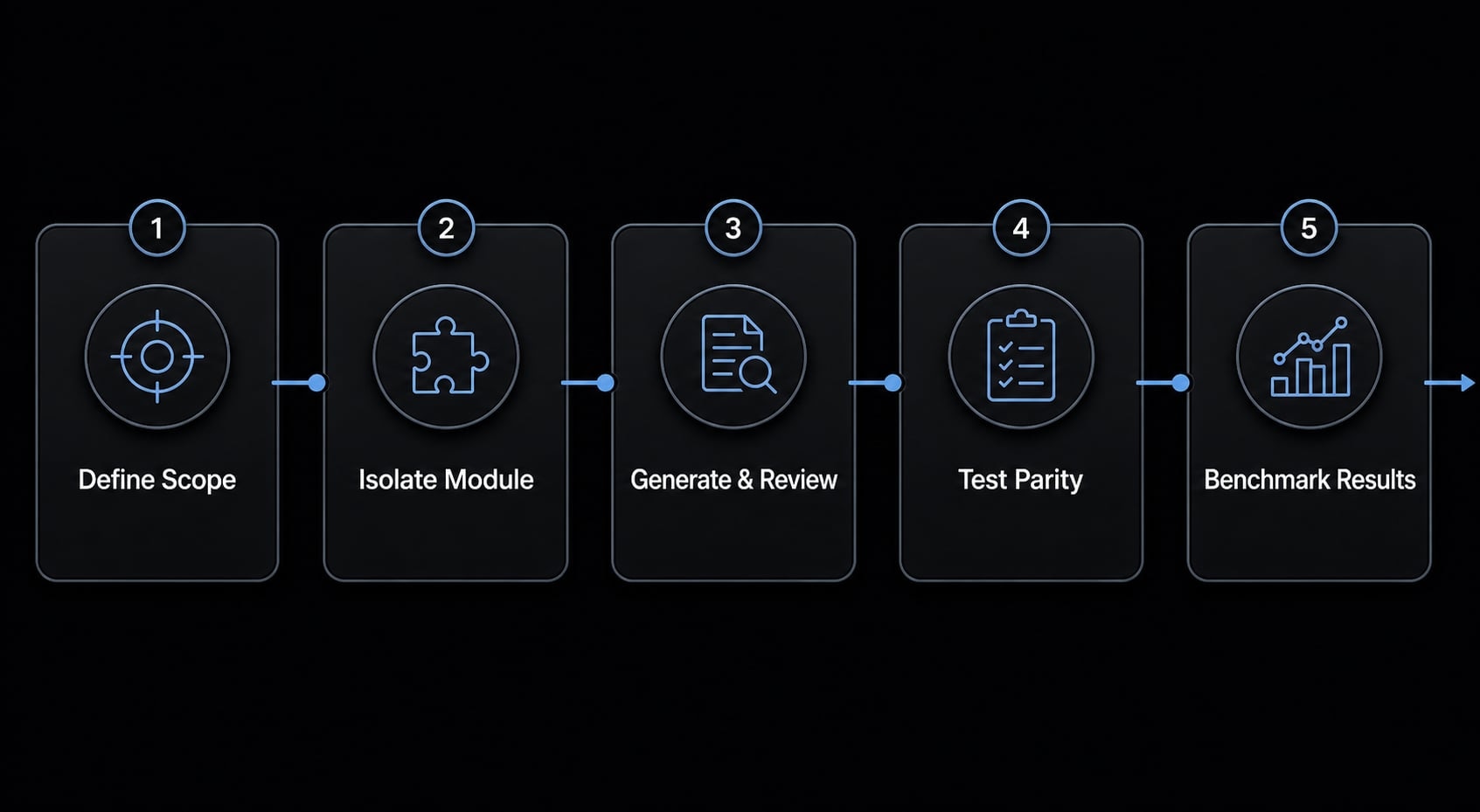
The most reliable pattern in codebase migration is to port module by module rather than asking for a wholesale rewrite. This improves reviewability, rollback safety, and maintainability.
It also fits the practical limits of LLM context window management. Smaller files, isolated methods, and clean module boundaries generally produce better output than huge cross-cutting rewrites.
For teams exploring how to use Claude Code to port TypeScript to Rust, the most effective approach is to break the codebase into smaller modules before generating and verifying each part.
This “little islands” approach also helps expose architectural mismatches early. If the original TypeScript code relies heavily on dynamic behavior, broad shared state, or loosely structured data, those assumptions need human redesign before Rust porting becomes clean.
Why tests matter more than “it compiles”
The key concept here is behavior parity. A Rust port is only successful if it preserves the intended behavior of the original system. That requires distinguishing three different outcomes:
- Syntactic success: The code compiles.
- Semantic correctness: The logic behaves as intended.
- Integration correctness: Modules work together under real usage.
This is why “it compiles” is not proof of correctness. In codebase migration, generated code can pass the compiler while still introducing logic drift, altered defaults, missing edge-case handling, or broken assumptions between modules.
A safer workflow usually includes:
- Test harnesses against known inputs and outputs.
- Integration tests across module boundaries.
- Parity checks against the original implementation.
- Domain-specific assertions for critical behavior.
Benchmarking should come later. Performance numbers only mean something after behavior parity is confirmed.
A pre-port checklist for Claude Code + Rust projects
If your goal is to use Claude Code to port TypeScript to Rust, this is the practical checklist to start with:
- Define migration scope clearly.
- Isolate modules before generation.
- Create equivalence tests early.
- Review domain models and type boundaries.
- Benchmark only after parity is confirmed.
This is the most reliable approach to Rust porting because it treats generation as one stage inside a supervised codebase migration, not as the whole solution.
Why Rust matters in AI coding workflows beyond the language itself
Rust appears in AI coding workflows not only because developers write applications in Rust, but because it often fits repeated, performance-sensitive tooling tasks. It is commonly used for CLIs, local runtimes, automation layers, and other systems where predictable resource usage, startup behavior, and stronger safety properties matter.
Rust is often chosen for tools that run often, run locally, or sit close to the system. That includes CLIs, local agents, automation tools, runtimes, and repeated background tasks.
In plain English, teams usually care about:
- Faster startup.
- Lower overhead.
- More predictable resource usage.
- Stronger safety guarantees.
This is where runtime performance optimization becomes relevant. Not every workload needs Rust, and not every rewrite is justified. But for repeated tooling tasks, execution speed and operational predictability can be meaningful.
That helps explain why conversations around Rust-based AI coding agents keep growing. The appeal is not just raw performance. It is the combination of speed, safer systems programming defaults, and good fit for local developer tooling.
The ecosystem signal matters too. The discussion around Bun moving more deeply into Rust is notable, not because one project proves everything, but because it reflects confidence in Rust for infrastructure-oriented workloads. That is the broader context behind interest in Rust-based AI coding agents and similar tools.
The important boundary condition is simple: Not every project needs Rust, and Rust is not automatically faster in every real-world situation. But it does make sense in many tooling-heavy scenarios where runtime performance optimization matters.
The main risks and supervision rules nobody should skip
The biggest failure mode is not using AI assistance. It is using it without boundaries. In AI-driven refactoring workflows, the common risks are abstraction drift, domain mismatch, hidden maintainability problems, overconfidence from generated code, and silent debt accumulation.
Warning: Fast output is not the same as safe output.
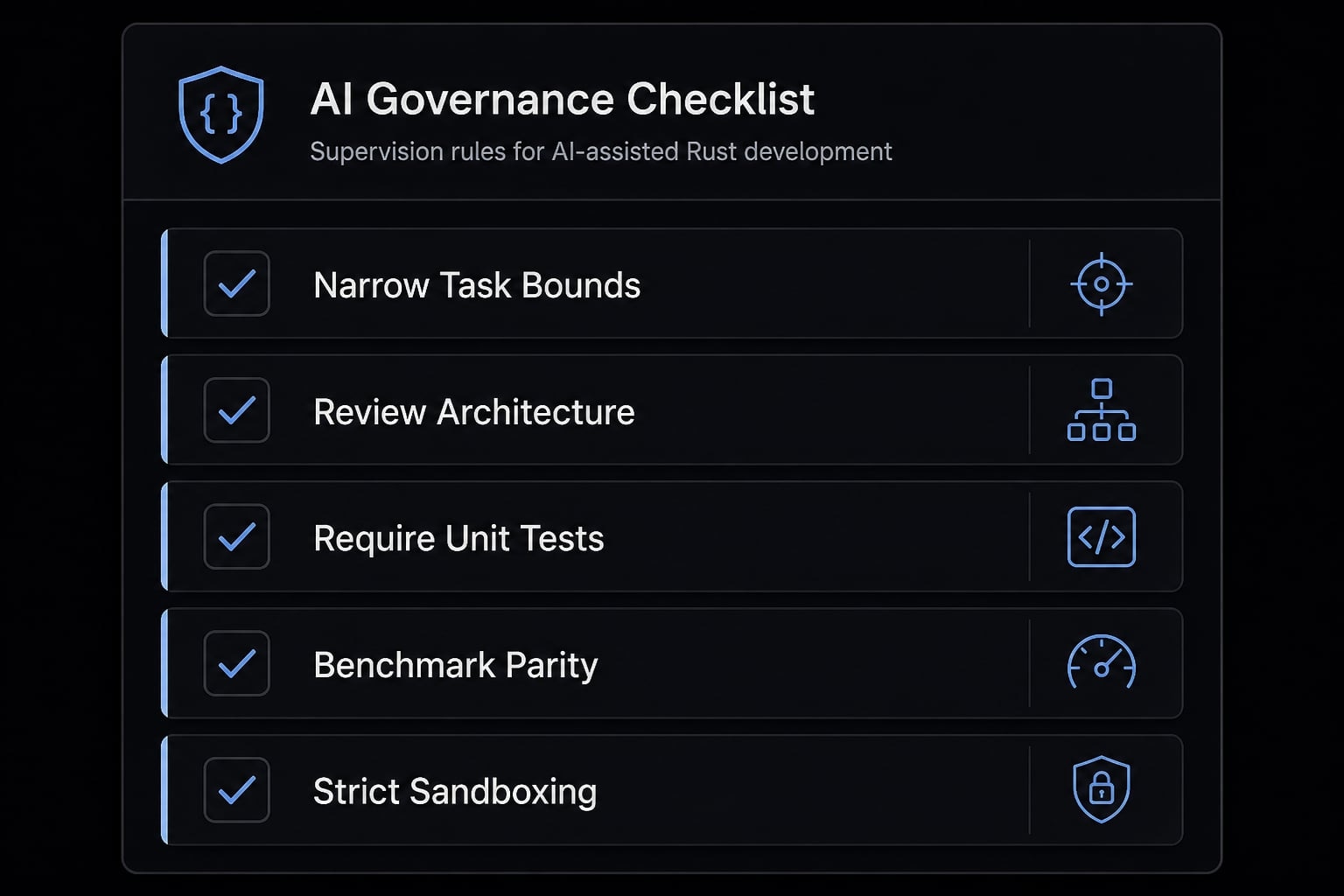
The safest operating model is human-in-the-loop AI orchestration. That means the tool accelerates implementation, while humans retain control over scope, quality, and system boundaries.
- Keep tasks narrow and bounded - Small, reviewable units reduce failure risk and improve output quality.
- Review architecture separately from generated code - Good-looking files do not guarantee coherent system design.
- Require tests before trusting refactors - This is the baseline for managing AI-generated technical debt.
- Benchmark only after behavior parity - Performance wins are irrelevant if correctness has drifted.
- Avoid broad system access without controls or sandboxing - Strong environment boundaries and sandboxing AI agents matter, especially for automation-heavy workflows.
These rules are not bureaucratic overhead. They are what turns raw output into reliable engineering productivity. Without them, AI-driven refactoring workflows often create hidden costs that appear later during maintenance, incident response, or integration work.
Well-run teams treat Claude Code as a fast assistant inside human-in-the-loop AI orchestration, not as an autonomous engineer.
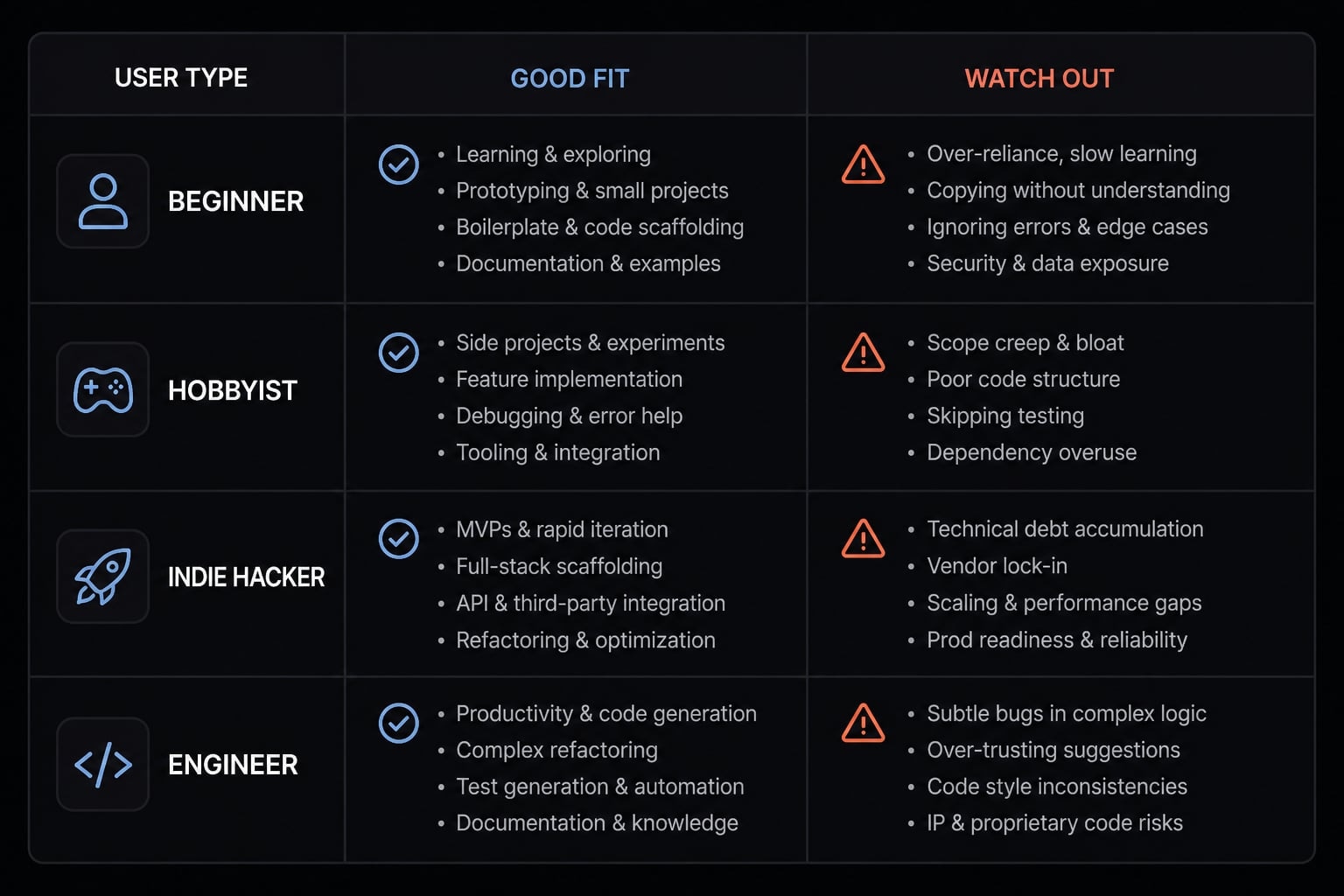
A simple decision framework: Is Claude Code + Rust a good fit for you?
The best-fit use cases for Claude Code + Rust depend on who you are, how disciplined your workflow is, and what outcome you care about most. For some teams, the value is faster learning. For others, it is structured implementation support inside a repeatable developer workflow.
Good fit when / Watch out for:
User type | Good fit when | Watch out for |
|---|---|---|
Beginner learning Rust | You want project-based learning, faster feedback, and help understanding compiler errors and patterns | Weak fit if you expect architecture quality without understanding the code |
Experienced engineer | You want throughput for repetitive implementation, tests, refactors, and docs | Weak fit if you try to delegate deep systems design or performance strategy |
Solo technical founder | You want to prototype a tool, explore migration options, or move faster with limited time | Weak fit if there is no review discipline and every generated shortcut becomes production code |
Small product teams | You have structured workflows, documented modules, and clear review ownership | Weak fit when process is chaotic, requirements are unstable, or architecture is undocumented |
This provides the simplest way to evaluate the best-fit use cases for Claude Code and Rust. A well-structured process increases the tool’s value, while weak review discipline increases the risk of hidden problems.
Teams exploring AI-powered productivity frameworks should treat this as an adoption filter, not a universal recommendation.
What real-world examples already show
The current pattern is consistent. TypeScript to Rust porting appears feasible when orchestration, modularity, and testing are strong. The success condition is not blind automation. It is disciplined decomposition and verification.
Smaller project examples also show a different but equally useful pattern: Claude Code can support a practical Rust learning journey when the developer is building something real, such as a server, CLI, or internal utility. In that setting, the tool helps with momentum, explanation, and debugging.
A third signal comes from the broader tooling ecosystem. Ongoing discussion around Bun in Rust and adjacent runtime infrastructure suggests Rust continues to earn trust for performance-oriented developer tooling. That does not prove every claim about Claude Code performance for Rust development, but it does reinforce why Rust keeps appearing in local tooling conversations.
The practical takeaway is straightforward: The value is acceleration, not abdication. Supervised leverage beats blind automation.
Frequently asked questions
What does "Claude Code Rust" mean in practice?
"Claude Code Rust" generally refers to the practical application of Claude Code-an AI-powered coding agent-to assist with Rust-based development workflows. It is an exploratory term representing the intersection of LLM-assisted coding and the Rust ecosystem, spanning project learning, tool building, codebase porting, and infrastructure performance tasks.
What are the primary use cases for using Claude Code with Rust?
The combination of Claude Code and Rust is most effective for:
- Accelerated learning: Understanding ownership and borrowing through practical project building.
- Tool development: Drafting CLIs and automation utilities.
- Codebase migration: Porting JavaScript or TypeScript modules to Rust.
- Performance optimization: Leveraging Rust for runtime-critical components or local AI tooling.
Can Claude Code be used to port a TypeScript codebase to Rust?
Yes, but only when migration is modular and test-driven. Avoid one-shot rewrites; instead, isolate individual modules, generate Rust equivalents, and establish behavior parity tests. Success depends on human supervision to manage architecture boundaries, ensure semantic correctness, and review the logic drift that can occur during translation.
Why is Rust frequently used in AI coding tools and agents?
Rust is increasingly chosen for AI-driven tooling and runtimes because of its memory safety, predictable execution speed, and low overhead. These traits make it ideal for building performance-sensitive, repeated system tasks, local agents, and CLIs, which require high throughput and stability under varying resource conditions compared to higher-level scripting languages.
How do I maintain code quality when using AI for Rust development?
To minimize technical debt and logic errors, follow these supervision rules:
- Keep AI tasks narrow and bounded.
- Review architecture design separate from generated code.
- Require comprehensive test coverage before accepting refactors.
- Benchmark performance only after verifying functional parity.
- Apply strict environment controls or sandbox your AI agents to limit uncontrolled system access.
Is Claude Code a good fit for beginners learning Rust?
Claude Code is an excellent fit for project-based learning. It helps beginners understand idiomatic Rust and compiler error messages by providing real-time feedback on actual code. However, beginners should still use traditional learning resources to grasp foundational concepts, as AI can occasionally provide solutions that are syntactically valid but architecturally flawed.
Read more:
- Claude Code toolkit: Scale your AI development workflow easily
- Claude Code tutorial: Set up and master your AI coding agent
- Everything Claude Code: A guide to streamlined AI coding
Conclusion
The most useful way to think about Claude Code Rust is as a practical workflow combination, not a promise of autonomous development. It tends to work best for faster learning, bounded tool building, repetitive implementation work, and structured migration support.
The upside is clear: Less repetitive work, better throughput, and faster iteration. The condition is equally clear: Architecture, testing, behavior parity, and quality control must stay under human ownership. If you want to go deeper, read a related guide on repeatable AI coding workflows or download a lightweight supervision checklist for AI-assisted development.