ClaudeKit: Optimize your AI workflow and development delivery
ClaudeKit: What it is, how it works, and whether it fits your workflow
AI tools can generate code, plans, and drafts quickly, but many teams still struggle to turn that speed into repeatable delivery. ClaudeKit becomes relevant when plain AI usage starts creating friction: Prompt rebuilding, weak handoffs, inconsistent outputs, and poor workflow discipline. For founders, CTOs, product leads, experienced developers, and solo builders, the real question is not whether an AI can help once, but whether an AI agent workflow framework can make repeated work more reliable. This guide explains what ClaudeKit is, how it works, what it is useful for, how it compares with alternatives, and who it fits best so you can evaluate it as an operational tool rather than a hype product.
What is ClaudeKit and what problem does it solve?
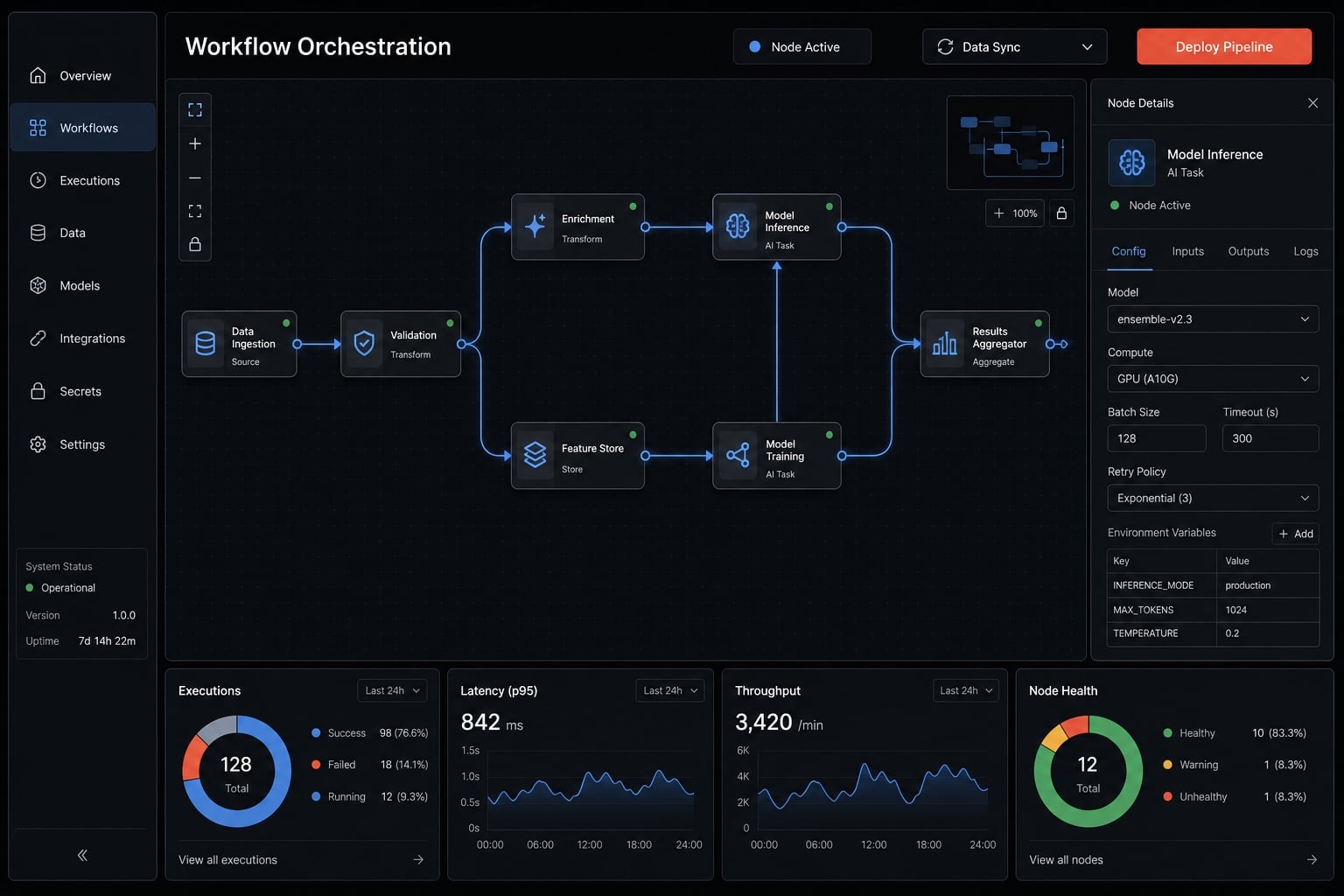
ClaudeKit is a structured workflow system built around Claude-based execution. It adds agents, skills, workflows, and validation steps around AI-assisted work so planning, building, debugging, and shipping can happen with more consistency, less manual coordination, and better reviewability than plain chat-based usage.
At a practical level, ClaudeKit is not trying to replace judgment or engineering discipline. It is trying to reduce the repeated operational mess that appears when teams rely on ad hoc prompting for real work. That distinction matters, especially once AI use moves beyond experiments and into delivery.
ClaudeKit as a workflow layer, not just a prompt pack
The fastest way to understand ClaudeKit is to see it as a workflow layer around Claude, not as an AI model and not as a folder of prewritten prompts.
Using Claude directly can work well for quick ideation, isolated bug questions, or one-off drafting. But when work spans planning, implementation, review, documentation, and follow-up, freeform usage often creates gaps. You need to restate context, reframe goals, remember process steps, and reapply best practices manually.
That is where a workflow layer becomes useful. Instead of depending entirely on operator memory and prompt engineering, ClaudeKit gives structure to repeated execution. In plain terms, a Claude coding toolkit like this is most valuable when the job is not “get one answer,” but “run a repeatable process with fewer misses.”
The operational pain ClaudeKit is designed to reduce
Teams usually feel the need for systems like this when AI use becomes frequent enough to expose the same breakdowns:
- Rebuilding prompts across recurring tasks instead of reusing stable execution patterns.
- Losing momentum between planning and coding because context management is weak.
- Creating weak handoffs between stages, especially across multi-step workflows.
- Getting different output quality for similar requests because there is little workflow consistency.
- Increasing operator burden because every step must be coordinated manually.
- Spending more time supervising AI behavior than benefiting from it.
In real delivery environments, these issues show up quickly once AI is used beyond one-off experiments. ClaudeKit helps reduce that friction, but it does not solve unclear requirements, poor architecture decisions, or weak review culture. It works best when the underlying team already values process and wants stronger execution discipline.
How ClaudeKit works: Core components and workflow model
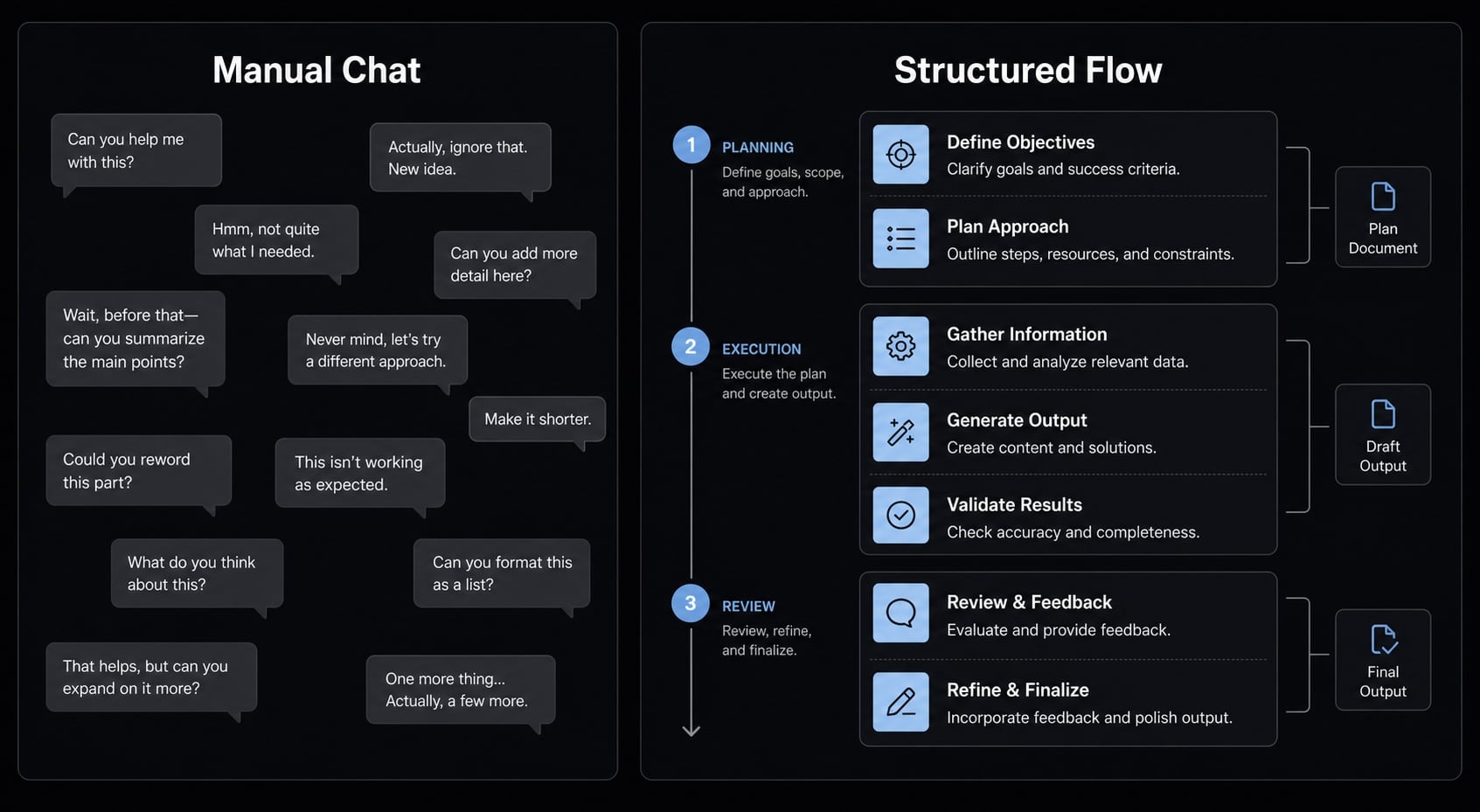
ClaudeKit works by structuring execution instead of leaving every task to freeform conversation. The goal is not to add complexity for its own sake, but to make repeated AI-assisted work easier to run, review, and reuse.
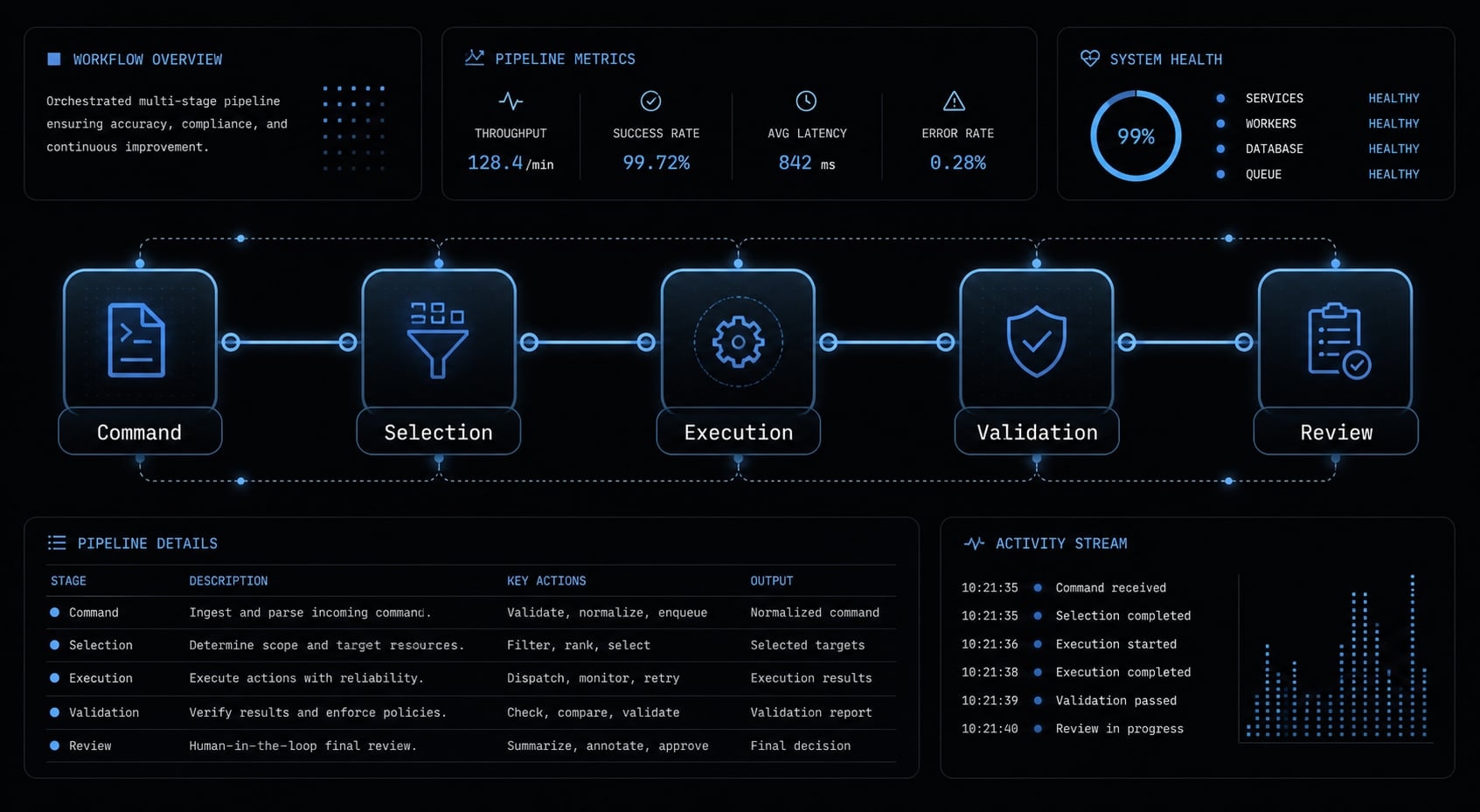
- A user enters a command through the CLI with a task or objective.
- ClaudeKit interprets the request and selects the right role, skill, or path.
- The task moves through a structured sequence such as planning, implementation, testing, or review.
- Checks and validation steps help verify whether the output is usable.
- The result returns for human review, refinement, or the next action.
That process is simple on the surface, but the value comes from how the parts connect behind it.
The 4 core building blocks
- Agents: Specialized roles that focus on different kinds of work, such as planning, debugging, or review.
- Skills: Reusable capabilities or command patterns that can be invoked for specific tasks.
- Workflows: Structured sequences that organize work into predictable steps.
- Hooks: Automatic actions or checks that run at defined points in the process.
These building blocks are role-based and understandable even if you do not want to study internal architecture. What matters is that they give shape to execution.
What happens after a user enters a command
In practice, the system usually follows a pattern like this:
- The request and available context are interpreted.
- The right role, tool, or skills path is selected.
- The task progresses through steps such as planning, investigation, implementation, testing, or documentation.
- Checks run to confirm whether the output meets the expected standard.
- The final output is returned for review, iteration, or handoff.
This matters because AI-assisted work often breaks down at transitions, not at the first answer. A planning output that does not translate into coding, or a bug fix that ignores downstream effects, creates more work than it saves.
Why orchestration matters more than raw command count
A long command list can look impressive, but command volume alone does not create value. In many systems, fragmented libraries increase cognitive load because users must decide what to run, in what order, and how to connect outputs between steps.
That is why orchestration matters more than quantity. Good orchestration improves handoffs, reduces repeated setup, and makes outputs easier to review. It also lowers the burden on the operator to remember every intermediate step.
This is where multi-agent orchestration becomes relevant. The goal is not “more agents” for marketing effect. The goal is role separation and connected execution, so planning, fixing, reviewing, and wrapping up do not collapse into one blurry action.
In real workflows, orchestration reduces coordination overhead, but it still depends on input quality. If the requirement is vague, the system can organize the work, but it cannot invent clarity that was never provided.
What ClaudeKit can actually help you do
ClaudeKit is most useful when work is repeated, multi-step, and easy to get wrong through manual AI use. Its strength is less about isolated outputs and more about preserving continuity across tasks.
For software development teams
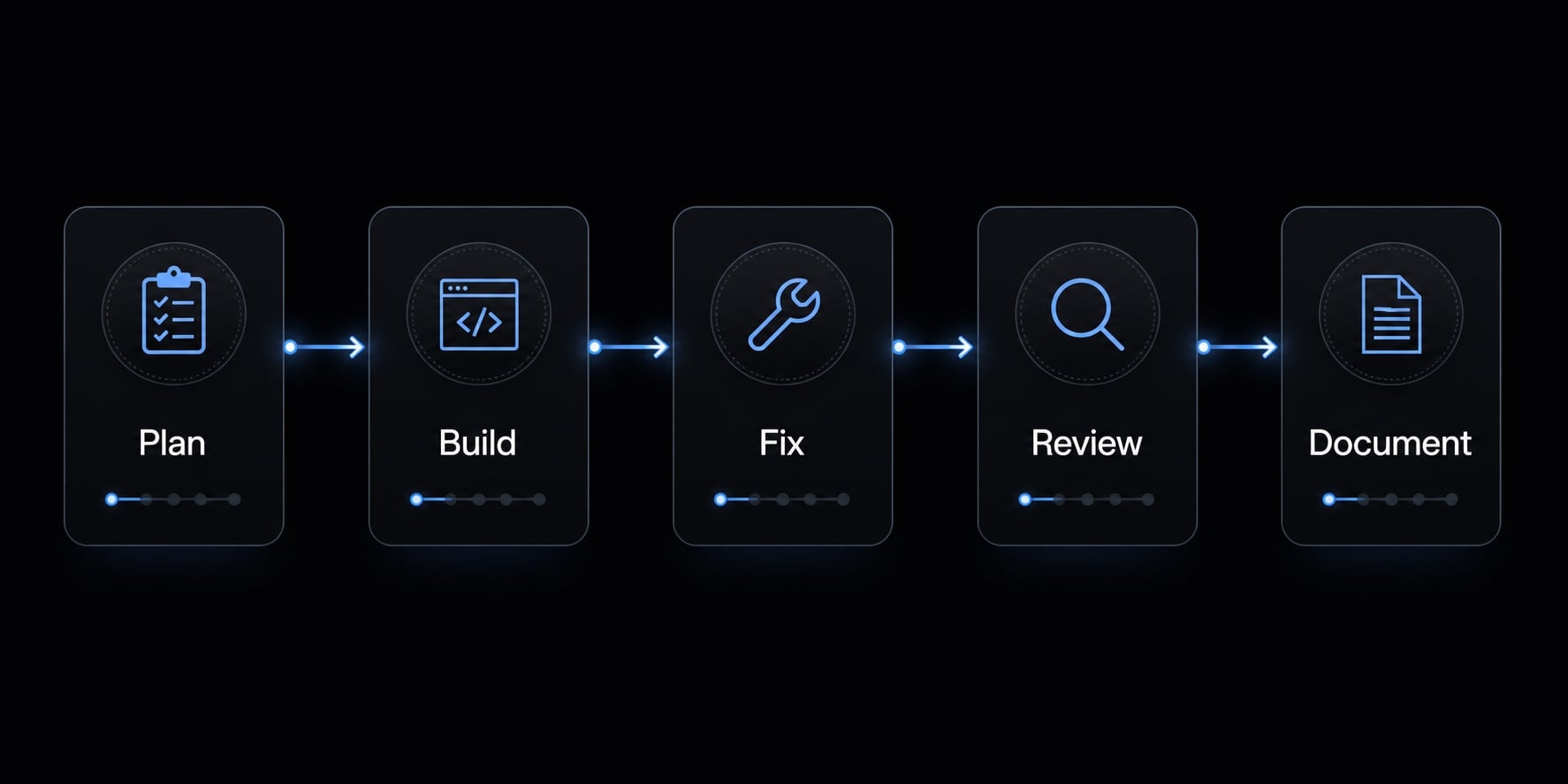
For delivery teams, the most practical use is across the core software flow:
- Planning with
/ck:planto scope a feature, clarify requirements, and frame execution. - Implementation with
/ck:cookto move from plan to build with more structure. - Debugging with
/ck:fixto investigate issues before applying shallow patches. - Documentation and wrap-up with git or docs-related steps to close the loop.
This matters across the software development lifecycle, where one weak transition can cause rework later. A feature plan that lacks implementation clarity creates build churn. A quick fix without enough diagnosis can introduce regressions. Documentation gaps slow future maintenance.
A compact task map looks like this:
- Plan a feature →
/ck:plan→ Clearer scope and fewer implementation misses. - Fix a bug →
/ck:fix→ Stronger diagnosis and more structured debugging. - Ship a build task →
/ck:cook→ Better continuity from plan to code to review. - Wrap up changes → git/docs step → Cleaner handoff and project memory.
The benefit is not autonomous shipping. The benefit is reduced variance and stronger control during repeated execution.
For solo founders and indie builders
For solo founders, the value is often cognitive rather than organizational. When you are switching between product thinking, code changes, bug triage, and release tasks, freeform AI can become mentally expensive. You keep rebuilding the same workflow logic every time.
ClaudeKit helps by turning recurring tasks into structured feature work. That structure reduces context switching and lowers the need to remember every best-practice step manually. Even without a large team, repeatability matters when you are shipping often.
For marketing and growth operations
This is a secondary use case, but still relevant. ClaudeKit-style systems can support:
- Research workflows for competitive analysis and structured discovery.
- SEO workflows for repeatable content planning and optimization tasks.
- Campaign execution where consistency across steps matters more than raw ideation speed.
Used well, this makes recurring growth work easier to repeat without rebuilding prompts from scratch each time.
After evaluating many AI-assisted delivery patterns, one lesson stays consistent: The biggest gains rarely come from one brilliant prompt. They come from making routine work easier to repeat without losing quality.
Evaluating AI workflow tools for your team? Review AgentKit’s workflow design examples and evaluation criteria to compare structured execution models before standardizing adoption.
ClaudeKit vs plain Claude vs open-source kits vs manual prompting
Most buyers are not choosing between a good tool and a bad one. They are choosing between different operating models when they adopt ClaudeKit. That is why ClaudeKit vs standard AI coding agents should be evaluated through workflow quality, setup effort, and repeatability rather than feature volume alone.
Option | Setup speed | Workflow consistency | Multi-step orchestration | Quality control gates | Learning curve | Best fit |
|---|---|---|---|---|---|---|
Plain Claude | Very fast | Low to moderate | Low | Low | Low | One-off questions, quick ideation |
Manual prompt stack | Fast initially | Moderate if maintained well | Low to moderate | Low | Moderate | Power users comfortable with custom prompting |
Open-source agent kits | Moderate | Moderate | Moderate | Varies widely | Moderate to high | Users who want flexibility and can self-maintain |
ClaudeKit | Moderate | High | High | Higher | Moderate | Repeated structured delivery workflows |
How to decide | Depends on workflow | Depends on process need | Depends on task complexity | Depends on risk tolerance | Depends on user maturity | Choose by operational fit, not hype |
This is the most useful way to think about ClaudeKit vs standard AI coding agents: It trades some simplicity for more process discipline. If your work is repetitive, multi-step, and quality-sensitive, that trade can be rational. If your use is casual, it may feel unnecessary.
The comparison also shows why open-source kits are not automatically better or worse. Many are flexible and cost-effective, but they often require more self-assembly, more maintenance, and more operator judgment. That can be acceptable for advanced users, but it raises the burden of consistency.
Where ClaudeKit has a real advantage
ClaudeKit tends to be strongest when work regularly moves through planning, implementation, fixing, review, and documentation in sequence.
Its real advantage is not just more commands. It is:
- Stronger quality control around repeated work.
- More dependable multi-step orchestration.
- Less manual coordination between stages.
- Better workflow consistency when similar tasks happen often.
- Clearer role separation than a single freeform chat thread.
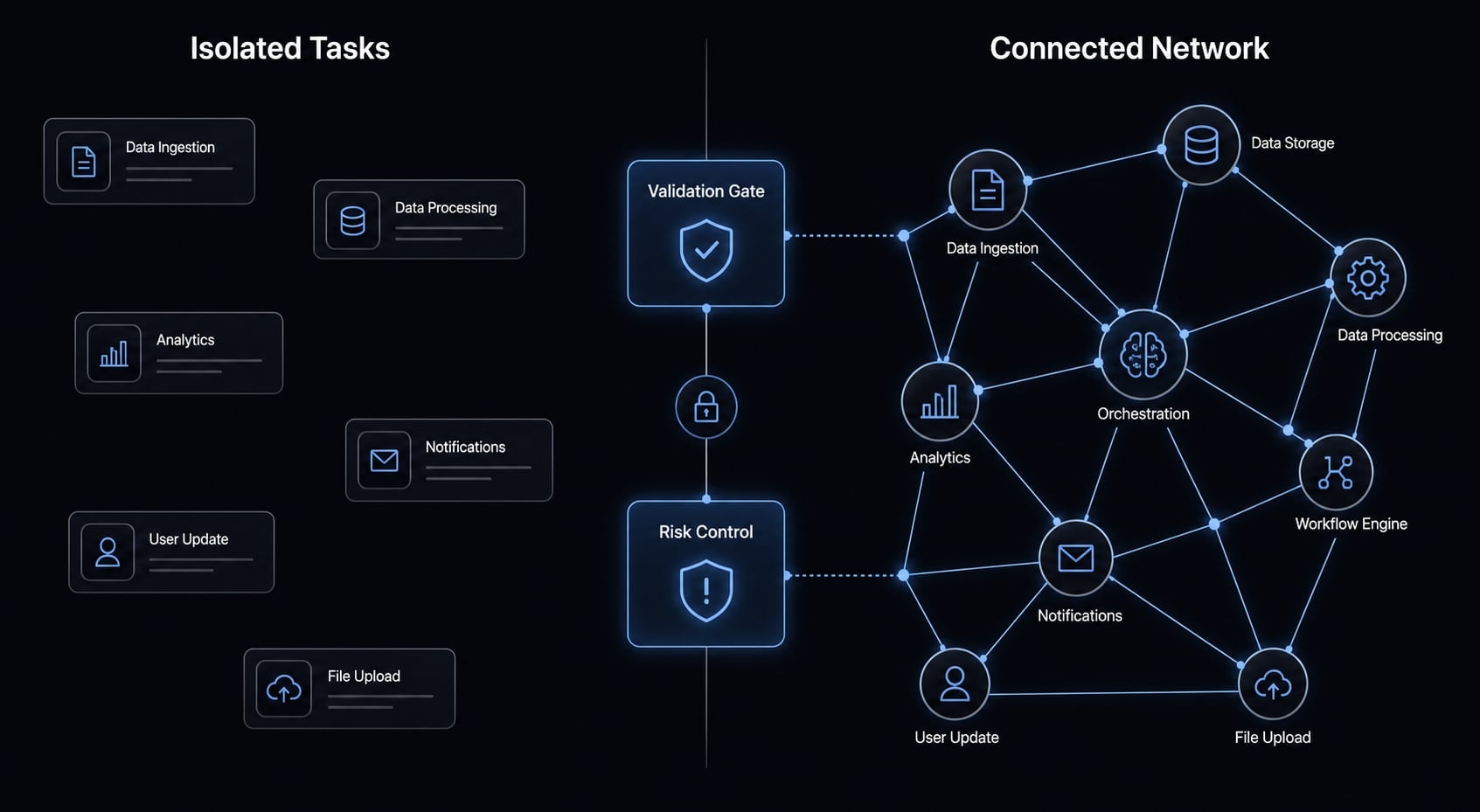
This is especially important when the cost of a shallow answer is high, such as production code, recurring client delivery, or ongoing feature iteration. The underlying concept resembles a mesh network more than a linear prompt chain. In practical terms, connected capabilities are usually more useful than isolated shortcuts because they reduce friction between steps.
Where a simpler setup may still be enough
There are many cases where plain Claude or a lighter setup is enough:
- One-off tasks that do not need repeatability.
- Quick brainstorming or rough planning.
- Casual coding help or ad hoc debugging questions.
- Low-volume usage where prompt rebuilding is not yet a problem.
- Users who prefer freeform interaction over structured commands.
If that describes your workflow, ClaudeKit may feel too structured relative to the value you gain. That is not a weakness of the tool. It is a reminder that tooling should match workflow maturity.
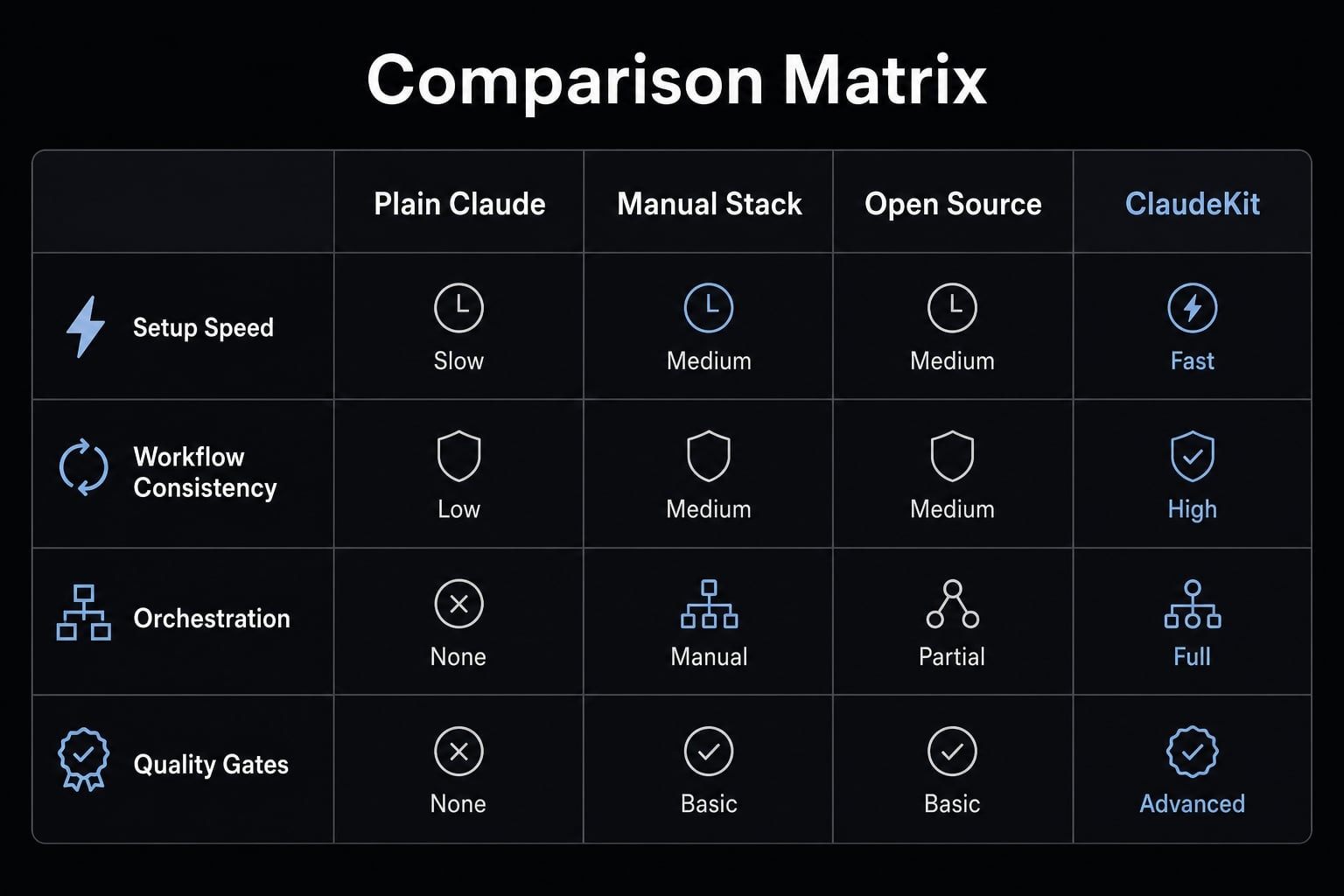
Tools with more structure often create better repeatability, but they also introduce setup effort and process overhead. Before standardizing any system, evaluate total maintenance burden, not just first-week convenience.
What makes ClaudeKit different in practice
The most meaningful difference is not branding or command count. It is that ClaudeKit appears designed around disciplined execution rather than isolated AI interactions.
Interconnected skills vs isolated skill libraries
A useful way to describe this is mesh network skill interconnectivity. In plain English, that means skills are designed to work together rather than sit in a large but disconnected library.
That matters because many kits give users lots of shortcuts but little coordination. You still need to decide what runs first, what depends on what, and how to move from one step to the next. Connected systems reduce that friction.
Operationally, this usually means:
- Fewer manual handoffs between steps.
- Less prompt rebuilding.
- Smoother transitions from planning to building to review.
- More reliable repeatability across similar tasks.
Validation and risk control features
ClaudeKit also stands out by emphasizing control features that matter in real work.
- Artifact-gated validation means outputs should be checked against concrete work artifacts before trust increases. Instead of accepting a confident answer at face value, the system expects evidence tied to the actual task.
- No-side-effects gatekeeping means changes should be evaluated for unintended consequences, not just surface-level success. That is important in debugging and implementation because shallow fixes often move the problem elsewhere.
The practical value is straightforward:
- Fewer shallow fixes.
- Better reviewer confidence.
- Lower regression risk.
- A safer path toward production-ready AI agents.
That phrase should be interpreted carefully. Production-ready AI agents does not mean fully autonomous software workers. It means more controlled, more reviewable, and better aligned with real delivery standards.
Need a more objective way to compare structured AI systems? Use AgentKit’s vendor evaluation checklist to assess orchestration quality, setup effort, governance, and repeatability across tools.
Who should use ClaudeKit and who probably should not
The best way to qualify ClaudeKit is by workflow shape, not company size. A two-person team with repeated release work may benefit more than a larger team using AI only occasionally.
Best-fit scenarios
ClaudeKit is a stronger fit for:
- Developers doing recurring planning, build, fix, and review loops.
- Solo founders managing repeated delivery work across multiple roles.
- Teams shipping production code where mistakes are costly.
- Users who care about repeatable execution more than casual convenience.
- Small product teams that want process structure without building a system from scratch.
- Client-service environments where consistency matters across projects.
When ClaudeKit may be unnecessary
ClaudeKit may be a weak workflow fit for:
- Casual users who only need occasional AI help.
- Low-complexity tasks that do not require process discipline.
- People who prefer freeform chat over command-driven structure.
- Infrequent usage where prompt rebuilding is not a serious burden.
- Teams with low tolerance for learning commands or maintaining structured routines.
This direct disqualification matters because not every AI user needs orchestration. If the work is simple and infrequent, simpler tools may be the better choice.
What to expect when getting started with ClaudeKit
A realistic onboarding path starts small. The most common mistake is trying to adopt the entire system at once, before you know whether the workflow feels natural in real work.
First workflows to try
If you are searching for how to set up ClaudeKit in a practical way, start with a quick start sequence tied to actual tasks rather than abstract exploration:
- Use
/ck:planon one real feature to see how it structures scope and next steps. - Run
/ck:fixon one actual bug instead of a toy example. - Try
/ck:cookfor one contained implementation task. - Close the loop with a git or documentation step.
- Review outputs, refine inputs, and decide what feels worth repeating.
Because the system is CLI-driven, adoption gets easier when each command is attached to real work. The structure feels less artificial when it replaces an existing pain point.
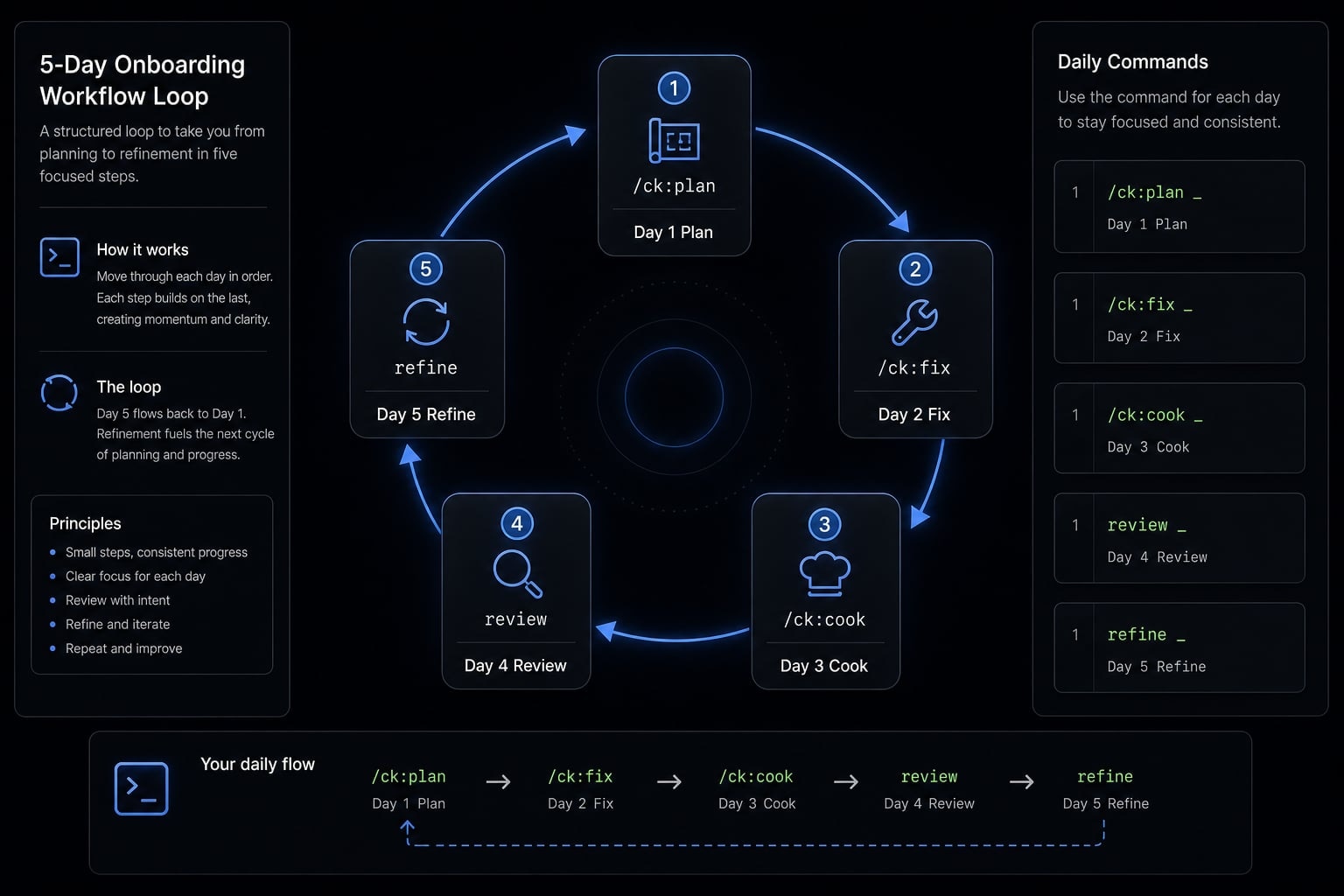
A practical first-week sequence could look like this:
- Day 1: Plan one feature.
- Day 2: Fix one real bug.
- Day 3: Run one build task.
- Day 4: Review and document the output.
- Day 5: Decide whether the workflow improves consistency enough to keep using.
The main realism point is simple: Value compounds through repeated use. ClaudeKit may not feel transformative on day one. Its benefits become clearer when you compare several cycles of structured work against the usual manual coordination pattern.
Considering team adoption instead of solo use? AgentKit can help map a lightweight rollout path, from first workflow selection to quality-control checkpoints and team enablement.
Frequently asked questions
What is ClaudeKit?
ClaudeKit is a structured workflow system designed to enhance Claude’s execution capabilities. Rather than serving as a simple collection of prompts, it provides an ecosystem of AI specialists, or agents, reusable skills, and standardized processes that support more consistent software development and business operations.
How does ClaudeKit differ from using Claude directly?
Using Claude directly can produce fragmented results and require instructions to be configured repeatedly. ClaudeKit provides an orchestration layer with interconnected skills that maintains context, enforces quality through validation gates, and automates recurring steps without requiring you to rewrite prompts from scratch.
Should you choose ClaudeKit over other open-source toolkits?
Choose ClaudeKit if you prioritize tightly connected tools through a mesh network and production reliability. While many open-source toolkits offer large but disconnected collections of skills, ClaudeKit focuses on skills that work together to complete specialized workflows more reliably.
Is ClaudeKit suitable for beginners?
Yes, particularly if you want to follow standardized workflows from the beginning. Although learning the CLI commands requires some initial effort, the system helps beginners avoid excessive trial and error by providing proven processes for planning, debugging, and product development.
Does ClaudeKit fully automate your work?
No. ClaudeKit does not replace human judgment or oversight. It acts as a structured project manager or technical assistant. You must still define requirements, approve important changes, and conduct final quality checks through the validation gates required by the system.
How do you begin using ClaudeKit effectively?
Follow this workflow:
- Use
/ck:planto plan a single feature. - Test
/ck:fixon a small, real issue in the codebase. - Use
/ck:cookto implement the feature according to the plan. - Review the results and refine the work based on the system’s feedback.
Conclusion
ClaudeKit is most compelling when AI-assisted work needs to be repeatable, reviewable, and quality-controlled across multiple steps. Its value is less about raw command volume and more about structured execution, connected orchestration, and lower coordination overhead in real delivery work.
That said, simpler needs do not always require more structure. If your usage is light, exploratory, or mostly one-off, plain Claude may be enough. The right decision comes down to workflow fit: How often similar tasks repeat, how costly inconsistency is, and how much process discipline your team actually wants.
If you are evaluating structured AI workflows for engineering or operations, review more workflow examples or request a practical walkthrough with AgentKit to compare adoption paths before committing to a tool standard.