How to Submit to Build with AK
Everything you need to showcase your product on the official AgentKit Directory. Choose visual authoring in our Web Studio, automate with our developer CLI, or let your AI Coding Agent submit autonomously via MCP.
Method 1: Web Studio
Interactive browser builder with curated layout templates, typed drag-and-drop blocks, and live mobile/web preview.
Method 2: CLI Toolkits
Command-line suite (@bestagentkits/build-with-ak) to scaffold, validate, diff, and push from terminal.
Method 3: MCP Server
Let Claude Code, Cursor, or OpenCode autonomously prepare, validate, and submit your showcase via Model Context Protocol.
Who can submit to Build with AK?
If you own an active license (Engineer Kit, Marketing Kit, Combo, Desktop App) or an active team seat, submission is 100% free and unlocked automatically on your dashboard.
Not an existing customer yet? Unlock the complete publishing toolkit via our Early Bird offer at $24 (50% OFF, first 100 slots). Includes Web Studio, CLI & MCP toolkits, and R2 media hosting.
Method 1: Self-Service Web Studio (Visual / No-Code)
Fastest way to build and preview directly in your browser.
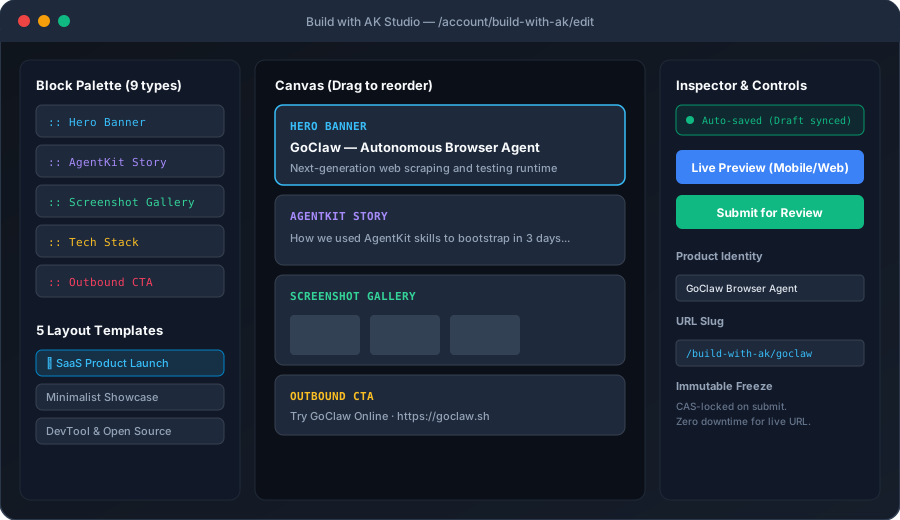
Open the Studio
Log in to your account and navigate to /account/build-with-ak (or click "Submit Product" in the navigation bar).
Fill in Product Identity & Upload Logo
Enter your product name, tagline, custom slug (e.g. /build-with-ak/my-app), website URL, demo URL, and upload your square logo directly to Cloudflare R2 storage.
Pick a Template or Compose Custom Blocks
Choose from curated templates (SaaS Product Launch, Minimalist Showcase, DevTool & Open Source, Visual Media App, or Case Study), or drag and reorder typed blocks on the interactive canvas.
Live Preview & Submit
Click Live Preview to test your draft across Desktop and 390px Mobile viewports. When satisfied, click Submit for Review. Your revision will be frozen for review with zero downtime for any existing live listing.
Build together in Studio with WebMCP
Use your browser’s AI to work on the open Studio draft through the WebMCP browser standard. Tools become available automatically in supporting browsers, including Codex Browser. No connection token, local bridge, or additional MCP server is needed.
- Sign in and open your product draft in Studio using a browser with WebMCP support.
- Check that Studio shows WebMCP ready.
- Ask your AI to read the current draft and schema, then update metadata or insert, edit, remove and reorder blocks.
- Upload media in Studio and use its finalized asset IDs in your blocks.
- Review the preview and saved state, then select Submit for Review. Use Disable WebMCP to turn off browser tools.
Changes appear in Studio and use its normal autosave and revision checks. Only the open draft is exposed. Editing pauses while saving, on conflicts, or during submission. These tools cannot submit, publish, purchase, or delete a listing. Leaving Studio removes its tools. Browser support varies; manual editing and the separate hosted HTTP MCP connection remain available.
Method 2: AI-Powered Autonomous CLI Toolkits
Use our developer CLI package @bestagentkits/build-with-ak from the command line or CI scripts.
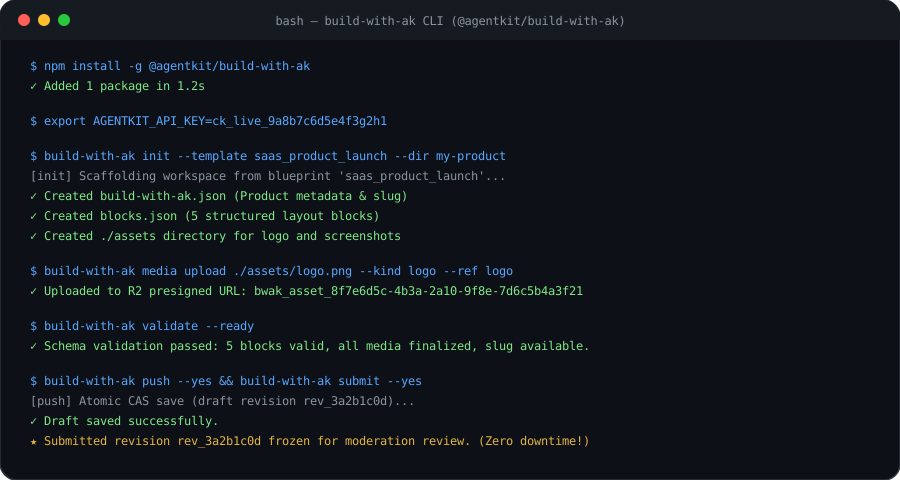
1. Install and Configure
Install globally or clone directly from the official open-source repository (bestagentkits/build-with-ak-toolkits):
# Option A: Global install via npm / pnpm / bun
npm install -g @bestagentkits/build-with-ak

# Option B: Clone & link from GitHub source
git clone https://github.com/bestagentkits/build-with-ak-toolkits.git
cd build-with-ak-toolkits && pnpm install && pnpm build && npm link

# Set your API Key (generate from /account/api-keys)
export AGENTKIT_API_KEY=ck_live_your_api_key_here
export AGENTKIT_ENV=production
# Initialize a new workspace with SaaS template
build-with-ak init --template saas_product_launch --dir my-product-showcase
cd my-product-showcase

# Inspect the scaffolded build-with-ak.json and blocks.json
ls -la
3. Upload Media & Validate
# Check if your preferred slug is available
build-with-ak slug check my-cool-app

# Upload your logo (must be PNG/JPG/WebP/SVG, max 5MB)
build-with-ak media upload ./assets/logo.png --kind logo --ref logo

# Run full strict readiness validation
build-with-ak validate --ready
4. Live Preview & Push
# Start local live-reload preview server on 127.0.0.1:4173
build-with-ak preview --watch

# Push draft with atomic CAS concurrency check
build-with-ak push --yes

# Submit draft for moderation review (freezes submittedRevisionId)
build-with-ak submit --yes
Method 3: Autonomous AI Agents via MCP
Empower Claude Code, Cursor, OpenCode, and Windsurf to create and submit your showcase autonomously.

Hosted MCP server (Streamable HTTP)
Use the official hosted endpoint https://bwak.agentkit.best/mcp. Choose OAuth in your client, sign in to AgentKit, and review the requested permissions. Read access covers your listing and analytics; editing and submission require write access.
{
  "mcpServers": {
    "build-with-ak": {
      "type": "http",
      "url": "https://bwak.agentkit.best/mcp"
    }
  }
}
Adapt the configuration shape to your MCP client. Disconnect an app from Account → Connected apps. Clients without OAuth support can continue using an AgentKit API key:
{
  "mcpServers": {
    "build-with-ak": {
      "type": "http",
      "url": "https://bwak.agentkit.best/mcp",
      "headers": {
        "x-api-key": "ck_live_your_api_key_here"
      }
    }
  }
}
Local stdio MCP alternative
Add the following to your MCP configuration file (claude_desktop_config.json, .cursor/mcp.json, or opencode.json):
{
  "mcpServers": {
    "build-with-ak": {
      "command": "npx",
      "args": ["-y", "--package=@bestagentkits/build-with-ak", "build-with-ak-mcp"],
      "env": {
        "AGENTKIT_API_KEY": "ck_live_your_api_key_here",
        "AGENTKIT_ENV": "production"
      }
    }
  }
}
Available MCP Tools
get_listing_statusGet current draft revision, published revision, and moderation status.
check_slug_availabilityCheck if a slug is available and receive alternative recommendations.
list_templates & inspect_templateExplore all 5 pre-configured layout blueprints and block schemas.
upload_mediaUpload and finalize logos or screenshots to Cloudflare R2 object storage.
validate_listing & push_draftValidate structure and perform atomic CAS update to save draft.
submit_for_reviewFreeze submitted revision and request moderation review.
Example Agent Prompt
Agent & Marketplace Integrations
Install the companion Agent Skill directly to your AI Coding Agents.
1. Claude Code & Claude Desktop Plugin
Install directly via the Claude Plugin Marketplace:
claude plugin add bestagentkits/build-with-ak-toolkits
2. skills.sh (Agent Ecosystem)
skills.shInstall the skill to your coding agent (Claude Code, Cursor, Codex, OpenCode, Amp) via skills.sh:
# Install to current project
npx skills add bestagentkits/build-with-ak-toolkits

# Or install globally across all supported agents
npx skills add bestagentkits/build-with-ak-toolkits -g -y

# Or use directly without installing
npx skills use bestagentkits/build-with-ak-toolkits --skill build-with-ak
Read the interactive API reference or download the OpenAPI contract for current endpoint and block schemas. The hosted toolkit also publishes its service OpenAPI schema. REST updates must include the current draft revision ID to detect concurrent edits.
Method 4: Direct REST API
Integrate directly from custom scripts or backends using standard HTTP requests.
| Method | Endpoint | Description |
|---|---|---|
| GET | /api/build-with-ak/listings | List your listings and quota (1 included with AgentKit, +1 per Publisher purchase) |
| GET | /api/build-with-ak/listing?listingId= | Fetch a listing's draft and published revisions (defaults to your oldest listing) |
| POST | /api/build-with-ak/listing | Create another product listing within your quota |
| PUT | /api/build-with-ak/listing?listingId= | Save draft blocks with CAS expectedDraftRevisionId check |
| POST | /api/build-with-ak/listing/submit | Freeze revision and submit for review |
| GET | /api/build-with-ak/slug-availability | Query slug availability and recommendations |
| POST | /api/build-with-ak/media/upload-intent | Request R2 presigned upload URL |
| POST | /api/build-with-ak/media/finalize | Verify uploaded asset in R2 and mint asset ID |
Sample cURL Request
curl -X PUT "https://agentkit.best/api/build-with-ak/listing" \
  -H "Authorization: Bearer ck_live_your_key" \
  -H "Content-Type: application/json" \
  -d '{
    "expectedDraftRevisionId": "3a2b1c0d-4e5f-6a7b-8c9d-0e1f2a3b4c5d",
    "name": "My AI Product",
    "slug": "my-ai-product",
    "tagline": "The fastest AI coding companion",
    "category": "developer_tools",
    "blocks": [ ... ]
}'Explore the Toolkits Repository & Packages
The Build with AK CLI and MCP server are fully open source. Check out the source code, read detailed contract documentation, or report issues on GitHub:
Ready to submit your showcase?
Explore existing products or launch the submission studio now.