Context Engineering: How to turn AI Coding Agents into Production-Ready tools
Hey guys, been a while, miss me? 😁
Haven’t written a post in 2 weeks huh, that’s the consequence of “Black Friday” haha... I’ve been swamped with customer support and technical support for ClaudeKit after the explosive BF season, so even though I have so many things I want to write, I couldn’t find any free time to write 🥲
Got a bit of breathing room this morning so I’m squeezing in this post.
So last Saturday I had a livestream with the NextLevelBuilder crew, and someone asked me “How to improve the efficiency of Claude Code / ClaudeKit”
Besides sharing the workflow I usually use, my first answer was: “LEARN”
Seriously, if you want to maximize the effectiveness of tools or AI, you need to understand how they work under the hood, only then can you use them correctly. No toolkit is magical enough to cover all of that.
And one of the most important things I think you need to learn is:
Context Engineering: how to turn AI Coding Agents into Production-Ready tools
When AI is still just a “Slop Machine”
I watched a video by Dex Horthy - CEO of HumanLayer - at the AI Engineer Summit 2025 event (link here or watch the video at the end of the post), he gave a shocking talk about the reality of AI coding agents.
Not discussing potential or a bright future, but frankly facing a bitter truth:
Most of the time when you use AI to code, you’re creating a lot of rework, code churn, and it doesn’t work well with complex tasks or brownfield codebases.
Research from Eigor with 100,000 developers shows a reality:
You’re shipping more code, but most of it is just redoing the slop stuff you shipped last week.
If you’re working on a simple greenfield project like a NextJS dashboard, AI will work great.
But if you jump into a 10-year-old Java codebase? Good luck.
—
Context Engineering: the soul of AI Development
Why Is Context So Important?
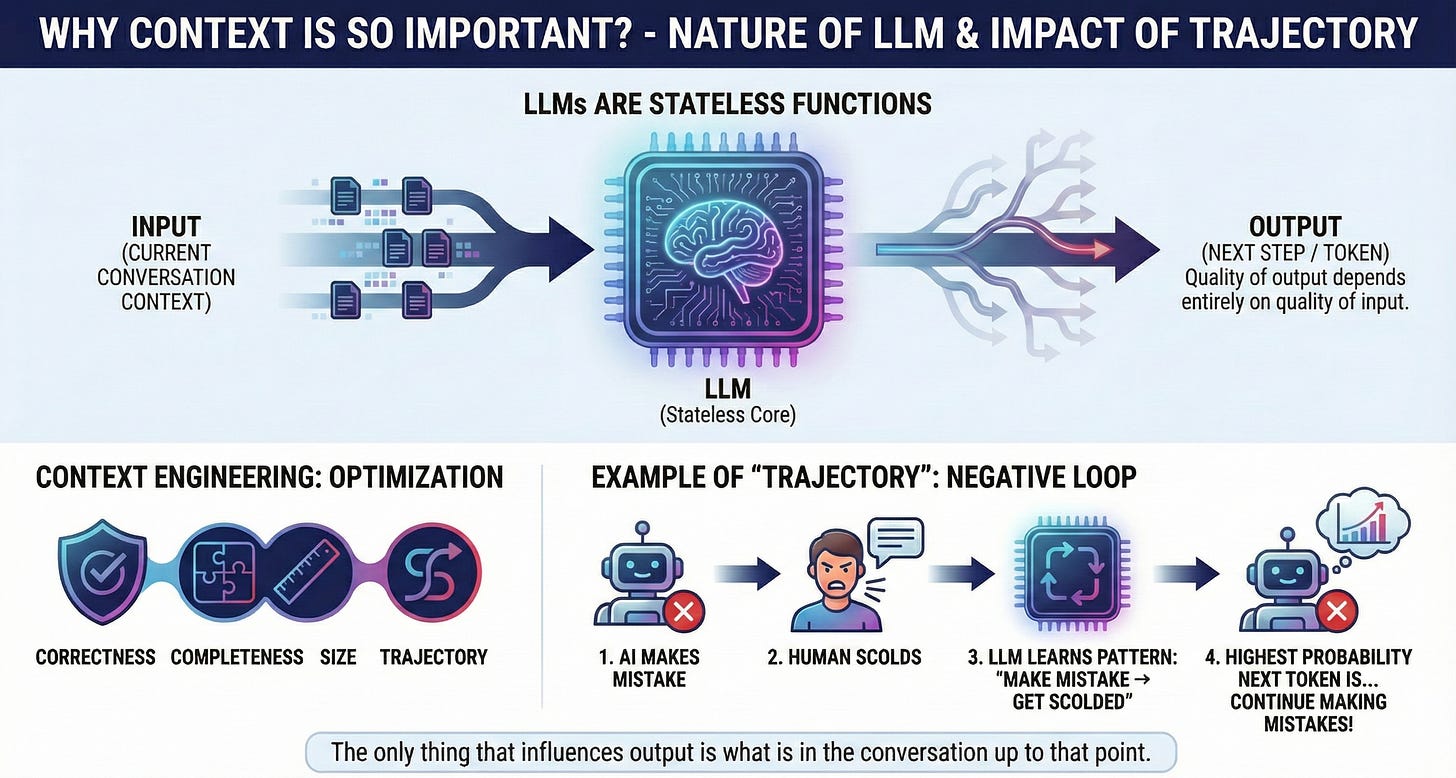
LLMs are fundamentally stateless functions.
The quality of output depends entirely on the quality of input.
Each time Claude Code or any coding agent chooses the next step, there are hundreds of correct steps and hundreds of wrong steps. The only thing that affects the output is what’s in the conversation up to that point.
Context engineering is about optimizing the context window for correctness, completeness, size, and trajectory.
The trajectory part is especially interesting - if you constantly yell at the AI for doing things wrong, the LLM will learn the pattern: “OK, I did wrong → human yells at me → I do wrong again → human yells at me”. The next token with the highest probability in this conversation is... to continue doing wrong to get yelled at! 😂
AI/LLM is a statistical probability algorithm, remember?
“Dumb Zone”: The 40% Forbidden Zone
This is the key concept that Dex introduced: When you use more than 40% of the context window, performance starts to decline sharply. With Claude Code having ~168,000 tokens, around 40% is the threshold where you’ll see clear diminishing returns.
“The more context window you use, the worse the results”
If you have too many MCPs (Model Context Protocol servers) in your coding agent, you’re doing all the work in the “dumb zone” and will never get good results.
Why 40%?
Research shows that transformer models have a characteristic: as the context window gets larger, the model’s “recall” and “reasoning” capabilities gradually decrease.
This isn’t a bug but a fundamental architecture characteristic.
Larger context windows don’t eliminate the need to manage context in a disciplined way. Instead, they make it easier to degrade output quality if there isn’t proper curation.
I wrote about this topic a few months ago, you can read it again here:
[VC-07] Claude Code: Common Mistakes & “Production-ready” Project
·
Oct 16
![[VC-07] Claude Code: Common Mistakes & “Production-ready” Project](https://substackcdn.com/image/fetch/$s_!65P_!,w_1300,h_650,c_fill,f_auto,q_auto:good,fl_progressive:steep,g_auto/https%3A%2F%2Fsubstack-post-media.s3.amazonaws.com%2Fpublic%2Fimages%2Fa2628e90-f782-472b-892f-2b705a91bd9a_1536x1024.png)
Translated from:
—
Research-Plan-Implement: Anti-”Slop” Workflow
HumanLayer has developed a workflow they call RPI (Research-Plan-Implement).
This is also the exact workflow I use daily with ClaudeCode/ClaudeKit, and it’s also the backbone that creates the clear difference in ClaudeKit’s effectiveness compared to other AI coding tools.
It’s not just a set of prompts or a rigid process, but a philosophy of designing the entire development process around context management.
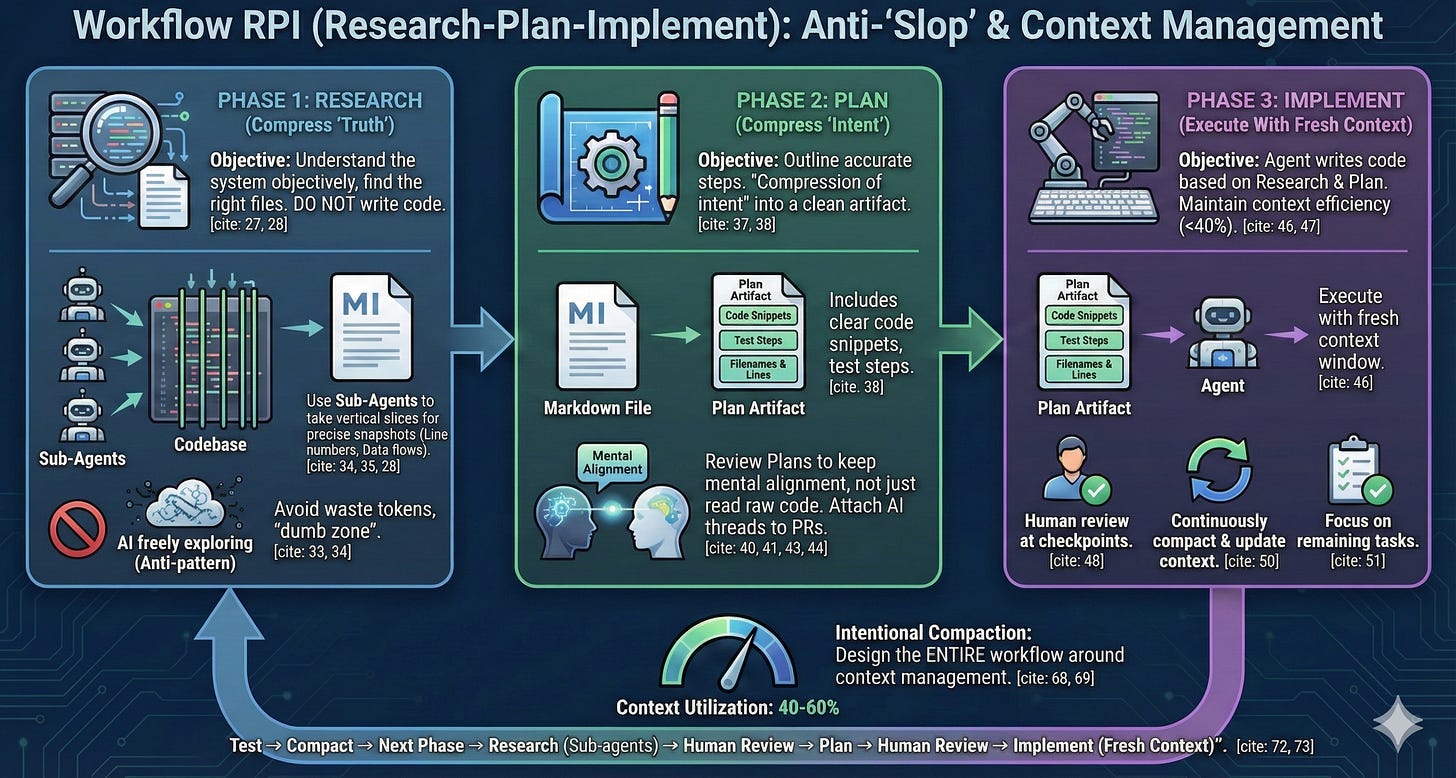
Phase 1: Research - Compress the Important Things from Codebase
The research phase focuses on objectively understanding how the system works, finding the right files, and maintaining objectivity. The goal is not to write code, but to create a markdown file containing exactly the necessary information: file names, line numbers, data flows.
Why not let AI explore on its own? (without guidance)
Because if you let AI freely explore a large codebase, it will:
Read a bunch of irrelevant files
Fill the context with lengthy tool outputs
Waste tokens understanding unnecessary code
Start from the “dumb zone” right from the beginning
Instead, you can launch multiple sub-agents to get slices through the codebase, then build a research document that’s a snapshot of exactly the important parts of the codebase.
Phase 2: Plan - Compress “Intent”
The planning phase outlines the exact steps, including file names, line numbers, code snippets, and clear test steps. This is “compression of intent” - you compress your intention into a clean artifact.
Mental Alignment Through Planning
Code review isn’t just for finding bugs, but mainly to maintain mental alignment - ensuring everyone on the team understands how and why the codebase is changing.
The problem: When AI ships 2,000-3,000 lines per week, you can’t read all the code. But you can read plans.
For example, when attaching entire Claude threads to PRs, we can help reviewers see the exact steps, prompts, and test results - this takes the reviewer on a journey that a GitHub PR alone cannot do.
Phase 3: Implement - Execute with Fresh Context
The implementation phase is where the agent actually writes code based on research and plan. The goal is to maintain context window efficiency (Dex recommends under 40%) and human review at key checkpoints.
Key practices:
Continuously compact and update the context window
Mark completed tasks, focus on remaining (in CK if using
/codecommand will auto-handle this part)
Review the plan rather than reading raw code changes
Many of you make this mistake when using CC/CK, just delegate all tasks to AI to think for you then let it go wild, in the end AI takes you all the way to Mars...
Please, review the plan!
Sub-Agents: Not About “Roles” But About Context Control
A common anti-pattern Dex warns about: Sub-agents are not for “role personification”.
People often create “frontend sub-agent”, “backend sub-agent”, “QA sub-agent”, “data scientist sub-agent” - please stop.
Sub-agents are for controlling context, not for simulating human roles.
Honestly, I also made this mistake initially:
[VC-04] Subagents from Basic to Deep Dive: I misunderstood!
·
Oct 15
![[VC-04] Subagents from Basic to Deep Dive: I misunderstood!](https://substackcdn.com/image/fetch/$s_!1NNb!,w_1300,h_650,c_fill,f_auto,q_auto:good,fl_progressive:steep,g_auto/https%3A%2F%2Fsubstack-post-media.s3.amazonaws.com%2Fpublic%2Fimages%2F28eaef2f-c1a2-4749-9fb7-d7d43795bd33_1400x933.png)
Translated from:
Quote:
“Sub Agents are the army that goes out to collect useful information!”
The Correct Way to Use Sub-Agents:
Suppose you want to understand how a feature works in a large codebase. Instead of letting the main agent read dozens of files, wasting tokens:
Fork a sub-agent with fresh context window
Sub-agent explores, reads files, understands codebase
Sub-agent returns an extremely concise message: “The file you need is src/auth/oauth.ts lines 142-256”
Main agent only needs to read that 1 file and straight to work
If you use sub-agents correctly, you can get good responses and manage context extremely efficiently.
Secret: this is exactly how the scout sub-agent in ClaudeKit works.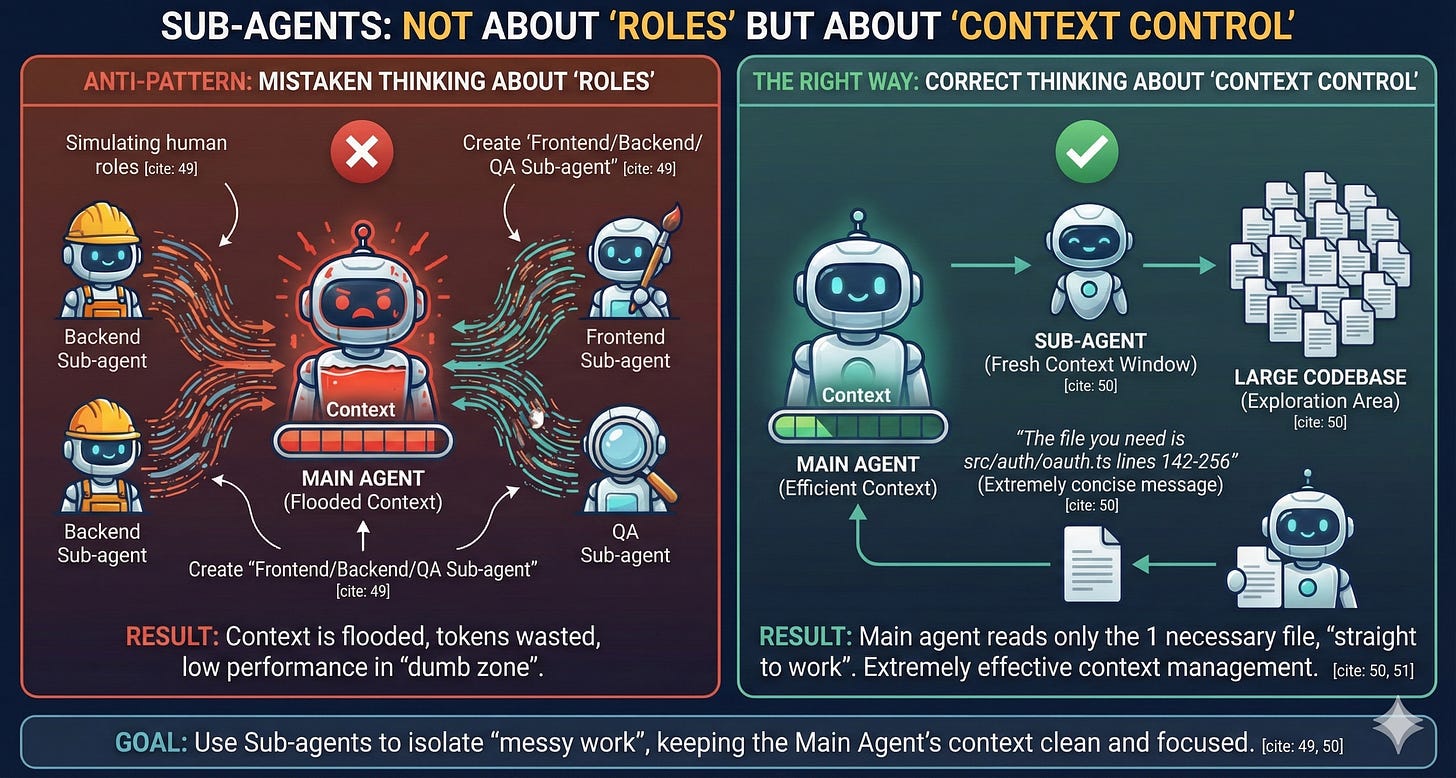
—
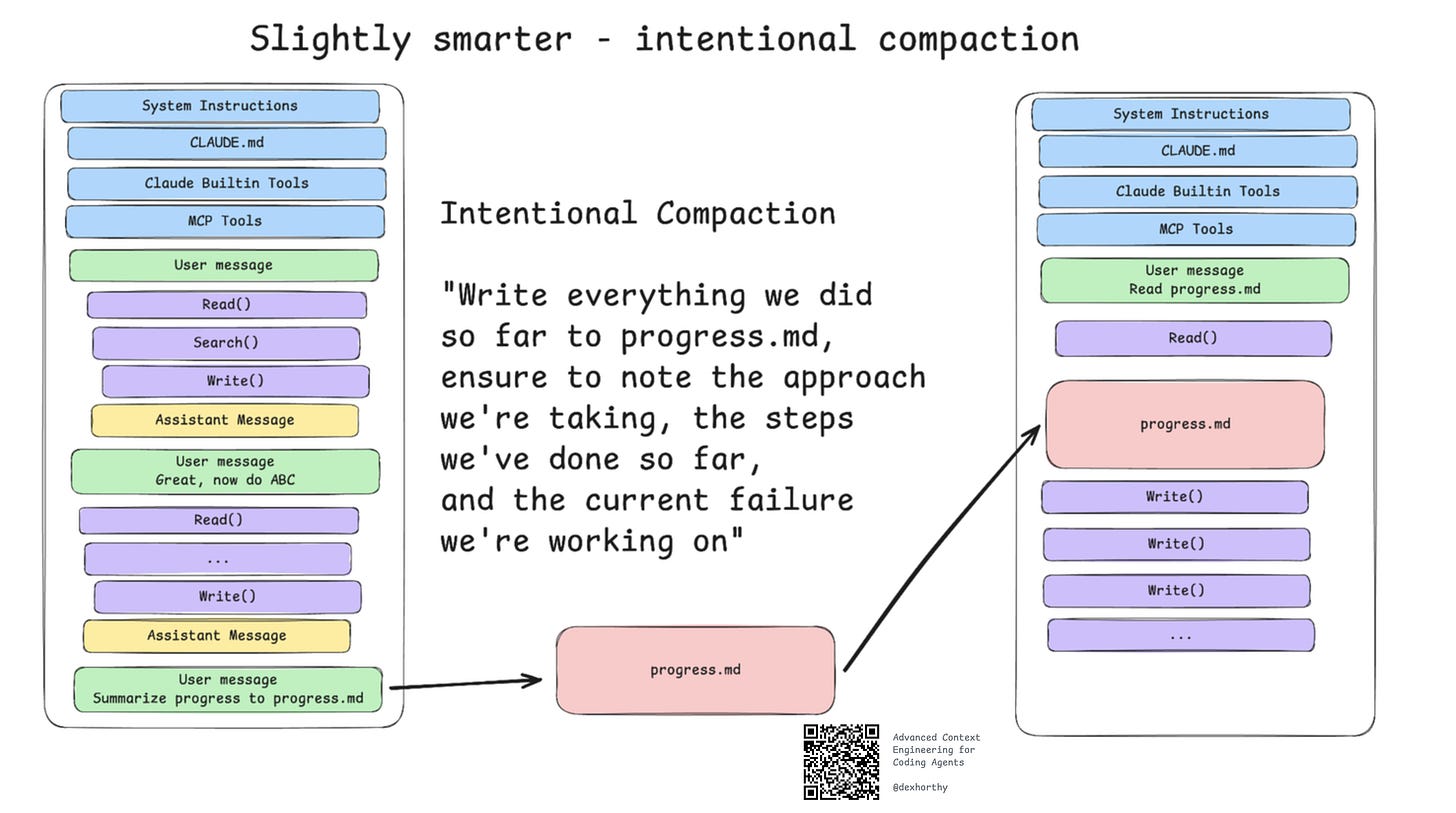
Intentional Compaction: Core Workflow
Deliberately compressing regularly means designing the ENTIRE WORKFLOW around “context management”, keeping it optimal in the 40-60% range.
The naive way in the beginning:
Ask → AI wrong → Fix → AI wrong again → Fix → ... → Run out of context or give up
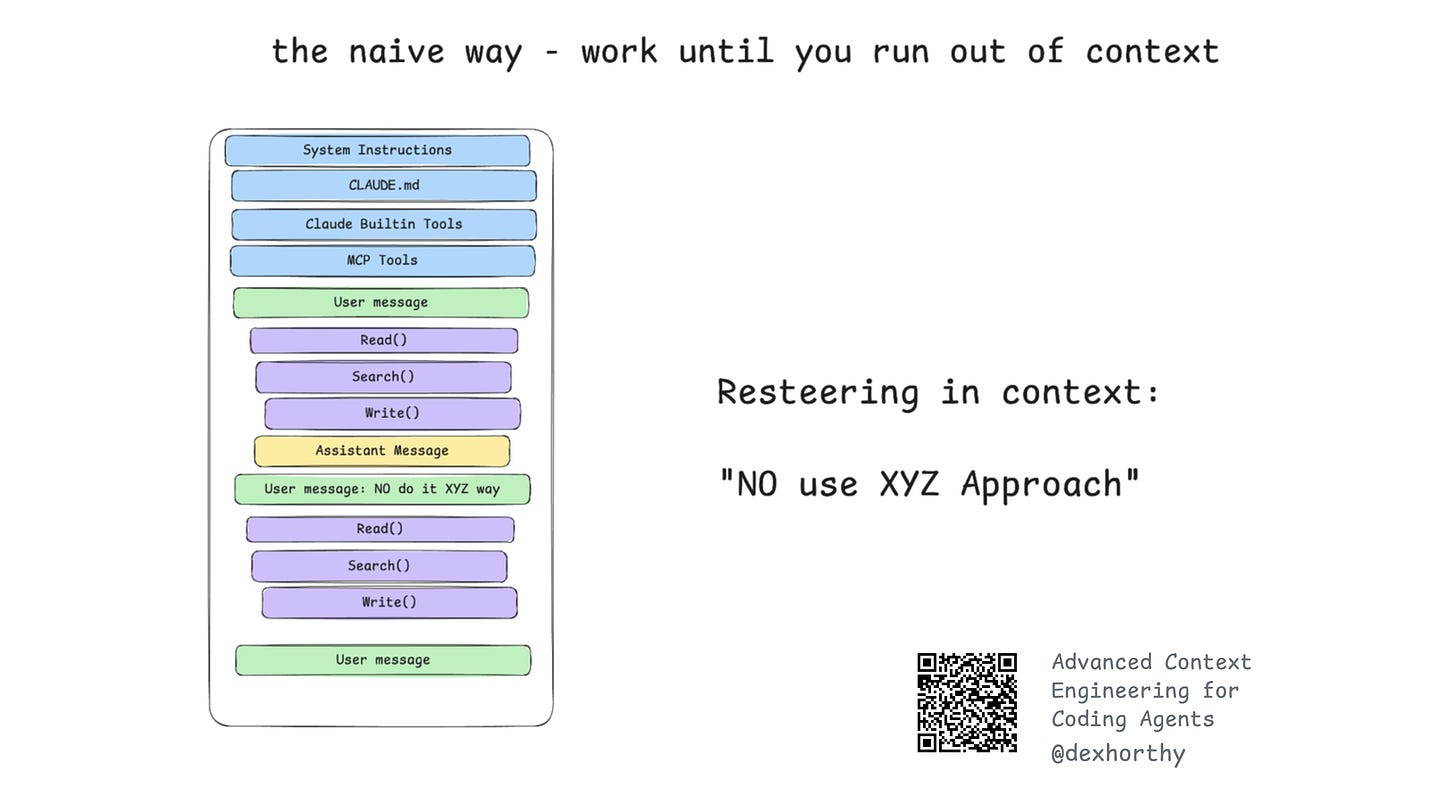
A slightly smarter way:
Ask → AI goes off track → Start over with fresh context with guidance: “Do this, but don’t use ABC approach because it doesn’t work”
The ultimate mastery (RPI):
Research (sub-agents) → Human review → Plan → Human review → Implement (fresh context) → Test → Compact → Next phase
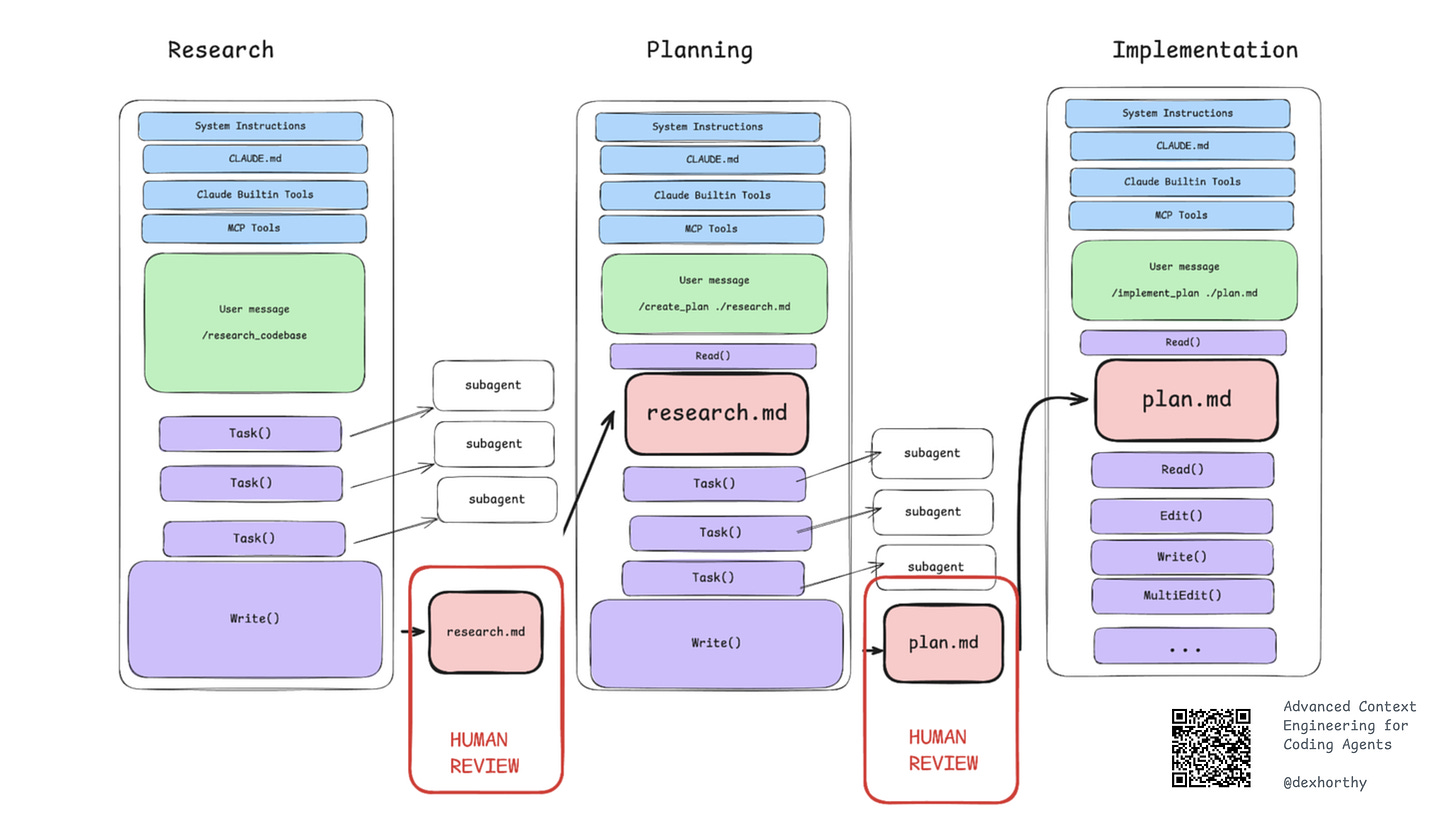
Looks familiar, doesn’t it? That’s right, that’s ClaudeKit’s workflow! 😁
—
The Distortion of “Spec-Driven Dev”
One of the most interesting points I found in Dex’s talk was when he declared spec-driven development is dead - not the idea, but the term.
Spec-Driven Dev: When a term is invented by a person/group with a good definition, but then it spreads through the community in many ways and ultimately distorts the original definition.
What does “Spec-Driven Dev” mean now?
Some people: “Write better prompts”
Some others: “Write PRD (Product Requirements Document)”
Some: “Use verifiable feedback loops”
Sean Wang: “Treat code like assembly, focus to markdown”
The rest: “Use many markdown files when coding”
Some more: “Docs for open source library”
Oh my god... exactly, it’s just like the game of “telephone” - one person hears from another, someone reads what someone else wrote, then adds their own “interpretation”, and it goes way off track.
It’s like “context pollution” causing AI to hallucinate.
Result? The term becomes useless.
Instead of arguing about what “spec-driven dev” means, focus on what actually works: Research, Planning, and Intentional Compaction (RPI)
Key lessons
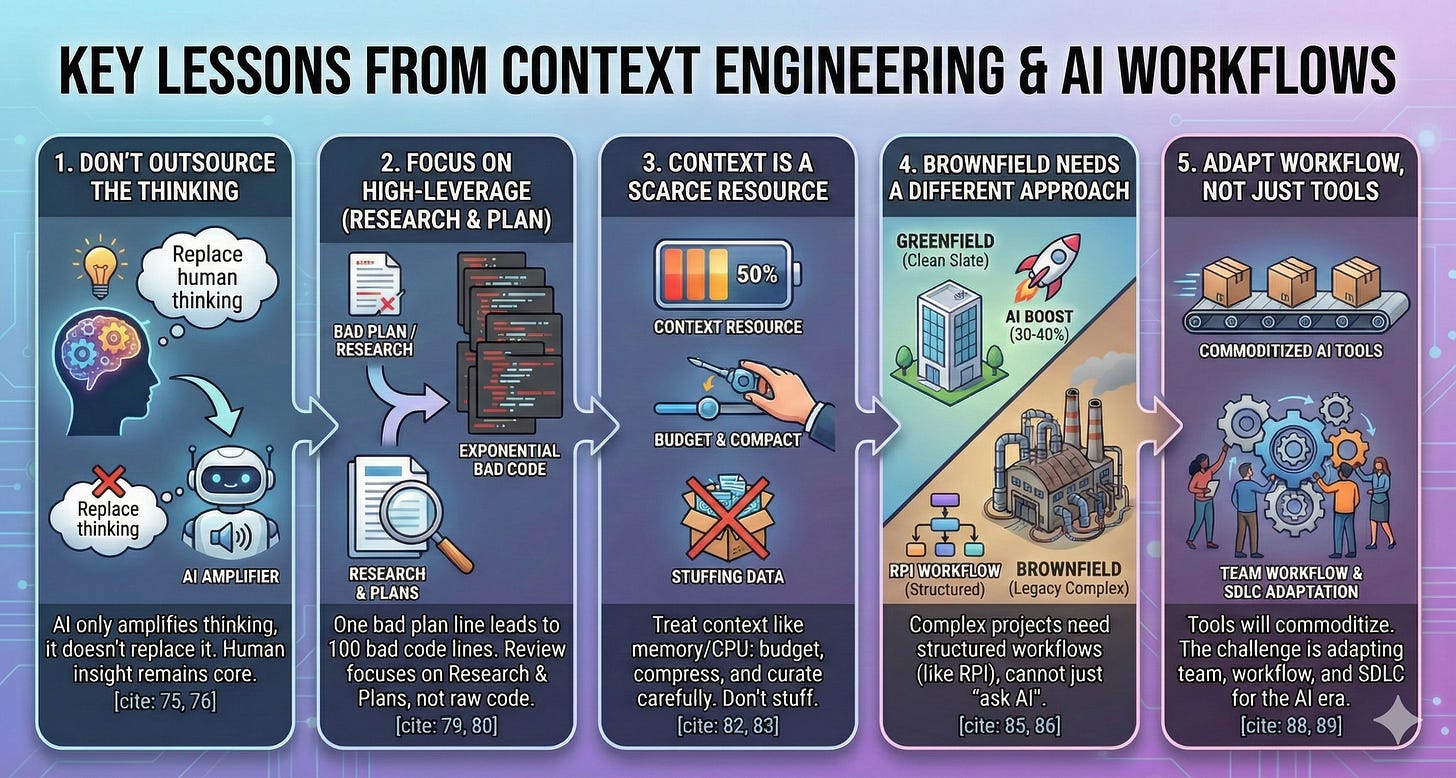
1. Don’t make AI think instead of you...
Please, we have brains, AI doesn’t.
Train your brain to think well and become increasingly enlightened.
AI cannot replace thinking.
It can only amplify the thinking you already have - or suggest thinking you haven’t thought of yet.
2. “Bad Line Of Code” vs “Bad Line Of Plan”
A bad line of code is a bad line of code.
A bad line of plan can lead to 100 bad lines of code.
A bad line of research - misunderstanding how the system works - the whole thing will collapse.
This is why “human review” is always the critical step in this AI development process.
We must focus on the highest-impact parts: Research and Plans, not raw code.
3. Context is a scarce resource
We need to understand and treat context the way operating systems treat RAM and CPU: as finite resources that need to be balanced, compressed, optimized, and allocated intelligently.
Efficient agent systems aren’t about cramming as much code as possible into context.
They carefully curate, prioritize relevance, and continuously compress.
4. Brownfield Projects need a different approach
In greenfield projects (new apps, clean slate), AI increases productivity by 30-40%.
But in brownfield codebases (legacy, complex systems), it’s a completely different story.
The RPI workflow is designed specifically for brownfield - where you can’t just “ask AI and figure it out”.
5. Tools are accessible to everyone, but workflows are not
Coding agents will become commoditized and released (like ClaudeKit).
Everyone can access them and will learn how to use them better.
The hard part is how teams and processes work in a world where 99% of code is shipped by AI.
—
That’s it, in my opinion: Context Engineering is the supreme rule
If you’ve been reading my blog recently, you’ll know my view on AI models at the current moment: they’ve hit the wall!
Don’t expect models to get much smarter, each new version release only increases <1%, almost indistinguishable to the naked eye.
However, that doesn’t mean the models are bad - with today’s models, we can already achieve production-quality code - if you know how to manage context (oc).
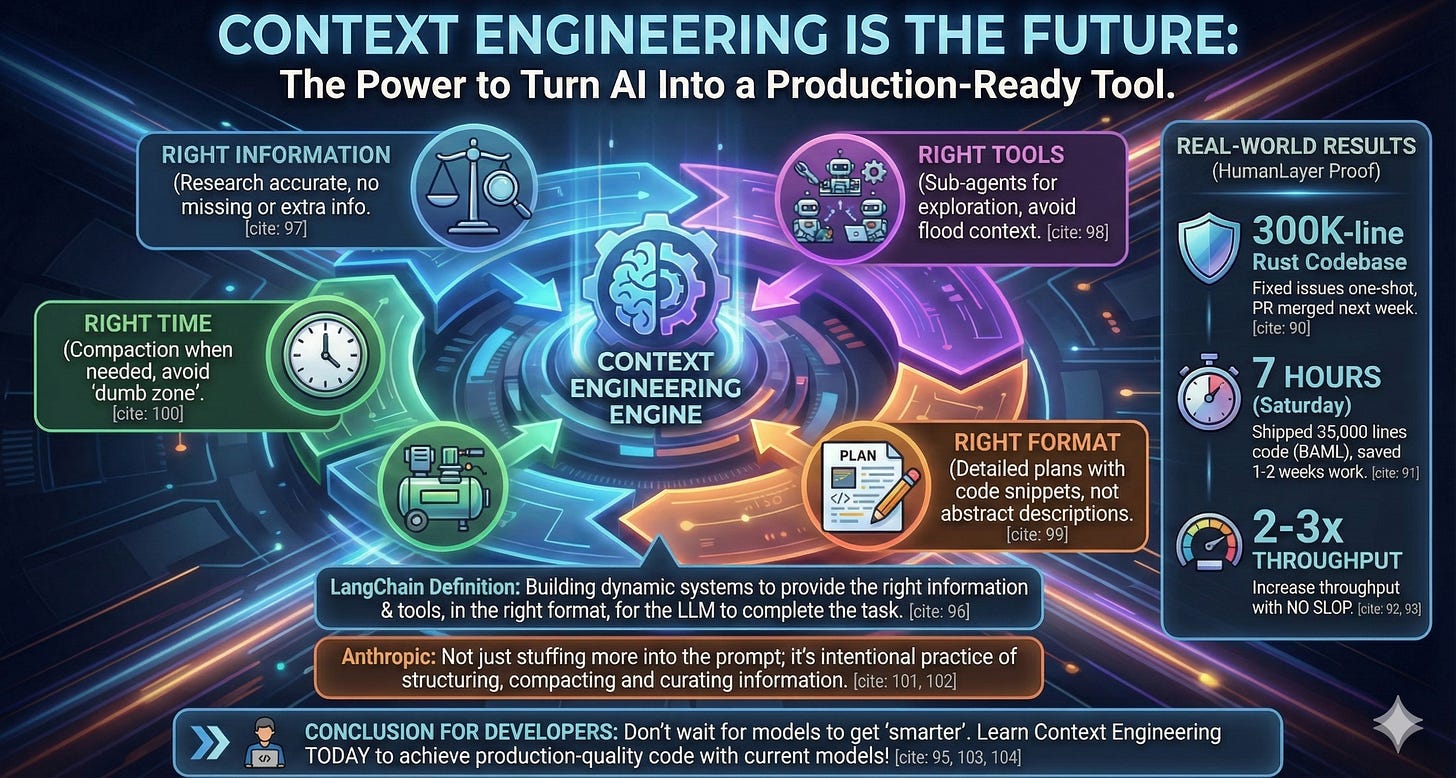
Context engineering can be defined as follows:
“Building dynamic systems to provide the right information and tools in the right format so LLMs can complete tasks reasonably”
In summary:
Right information: Research correctly, not too little not too much
Right tools: Sub-agents for exploration and collecting necessary information, without polluting context
Right format: Plans with code snippets, not just abstract descriptions
Right time: Compaction when needed, don’t touch the “dumb zone”
Even Anthropic’s Engineering team has said:
Context engineering isn’t just about cramming more stuff into prompts - it’s the deliberate practice of structuring, compacting, and curating information.
And this is on you, no AI model can “think for you - do it for you”!
So my advice for developers struggling with AI coding tools: Don’t wait for models to get “smarter” - learn context engineering right now.
Unrelated but lately Gemini has been making illustrations that are quite decent! 😁
Source video of Dex’s talk: