
Article 13 in the AgentKit v3 onboarding series. About a 12 minute read. Read article 12 first.
Ever since I started using Opus 5.5 in Claude Code (the desktop app), the way I work has changed completely. I no longer sit chatting with one agent, waiting for it to do things one by one. Now I open one main session as the "conductor", and it splits the work into several sub-sessions running in parallel, each with its own worktree, its own branch, its own PR. I only lock the requirements at the start and review at the end.
Two skills make this happen: /ak-orchestrate and /ak-atoz. This article introduces both, with my real experience, the good parts and the parts to be careful about.
1/ How is a sub-session different from a subagent?
These two sound alike but are different in nature:
| Subagent | Sub-session | |
|---|---|---|
| Where it runs | Inside a turn of the parent session | A real, independent session |
| What you see | Only the summary it returns | You can open it, talk to it, stop it, steer it |
| How long it lives | Gone when the job is done | Lives across many turns, can be resumed |
| Result | One answer back to the parent session | Usually its own branch and its own PR |
| Good for | Lookups, reading many files, independent review within the same job | A complete piece of work with its own output |
What does Anthropic say about this?
The guidance built into the Claude Code desktop app is pretty blunt: subagents cost more than you think. A subagent only knows what you write in its prompt. You only see the summary it sends back, so details get lost at both ends. Its mistakes also come back in the same confident tone as correct results. The principle there is "when in doubt, don't spawn". If it is a handful of tool calls, do it yourself, and only hand it to a subagent when there is independent work that can run in parallel, or when it has to read across many files and you only need to keep the conclusion.
A sub-session, on the other hand, is meant by that guidance for a piece of work of its own: it outlives the current turn, the user wants to open it or steer it separately, and it ends with something of its own like a branch, a PR, or a change in another repo. A small piece of the work you are already doing (searching, reading files, testing, reviewing) stays in the main session or goes to a subagent.
Community tests point the same way. One test measured that using subagents for small tasks pushed tokens from about 121 thousand up to 513 thousand, more than 4x. That number is from a single test so take it as a reference only, but the direction is clear: subagents are not the default, they are a tool for the right kind of job.
So the rules I use:
Each GitHub issue, each PR is one sub-session.
Subagents only inside a single job: scouting code, reading docs, or an independent review so the perspective is not anchored to my own opinion.
Opus 5.5 really is good at orchestrating
With earlier model versions, letting an agent orchestrate itself was a pointless way to burn tokens: spawning everywhere, handing out overlapping work, then spending more tokens reading each other's results. With Opus 5.5 it is a different story. It knows which work to do itself and which to split out, writes briefs for sub-sessions clearly enough, and is willing to check the diff instead of trusting the report.
That said, don't think it is perfect. I still run into sub-sessions that report "done" while CI is still red, so the review step at the end never gets skipped.
2/ GitHub Issues is the work board and the single source of truth
This is the biggest change in my habits: everything lives on GitHub Issues. Plan, progress, todos, status, decisions, all updated there, not scattered across chats or temp files.
Why? Because when 5 to 10 sub-sessions run at once, the most fragile thing is coordination. Two agents doing the same job, or one agent editing what another just finished editing. The issue becomes the place to:
Claim work: the agent picks up an issue itself, assigns it to my GitHub user, and adds the
in progresslabel. Another agent seeing that label knows someone already has it.Report progress: labels follow the lifecycle
in progress→in review→done(PR opened) →shipped(merged).Record findings: if it hits a bug or gap outside the scope, it opens a separate issue with the
ai-handlelabel instead of fixing things sprawlingly in the current run.Keep history: later you (or another agent) read the issue and know why a decision was made.
The most fun part is sub-sessions messaging each other to coordinate. For example, the session doing the API tells the session doing the website: "the new endpoint is live, this field changed in the schema". I no longer have to be the messenger 😂
3/ My workflow, step by step
Step 1: open a new main session, with an environment that contains all the related project folders.
For example with AgentKit, I add everything into one session: the kit and skills repo, the website, the MCP server, AK Vault, AK Render... The main session needs to see the whole picture to split the work correctly.
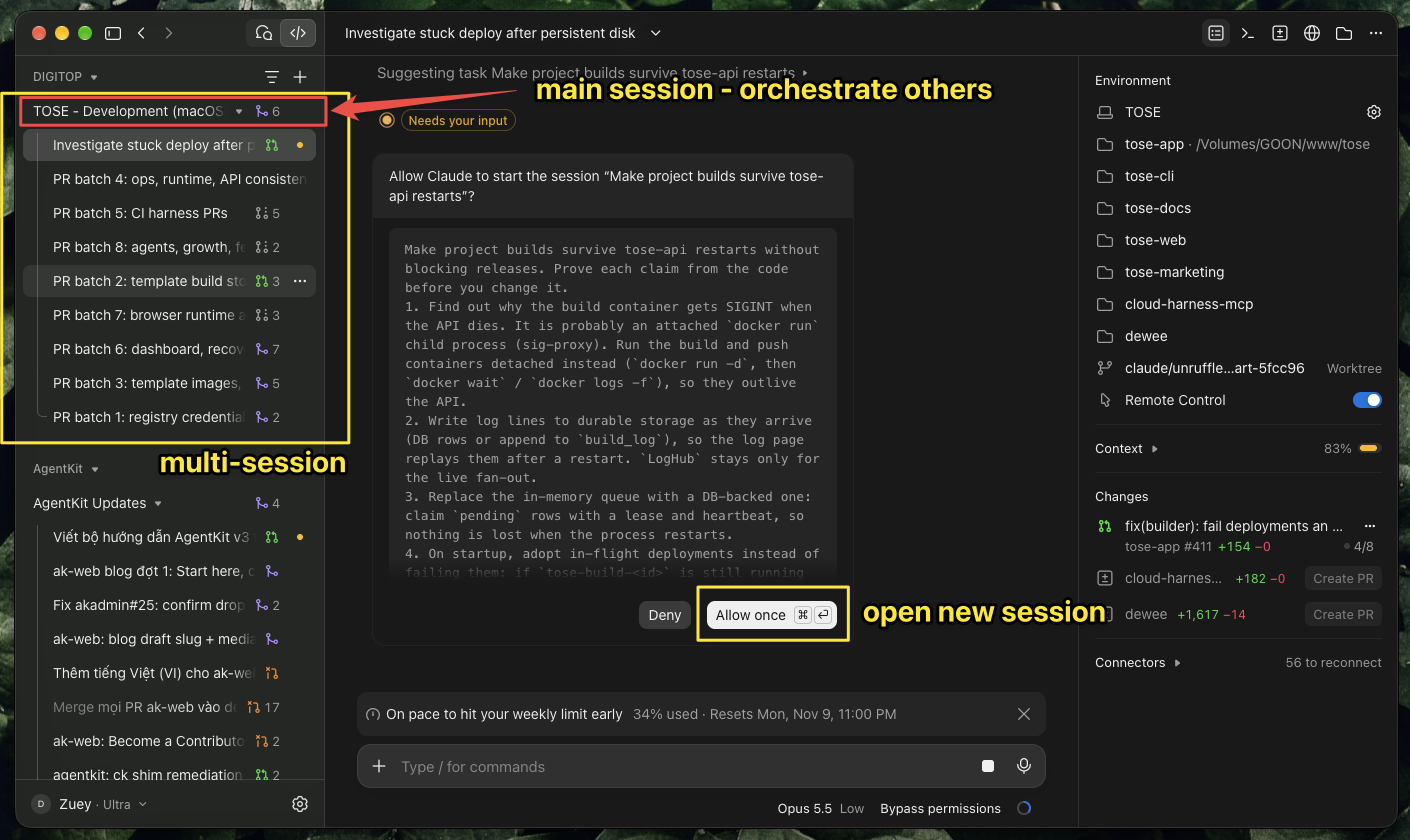
The main session "TOSE - Development" (red frame) has 8 PR batch sub-sessions open (yellow frame on the left). Every time it wants to open a new session, the app asks "Allow once". The right column is the environment containing all the project folders.
Step 2: lock the work. For one clear piece of work use /ak-atoz (section 5). For an existing list of issues, hand it straight to /ak-orchestrate:
/ak-orchestrate handle the issues labeled ai-handle in bestagentkits/agentkit,
one sub-session per issue in its own worktree, independent review before opening the PR
Step 3: let the main session orchestrate. It plans, splits the work into non-overlapping groups of files, opens sub-sessions, monitors them, and collects results. Dependent work waits until the earlier work is done.
Step 4: wake up and review the PRs. Each PR has already been through a review round in a clean context. My job is to read, ask about anything suspicious, then merge.
4/ /ak-orchestrate: orchestration, including other agent runtimes
/ak-orchestrate is the orchestration skill. The skill handles the judgment: which job goes to whom, which model, what risk level. The ak orchestrate CLI handles the deterministic part: plan state, process supervision, and saving evidence so a run can be replayed.
A few points worth knowing:
Session-first. Each worker is a real session with its own context, model and lifecycle, or a supervised headless process. A nested subagent does not count as a worker, unless the runtime does not allow opening sessions because of missing permissions. In that case the skill may fall back and must state it clearly in the report.
By default it only uses the runtime that is already running. To pull in another runtime (Codex, Pi...) turn on
--cross-runtime, or name the runtime in the request. A runtime that gets pulled in must pass a real check: is it installed, is it logged in, is there quota left, what does it cost. If it fails, the job reportsblockedwith evidence, instead of quietly switching somewhere else.Replayable. Every run has its own result folder, and if it stops midway you
--resumefrom there.A final referee. Results are re-checked by an independent "arbiter" before handoff.